
10Gtek X540-10G-2T
4.1Editor score
Dual 10GbE RJ45 ports
Intel X540 controller
PCIe x8 and x16 support
Compare the 10 best 10GB Ethernet Cards for speed, ports, PCIe fit, operating systems, cabling, and features in this detailed expert buying guide for modern
A 10GB Ethernet Card adds a fast wired connection to a desktop, workstation, server, or compact PC that lacks a suitable 10GbE port. The right model should match your motherboard, network equipment, cabling, operating system, and performance goals while avoiding compatibility problems that can limit the advertised link speed.
This guide compares ten real PCIe and USB-C options based on their controller, supported speeds, port count, interface width, operating-system coverage, included hardware, and intended use. It covers copper RJ45 adapters, an SFP+ fiber-capable card, a purpose-built Synology model, and a USB-C alternative for systems without an expansion slot.
The selections show how a multi-gigabit card can suit a general desktop, how a dual-port design helps servers and virtualization, and why a compact PCIe 4.0 x1 model can be useful in small systems. Ratings and specifications can change with revisions, so confirm current compatibility and retailer information before purchasing, as prices and bundles also change.
4.1Editor score

4.2Editor score

4.6Editor score
The table below compares the ten cards by connection type, controller, supported link speeds, port count, and expansion interface, making it easier to identify the most suitable option for a desktop, server, NAS, compact PC, or Synology system.



The TP-Link TX401 is a single-port PCIe adapter built around 10GBase-T networking, with a listed rating of 4.2 out of 5. It is the most balanced general-purpose choice in this roundup because it combines a full range of negotiated speeds, broad operating-system support, Quality of Service features, and installation hardware for different desktop case designs.
We may earn a commission when you buy through this link, at no additional cost to you.
Its most useful feature is automatic negotiation across 10Gbps, 5Gbps, 2.5Gbps, 1Gbps, and 100Mbps. That flexibility matters when a new 10GbE card is connected to older infrastructure or a switch that cannot provide the full advertised rate. The included 1.5-meter CAT6A cable also removes one common obstacle to setting up a genuine 10Gbps copper link without requiring a separate specialty cable purchase.
The TX401 also supports QoS, which can prioritize latency-sensitive traffic such as games or interactive applications when bandwidth is contended. Standard and low-profile brackets broaden desktop compatibility, while the stated operating-system coverage includes Windows client and server releases plus Linux. The trade-offs are a single network port and the normal requirements of a PCIe installation: a suitable slot, appropriate drivers, and a chassis that can accommodate the card.
This is a strong recommendation for a desktop owner who wants a straightforward 10GbE upgrade, especially one moving from gigabit networking to a NAS, fast switch, or workstation workflow. It is less appropriate for users who need two simultaneous 10GbE connections or a USB-C-only portable computer. For those needs, one of the dual-port or USB-attached alternatives may fit more naturally.
Automatic negotiation makes the TX401 practical for mixed networks. It can take advantage of faster infrastructure when available while remaining usable with slower switches and routers, reducing the need to replace every device on the network at once.
The bundled CAT6A cable and two bracket options address two frequently overlooked details. A suitable cable can make installation easier, while the low-profile bracket helps the card fit compact mini-tower and other space-conscious cases.
We may earn a commission when you buy through this link, at no additional cost to you.
The VIMIN 10G PCI-E Network Card has a 4.5 rating and provides two 10Gbps RJ45 ports based on the Intel X540-T2 controller. Its combination of dual connectivity, server-oriented features, and support for Windows, Windows Server, Linux, and VMware makes it an attractive option for users who need more than one fast wired connection.
We may earn a commission when you buy through this link, at no additional cost to you.
Two ports can serve different practical roles. One could connect a workstation to a high-speed NAS while the other links to another workstation, server, or management network. Alternatively, the ports can be configured for compatible aggregation, bridging, or virtualization arrangements, although exact functions depend on the operating system, driver, switch, and intended application.
The most important limitation is explicit in the product information: 2.5Gbps and 5Gbps are not supported, so the card will operate at 1Gbps when connected to a network device using those rates. That makes it a specialist choice for genuine 10GbE or 1GbE infrastructure rather than a broadly flexible multi-gig option. The heat sink, gold-finger interface, and included standard and slim brackets are nevertheless positives for sustained server or workstation use.
Buyers who need two 10GbE RJ45 connections and have matching switches, cabling, and operating-system support should give this card serious consideration. It is less attractive for a home network that negotiates mainly at 2.5G or 5G. Confirm those network settings and your preferred virtualization platform before buying, because the card's dual-port capability does not guarantee compatibility with every combination of software and hardware.
Dual ports provide more than a spare connector. They can separate storage, management, workstation, or guest traffic, giving administrators and advanced users more choices when designing a high-speed local network.
This card is optimized for endpoints operating at 10Gbps or 1Gbps. If the switch or peer negotiates at 2.5G or 5G, the stated behavior is to fall back to 1Gbps, so checking existing equipment is essential.
We may earn a commission when you buy through this link, at no additional cost to you.
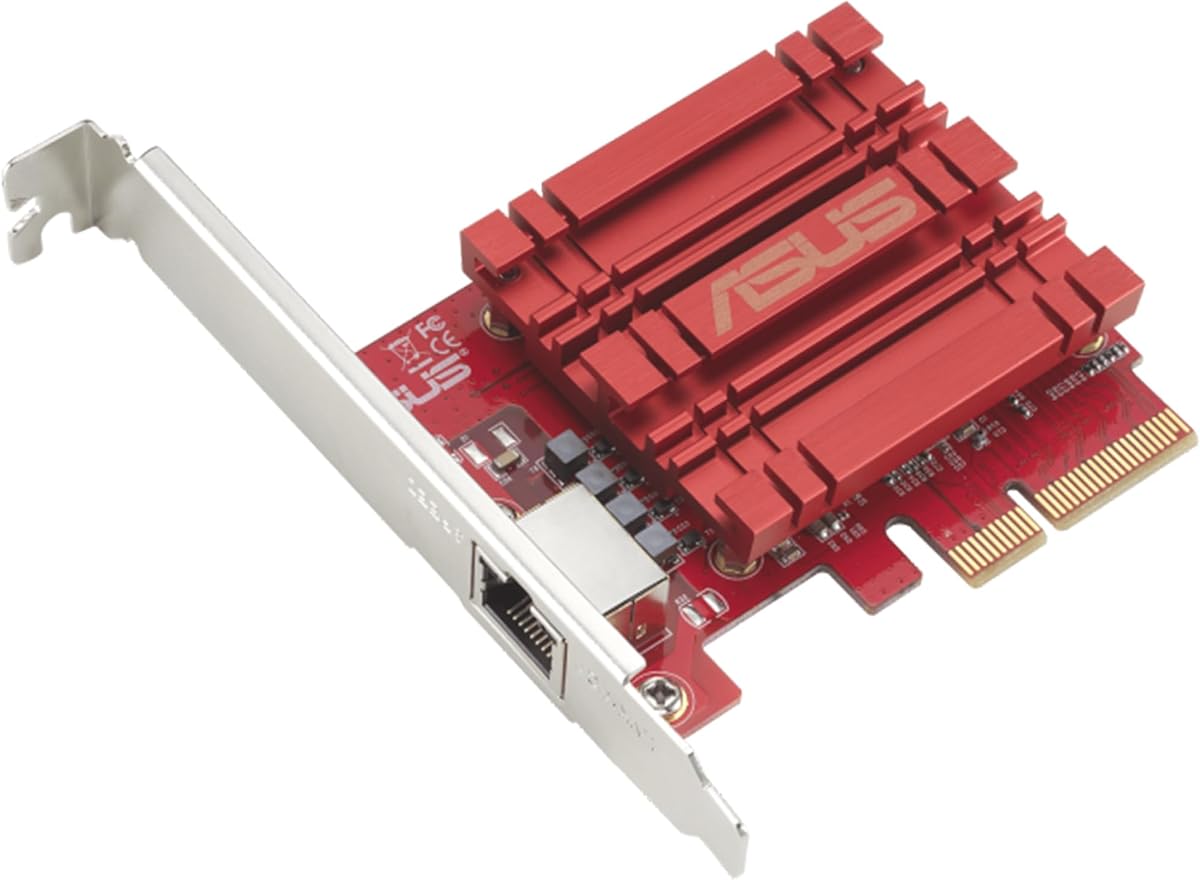
The Asus NADACA0140 is a single-port RJ45 adapter with a 4.1 rating and support for speeds from 100Mbps through 10Gbps. It is a practical option for users who want standard copper networking, backward compatibility with slower equipment, and a straightforward way to bring a faster Ethernet connection to a compatible desktop.
We may earn a commission when you buy through this link, at no additional cost to you.
Its five-speed support covers 10, 5, 2.5, 1Gbps, and 100Mbps. That makes it useful across several generations of network hardware, from a newer multi-gig switch to older gigabit infrastructure. The RJ45 connection also avoids the need for a separate transceiver arrangement, and built-in QoS lets selected traffic receive priority for a smoother interactive experience.
The product information identifies support for Windows 10, 8.1, 8, 7, and Linux kernels 4.4, 4.2, 3.6, and 3.2. Those listed kernels date the adapter's support profile, so buyers running a current distribution should verify driver behavior. Its single-port design is another constraint for tasks that require link aggregation, multiple network paths, or separate management and data connections.
This card fits users who specifically want an Asus-branded PCIe copper adapter with multi-gig flexibility and QoS. It is a sensible alternative to similarly equipped RTL8127-based models, particularly if one is already known to work with a particular chassis or driver set. Confirm the physical slot, current operating-system drivers, and the network equipment you intend to use before finalizing the purchase.
The broad negotiation range reduces the chance that a new adapter will be wasted on older infrastructure. A user can move between gigabit and 10-gigabit environments without changing cards, provided the switch, peer device, and cabling support the selected rate.
Traffic prioritization can help when latency-sensitive applications share a busy link. It is especially relevant to gaming, remote desktops, and other interactive workloads that benefit from prompt delivery.
We may earn a commission when you buy through this link, at no additional cost to you.
The 10Gtek X540-10G-2T is a dual-port 10GbE adapter built around an original Intel X540 controller and carries a 4.1 rating. Its appeal lies in combining familiar server-oriented silicon with two copper RJ45 connections, a low-profile bracket, and compatibility across Windows, Linux, and ESX environments.
We may earn a commission when you buy through this link, at no additional cost to you.
The Intel X540 is associated with intelligent offload features intended to improve efficiency and server stability. The card also supports Storage over Ethernet protocols such as iSCSI, FCoE, and NFS, making it relevant to storage-oriented servers and virtualization hosts. Its dual RJ45 ports accept Category 6A cabling for runs up to 100 meters, while Category 6 is listed as suitable for shorter distances up to 55 meters.
There are some operational caveats. The product information says Windows 11 can be used, but manual setup and guidance are required. The card is also not designed for hot swapping, which matters in environments where maintainers expect a network card to be exchanged while the system remains powered. A PCIe 2.1 x8 interface is sufficient for the listed role, but buyers should ensure their motherboard and case provide appropriate space and lane support.
This is a compelling budget-oriented choice for a server, virtualization host, or enthusiast workstation that genuinely needs dual 10GbE. It may be less convenient for a current consumer Windows 11 system because of the stated manual configuration requirement. For users in that situation, the TP-Link TX401 or a modern RTL8127 card offers a more conventional multi-gig and operating-system story.
The original Intel X540 controller and intelligent offload features make this card more relevant to sustained server workloads than a basic desktop network card. It is especially relevant where storage protocols and virtualization environments are part of the setup.
Two RJ45 ports support high-speed storage, management, and host networking arrangements. The included low-profile bracket broadens the range of small-form-factor servers and compact cases that can accept the adapter.
We may earn a commission when you buy through this link, at no additional cost to you.
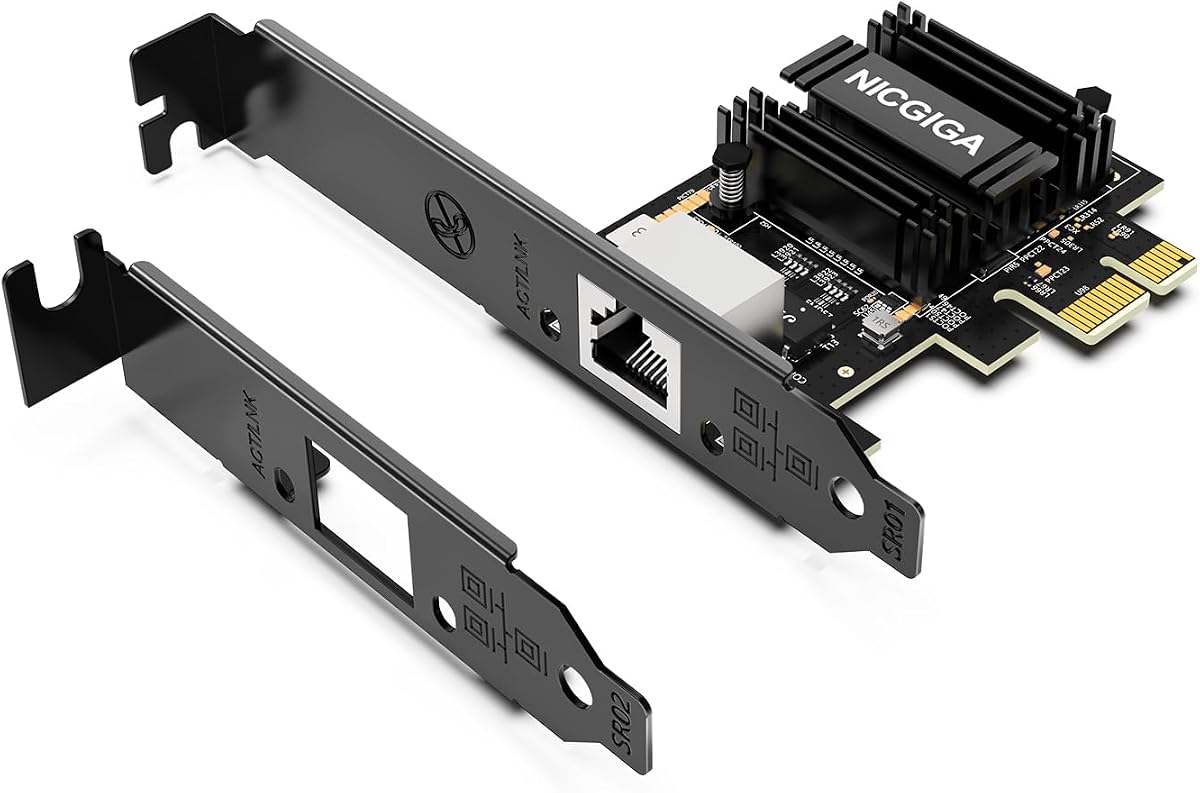
The NICGIGA RTL8127 has a 4.3 rating and uses a Realtek RTL8127 controller on a compact PCIe 4.0 x1 interface. It is especially useful when a builder wants one 10GbE port without occupying a full-width slot or consuming numerous lanes, making it relevant to Mini PCs, ITX systems, and compact workstations.
We may earn a commission when you buy through this link, at no additional cost to you.
Despite its small interface, the card supports 10Gbps, 5Gbps, 2.5Gbps, 1Gbps, and 100Mbps with automatic negotiation. It can therefore work with both newer multi-gig equipment and older networks. The listed system coverage includes Windows 11 and 10, Windows Server 2019 and 2022, and modern Linux distributions using kernel 6.x or later. Systems with older 5.x kernels may require the Realtek official source code.
Physical fit requires attention. The adapter fits PCIe x1, x4, x8, and x16 slots but is not for the older PCI slot format, which is a different connector and protocol. The included full-height and low-profile brackets are helpful, but the host system must still provide enough internal clearance. A single-port design also means this is not the right solution for a dual-link or multi-connection requirement.
The NICGIGA is recommended for compact builds that need multi-gig copper networking in a small slot footprint. Its low heat generation and power use are additional advantages for always-on or compact systems. Before purchase, verify that the case exposes the required connector position, that the power supply and motherboard can support the adapter, and that your chosen Linux version has an appropriate driver path.
The x1 interface is a practical choice when adding fast networking without monopolizing expansion lanes. It can work in a small workstation that already reserves larger slots for a graphics card or other accelerator.
Native support in current Windows and Linux environments makes the RTL8127 attractive for general-purpose systems. Older kernel installations require an additional driver step, so buyers should check the operating-system version rather than assume universal support.
We may earn a commission when you buy through this link, at no additional cost to you.
The VunLink RTL8127AT is a 4.3-rated single-port adapter intended for PCs, NAS systems, servers, workstations, gaming computers, home labs, and media workflows. Its Realtek RTL8127AT controller combines a full 10GbE link with automatic support for 5Gbps, 2.5Gbps, 1Gbps, and 100Mbps.
We may earn a commission when you buy through this link, at no additional cost to you.
The PCIe 4.0 x1 design is the card's most distinctive physical feature. It fits x1, x4, x8, and x16 slots, allowing users to add a high-speed Ethernet port without taking a larger number of lanes. Standard and low-profile brackets are included, supporting both conventional towers and compact desktop systems. That makes the adapter particularly appealing for small builds where a full-size server card may be difficult to accommodate.
The product information highlights lower power consumption and reduced heat output compared with traditional 10GbE solutions, which is valuable in compact enclosures. Windows 10, Windows 11, Windows Server, and mainstream Linux systems are supported, but the seller notes that drivers may be needed and that NAS, virtualization, and Linux compatibility can vary by version and kernel. Those qualifications deserve attention before installation.
This is a good fit for a builder seeking a current multi-gig controller, a small physical footprint, and broad speed flexibility. The single RJ45 port and dependence on host compatibility limit it for advanced dual-link configurations. Confirm the intended operating system, the network peer or switch capabilities, and the case layout to ensure the adapter is appropriate before purchasing.
The RTL8127AT supports the speeds most commonly encountered across current consumer and prosumer infrastructure. Automatic negotiation also makes it easier to use the same card with a 10GbE NAS, a multi-gig switch, and older 1Gbps equipment.
A narrow x1 interface, low-profile bracket, and lower-heat controller help this adapter fit compact systems. These details can matter as much as headline speed when space, airflow, and power budgets are tightly constrained.
We may earn a commission when you buy through this link, at no additional cost to you.
The Asus XG-C100F is a 4.3-rated SFP+ network card that provides 10Gbps connectivity through a cage accepting either fiber-optic or direct-attach copper modules. It serves a different infrastructure role from the RJ45 cards in this guide, making it particularly relevant to building fiber backbones, workstation links, and long-distance high-speed connections.
We may earn a commission when you buy through this link, at no additional cost to you.
Fiber optics can carry high-speed transmissions over much greater distances than conventional copper cabling. The SFP+ cage also supports direct-attach copper, allowing the same card to work with a compatible short-range cable module. This flexibility can simplify purchasing when a network architect already standardizes around SFP+ equipment. A transceiver or compatible module must be selected separately, and the connected switch or peer must use the same physical and logical interface.
The card uses a PCIe 2.0 or 3.0 x4 interface and includes an aluminum heatsink for cooling during demanding workloads. QoS automatically boosts bandwidth for important streams or games. Its operating range is listed as 0 to 40 degrees Celsius, with a storage range of minus 40 to 60 degrees Celsius, which is useful information for controlled server-room or office deployments.
Buyers should choose the XG-C100F for fiber-capable networks or established SFP+ infrastructure, not simply because they want a generic desktop upgrade. If their switch and workstation use ordinary RJ45 ports and CAT6A cabling, a copper RJ45 adapter will usually be simpler. For a fiber-based lab or building network, however, it provides a focused and capable 10GbE solution.
The SFP+ cage allows administrators to choose the medium that best fits the link. Fiber supports extended distances, while compatible direct-attach copper modules are convenient for short connections between closely positioned devices.
The built-in aluminum heatsink helps remove heat during sustained high-performance transfers. It is a sensible design choice for a card intended for long, data-heavy operations rather than occasional short transfers.
We may earn a commission when you buy through this link, at no additional cost to you.
The Synology E10G30-T2 is a two-port 10GbE RJ45 PCIe adapter with a 4.6 rating, the highest among the listed products. Its purpose-built design for Synology systems makes it a premium choice for owners seeking a direct, manufacturer-aligned upgrade for compatible storage platforms.
We may earn a commission when you buy through this link, at no additional cost to you.
The card's two 10GbE ports are designed to support high-performance storage applications, where NAS traffic can benefit from faster links than a typical gigabit connection offers. Automatic negotiation between 10Gbps and 1Gbps makes it compatible with a range of network speeds, although the maximum result still depends on the Synology system, switch, cabling, storage configuration, and workload.
Compatibility is more specific than with general-purpose PCIe cards. The product information instructs buyers to consult the hardware compatibility list and states that DSM 7.1.1-42962 Update 5 or later is required. A five-year warranty provides reassurance, but that support applies within the intended Synology environment rather than making the card suitable for arbitrary desktops and servers.
This is the ideal choice for a compatible Synology owner who wants two dedicated 10GbE connections and values vendor-specific support. It is not the correct general-purpose adapter for a custom PC or third-party server, even if the physical connector appears similar. Check the current Synology compatibility list and DSM version before ordering to avoid an unusable installation.
The adapter is designed around high-performance Synology storage applications rather than general desktop connectivity. That focused purpose can make configuration and integration more straightforward within a supported Synology environment.
The five-year warranty and clearly stated DSM requirement make platform planning easier. Checking both the hardware list and software version before purchase helps prevent compatibility surprises.
We may earn a commission when you buy through this link, at no additional cost to you.
The TRENDnet TEG-10GECTX is a 4.1-rated PCIe adapter with one 10Gbps RJ45 port and a broad set of negotiated speeds. It supports 10Gbps, 5Gbps, 2.5Gbps, 1Gbps, and 100Mbps, while using a PCIe Generation 3.0 x4 interface to add 10GbE connectivity to a compatible computer.
We may earn a commission when you buy through this link, at no additional cost to you.
A notable strength is its 2.5GBASE-T support over standard Cat5e cabling at distances up to 100 meters. That can make it easier to reuse existing wiring for multi-gig service rather than requiring new high-grade cable throughout an office or home. The product information also lists compliance with IEEE standards for 10GBASE-T, 2.5GBASE-T, VLANs, and link aggregation.
Its operating-system coverage includes Windows 11, Windows 10, Windows 8.1, and several Windows Server versions. NDAA and TAA compliance may be relevant to United States and Canadian government purchasing, while a three-year manufacturer protection plan adds support beyond the basic hardware. Standard and low-profile brackets are included, though the x4 card is physically larger than an x1 alternative.
The TEG-10GECTX is a sensible choice for a business desktop, workstation, or server that needs a conventional single-port copper upgrade and may benefit from reusing Cat5e wiring. It may be less suitable when physical slot space is scarce or when two independent high-speed links are required. Confirm the case has room for the card and the appropriate bracket.
Support for 2.5G and 5G over Cat5e up to 100 meters can reduce cabling barriers. It provides a practical middle ground between ordinary gigabit wiring and a full 10GbE cabling refresh.
Extensive Windows and Windows Server support, procurement-related compliance, a three-year protection plan, and included brackets give the card a practical profile for professional installations.
We may earn a commission when you buy through this link, at no additional cost to you.
The Cable Matters USB C to 10Gb Ethernet Adapter is a 3.9-rated USB-C option for laptops, mini PCs, and other systems that cannot accept an internal PCIe network card. It uses the Realtek RTL8159 USB 10G controller and supports automatic negotiation across 10G, 5G, 2.5G, 1G, and 100M.
We may earn a commission when you buy through this link, at no additional cost to you.
Unlike a PCIe adapter, this solution depends on the host's USB-C connection. The product information recommends USB 3.2 Gen 2×2 with 20Gbps bandwidth or better for the strongest results and notes that Thunderbolt 3, 4, and 5 and USB4 devices are supported. On macOS, the system may report a 5Gb link, while typical real-world throughput is around 5Gbps depending on the Mac and other variables.
Thermal management is a major selling point. The adapter uses a Realtek RTL8159 controller, rugged aluminum housing, thermal silicone, and a heat sink to limit heat during sustained use. Its braided USB-C pigtail adds flexibility and reduces strain at the connector. It is also described as plug-and-play on current macOS and Windows, although older operating systems may need the latest driver.
This adapter is best for a portable workstation or space-constrained computer where adding an internal card is impossible. Check the USB-C port's underlying protocol before buying, because a nominal USB-C connector alone does not guarantee 20Gbps performance. It is also not intended for Android devices or Xbox One S. For a desktop with a free PCIe slot, an internal adapter will generally be the more direct route.
USB-C 10GbE gives compatible notebooks and compact computers access to fast wired networking without opening the chassis. It is especially useful for large backups, NAS access, and high-volume content transfers in temporary workspaces.
The stated 10Gbps is a theoretical link rate, and the full result depends on the USB-C link, host controller, operating system, switch, and cable. The listed guidance about USB 3.2 Gen 2×2 and the lower macOS results is essential for setting accurate expectations.
We may earn a commission when you buy through this link, at no additional cost to you.
The best 10GB Ethernet Card is not simply the model with the highest headline speed. A sound purchase depends on matching the adapter's connector, controller, PCIe or USB interface, supported negotiation rates, physical dimensions, operating-system support, and intended workload to the rest of the network.
RJ45 adapters use copper Ethernet cables and are the easiest option for most desktops, workstations, and servers. An SFP+ card is more appropriate when the network is built around fiber modules or direct-attach copper hardware. A USB-C adapter serves portable or compact systems that lack a usable PCIe slot, but the host USB-C port must provide a sufficiently fast data link. Matching the connector to existing switches and cabling avoids unnecessary modules, adapters, and installation complexity.
A card capable of 10Gbps can still negotiate at a lower rate. The TP-Link, Asus, NICGIGA, VunLink, TRENDnet, and Cable Matters products list broad multi-gig ranges that include 2.5G and 5G. By contrast, the VIMIN and 10Gtek dual-port models are explicitly limited to 10G and 1G behavior. Check the switch and peer device because the fastest supported card cannot create a faster link than the equipment on the other end.
The physical connector and protocol both matter. Compact RTL8127 cards use PCIe 4.0 x1 and can fit x1, x4, x8, and x16 slots, but they are not for legacy PCI slots. The X540-based dual-port cards use a wider x8 interface. TRENDnet uses a PCIe 3.0 x4 layout, while the Asus SFP+ model also uses x4. Users should inspect motherboard slot labels, case spacing, and the physical length of the card before ordering.
The listed systems range from current Windows and Windows Server releases to specific Linux kernel versions and VMware or ESX environments. The 10Gtek card requires manual setup for Windows 11, while older Linux systems using the NICGIGA may need Realtek source-code drivers. VunLink notes that compatibility can vary with NAS platforms, virtualization environments, and Linux distributions. Checking the current operating system, kernel, and intended workload prevents a driver obstacle from undermining the network upgrade.
A single-port card is often sufficient for a desktop connecting to one high-speed switch or NAS. Two ports can support separate storage, management, guest, or host networks and may provide more flexibility in server and virtualization setups. However, multiple ports do not automatically create redundancy or aggregation; that requires compatible software, switch configuration, and cabling. Choose the number of ports around the actual network design rather than assuming that more connectors always provide a better result.
A 10Gbps copper link is only as strong as the cable path. CAT6A is included with the TP-Link TX401 and is specified for long 10GbE copper runs. The 10Gtek card lists Category 6A up to 100 meters and Category 6 up to 55 meters. The TRENDnet card can use Cat5e for 2.5G and 5G at distances up to 100 meters. Patch panels, wall outlets, connectors, and cable damage can all reduce performance, so an entire certified path should be considered.
A 10GbE controller can generate meaningful heat during sustained transfers, particularly in a small enclosure. Cards with heat sinks, including the VIMIN and Asus SFP+ models, may be beneficial for heavy server workloads. The RTL8127-based options emphasize lower power and heat output. Size also matters: x1 cards are easier to fit in compact cases, while dual-port X540 designs and other x4 cards may require additional clearance and airflow.
Gaming, NAS transfers, media editing, virtualization, and storage networking each place different demands on a network adapter. QoS can help interactive traffic, while Intel offload features and storage protocols may matter for servers. A Synology-specific card is optimized for a particular ecosystem, and a USB-C adapter prioritizes portability over direct PCIe access. Define whether the goal is low latency, high sustained throughput, two network paths, fiber reach, or simple compatibility before choosing.
Before installing an internal card, power the computer down completely, unplug the power cable, and follow the chassis manufacturer's safety instructions. Open the case, identify a compatible PCIe slot, and check for clearance around the card, heatsink, cables, and adjacent components. Install the appropriate full-height or low-profile bracket, seat the card firmly in the slot, and secure it with the retaining screw or latch.
Connect a certified Ethernet cable between the card and a compatible switch, router, or NAS. The other endpoint must support the desired speed, and any patch panels or intermediate cabling must also be suitable. Power on the computer, install any required operating-system drivers, and use the system's network settings to confirm that the adapter is detected. Windows normally provides a straightforward status path, while Linux users should check the network manager, kernel logs, and interface configuration.
After confirming the link, test both the negotiated rate and real-world transfer behavior. A connection labeled at the intended speed is a useful baseline, but sustained file transfers, latency, and CPU utilization better indicate whether the complete system is functioning as intended. Keep the card seated, the connectors clean, and the airflow path clear. For fiber or SFP+ systems, protect dust-sensitive optics, use compatible modules, and avoid looking into an active fiber connector.
It can improve performance on local networks, but it will not automatically increase the speed delivered by an internet service. The benefit appears when a computer currently uses a 1Gbps adapter while the switch, router, NAS, and cabling support a faster local connection. Internet throughput also remains limited by the provider's plan, remote server speeds, processing power, and the application's ability to use additional bandwidth.
CAT6A is a dependable choice for a full 10GBASE-T copper link, and the TP-Link TX401 includes a 1.5-meter CAT6A cable. The 10Gtek listing specifies Category 6A for distances up to 100 meters and Category 6 for shorter runs up to 55 meters. Cable quality, installation, connectors, patch panels, and damage all matter, so the entire path should be certified rather than judged by one segment.
That depends on the card's interface. The NICGIGA and VunLink RTL8127-based products use PCIe 4.0 x1 and are listed as compatible with x1, x4, x8, and x16 slots. Wider X540-based cards generally need an x8 slot, while the Asus SFP+ and TRENDnet options use x4 layouts. A physical x16 slot can often accept a shorter x1 card, but users should verify the motherboard manual and case clearance.
No. The product information lists Windows 11 support for several cards, but the 10Gtek X540 model requires manual setup and suggests contacting the seller for an installation guide. Some listings emphasize older Windows releases without explicitly mentioning Windows 11. Users should confirm current driver availability, operating-system version, and any required configuration steps before ordering.
Only if the network design requires them. One port is sufficient for connecting a desktop to a high-speed NAS or switch. Two ports can support separate storage, management, host, or guest networks and may be useful in servers and virtualization environments. They do not automatically provide link aggregation or failover, so compatible operating-system features, drivers, switch settings, and cabling must also be in place.
An RJ45 card connects directly to conventional copper Ethernet cables. An SFP+ card uses a modular cage that can accept compatible fiber-optic or direct-attach copper hardware. The Asus XG-C100F follows the SFP+ approach, making it suitable for fiber-oriented infrastructure, while the other copper-focused cards use RJ45 ports. The correct choice depends mainly on the switch, network path, distance, and available modules.
Yes, provided the computer's USB-C port exposes a sufficiently fast data connection and the network path supports the intended rate. The Cable Matters adapter uses the Realtek RTL8159 controller and supports several negotiated speeds. Low-latency wired gaming can benefit from a stable Ethernet link, but actual performance still depends on the internet connection, game server, switch, adapter driver, and host bandwidth limits.
A 10Gbps-capable card negotiates the highest common rate supported by both ends and every device along the path. A 2.5G or 1G switch, an older NAS, unsuitable cable, a USB-C port with limited bandwidth, or an operating-system driver issue can all produce a lower result. Check the card's negotiated rate, link lights, network settings, driver status, and the specifications of the connected equipment before assuming the adapter has failed.
The TP-Link TX401 stands out as the best overall general-purpose choice because it combines 10GbE, full multi-gig negotiation, QoS, broad operating-system support, a CAT6A cable, and both bracket options. For a budget-conscious server or workstation needing two high-speed copper links, the 10Gtek X540-10G-2T is compelling, while the Synology E10G30-T2 is the premium choice for compatible Synology storage systems.
Prioritize the connection path rather than the headline label. Choose an RJ45 card for standard copper networks, an SFP+ model for fiber-based infrastructure, a compact RTL8127 card for space-constrained PCIe systems, and a USB-C adapter for portable hardware. Confirm the negotiated rates, port count, driver support, physical clearance, cabling, and switch compatibility before making a final decision.
Retailer availability, software updates, bundles, and prices can change over time, so review the current listing and manufacturer information immediately before purchasing. Matching the card to the exact system and network environment is the surest path to obtaining reliable 10GbE performance rather than an expensive adapter that is constrained by hardware or configuration.
