
VR2 Silicone Protective Cover Set
4.7Editor score
Comprehensive silicone protection set
Covers headset and controllers
Washable, reusable components
Discover the best PS5VR2 accessories for 2026, comparing charging stations, protective covers, travel cases, controller upgrades, and essential VR hardware for
PS5VR2 accessories can make virtual reality more convenient, comfortable, organized, and easier to maintain. The right additions range from simple controller charging docks to protective silicone kits, all-in-one storage stations, travel cases, and even a complete VR headset bundle.
This guide compares the listed products by examining compatibility, charging capability, protective features, storage capacity, lighting options, portability, and the practical value of each design. It includes official PlayStation hardware, third-party charging solutions, protective accessories, and a few gaming additions worth considering.
Each review highlights the strongest reasons to choose a product, along with its important limitations and ideal buyer. Ratings and availability can change over time, and current prices vary by retailer, promotion, and region, so compare the latest listings before purchasing.
4.7Editor score

4.7Editor score

4.5Editor score
The comparison below places every listed product on the same practical playing field, highlighting its main function, compatible hardware, standout feature, and primary limitation. Some choices focus on charging and organization, while others provide protection, portability, or the complete VR experience.




The PlayStation VR2 Sense Controller Charging Station is a focused solution for a common problem: keeping both PSVR2 Sense controllers ready to use. With a 4.7 rating, it stands out for its simple operation, simultaneous charging, and dedicated click-in design. It does not try to be an all-purpose furniture piece, which makes it appealing to buyers who value reliability over visual extras.
We may earn a commission when you buy through this link, at no additional cost to you.
Its strongest feature is simultaneous charging, allowing both controllers to recharge together instead of rotating one at a time. The click-in arrangement also reduces the need to fiddle with loose USB-C connections, while the no-console-connection design gives users flexibility in where they position the dock. Fast, straightforward charging makes it especially useful at the end of a VR session when both controllers may need a quick turnaround.
The trade-off is that this station focuses on controller charging rather than broader organization. It does not provide a place for the PSVR2 headset, cables, or other accessories, and it lacks the programmable lighting found on some third-party stations. As a result, it may not solve every cable-management problem in a gaming area, particularly for owners of multiple PlayStation controllers.
This is the strongest general recommendation for PSVR2 owners who mainly need a dependable way to charge the Sense controllers. It is easier to recommend than a large multifunction dock because it does one job with a short learning curve. Choose it when simultaneous charging, compact placement, and straightforward operation matter most.
Charging both Sense controllers at once helps minimize downtime between sessions. The dedicated controller layout also makes the dock more predictable than a general-purpose charging base.
Because the station does not need a console connection, it can be placed near a television cabinet, desk, or charging area without tying its operation to the PS5. This also makes it easier to keep the controllers organized between uses.
We may earn a commission when you buy through this link, at no additional cost to you.
The VR2 Silicone Protective Cover Set offers broad physical protection for a PSVR2 setup, earning a 4.7 rating. Its bundle includes a headset shell cover, face cushion cover, lens dust cover, and two controller thumb grips, giving new owners more coverage than a single-purpose skin would provide.
We may earn a commission when you buy through this link, at no additional cost to you.
The closed face-cover design is intended to reduce light leakage while helping keep perspiration away from the stock facial pad. A thicker lens cover is designed to absorb impact, while the thumb grips protect controller sticks from scratches and grime. High-grade silicone is washable and reusable, which adds practical value for owners who play regularly or share the headset with family members.
Fit and long-term comfort remain important considerations with any third-party cover. The set is specifically designed for PSVR2, but installation can add slight bulk compared with leaving the stock components uncovered. Users who strongly prefer the original materials and appearance may also prefer a minimal protective approach. Dust can settle on exposed silicone surfaces and will need periodic cleaning.
Choose this set if protection, sanitation, and several useful additions in one bundle matter more than electronics or decorative lighting. It is particularly suitable for households using PSVR2 regularly, for younger players, and for anyone who wants to protect the headset, facial interface, lenses, and controller sticks without buying several separate accessories.
The set covers the headset shell, face contact area, lenses, and controller sticks. That breadth makes it more useful for everyday wear and accidental damage than a headset-only silicone skin.
The silicone materials can be cleaned and reused, making the set practical for frequent sessions. Regular cleaning helps preserve a fresher contact surface and prevents dirt from accumulating around the thumb grips.
We may earn a commission when you buy through this link, at no additional cost to you.
The KIWI design D2 3-in-1 Controller Charging Station is the most ambitious charging option in this guide, with a 4.5 rating. It combines controller charging with vertical PSVR2 headset storage, helping a gaming area handle two related but distinct hardware needs without requiring separate stands.
We may earn a commission when you buy through this link, at no additional cost to you.
A 22.5W adapter powers the station, and the product description states that controllers can reach a full charge in approximately one and a half to two hours. Real-time LED indicators show the charging status of each controller. The vertical format reduces the station's footprint, while a non-slip silicone base and balanced structure are designed to prevent tipping or accidental movement.
Its multifunction design also creates more complexity than a basic charging dock. The stand occupies more visual and physical space, and the charging arrangement is tailored to specific PlayStation controller types. Users who own only PSVR2 Sense controllers and no conventional PS5 controllers may find that some of the combined functionality goes unused.
This station is best for PlayStation owners who want one prominent home for PSVR2 and PS5 controller charging. Its included adapter, headset holder, stable construction, and individual status lights justify the premium position for buyers who value a coordinated, organized setup. It is less compelling for those who travel with the headset or require a highly compact dock.
The station charges both PSVR2 and compatible PS5 controllers while also holding the headset vertically. That combination reduces the number of separate objects occupying the gaming area.
Individual LED indicators make it easier to see which controller is charging and when charging is complete. This is particularly useful in a shared household where more than one player may use different controllers.
We may earn a commission when you buy through this link, at no additional cost to you.
The PlayStation VR2 headset is the essential piece of hardware around which the rest of these accessories are designed. Its 4.4 rating reflects a major platform with advanced features including eye tracking, headset feedback, 3D Audio, haptic feedback, adaptive triggers, and finger touch detection.
We may earn a commission when you buy through this link, at no additional cost to you.
The headset supports 4K HDR visuals, a 110-degree field of view, and advanced graphical rendering. Those specifications make it a compelling foundation for immersion-focused games and media experiences. Adaptive triggers and finger touch detection add new ways to interact with virtual environments, while eye tracking can make certain interactions feel more natural and immediate.
The PlayStation VR2 is not a conventional add-on in the same way as a cover, cable, or charging dock. It is the central device that unlocks the PS5's virtual reality experiences and needs compatible games, a PS5, and suitable play space. Anyone already equipped with the complete core system may gain little from purchasing another headset, while new VR users should consider the total hardware requirement before buying.
For someone beginning a PS5 virtual reality setup, the PlayStation VR2 is the essential starting point rather than a discretionary accessory. Its combination of visual performance, tracking features, and tactile controls sets the standard for the other hardware in this guide. Pair it with a reliable controller charging station and protective set for a more complete, well-organized system.
A 110-degree field of view and 4K HDR support are central to the headset's immersion. Eye tracking, 3D Audio, and haptic features also enrich supported software beyond simple visual presentation.
Adaptive triggers, finger touch detection, and headset feedback provide multiple layers of interaction. Together, they give compatible games more ways to communicate movement, selection, and environmental detail.
We may earn a commission when you buy through this link, at no additional cost to you.
The PlayStation VR2 Horizon Call of the Mountain Bundle combines the headset with a major VR game, giving new users a more complete entry package. Its 4.4 rating reflects the same core hardware strengths as the standard headset while adding a recognizable virtual reality experience to the package.
We may earn a commission when you buy through this link, at no additional cost to you.
Eye tracking, headset feedback, 3D Audio, haptic feedback, adaptive triggers, and finger touch detection provide the interaction foundation. The headset also supports 4K HDR visuals, a 110-degree field of view, and advanced graphical rendering, ensuring the included software has access to the platform's main presentation features.
A bundle is most valuable to someone who wants an immediate way to explore VR. Buyers with a strong preference for different games may find the headset alone more flexible, especially if they already own compatible titles. The package also does not remove the need for a compatible PS5, a supported play area, or additional accessories such as a charging station and protective cover.
This is a sensible starting choice for a PlayStation household interested in trying virtual reality without beginning with only the headset. It offers a clear entry point with popular content included, while preserving all the main PSVR2 capabilities. Owners of the standard headset can instead direct their accessory budget toward protection, charging, storage, and improved organization.
Including a major Horizon title removes the need to select a first VR game before the hardware is useful. That convenience makes the bundle particularly approachable for newcomers.
The bundle retains the headset's eye tracking, adaptive triggers, haptic feedback, 4K HDR support, and wide field of view. Software features remain dependent on each title's support, but the hardware supplies the necessary foundation.
We may earn a commission when you buy through this link, at no additional cost to you.
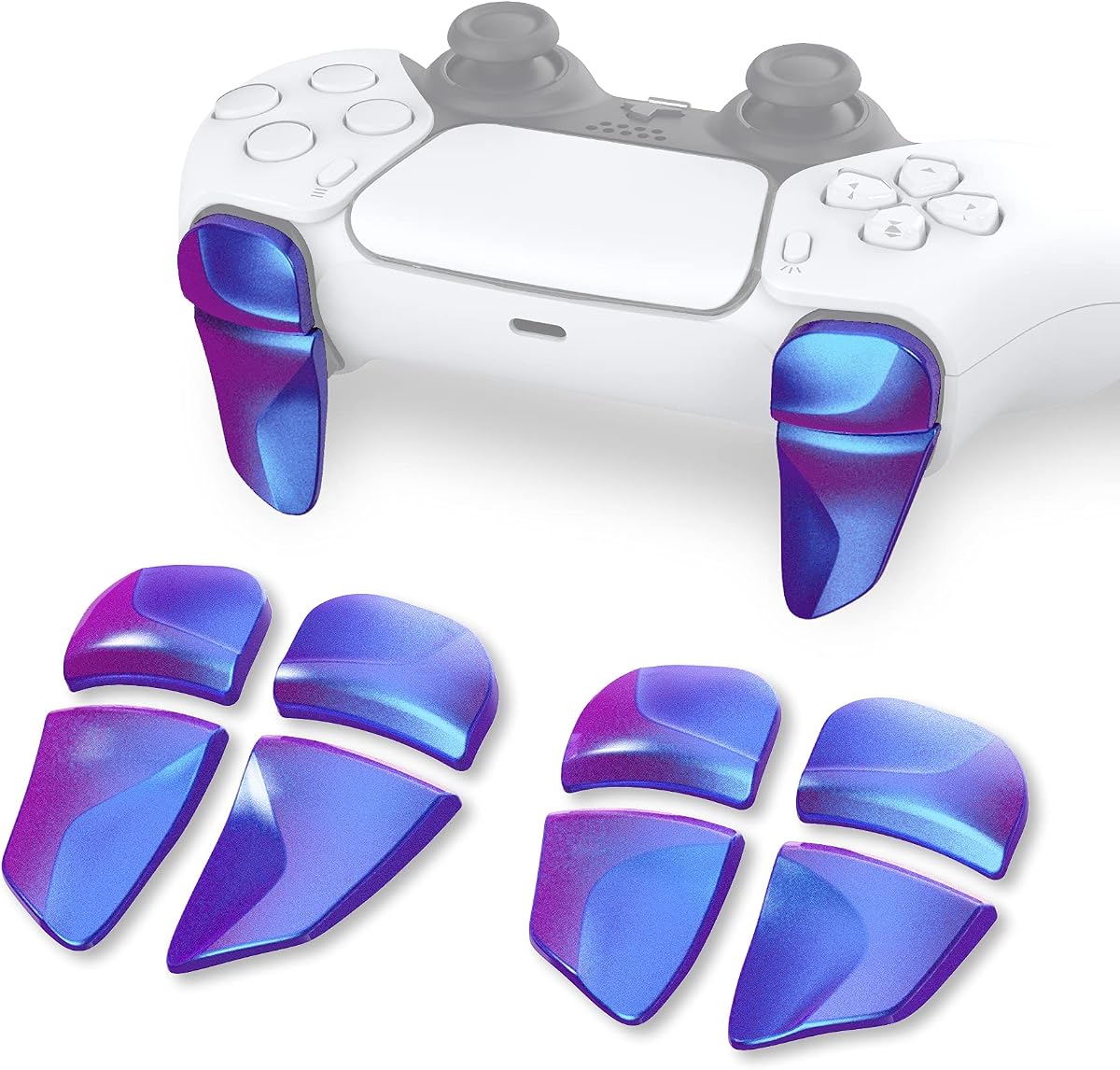
The PlayVital Blade 2 Shoulder Buttons are an ergonomic upgrade for conventional PS5 controllers rather than a direct PSVR2 Sense controller accessory. They receive a 4.4 rating and are designed to make shoulder buttons and triggers easier to reach for players with larger hands or those who prefer additional trigger extension.
We may earn a commission when you buy through this link, at no additional cost to you.
The package includes two pairs of L1, R1, L2, and R2 extenders. The L1 and R1 pieces offer two thicknesses, while the L2 and R2 pieces offer two lengths, allowing users to select a combination that suits their grip. The extenders are intended to increase button response, improve reach, and rest the fingers during longer sessions.
Compatibility extends to the standard PS5 controller, PS5 Edge controller, and PS Portal Remote Player. Installation requires adhesive stickers, so the attachments need proper placement and firm pressure. The accessories add bulk to the controller and may not suit players who prefer a completely stock setup. They also do not fit the PSVR2 Sense controllers.
Choose this pair of extenders for players who already own a compatible conventional PS5 controller and find its shoulder controls uncomfortable. It can be a useful complement to a larger PS5 gaming setup, but PSVR2 owners should not mistake it for a Sense controller enhancement. For the PSVR2 itself, prioritize the dedicated charging and protective accessories in this guide.
Different thickness and length choices let users tailor the extension to their hands and preferred controller grip. This flexibility is more useful than a single fixed-size extender.
Players who struggle to reach the standard shoulder buttons can use the extensions to bring those controls closer to their fingers. The result may be easier access and less strain during extended play.
We may earn a commission when you buy through this link, at no additional cost to you.
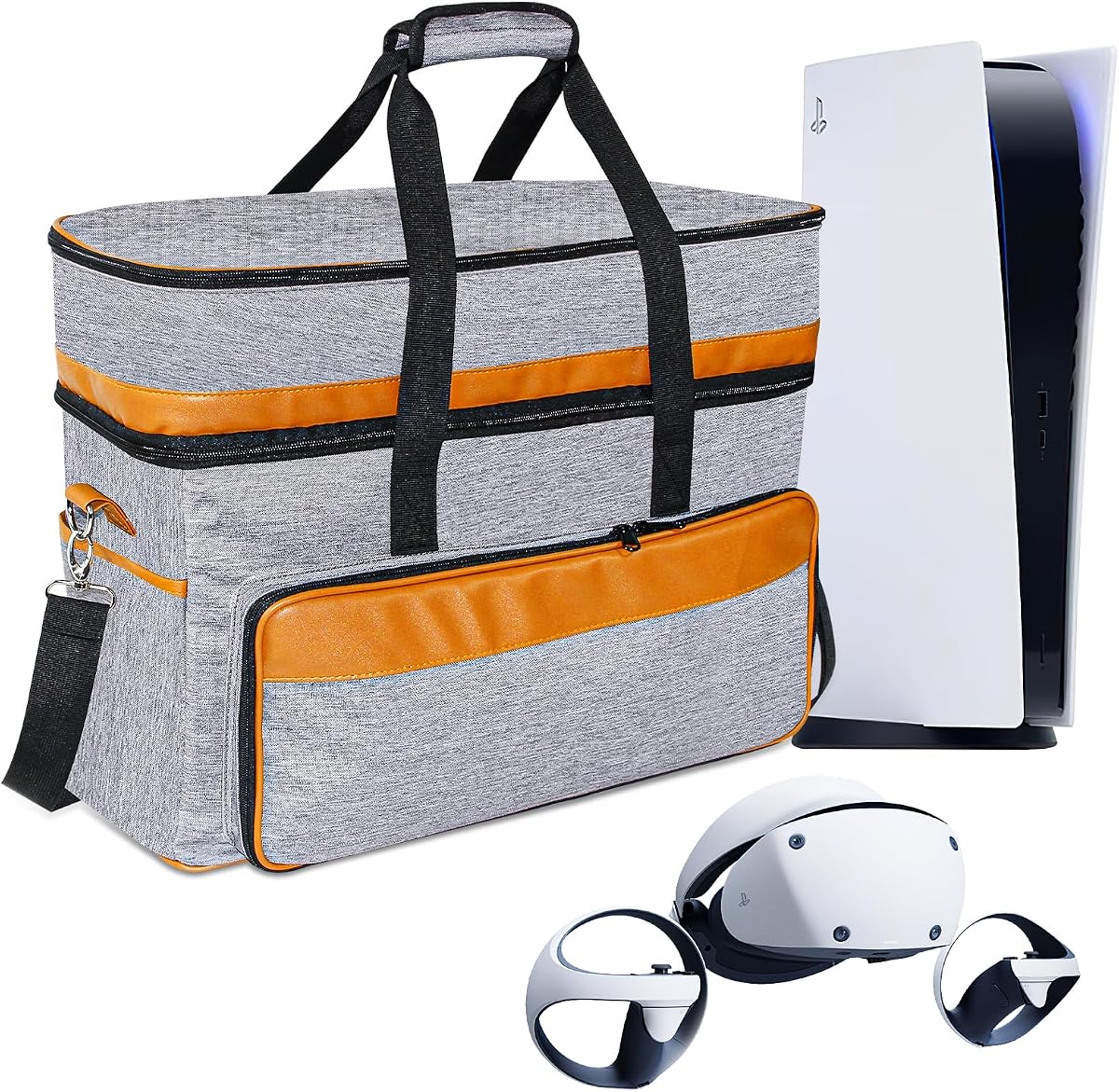
The FPVtosky Carrying Case is built for people who want to transport an entire PS5 and PSVR2 setup rather than just the headset. Its 4.1 rating reflects broad practical utility, and the listed compatibility includes PS5, PS5 Pro, PS5 Slim, PSVR2, controllers, charging docks, cables, and related accessories.
We may earn a commission when you buy through this link, at no additional cost to you.
Its exterior uses water-repellent, abrasion-resistant high-density nylon, while a shock-absorbing sponge layer and softer inner material provide additional protection. Reserved interior spaces separate the main hardware from smaller accessories, and the flexible layout gives users room to arrange components according to the trip.
The trade-off is bulk. A bag designed for a console, headset, base, controllers, and charging equipment will be larger than a compact PSVR2-only case. Its material and structural features also make it more relevant for travel, extended storage, and moving between locations than for a permanently docked living-room setup. Users should verify the arrangement against the accessories they actually own.
This case is best for travelers, event attendees, and households that move a PlayStation setup between rooms or locations. Its multi-layer construction and flexible storage distinguish it from a lightweight padded sleeve. It also offers a convenient way to keep PSVR2 and its related accessories together, reducing the likelihood of leaving essential pieces behind.
Water resistance, abrasion resistance, shock-absorbing foam, and a soft inner layer each address a different handling risk. That layered approach is useful when equipment is moved in luggage or stored in a busy vehicle.
Separate and adaptable interior areas can accommodate the headset, console, controllers, charging dock, and cables. Buyers should compare the listed dimensions with their own equipment before relying on it for frequent travel.
We may earn a commission when you buy through this link, at no additional cost to you.
The Fastsnail RGB Charging Station is designed for gamers with multiple PlayStation controllers who want charging and storage in one prominent unit. It carries a 4.4 rating and supports PSVR2 Sense, DualSense, and DualSense Edge controllers, with capacity to charge four controllers at the same time.
We may earn a commission when you buy through this link, at no additional cost to you.
The station includes a 5V/3A adapter, four Type-C magnetic adapters, and intelligent chip control. Indicator lights show red during charging and blue when finished. It also offers 10 lighting choices across color and behavior modes, including monochrome, breathing, and flashing effects. For organization, the stand can hold a PSVR2 headset, two PSVR2 controllers, two conventional PlayStation controllers, cables, and headphones.
This is clearly a feature-heavy option. The larger frame and multiple charging positions may occupy more room than a basic dock, while the lighting could be unnecessary for users who prefer a minimalist entertainment area. The product description also notes that the auxiliary USB ports are for charging rather than data transfer, a limitation worth considering for owners expecting a hub.
Choose the Fastsnail station for a shared gaming room, a large PlayStation collection, or a setup where several controller types are in regular use. Its capacity, included adapters, and organizational benefits exceed those of a standard PSVR2-only dock. For a single-player PSVR2 setup, the official charging station is the more focused alternative.
Charging support for PSVR2 Sense, DualSense, and DualSense Edge controllers makes the station useful beyond a single headset ecosystem. Four simultaneous charging positions accommodate multiplayer sessions and shared households.
Ten lighting modes let users tailor the station to a gaming-room aesthetic or turn illumination off when it is distracting. Integrated storage adds value by keeping frequently used equipment together.
We may earn a commission when you buy through this link, at no additional cost to you.
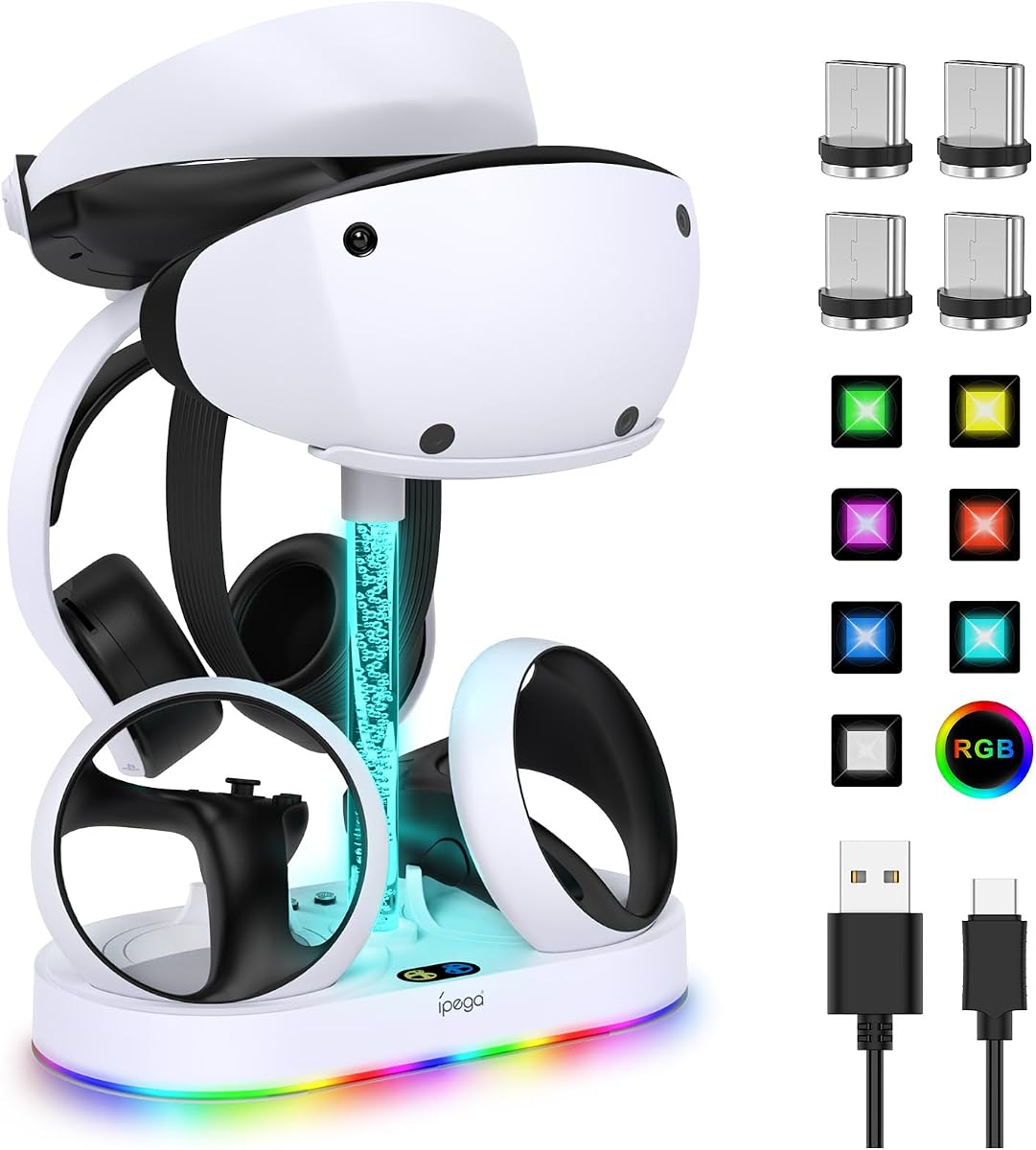
The FASTSNAIL RGB Charging Stand focuses directly on PSVR2 while adding enough storage and lighting to serve as a small gaming-zone hub. With a 4.4 rating, it offers dual controller charging, a headset holder, and multiple lighting choices in a relatively focused design.
We may earn a commission when you buy through this link, at no additional cost to you.
The stand provides 15 lighting modes, including seven monochrome colors, eight dynamic effects, breathing, flashing, gradient, and memory behavior. Four magnetic Type-C adapters remove the need for separate controller wiring. The charging indicator turns orange while charging and blue when complete, and the product description states that two Sense controllers can charge in approximately one and a half to two hours.
Power comes from the PS5 console or a suitable 5V/2A adapter. The listing specifically warns that a 1A adapter may not provide enough input current for ideal operation. A USB output is included for data transfer or additional charging, although the stand's core purpose remains PSVR2 Sense controller charging. It is therefore less versatile than a four-controller station for mixed PlayStation hardware.
This is a good choice for a PSVR2-focused setup that values atmosphere and a defined place for the headset, controllers, cables, and headphones. It offers more personality than a basic dock and maintains dedicated charging performance. Buyers should confirm that their preferred power source meets the stated requirement before installation.
Two magnetic charging connections and included Type-C adapters simplify controller setup. The dedicated format is ideal for households whose primary VR hardware consists of a PSVR2 headset and its Sense controllers.
Fifteen modes cover static colors, dynamic effects, breathing, flashing, gradients, and a remembered setting. Users can also disable the lights while preserving the charging function for a quieter appearance.
We may earn a commission when you buy through this link, at no additional cost to you.
The Meta Quest Headset Charging Dock is not a PSVR2 accessory, but it is relevant to readers who also use Meta's VR platform. It supports Quest 2, Quest 3S, and Quest 3 headsets, receives a 4.4 rating, and combines a charging cradle with a vertical display and controller-storage area.
We may earn a commission when you buy through this link, at no additional cost to you.
The headset rests on an upper plastic bracket and charges through a Type-C cable. The listed charging time is approximately three to five hours when a suitable adapter is used. Side suspension supports Quest 2 controllers, the base stores Quest 3 controllers, and third-party head straps or headphones can also fit into the available space.
The controller-storage function does not include charging, which is the product's most important limitation. Its charging performance also depends on an appropriate power adapter. Because it targets Meta Quest hardware rather than PSVR2, it offers no direct charging or storage benefit for a PlayStation VR2 setup and should not be considered a substitute for the PSVR2 stations in this guide.
Choose this dock if you own compatible Meta Quest equipment and want one compact place to charge and display the headset. Its enlarged contact area, four non-slip feet, angled tray, and tool-free assembly help maintain stability. For readers shopping strictly for PS5VR2 accessories, skip it and choose a station with explicit PSVR2 compatibility instead.
The angled headset cradle serves as both a charging position and a display stand. That combination helps keep a compatible Quest headset visible and accessible when it is not being used.
An enlarged base contact area and four non-slip pads reduce wobbling, while the kit supports three listed Quest generations. Third-party grip covers and head straps can remain attached during storage.
We may earn a commission when you buy through this link, at no additional cost to you.
The right PS5VR2 accessory depends on the problem you want to solve. Consider hardware compatibility first, then focus on charging capacity, protection, storage design, portability, lighting, and the amount of space available in your gaming area.
PS5, PS5 Slim, PS5 Pro, DualSense, DualSense Edge, PS Portal, and PSVR2 Sense controllers are related products but are not interchangeable. A dock that fits a conventional DualSense controller may not fit PSVR2 Sense controllers, and a carry case designed for a headset may not hold a complete console. Read the compatibility list carefully rather than relying on a shared PlayStation branding. Pay particular attention to controller shape, connector type, headset dimensions, and whether the accessory supports charging, storage, or both.
A PSVR2 owner with one headset and two Sense controllers only needs two controller charging positions. Larger households may want a four-controller station that also handles DualSense or DualSense Edge hardware. Check the stated charging times, included power adapter, input requirements, and indicator behavior. Magnetic adapters can make charging more convenient, but users must ensure the correct adapter is seated properly. A console-powered stand may fit an existing setup, while a station with its own adapter offers more placement flexibility.
A protective accessory should do more than change the headset's color. For a PSVR2, useful protection can include a shell cover, face cushion, lens dust cover, and controller thumb grips. Silicone that can be washed and reused is helpful around sweat-prone contact areas. Thick lens covers can help absorb impacts, while closed face covers may reduce light leakage. Because added covers can slightly change the fit, users should confirm that they are specifically designed for the PSVR2 rather than a visually similar headset.
A vertical charging stand can keep the headset visible and reduce cable clutter, while a wider multifunction unit may also hold controllers, headphones, and charging adapters. Check the stand's footprint and stability before purchasing, especially if space near the television is limited. Stable bases, non-slip pads, and balanced construction are especially important when a headset is suspended above the desktop. Users should decide whether they value a focused dock, a display stand, or a complete storage station before choosing a design.
RGB lighting can make a gaming area feel more cohesive, and some stations offer static colors, breathing effects, flashing modes, gradients, and memory functions. Lighting is not inherently better than a plain dock; it is a preference. Buyers who enjoy visible effects may favor one of the FASTSNAIL models, while those who want a quieter setup may prefer the official controller dock or a product that can disable its illumination. Always check whether lights can be turned off while charging remains available.
Travel protection is a different requirement from desk organization. A case designed for PS5 and PSVR2 hardware should accommodate the console, headset, controllers, charging equipment, and cables with separate internal areas. Look for water-repellent outer fabric, abrasion resistance, shock-absorbing padding, and a soft inner surface. Check the carrying options, including handles, shoulder straps, or suitcase straps, and consider how the case affects airport or vehicle packing. A compact headset-only case is easier to transport but stores less equipment.
The power arrangement can determine where a charging station can be placed. Some products include a suitable adapter, while others expect power from the PS5 console or a user-supplied USB power source. A dock that needs more current than an available adapter provides may charge slowly or operate imperfectly. Review the stated input specifications and connector type before installation. Keeping the power cable routed behind furniture can preserve a tidy setup, but the cable must still reach a reliable outlet or console.
The most feature-rich accessory is not automatically the most useful. A basic official dock may serve a single PSVR2 owner better than a large RGB station with unused controller positions. Conversely, a four-controller hub can be worthwhile for families or players who regularly alternate between VR and traditional PlayStation games. Compare the number of functions you will actually use against the footprint, power requirements, and complexity of the product. Basic charging and dependable protection usually provide more value than decorative additions that remain unused.
Begin by confirming compatibility, reading the included instructions, and placing the accessory on a clean, level surface away from direct heat or excessive moisture. Charging stations should be connected to the stated power source before controllers are placed on the charging contacts. Protective covers should be fitted without forcing delicate ports or controls, and carry cases should be packed so cables do not sit in sharp bends.
For charging docks, seat each supported controller carefully until it clicks into place or the charging indicator confirms connection. Check the light colors described in the product manual, and allow the advertised charging period to complete. Do not use a power source that falls below the stated input requirement, and disconnect the dock if it becomes unusually hot, damaged, or intermittent. LED-equipped stands can often be switched off while retaining the charging function.
Clean silicone covers with the care method permitted by the manufacturer, allowing every piece to dry fully before installation. Keep lens dust covers free of scratches and avoid pressing against the PSVR2 lenses. Wipe charging contacts gently and keep small magnetic adapters clear of dirt. Store the headset away from prolonged direct sunlight, do not leave it compressed in a crowded bag, and periodically inspect covers, straps, connectors, and case seams for wear.
The headset and Sense controllers provide the core VR experience, but extras can improve convenience and longevity. A controller charging station helps keep both controllers ready, while a silicone set can protect the shell, face pad, lenses, and thumb sticks. The most useful additions depend on how often you play, how many people share the system, and whether you travel with the hardware.
Some multifunction docks support both PSVR2 Sense controllers and conventional DualSense or DualSense Edge controllers. The KIWI design D2 and Fastsnail four-controller station are examples of products described with broader PlayStation controller compatibility. Check the exact controller models, included adapters, and charging positions because a dock that stores another controller may not charge it.
RGB stations are primarily suited to buyers who want visible lighting and a more decorative gaming setup. A basic dock can be more compact, simpler, and less distracting. Lighting does not improve tracking or headset performance, so the deciding factors should be charging capacity, stability, compatibility, storage, and the amount of desk space available.
Only use a case that explicitly lists PSVR2 compatibility and confirms enough interior space for the headset, controllers, cables, and other items you plan to bring. The FPVtosky case is described as accommodating PS5-family consoles, PSVR2, controllers, charging docks, and related accessories. A compact headset case may protect only the headset and its immediate accessories.
A third-party station can be appropriate when its compatibility, electrical requirements, safety certifications, and included components are clear. Check whether it requires a particular power adapter or minimum current and whether its indicators behave as described. Follow the manufacturer's setup instructions, inspect connectors for damage, and stop using the station if it overheats or operates inconsistently.
Do not assume compatibility because both products are part of the PlayStation ecosystem. PSVR2 Sense controllers have a different form factor from DualSense controllers, and many standard PS5 docks are shaped specifically for the conventional controller. Look for explicit PSVR2 Sense support and the required magnetic or cable adapters before using a station.
The answer depends on the urgency of your need. A charging station improves everyday convenience, while a protective set helps reduce wear and accidental damage over time. New owners may prioritize the official controller dock, and regular players may add a washable silicone set next. Frequent travelers can start with a suitable carrying case and protective cover to safeguard the headset in transit.
The listed Meta Quest Headset Charging Dock is designed for Quest 2, Quest 3S, Quest 3, and some other Type-C VR headsets, not PSVR2. It should not be used as a PSVR2 charging solution. Choose a station or dock that explicitly supports PSVR2 Sense controllers and confirm that the included adapters fit their charging contacts.
The PlayStation VR2 Sense Controller Charging Station is the most focused top pick for owners who want fast, straightforward dual-controller charging. The VR2 Silicone Protective Cover Set provides the strongest physical protection package, while the KIWI design D2 delivers the most integrated premium charging and storage experience. Each serves a different need, but all three make routine PSVR2 ownership more convenient.
Prioritize confirmed PSVR2 compatibility before considering color, lighting, or extra functions. A standard two-controller setup rarely needs four charging positions, while a shared household may benefit from broader PlayStation controller support. Protective users should also consider washable silicone, while travelers need a case with verified room for the headset, console, controllers, and cables.
Ratings, bundle contents, and retailer availability can change, and current prices vary by promotion and region. Review the latest product listing, included components, power requirements, and current customer feedback before making a final purchase. That final check helps ensure the chosen accessory fits both the PSVR2 equipment and the way you actually play.