
QNAP Thunderbolt 3 Expansion Card
4.7Editor score
Two Thunderbolt 3 ports
PCIe Gen3 x4 interface
Low-profile bracket included
Explore the best Thunderbolt Add in Card for PC options, comparing speed, ports, display support, PCIe compatibility, charging, and installation needs.
A Thunderbolt add-in card can bring fast external connectivity to a PC that lacks modern USB-C or Thunderbolt ports. The right card may add high-speed storage, support multiple displays, provide device charging, or connect specialized professional equipment, so matching the card to your motherboard and workflow matters.
We compared all ten options by examining port count, interface generation, PCIe lane requirements, bandwidth, display capabilities, charging support, daisy-chaining, operating-system compatibility, and intended use. The list includes general-purpose desktop cards, workstation-oriented models, and expansion cards designed for specific systems.
The recommendations below show which product stands out in each category and where compatibility limits may apply. Product listings and availability can change, so confirm current specifications, fit, and system support before ordering.
4.7Editor score
3.2Editor score

4.2Editor score
This side-by-side comparison highlights the major differences among all ten cards, including interface generation, physical connections, PCIe lane use, display support, charging capabilities, and the specialized systems each model is designed to serve.


The ASUS ThunderboltEX 4 combines a modern Intel Thunderbolt 4 controller with two USB Type-C ports, giving a desktop a flexible path to high-speed peripherals. Its 3.9 rating places it among the stronger-reviewed options in this group, while the combination of data, display, and charging functions makes it unusually useful for a general-purpose expansion card.
We may earn a commission when you buy through this link, at no additional cost to you.
The card provides up to 40Gb/s of bidirectional bandwidth per port and can connect as many as five Thunderbolt-enabled devices in a daisy-chain configuration. DisplayPort 1.4 support enables high-resolution monitor setups, including resolutions up to 8K when all connected equipment and the host configuration support it.
A quick-charge solution rated up to 100W adds another layer of utility, particularly for laptops and other power-hungry USB-C devices. The trade-off is that compatibility should be checked carefully: the related listing references an Intel Thunderbolt 4 JHL 8540 controller, so motherboard support, firmware, slot layout, and operating-system drivers all deserve attention before purchase.
This is a strong recommendation for builders who want a balanced Thunderbolt add-in card without moving to Thunderbolt 5. It suits users who need fast storage, multi-display potential, daisy-chaining, and meaningful charging in one PCIe upgrade, provided the installed PC meets the card's platform requirements.
Two USB-C Thunderbolt ports let you organize high-speed storage, a display, and other peripherals without relying on separate add-in controllers. The ability to daisy-chain up to five enabled devices per port helps reduce cable clutter in multi-device workspaces.
Up to 100W of quick charging makes this card more useful than a data-only expansion option. The connected device, charger negotiation, and cable must all support the required power level for dependable results.
We may earn a commission when you buy through this link, at no additional cost to you.
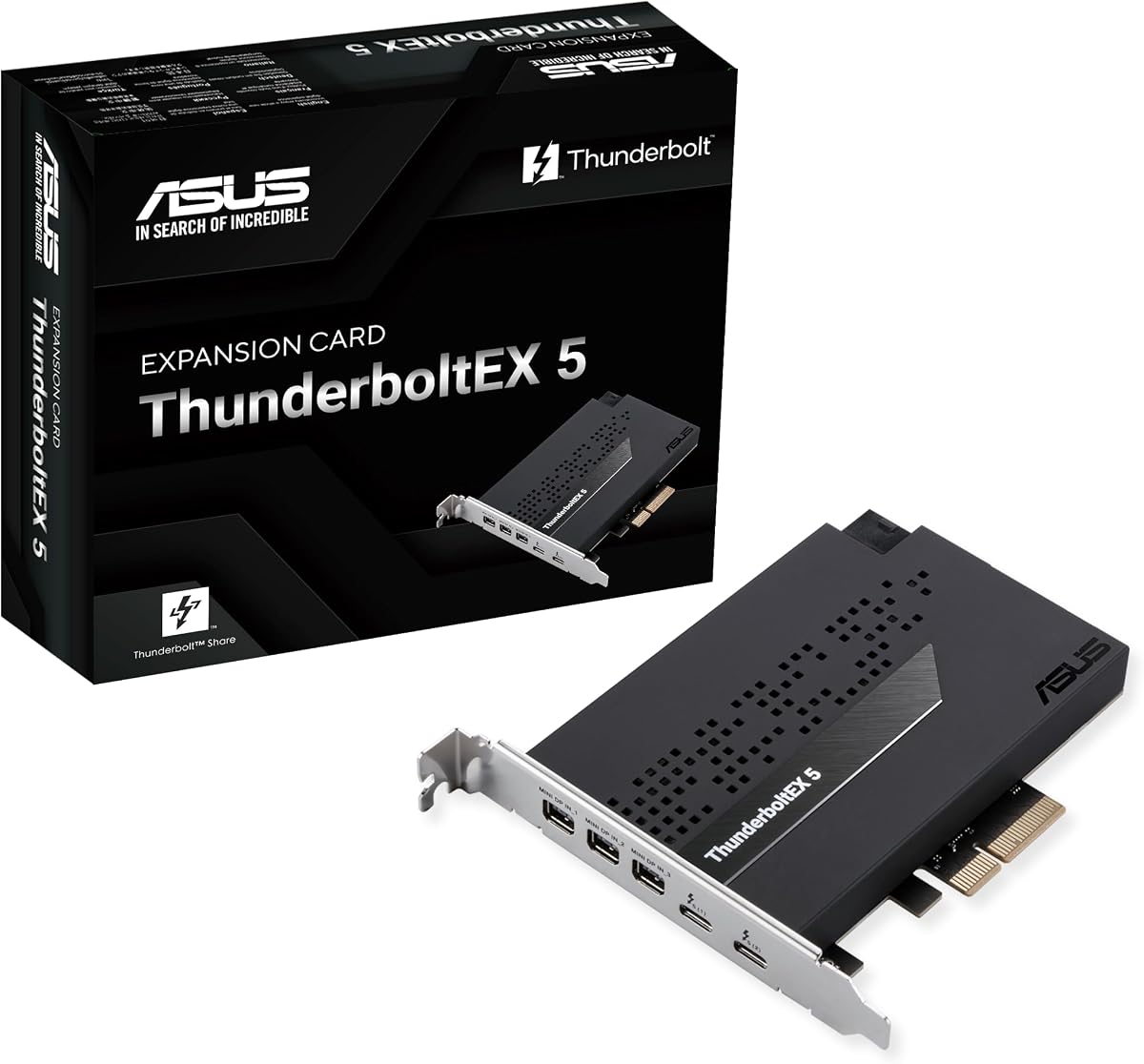
The ASUS ThunderboltEX 5 is built for users who want the newest Thunderbolt capabilities in a desktop expansion card. Its two Thunderbolt 5 USB-C ports, up to 120Gbps of bandwidth, and DisplayPort 2.1 support place it among the most technically advanced options in this comparison.
We may earn a commission when you buy through this link, at no additional cost to you.
Data-intensive workflows are the primary attraction. The card is built around a PCIe 4.0 x4 interface, and its daisy-chain support allows up to five Thunderbolt devices to be connected. DisplayPort 2.1 with DSC can support up to three 8K 60Hz displays when the complete system is configured appropriately.
Charging is also unusually capable: the two Type-C ports provide up to 130 watts in total, with up to 96 watts available for one device. These figures make the card interesting for high-powered peripherals and mobile workstations, though the lower 3.2 rating suggests buyers should examine recent customer feedback and platform requirements carefully.
The card is best for an enthusiast or professional system built around compatible Intel 800-series motherboards. It makes more sense when Thunderbolt 5, high-bandwidth storage, or high-resolution multi-display output justifies the newest interface than when a basic Thunderbolt upgrade would be sufficient.
Up to 120Gbps of bandwidth provides substantial headroom for demanding storage arrays and high-resolution video workflows. The advantage is most meaningful when paired with devices that can exploit Thunderbolt 5 capabilities rather than older peripherals.
DisplayPort 2.1 and DSC support make multi-monitor configurations possible, including as many as three 8K 60Hz displays. GPU output, display adapters, operating-system support, and refresh-rate combinations still need to be verified before installation.
We may earn a commission when you buy through this link, at no additional cost to you.
The QNAP Thunderbolt 3 Expansion Card, also identified as the QXP-T32P, combines a strong 4.7 rating with a compact, practical design. Its two Thunderbolt 3 USB Type-C ports make it a sensible upgrade for compatible systems that need fast external storage, display connectivity, or other Thunderbolt peripherals.
We may earn a commission when you buy through this link, at no additional cost to you.
The card uses a PCIe Gen3 x4 interface and comes in a low-profile form factor. Both low-profile and full-height brackets are included, making it easier to accommodate different chassis layouts. That flexibility is valuable for compact desktop and NAS-style builds where an oversized add-in card could obstruct airflow or fail to fit.
Its main limitation is generational rather than functional. Thunderbolt 3 provides up to 40Gbps of bandwidth, which remains highly useful for storage and accessories but does not match the theoretical headroom of Thunderbolt 5. Users should also verify that the host motherboard supports the required PCIe slot, drivers, and operating-system environment.
This is a compelling choice for a compatible QNAP or general desktop system seeking compact, well-reviewed dual-port Thunderbolt expansion. It offers more restraint than a flagship Thunderbolt 5 card while retaining the central benefits of fast external connectivity.
The low-profile body and included bracket options improve the chance of a clean installation in space-conscious cases. Physical clearance should still be checked against nearby heatsinks, drives, and other expansion cards.
Two Thunderbolt 3 ports remain practical for external storage, docks, and compatible displays. Their value is strongest in systems where reliable expansion is needed without moving to a newer motherboard platform.
We may earn a commission when you buy through this link, at no additional cost to you.
The OWC Mercury Helios 5S is more than a simple desktop Thunderbolt card. It is a comprehensive PCIe and connectivity expansion system with three Thunderbolt 5 ports, 80Gb/s connections, and support for professional add-in cards. Its 4.2 rating reflects a capable design intended for demanding creative and data workflows.
We may earn a commission when you buy through this link, at no additional cost to you.
OWC positions the device for compact systems such as MacBooks, Mac Studio, and Mac mini that lack accessible internal expansion. It can accept a half-length, full-height, single-width, or double-width card through a PCIe 4.0 x4 connection in a mechanical x16 slot, with more than 6000MB/s available for simultaneous read and write activity.
The three Thunderbolt 5 USB-C ports each support 15W power delivery and broaden the range of connected devices, displays, and drives. Video capture, high-speed fiber or Ethernet adapters, NVMe RAID, and audio I/O are among the professional applications highlighted for the platform.
This premium model is best for users who need both external Thunderbolt connectivity and internal PCIe expansion in a constrained workspace. It requires more deliberate setup than a standard desktop card, but for the right creative, media, or storage workflow, it provides a notably more versatile solution.
The key advantage is the combination of three Thunderbolt 5 ports and an internal card slot. That lets a compact workstation connect modern accessories while also adding specialized capture, network, audio, or storage hardware.
Over 6000MB/s of available internal bandwidth supports demanding concurrent workflows. Actual performance depends on the installed card, connected storage, host system, and data path.
We may earn a commission when you buy through this link, at no additional cost to you.
The StarTech 5-Port USB 10Gbps PCIe Card is a practical alternative for a PC that needs more USB-C connections but does not require Thunderbolt bandwidth. It has a 4.4 rating and adds four external USB Type-C ports plus one internal USB Type-A port through a single PCI Express x4 connection.
We may earn a commission when you buy through this link, at no additional cost to you.
Its ASM3142 controller supports USB 3.2 transfer speeds up to 10Gbps, making it suitable for large file transfers and high-resolution photo or video workflows using external storage. An optional SATA power connection supplies additional power when motherboard power alone is insufficient.
Compatibility is one of the strongest parts of the design. Drivers auto-install in most supported versions of Windows, macOS, and Linux, and the card works across Intel, AMD, and Apple Silicon platforms that expose a compatible PCIe slot. However, it does not support DisplayPort Alt Mode or USB Power Delivery, so it is a port-count solution rather than a Thunderbolt upgrade.
Choose this card when the central goal is inexpensive, broadly compatible USB expansion. Skip it if you need Thunderbolt daisy-chaining, native video output, or significantly faster external storage than its 10Gbps controller can provide.
The mix of four external USB-C connectors and one internal USB-A connector supports a broad range of accessories. The internal port can be particularly helpful for a case-mounted connector or header connection.
Automatic driver installation across major operating systems reduces setup friction. As with any expansion card, confirm that the host has an available slot, adequate drivers, and the required physical clearance.
We may earn a commission when you buy through this link, at no additional cost to you.
The ASUS USB4 PCIe Gen4 Card offers a middle ground between conventional USB expansion and full Thunderbolt hardware. It uses a certified USB4 controller, provides two USB-C ports, and supports 40Gbps of bidirectional bandwidth, giving it enough headroom for many high-speed storage and docking applications.
We may earn a commission when you buy through this link, at no additional cost to you.
DisplayPort 1.4 support opens the possibility of an 8K Ultra HD output, while the card can daisy-chain up to five USB4 devices. Each Type-C port supports charging up to 60W, making the card more versatile for connected laptops and other compatible devices.
The 3.8 rating indicates that buyers may encounter some installation or compatibility friction. Users should verify motherboard support, available PCIe lanes, driver maturity, and whether the host system can provide the expected display and power-delivery functions.
This card is most appropriate for a modern PC that needs USB4 speed, multi-device connectivity, and display support but does not specifically require a Thunderbolt-certified controller. It is a sensible option for builders assembling a new system around current USB4 components.
Forty-gigabit bidirectional bandwidth supports modern docks, storage, and displays more effectively than a basic 10Gbps USB card. The exact experience depends on the connected USB4 devices and the host system's implementation.
DisplayPort 1.4 and 60W charging make the expansion practical beyond simple data transfer. Compatible adapters and cables are necessary to unlock these functions reliably.
We may earn a commission when you buy through this link, at no additional cost to you.
The Universal Audio Thunderbolt 3 Option Card is a specialist studio upgrade rather than a general-purpose desktop expansion. It carries a perfect 5.0 rating and is designed to add two Thunderbolt 3 USB-C ports to compatible Apollo rackmount audio interfaces.
We may earn a commission when you buy through this link, at no additional cost to you.
The two ports support daisy-chaining of Apollo devices or other peripherals, while Thunderbolt 3 provides up to 40 Gbps for demanding equipment such as hard drives and dual 4K display arrangements. The option card also delivers 15W of bus power to downstream Thunderbolt peripherals.
Its limitations are clearly defined by its purpose. It requires compatible Apollo hardware and a supported environment, specifically macOS Sierra or High Sierra or the 64-bit Anniversary Edition of Windows 10 as listed in the product information. Buyers should not treat it as a generic way to add Thunderbolt to an arbitrary desktop.
For an Apollo studio owner who wants modern, fast peripheral connectivity, this is an excellent purpose-built solution. For a general PC builder, a universal desktop expansion card will offer a much broader range of compatible systems.
The option card was designed around Apollo rackmount interfaces, allowing compatible studios to expand with Thunderbolt 3 peripherals. This focused design can be a major advantage over a general-purpose card in the intended environment.
Two Thunderbolt 3 ports make it possible to connect supported audio hardware and additional peripherals in a chain. Bandwidth sharing across the chain can affect performance for especially demanding devices.
We may earn a commission when you buy through this link, at no additional cost to you.
The QNAP QXP-T52P is a modern dual-port Thunderbolt 5 expansion card aimed particularly at storage-intensive and NAS-oriented systems. It supports up to 40Gbps unidirectional and 80Gbps bidirectional bandwidth, making it relevant for fast file transfers, 4K editing, and large backup workflows.
We may earn a commission when you buy through this link, at no additional cost to you.
Despite its newer interface, the card is listed as compatible with Thunderbolt 4 and Thunderbolt 3 devices. That backward support can make it easier to integrate with an existing collection of peripherals while the user moves toward newer equipment.
The main caution is its 1.0 rating, which indicates limited positive customer feedback or unresolved practical issues. Buyers should investigate recent reviews, verify QNAP platform support, and confirm host compatibility rather than relying only on the headline bandwidth figures.
For a compatible QNAP environment that is ready for Thunderbolt 5, the technical specification is attractive. For anyone hesitant about a very new platform, waiting for additional customer feedback or choosing an established Thunderbolt 4 alternative may reduce risk.
The card's headline bandwidth is aimed at workflows involving fast external media, large project files, and backups. Real-world gains require Thunderbolt 5 storage, suitable cables, and a host system that can exploit the newer interface.
Compatibility with Thunderbolt 4 and Thunderbolt 3 devices eases migration. It allows existing accessories to remain useful while newer Thunderbolt 5 equipment is introduced gradually.
We may earn a commission when you buy through this link, at no additional cost to you.
The Dell Thunderbolt 3 PCIe Add-in Card with Dual USB Type-C Ports, model 0NKT13, provides a traditional PCIe upgrade for compatible desktop systems. Its core proposition is straightforward: two USB-C Thunderbolt connections on an add-in card for a host that lacks suitable built-in ports.
We may earn a commission when you buy through this link, at no additional cost to you.
The supplied listing confirms the card's identity, dual USB Type-C arrangement, and Thunderbolt 3 role, but it provides considerably less detail than the listings for the ASUS, QNAP, OWC, and StarTech products. No numerical customer rating is available, so there is no rating signal for this review to weigh.
That limited documentation makes compatibility the central issue. Users should identify the exact system model, confirm the available slot and lane layout, check the required drivers, and verify whether the card's bracket and physical dimensions fit the chassis. They should also confirm current support from the host manufacturer.
This card may suit a builder who already knows that the Dell 0NKT13 is the correct part for a specific platform. For a first-time upgrader comparing many options, cards with clearer specifications and stronger customer feedback are generally easier to evaluate.
The 0NKT13 designation should be matched against the intended Dell system or its documented support list. Blind compatibility assumptions can lead to problems with drivers, slot requirements, and physical fit.
Dual USB Type-C ports support external Thunderbolt accessories and displays through suitable adapters. The card's value comes from extending those connections to a compatible system rather than from newer interface generation.
We may earn a commission when you buy through this link, at no additional cost to you.
The Sonnet Thunderbolt 3 Upgrade Card is designed specifically for the Echo Express SE I expansion system. It holds a perfect 5.0 rating and adds Thunderbolt 3 connectivity to compatible setups, allowing users to connect demanding external storage and improve media-library workflows.
We may earn a commission when you buy through this link, at no additional cost to you.
Its strongest application is high-capacity external drive access. Thunderbolt 3 provides up to 40Gbps of bandwidth, which is well suited to moving large media libraries, project files, and other working data between compatible systems. The listing also describes compatibility with a range of Macs and PCs that use Thunderbolt 3 or older Thunderbolt versions through an adapter.
This is not a general-purpose card that can be installed into any desktop's PCIe slot. It requires the intended Echo Express SE I platform and appropriate installation. The included documentation and straightforward upgrade process help, but system matching remains essential.
For owners of that expansion system, the card is a well-reviewed way to move from older connectivity to a faster Thunderbolt 3 workflow. Everyone else should look at a universal PCIe card such as the ASUS, QNAP, OWC, or StarTech options instead.
The card upgrades an established Echo Express SE I system rather than serving as an arbitrary PCIe accessory. This focused compatibility makes it especially attractive to media professionals who already use Sonnet's expansion architecture.
Thunderbolt 3 is well matched to external high-capacity drives used for media, backups, and project files. File-system support, drive performance, and host configuration still influence real-world throughput.
We may earn a commission when you buy through this link, at no additional cost to you.
The right Thunderbolt add-in card depends on your motherboard, case, peripherals, bandwidth needs, and display ambitions. Use the following factors to narrow the field before making a purchase.
Thunderbolt generations determine the theoretical bandwidth and capabilities available to connected devices. Thunderbolt 3 and 4 support up to 40Gbps, while Thunderbolt 5 cards advertise up to 80Gbps bidirectional or 120Gbps total bandwidth depending on the product and transfer direction. Newer generations are most valuable when using compatible high-speed storage, docks, displays, or professional capture equipment.
Choose the newest generation your ecosystem can fully support, but do not assume every peripheral will deliver its maximum speed. Older Thunderbolt devices may work, while their actual throughput will remain limited by their own controller.
The add-in card must physically fit the case and function within the PCIe slot it occupies. Some cards use a PCIe x4 interface in a longer mechanical slot, while specialized products may require a full x16 slot for internal expansion. Check both the electrical lane requirement and the physical length, height, and bracket position.
Do not assume that an x16 slot automatically provides dedicated x4 bandwidth if the motherboard shares lanes with other devices. Review the board manual and the current slot layout for the selected processor and motherboard.
Compatibility extends beyond the connector shape. Thunderbolt add-in cards may require a supported motherboard chipset, correct firmware, operating-system drivers, and BIOS settings. Some QNAP cards are intended for specific NAS platforms, the Universal Audio option card is designed for Apollo interfaces, and the Sonnet card requires an Echo Express SE I.
Verify the exact card and system against the manufacturer's support documentation. When evidence is limited, favor a product with clearer specifications, established driver support, and a stronger customer review history.
Display capabilities vary significantly across the list. The ASUS ThunderboltEX 4 supports DisplayPort 1.4 and up to 8K resolution, while the ThunderboltEX 5 includes DisplayPort 2.1 and can support up to three 8K 60Hz displays with DSC. Other cards primarily provide data connections and require a compatible display adapter.
Check the graphics hardware, operating system, display adapters, refresh rates, and DSC support. A card's maximum resolution does not guarantee that every port, cable, GPU, and display can be combined simultaneously.
Power delivery can make a Thunderbolt card useful for charging laptops and other connected devices. The ASUS ThunderboltEX 4 supports up to 100W quick charge, the ThunderboltEX 5 provides up to 130 watts total with up to 96W for one device, and the ASUS USB4 card supports up to 60W per Type-C port. The OWC Helios 5S lists 15W per Thunderbolt 5 port.
Confirm that the host can supply adequate power, the peripheral accepts the offered level, and the cable supports the intended function. Data transfer and charging may also depend on whether the host's PCIe slot provides auxiliary power.
The number of usable ports affects how easily a workspace can connect storage, displays, docks, and other accessories. ASUS and QNAP cards provide two Thunderbolt connections, while the OWC Helios 5S provides three. The ASUS ThunderboltEX 4, ThunderboltEX 5, and QNAP Thunderbolt 5 support daisy-chaining of as many as five enabled devices per relevant port or setup.
Daisy-chaining can reduce cable clutter, but each device shares available bandwidth and bus power. For predictable performance, separate high-bandwidth drives and displays are often better placed on independent connections when the card allows it.
Expansion cards come in low-profile, full-height, specialized, and multi-slot designs. The QNAP QXP-T32P includes low-profile and full-height brackets, making it adaptable to small and standard cases. The OWC Helios 5S is a larger expansion platform with a mechanical x16 slot, while the Sonnet and Universal Audio cards fit specialized ecosystems rather than ordinary desktop bays.
Measure the available case clearance and inspect the positions of adjacent cards, CPU coolers, and drive cages. Bracket choice alone does not guarantee that every enclosure will accept the card.
The operating system must recognize the card and load the appropriate controller drivers. StarTech lists automatic driver installation across major Windows, macOS, and Linux versions, while the Universal Audio Thunderbolt 3 option card lists specific macOS and Windows 10 editions. Other products may depend on motherboard support packages or platform-specific updates.
Check driver availability before buying, especially for a newly released interface. If no stable driver path exists, the latest bandwidth specification may be of little practical value until the host platform catches up.
Before installation, power down the PC, disconnect the power cable, and consult the motherboard and card manuals. Confirm that the PCIe slot has the required lanes, that the card's bracket matches the chassis, and that no neighboring component blocks clearance. Use the manufacturer's installation procedure and avoid forcing the card into the slot.
After seating the card and securing its bracket, connect any required auxiliary power, reinstall the case, and start the system. Install the specified controller and motherboard drivers, then verify that the operating system recognizes the card. Update firmware when advised, and reconnect one peripheral at a time before testing display, charging, storage, and daisy-chain functions.
Use quality Thunderbolt or USB4 cables that support the required data rate, video standard, and charging level. Keep connectors clean and avoid sharply bending cables. For storage, use reliable cabling and monitor drive temperatures during sustained transfers. If performance or recognition problems occur, test the card with a known-compatible cable and peripheral, confirm slot settings, and check for driver or firmware updates before suspecting hardware failure.
Not necessarily. The card must fit physically, the motherboard must provide the necessary PCIe lanes, and the chipset or platform must support the selected Thunderbolt generation. Drivers and firmware support also matter. Check both the add-in card and motherboard documentation before purchasing, especially for specialized QNAP, Dell, Sonnet, OWC, and Universal Audio products.
It depends on the generations and devices involved. Thunderbolt 3 and 4 provide up to 40Gbps, while Thunderbolt 5 can reach higher bandwidth levels depending on transfer direction and device capability. USB4 can also operate at 40Gbps. Actual storage performance is usually limited by the drive itself, thermal behavior, file system, and whether all connected devices can share the available bandwidth.
No. Display support depends on the card's DisplayPort output, Thunderbolt DisplayPort Alt Mode, compatible adapters, GPU capabilities, and the operating system. The ASUS ThunderboltEX 4 and ThunderboltEX 5 have explicit DisplayPort support, while several other options focus on storage and data. Check the complete signal chain rather than assuming every USB-C port can drive a display.
Often yes, because modern Thunderbolt implementations generally maintain backward compatibility with earlier generations. The QNAP QXP-T52P specifically lists compatibility with Thunderbolt 4 and Thunderbolt 3 devices. The connected device will operate at the limits of its own hardware, and adapters or cables may still be needed when connecting older equipment.
Some installations need additional power, depending on the card, motherboard slot power, and connected peripherals. A PCIe slot provides baseline power, while larger cards or multiple high-power devices may require an auxiliary power connector. The StarTech USB card offers optional SATA power for this reason. Check the card's requirements before installation and never connect an unsupported power source.
A general-purpose card is designed to add Thunderbolt or USB connectivity to a broad range of compatible PCs. Specialized cards are tied to particular hardware ecosystems, such as QNAP storage systems, Apollo audio interfaces, Echo Express chassis, or a compact computer architecture. Specialized products may integrate beautifully with their intended system but offer little value outside it.
Many Thunderbolt cards support daisy-chaining, allowing compatible peripherals to connect through a chain. Several products in this guide list support for as many as five Thunderbolt devices, depending on the port and configuration. Shared bandwidth and power can reduce performance, so high-speed storage and demanding displays may benefit from separate connections.
Start by confirming that the slot supports the card's required lanes and that the bracket is properly secured. Check the BIOS for any disabled slot or platform setting, then verify that the appropriate drivers and firmware are installed. Reseat the card, test a known-good cable and peripheral, and inspect the motherboard documentation for compatibility limits.
The ASUS ThunderboltEX 5 stands out for advanced bandwidth, charging, and DisplayPort 2.1 capabilities, while the ASUS ThunderboltEX 4 offers a more balanced and established route into Thunderbolt 4. The QNAP QXP-T32P is especially appealing for compact systems, and the OWC Helios 5S represents the premium choice for workflows that also need internal PCIe expansion.
Before choosing, prioritize the interface your peripherals actually use, the PCIe lane and physical requirements of your system, and the availability of reliable drivers. A specialist card can be perfect for its intended ecosystem, but a general-purpose model usually makes more sense when compatibility is uncertain.
Finally, check current product listings, support documents, and prices immediately before purchasing. Interface generations, firmware, bracket contents, and host compatibility can evolve, so the most suitable card is the one that matches both your hardware and your actual daily workflow.