
typecase Edge
4.4Editor score
Floating magnetic viewing stand
Multi-touch precision trackpad
Eleven-color keyboard backlight
Our iPad A16 Folio Case with Keyboard guide compares 10 options for typing, trackpad use, protection, portability, viewing angles, and compatibility.
An iPad A16 folio case with keyboard can transform a tablet into a more practical writing, editing, and browsing tool, but the best model depends on how you work. Important considerations include the keyboard layout, trackpad, viewing-angle stability, protection, battery life, and whether the tablet is designed to float above the keys.
We compared all ten products for the iPad A16 11-inch and compatible iPad 10th generation, paying close attention to their listed features, supported viewing modes, detachable or fixed construction, shortcut keys, and stylus storage. The guide includes premium first-party options, rugged protective designs, lightweight alternatives, and adaptable folio models.
Each review explains the strongest reasons to consider a particular case, along with its meaningful trade-offs. Ratings and specifications reflect the supplied product information, while prices and availability can change frequently. Always verify your iPad model number before ordering.
4.4Editor score
4.4Editor score

4.6Editor score
The comparison below highlights the major differences among the ten compatible folio cases, including their physical layouts, trackpads, lighting, viewing systems, power connections, and extra storage.





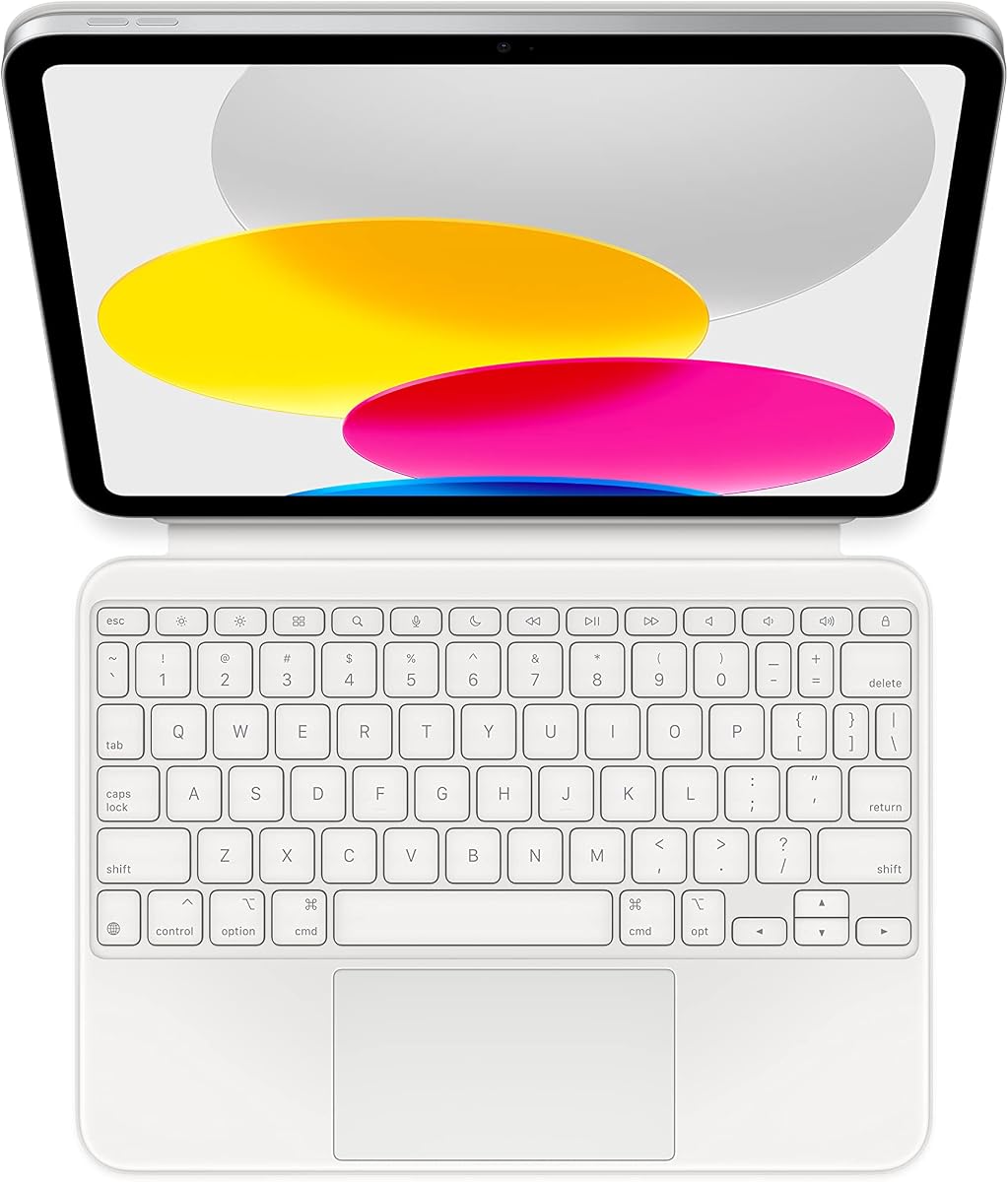
The Apple Magic Keyboard Folio is a polished all-in-one option for owners who value a straightforward connection to their iPad. It carries a 4.4 rating and combines a detachable keyboard with a protective back panel, giving the tablet front and back coverage when the two pieces are magnetically attached.
We may earn a commission when you buy through this link, at no additional cost to you.
Its largest attraction is the integrated trackpad. The large click-anywhere surface supports Multi-Touch gestures and cursor movement, while the 14-key function row keeps common controls close at hand. Perhaps the most convenient feature is the absence of a charging or pairing process: the keyboard attaches magnetically and is ready for immediate use.
The two-piece construction is genuinely versatile. You can remove the keyboard for reading or watching while retaining the tablet in its protective shell, then reconnect it when writing, editing, or browsing becomes more important. The back panel also includes an adjustable stand for a smooth, continuous viewing experience.
This is the most cohesive choice for someone who wants the iPad and keyboard to feel like one integrated device without managing batteries or Bluetooth menus. Its limitations are that the listed version uses a US English layout and does not advertise illuminated keys, so people who require alternate layouts or stronger low-light visibility may prefer a third-party alternative.
Overall, the Magic Keyboard Folio earns the top position for its refined construction, roomy trackpad, and unusually simple user experience. It is particularly well suited to students, writers, and office users who want a dependable keyboard case for the iPad A16 or 10th generation.
The generous click-anywhere trackpad makes cursor control, scrolling, and Multi-Touch gestures practical without forcing users to rely on repeated screen taps. It also creates a more familiar computer workflow for document editing, web research, and multitasking.
Separating the keyboard from the back panel lets the user move between a laptop-style setup and a lighter tablet arrangement without removing the iPad from its protective cover. This makes the product easier to adapt to different tasks and viewing habits.
We may earn a commission when you buy through this link, at no additional cost to you.
The Harvopu Folio combines a protective cover, detachable Bluetooth keyboard, touchpad, and illuminated keys in an ambitious feature set. Its 4.3 rating reflects a broadly capable design aimed at students and home-office users who want flexible viewing angles and better low-light visibility.
We may earn a commission when you buy through this link, at no additional cost to you.
Seven RGB backlight colors and three brightness levels are especially useful for evening study or travel. A full row of iPad-oriented shortcut keys supports common tasks, while the high-sensitivity trackpad handles taps, swipes, scrolling, and application switching. The keyboard can also detach completely, allowing the cover to function as a standalone tablet case.
Three anti-slip grooves inside the cover allow the tablet to be repositioned for writing, drawing, or general viewing. The outer soft PU material is described as smooth and resistant to stains, while the TPU interior uses a honeycomb design for heat dissipation and protection from shocks and scratches.
Its main inconvenience is that it operates over Bluetooth rather than through a direct connection. The keyboard must first be paired by holding the Fn+C combination and selecting the Bluetooth Keyboard device in the iPad's settings. The rechargeable 420mAh battery generally takes two to three hours to fill, and a Type-C cable is included.
This case makes sense for users who want more visual customization and adjustable angles than the Apple accessory provides. It is a strong choice for shared study spaces, evening note-taking, and everyday productivity, provided the one-time Bluetooth setup does not bother you.
Seven backlight colors and three brightness levels let users tune the keyboard to different surroundings. The illumination is more useful than a single fixed setting, especially for nighttime study, travel, or dim shared workspaces.
The anti-slip grooves allow the iPad to shift between several positions. That flexibility supports upright typing, lower writing and drawing angles, and more relaxed viewing when a fixed stand would be too restrictive.
We may earn a commission when you buy through this link, at no additional cost to you.
The typecase Folio stands out with a 4.6 rating, the highest listed score among these products, while remaining focused on portability and practical everyday use. It supports both the 11-inch iPad A16 models and the 10.9-inch iPad 10th generation through its precisely shaped protective design.
We may earn a commission when you buy through this link, at no additional cost to you.
Its magnetic Bluetooth keyboard can be attached for focused typing and removed when reading, drawing, or video calls become the priority. The keyboard uses quiet scissor-style keys with laser-etched legends, seven backlight colors, adjustable brightness, and a row of shortcuts for routine iPadOS navigation.
Protection comes from a combination of synthetic leather, flexible TPU edges, and precisely aligned cutouts. The cover is intended to guard against everyday scratches and bumps while keeping access to buttons, ports, and the camera open. A built-in pencil holder provides convenient storage, although the iPad and stylus are not included.
One important distinction is that this particular model does not advertise a trackpad. Buyers who navigate primarily through touch should find that acceptable, while those who want a cursor and gesture control should look at the Harvopu, Edge, Folio Duo, Dexnor, ESR, or Magic Keyboard Folio instead.
For a lightweight, attractive case with adjustable backlighting and a detachable keyboard, the typecase Folio is a compelling selection. It is best for students, travelers, and casual writers who want the visual benefits of an illuminated keyboard without a large floating stand.
The scissor-style keyboard is described as quiet and comfortable, making it suitable for classrooms, shared offices, and late-night use. Laser-etched letters should also remain easier to identify as the key surfaces wear over time.
Combining a slim folio exterior with flexible TPU edges gives the tablet protection without the bulk of a heavily reinforced workstation case. The pencil holder adds useful organization for users who already own a compatible stylus.
We may earn a commission when you buy through this link, at no additional cost to you.
The CHESONA Folio is a strong productivity choice for users who regularly move between an iPad and another Bluetooth device. It has a 4.5 rating and supports pairing with up to two devices, with a dedicated shortcut for switching between them without manually reconnecting each time.
We may earn a commission when you buy through this link, at no additional cost to you.
The magnetic keyboard detaches to let the iPad function as a standalone tablet, while the integrated multi-touch trackpad supports clicking, scrolling, swiping, and familiar gestures. Seven backlight colors and three brightness levels make the keys easier to see in darker environments.
Its 500mAh battery is larger than those in several competing models. The keyboard enters sleep mode after 15 minutes of inactivity, and the backlight turns off after 30 seconds without typing, helping conserve power during intermittent use.
Storage and access details are thoughtfully handled. The folio includes an Apple Pencil holder with spaces for a cap and adapter, while precise cutouts leave ports, sensors, speakers, microphones, and cameras accessible. The iPad and pen are not included, and compatibility is limited to the listed A16 and 10th-generation models.
The CHESONA is particularly useful for students using more than one device or professionals alternating between an iPad and a second Bluetooth machine. Its combination of a trackpad, useful battery life, and fast device switching gives it broader everyday utility than a basic illuminated keyboard case.
The ability to pair two devices makes this keyboard useful beyond a single iPad workflow. A shortcut can move the active connection to the other paired device, reducing friction when notes, messages, and desktop work alternate throughout the day.
The keyboard sleeps after 15 minutes without use, and the lighting shuts off after 30 seconds without typing. These automatic behaviors help preserve the relatively substantial 500mAh battery during regular workdays.
We may earn a commission when you buy through this link, at no additional cost to you.
The typecase Edge is the premium pick in this lineup because it combines a floating magnetic stand with one of the most thoughtfully equipped keyboards listed. Its 4.4 rating reflects a polished design for users who want their iPad to resemble a conventional laptop setup while still benefiting from tablet versatility.
We may earn a commission when you buy through this link, at no additional cost to you.
The floating structure holds the iPad above the keyboard and offers a more open viewing position. A precision multi-touch trackpad supports scrolling, swiping, editing, browsing, and multitasking, while palm rejection helps keep the cursor from moving unexpectedly when both hands rest near the touch surface.
Its eleven backlight colors exceed the seven-color options offered by several competitors. Three brightness levels and a full row of iPadOS shortcuts for brightness, media, and volume make it easy to adapt the keyboard to different working conditions and routines.
The outer shell uses synthetic vegan leather, a secure magnetic closure, and a holder for an Apple Pencil. The rechargeable Bluetooth keyboard has also undergone listed testing focused on hinge stability, key feel, and connection reliability, and Typecase provides 12-month support.
Choose the Edge when screen height, refined styling, and a premium floating design matter more than minimum bulk. It is a natural fit for commuting professionals, students attending online classes, and anyone who spends extended periods writing, editing documents, or joining video calls from an iPad.
Raising the iPad above the keyboard creates a more familiar sightline than a flat folio arrangement. That separation can reduce the feeling of hunching over the screen and makes a compact workstation feel more natural during longer sessions.
Eleven backlight colors provide more visual choice than standard single-color illumination, while three brightness levels suit different environments. Palm rejection adds a practical safeguard for touch typing because it reduces unintended cursor movement.
We may earn a commission when you buy through this link, at no additional cost to you.
The Logitech Rugged Folio is built for protection and dependable physical interaction. It has a 4.3 rating and uses proprietary shock-absorbent materials described as exceeding military-standard drop tests, making it a fitting choice for field work, travel, and busy households.
We may earn a commission when you buy through this link, at no additional cost to you.
Smart Connector technology creates a major convenience advantage. The keyboard connects magnetically and draws power directly from a compatible iPad, so there is no Bluetooth pairing or separate charging routine. That makes it feel especially natural for users who prefer a traditional computer-style connection.
Four modes—Type, Write and Sketch, View, and Read—adapt the case to different tasks. A flexible kickstand offers a 40-degree tilt, and a durable membrane seals the keyboard against spilled drinks, crumbs, and other everyday mishaps. The surface can be wiped clean if an accident occurs.
The magnetic latch keeps the folio closed during transport and provides a place to store a Logitech Crayon, Apple Pencil, or another digital stylus. A full row of iPadOS shortcuts includes media controls and Dictation, covering frequent actions without requiring the tablet itself.
This model is less suitable for buyers who want a large trackpad or elevated floating display because neither feature is included. In return, it delivers a rare combination of ruggedness, spill resistance, four working modes, and automatic connection, making it particularly compelling for demanding mobile use.
Shock-absorbent materials protect around the tablet, while the sealed keyboard membrane helps prevent common liquid and debris accidents. The case therefore supports use in environments where a slim fashion folio may feel too exposed.
Powering the keyboard from the iPad removes both pairing steps and a separate charging routine. The magnetic Smart Connector is especially helpful for people who want the immediacy of opening a laptop-style case and beginning work.
We may earn a commission when you buy through this link, at no additional cost to you.
The typecase Folio Duo is built around flexibility, with a 4.4 rating and a design that shifts between upright productivity use, a low writing position, portrait viewing, and standard landscape typing. It supports the iPad A16 and iPad 10th generation while remaining compact enough for commuting and class.
We may earn a commission when you buy through this link, at no additional cost to you.
Its magnetic keyboard can be removed in seconds, leaving the protective case attached to the tablet. This makes it easy to switch from a focused writing setup to reading, drawing, or video without carrying a separate shell. When connected, the keyboard provides quiet, well-spaced typing and a full row of iPadOS shortcuts.
The precision trackpad supports multi-touch gestures for scrolling, editing, browsing, and switching apps. Seven-color illumination makes the keys easier to see in dorm rooms, cafés, and aircraft cabins, while the exterior leather-style finish and shock-absorbing inner case guard against daily wear.
A built-in pencil slot keeps a compatible stylus protected and accessible, and precise cutouts preserve access to buttons, speakers, and the charging port. Typecase also backs the product with a 12-month warranty and customer support. Apple Pencil is not included.
The Folio Duo is a strong all-around recommendation for users who switch between typing, note-taking, reading, and media. It may be less compelling than the Edge for a raised laptop-like screen, but its broad range of positions makes it especially adaptable for study and creative work.
Portrait support is useful for reading documents or scrolling, while landscape offers a conventional keyboard arrangement. The low-angle position can also feel more natural for writing and drawing than a single upright stand.
Detaching only the keyboard preserves the tablet's protective cover and reduces bulk. This middle-ground design is practical for people who want physical keyboard productivity without committing to a permanently attached workstation.
We may earn a commission when you buy through this link, at no additional cost to you.
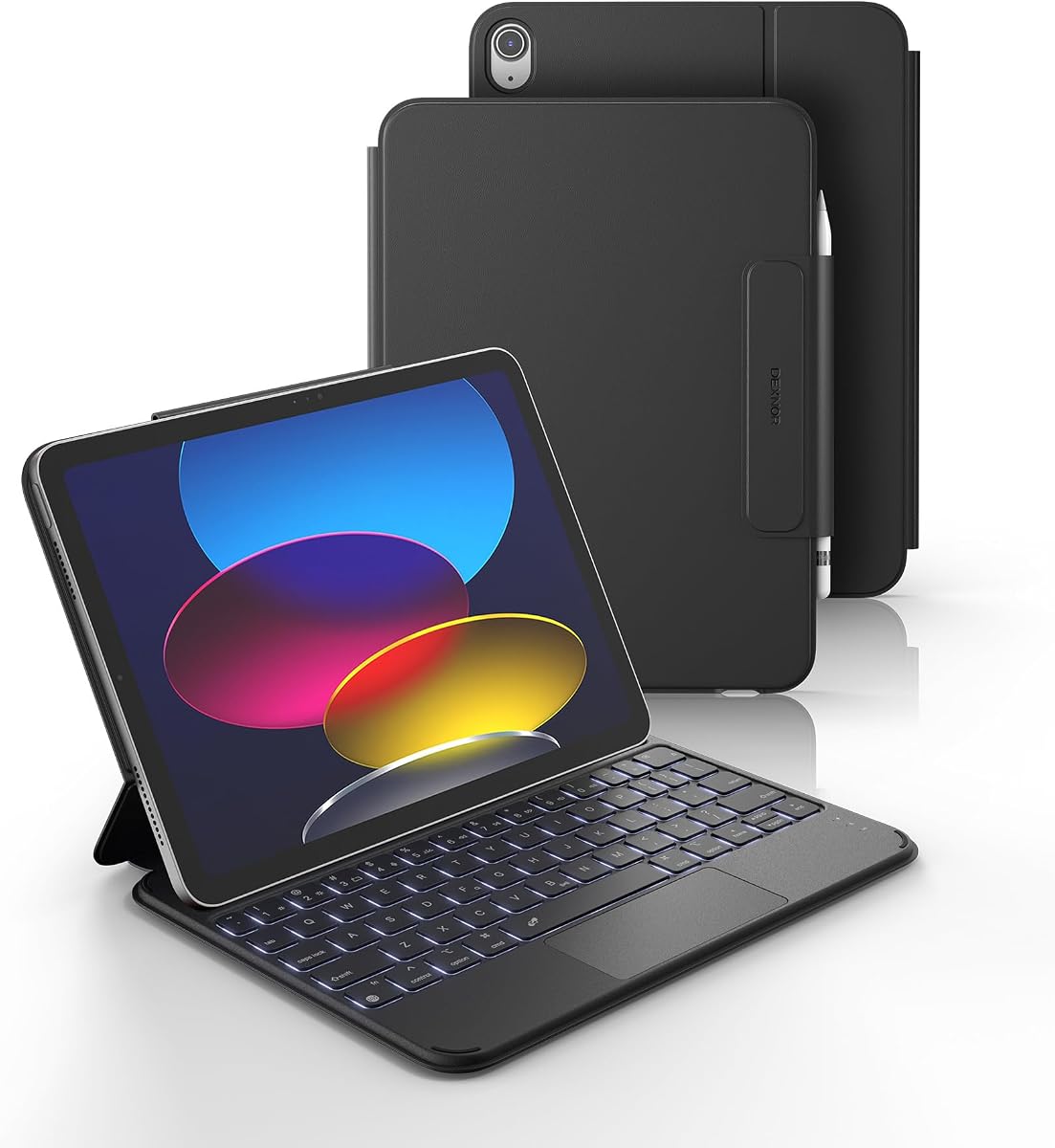
The Dexnor Ultra-Light is a travel-oriented keyboard case with a deliberately flat layout. It has a 4.3 rating and a listed weight of 1.16 pounds, making portability an explicit priority. The iPad rests flat on the keyboard base rather than floating above it.
We may earn a commission when you buy through this link, at no additional cost to you.
That flat design creates a stable platform for desks, couches, beds, and lap use. A reinforced magnetic system anchors the tablet, while the stated 120-degree viewing angle offers an upright position for typing, writing, streaming, and note-taking. It is not a floating cantilever model, and that distinction should guide your expectations.
The built-in multi-touch trackpad supports familiar gestures for editing, browsing, and multitasking. Palm rejection can be disabled with the Fn and spacebar combination when it interferes with a preferred interaction style. The keyboard also has well-spaced scissor-switch keys and shortcut keys for brightness, volume, and other common actions.
A 650mAh lithium-polymer battery is listed to support up to 200 hours of typing without the backlight and 1,200 hours of standby. Opening the case powers the keyboard and wakes the iPad, while closing it turns the keyboard off and allows the tablet to sleep. A separate sleep timer is listed for the keyboard, and the lighting sleeps after 45 seconds of inactivity.
This recommendation is best for users who prioritize stability and battery life over screen elevation. Its compatibility list is specific, so buyers should confirm the model number on the back of the iPad and ensure the device does not have the excluded three-contact configuration.
A flat keyboard base can feel secure on soft surfaces and during lap use. It avoids the cantilevered profile that some elevated stands create, making it a practical alternative for mobile writing and media viewing.
The listed 200-hour typing duration without backlighting and 1,200-hour standby figure are especially useful for students and travelers. Automatic sleep behavior further reduces consumption when the case is not actively used.
We may earn a commission when you buy through this link, at no additional cost to you.
The ESR Ultra-Light is a 4.4-rated option for travelers and minimalists who want a thin keyboard case with a generous trackpad. Its listed thickness is only 6.9 millimeters, yet it retains a detachable magnetic keyboard, a form-fit protective cover, and reinforced Air Guard corners.
We may earn a commission when you buy through this link, at no additional cost to you.
The standout interface is a precision trackpad described as 65 percent larger than those on regular keyboards. It supports intuitive gestures from one-finger dragging to three-finger scrolling, which can make document editing, web navigation, and application switching more efficient.
A triangular support provides two viewing angles: 65 degrees for working, reading, or watching and 20 degrees for sketching and writing. These fixed positions offer useful differentiation without adding the complexity or bulk of a multi-position or floating mechanism. The magnetic design is intended to remain steady without wobbling or tipping.
Protection is supplied by a durable form-fit cover, reinforced corners, and magnetic strips, while precise cutouts maintain access to buttons, ports, and speakers. The keyboard can also be used separately from the iPad, making the case useful for switching between productive and media-focused sessions.
The most obvious compromise is the absence of a keyboard backlight. That reduces bulk and removes one battery-hungry feature, but it also limits comfort in dark conditions. For users who type in well-lit spaces and value slimness, the ESR remains one of the more elegant choices here.
The enlarged touch surface gives users more room for cursor movement and multi-finger gestures. That control can reduce the amount of reaching required when editing, browsing, or moving among applications.
The upright 65-degree position suits ordinary viewing and work, while the 20-degree setting lowers the screen for writing or sketching. Two purpose-specific angles cover common needs without a complicated hinge.
We may earn a commission when you buy through this link, at no additional cost to you.
The CC Store Folio combines a 4.6 rating with a broad set of everyday features. It supports the listed 11-inch iPad A16 and 10.9-inch iPad 10th generation models, with the case providing an adjustable kickstand, magnetic detachable keyboard, and a stated working time of more than 200 hours.
We may earn a commission when you buy through this link, at no additional cost to you.
The keyboard uses Bluetooth and can attach strongly to the case or detach completely. Once paired, it is designed to reconnect when switched on, supporting a more traditional typing, editing, or streaming setup while remaining easy to carry when the keyboard is removed.
A large-capacity rechargeable battery is listed to deliver more than 200 hours of working time after two to three hours of charging. The adjustable support offers multiple tilt positions, allowing the user to alter the screen angle for desk work or more relaxed viewing on a couch.
Storage is unusually accommodating. A pencil holder and top pen slot keep accessories organized, and a rear cutout allows a stylus to be removed without dismantling the case. The exterior uses PU leather intended to resist scratches, spills, and fingerprints while adding relatively little bulk.
The package includes the keyboard case, detachable keyboard, USB-C charging cable, and user manual. A stylus is not included, and no trackpad is mentioned. This makes the Folio best for users who prefer a full-size keyboard and long battery life over cursor-based navigation.
The stated battery life is suited to users who work through long classes, meetings, or travel days without frequent charging. The rechargeable design avoids disposable batteries, while the included USB-C cable keeps the initial setup simple.
Separate pencil and pen storage helps prevent accessories from being misplaced. A cutout in the back also improves access to a stylus when the iPad is held in its normal viewing position.
We may earn a commission when you buy through this link, at no additional cost to you.
The right folio depends on your work style, portability needs, and preferred way of navigating iPadOS. Use the following factors to narrow the field before making a final compatibility check.
Compatibility is the most consequential buying factor because cases made for one iPad generation often use different dimensions, camera cutouts, connector positions, and magnetic arrangements. The products in this guide list support for the 11-inch iPad A16 models A3354, A3355, and A3356 and several compatible iPad 10th-generation model numbers. Some listings also mention A3162, while individual models explicitly exclude other iPad Air, iPad Pro, and older-generation devices. Look for the model code on the back of the tablet, beginning with an A followed by numbers, and compare it with the case listing before buying.
The physical relationship between the screen and keyboard affects comfort, stability, and portability. A floating design raises the iPad and creates a more laptop-like sightline, as seen with the typecase Edge, but generally adds visual complexity and bulk. Flat cases keep the tablet closer to the keyboard and can feel stable on a lap or soft surface, making the Dexnor a portability-focused example. Adjustable and multi-position folios provide several angles for reading, writing, drawing, and video. Consider your most common work surface, whether you use the iPad in bed, at a desk, on a couch, or while traveling.
A useful keyboard should offer comfortable spacing, clear legends, and the shortcut controls you use most often. Several models in this list provide a row of iPadOS shortcuts for brightness, media, volume, Dictation, or Screenshot functions. Backlighting is useful in dim rooms, but it adds a feature that consumes power and may make a case larger. The Apple Magic Keyboard Folio focuses on a 14-key function row without advertised illumination, while the typecase Edge offers eleven colors and three brightness levels. Other models use seven colors, and the ESR has no listed keyboard backlight.
A trackpad can make text editing, browsing, and multitasking feel much more like using a computer. The Magic Keyboard Folio, Harvopu, CHESONA, typecase Edge, typecase Folio Duo, Dexnor, and ESR all advertise multi-touch or precision trackpads. By contrast, the standard typecase Folio, Logitech Rugged Folio, and CC Store Folio do not list one. Touch navigation remains adequate for many tablet tasks, but a trackpad is valuable if you spend substantial time editing documents, moving cursors through long passages, or using an external display.
Connection systems affect setup, battery management, and the number of devices you can use. The Logitech Rugged Folio uses Smart Connector technology, draws power from the iPad, and requires no Bluetooth pairing. The Apple Magic Keyboard Folio also requires no charging or pairing. Most third-party models use rechargeable Bluetooth keyboards, which provide detachable operation but require an initial pairing process and periodic charging. The CHESONA can pair with two devices and switch between them, while the listed battery capacities range from 420mAh to 650mAh. Consider both connection convenience and how long you expect to work away from a cable.
Protection should match the conditions in which the iPad travels. The Logitech Rugged Folio is the most explicitly rugged option, with shock-absorbent materials, drop-test claims, a sealed keyboard membrane, and four usage modes. Other options combine a leather or PU exterior with a TPU inner shell, magnetic closure, and reinforced corners to protect against scratches, bumps, dust, and everyday spills. A folio with a pencil holder adds another layer of drop protection by keeping the stylus secured rather than loose in a bag. The Apple Magic Keyboard Folio includes a protective back panel that attaches magnetically for front and back coverage.
The best portable case is one you will carry consistently. Models with detachable keyboards and slim shells are easier to manage than full floating workstations, especially when moving between classrooms, offices, and meetings. The Dexnor is explicitly marketed around a listed weight of 1.16 pounds, while the ESR emphasizes a 6.9-millimeter profile. A built-in Pencil holder is valuable if you own a stylus, but the stylus itself is not included with any of the products that advertise one. Also consider charging-cable access, button cutouts, speakers, cameras, and whether you need separate storage for a pen or adapter.
Begin by confirming that the iPad model is supported, then install the case without forcing any corner. For a Bluetooth model, charge the keyboard fully, switch it on, open the iPad's Bluetooth settings, and follow the pairing combination specified in the included instructions. Products using a direct connector should be attached in the proper orientation so their magnetic or electrical connection is recognized automatically.
Use the viewing support that matches the task rather than forcing a screen into an awkward angle. An upright position is effective for typing and media, while a lower angle may be better for handwriting or drawing. When typing, place the tablet on a stable surface, keep the keyboard flat, and use the trackpad or touch screen according to your preferred workflow. Detach the keyboard when reading, sketching, or watching video if your model supports that configuration.
Protect the case by keeping liquids away from the keyboard and avoiding prolonged direct heat. Clean the exterior with a soft, lightly dampened cloth, and avoid soaking openings, buttons, or connector areas. Do not use abrasive cleaners. Charge rechargeable keyboards with the supplied or compatible USB-C cable, and keep the stylus secured in its holder so it cannot damage the tablet during transport.
Every product listed for this roundup states compatibility with the iPad A16 11-inch and the iPad 10th generation 10.9-inch, but the exact model codes still matter. Check the A-number printed on the back of your iPad and compare it with the seller's list. Some products also list A3162, while others explicitly exclude certain iPad Pro, iPad Air, and older-generation models.
Most of the third-party options in this guide use Bluetooth and require a one-time pairing process. The Apple Magic Keyboard Folio and Logitech Rugged Folio use direct magnetic connections instead, so they need neither a Bluetooth pairing nor separate charging. Always follow the connection instructions supplied with the exact model you purchase.
It depends on how you work. A trackpad is valuable for selecting text, scrolling long pages, editing documents, and using iPadOS with a cursor, but it is not essential for every task. Several picks include large multi-touch surfaces, while the Logitech Rugged Folio, standard typecase Folio, and CC Store Folio do not list a trackpad.
A floating case supports the iPad above the keyboard, creating a more laptop-like screen position. A flat case keeps the tablet close to the keyboard base and may feel steadier on a lap or soft surface. Your choice depends on whether you prioritize screen height, portability, or stability.
The illuminated models listed here generally use rechargeable Bluetooth batteries, so they need periodic charging through USB-C. The illuminated Apple Magic Keyboard Folio is not one of the listed illuminated options. Battery life and charging time vary by model, and automatic sleep features can help conserve power when the keyboard is inactive.
No. The iPad is a separate purchase, and every listing that mentions a built-in Pencil holder states that the stylus is not included. Some cases also offer a pen or adapter slot, but accessories should be checked separately. Confirm the complete package contents before ordering if you already own a particular stylus or need a charging cable.
Travel priorities usually favor a light, detachable design with useful battery life and a secure closure. The Dexnor emphasizes a listed weight of 1.16 pounds and long battery figures, while the ESR is designed around a 6.9-millimeter profile. The Logitech Rugged Folio is the stronger choice when maximum drop and spill protection matters more than minimum bulk.
For the products with magnetically detachable Bluetooth keyboards, yes. The keyboard can be used separately and reconnected to the case according to its pairing instructions. The Logitech Rugged Folio uses a direct Smart Connector and a different integrated design, so it is not a detachable standalone keyboard in the same sense.
The Apple Magic Keyboard Folio is the strongest all-around recommendation for its native connection, roomy trackpad, detachable two-piece layout, and uncomplicated setup. The typecase Edge stands out as the premium option for its floating screen, refined construction, palm rejection, and extensive backlighting, while the typecase Folio offers a lighter, budget-friendly way to gain a detachable illuminated keyboard.
Your priorities should guide the remaining choice. Select the Logitech Rugged Folio for heavy-duty protection and spill resistance, the Dexnor for a flat and stable travel layout, the ESR for exceptional slimness and a large trackpad, or the CHESONA for two-device switching. Models without trackpads can still be effective for touch-oriented work, but they are less suitable for extensive cursor-based editing.
Before placing an order, verify the exact iPad model number, check the included components, and consider the charging and connection method. Current prices and product availability can change, so comparing the complete feature set and reading the latest listing details is the best way to select a keyboard folio that fits your needs.