
HDMI 2.0 Repeater 4K 60Hz
4.6Editor score
Stable transmission up to 30 meters
4K at 60Hz support
Compact plug-and-play housing
Compare 10 HDMI Signal Amplifier Boosters for 8K support, 4K performance, long-range reach, power options, and easy setup in this expert guide.
HDMI signal amplifier boosters can restore stability across long cable runs where a direct connection produces flickering, black screens, intermittent sound, or reduced picture quality. The right unit should match your source resolution, display capabilities, cable length, and available power rather than simply advertise the largest possible distance.
This guide compares 10 HDMI repeaters based on supported resolutions, transmission ranges, bandwidth, audio and copy-protection features, physical design, and installation requirements. It covers options for conventional 4K home entertainment, demanding 8K gaming, long commercial runs, and installations where space is limited.
Each review explains the product's strongest use case and practical limitations, while the comparison table makes the core specifications easier to scan. Product availability, features, and prices can change, so readers should confirm the current listing and compatibility details before purchasing.
4.6Editor score

4.9Editor score

4.5Editor score
The following comparison highlights maximum advertised reach, supported video modes, power requirements, and the most relevant installation considerations for all 10 HDMI signal amplifier boosters.




This active HDMI 2.1 repeater combines broad resolution support with a practical 50-meter extension claim, making it one of the most flexible options in the group. Its 4.2 rating reflects a capable package, but users should note that the advertised maximum range and refresh-rate combinations depend on cable quality and the rest of the signal chain.
We may earn a commission when you buy through this link, at no additional cost to you.
The built-in amplification chip is intended to combat degradation on longer runs, while support for 8K at 60Hz, 4K at 120Hz or 240Hz, HDR, 3D, and RGB 4:4:4 makes it suitable for modern gaming systems and home theaters. Optional 5V/1A USB-C power can strengthen the signal on especially long runs or when the source device supplies limited power.
The principal trade-off is that the most impressive specifications require a suitable installation. Certified Ultra High Speed HDMI cables are recommended on both the input and output sides, and the real-world outcome will still depend on source capabilities, display support, and the resolution being transmitted. The 50-meter figure is also presented as a conditional maximum rather than an unconditional performance guarantee.
This repeater is a strong candidate for a PS5 or Xbox Series X/S setup, a projector in another room, or a home theater where 4K gaming and future-oriented 8K support matter. Buyers should use certified cables and connect external power when needed. It is best suited to users who value format flexibility over the more compact design of simpler 4K-only units.
Support for 4K at 120Hz and 240Hz distinguishes this model from conventional HDMI 2.0 boosters. The source, display, cables, and repeater must all support the selected mode for the full specification to remain available.
The USB-C power input provides useful extra support for long cable paths or sources that cannot reliably energize the repeater. It is an optional feature rather than a requirement for every installation.
We may earn a commission when you buy through this link, at no additional cost to you.
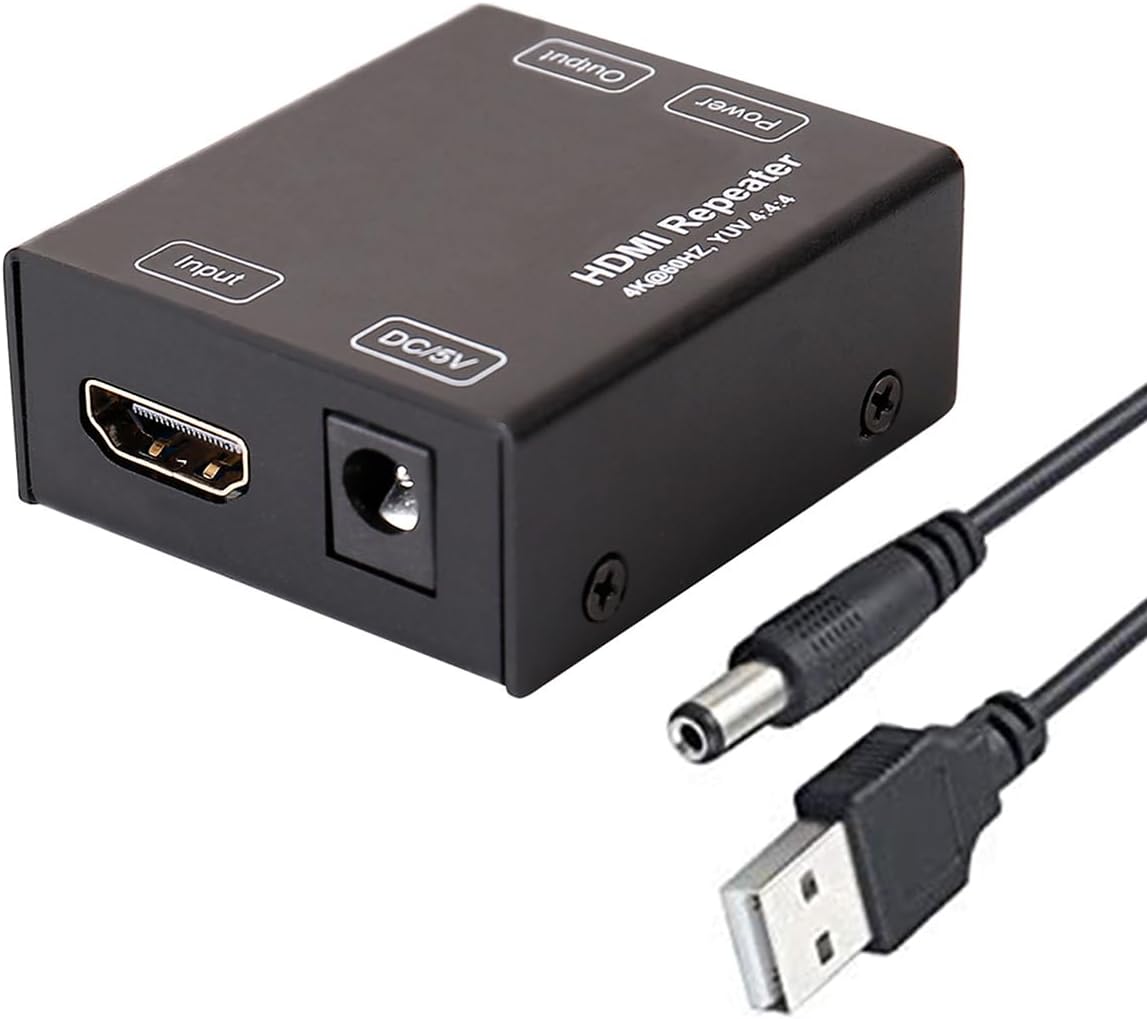
This compact HDMI 2.0 repeater is a refreshingly straightforward option for extending a conventional 4K signal. With a 4.6 rating, it stands out for its simple installation, useful 30-meter reach, and lack of a mandatory external power supply.
We may earn a commission when you buy through this link, at no additional cost to you.
The device amplifies and reshapes the incoming signal before passing it to the display, with support for 4K at 60Hz and backward compatibility with lower resolutions. Female input and output ports make the connection order intuitive, and its 1.96 by 1.1 by 0.47-inch body can be concealed behind a television or within an entertainment cabinet.
Its limitations are closely related to its simplicity. It is built around HDMI 2.0 rather than HDMI 2.1, so it does not address high-bandwidth 8K, 4K at 120Hz, VRR, or ALLM requirements. The listing also advises placing the repeater closer to the display to minimize degradation and using suitable HDMI 2.0 cables on both sides.
This model suits users extending a PS4, DVD player, laptop, TV box, or other 4K-ready source across a room without wanting another power adapter. It is a particularly accessible choice for straightforward home use, provided the required bandwidth is 4K at 60Hz or lower and the cable run is within the product's stated operating range.
The source connects to the repeater's input, and the display connects to its output. Because no drivers or complex configuration are involved, installation usually takes only a few minutes.
Its very small metal enclosure is easy to hide behind wall-mounted televisions or inside crowded AV cabinets. Keeping it near the display can also help preserve signal quality over longer runs.
We may earn a commission when you buy through this link, at no additional cost to you.
The Flashmen HDMI Booster 2.0 is designed for extended 4K distribution, with an advertised range of up to 60 meters or 200 feet. Its 4.2 rating, 18Gbps bandwidth, and HDMI-powered design make it a practical choice for conventional ultra-HD installations that need more reach than a short in-room repeater.
We may earn a commission when you buy through this link, at no additional cost to you.
It supports 4K at 60Hz, 4K at 30Hz, 1080p, 720p, 3D, and HDCP 2.2 while remaining backward compatible with HDMI 1.x devices. A compact metal chassis promotes heat dissipation, and the unit normally draws power through HDMI. A backup power cord is included for use with high-power sources that cannot adequately power the repeater themselves.
This is not an 8K or modern gaming-feature solution. Maximum performance depends on source and display capabilities, cable quality, and the selected resolution. The listed distance is an upper limit rather than a guarantee at every bandwidth, so installations requiring long runs should use appropriate high-quality HDMI cables and verify the mode in advance.
The repeater fits control rooms, conference rooms, schools, offices, training areas, and showrooms where a source must reach a distant display. It is also a sensible option for a long 4K home-theater connection. Choose it for range and 4K support rather than for 8K, VRR, or exceptionally high refresh rates.
The metal construction helps manage heat from the active amplification circuitry. That is useful during extended operation and helps the compact unit remain appropriate for professional AV environments.
Most installations can use HDMI bus power, while a backup lead adds stability for demanding source devices. This reduces setup complexity without removing an option for weaker outputs.
We may earn a commission when you buy through this link, at no additional cost to you.
The Neoteck HDMI 2.0 Repeater is a compact 4K solution with unusually clear guidance about how transmission distance changes with resolution. It carries a 4.0 rating and targets users who need longer reaches, HDR support, and a discreet installation rather than HDMI 2.1 gaming features.
We may earn a commission when you buy through this link, at no additional cost to you.
The listed performance scales by use case: 4K at 60Hz up to 30 meters, 4K at 30Hz up to 40 meters, and 1080p at 60Hz up to 60 meters. It supports HDR and 4K at 60Hz in YUV 4:4:4, while a 53 by 45 by 19mm metal housing protects the internal components and simplifies placement.
Installation guidance matters with this model. The manufacturer recommends a high-quality 24AWG HDMI 2.0 cable and suggests positioning the repeater closer to the source, or around the midpoint for runs beyond 20 meters. A USB power cable is included, but a 5V/1A adapter is not, and external power may produce more stable results.
This repeater is well matched to 4K televisions, Blu-ray players, set-top boxes, and presentation displays that need a longer cable path. Its scaled distance specifications make it easier to plan than many generic boosters, although buyers seeking 8K, 4K at 120Hz, VRR, or ALLM should choose a more advanced HDMI 2.1 unit.
The distinction between 4K and 1080p reach helps prevent unrealistic expectations. Lower bandwidth modes travel farther, allowing installers to select a repeater that matches the actual display requirement.
HDR and 4K at 60Hz YUV 4:4:4 support suit modern televisions and media devices. The source, cables, repeater, and display must all be compatible with the chosen format.
We may earn a commission when you buy through this link, at no additional cost to you.
This HDMI 2.1 repeater is a feature-rich option for installations that need genuine high-bandwidth HDMI 2.1 support. Its 4.5 rating is supported by 48Gbps bandwidth, 8K at 60Hz capability, and a supplied power adapter designed to reduce stuttering, flickering, and black-screen problems.
We may earn a commission when you buy through this link, at no additional cost to you.
Advertised reach depends on resolution: up to 52 feet for 8K at 60Hz, 66 feet for 4K at 60Hz, and 132 feet for 1080p at 60Hz. The unit supports CEC, HDR, and HDCP 2.3, and the listing identifies projectors, televisions, PS5, Xbox Series X/S, Blu-ray players, laptops, and other HDMI sources as suitable devices.
Cable quality is the decisive constraint. A standard 24AWG HDMI 2.1 cable or an equivalent of similar quality is advised, and full HDMI 2.1 functionality requires Ultra High Speed HDMI cabling. The product is therefore better viewed as a complete high-speed installation component than a universal cure for weak signals on inexpensive cables.
This is a strong premium pick for gamers, early adopters, and home-theater enthusiasts who want headroom for 8K. It is less compelling for a basic 4K television or a short cable run, but the included adapter and clearly defined distance limits make it a more self-contained choice than many competing 8K repeaters.
The 48Gbps design supports 8K at 60Hz and 4K at 60Hz with enough headroom for demanding modern equipment. Both the source and television must independently support 8K.
The included ETL-certified adapter separates repeater power from the source's HDMI output. That can be valuable on long runs where bus power alone is insufficient.
We may earn a commission when you buy through this link, at no additional cost to you.
This HDMI 2.1 repeater combines 8K capability with VRR and ALLM support, making it particularly relevant to gamers who need a longer connection without giving up modern display features. It currently has no customer rating, so its appeal rests on the stated specification set rather than a visible history of user feedback.
We may earn a commission when you buy through this link, at no additional cost to you.
The device extends 8K at 60Hz in YUV 4:4:4 up to 20 meters, divided between 10 meters of input and 10 meters of output. It reaches up to 30 meters at 4K at 60Hz and up to 40 meters at 1080p. Other stated support includes 1200MHz per channel, 48Gbps total bandwidth, 12-bit deep color, HDCP 2.3, CEC, 3D, and 1080p at 240Hz.
Active circuitry provides self-powered operation, while USB-C power is available for more demanding extended connections. The listing recommends standard AWG24 HDMI cable or equivalent quality. As with any long high-bandwidth run, realistic performance depends on the complete chain, and advertised 8K reach should not be treated as a guarantee with every source or cable.
This is a good fit for an 8K television or high-end gaming display located away from the console, especially when variable refresh rate and low-latency features matter. It also supports compressed and uncompressed audio formats. Buyers should verify that their source, display, and cables support the exact VRR, ALLM, or refresh-rate combination they intend to use.
VRR and ALLM are important to smooth, responsive gaming. Passing those features through an extended connection helps preserve the intended experience when the television is far from the console.
Support for 12-bit color, HDCP 2.3, 7.1-channel LPCM, DTS, Dolby Digital, DTS-HD Master Audio, and Dolby TrueHD makes the repeater suitable for mixed entertainment and home-cinema installations.
We may earn a commission when you buy through this link, at no additional cost to you.
The DTECH HDMI Signal Amplifier is a versatile 4K repeater for situations where a source must travel a substantial distance to a television, projector, or computer display. Its 4.1 rating and clearly divided resolution limits make it a practical option for many homes, offices, and presentation environments.
We may earn a commission when you buy through this link, at no additional cost to you.
With 18Gbps bandwidth, the unit supports 4K at 60Hz in YUV 4:4:4 up to 82 feet, 4K at 30Hz up to 131 feet, and 1080p at 60Hz up to 164 feet. It also carries HDCP 2.2, 3D, CEC pass-through, 36-bit deep color, and audio formats including DTS-HD, TrueHD, LPCM 7.1, AC3, DTS, and DSD.
Low-power source devices can operate it without additional power, but demanding sources such as a PS4 may need the backup charging cable. The mini aluminum housing is small enough for mounting behind a display or inside a rack, although cable routing and service access should be considered before installation.
This model works well for PS4, VR equipment, Blu-ray players, computers, projectors, receivers, and TV boxes. It is a better fit for long 4K or 1080p routes than for 8K entertainment. Users should select the appropriate resolution-to-distance combination and ensure the entire cable chain meets the relevant HDMI 2.0 standard.
Stated reach varies substantially between 4K and 1080p. Knowing the required mode makes it easier to judge whether the repeater can support the intended installation without overstating its capability.
CEC support can simplify control between compatible source and display devices. Broad audio compatibility helps the same repeater serve media players, computers, receivers, and conventional television setups.
We may earn a commission when you buy through this link, at no additional cost to you.
The JerGO HDMI 2.0 Booster emphasizes range, with a maximum advertised transmission distance of 200 feet. Its 4.0 rating and 18Gbps bandwidth position it as a long-distance option for 4K displays, while its compact construction and usually self-powered design keep installation relatively simple.
We may earn a commission when you buy through this link, at no additional cost to you.
It supports 4K at 60Hz, 1080p, 3D, and HDCP 2.2, and remains backward compatible with HDMI 1.x devices. Gold-plated connectors and a metal case form the physical design, while the product is intended to improve stability where long cables cause cutouts, extended waits, or degraded picture and sound.
The 200-foot figure represents the upper end of the claimed capability and should be considered alongside the required resolution, source, display, and cable quality. The unit normally draws power from HDMI, but PS4 installations may require the separate power provision. It also does not provide the bandwidth required for 8K or high-refresh 4K gaming modes.
This repeater is worth considering for large properties, conference rooms, classrooms, digital signage, and other long-distance 4K routes. It offers a reassuring maximum reach, but buyers should not interpret that figure as uniform performance at every setting. For modern consoles or 8K displays, a more capable HDMI 2.1 booster is the better match.
The stated 200-foot reach is the most prominent feature in this category. Actual stability will vary with resolution and cable construction, so realistic expectations remain essential.
Most installations do not need a separate power supply, which keeps the system easy to deploy. PS4 users should account for the noted exception and plan the appropriate connection.
We may earn a commission when you buy through this link, at no additional cost to you.
This HDMI 2.0 signal amplifier offers an adaptable combination of automatic modes, external power, and compact construction. It carries a 4.0 rating and is aimed at users who need more stable 4K or 1080p transmission over extended runs between a source and display.
We may earn a commission when you buy through this link, at no additional cost to you.
HDMI 2.0 mode supports 4K at 60Hz up to 60 feet, divided into 25 feet of input and 35 feet of output. HDMI 1.3 mode supports 1080p at 60Hz up to 100 feet, with 60 feet on the input side and 40 feet on the output. The unit reshapes the signal in real time and can operate through HDMI self-powering or receive added stability from USB-C power.
Placement is important for high-quality 4K transmission, with the listing recommending that the booster sit close to the display. It does not support fiber-optic HDMI cables or HDMI cables with Ethernet functionality. Those exclusions make it less flexible than a fully compatible alternative, but they are clearly stated and help buyers avoid unsuitable setups.
The repeater works with PS5, Xbox Series X, 4K Fire Stick, Blu-ray players, laptops, and other HDMI devices. Its 49.8 by 27.9 by 11.9mm body is easy to conceal behind a television. It is best suited to conventional 4K where optional power is useful, rather than to 8K or high-refresh gaming installations.
The two operating modes let the repeater handle 4K and 1080p runs with different practical limits. Users do not need to manually reconfigure the device for ordinary source changes.
External USB-C power can resolve weak output from older graphics hardware, virtual-reality equipment, and other power-limited sources. HDMI self-powering remains available for simpler installations.
We may earn a commission when you buy through this link, at no additional cost to you.
The J-Tech Digital 8K HDMI 2.1 Repeater combines a 4.9 rating with a broad set of modern audiovisual features. It regenerates the signal to support longer runs while offering 48Gbps bandwidth, 8K at 60Hz, and 4K at 120Hz, making it a leading choice for current and next-generation displays.
We may earn a commission when you buy through this link, at no additional cost to you.
Advertised transmission reaches 49 feet at 8K at 60Hz with 4:4:4 sampling and 66 feet at 4K at 60Hz. The feature set includes HDR10, HDCP, DSC, CEC, and 7.1-channel audio support for DTS-HD, TrueHD, LPCM, AC3, DTS, and DSD. USB-C power is used, and the stated source options include PS5, Xbox, PCs, and Blu-ray players.
The trade-off is reach. Although the 4K distance is substantial, it is shorter than the maximum figures advertised by several HDMI 2.0 models, and users should not expect the same cable length at every resolution. Full 8K performance also requires compatible source equipment, a capable display, and suitable high-bandwidth HDMI cables.
This repeater is a strong recommendation for gamers, home-theater builders, and users who want broad feature compatibility in a compact modern package. Its 4.9 rating, 48Gbps capability, and comprehensive format support make it the most well-rounded option here, while lifetime technical support adds reassurance for complex installations.
Forty-eight gigabits per second supports 8K at 60Hz and 4K at 120Hz, providing useful headroom for high-end gaming and media equipment. The entire connection chain must support the desired format.
DSC, HDR10, CEC, HDCP, and major surround-audio formats allow the repeater to serve consoles, computers, disc players, receivers, and displays without relying on a narrow feature set.
We may earn a commission when you buy through this link, at no additional cost to you.
Choosing an HDMI signal amplifier booster requires matching the repeater's bandwidth and reach to the source, display, cable length, and installation environment. The most useful specification is the distance permitted at the exact resolution and refresh rate you intend to use.
Start with the resolution and refresh rate required by your source and television, not with the largest number printed on the product box. A repeater that supports 8K at 60Hz may still limit 4K to 60Hz, while a 4K-oriented HDMI 2.0 unit cannot provide 8K, 4K at 120Hz, or the full bandwidth required by advanced gaming features. Check whether the desired mode is supported at the exact cable distance you need, including color sampling and HDR requirements.
Maximum transmission distance is not a fixed property across all video modes. Higher pixel rates consume more bandwidth and usually reduce the distance a signal can travel reliably. A booster might advertise 40 meters at 1080p but only 20 meters at 8K, or it might offer 60 feet at 4K and a shorter range at 8K. Use the manufacturer's resolution-by-distance chart as a planning guide, and add a safety margin rather than designing exactly at the published limit.
A repeater cannot fully overcome poor or unsuitable cables. For 4K, use a properly constructed HDMI 2.0 cable; for 8K, 4K at 120Hz, and full HDMI 2.1 performance, use certified Ultra High Speed cable. Some manufacturers specify 24AWG or equivalent construction for longer runs. Keep both input and output cables within suitable limits, avoid unnecessary splitters or converters, and inspect connectors for damage. The correct booster and the correct cable work together as one signal chain.
Gaming users should determine whether variable refresh rate, automatic low-latency mode, HDR, and high refresh rates matter to the setup. Some HDMI 2.1 repeaters explicitly support VRR and ALLM, while ordinary HDMI 2.0 units generally do not. Home-theater installations may prioritize HDR10, CEC, HDCP, 3D, and surround-audio pass-through. The source, repeater, display, and any intervening receiver must all support the same features for them to remain available.
Some repeaters draw enough power from the source's HDMI output, while others include or require an external adapter. Self-powered designs are convenient, but independent power can improve reliability with high-power gaming consoles, older graphics cards, virtual-reality hardware, and long cable paths. Confirm whether the necessary adapter is included and whether the connector is USB-C or another format. A unit that supports optional power gives useful flexibility without forcing an extra accessory on simpler installations.
Many of these repeaters are small enough to conceal behind a wall-mounted television, beneath a projector, or inside an AV cabinet. Nevertheless, placement affects performance. Some guidance recommends keeping the repeater near the display, while other long-distance arrangements place it near the source or at the midpoint. Avoid sharply bent or stressed cables, provide ventilation if the unit runs warm, and make sure the enclosure remains accessible if a backup power connection may be needed.
HDCP support matters when content comes from streaming boxes, Blu-ray players, consoles, and many other commercial sources. The listed HDCP version should work with the devices in the chain, but device firmware can also affect compatibility. For audio, check the formats you use, such as LPCM, Dolby Digital, DTS, DTS-HD Master Audio, Dolby TrueHD, AC3, or DSD. Active regeneration can improve stability, but it cannot add support for an audio format the source or display does not already handle.
A compact HDMI 2.0 repeater is usually enough for a conventional living room, bedroom, or office display using 4K at 60Hz. Home theaters with 8K televisions, high-refresh gaming, complex audio, or long runs benefit from a full HDMI 2.1 model. Commercial installations should also consider rack space, cooling, support access, and the ability to power the unit consistently. The best choice is not always the model with the greatest distance; it is the one that meets the actual mode and environmental requirements without unnecessary complexity.
Begin by identifying the source, display, intended resolution, and total cable length. Disconnect power from any equipment being rewired, then connect the source HDMI output to the repeater's input and the repeater's output to the display input. If the manufacturer specifies a different placement strategy, follow it; otherwise, avoid sharply bending either HDMI cable and keep the unit accessible during initial setup.
Power the source and display, select the appropriate HDMI input on the display, and allow the devices time to negotiate their available format. If the picture is unstable, move the repeater closer to the display or source as directed, replace the cable with a higher-quality or appropriately rated model, and reduce the resolution or refresh rate while troubleshooting. Add external USB-C or adapter power only when the manufacturer supports it and the required supply is available.
For routine care, keep the repeater dry, ventilated, and away from direct heat or heavy impact. Do not place stickers or tape over ventilation openings, and avoid frequently unplugging cables that have settled into a working position. Periodically reseat loose connectors and check for damaged ports. If performance changes, test the source-to-display connection with a short known-good cable before assuming the booster has failed.
An HDMI repeater primarily stabilizes and regenerates a signal that has weakened over distance. It may improve consistency, reduce flicker or black-screen events, and help preserve supported resolution, but it cannot create detail, HDR performance, or refresh rates that the source, display, and cables do not support. The result depends on the entire signal chain.
Only if the repeater and every connected device support the desired conversion or fallback behavior. Most repeaters simply pass a compatible signal, so an unsupported mode may result in no picture rather than automatic conversion. Check the specifications for the exact resolutions and refresh rates accepted by the unit.
Placement depends on the product and the total cable length. Some manufacturers recommend keeping the repeater near the display, while others suggest placing it near the source or midway along a long run. Follow the included guidance, keep both cable sections within their rated limits, and avoid strain on either connector.
For dependable 8K, 4K at 120Hz, or full HDMI 2.1 performance, certified Ultra High Speed cables are strongly recommended. A lower-grade cable can become the limiting factor even when the source, repeater, and television all support the target format. Use appropriately rated cables on both the input and output sides.
The cause is often a marginal cable, excessive total distance, an unsupported resolution, or insufficient power at the repeater. Start by testing a short connection directly between the source and display, then reinstall the repeater using suitable cables. If available, add external power and temporarily use a lower resolution to identify where the chain becomes unstable.
Yes, provided the source, television, cables, and booster all support the same HDMI format. A modern gaming setup may require HDMI 2.1 features such as 8K, 4K at 120Hz, VRR, or ALLM, so an HDMI 2.0-only unit may stabilize a connection while limiting the available gaming features.
Independent power can be more consistent with demanding consoles, older graphics cards, virtual-reality devices, and long runs. Self-powered models are easier to install and work well with many source devices. The better choice depends on the source's available power and whether external power is included or must be purchased separately.
A correctly operating repeater should be designed to pass audio and video without noticeable added delay. If there is a noticeable delay or synchronization issue, investigate the source, display, receiver, or game mode settings. It is also worth checking whether another device in the chain is adding processing latency.
The J-Tech Digital 8K HDMI 2.1 Repeater stands out for its 4.9 rating, 48Gbps bandwidth, and broad support for HDR10, DSC, CEC, and surround audio. The HDMI 2.0 Repeater is the most approachable conventional 4K option, while the powered HDMI 2.1 8K repeater is a feature-rich premium choice for users who want dedicated power and clearly defined distance limits.
Prioritize the mode you actually need, the distance at that specific mode, and the quality of both HDMI cables. Additional reach is valuable only when it remains stable, so users extending 4K or 8K signals should leave room below the stated limit and use cables rated for the appropriate HDMI generation.
Before purchasing, compare the current listing with the resolution, refresh rate, power, and cable requirements in the guide. Product features, ratings, availability, and prices can change, making a fresh check of the latest specifications and customer feedback essential for a successful installation.