
HDMI ARC to 3.5mm AUX Audio Extractor Converter Cable 3 FT
4.4Editor score
Integrated ARC/eARC cable
USB-powered analog output
Up to 192KHz sampling
This guide compares the best HDMI Arc to 3.5mm Aux Audio Extractor options, covering ARC/eARC support, audio formats, output connections, power needs, and
An HDMI ARC to 3.5mm AUX audio extractor can connect a modern television’s digital return audio to powered speakers, headphones, a mixer, or a legacy stereo amplifier. The right adapter must match your television’s ARC or eARC capability, decode the selected audio format, and provide the output connections your existing sound system actually needs.
We compared all ten products by examining their signal direction, ARC or eARC support, maximum sampling rate, supported audio formats, analog and digital outputs, power requirements, installation process, and intended source devices. The list includes dedicated TV audio-return cables as well as more flexible HDMI extractors designed for consoles, disc players, and streaming devices.
Each review explains the most useful capabilities and the limitations that could affect compatibility. Our top three selections provide the strongest combinations of feature coverage, installation convenience, and design, while the remaining options offer meaningful differences for particular audio systems. Product availability and pricing can change, so confirm the current listing before buying.
4.4Editor score
4.5Editor score

4.5Editor score
The table below compares all ten extractors across their intended signal source, ARC or eARC compatibility, available audio outputs, power method, and key format support. These distinctions matter because an extractor designed only for a television’s ARC return path cannot necessarily accept a game console or streaming device directly.


This compact HDMI ARC to 3.5mm AUX audio extractor combines the HDMI television connector, USB power lead, and 3.5mm stereo output in one integrated three-foot assembly. It holds a 4.4 rating and stands out for supporting both ARC and eARC television return audio, making it broadly suitable for modern sets that no longer include a conventional headphone or analog output.
We may earn a commission when you buy through this link, at no additional cost to you.
The integrated construction reduces the number of loose connections around a television. A gold-plated HDMI plug and AUX connector sit inside aluminum alloy housings, while the braided cable jacket and overmolded internal board are designed for durability and heat management. Maximum sampling is listed at 24-bit/192KHz, with backward compatibility for 32KHz and 44.1KHz signals.
Its most important restriction is the supported format. The extractor handles PCM and LPCM audio but does not decode Dolby 5.1 or DTS 5.1, so the television must be configured to deliver stereo PCM or LPCM through its return channel. It is also strictly directional, accepting audio only from a television’s ARC or eARC port rather than from a game console or set-top box.
This is a strong choice for someone seeking a tidy connection to powered speakers, headphones, a mixer, or an older stereo system. The main compromises are the need to connect USB power and the absence of multichannel decoding. Those limitations are reasonable for a focused analog-stereo solution, and the two-year warranty adds useful reassurance.
Combining the television plug, power lead, and analog output in one body reduces cable clutter. It is particularly useful when the television sits close to a sound system and the user wants a single managed connection rather than several separate adapters.
The built-in processing board is specified for clear stereo conversion with reduced distortion and background noise. Support for sampling rates up to 192KHz makes it suitable for current HD television and streaming content when the TV is set to the correct PCM mode.
We may earn a commission when you buy through this link, at no additional cost to you.
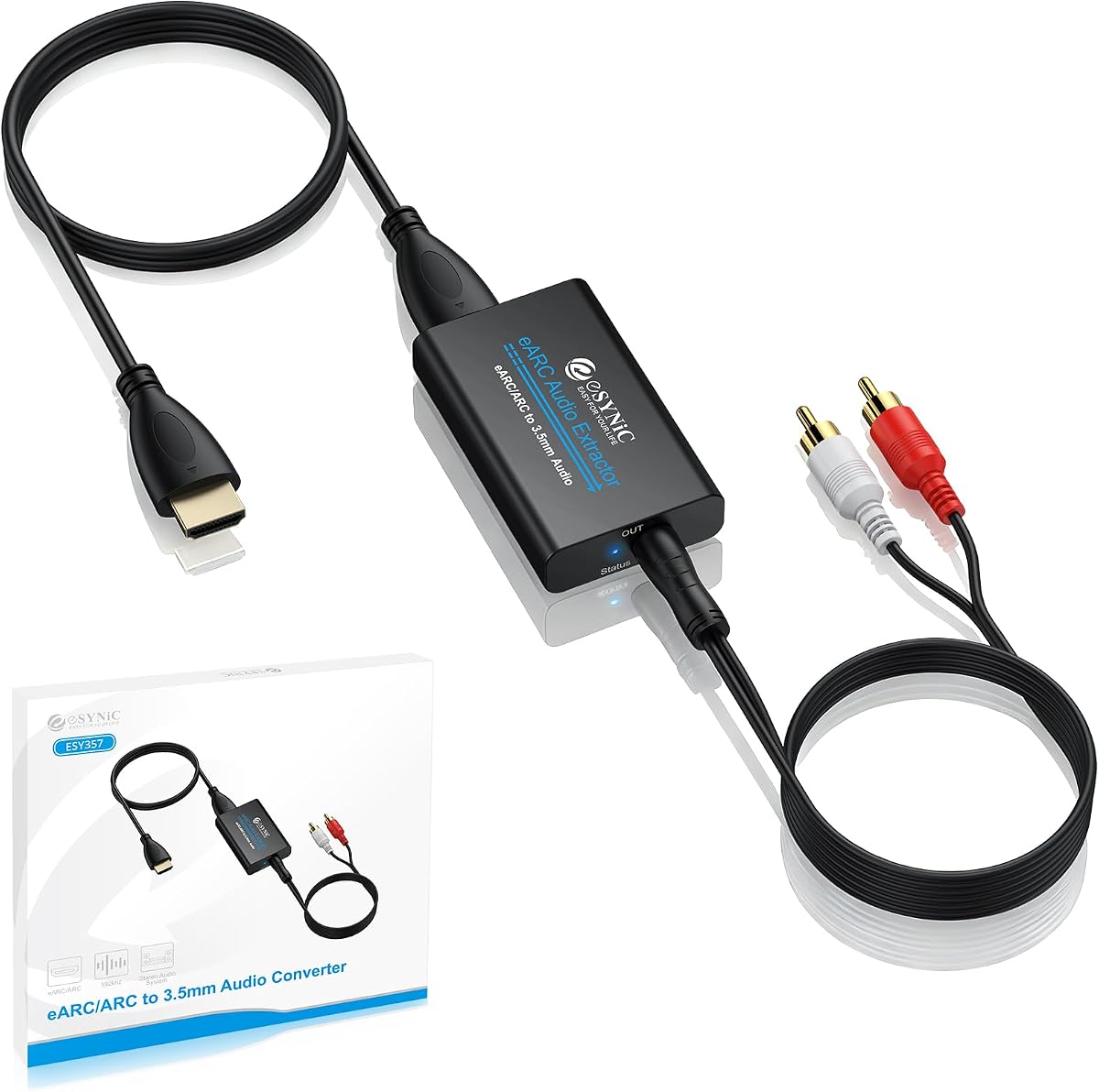
The eSynic Professional extractor is a versatile adapter for moving television audio to a 3.5mm stereo device or separate left and right channel outputs. Its 4.5 rating reflects a strong combination of ARC and eARC support, useful analog options, and a maximum listed sampling rate of 24-bit/192KHz.
We may earn a commission when you buy through this link, at no additional cost to you.
The availability of both 3.5mm AUX and L/R outputs gives it more flexibility than a basic one-cable extractor. It can feed a compatible mixer, powered speaker set, stereo amplifier, or headphones, while the signal indicators make it easier to confirm whether the extraction unit is powered and receiving a signal.
This is not a universal HDMI converter. The product is intended specifically for a television with an HDMI ARC or eARC return port, and it does not accept a game console, disc player, or streaming stick as a direct source. It also supports PCM and PCM 2.0 rather than Dolby or DTS compressed surround formats, requiring the television’s output format to be changed to PCM.
The eSynic is well suited to buyers who want a more substantial extractor than a simple integrated cable and need either a 3.5mm or full L/R connection. Its clearer input restrictions and television-focused design make it predictable to install, while the two analog outputs broaden the range of legacy audio equipment it can serve.
Separate left and right outputs are valuable when the destination system uses RCA-style stereo inputs. The 3.5mm socket remains convenient for headphones and compact powered speakers, allowing one extractor to cover several common arrangements.
After connecting an ARC-capable HDMI cable and USB power, the television must have ARC or eARC enabled and its audio format set to PCM. The status indicators reduce uncertainty when users are troubleshooting a missing signal.
We may earn a commission when you buy through this link, at no additional cost to you.
This converter is designed for televisions that expose a conventional HDMI ARC return path and a user who needs the signal delivered as 3.5mm analog stereo. It carries a 4.5 rating and supports sampling rates listed at 32, 44.1, 48, 96, and 192KHz with 24-bit data streams.
We may earn a commission when you buy through this link, at no additional cost to you.
Its digital noise reduction is intended to produce a clean analog signal for a soundbar with analog input, stereo speakers, a home theater amplifier, or a mixer. The product supports a wide range of television brands, and its installation requires no additional drivers or complicated software configuration.
The specification deliberately separates ARC from eARC: this model does not work with eARC ports or ordinary HDMI inputs. It also cannot decode 5.1-channel Dolby AC3 or DTS, and the television must be changed to PCM or stereo output. Volume changes through the television remote are not available during use, so adjustment must happen at the headphones, speakers, mixer, or amplifier.
This is a compelling premium option for a stereo-only system where clarity and high sampling support matter more than multichannel decoding. The lack of eARC support makes television compatibility the first thing to verify, but when an ARC port is available, the converter provides a focused and convenient way to reuse older audio equipment.
The supplied instructions identify PCM menu paths for Samsung, LG, and Sony televisions. This practical guidance helps users reach the correct setting more quickly and avoid the common problem of an active extractor producing no sound.
Keeping the conversion path focused on PCM stereo makes the product easier to understand than a more complex decoder. It is a better fit for analog stereo speakers and amplifiers than for users expecting Dolby or DTS surround decoding.
We may earn a commission when you buy through this link, at no additional cost to you.
This HDMI ARC to AUX converter offers a direct route from a television’s ARC return channel to a 3.5mm stereo output. Its 4.2 rating reflects a focused product with 192KHz sampling support and straightforward operation, though it has fewer connection options than several box-style extractors in the list.
We may earn a commission when you buy through this link, at no additional cost to you.
The converter is intended for HDTVs, soundbars with analog input, speakers, amplifiers, and mixers. It accepts HDMI ARC digital audio and converts it to two-channel analog audio, with listed sampling options of 32, 44.1, 48, 96, and 192KHz. Digital noise reduction is included to minimize distortion while extracting the signal.
Users need to be attentive to the input limitation: it cannot be used with an eARC port or a standard HDMI input. Dolby AC3 and DTS 5.1 are unsupported, so the television must output PCM or stereo. Remote-control volume adjustment also does not carry through the analog output, making volume changes at the connected speakers or amplifier necessary.
This product is a practical option for a basic living-room television and an existing pair of powered speakers. It is less versatile than adapters with optical, RCA, or multi-input options, but its narrow purpose, useful setup instructions, and high sampling support make it straightforward for a compatible stereo installation.
The converter avoids unnecessary decoding modes and concentrates on television ARC return audio to 3.5mm stereo. That simplicity can be advantageous for users who already know their equipment and want one dependable connection.
Documented paths for changing several major television brands to PCM help users establish a working configuration. The most common source of silence in an ARC-to-aux system is an incompatible output format, so this instruction is especially relevant.
We may earn a commission when you buy through this link, at no additional cost to you.
The VPFET is more of a general HDMI audio extractor than a dedicated television ARC return adapter. It accepts standard HDMI sources, including disc players, streaming devices, game consoles, and computers, then makes the audio available through optical and 3.5mm outputs. Its 4.1 rating makes it a practical choice for users who need more than television-only extraction.
We may earn a commission when you buy through this link, at no additional cost to you.
Three modes cover 2.0-channel, 5.1-channel, and pass-through operation. The 3.5mm output should be used in 2.0-channel mode, while the optical output is intended for 5.1-channel audio such as DTS 5.1. Pass mode provides a fallback when users need to restore a video and audio signal after the first two operating configurations produce no output.
It is important to distinguish this product from the dedicated ARC converters elsewhere in the guide. The TV cannot be connected as the input source, and the device does not support ARC or eARC. The listed HDMI 1.4 bandwidth supports up to 4K at 30Hz, while some streaming devices and consoles are limited to 1080p by their own output capabilities.
This extractor is ideal when the source is a game console, Blu-ray player, or streaming box rather than a television. It is less appropriate for someone searching specifically for television audio return, but the optical and analog outputs make it valuable for building a flexible secondary audio system.
Unlike a directional television-return cable, this unit is designed for standard HDMI sources. That makes it useful for temporarily connecting a console, disc player, or computer to an amplifier or powered speakers while retaining an optional display path.
The mode selector controls how audio is decoded. Users should select stereo for 3.5mm output, use 5.1 mode for compatible optical equipment, and use pass mode if no sound or video appears in the preferred configuration.
We may earn a commission when you buy through this link, at no additional cost to you.
This ten-foot unidirectional cable is built for installations where the television and analog sound system are not positioned directly beside one another. It receives television audio through HDMI ARC or eARC and delivers a 3.5mm stereo signal, with a 4.0 rating reflecting a clear, specialized design.
We may earn a commission when you buy through this link, at no additional cost to you.
The all-in-one breakout integrates the HDMI television connector, power lead, and AUX cable. Gold-plated HDMI and AUX connectors, aluminum alloy housings, an overmolded processing board, and a braided jacket are intended to improve durability and resistance to interference. Audio is supported at up to 24-bit/192KHz using PCM or LPCM formats.
The cable is not a general-purpose HDMI source adapter. Standard HDMI ports, game consoles, and set-top boxes cannot be connected directly, and reverse conversion is not possible. Compressed surround formats such as Dolby Digital 5.1, DTS, and 7.1 are also unsupported, meaning the television must be set to stereo PCM or LPCM.
Its length is the defining benefit for entertainment furniture, wall-mounted televisions, or speaker systems placed several feet away. The trade-offs are continued dependence on USB power and the loss of surround decoding. For a straightforward analog-stereo setup, however, it offers an organized connection with useful reach and broad television-brand compatibility.
The ten-foot length makes it easier to connect a television to a floor-standing speaker system, side cabinet, or amplifier away from the wall. It reduces the need for extra extension leads in many living-room arrangements.
Metal connector housings, gold-plated contacts, a braided outer jacket, and an overmolded board give the assembly a more robust physical design. The integrated approach also keeps the functional leads together around the installation.
We may earn a commission when you buy through this link, at no additional cost to you.
This 4K60Hz extractor is the most functionally versatile product in the list, earning a 4.8 rating. It can operate in television ARC mode, accept a standard HDMI source in 2.0-channel mode, or handle a 5.1-channel optical connection. Its 3.5mm and optical outputs make it suitable for a wide variety of audio equipment.
We may earn a commission when you buy through this link, at no additional cost to you.
The HDMI path supports resolutions up to 4K60Hz and is backward compatible with 4K30Hz, 2K60Hz, 2K30Hz, and 1080p. Source options include Blu-ray and DVD players, television boxes, Fire TV Stick, Apple TV, game consoles, laptops, and cameras. A 3.5mm-to-RCA cable is included for amplifiers that use separate left and right inputs.
In television mode, the included full-featured HDMI cable must connect to the television’s ARC port, CEC must be enabled, and the unit’s DIP switch must be set appropriately. The product does not support eARC, does not amplify audio, and cannot operate with a gaming headset; in-ear headphones or an amplifier are required. A micro 5V power cable is mandatory.
This extractor is best for a mixed entertainment setup where both television return audio and conventional HDMI sources may be used. It also handles video at 4K60Hz more effectively than most dedicated ARC-to-AUX cables, making it a strong choice for users who want broader functionality without giving up 3.5mm stereo output.
TV mode uses the television's return-audio capability, while 2.0 and 5.1 modes handle standard HDMI sources. This separation allows the unit to serve more than one entertainment arrangement when settings and cables are changed appropriately.
Optical output supports compatible surround receivers, while 3.5mm handles stereo headphones, speakers, and amplifiers. The included RCA adapter bridges the gap between a single 3.5mm plug and traditional left and right inputs.
We may earn a commission when you buy through this link, at no additional cost to you.
This ARC converter offers separate left and right analog outputs alongside a 3.5mm stereo port, allowing both connection styles to operate at the same time. It carries a 4.1 rating and targets HDTV users who want to feed a soundbar, powered speakers, or a stereo amplifier from an HDMI ARC port.
We may earn a commission when you buy through this link, at no additional cost to you.
The device supports sampling rates of 32, 44.1, 48, 96, and 192KHz. Its aluminum metal housing is intended to improve heat dissipation and stability, while digital noise reduction helps produce clean stereo audio. A high-speed HDMI cable meeting HDMI 1.4 or later is recommended for the television connection.
Despite references to several entertainment devices in its compatibility description, the product’s core operation is television-only. It requires a port with ARC return capability and cannot accept a standard HDMI source directly. Dolby, DTS, DSD, 5.1-channel, and 7.1-channel raw formats are not decoded, so PCM 2.0 output must be selected on the television.
The lack of a built-in CEC protocol also means the television remote cannot adjust the converter’s volume directly. For users who need separate left and right connections plus a headphone-style output at the same time, that limitation is worth weighing against the convenience of simultaneous analog outputs.
The simultaneous 3.5mm and L/R outputs provide unusual flexibility for one HDMI ARC converter. A user can connect a stereo system through individual channels and headphones through the shared mini-plug output at the same time.
The television must have a genuinely ARC-capable port, and its output must be changed to PCM 2.0. Checking the port label and relevant CEC or ARC setting before connecting prevents most avoidable setup problems.
We may earn a commission when you buy through this link, at no additional cost to you.
The avedio links extractor combines a conventional HDMI input path, television ARC/eARC return support, and both optical and 3.5mm audio outputs. Its 4.0 rating reflects an older but broad feature set, particularly useful for installations that need Dolby Digital, TrueHD, or DTS-HD through a compatible optical receiver.
We may earn a commission when you buy through this link, at no additional cost to you.
Three audio modes are offered: pass, 2.0-channel, and 5.1-channel. The 3.5mm output supports incoming two-channel PCM or LPCM stereo, while the optical output can carry two-channel PCM, Dolby Digital 5.1, Dolby TrueHD, or DTS-HD. To obtain audio simultaneously from both analog and optical outputs, the input format must be PCM or stereo.
Video specifications include support for 4K at 60Hz, 3D, and the common lower HD resolutions, with HDMI 2.0 and HDCP 2.2 listed among the supported standards. The unit can also accept standard HDMI devices such as Blu-ray players, television boxes, streaming devices, consoles, computers, cameras, and recorders.
CEC is not supported, and the product description contains a potentially confusing note about ARC/eARC while also identifying television use as limited to the appropriate interface. Buyers should therefore verify their television and the supplied instructions carefully. It remains a capable choice for a receiver with optical input and a broader collection of source devices.
The optical path is the key distinction for buyers with a surround receiver or sound system that can decode Dolby Digital, TrueHD, or DTS-HD. The 3.5mm output remains the appropriate choice for ordinary stereo speakers and amplifiers.
Simultaneous analog and digital output requires a stereo PCM source format. When the input contains compatible surround audio, the mode and connected outputs need to be matched carefully to avoid missing sound.
We may earn a commission when you buy through this link, at no additional cost to you.
This multi-output extractor is unusual because it can switch between television ARC/eARC return audio and a conventional HDMI source such as a disc player, console, or streaming device. It holds a 4.5 rating and supports Dolby, DTS 5.1, and PCM 2.0, giving it broad format coverage for both 3.5mm and optical destinations.
We may earn a commission when you buy through this link, at no additional cost to you.
The ARC-IN position is used for audio returned by a television, while HD-IN accepts a source device and routes its signal to the soundbar, amplifier, or connected audio system. The 3.5mm, optical, and soundbar-oriented outputs can provide audio to several types of equipment, making the unit useful for shared home theater installations.
Volume can be adjusted with the television remote through the ARC and 3.5mm outputs, although the optical output does not carry that control. Seven-channel audio is not supported, and the listed video ceiling is 4K at 30Hz. These limits make the adapter more appropriate for stereo or 5.1 systems than for a high-end home theater requiring contemporary surround formats and 4K60Hz video.
This product earns a place for buyers who want a single box to manage both television return audio and a separate source. Its mode switch offers more operating flexibility than dedicated cables, while broad decoder support and remote volume control add convenience for compatible sound systems.
The input toggle separates television-return operation from direct HDMI source use. This makes it possible to move between a television and a console or disc player without replacing the entire audio extraction setup.
Optical, 3.5mm, and soundbar-oriented outputs cover receivers, amplifiers, wired headphones, and compatible soundbars. Television remote control works through the ARC and 3.5mm paths, but it is not available for the optical output.
We may earn a commission when you buy through this link, at no additional cost to you.
Choosing an HDMI ARC to 3.5mm AUX audio extractor starts with identifying the source, confirming the television’s return-audio capability, and matching the extractor’s outputs to the destination equipment. Format support, power method, remote-control behavior, and installation distance are equally important because they determine whether the adapter works as intended.
ARC and eARC describe television features that allow a compatible television to return its internal audio through an HDMI port. Look for the HDMI ARC or eARC label on the television, consult its manual, and avoid assuming that every HDMI socket supports audio return. Many extractors are directional and work only with a television return signal, while a few also accept standard HDMI sources.
A television-only extractor cannot usually accept a game console, Blu-ray player, laptop, or streaming stick directly. If you need to route those devices, select a model with a standard HDMI input, HDMI pass-through, or source-selection switch. Dedicated TV return cables tend to be simpler, while universal HDMI extractors provide broader entertainment compatibility.
A 3.5mm jack carries analog stereo, so the extractor must decode television audio and reduce it to two channels. PCM and LPCM are the most broadly compatible formats. Some products also decode Dolby or DTS for optical output, but compressed surround cannot simply be placed on every analog stereo connection. Check the television’s digital output format before deciding that a product is faulty.
A 3.5mm connection suits headphones, compact speakers, mixers, and amplifiers with a mini-jack input. Separate left and right outputs help with traditional stereo receivers, while optical or SPDIF provides a better path for surround-capable equipment. Some products offer multiple outputs, but the listed formats and modes may restrict which can operate simultaneously.
Most active extractors require a continuous USB connection, either from a television port or a separate power supply. Remote-control volume through the television depends on CEC or ARC integration, and some dedicated converters deliberately provide no volume control. If convenient television-remote adjustment is important, verify that behavior before purchasing rather than assuming it will work.
For a simple television-to-stereo adapter, video capability is largely irrelevant because only the return-audio path is used. If the extractor also carries HDMI video, inspect resolution, refresh rate, HDCP, and bandwidth support. Models advertised for 4K60Hz are more future-facing than 4K30Hz units, but every source, cable, and display must support the same standard.
Integrated cables offer an uncluttered installation and are often sufficient when the television is near the amplifier or speakers. Longer versions make wall-mounted displays and side-mounted speakers easier to reach. Box-style extractors are more flexible when several cables and modes are needed, but they occupy more space and require a separate HDMI connection.
Gold-plated contacts, metal connector housings, braided jackets, and protected internal boards can improve durability in frequently handled installations. Warranty coverage is also useful because these small devices sit between expensive televisions and audio systems. Build claims should be considered alongside compatibility, since a well-made extractor still will not work with an unsupported port or format.
Begin by identifying the television’s HDMI ARC or eARC port and the analog input on your sound system. Connect the extractor using a full-featured HDMI cable where required, plug its USB power lead into the television or a suitable USB power source, and then connect the 3.5mm, L/R, or optical output to the destination. For integrated cable designs, simply insert the HDMI plug into the correct television port and connect the male AUX plug to the amplifier or speakers.
On the television, enable ARC, eARC, or CEC as applicable and change the audio output format to PCM, LPCM, or stereo. The exact menu path varies by brand, but the process commonly appears under Sound, Sound Output, Expert Settings, or Digital Audio Output. Connect and configure the speakers, headphones, or amplifier last, and begin with a moderate volume to avoid an unexpectedly loud output.
For care, keep the connector housings dry and avoid sharply bending the cable near the HDMI or 3.5mm plug. Route the braid away from power cords and moving furniture, and do not connect or remove the 3.5mm plug while audio is playing. If sound is missing, first confirm the correct television port, USB power, ARC or eARC setting, PCM format, and destination input before assuming the extractor is defective.
No. The television must have an HDMI port with ARC or eARC audio-return capability, and the adapter must explicitly support that type of connection. A standard HDMI input may carry video and audio from a source to the television, but it generally does not return television audio to an external device. Check the port label and the television manual before buying.
The most common cause is an incorrect television audio format. Set the digital output to PCM, LPCM, or stereo, and ensure ARC, eARC, or CEC is enabled. Also confirm that the USB power cable is connected and that the correct ARC-capable television port is being used. Finally, verify that the amplifier or speakers are selected as the active audio input.
It depends on the model and output. Several products in this guide decode PCM and LPCM only, while some box-style extractors support Dolby Digital or DTS 5.1 through optical output. A 3.5mm connection is analog stereo, so a 5.1 or 7.1 signal must be decoded or downmixed by a compatible extractor before it can be represented correctly.
Integrated cable designs include the television-side HDMI connection and usually require only the included USB power lead. Box-style extractors generally need an HDMI cable between the source or television and the extractor. The product listing should identify whether a cable is included, and ARC operation generally calls for a full-featured HDMI cable rather than a basic video lead.
Only with a model designed to accept a standard HDMI source. Dedicated television-return extractors are usually directional and cannot take direct input from a console, disc player, or streaming device. The VPFET, 4K60Hz multi-mode, avedio links, and ARC/eARC multi-output options offer broader source compatibility, subject to their respective format and mode requirements.
Some extractors do not include CEC or remote-control volume support, while others provide it only through specific outputs. The dedicated PCM converters commonly require volume adjustment on the connected headphones, speakers, mixer, or amplifier. Check the product notes for CEC behavior and verify that the television’s relevant control setting is enabled.
A high sampling specification indicates the converter can accept a wide range of digital source rates, but the real result also depends on the television’s output settings and the original content. Many broadcasts and streaming services use lower rates. Compatibility, clean decoding, and correct format selection matter more than the headline number alone.
Only if the extractor offers the required outputs and its instructions permit simultaneous operation. Several models provide both a 3.5mm port and separate L/R outputs, while others include optical and analog ports. Formats can also affect simultaneous output, so set the source to PCM or stereo when using shared analog outputs.
The 3-foot integrated cable is the most budget-conscious choice for a straightforward television-to-stereo setup, while the eSynic Professional extractor stands out for flexible 3.5mm and L/R outputs alongside ARC and eARC support. The 192KHz ARC-to-AUX converter rounds out the top three with precise sampling claims and clear television setup guidance.
Prioritize compatibility before any other feature. Confirm whether the television offers ARC or eARC, decide whether the source is television return audio or a conventional HDMI device, and check the required PCM or surround format. Then match the output to your existing speakers or amplifier and verify USB power, remote-volume behavior, cable length, and simultaneous-output limitations.
Product listings and prices can change, so review the current description, specifications, customer feedback, and compatibility notes before purchasing. The most suitable extractor is not necessarily the one with the longest feature list, but the one that connects cleanly to your television, source format, power arrangement, and existing audio system without unnecessary complexity.