
NZXT H5 Flow
4.7Editor score
Two pre-installed 120mm fans
Large front radiator support
Streamlined cable management
Explore the best Modern PC Case options, comparing airflow, styling, cooling support, cable management, displays, and build quality.
A modern PC case should do more than hide components. It needs to manage airflow, accommodate contemporary hardware, organize cables, provide convenient access, and complement the visual character of a finished gaming or workstation build. The right enclosure can make assembly easier while giving your system a more polished, intentional appearance.
This guide compares ten modern PC cases using the specifications and product information supplied for each model. We considered cooling capacity, included fans, radiator support, motherboard compatibility, graphics-card clearance, drive provisions, cable-management features, display integration, materials, and the effect each design has on the overall build experience.
The list includes everything from compact airflow-focused designs to expansive dual-chamber enclosures with panoramic glass and integrated touchscreens. Each review identifies the strongest reasons to consider the case, along with practical limitations or requirements. Product availability and prices can change, so verify current specifications and offers before purchasing.
4.7Editor score

4.8Editor score

4.7Editor score
The comparison below highlights the defining characteristics of each enclosure, including airflow, fan hardware, radiator flexibility, visual presentation, and practical features for assembling and maintaining a modern desktop PC.




The CORSAIR 4000D RS ARGB Frame combines a recognizable mid-tower platform with a modular design system and a strong collection of cooling provisions. Its 4.7 rating reflects a favorable balance of appearance, airflow, fan support, and practical features. The steel Y-pattern front panel and three pre-installed RS ARGB PWM fans give it a performance-oriented foundation rather than treating lighting as an afterthought.
We may earn a commission when you buy through this link, at no additional cost to you.
Its standout quality is the FRAME system, which allows major case elements such as the motherboard tray and front I/O area to be changed or upgraded. Inside, the InfiniRail mounting system lets users reposition fans at many points along the front and roof rails. Fans can be installed at sizes up to 200mm at the front and 140mm in the roof, giving builders useful flexibility as their cooling needs evolve.
The internal side panel near the motherboard tray can remain in place as a cable-management cover or be removed to add side-mounted fans. That makes the enclosure unusually adaptable, although it also requires more deliberate planning than a straightforward fixed-layout case. The ARGB lighting adds another cable and control consideration, so builders should confirm motherboard header availability and plan how the lighting controller and power connections will be hidden.
This is a strong recommendation for a gamer or enthusiast who wants a modern black mid-tower with substantial airflow, attractive illumination, and genuine expansion potential. It may not be the simplest choice for a first build, but it offers more flexibility than many competing enclosures. For users who value a customizable foundation and do not mind managing the extra details, it is among the most versatile cases in this guide.
Movable InfiniRail mounts allow fans to be positioned along the front and roof rather than confined to fixed holes. The removable side panel adds another possible airflow route when additional cooling is more important than a fully concealed cable channel.
The FRAME system is designed to evolve with the build. Replaceable or adjustable components make it possible to tailor the chassis as priorities shift from cleaner cable routing to motherboard upgrades, extra ports, or revised internal organization.
We may earn a commission when you buy through this link, at no additional cost to you.
The HYTE Y70 Touch Infinite is a showcase enclosure built around a 14.9-inch touchscreen with 682 x 2560 resolution, a 60Hz refresh rate, and 10-point multi-touch capability. Its 4.7 rating reflects the appeal of combining a premium panoramic-glass presentation with extensive hardware support and display customization through HTYE Nexus software. It is designed to be seen as much as it is used.
We may earn a commission when you buy through this link, at no additional cost to you.
The three-piece panoramic glass and dual-chamber layout give the system a wide viewing area while separating the visible component area from the rear cable-management space. A color-matched canopy and included PCIe 4.0 x16 riser support four-slot vertical graphics mounting. Cooling capacity is also impressive, with room for a side-mounted 360mm radiator, an adjustable top radiator position, and additional fans around the lower chamber for as many as ten fans.
This level of integration is not without trade-offs. The touchscreen, riser, lighting, fans, and potentially multiple radiator arrangements create a more involved system than a conventional ATX mid-tower. Builders need to plan motherboard orientation, riser compatibility, software, and cable paths carefully. Those demands make the case better suited to an enthusiast who values the presentation and will actively use the screen than to someone seeking the simplest possible installation.
Choose this model when the integrated display is the centerpiece of the build and the budget can accommodate both its larger structure and specialized hardware. It delivers a distinctive modern aesthetic that conventional glass-panel cases cannot match, while offering more than enough cooling flexibility for a powerful gaming configuration.
The 14.9-inch panel provides multi-touch interaction and supports extensive customization through HTYE Nexus software. It turns the front of the case into an interactive element rather than a static display surface.
The included PCIe 4.0 x16 riser and color-matched canopy make it possible to mount a compatible graphics card vertically. This can improve the view of the card while fitting naturally into the case's panoramic visual layout.
We may earn a commission when you buy through this link, at no additional cost to you.
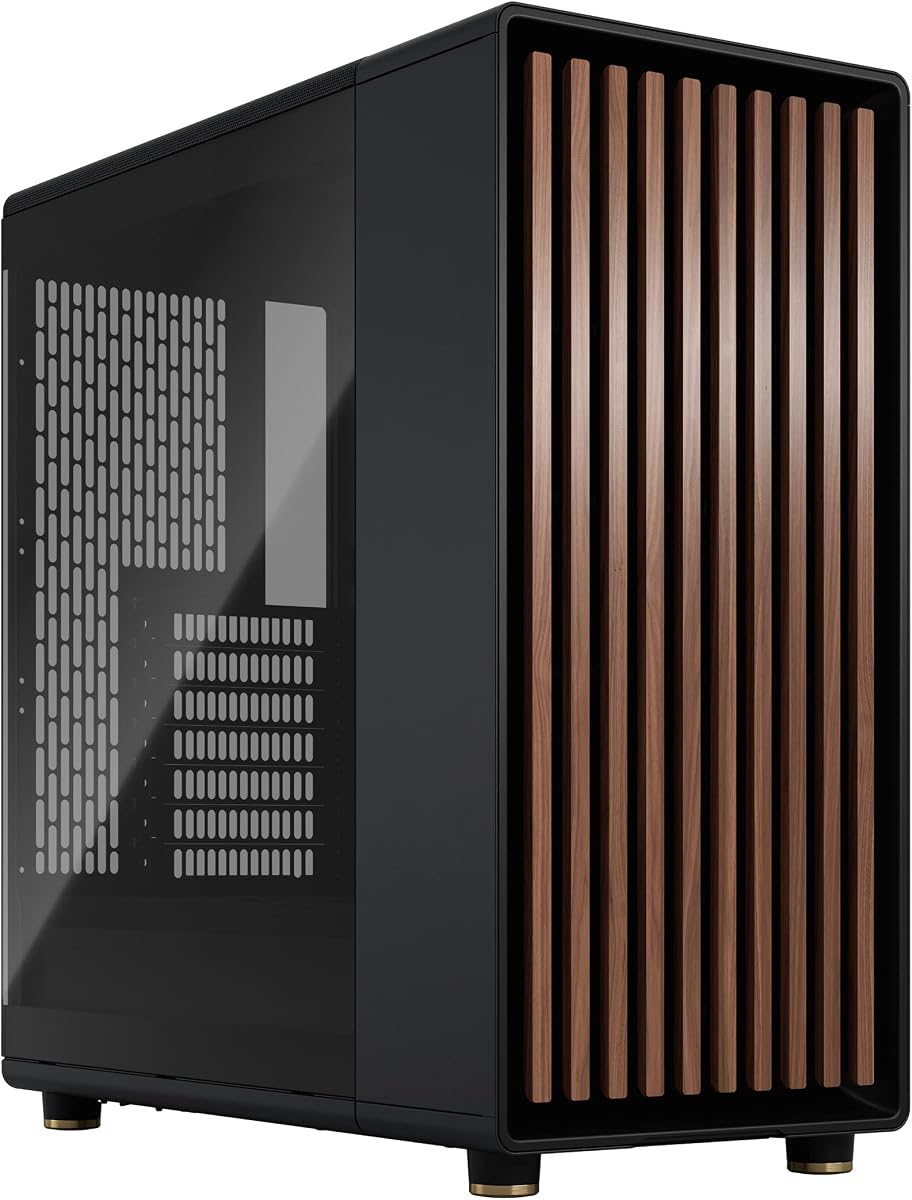
The Fractal Design North stands apart with a front panel built around sustainably sourced oak or walnut, bringing a warm natural texture to an otherwise modern metal-and-glass enclosure. It carries a 4.7 rating and is designed for ATX, micro-ATX, and Mini-ITX motherboards. Two 140mm Aspect PWM fans are included, giving buyers useful airflow performance immediately.
We may earn a commission when you buy through this link, at no additional cost to you.
Natural ventilation is central to the design. The open front and integrated mesh help air move through the chassis, while the front bars are formed from wood rather than an entirely synthetic face. The glass side panel offers a clear view of the components, and the side panels, front, and top can be removed using accessible tabs for easier installation and maintenance.
Component clearance is generous, with support for graphics cards up to 355mm or up to 300mm when a 360mm radiator is installed at the front. The seven bridgeless expansion slots are adequate for most modern gaming builds, though they are fewer than those found in many full-size chassis. Storage includes two combined 3.5-inch and 2.5-inch mounts plus two dedicated 2.5-inch positions.
The North is ideal for builders who want modern PC styling without the uniform black-and-metal appearance found across many cases. Its natural wood detail, included 140mm fans, removable panels, and ventilation-oriented layout make it particularly approachable for a polished everyday gaming build.
Genuine walnut or oak bars create a tactile focal point at the front of the case. The result bridges contemporary industrial design and Scandinavian-inspired interiors more distinctly than a conventional mesh-front enclosure.
Integrated tabs allow the side panels, front, and top to be removed without a complicated tool process. That helps when fitting components, routing cables, or reaching a fan that needs adjustment.
We may earn a commission when you buy through this link, at no additional cost to you.
The Lian Li LANCOOL 217 is a highly practical ATX mid-tower that pairs a restrained modern exterior with substantial cooling hardware. Its 4.8 rating is the highest in this group. Five PWM fans come pre-installed, including two large 170 x 30mm front fans, two 120mm reversed-blade fans, and a 140mm rear fan. That package can give a new build meaningful airflow without requiring an immediate fan purchase.
We may earn a commission when you buy through this link, at no additional cost to you.
The front fans can operate in a balanced position or be raised into CPU mode to direct more airflow toward the processor. Toolless fan mounting and flexible mounting locations make it easier to adapt the layout as a build develops. Real walnut wood accents soften the industrial structure, while the restrained black treatment lets the enclosure fit comfortably into many gaming or office environments.
Cable management is one of the strongest aspects of the design. Support for back-connect motherboards helps conceal wiring, two power buttons provide convenient access regardless of how the case is positioned, and the power supply can face forward or rotate for easier cable management. Compatible power supplies can be as long as 220mm. Users should still verify rear connector and motherboard clearance because case support does not eliminate every compatibility check.
The LANCOOL 217 is a compelling choice for a builder who prioritizes airflow, tidy installation, and useful included components. The wood accents may not match every theme, but the underlying case is balanced enough to serve as the foundation for a powerful modern gaming system without immediately needing extra fans.
Five PWM fans create a strong starting configuration, with large front fans positioned to cool both major heat-producing components. The adjustable CPU mode offers a targeted alternative when the processor needs additional airflow.
Back-connect motherboard support, dual power buttons, and alternate PSU positioning simplify cable routing and everyday access. These details make the enclosure practical for builds where a clean interior is a priority.
We may earn a commission when you buy through this link, at no additional cost to you.
This Pitch Black version of the HYTE Y70 Touch Infinite delivers the same feature-rich foundation as the Snow White model but in a darker visual treatment. It holds a 4.7 rating and centers on a large 14.9-inch, 2.5K-resolution touchscreen. For builders creating a dark, cinematic gaming station, the finish can integrate more seamlessly with black components and subdued lighting.
We may earn a commission when you buy through this link, at no additional cost to you.
The three-piece panoramic glass reveals a dual-chamber interior, while the included PCIe 4.0 x16 riser enables vertical four-slot graphics placement. Its cooling layout supports a side-mounted 360mm radiator, an adjustable top radiator position, and lower-chamber fans, with total capacity reaching ten fans. The newer panel is described as 43 percent brighter than earlier versions and supports ten-point multi-touch interaction.
The main trade-off is complexity. A screen, vertical graphics arrangement, substantial glass area, and multiple cooling zones require more consideration than a conventional case with fixed components. The riser must be compatible with the chosen graphics card, motherboard layout must suit the vertical arrangement, and software adds another layer to setup. Buyers who want the display but not the extra complexity should consider the standard HYTE Y70 instead.
This model is best suited to an enthusiast who wants a dramatic dark enclosure and values an interactive centerpiece. It offers the visual impact of a premium display case with enough cooling flexibility to support a high-performance configuration, provided the builder is comfortable with deliberate installation planning.
The Pitch Black finish coordinates naturally with dark motherboards, graphics cards, and understated lighting. Panoramic glass provides a wide view of the vertically mounted hardware and separated rear cable chamber.
Multiple radiator positions and room for ten fans make the enclosure adaptable to air-cooled and liquid-cooled systems. The adjustable top mounting area adds flexibility when different fan thicknesses or radiator dimensions must be accommodated.
We may earn a commission when you buy through this link, at no additional cost to you.
The NZXT H5 Flow delivers a clean, restrained approach to a modern ATX mid-tower. Its 4.7 rating reflects a useful balance of compact styling, mesh-assisted airflow, and cooling flexibility. Two 120mm Quiet Airflow fans are pre-installed, one at the front and one at the rear, providing a functional baseline for a new build.
We may earn a commission when you buy through this link, at no additional cost to you.
The perforated PSU shroud is designed to draw air through both its side and bottom, opening additional cooling paths around the power supply. Radiator support includes a 360mm unit at the front and a 240mm unit at the top. Ultra-fine mesh across the top, front, and side panels is intended to promote airflow while filtering dust, giving the case a more performance-conscious foundation than its minimalist appearance might imply.
The main limitation is the modest two-fan bundle. A builder adding a graphics card, powerful processor, or liquid cooler may want more intake or exhaust capacity. Cable management is handled through wide channels, hooks, and straps, which is useful for maintaining a clean view, although the case is less elaborate than dual-chamber premium models. There is also no display or other novelty feature beyond its visual design.
For someone assembling a capable first gaming PC, the H5 Flow offers a manageable balance of size, cooling support, and clean presentation. It is particularly appealing if the system will use a modest air-cooled configuration or if the included fans are sufficient for the selected hardware. It may not deliver the fan-rich specification of the Lian Li or Antec alternatives, but it remains a focused and approachable option.
The H5 Flow supports a full ATX motherboard while maintaining a mid-tower format. That gives builders room for standard components without committing to the larger footprint associated with elaborate full-tower designs.
Side and bottom perforations allow the power-supply shroud to participate in airflow. This creates additional routes for air to circulate around lower components and the PSU area.
We may earn a commission when you buy through this link, at no additional cost to you.
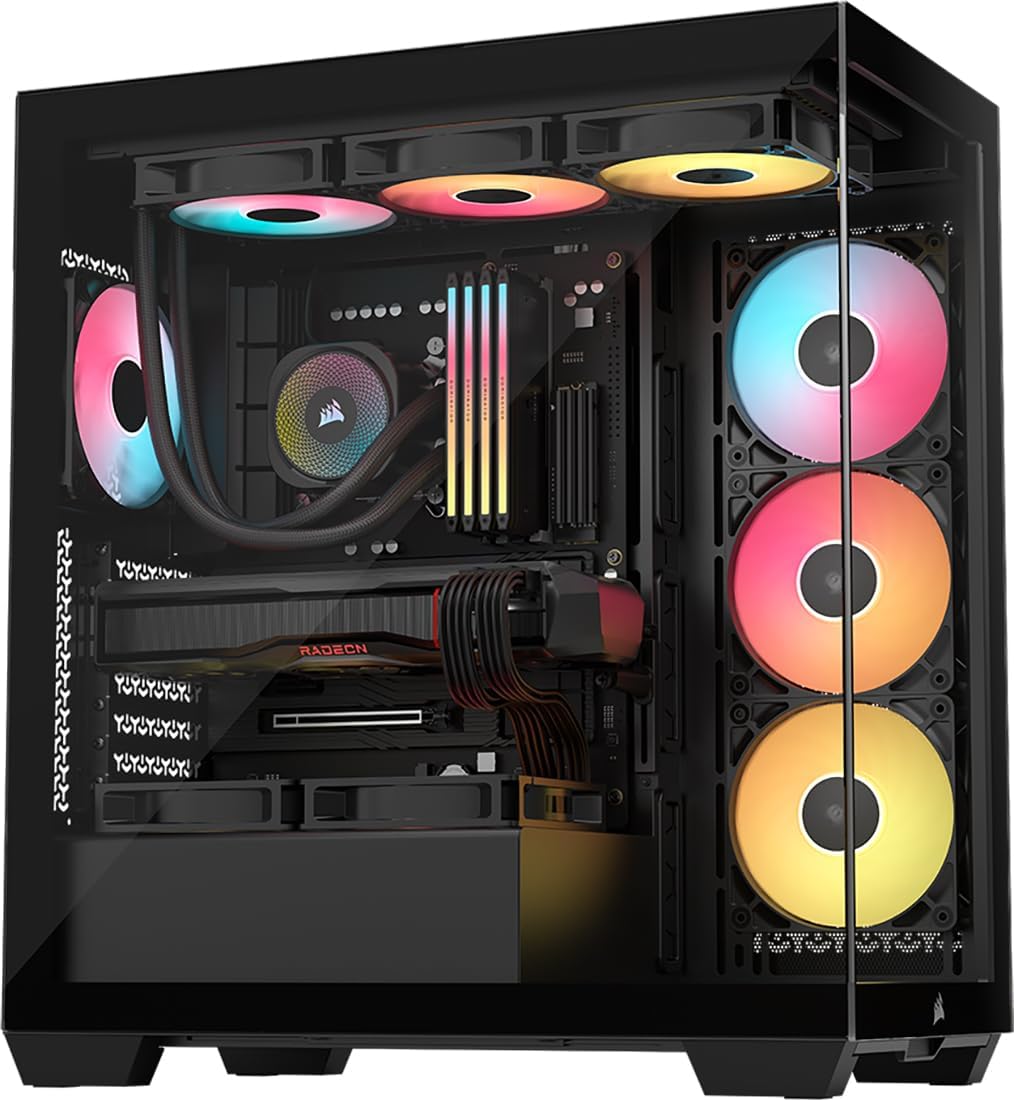
The CORSAIR 3500X RS ARGB emphasizes a panoramic view while retaining a broad set of cooling positions. Its 4.6 rating reflects a capable mid-tower package with three pre-installed RS120-R ARGB fans, removable glass panels, and compatibility ranging from Mini-ITX through EATX motherboards. It is designed for builders who want their components prominently visible without sacrificing practical expandability.
We may earn a commission when you buy through this link, at no additional cost to you.
The wraparound glass aesthetic provides a broad look into the chassis, while side, roof, and PSU fan positions allow up to ten 120mm fans. The included fans support motherboard control through a 5V ARGB header. Removable front and side glass panels make initial assembly and later access easier, though tempered glass still deserves careful handling to avoid fingerprints or accidental damage.
A particularly useful feature is its validation for reverse-connection motherboards such as ASUS BTF, MSI Project Zero, and Gigabyte Project Stealth models. Those boards place connections on the rear, allowing a cleaner internal view when compatible cables and components are used. This feature does not help every motherboard, so builders should verify whether their selected board supports the arrangement.
The 3500X RS ARGB is a good fit for a modern gaming system where visual presentation and future cooling expansion matter. Its three included ARGB fans offer more than a minimal bundle, and the ten-position ceiling leaves considerable room for additional airflow. The trade-off is that it provides less integrated sophistication than touchscreen models while still being a more elaborate presentation than minimalist cases.
Wraparound glass gives internal components a more expansive presentation than a conventional single side window. Removable panels preserve visual appeal while keeping installation and maintenance tasks approachable.
Side, roof, and PSU mounting locations support as many as ten 120mm fans. Starting with three included ARGB units leaves room for a more comprehensive cooling arrangement as component heat levels become clear.
We may earn a commission when you buy through this link, at no additional cost to you.
The standard HYTE Y70 offers the dramatic panoramic-glass and dual-chamber design of the Y70 family without an integrated touchscreen. Its 4.7 rating makes it a compelling visual option for builders who value the enclosure's architecture but do not need a large interactive display. The three-piece glass front and side panels create a wide view of the main hardware chamber.
We may earn a commission when you buy through this link, at no additional cost to you.
Its included PCIe 4.0 x16 riser supports vertical graphics mounting and comes with a color-matched canopy designed to preserve an uninterrupted visual flow. Cooling capacity reaches ten fans, with support for a 360mm radiator on the side, an adjustable top radiator area, and lower-chamber fan arrangements. These options provide enough flexibility for serious cooling configurations.
The attention to build experience is notable. Helpful labels, reusable Velcro straps, floating storage sleds, a clicky blue power switch, tool-less panels, and generous rear cable-management space all support assembly and upkeep. As with the Touch Infinite models, the riser and vertical layout require compatible hardware, and the expansive glass surfaces will collect fingerprints and show dust more readily than opaque panels.
The HYTE Y70 is best suited to an enthusiast who wants a premium-looking build with panoramic visibility, vertical graphics, and sophisticated cooling options. It can serve as the centerpiece of a gaming system, provided the builder is comfortable planning the component layout. It is a strong alternative to the touchscreen versions for anyone who values physical design without adding another display and software ecosystem.
Separating visible hardware from rear cable storage keeps the main chamber visually clean. The dedicated space also provides room for cable management and helps preserve the panoramic presentation.
Tool-less panels, labeled mounting areas, reusable straps, and floating storage sleds reduce friction during the build process. These small details help justify choosing the case for more than appearance alone.
We may earn a commission when you buy through this link, at no additional cost to you.
The Antec Flux Pro is a full-tower E-ATX enclosure built for builders who want extensive cooling freedom. It carries a 4.7 rating and combines metal, glass, and wood textures for an appearance that is less uniform than many all-black chassis. Six PWM fans are pre-installed, and the case can support up to 12 fans in total.
We may earn a commission when you buy through this link, at no additional cost to you.
The installed configuration includes three Tranquil 140 PWM fans at the front, two P12R PWM reverse-blade fans on the power-supply shroud, and one Tranquil 140 PWM fan at the rear. Removable cooling brackets on the top, front, and PSU shroud make it easier to configure different positions. The case can also install a 420mm radiator and a 360mm radiator simultaneously, offering exceptional flexibility for a cooling-intensive system.
The innovative iShift PSU mount allows a 90-degree orientation, which can simplify routing or help align the power supply with the case layout. A CPU/GPU dual temperature display adds a functional readout that can be useful when monitoring a heavily loaded system. The trade-off is footprint: a full tower demands more floor and desk space than the mid-towers elsewhere in the guide, and the number of possible configurations can make initial planning more involved.
This is a strong recommendation for an enthusiast with an E-ATX motherboard, a powerful graphics card, and an ambitious cooling plan. It is particularly useful when multiple radiators or more than six fans are genuine requirements. Users with standard ATX components and limited space can obtain a more suitable enclosure from one of the compact or mid-tower options.
Twelve-fan capacity and support for simultaneous 420mm and 360mm radiators give the case exceptional flexibility. Removable brackets make it more practical to adapt the cooling arrangement during assembly.
The dual CPU and GPU temperature display provides at-a-glance thermal information. It is especially convenient for a case that can accommodate demanding components and multiple cooling loops.
We may earn a commission when you buy through this link, at no additional cost to you.
The FOIFKIN F300 2025 combines a 270-degree panoramic tempered-glass design with unusually generous component limits. It has a 4.6 rating and offers a straightforward visual alternative to cases that emphasize RGB or integrated displays. The glass curtain wall gives the interior a wide field of view, while a tool-free removal design supports installation and maintenance.
We may earn a commission when you buy through this link, at no additional cost to you.
Four non-LED fans are pre-installed, providing a useful baseline for airflow without adding lighting cables to the build. The case can accommodate up to ten 120mm fans and as many as three 360mm liquid coolers according to the supplied information. Its spacious component support includes ATX, micro-ATX, and Mini-ITX motherboards, CPU coolers up to 170mm high, graphics cards up to 400mm long, and ATX power supplies up to 220mm long.
Storage and expansion are also flexible. The configuration includes one HDD and two SSD mounts or three SSD mounts, along with seven expansion slots. Front-panel connectivity includes a Type-C 3.0 port, one USB 3.0 port, one USB 2.0 port, microphone and audio connections, plus power and restart buttons. These features make the case suitably equipped for a standard contemporary build.
The FOIFKIN F300 is a reasonable choice for buyers who prioritize the glass view, fan quantity, and component clearance more than premium software integration or a coordinated lighting ecosystem. Its included fans do not provide RGB, so users seeking illumination must plan that separately. Even so, the broad fitment and four-fan starting point create a flexible foundation for a modern gaming PC.
Support for graphics cards up to 400mm, power supplies up to 220mm, and CPU coolers up to 170mm gives builders room to choose substantial components. The ATX, micro-ATX, and Mini-ITX motherboard support broadens compatibility further.
The design focuses on viewing the components rather than adding illumination. Four plain fans keep the initial setup clean and avoid the extra control and power requirements associated with addressable lighting.
We may earn a commission when you buy through this link, at no additional cost to you.
A modern PC case should fit the hardware, support the intended cooling plan, and make assembly and maintenance easier. Comparing layout, clearance, included fans, cable routing, and presentation before buying helps prevent expensive compatibility problems.
Begin by checking which motherboard sizes the case supports and whether the chassis is truly ATX-compatible rather than merely able to accept smaller boards. The NZXT H5 Flow, Fractal Design North, and Lian Li LANCOOL 217 are ATX mid-towers, while the Antec Flux Pro is a larger E-ATX-oriented full tower. The HYTE enclosures use an ATX-focused dual-chamber design. Also check connector placement if clean cabling is important, especially for reverse-connection boards supported by the CORSAIR 3500X RS ARGB.
Long graphics cards can conflict with front fans, radiators, storage cages, or PSU shrouds. The Fractal Design North supports cards up to 355mm, while the FOIFKIN F300 2025 lists support up to 400mm. Radiator installation can reduce available length, as shown by the North's 300mm allowance with a front 360mm radiator. Measure the actual card and account for power cables and riser connectors before finalizing a case choice.
Cooling potential depends on more than the number of included fans. Look at fan sizes, mounting locations, radiator dimensions, bracket removability, and whether the PSU shroud can draw air. The Antec Flux Pro supports up to 12 fans and simultaneous 420mm and 360mm radiators. HYTE models support up to 10 fans, while the NZXT H5 Flow accepts front and top radiators but starts with only two fans. Choose capacity that matches both current hardware and future upgrades.
Pre-installed fans provide immediate value and simplify first-time assembly. The CORSAIR 4000D RS ARGB and 3500X RS ARGB each include three ARGB fans, the LANCOOL 217 includes five PWM fans, the Antec Flux Pro includes six, and the FOIFKIN F300 includes four non-RGB fans. Lighting adds visual impact but also requires a 5V ARGB header or controller, additional power connections, and careful cable management.
A modern case should conceal wires without making them difficult to reach. The LANCOOL 217 supports back-connect motherboards and offers dual power buttons, while the HYTE Y70 uses a separate rear chamber for cable storage. Look for wide routing channels, hooks, straps, reusable fasteners, and removable panels. Tool-free access is particularly helpful when changing fans or storage, but every design still benefits from a deliberate cable path planned before components are installed.
The supplied cases span several distinct visual approaches. The Fractal Design North and Lian Li LANCOOL 217 incorporate natural wood accents, the FOIFKIN F300 and CORSAIR 3500X emphasize panoramic glass, and the HYTE Y70 Touch Infinite adds a large interactive display. Glass provides a broad view but attracts fingerprints and shows dust, while wood creates a more organic character. Integrated displays are striking but require software, power, and compatible orientation planning.
Check the number and type of drive mounts, expansion slots, and removable storage trays against the intended build. The Fractal Design North includes two combined 3.5-inch and 2.5-inch mounts and two dedicated 2.5-inch mounts, with seven bridgeless expansion slots. The FOIFKIN F300 supports three SSDs or two SSDs with one HDD and offers seven slots. Modern gaming builds often need fewer hard-drive bays than workstations, but extra mounting points can help keep storage organized.
A case can be technically capable but impractical in the intended location. The Antec Flux Pro's full-tower format offers extensive cooling and E-ATX support but requires more room than a mid-tower. The NZXT H5 Flow is described as compact while still accepting ATX boards. Measure the available desk or floor area, leave room for front-to-back airflow and cable bending, and consider whether the power buttons or controls will remain accessible after installation.
Prepare the workspace before installing components. Lay the case on its side, remove the panels and supports that obstruct access, identify every screw location, and consult the case instructions for bracket positions and tool-free latches. Install the power supply and connect the required cables before densely arranging the motherboard or graphics card. Keeping the original packaging nearby can also help with storage or transport.
Install fans and radiators in their final positions, then connect power headers and any ARGB or temperature-control leads. Route cables through the designated channels as each component is fitted rather than leaving the entire wiring process until the end. Use the case's included straps or reusable fasteners where available, avoid forcing tight bends, and ensure that airflow intakes remain unobstructed.
For routine care, power down and disconnect the system before opening the case. Remove dust from mesh panels and filters with a soft brush or suitable cleaning method, clean tempered glass with a soft microfiber cloth, and inspect fan connections and cable ties periodically. Do not spray cleaner directly onto a panel, and take care when removing large glass sections. If the case includes an integrated touchscreen, install its software and check display, touch, and control functionality as part of the initial setup.
For most ATX gaming builds, a mid-tower provides enough room for a standard motherboard, contemporary graphics card, ATX power supply, and multiple storage drives. The key is to check the specific case's graphics length, CPU cooler height, power-supply length, and radiator clearance. Cases such as the Fractal Design North and FOIFKIN F300 2025 offer generous room for large components.
Pre-installed fans make a new build faster and can provide enough baseline cooling for a modest system. They are not automatically enough for a high-end processor or graphics card under sustained load. Compare the included fan count and size with the additional cooling your components require, and check whether the case also supports radiator installation.
Panoramic glass is attractive and provides a broad view of the components, but it can make dust and fingerprints more noticeable than opaque metal or wood panels. Regular cleaning with a microfiber cloth and routine filter or mesh maintenance helps preserve the appearance. The glass panels on several cases are removable, making careful access easier.
An integrated touchscreen is most useful for an enthusiast who wants the front of the PC to display customized information or provide interaction. It adds complexity, power requirements, and software considerations, so it is unnecessary for a conventional build. The HYTE Y70 Touch Infinite is best suited to users who will actively use the display and have carefully planned the internal layout.
A dual-chamber layout separates the visible component area from the cable-management area behind the motherboard tray. This can create a cleaner interior and prevent cables from interrupting the main view. It also changes cable-routing and access considerations, so builders should confirm that the motherboard, riser, storage, and power connections align with the intended chamber arrangement.
Check the case's maximum graphics-card length and compare it with the exact model you plan to use. Include the extra depth created by power cables or a vertical riser, and check whether installing a front radiator reduces the stated clearance. The North allows up to 355mm normally and up to 300mm with a 360mm front radiator, illustrating why the cooling layout matters.
Wood accents can provide a distinctive alternative to standard metal and plastic panels when the manufacturer designs and fits them as part of the structure. The Fractal Design North uses sustainably sourced oak or walnut bars, while the LANCOOL 217 offers real wood accents. Buyers should still treat the panels carefully during assembly and cleaning to avoid impacts or moisture exposure.
Yes. Planning the major cable paths first prevents blocked headers, tangled wires, and unnecessary removal of installed hardware. Identify motherboard connections, the graphics-card power route, the front-panel and USB wiring, fan headers, and any ARGB controller before placing the main components. Use the case's routing channels, hooks, and reusable straps to keep the finished interior orderly.
The LANCOOL 217 stands out as the strongest all-around recommendation because it combines five included PWM fans, flexible mounting, walnut accents, dual power buttons, and practical cable-management options. The CORSAIR 4000D RS ARGB is ideal for builders who want modularity and fan-position flexibility, while the HYTE Y70 Touch Infinite is the leading showcase choice for an interactive premium centerpiece.
Prioritize hardware fit, cooling layout, and assembly convenience before visual preferences. The NZXT H5 Flow suits straightforward ATX builds, the Fractal Design North brings natural wood styling, the Antec Flux Pro serves cooling-intensive full-tower systems, and the FOIFKIN F300 emphasizes spacious glass presentation and generous clearances. A smaller, cleaner system may not need the complexity of a premium dual-chamber enclosure.
Before making a final purchase, recheck the manufacturer's current specifications against your exact motherboard, graphics card, power supply, CPU cooler, storage, and radiator. Confirm fan and lighting headers, physical room at the installation site, and the availability of every required accessory. Product details and prices can change, so current listings and manufacturer documentation should guide the final decision.