CanaKit Raspberry Pi 5 Starter Kit PRO
4.7Editor score
Complete Pi 5 hardware bundle
Eight gigabytes of RAM
Active cooling and heat sink
45W USB-C power supply
Explore the best Raspberry Pi for Retropie, comparing complete kits, preloaded SD cards, hardware options, compatibility, features, and ease of use.
A Raspberry Pi for Retropie can recreate the feeling of classic game consoles in a compact, highly customizable system, but the best choice depends on compatibility, storage, controllers, cooling, and setup preferences. A preloaded image offers immediate convenience, while a complete starter kit provides more control over the hardware and operating system.
This guide compares ten Raspberry Pi and microSD-card options, focusing on supported generations, system libraries, included accessories, media features, controller support, and the balance between convenience and flexibility. It covers both ready-to-use Batocera or RetroPie cards and hardware packages intended for a more hands-on installation.
Each pick explains who it suits, what makes it stand out, and where its limitations matter. Ratings reflect the supplied marketplace feedback rather than personal testing, and product availability, bundle contents, and prices can change, so readers should confirm the current listing before buying.
4.7Editor score

4.7Editor score

3.8Editor score
The comparison below separates full hardware kits, standalone boards, and preloaded gaming cards by compatibility, storage, included components, and intended level of setup. It makes the differences between a flexible new installation and an immediately usable retro-gaming image easier to see.


This is a preloaded 128GB microSD card designed specifically for the Raspberry Pi 5, with a supplied rating of 4.4. Its defining advantage is simplicity: the Batocera-based image is already configured, so the buyer can concentrate on connecting a display and controllers rather than assembling the operating environment from individual components. The listing advertises more than 28 systems and 12,000-plus games, with particular emphasis on cartridge-era platforms such as Master System, Genesis, Atari, and arcade systems.
We may earn a commission when you buy through this link, at no additional cost to you.
The card is designed around a user-friendly interface that avoids command-line configuration. It includes automatic save and load functionality, snapshot support, game manuals, searchable game lists, screenshots, recording, and media such as box art, wheel art, fan art, ratings, and maps. It also lists support for SFC RetroPad, Xbox, and PlayStation controllers, making it a practical starting point for a living-room console rather than only a bare emulation project.
The principal limitation is hardware rigidity. The listing clearly restricts this version to the Raspberry Pi 5, so it will not work as a drop-in card for a Pi 4, Pi 3, or other model. Users must also consider the legality of game content: the card provides the software environment and organization tools, while ownership of the relevant ROMs or other game files remains the user's responsibility. A Raspberry Pi 5, compatible display, controller, power supply, and case or enclosure are not included.
This is the most convenient choice for someone who already owns a Pi 5 and wants a large, navigable retro-gaming environment without a lengthy software setup. It is less suitable for a first-time buyer seeking a complete console because the hardware itself is separate, and it offers less flexibility than building a standard Raspberry Pi OS image from scratch. For Pi 5 owners prioritizing immediate usability, however, it delivers the strongest combination of library breadth, interface features, and controller support.
For many buyers, installing emulators, arranging directories, configuring controllers, and learning the operating system are the largest obstacles to a first retro-gaming build. This card removes those steps by presenting a preconfigured Batocera environment, allowing more time to focus on display settings, control mapping, and personal library organization.
The extensive metadata is one of the most useful parts of the image. Box art, screenshots, manuals, ratings, and fan art make the library more approachable, while filtering and search tools help players move through large collections without manually browsing individual folders.
We may earn a commission when you buy through this link, at no additional cost to you.
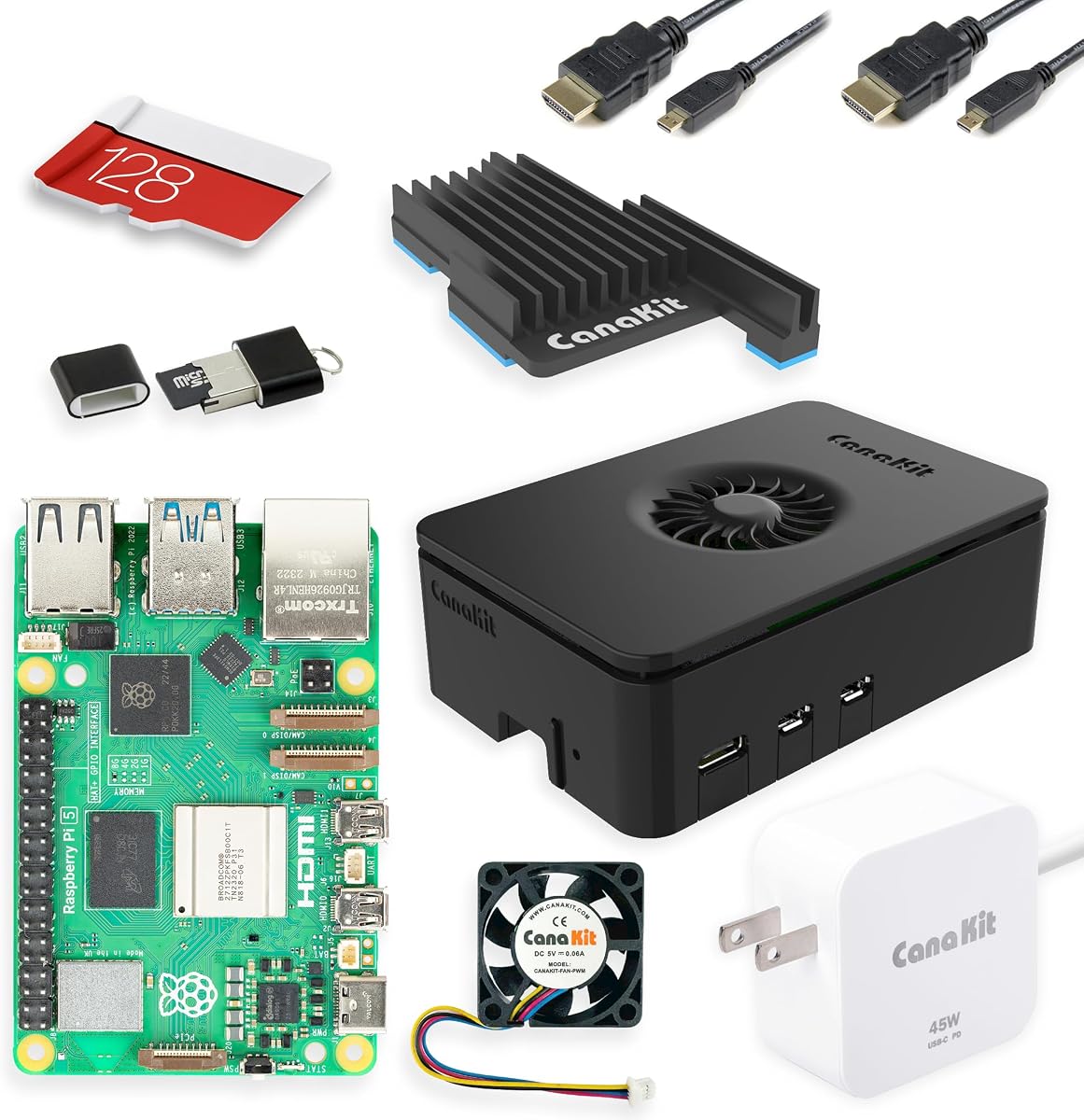
The CanaKit Raspberry Pi 5 Starter Kit PRO is the most complete conventional hardware package in this guide, carrying a supplied rating of 4.7. It includes the Raspberry Pi 5 with 8GB of RAM, a 128GB microSD card preloaded with 64-bit Raspberry Pi OS, a USB card reader, a matching case, a low-noise fan, a large heat sink, a 45W power supply, and two six-foot display cables. That combination reduces the number of separate accessories needed for a first build.
We may earn a commission when you buy through this link, at no additional cost to you.
The Pi 5's 2.4GHz 64-bit quad-core processor provides the performance foundation for a modern emulation setup, while the bundled cooling components help maintain stable operation under sustained load. The 128GB card provides ample room for operating-system files and a personal legally obtained game library. Display cables supporting up to 4K at 60p are also included, although the kit does not include a monitor, television, game controller, or game software.
This package does not arrive with RetroPie or Batocera already configured. Buyers who want to choose an operating system, install emulators manually, or retain the ability to use the Pi for other projects will appreciate that flexibility. By contrast, someone seeking a game-only appliance may consider this less convenient than a preloaded Batocera card. The included reader is useful for writing the chosen image, while the case and cooling system make the initial desktop setup more practical.
The CanaKit kit is best for buyers who want a complete, polished Raspberry Pi 5 foundation and intend to build their own RetroPie or Batocera installation. It offers more freedom than a preloaded card and a more coherent set of components than assembling a Pi individually. For that reason, it stands out as the best premium starting kit, even though gaming accessories must still be sourced separately.
Matching the case, fan, heat sink, power supply, card reader, and cables to a current Raspberry Pi model reduces compatibility guesswork. This is especially useful for beginners who may not know which power standard, thermal solution, or display connection best fits the board.
Because the card contains Raspberry Pi OS rather than a locked gaming image, the owner can select RetroPie, Batocera, or another environment. That makes the kit suitable for people who want to customize controllers, add emulators, or reuse the hardware for general computing projects.
We may earn a commission when you buy through this link, at no additional cost to you.
This 64GB preloaded Batocera card is a lower-capacity alternative to the larger 128GB option, with a supplied rating of 3.8. It offers ten installed systems and a range of features intended to make the card immediately usable, including automatic save and load, snapshots, game manuals, searchable lists, screenshots, recording, and media artwork. The listed platform emphasis includes Dreamcast, PlayStation, Sega, Atari, and arcade systems.
We may earn a commission when you buy through this link, at no additional cost to you.
Its main appeal is the combination of a smaller card and a finished interface. A 64GB image can be easier to maintain because it contains less data and usually requires less card management than an extensive image. At the same time, the supplied listing contains contradictory compatibility wording: the heading identifies Pi 5, while one bullet also mentions Pi 4, Pi 4B+, Pi 4/400, and Pi 5/500. The prominent title and first compatibility warning point to Pi 5.
The lower rating means buyers should examine recent customer feedback carefully, especially regarding the image, included content, controller behavior, and model compatibility. The product is also a card rather than a complete Raspberry Pi console, so a board, suitable power, display output, and controllers remain separate requirements. The listed legal and content responsibility also remains with the purchaser, just as with other preloaded gaming images.
This is the best budget-oriented preloaded card for a buyer who wants the Batocera experience and a smaller storage footprint. It is less attractive than the 128GB card for broad cartridge collections and less flexible than the CanaKit starter kit. The important caveat is to verify that the seller still describes compatibility consistently before purchase.
A 64GB card may suit players who own a modest, curated set of games and do not need to store every system or media asset. It provides enough room for the operating image and a personal library while keeping the setup less demanding than a very large image.
The listing headline and warning identify the Raspberry Pi 5, but another bullet includes older models. Since a preloaded image may contain device-specific settings, buyers should confirm the intended Raspberry Pi generation with the seller rather than relying on the contradictory bullet.
We may earn a commission when you buy through this link, at no additional cost to you.
This 128GB card is intended for Raspberry Pi 3, 3B, and 3B+ owners and has a supplied rating of 3.5. The headline advertises more than 28 systems and 12,000-plus games, while the detailed description separately states that 10 systems are installed and tested. It uses the familiar Batocera interface with automatic saves, snapshots, manuals, media-rich lists, screenshots, recording, and support for several controller families.
We may earn a commission when you buy through this link, at no additional cost to you.
For someone who already owns an older Pi 3, the card can be an efficient way to transform existing hardware into a dedicated gaming system. The 128GB capacity provides room for a broad collection, and the cartridge-heavy system emphasis makes it relevant for players interested in Master System, Genesis, Atari, and arcade software. The media presentation also gives the interface a more console-like feel than basic file browsing.
The lower rating and inconsistent description warrant caution. One bullet says the card is only for Pi 3 models, but the next bullet discusses Pi 4 and Pi 5 compatibility in its setup text. The title and opening warning should be treated as the controlling information, so buyers should not assume it will run on a Pi 4 or Pi 5. Performance is also naturally constrained by the older Pi 3 generation compared with current hardware.
This is a specialized option rather than a universal recommendation. It makes sense if the buyer already owns a compatible Pi 3, wants to avoid manual image setup, and primarily values cartridge-era libraries. For a new system, the current Pi 5 options offer more processing power, while the Pi 4 cards provide a better balance of performance and model-specific preloaded alternatives.
A ready-loaded card can give an existing Pi 3 a new purpose without requiring users to learn the full software installation process. It is especially relevant when the hardware is already owned and the goal is a simple living-room interface.
The headline advertises a 28-plus-system collection, whereas another bullet states that 10 systems are installed. Product details should be checked directly with the seller if the precise library is central to the purchase.
We may earn a commission when you buy through this link, at no additional cost to you.
This 64GB RetroPie image is designed for the Raspberry Pi 3 and 3B+ and carries a supplied rating of 4.2. Its title emphasizes games for NES, SNES, Genesis, Game Boy, Atari, arcade, and MAME, while the description states that a library of ten systems is installed and tested. The RetroArch-centered approach and plug-and-play setup make it approachable for owners of compatible older hardware.
We may earn a commission when you buy through this link, at no additional cost to you.
The interface is designed to reduce the learning curve. It offers automatic save and load, snapshot support, game manuals, screenshots, recording, filtering and searching, and artwork such as box art, wheels, fan art, ratings, and maps. Listed controller compatibility includes SNES-style RetroPad, Xbox, and PlayStation controllers, allowing a wide range of existing gamepads to be considered.
This option is not intended for a Raspberry Pi 5, 4, or other newer board, despite the common reuse of the term Raspberry Pi in product titles. The Pi 3 platform has less processing headroom, and the smaller card places a firmer limit on library expansion. As with the other image cards, the software does not replace the need for the correct hardware, a suitable power source, video connection, and a display.
The 64GB Pi 3 card is a solid choice for someone already using that model and seeking an established, low-configuration setup. Its 4.2 rating is more reassuring than the rating attached to the other Pi 3-focused 128GB card. It is best treated as an upgrade for existing compatible hardware rather than as the foundation for a new high-performance build.
RetroArch provides a consolidated interface around multiple emulators, while the preloaded setup removes much of the initial configuration work. The result is easier for newcomers to navigate and easier for owners of older Pi models to maintain.
The highlighted library centers on systems that are well suited to Pi 3 hardware. This makes the card a sensible choice for players whose priorities are NES, SNES, Genesis, Game Boy, Atari, and arcade experiences rather than demanding disc-based emulation.
We may earn a commission when you buy through this link, at no additional cost to you.
This Pi 5 card differentiates itself from standard cartridge-focused images by adding a larger selection of CD-ROM-era systems. It has a supplied rating of 3.6 and advertises 23,668 games across 21 additional systems, including 32-bit and sixth-generation disc consoles, the UMD handheld, CD-ROM add-ons, Japanese home computers, and DOS-era PC titles. The main cartridge collection is described as complete.
We may earn a commission when you buy through this link, at no additional cost to you.
The product's most interesting feature is its transparent differentiation. The listing explicitly says the disc libraries are curated rather than exhaustive and gives representative counts for different console generations. It also notes that disc-based systems have been optimized and multi-disc games consolidated, addressing a common frustration where changing discs interrupts play. The interface provides the same media-rich navigation, manuals, snapshots, and controller support found on other Sonicon images.
Buyers should interpret the total game figure carefully. The headline count combines complete cartridge collections with selected disc-era titles, so it should not be read as 23,668 complete disc games. The listing itself recommends contacting the seller for the exact title list when precise disc content matters. Performance will also vary by system and the particular Raspberry Pi 5 configuration, making cooling and suitable controllers important considerations.
This card is the most focused option for a player who already has a comprehensive cartridge image but wants more Dreamcast, PlayStation, 3DO, PSP, and related disc-based coverage. It is not the best starting card for someone primarily interested in 8-bit and 16-bit games, nor is it a complete disc archive. For the specific niche it addresses, however, it adds meaningful variety and thoughtful multi-disc handling.
Most entry-level images focus heavily on cartridges and arcade systems. Adding 32-bit consoles, later disc hardware, the PSP, and DOS titles gives experienced players a more varied library without requiring them to assemble and optimize every disc emulator.
The listing makes clear that no 512GB card can contain a complete library for every disc platform. Its value lies in selected, optimized examples and consolidated multi-disc titles, so buyers seeking specific games should request the detailed list first.
We may earn a commission when you buy through this link, at no additional cost to you.
This 512GB image is the largest storage option in the guide and is configured for the Raspberry Pi 4, 4B+, and 400. No numerical marketplace rating was supplied, so it does not carry the same visible feedback signal as the other products. The listing advertises more than 60 systems, over 22,000 games, complete pre-1990s libraries, and a curated selection of disc-based hits.
We may earn a commission when you buy through this link, at no additional cost to you.
Its greatest strength is organization. The listing mentions folders for four-player games, light-gun titles, arcade content, favorites, and recently played games, making a large library more navigable. Disc systems such as Dreamcast, PlayStation, 3DO, and PSP are optimized, while multi-disc titles are consolidated. Box art, wheels, screenshots, videos, ratings, fan art, maps, and manuals add a polished presentation.
The Pi 4 restriction is important because this is not a universal image. It also does not include a Raspberry Pi, power supply, case, cooling solution, controllers, or display equipment. A 512GB card can be slower than smaller cards depending on the card class and device, although the listing's claims do not provide a sustained performance test. As always, the availability and legality of game files are separate from the image's technical features.
This is a compelling choice for an existing Pi 4 owner who wants one broadly stocked card and values organization over a hands-on build. The 512GB capacity gives the user room to add files later, while the greatest-hits approach provides a strong starting library. It is less useful for buyers seeking a new system because a complete Pi 4 kit or current Pi 5 hardware may offer a more modern foundation.
The 512GB capacity leaves considerable room for a preloaded greatest-hits collection plus additional legally obtained files. More importantly, the specialized folders help users manage a large mixed library without relying entirely on raw file directories.
The Pi 4 remains capable of handling a broad retro library, and this image packages that experience with extensive metadata and curated disc support. It is especially attractive to owners who want the image to look and behave more like a curated console than a technical project.
We may earn a commission when you buy through this link, at no additional cost to you.
This 128GB card offers a balanced preloaded option for the Raspberry Pi 4 family and carries a supplied rating of 4.3. It advertises 28 systems and highlights NES, SNES, Sega, Game Boy, Atari, arcade, MAME, Genesis, and N64 content. The card is preconfigured for plug-and-play use, making it a practical option for owners who do not want to build an emulator collection manually.
We may earn a commission when you buy through this link, at no additional cost to you.
Its interface includes automatic save and load, snapshots, game manuals, searchable media-rich lists, screenshots, recording, and visual assets such as box art, wheel art, fan art, ratings, and maps. Support for SFC RetroPad, Xbox, and PlayStation controllers broadens the choices for existing gamepads. The 128GB capacity sits between smaller starter images and the very large 512GB offering.
The main restriction is generational: the product is intended for Pi 4, 4B+, and 400 models and should not be assumed compatible with Pi 5. A complete setup still requires a Pi 4, suitable power, a display connection, and controllers. Buyers should also verify that their preferred games and system configurations are present before relying on the image for a specific collection.
For a Pi 4 owner, this card may be the most balanced choice in the guide because it combines a respectable rating, substantial storage, a broad cartridge focus, and a polished interface. It is less suitable for someone building from the latest Pi 5, but it offers a much simpler path than a manual installation and does not require the storage commitment of the 512GB image.
The 28-system claim covers a wide cross-section of 8-bit, 16-bit, handheld, and arcade platforms. For players who want recognizable classics and a useful amount of variety, that mix offers more substance than a small ten-system starter image.
The card replaces a lengthy process of installing emulators and tuning a frontend with a ready-made Batocera environment. Users still need compatible hardware, but they avoid much of the early software configuration.
We may earn a commission when you buy through this link, at no additional cost to you.
The CanaKit Raspberry Pi 4 Starter PRO combines a 4GB Raspberry Pi 4 Model B with the accessories needed for a functional desktop or console project. It has the highest supplied marketplace rating in the guide at 4.8. The bundle includes a preloaded 32GB Class 10 microSD card, a USB reader, a high-gloss case with an integrated fan mount, a low-noise fan, heat sinks, a filtered 3.5A USB-C power supply, a six-foot 4K-capable display cable, and a USB-C power switch.
We may earn a commission when you buy through this link, at no additional cost to you.
As a general Raspberry Pi foundation, the kit is cohesive and straightforward. The case and fan provide active cooling, the power switch adds convenience, and the preloaded card reduces the initial installation step. These are useful qualities for a compact retro console, where replacing separate cooling and power components can create clutter. The 1.5GHz 64-bit quad-core processor remains capable of many classic emulation tasks.
Its 4GB memory and 32GB storage are modest by modern standards. RetroPie installation is also not included, so this is not a direct substitute for a preloaded gaming card. The Pi 4 generation is older than Pi 5 hardware, and buyers who want the newest ports, storage expansion, or maximum processing performance should consider the newer platform instead.
This kit is best for someone who values a complete, well-regarded hardware bundle over the most current specification. It is particularly attractive to owners who want to install their own RetroPie or Batocera image and use the same hardware for other projects. The 4.8 rating makes it an appealing purchase, provided its capacity and performance are sufficient for the intended library.
The integrated fan mount and included low-noise fan simplify thermal management. That is valuable when the board is enclosed, where passive cooling alone may not provide enough headroom for sustained workloads.
The preloaded card, reader, display cable, power supply, and power switch cover several basic needs. Although a display and controller must still be added, the bundle reduces the number of parts a beginner has to research before the first boot.
We may earn a commission when you buy through this link, at no additional cost to you.
The standalone Raspberry Pi 5 with 8GB of RAM is the strongest general-purpose platform for a custom Retropie build. It has a supplied rating of 4.7 and uses a 2.4GHz quad-core ARM Cortex-A76 processor. The board also provides dual 4K micro-HDMI outputs, USB-C power, high-speed USB 3.0 ports, and a PCIe expansion connector that can support compatible M.2 NVMe adapters.
We may earn a commission when you buy through this link, at no additional cost to you.
Those specifications make it a flexible foundation for a new gaming build. Eight gigabytes of memory provides comfortable headroom for emulation, background services, and customization, while NVMe support opens the door to faster storage than a conventional microSD card. Dual micro-HDMI outputs may also be useful for a multi-display or wider desktop arrangement, although most retro-gaming setups will use a single television or monitor.
This is a bare board rather than a complete kit. It does not include a microSD card, power supply, cooling solution, case, display cable, controllers, or gaming software. Retropie or Batocera must be written to compatible storage and configured after assembly. Those omissions are the main reason the Pi 5 appears in every major hardware category in this guide but is not itself a turnkey console.
The Raspberry Pi 5 is best for experienced users, builders, and tinkerers who want to choose every component. It also makes sense for someone planning to reuse the board for programming, Linux development, automation, or other projects. For a plug-and-play gaming system, pair it with the appropriate preloaded card or install a carefully selected image on high-quality storage of your own.
The PCIe connector enables compatible M.2 NVMe adapters, which can provide a major improvement in load times compared with typical microSD storage. Buyers must account for the required adapter, enclosure or cooling solution, and a suitable boot configuration.
The same board that runs RetroPie can support Linux-based development, home labs, automation, and educational projects. That versatility helps justify the hardware investment for buyers who want more than a one-purpose game console.
We may earn a commission when you buy through this link, at no additional cost to you.
The most useful Retropie purchase depends on whether you prioritize a ready-to-play software image, a complete hardware bundle, or the flexibility to build everything yourself. Compatibility, storage, cooling, controller support, and legal game ownership should be evaluated before choosing a product.
A preloaded card is usually tuned for one hardware generation, so confirm the exact board model before buying. The Raspberry Pi 5 options in this guide target Pi 5 or Pi 5/500 systems, while several cards are specifically intended for the Pi 4 family and one pair targets the Pi 3, 3B, and 3B+. These distinctions matter because device drivers, boot behavior, and performance expectations can differ across generations. A card advertised for a Pi 4 should not be assumed to work on a Pi 5, and the current Pi 5 boards should not be treated as replacements for the explicitly older Pi 3 and Pi 4 products.
Choose a card only when its model wording matches your hardware, and ask the seller if the listing contains conflicting generation references.
A preloaded Batocera or RetroPie card offers the fastest route to a console-like interface. It can include emulators, metadata, controller mappings, and browsing features without requiring the buyer to perform every installation step. A standard hardware kit or bare board provides more freedom but places responsibility for writing the image, installing emulators, arranging game directories, and configuring controls on the owner. This choice is less about quality than about desired control and willingness to troubleshoot.
Pick a preloaded image for convenience, or choose a bare board when customization and future projects matter most.
Storage needs depend on whether the image is a focused starter set or a broad collection with artwork and documentation. A 64GB card is manageable for a curated library, 128GB provides a more comfortable balance, and 512GB offers the greatest room for additions. Capacity alone does not determine speed, so buyers should also consider the card's class, the Pi model, and the demands of the emulators being used. NVMe support on the Pi 5 can provide a faster alternative to microSD storage, but it requires compatible hardware and additional setup.
Choose enough capacity for your collection, and consider faster storage when build time or demanding emulation is a priority.
Raspberry Pi boards generate heat, and an enclosed retro console needs more ventilation than a desktop installation. A Pi 5 generally benefits from an active cooling solution and an appropriate case, while a starter kit that includes a fan, heat sink, and power supply reduces the risk of incompatible components. Sustained heat can lead to throttling, which may reduce emulation performance or interrupt a session. Cooling is especially relevant for large, multi-system images and more demanding disc-based platforms.
Include proper cooling in the build, and avoid tightly enclosing the board without a deliberate airflow plan.
The preloaded Sonicon images list support for SFC RetroPad, Xbox, and PlayStation controllers, but users should verify the exact controller type and connection method. Wired USB gamepads generally offer the most direct path, while wireless models depend on Bluetooth support, pairing, and battery life. Arcade sticks, light guns, trackball controllers, and specialty input devices may require additional configuration. The frontend can make navigation attractive, but physical controls ultimately determine whether the system feels authentic and comfortable.
Choose controllers that are explicitly supported or known to work with the selected image, and test them before building a permanent enclosure.
Modern Raspberry Pi boards use micro-HDMI rather than full-size HDMI, so the correct adapter or cable is essential. The Pi 5 supports two micro-HDMI outputs, and the starter kits include six-foot cables advertised for use with displays up to 4K at 60p. Television compatibility, resolution, refresh rate, and overscan settings can affect the final presentation. A gaming build should be configured for the target display instead of relying on automatic settings that may not match an older television.
Confirm port type, display resolution, and refresh-rate support before purchasing cables or configuring video output.
A preloaded image may contain an organized structure, media, or an asserted game collection, but the software card does not eliminate copyright responsibilities. Users should only add and play games they legally own, and should review the seller's exact title list when specific platforms or games are essential. Listings in this guide advertise totals ranging from focused ten-system libraries to much larger collections, but those numbers can combine complete cartridge sets with selectively curated disc titles.
Treat the software image and the game library as separate questions, and verify both against your own collection.
A starter kit can include the Raspberry Pi, microSD card, case, cooling, power supply, reader, and display cable, making it easier for a first-time builder. A preloaded gaming card includes software but normally requires most hardware. A standalone board is the most flexible option but demands the most research. Buyers should compare the complete component list, not just the headline product, because a low-cost board may ultimately require a case, reliable power, storage, cooling, and a controller.
Add up the required components before deciding that a bare board is the better value.
Begin by confirming that the Raspberry Pi model exactly matches the preloaded card, then connect the board to a compatible display, reliable power source, and controller. If the product is a starter kit, install the supplied cooling components and place the board in its case. A bare board should be assembled with an appropriate case, active cooling, and storage before repeated gaming sessions.
For a preloaded card, insert it into the Raspberry Pi and boot into the provided interface. Navigate the game lists, connect and configure a controller, and adjust display, audio, save, and snapshot settings. For a custom installation, write the chosen RetroPie or Batocera image to a compatible card with a USB reader, install the software, and add only legally obtained game files in the locations expected by the emulator configuration.
Shut the system down cleanly before removing the card or changing hardware. Keep the system ventilated, avoid exposed dust and moisture, and use a stable power connection. Back up saved games, controller mappings, and configuration files, and use a storage card suitable for the number of files and system demands. Address update prompts and image changes carefully so that customized settings are not unintentionally lost.
The Raspberry Pi 5 with 8GB of RAM is the strongest platform in this list for new custom builds, while the Pi 4 remains a capable option for established libraries. A ready-to-use image may matter more than raw processing power for a beginner. Choose the hardware first, then find a preloaded card specifically designed for that generation.
No. The cards in this guide are tied to particular Raspberry Pi generations, including Pi 3, Pi 4, or Pi 5 variants. Software drivers and board settings can differ, so confirm the compatibility warning before purchase. If a listing contains inconsistent model references, ask the seller for written clarification before ordering.
The listings advertise different collection sizes, ranging from focused ten-system libraries to much larger cartridge and disc-era selections. Some descriptions explicitly describe curated disc libraries rather than complete releases. Buyers should request the detailed title list and ensure that they legally own the game files they intend to use.
A 64GB card can be sufficient for the operating image and a curated set of games, particularly for classic cartridge-based systems. It offers less room for artwork, manuals, large disc collections, and future additions than 128GB or 512GB options. The right choice depends on how many systems and personal files the collection contains.
A preloaded card normally requires a compatible Raspberry Pi, suitable power, a display connection, and one or more controllers. A case and cooling may also be needed for a neat, stable installation. None of the card listings includes a complete console, even when software and media libraries are already configured.
It depends on the buyer's priorities. CanaKit provides a coordinated set of Raspberry Pi hardware and leaves the operating system open for customization, while a preloaded card removes most of the software setup work. A beginner seeking immediate gaming may prefer a card, whereas a builder who wants control and future projects may prefer the kit.
Active cooling is strongly advisable for sustained use, particularly in a Pi 5 build or an enclosed console. Heat can lead to throttling and inconsistent performance. The Pi 5 starter kits include a fan and heat sink, while other hardware and preloaded-card purchases should be matched with suitable cooling.
The preloaded images list support for Xbox and PlayStation controllers, but connection method and compatibility can vary. Wired controllers are usually the simplest route, while wireless controllers require pairing, battery management, and occasional troubleshooting. Confirm the controller model and the selected image's configuration guidance before final installation.
The Raspberry Pi 5 8GB is the best foundation for a modern custom build, the CanaKit Pi 5 PRO is the most complete premium hardware package, and the Sonicon 64GB card is a practical preloaded choice for buyers who want less setup. Each serves a different need, but compatibility with the owner's existing hardware comes before every other consideration.
Prioritize a preloaded image if convenience is the main concern, a complete kit if you want essential accessories in one package, and a bare board if customization, fast storage, or other Raspberry Pi projects matter. Match the card to the exact Pi generation, allow room for legal game files, and include reliable cooling, power, and controllers in the overall plan.
Marketplace ratings and prices can change, and product descriptions may contain conflicting model or library statements. Before purchasing, verify the current listing, the included components, and the seller's exact compatibility information. Those checks will usually matter more than a small difference between otherwise similar preloaded cards.