
Canon MegaTank G3270
4.1Editor score
High-page-capacity ink tanks
Wireless printing and scanning
Up to 7,700 color pages
Photo printers with inexpensive ink can suit families, students, scrapbookers, and home offices that print photos regularly without requiring a large dedicated imaging system. The most useful model balances vivid color, manageable ink consumption, straightforward setup, and enough paper capacity to avoid constant reloading.
This guide compares ten products across dedicated portable printers, wireless home multifunction devices, ink-tank systems, and a compatible cartridge option. The evaluation considers print formats, connectivity, editing tools, paper handling, scanning features, portability, and the potential long-term value of each approach.
The list reveals that the strongest choice depends on how and where you print: compact sticker printers suit mobile use, while all-in-one models serve documents and photos. Product ratings and availability can change, and shoppers should verify current ink costs, supplies, and features before purchasing.
4.1Editor score

4.4Editor score
4.6Editor score
As an Amazon Associate we earn from qualifying purchases.
The comparison below covers dedicated portable photo printers, ink-tank models, wireless inkjets, and a compatible cartridge product so readers can compare format, connectivity, capabilities, and ongoing-print economics without overlooking important differences.



The Liene M100 is a dedicated 4×6-inch photo printer built around thermal dye sublimation, giving it a focused role that differs from a general-purpose office inkjet. With a 4.4 rating, it offers the most balanced package in this guide for buyers who want immediate color photographs, phone-based workflows, and a relatively portable design. The included 100 sheets and three cartridges also reduce the need to assemble a complete starting setup before the first print.
We may earn a commission when you buy through this link, at no additional cost to you.
Its core technology helps the dyes penetrate the photo paper while the finished surface resists water, scratches, fingerprints, and fading. Those characteristics make it more practical for albums, gifts, and keepsakes than a basic inkjet can be in damp or frequently handled settings. The built-in hotspot also removes a common source of setup friction: the printer does not need to join an existing home network before a phone can send it a photo.
The principal compromise is specialization. It is intended for 4×6 output rather than standard letter-size documents, scanning, or copying, and the product description specifically advises cleaning the print head promptly if smudges appear. A suitable cartridge must click securely into place, and prospective buyers should account for the ongoing thermal-color supply system rather than assuming ordinary inkjet cartridges will fit.
This is the strongest general recommendation for someone whose main goal is producing tangible photos from an iPhone, Android device, or computer. The combination of dye-sublimation quality, independent Wi-Fi, multiple-device support, and included media makes it especially attractive for family use. For high-volume office printing, a refillable ink-tank or multifunction model would be more efficient, but for personal photos the M100 is the most convincing all-around choice here.
Thermal dye sublimation is especially useful for photos that will be handled, stored, or displayed. The described water-, scratch-, fingerprint-, and fade-resistant surface gives printed keepsakes a more durable finish than many conventional inkjet photographs.
The printer creates its own hotspot, so users do not need to place it on a crowded Wi-Fi network. It supports as many as five simultaneous connections and works with iPhone, Android, and PC, making it convenient for family gatherings and shared event printing.
We may earn a commission when you buy through this link, at no additional cost to you.
The HP Envy Photo 7975 is a wireless multifunction printer aimed at households that want more than photo output. It carries a 4.0 rating and combines color photo printing with scanning, copying, automatic two-sided document printing, a document feeder, and a separate photo tray. That broader feature set makes it a practical central device for a home office or family activity room.
We may earn a commission when you buy through this link, at no additional cost to you.
Photo-related features are a central part of its design rather than an afterthought. The supplied information highlights true-to-screen borderless printing and advanced photo features, while the separate tray helps users switch between standard documents and supported photo media. Mobile and wireless printing reduce the need to send every file through a computer, and the large color touchscreen makes setup and job control more direct.
The notable weakness is that this is still a conventional inkjet multifunction, so the strongest advantage comes from doing many tasks in one device rather than from exceptionally inexpensive per-print operating costs. A three-month Instant Ink trial is mentioned, but buyers should examine the trial terms and their normal printing habits before assuming it represents ongoing value. The printer itself is also bulkier than a dedicated pocket model.
Choose the Envy Photo 7975 if one household needs school projects, records, copies, and family photos in equal measure. It is less tailored to someone who only prints small stickers, yet its wireless operation, photo tray, and automatic feeder make it a versatile home hub. It is particularly attractive for users who value guided controls and want a single machine to handle several office tasks.
Printing, scanning, copying, automatic duplexing, and a document feeder make this more useful than a photo-only device. The combination can replace several separate tools while preserving a dedicated photo tray for creative work.
The color touchscreen gives users a direct way to review settings and manage jobs, while mobile and wireless printing support convenient output from compatible devices. This reduces the learning curve for households that want photos without complicated desktop workflows.
We may earn a commission when you buy through this link, at no additional cost to you.
The Canon PIXMA TS6520 is a compact wireless all-in-one with a 4.2 rating and a strong balance of home-office and photo functions. It prints, scans, and copies, supports bordered and borderless photos up to 8.5 by 11 inches, and includes automatic two-sided printing. The result is a broader tool than a dedicated mini printer without the larger footprint of many office multifunctions.
We may earn a commission when you buy through this link, at no additional cost to you.
Canon uses a two-cartridge hybrid ink system to deliver sharp text and vivid color. The 1.42-inch monochrome OLED provides at-a-glance status, ink-level information, and setting adjustments without requiring a large display. Dual-band Wi-Fi support can provide a more stable connection than a single-band setup in a busy home, and the Canon PRINT App, Apple AirPrint, and Mopria options support direct mobile workflows.
Its limitations reflect the value-focused positioning. The two-cartridge arrangement may require more attention during mixed-color printing than a multi-ink system, and the supplied information does not list an automatic document feeder. It is therefore best for homes and hybrid workers with moderate page volumes rather than offices that routinely scan multi-page stacks.
The TS6520 is a strong choice for anyone wanting a compact, modern printer that handles both everyday documents and photos. It makes the strongest sense where desk space is limited, wireless access matters, and the owner wants automatic duplexing without paying for a larger professional-style machine. For heavier document throughput, compare the Canon MegaTank G3270 or HP Smart Tank 5003.
The compact body is balanced by useful productivity features, including automatic duplex printing, scanning, copying, and a clear OLED status display. It can therefore serve as a compact home-office hub rather than a single-purpose photo peripheral.
Support for the Canon PRINT App, Apple AirPrint, and Mopria Print Service gives users several ways to submit images. Dual-band Wi-Fi also helps maintain a dependable connection in homes where the printer and phone may encounter crowded wireless environments.
We may earn a commission when you buy through this link, at no additional cost to you.
The Canon MegaTank G3270 is the clearest budget answer for frequent printing, with a 4.1 rating and a high-volume ink-tank format. The supplied information states that one set of inks can produce up to 6,000 black-and-white pages or 7,700 color pages. Those figures make it a compelling choice for households and home offices seeking low operating costs rather than a small dedicated photo gadget.
We may earn a commission when you buy through this link, at no additional cost to you.
Refillable tanks address the most persistent weakness of entry-level inkjets: the cost of frequently replacing small cartridges. Canon also includes up to two years of ink with the specified package, while wireless connectivity handles printing, copying, and scanning. A 1.35-inch square LCD provides basic status and control information without adding the complexity of a larger touchscreen.
The tradeoffs are important. The supplied description specifies single-sided printing, and a refillable system aimed at economical document production may not provide the same dedicated photo-handling experience as higher-end multifunctions. Buyers focused on fine photography should verify paper support and image output details for their preferred media before choosing it.
The G3270 is ideal for students, families, and home offices that produce a meaningful number of pages and still want color photos. Its major advantage is the cost of continued use, not specialized creative features. Choose it when inexpensive ink and dependable wireless functions matter most, and pair it with suitable glossy or photo paper when image output is important.
The large page yields and refillable tank format are designed to reduce the repeated expense of cartridge replacement. That makes the G3270 a practical solution for regular school, office, and household documents where ink consumption is substantial.
Wireless print, copy, and scan functions cover the common tasks expected from a home multifunction. The compact LCD keeps status and core controls accessible without requiring users to navigate a complex display.
We may earn a commission when you buy through this link, at no additional cost to you.
The Canon PIXMA TS4320 is an affordable all-in-one for home users and hybrid workers. Its 3.9 rating is the lowest among the multifunction models in the list, but the supplied capabilities remain relevant: color printing, scanning, copying, borderless and bordered photo output, wireless connectivity, and automatic duplex printing.
We may earn a commission when you buy through this link, at no additional cost to you.
The hybrid two-cartridge ink system is intended to balance sharp text with vivid colors. Users can print media up to 8.5 by 11 inches, manage ink and status through the 1.42-inch monochrome OLED, and use the Canon PRINT App, Apple AirPrint, or Mopria Print Service for mobile output. Its small footprint is useful for desks and home offices where every inch matters.
The main caution is that this is a straightforward budget model rather than a highly specialized imaging device. It has no automatic document feeder in the supplied information, and its hybrid ink setup may be less flexible than systems with separate photo cartridges. The lower rating may reflect a mix of expectations and experiences that cannot be resolved from the product description alone.
Buy the TS4320 for a modest home setup that needs documents and occasional photos without advanced photo-paper features. It is well suited to EPEAT Silver and ENERGY STAR-conscious shoppers, while dual-band Wi-Fi and automatic duplexing provide useful everyday conveniences. Those wanting larger ink volumes should consider the MegaTank, while portable-photo buyers should examine a smaller dedicated device.
Automatic two-sided document printing reduces paper use and shortens common office workflows. Combined with scanning, copying, and wireless access, the TS4320 provides the essentials expected from a compact family printer.
The printer's EPEAT Silver and ENERGY STAR certifications indicate attention to recognized efficiency standards. These credentials can matter to buyers who want capable home printing without choosing an unnecessarily large or power-hungry design.
We may earn a commission when you buy through this link, at no additional cost to you.
The Nelko 520 cartridge is not a printer by itself, but it is relevant to the search for a photo printer with cheap ink because it supplies the PP01 and PP03 portable models. It has a 4.6 rating, uses dye ink for bright, saturated color, and is stated to produce up to 80 full-color photos per cartridge. That capacity makes cartridge cost an important part of the overall printer economics.
We may earn a commission when you buy through this link, at no additional cost to you.
An intelligent chip is designed to match the compatible printer, while the integrated waste ink container helps manage the cartridge system. The supplied instructions also warn that the waste container should be replaced with the cartridge rather than treated as a permanent printer component. This makes cartridge replacement a complete consumable step instead of a partial refill.
The cartridge's practical limitation is that it only serves Nelko PP01 and PP03 devices. Buyers must verify printer compatibility, remove the protective packaging and tape, and install the cartridge in the correct slot. If a cartridge has been unused for a long period, the manufacturer advises gently wiping the print head vertically with a lint-free cloth or cotton pad to address potential drying.
This product is a good fit for owners of a compatible Nelko printer who prioritize usable page yield and straightforward setup. It is also useful for crafts, journals, labels, party favors, event giveaways, and scrapbook projects where small color prints are produced in batches. However, shoppers seeking a complete photo-printing solution should purchase the PP01 itself rather than treat this cartridge as a stand-alone device.
A stated yield of up to 80 full-color photos per cartridge can make recurring cost easier to evaluate for a compatible printer. Buyers should calculate expected photo volume against cartridge availability and replacement needs.
The dye ink is described as producing bright, saturated images that become water-resistant and smudge-resistant after drying. That makes the cartridges relevant to scrapbooks, planners, party favors, and frequently handled keepsakes.
We may earn a commission when you buy through this link, at no additional cost to you.
The Nelko PP01 is a pocket-sized 2×3-inch photo printer designed for phones, travel, school projects, and creative keepsakes. Its 4.3 rating reflects a strong combination of portability, 600 DPI inkjet output, sticky-backed paper, and an app with extensive editing tools. At 308 grams, it is easier to carry than a full home multifunction or a larger 4×6 portable unit.
We may earn a commission when you buy through this link, at no additional cost to you.
Printing is handled through Bluetooth using the Nelko app on iOS or Android. The app supports filters, graffiti, borders, stickers, text, collages, and AI image editing, and the supplied information says a prepared photo can be sent for printing in under 90 seconds. The sticky-backed output immediately suits scrapbooks, journals, planners, labels, party favors, and personal photo displays.
The format is the main limitation. A 2×3 print is smaller than a standard 4×6 photograph, so it works best for compact creative projects rather than wall display. Users also need the app and Bluetooth workflow, and a charging adapter is not included. Each compatible ink cartridge is stated to print up to 80 full-color photos on sticky-backed paper, making cartridge planning important for regular use.
The PP01 is a strong recommendation for students, travelers, crafters, and event photographers who want physical photos that can be pasted into a project immediately. It is less suitable for producing conventional family-size prints, but its small size, fast workflow, and adhesive output create a distinct advantage. Pair it with compatible Nelko supplies and adequate charging time before taking it on a trip.
The app goes beyond basic image transfer with collages, filters, frames, text, stickers, graffiti, and AI editing. These tools help turn small prints into scrapbook elements, planner details, party favors, or personalized event gifts.
The adhesive backing removes the need for separate glue or tape when adding photos to journals and albums. It also makes the printer useful for event giveaways, classroom crafts, labels, and travel memory books.
We may earn a commission when you buy through this link, at no additional cost to you.
The HP DeskJet 2955 is a wireless color inkjet all-in-one aimed at straightforward household use. Its 3.7 rating is the lowest in this list, and the supplied product information is notably limited, so it is impossible to evaluate every aspect of photo quality, paper handling, and running cost from the available data. It is best considered a basic home option rather than a photo-specialist recommendation.
We may earn a commission when you buy through this link, at no additional cost to you.
The confirmed strengths are simple: wireless color printing and an all-in-one configuration. The listed weight of 10.45 pounds indicates a device that is portable enough to reposition but is not intended to match the convenience of a pocket photo printer. The product category and model name suggest a printer, scanner, and copier, but the available text does not detail specific tray sizes, print speeds, ink formats, or photo-media support.
That limited documentation creates a meaningful purchasing caveat. A buyer focused specifically on inexpensive ink and photo output should verify the exact cartridge format, current ink cost, supported paper types, borderless capability, and whether a dedicated photo input tray is present. Online listings can also vary by package, making the precise included configuration important to verify before checkout.
The DeskJet 2955 makes sense for a home user who wants a familiar wireless inkjet and basic multifunction functions without paying for advanced photo features. It may be appropriate for occasional photos and everyday documents, but the available rating and sparse specification list make it difficult to recommend over better-documented alternatives. Prospective buyers should treat convenience and current supply costs as the deciding checks.
Wireless color printing and an all-in-one format cover the essentials for a shared home device. The straightforward positioning may appeal to users who prioritize familiar operation over specialized photo controls.
Because the supplied information does not state cartridge yields, supported photo sizes, or included accessories, shoppers should confirm those details. Current ink availability and the cost per print are especially important for this keyword.
We may earn a commission when you buy through this link, at no additional cost to you.
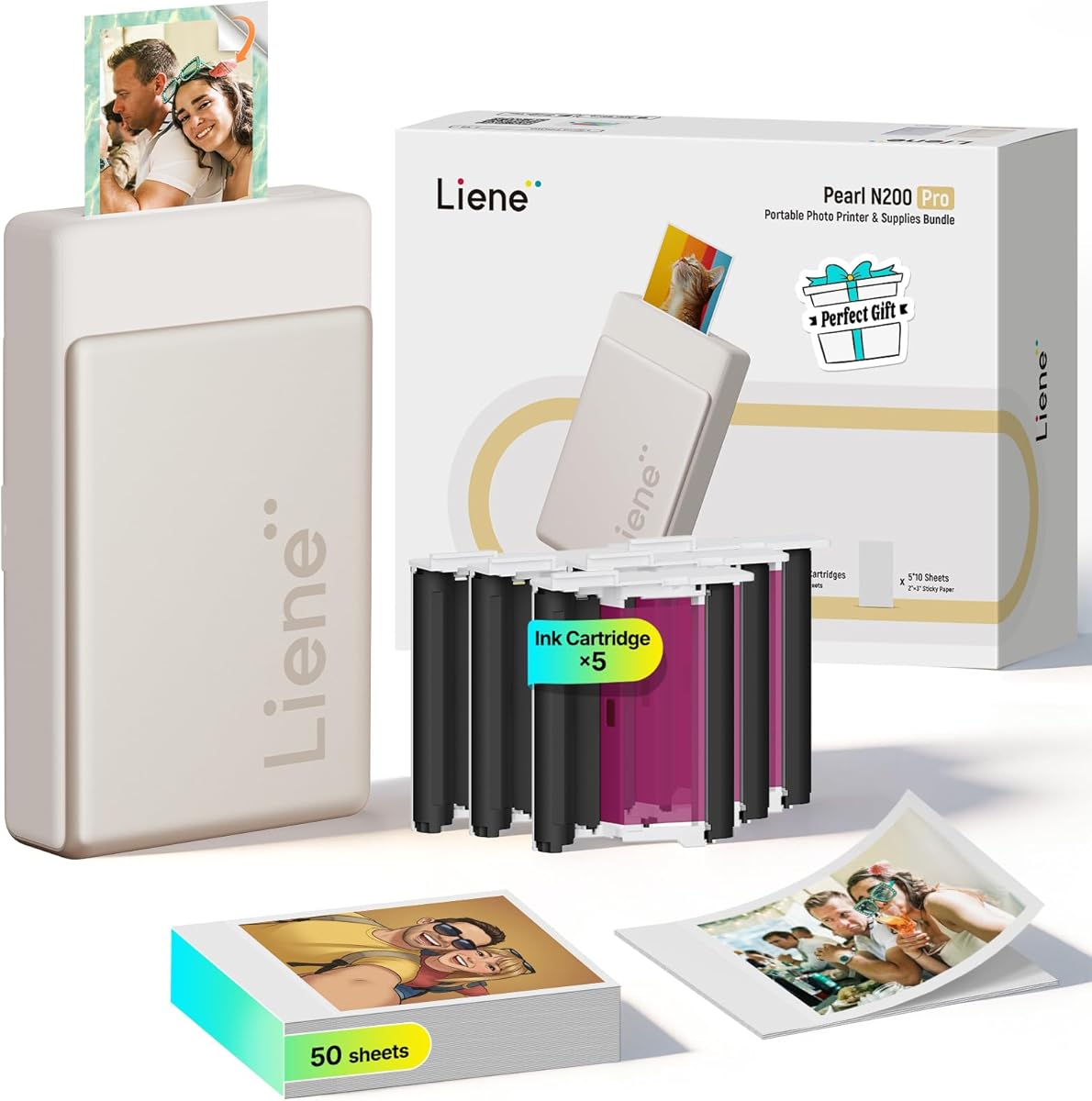
The Liene Pearl N200 Pro is a premium compact photo printer that combines 2×3-inch dye-sublimation output with a substantial creative app. It has a 4.6 rating, the highest among the products in this guide, and stands out through AI-assisted portrait styles, background removal, frames, watermarks, timestamps, and a built-in camera-based shooting mode.
We may earn a commission when you buy through this link, at no additional cost to you.
Unlike a workflow that begins by selecting an existing image, InstaPic Print mode lets users capture a moment and move toward a print through the printer's integrated camera filters. The thermal dye-sublimation process is described as producing sharper results and more vibrant colors than other portable photo printers. Bluetooth pairing and multi-device support let multiple guests print at a party or gathering.
Its constraints come from the portable design. Output is limited to small adhesive-backed photos, and one full charge is stated to support as many as 27 sticker prints, which may require planning for larger events. The supplied data does not provide a full cost-per-print calculation, so owners should consider cartridge use and included media when judging long-term expense.
The N200 Pro is the most feature-rich choice for creative users who value immediate capture, app-based artistry, and polished small prints. It is particularly compelling for parties, scrapbook sessions, social gatherings, and users who want more editing than a basic printer app provides. Buyers should ensure Bluetooth and the app workflow suit them, but for portable creativity it is the standout premium option.
The integrated camera and InstaPic Print mode create a direct path from a moment to a physical sticker. Built-in filters add a playful element to parties, gatherings, and spontaneous celebrations.
AI portrait reinterpretation, background removal, frames, watermarks, timestamps, and official stickers provide a broad editing set. Keeping these tools together reduces the need to move between separate apps for common creative tasks.
We may earn a commission when you buy through this link, at no additional cost to you.
The HP Smart Tank 5003 is a refillable all-in-one positioned for high-volume, low-cost printing. It carries a 3.9 rating and is described as including up to three years of ink and an allowance of 6,000 color or black pages. That large starting supply makes it interesting for households that want the flexibility of an inkjet with a tank-based approach to ongoing costs.
We may earn a commission when you buy through this link, at no additional cost to you.
The cartridge-free tank system is simple to replenish: compatible ink bottles plug directly into the tanks and drain without squeezing. Printing, copying, scanning, borderless output, mobile printing, and wireless printing are all included. The supplied description also highlights sharper text and richer colors associated with HP Smart Tank, although its photo quality should still be judged with the intended paper and settings.
The tradeoff is size and a dependency on proprietary refill bottles. This is a permanent desk printer rather than a portable event device, and the large included allowance does not eliminate the need to confirm bottle availability and ongoing supply costs. Its 3.9 rating also places it behind several competitors, so experienced buyers should check current feedback for their preferred uses.
The Smart Tank 5003 is a good option for a home office, family, or small organization that prints both documents and photos at meaningful volume. It may be especially attractive to users who want fewer cartridge replacements and a generous initial supply. For occasional pictures, a portable photo printer may be more convenient, while the tank format rewards consistent printing.
The tank design replaces conventional cartridges with bottles that plug into the printer and drain into the reservoirs. The mess-free approach is designed to make replenishment more convenient than handling small sealed cartridges.
Borderless printing expands the device beyond text-heavy office work, while copying and scanning prevent it from being a single-purpose printer. Wireless and mobile access make it suitable for shared household or small-office use.
We may earn a commission when you buy through this link, at no additional cost to you.
The right choice depends on photo size, printing volume, paper format, connectivity, and creative features. Comparing these factors before buying helps identify a model that produces satisfying images without creating unexpected ink or supply costs.
A low purchase cost does not necessarily mean inexpensive printing. The most useful comparison includes the required ink or tank system, stated page yield, the number of colors needed for acceptable quality, and whether compatible refills are readily available. Standard inkjets may use separate cartridges for black, color, and photo ink, while thermal printers use dedicated color media. Refillable tanks can be more economical for frequent document and photo output because users replace fluid rather than buying compact cartridge units.
Photo size determines what the printer can practically produce. Dedicated mini models generally handle 2×3-inch adhesive prints, while the Liene M100 focuses on 4×6-inch photographs. Home inkjets may support bordered and borderless output up to 8.5 by 11 inches, which is useful for albums, projects, and framed displays. Larger formats are not necessarily more economical, so select the size that matches your real projects rather than assuming a bigger sheet creates better value.
Inkjet systems spray liquid color and can provide sharp detail on supported photo paper. Thermal dye-sublimation models transfer color into the printing layer, often producing a more durable surface for frequently handled keepsakes. Compact inkjet printers can also produce vivid small photos, while their cartridge economics depend on usage. The ideal technology depends on whether color accuracy, surface durability, media type, or the size of the finished print matters most to you.
Occasional hobby printing and routine office output create very different demands. A compact printer may be perfect for a few snapshots, event favors, or planner photos, but repeated refill and paper changes can become inconvenient. Tank systems are better suited to regular high-volume output, while multifunction models add scanning and copying. Check the included paper, paper tray capacity, automatic duplex support, and whether an automatic document feeder is necessary for your workload.
Most modern photo printers connect through Wi-Fi, Bluetooth, or a USB cable and depend on an app for image transfer and editing. A built-in hotspot can be valuable when a home network is unreliable or unavailable. App quality matters because it determines how easily you crop, filter, add text, remove backgrounds, and select the correct paper. Confirm that the app is available for your phone or computer and that it supports the creative features you genuinely plan to use.
AI editing, background removal, frames, filters, collages, and automatic capture can make creative printing much more convenient, but each feature adds software complexity. A separate photo tray, borderless support, and dedicated photo handling may matter more to families, while scrapbookers may prioritize adhesive backs and creative templates. Avoid paying for advanced tools you will not use, and focus on the media support and editing controls that improve your most common projects.
Portable photo printers are especially useful for travel, parties, school projects, and event giveaways. Their small size and battery operation improve freedom, but paper capacity and charges per session are limited. A home wireless printer offers greater paper handling and is better suited to a fixed desk. Check the listed weight, supported paper size, battery endurance, charging requirements, and whether a power adapter is included before planning to print away from an outlet.
The cheapest ongoing result depends on a dependable supply chain. Check whether cartridges, ink bottles, and matching paper are sold for the exact model, and compare cartridge yield with the number of photos you expect to make. Some portable cartridges include waste containers that are replaced with the cartridge, while ink-tank printers need compatible bottles. Also consider app support, printhead maintenance, and whether the manufacturer continues offering the required consumables for the printer's intended lifespan.
Begin with the correct paper and ink. Keep the printer on a clean, level surface, install the specified cartridge or refill the proper tank, and load compatible photo media in the indicated orientation. Portable Bluetooth models should be paired through the manufacturer's app, while Wi-Fi devices may need to join a network or use a built-in hotspot. Before printing a large batch, make one test image and confirm the crop, borders, orientation, and color settings.
For portable inkjet printers, insert the paper with the smooth side facing down and install the cartridge according to the supplied instructions. For the Liene M100, confirm that the cartridge clicks into place before beginning a job. If an image shows smudges, the product guidance recommends promptly cleaning the print head. A cartridge that has not been used for an extended period may need the print head wiped vertically with a lint-free cloth after opening its packaging.
Store prints away from direct heat, moisture, and excessive light, and allow inkjet images to dry before stacking or inserting them into albums. Keep the cartridge installed when the portable printer is not in use, clean the rollers gently, and avoid touching the print surface. For ink-tank models, use only compatible bottles, tighten containers after filling, and wipe residual fluid from the exterior to protect the surrounding surface.
Refillable ink-tank printers are often the most economical for high-volume color output because they replace smaller cartridge units with larger fluid supplies. Compact cartridge-based models can be inexpensive for occasional prints, but their cost depends heavily on cartridge yield and how many photos you make. Compare cost per finished photo using the exact paper and ink combination you expect to use.
An ink-tank model is usually better when you print documents and photos regularly because refilling can be cheaper and more convenient over time. A cartridge printer may make more sense for light usage or when you already own a compatible printer. The correct comparison also includes paper costs, available supplies, and how often the machine will be used.
Portable printers can produce clear, colorful small photos, but their output size is generally limited. The Nelko PP01 and Liene N200 Pro produce 2×3-inch adhesive prints, while the Liene M100 targets 4×6-inch photos. For letter-size creative work or framed displays, consider a home multifunction such as the Canon PIXMA models or HP Envy Photo 7975.
Bluetooth is common for small portable printers and keeps the workflow independent of a home network. Wi-Fi is better for larger home devices because it can serve several users and integrate with phones, tablets, and computers. Some printers, such as the Liene M100, create their own hotspot, while others join an existing network and support services such as AirPrint or Mopria.
Print only the copies you need, use draft settings for preliminary proofs, and choose the correct paper profile for each supported media. High-quality paper is not a substitute for a suitable image file, so resize photos to the printer's recommended dimensions before transferring them. Regular maintenance also helps avoid wasted pages caused by smudges or poor printhead performance.
Dye-sublimation prints are generally well suited to keepsakes because the color is transferred into the printing layer and the finished surface is described as resistant to water, scratches, and fading. Inkjet output can still look excellent, especially on appropriate photo paper, but may need more care when handled or exposed to moisture. Consider the intended use of each print when comparing technologies.
It varies by product. The Liene M100 includes 100 sheets and three cartridges, the Nelko PP01 works with sticky-backed 2×3-inch paper, and the Liene N200 Pro lists 50 sheets and five cartridges. Always verify the exact bundle before ordering, since package contents can change and compatible replacement supplies may need to be purchased separately.
A photo-only or compact model is usually better for portable use, creative stickers, and occasional keepsakes. An all-in-one is more practical when you also need standard documents, scanning, copying, duplex printing, or a document feeder. Consider the balance between portability, paper size, ongoing ink economics, and the number of non-photo tasks you expect to perform.
The Liene M100 is the strongest overall choice for 4×6 photos because it combines thermal dye-sublimation output, a built-in hotspot, useful editing tools, multiple-device support, and 100 included sheets. The Canon MegaTank G3270 is the budget leader for frequent output, while the Liene Pearl N200 Pro stands out as the premium portable model for advanced creative editing and instant capture.
Prioritize the factors that affect your actual use: cost per print, supported paper size, color technology, wireless workflow, and the volume of documents you need alongside photographs. Dedicated mini printers excel at travel and crafts, 4×6 models suit keepsakes, and refillable tank systems make the most sense for regular high-volume printing.
Before ordering, verify the current ink and paper format, included accessories, app requirements, and supply availability. Prices and ratings can change, and promotional bundles may alter what is in the box. Comparing those current details with the needs identified in this guide will help narrow the field and prevent an attractive printer from becoming an expensive long-term choice.