
120mm AC Computer Cooling Fan
4.7Editor score
Direct wall-outlet power
Adjustable in-line speed control
Slim 120mm mounting profile
A cooling fan for an AV receiver can prevent heat buildup inside a closed cabinet, protect sensitive electronics, and reduce the risk of shutdowns or unstable performance. The right model depends on cabinet clearance, available power, airflow direction, and how much noise is acceptable during movies, gaming, or late-night listening.
We compared all ten products using their stated airflow, noise levels, bearing or motor design, power requirements, speed controls, dimensions, and intended applications. The list includes top-exhaust systems, cabinet-mounted exhaust fans, USB-powered models, dual-fan sets, and a premium multi-purpose system designed to move air around electronic equipment.
Each pick highlights a different practical advantage, from quiet high-capacity cooling to tool-free cabinet installation. Ratings reflect the supplied customer feedback, while features and limitations come from the listed product information. Availability and prices can change, so confirm the current listing and cabinet dimensions before purchasing.
4.7Editor score

4.8Editor score

4.4Editor score
As an Amazon Associate we earn from qualifying purchases.
The comparison below organizes every fan by its most important installation traits, including airflow capacity, operating noise, power method, physical size, and intended cabinet placement. This makes it easier to identify a model that matches your AV receiver setup and available space.
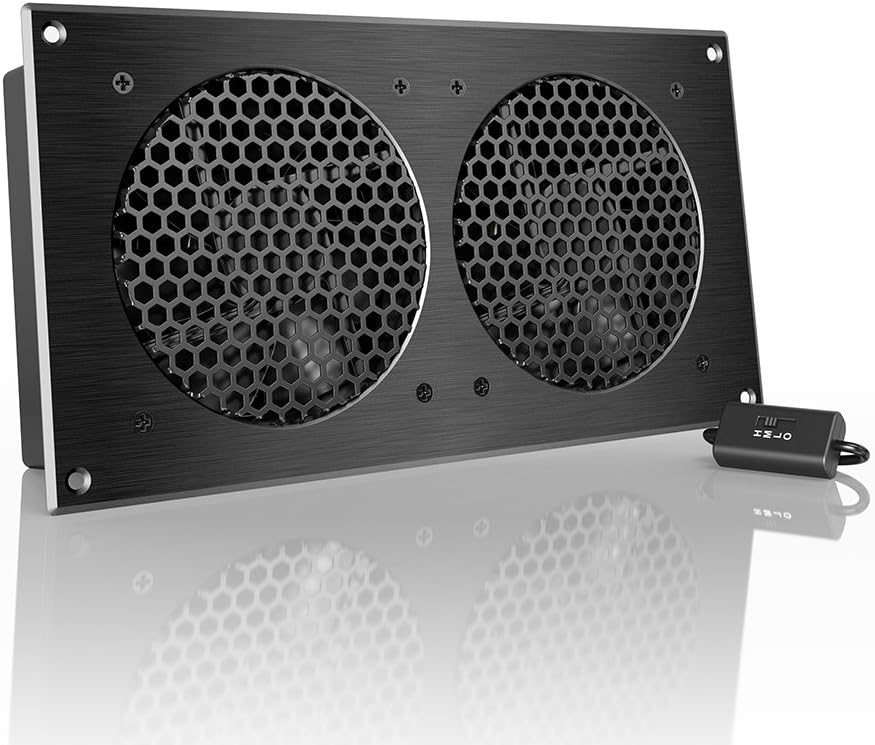


The AC Infinity AIRCOM S7 is a dedicated top-exhaust cooling system for routers, modems, game consoles, and other AV components. It holds a 4.8 customer rating and stands out for combining substantial stated airflow with a quiet 19 dBA operating level. Its purpose-built cabinet format makes it more focused than a conventional desk or computer fan.
We may earn a commission when you buy through this link, at no additional cost to you.
Two dual-ball bearing fans use PWM-controlled motors to move air while minimizing noise. The system offers 140 CFM of airflow, which is the highest listed figure in this guide. Two thermal trigger modes and four speed-control options give the user a way to balance cooling demand against background noise rather than relying on a single fixed setting.
The top-exhaust arrangement is the main design tradeoff. It requires sufficient clearance above the receiver and space for the fan system to draw in air and expel warm air from the cabinet. Its 11.6 by 6.3 by 1.5-inch dimensions are larger than the slim door-gap products in the list, so careful measurement is essential before ordering.
This is the strongest general recommendation for a receiver housed in a closed entertainment cabinet, particularly when the owner wants automated thermal control and high airflow. It is less attractive for a small shelf or a cabinet with very limited vertical clearance, but for a properly sized AV cabinet, the combination of capacity, programmability, and low noise is hard to overlook.
The two thermal trigger modes are especially useful for an AV receiver that works harder during gaming or extended movie sessions than it does while idle. Instead of leaving the fan at maximum output all day, the controls can respond to temperature changes and help maintain a more useful balance between cooling and acoustic comfort.
A stated noise level of 19 dBA makes the AIRCOM S7 suitable for rooms where audible fan noise would be distracting. Dual-ball bearing fans and PWM motor control further support stable, low-noise operation when the cabinet has enough clearance for proper airflow.
We may earn a commission when you buy through this link, at no additional cost to you.
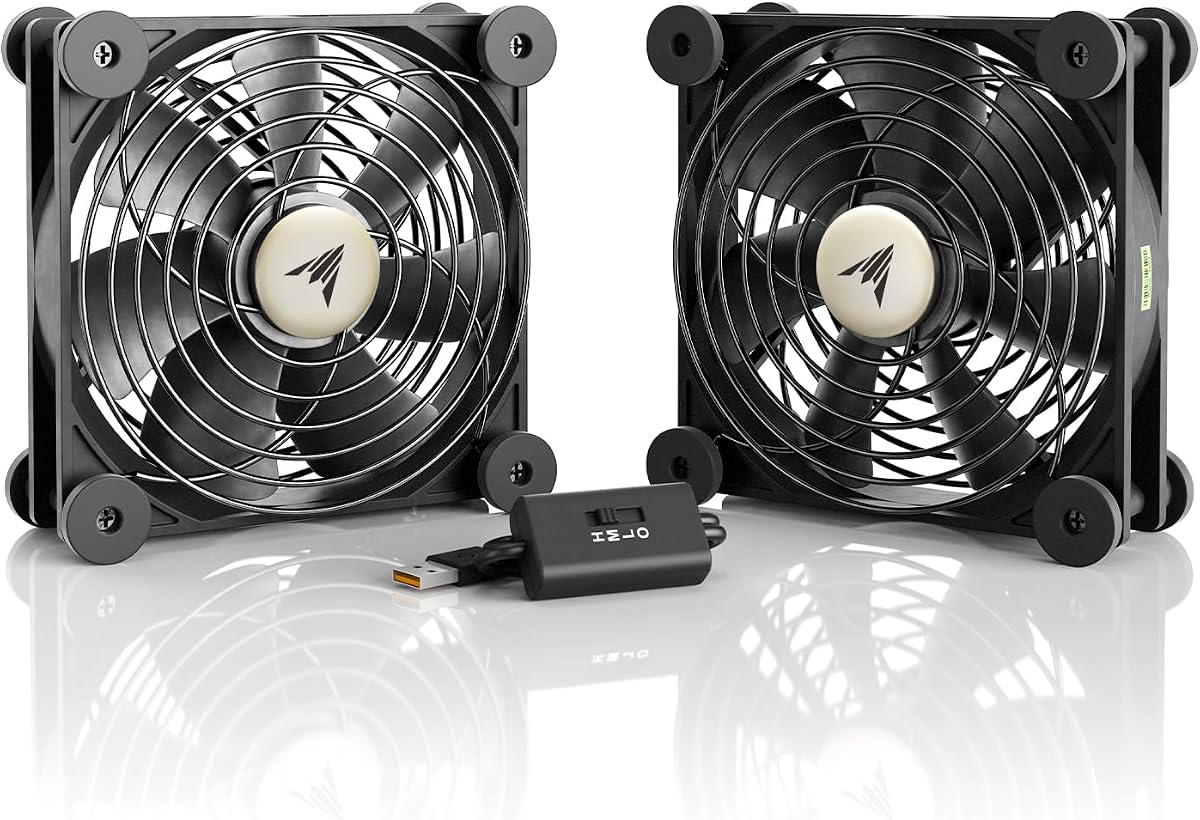
The AC Infinity MULTIFAN S7 uses two compact 120mm USB-powered fans and earns a 4.7 customer rating. It is a versatile option for receivers, routers, consoles, and other electronics because the fans can be laid flat or positioned upright. That flexibility makes it useful when a single exhaust location is not enough.
We may earn a commission when you buy through this link, at no additional cost to you.
Together, the fans provide a stated total airflow of 104 CFM and a total noise level of 19 dBA. A multi-speed controller lets users select a level suited to different viewing or listening conditions. USB power can come from ports on compatible AV electronics, avoiding the need for a separate power supply in many installations.
The fans do not have the same integrated, purpose-built appearance as the AIRCOM S7, and their cables may need to be routed carefully. Each fan measures 4.7 by 4.7 by 1 inch, so physical placement is easy, but directing both fans correctly is the user's responsibility. The included controller also adds another cable to organize.
Choose the MULTIFAN S7 when you want an adaptable two-fan arrangement rather than a fixed top-exhaust unit. It is especially appealing for mixed electronics setups because one fan can handle a hot router while the other cools the receiver or contributes to cabinet ventilation. Proper placement and speed adjustment are essential to obtain its full benefit.
A pair of independent fans gives the installer more ways to improve airflow than a single-fan product. One can pull cool air toward a component while the other moves warm air toward an exhaust opening, provided both are positioned to avoid recirculating the same air.
USB power removes the need for a dedicated outlet or bulky adapter when a compatible source is available. It also makes the system easier to rearrange, which is valuable if the cabinet layout or the collection of components changes over time.
We may earn a commission when you buy through this link, at no additional cost to you.
The AC Infinity AIRPLATE S7 is an ultra-quiet cabinet cooling system rated at 4.7 by customers. It is designed for cabinets where minimal noise and a relatively shallow profile matter. The CNC-machined aluminum frame and brushed black finish also give it a more refined appearance than many utilitarian cooling fans.
We may earn a commission when you buy through this link, at no additional cost to you.
The system provides a stated 104 CFM of airflow at 19 dBA, with a multi-speed controller for adjusting the balance between cooling and noise. It can draw power from a wall outlet or a USB port. The included Turbo Adapter is said to increase performance by 25%, although users should leave enough space for the accessory and connected cables.
Its 11.69 by 6.3 by 1.3-inch dimensions are slimmer than the AIRCOM S7 but not as compact as the door-gap designs. Users will still need to confirm that the fan can be mounted without blocking the receiver doors, ventilation slots, or equipment. A full-width cabinet fan can also create visible cord runs if the power source is not nearby.
The AIRPLATE S7 is an attractive middle ground between a small USB fan and a fully integrated programmable cooling system. It works well when a receiver cabinet benefits from stronger directed airflow but does not have room for a deeper top-mounted unit. Its quiet operation, selectable speeds, and dual power options make it broadly practical.
At 1.3 inches thick, the AIRPLATE S7 can fit more readily into a shallow equipment cabinet than bulkier alternatives. Its slim aluminum frame helps preserve usable space while still directing a meaningful amount of air through the enclosure.
Supporting both wall and USB power gives the installer more freedom when the nearest outlet or USB source is inconvenient. The choice can also simplify installation in a cabinet that already has a nearby power strip or compatible electronics.
We may earn a commission when you buy through this link, at no additional cost to you.
This 120mm AC cooling fan combines a 4.7 customer rating with exceptionally simple setup. It plugs directly into a standard 110V-240V wall outlet, making it a convenient choice when the AV receiver cabinet is near an outlet but has no convenient USB port. The included inline controller allows airflow to be adjusted without unplugging the fan.
We may earn a commission when you buy through this link, at no additional cost to you.
The complete package includes a 120 by 25mm fan, a speed-control dial, a protective metal finger guard, and a five-foot power cord. At only 25mm thick, the fan can fit narrow spaces that cannot accept standard 38mm computer fans. The stated brushless-motor design is also presented as a quieter alternative to fans that hum or rattle.
Its greatest limitation is the five-foot cord, which may not reach a suitable outlet from a central entertainment cabinet. The fan is also more general-purpose than the cabinet-specific products in this guide. It can be screwed onto a vent, secured to a shelf with ties, or placed on a surface, but it does not provide a permanently integrated top-exhaust structure.
This is a practical choice for users who value uncomplicated wall-powered operation and straightforward speed adjustment. It is especially useful for exhaust ventilation in a cabinet with a nearby outlet. Just confirm that the cord can reach without creating an unsafe trip path and that the fan has a safe, stable position.
Direct wall-plug power is the defining convenience of this model. There is no separate power brick to hide or connect, which can simplify installations in furniture where space is limited and cable appearance matters.
The in-line controller makes it easy to move from gentle nighttime ventilation to stronger exhaust during demanding use. Lower settings can reduce audible noise, while higher settings are useful when the receiver and other electronics are generating more heat.
We may earn a commission when you buy through this link, at no additional cost to you.
The Cabinet Cooling Fan USB is a no-drill ventilation solution for home theater cabinets, AV racks, network cabinets, and other electronics enclosures. It earns a 4.0 customer rating and focuses on a common problem: adding airflow without cutting permanent holes into expensive furniture.
We may earn a commission when you buy through this link, at no additional cost to you.
Its slim door-gap format uses existing cabinet gaps or vents to exhaust warm air. The 120mm fan is stated to deliver up to 77.12 CFM. A built-in speed controller allows the user to select quieter or stronger ventilation, while standard 5V USB power lets it operate from a power bank, wall charger, laptop, AV receiver, or another compatible USB source.
The primary drawback is that it needs a dependable USB power source. Powering the fan from the receiver itself may be convenient, but doing so creates a dependency on the device intended to be cooled. It also has the lowest rating among the ten products, so customer satisfaction is somewhat less established than among the leading models.
This fan is a sensible solution for renters, decorative cabinets, and setups where drilling is undesirable. It offers meaningful stated airflow and tool-free placement, but the lower rating deserves attention. Users should verify the door gap dimensions and ensure that the fan is powered from a source that will remain active while the cabinet needs cooling.
The door-gap approach allows air to escape through an opening that already exists. That makes the fan useful in finished cabinetry where permanent modifications would be inconvenient, costly, or visually undesirable.
The same basic design can serve receivers, routers, game consoles, computers, and network equipment. Its usefulness improves when the enclosure is genuinely confined and warm air has limited natural escape.
We may earn a commission when you buy through this link, at no additional cost to you.
The Cabinet Cooling Fan Door Fan is a slim, USB-powered fan for AV cabinets and entertainment furniture. Its 4.4 customer rating reflects a more positive reception than the lowest-rated option, while its core appeal remains the ability to improve ventilation without drilling permanent holes.
We may earn a commission when you buy through this link, at no additional cost to you.
The fan mounts using existing cabinet gaps or vents, making it especially appropriate for a media console that should remain intact. A standard 5V USB connection supplies power, and the stated design supports low operating noise for home theater use. The slim profile is intended to fit narrow media cabinets where bulkier fans cannot be installed.
The listing does not provide a specific airflow figure, so buyers cannot directly compare its output with the 140 CFM AIRCOM S7 or the 77.12 CFM door-gap model. The installation also depends on whether the cabinet has a suitable gap or vent, and the USB cable must reach a dependable power source without leaving the door obstructed.
This model is a strong fit for users who prioritize a discreet, no-drill installation and simple USB operation. It can be used around AV receivers, amplifiers, game consoles, routers, switches, media cabinets, and server racks. Confirm the gap dimensions and power arrangement before ordering, particularly if the cabinet has unusually tight tolerances.
The fan's slim profile and use of existing openings help it blend into an entertainment cabinet without visible cutouts. It is a practical approach for rental properties and furniture that may later be moved or resold.
Low operating noise is a priority in a room designed for movies and music. Adjustable airflow gives users a way to select a lower setting when visual performance matters most or a stronger setting during periods of elevated heat.
We may earn a commission when you buy through this link, at no additional cost to you.
The Cabinet Cooling Fan Gap-Flow is designed to fit against the inner edge of a cabinet door and exhaust heat through an existing gap or ventilation slot. It has a 4.2 customer rating and targets AV receivers, consoles, server racks, and other electronics in confined enclosures.
We may earn a commission when you buy through this link, at no additional cost to you.
Included non-destructive mounting brackets allow installation without a drill bit or complicated hardware. The stated setup can be completed in under 60 seconds, which makes the product attractive for quick cabinet improvements and temporary arrangements. A standard 5V USB connection handles power, and the slim Gap-Flow profile is engineered for limited-clearance locations.
The absence of a published airflow number makes direct output comparison more difficult. Door-gap performance also depends heavily on how closely the fan seals against the opening and whether warm air has a clear route out. The product should not be expected to replace a high-capacity dedicated cabinet system in every installation.
Choose this model for quick, reversible cooling in a home theater or network cabinet where drilling is not an option. It is well suited to AV receivers, PlayStation 5 or Xbox systems, amplifiers, and routers. Users should confirm that the included brackets will hold securely and that the USB source can support continuous operation.
The non-destructive brackets distinguish this model from fan systems designed to be permanently screwed into furniture. Installation and removal are straightforward, making it easier to adjust the position as the equipment layout changes.
The narrow profile is intended to make use of the door gap that many cabinets already provide. In a tight entertainment center, even a small improvement in warm-air escape can help keep an AV receiver operating comfortably.
We may earn a commission when you buy through this link, at no additional cost to you.
The Noctua NV-FS2 is a multi-purpose fan set intended for cooling electronic devices positioned underneath, beside, or on top of them. It is expressly listed for A/V receivers, stereo equipment, routers, game consoles, and storage solutions. Its 4.4 customer rating and comprehensive accessory package support its position as the premium option.
We may earn a commission when you buy through this link, at no additional cost to you.
The set centers on an NF-A12x25 PWM 120mm fan, known in the product description for ventilation efficiency and quiet operation. Extra-soft silicone gasket material and pads reduce vibration, while the offset design supports acoustics and airflow in either intake or exhaust positions. That flexibility is valuable when a cabinet's best fan location is not immediately obvious.
A compact NA-FC1 controller allows adjustment from maximum airflow toward near-silent operation. The package also includes a pre-installed fan grill, a 230/115V power supply with EU, US, and UK plug adaptors, and a one-meter extension cable for a combined stated length of 2.85 meters. More included components mean more routing choices, but also more to keep organized.
The NV-FS2 is best for a buyer who wants a refined fan, quiet adjustment, and a complete installation kit rather than the smallest possible solution. Its premium feature is the combination of a premium 120mm PWM fan, vibration control, flexible placement, and direct mains power. Verify the available power source and cable route before choosing it for a finished cabinet.
The NA-FC1 controller makes it possible to reduce fan speed when room acoustics matter and increase it when cooling demand rises. This is especially useful for a receiver placed beside seating or equipment used during quiet nighttime viewing.
Extra-soft silicone gasket material and pads help reduce the transfer of vibration into furniture. The offset design also reflects careful attention to acoustics, which can make a noticeable difference on a lightweight shelf or media cabinet.
We may earn a commission when you buy through this link, at no additional cost to you.
The Wathai 140mm x2 USB fan is a wide, flat cooling option for receivers, consoles, routers, computers, and crowded AV cabinets. It earns a 4.3 customer rating and combines two 140mm fans with a stated 57 CFM of airflow and an 18 dBA noise level, the lowest listed figure in this guide.
We may earn a commission when you buy through this link, at no additional cost to you.
A three-speed controller allows users to balance cooling against noise with low, medium, and high settings. USB power provides simple compatibility with AV receivers, routers, PCs, PS4, and Xbox, according to the product information. The fans can also be daisy-chained when more cooling or a coordinated installation is needed.
Its dual-fan design is 11 by 5.5 by 1 inch, so it covers more area than a single 120mm fan. While the flat configuration can fit a cabinet shelf, both fan housings and the connecting cables must be accommodated. Sleeve bearings are also listed rather than dual-ball bearings, which may influence the decision for buyers prioritizing bearing type.
This model is a good match when low acoustic output and broad coverage are priorities. It can sit under or on top of heat-producing gear, with the airflow direction chosen to match the setup. Measure the available shelf area and make sure the controller and USB connections will remain accessible before installation.
Two 140mm fans offer useful reach across a shelf or enclosure. The wide format can cool more than one closely grouped component without requiring a single fan to be positioned awkwardly between devices.
The stated 18 dBA noise level and three selectable speeds give users meaningful control over background sound. Low settings are suited to quiet viewing, while higher settings provide more airflow when the equipment is working harder.
We may earn a commission when you buy through this link, at no additional cost to you.
The GDSTIME 240mm Router Fan Cooler is a wide USB cooling system with two 120mm fans. It has a 4.3 customer rating and can be positioned under or on top of a receiver, amplifier, router, DVR, console, computer, or other AV electronics. The overall 240mm width gives it a broader cooling footprint than a single-fan model.
We may earn a commission when you buy through this link, at no additional cost to you.
Low, medium, and high settings are controlled through an inline switch. The low setting is described as near-silent from two feet away, making it useful during film or music playback. USB power can come from a Type-A port on compatible equipment, a wall charger, or a portable power bank, and the system requires no assembly.
The dual-fan layout may be less convenient on a narrow shelf, and the listed hydraulic bearing motor should be considered when weighing long-term use. Like other USB systems, it also depends on a suitable powered source. A dedicated wall adapter may be more reliable if the connected receiver or another component is switched off with the cabinet.
The GDSTIME cooler is a versatile option for users who want one assembly to support several nearby pieces of equipment. Its combination of a broad profile, three speeds, and simple USB power makes installation straightforward. It works particularly well when the cabinet has a wide shelf and a dependable USB source within reach.
The two-fan format can provide air across a receiver and a neighboring router, amplifier, or console. Placing the assembly above the equipment allows warm air to rise into the airflow path, provided the cabinet has a suitable route for that air to leave.
Three clearly separated settings make it easy to match fan output to the room and workload. The low setting is particularly attractive for quiet use, while the high setting is intended for stronger cooling during demanding operation.
We may earn a commission when you buy through this link, at no additional cost to you.
The best cooling fan for an AV receiver is the one that fits the cabinet, creates a useful exhaust path, runs quietly enough for the room, and can be powered safely. Comparing size, airflow, noise, installation method, and controls before buying prevents many common installation disappointments.
Measure the usable space before selecting a fan, including the height above the receiver, the width behind cabinet doors, and the depth needed for cables. A 120mm fan is common in compact equipment, while the AIRCOM S7 and AIRPLATE S7 use wider systems that require a broader mounting area. Door-gap fans can be slender, but they still need enough space to sit against the opening without preventing the door from closing.
Choose a fan whose full dimensions, including guards and controls, fit the intended location. Leave room for airflow and cable bends rather than measuring only the fan face.
Cooling works best when air enters through an available opening, passes near the heat-producing equipment, and exits elsewhere. A top-exhaust system is well suited to cabinets with clearance above the receiver, while a door-gap fan can remove rising warm air through a narrow opening. A fan placed in a sealed cabinet with no fresh-air inlet may circulate hot air without producing much net cooling.
Prioritize a product that matches your cabinet's opening and intended exhaust route. Confirm that the receiver's own vents are not blocked and that the fan can move air away from the equipment.
The listed models range from a stated 18 dBA to 19 dBA, and several include multi-speed controls for reducing output when appropriate. Noise is influenced by fan size, motor design, speed, vibration, cabinet resonance, and how close the listener sits. A fan that seems quiet in an open room can become noticeable inside a hollow cabinet or near a hard cabinet wall.
Look for adjustable speed and consider the lowest setting that maintains acceptable airflow. Place the fan on stable surfaces and use included vibration-reducing materials where available.
USB power is convenient for entertainment centers that already have compatible devices, but the source must remain on whenever cooling is needed. Wall-powered products offer independent operation and can be more dependable for overnight protection. A fan powered by the AV receiver itself creates a circular dependency: if that receiver is turned off, the fan stops as well.
Choose a stable power source and route cords away from doors, vents, and walking paths. Verify connector compatibility, cord length, and whether an additional USB port or outlet is available.
No-drill fans are valuable in decorative cabinetry, rentals, and furniture that may move. Door-gap mounting or non-destructive brackets provide a reversible solution, although they depend on suitable gaps and stable contact with the opening. Wall-mounted cabinet systems may feel more integrated but can require drilling and more careful alignment.
Check whether the cabinet already has vents, slots, or enough door clearance. If permanent modification is acceptable, choose a system that creates a more direct and reliable exhaust path.
Manual speed control is useful for simple installations, while thermal programming can reduce the need to adjust the fan throughout the day. The AIRCOM S7 offers two thermal trigger modes and four speed options, making it particularly attractive for cabinets whose heat level changes with viewing or gaming activity. A multi-speed controller is a useful middle ground between fixed output and full automation.
Decide whether you value fine manual control or automatic temperature response. More features are not automatically better, but programmable behavior can keep a receiver cooler without running at maximum noise around the clock.
A receiver-only cabinet may need only one directed fan, while a cabinet containing a receiver, amplifier, game console, router, and streaming box may benefit from wider coverage. Dual-fan designs can cool multiple nearby devices or combine intake and exhaust positions. Multi-purpose fans placed above equipment can support a broader group of components without permanent cabinet modifications.
Map the heat sources and available openings before choosing between one or two fans. More fans are not always necessary; correct placement and a continuous airflow path matter more than the number of units.
Begin by identifying the receiver's intake and exhaust areas, then position the fan where it can draw or move air without obstructing ventilation openings. For a top-exhaust system, center the equipment beneath the exhaust and maintain the recommended clearance. For a door-gap model, secure the fan against the inner edge of the door and confirm that the door still closes without pressing on the housing.
Connect the chosen power source, begin at a low speed, and increase airflow gradually while checking for vibration, rattling, recirculation, and cable strain. The receiver and fan should not be positioned so that one blocks the other's vents. After a period of use, compare the receiver's temperature behavior under typical and heavy workloads, then adjust the speed or placement as needed.
For routine care, disconnect power before moving or cleaning the fan. Remove accumulated dust from the blades and housing with a soft, dry brush or compressed air used carefully around the bearings. Check that the protective guard remains secure, tighten loose mounting hardware, and inspect cables for bending or damage. Clean the cabinet openings as well, because blocked vents can negate the benefit of an otherwise effective fan.
A dedicated fan is most useful when the receiver operates inside a closed or poorly ventilated cabinet. If the equipment has open shelf space and unrestricted airflow, it may cool adequately without assistance. Signs that airflow is needed include unusually warm cabinet surfaces, fan noise that never stops, or receiver shutdowns during extended use. A modest exhaust setup can help before the problem becomes severe.
A 120mm fan is the most common size represented in this guide because it fits many shelves and ventilation openings. Larger multi-fan systems can provide more airflow and broader coverage, but they require more space. The best size is determined by cabinet clearance, the available exhaust opening, and the amount of heat that needs to be removed rather than by fan size alone.
Exhausting warm air is generally the most useful arrangement because heat rises and can collect near the top of an enclosure. The system also needs some way for cooler air to enter, whether through another opening, a lower cabinet vent, or controlled leakage around the door. If intake and exhaust simply circulate the same trapped air, the improvement may be limited.
Some USB fans can draw power from a compatible receiver, but only while that receiver is operating. A separate wall charger or powered USB hub provides more dependable cooling, especially when the receiver is switched off. Verify the USB power requirements and avoid using a port that may disconnect when the receiver enters standby mode.
A quiet fan can provide effective cooling when it is correctly sized, continuously powered, and allowed to move air along a clear path. The stated noise and airflow figures are useful comparisons, but cabinet resonance and placement also influence perceived performance. Starting low and increasing the speed as needed usually produces the best acoustic balance.
They are designed to use existing cabinet gaps, door edges, or ventilation slots. Performance depends on how well the fan seals against the opening and whether the receiver sits near the rising warm-air path. A small gap that leaks heavily may reduce effective exhaust, so the mounting position should be adjusted to minimize bypass airflow.
Inspection frequency depends on the amount of dust in the room and the operating environment. A quick visual check every few months is sensible, with cleaning performed sooner if you notice rattling, vibration, or declining airflow. Always disconnect power first and keep moisture away from the fan and electronics.
One well-placed fan may be sufficient for a single receiver with clear intake and exhaust openings. A dual-fan system is more useful when several heat-producing devices share a cabinet or when one fan can provide intake while the other provides exhaust. Measure the shelf and plan the airflow path before choosing a wider two-fan assembly.
The AC Infinity AIRCOM S7 is the leading all-around choice because it combines 140 CFM of stated airflow, quiet PWM-controlled dual-ball bearing fans, and programmable thermal response. The 120mm AC fan is the best budget starting point, and the Noctua NV-FS2 is the premium option for buyers who prioritize refined noise control, vibration reduction, flexible placement, and a complete accessory package.
For most installations, prioritize a clear airflow path and a stable power source before focusing on fan specifications. Measure the cabinet, confirm that the receiver's vents remain open, and select a mounting method that suits the furniture. USB models are convenient, but a dedicated source may be more reliable, while top-exhaust and door-gap designs are best matched to the cabinet's geometry.
Ratings, product configurations, availability, and prices can change, so review the current listing before making a final purchase. Comparing the dimensions, stated airflow, noise level, and connection method against your actual setup will lead to the most suitable cooling fan for the receiver and the room around it.