
Bluetooth Mouse for Laptop Donut Pink
4.7Editor score
Bluetooth and 2.4G connectivity
Silent-click operation
Rechargeable 20-day battery
A mini travel mouse offers a practical way to make a laptop or compact computer easier to navigate without carrying a full-size peripheral. The best models balance a genuinely pocketable shape with dependable tracking, intuitive controls, simple connection methods, and enough comfort for work sessions that extend beyond a brief trip.
We compared these ten options by examining their connection styles, dimensions, sensor specifications, button layouts, power arrangements, operating-system support, and intended travel scenarios. The list includes wired, 2.4 GHz wireless, Bluetooth, and multi-mode designs, giving travelers different ways to balance convenience, reliability, and desk space.
Each review highlights the qualities that matter most for portable use, along with any compromises worth considering. The first three recommendations represent our strongest overall, premium, and budget choices, while the remaining entries provide practical alternatives. Product availability and pricing can change, so confirm current details before buying.
4.7Editor score

4.5Editor score

4.2Editor score
As an Amazon Associate we earn from qualifying purchases.
The comparison below places every compact mouse side by side, emphasizing connection method, portability, tracking, and everyday usability. It is designed to make the differences between simple wired models and more versatile wireless options easy to assess.



The Logitech Wireless Mini Mouse M187 Ultra Portable combines a genuinely pocket-ready body with the dependable convenience of 2.4 GHz wireless connectivity. Its 4.5 rating reflects a well-balanced feature set, and the most appealing qualities are its 1000 DPI optical sensor, three-button layout, and exceptionally small footprint.
We may earn a commission when you buy through this link, at no additional cost to you.
The mouse is designed to travel without becoming an afterthought. Its nano receiver can remain connected to the computer or be stored inside the mouse when it is not in use, reducing the chance of leaving an essential piece behind. The 1000 DPI sensor provides responsive cursor control for general productivity, web browsing, document work, and routine laptop navigation.
Its primary limitation is the need for a USB receiver, which rules it out for devices without a compatible USB-A port. It also uses a replaceable battery rather than a rechargeable cell. These are modest compromises for buyers who want uncomplicated wireless operation and broad compatibility across Windows, Mac, Chrome OS, and Linux systems.
This is our leading recommendation for travelers who want an established compact mouse without navigating complicated pairing procedures. It suits students, business travelers, café workers, and anyone who regularly switches between a laptop and a shared desktop. The combination of small size, straightforward controls, and receiver storage makes it especially convenient for mobile use.
The M187 occupies far less bag space than a conventional mouse, while its wireless design removes a cable from the setup. Storing the nano receiver inside the mouse also simplifies packing and helps preserve access to an occupied USB port.
A 1000 DPI optical sensor is well suited to routine desktop work and offers a useful balance of control and portability. The three buttons provide everything most users need without introducing complexity or crowded controls.
We may earn a commission when you buy through this link, at no additional cost to you.
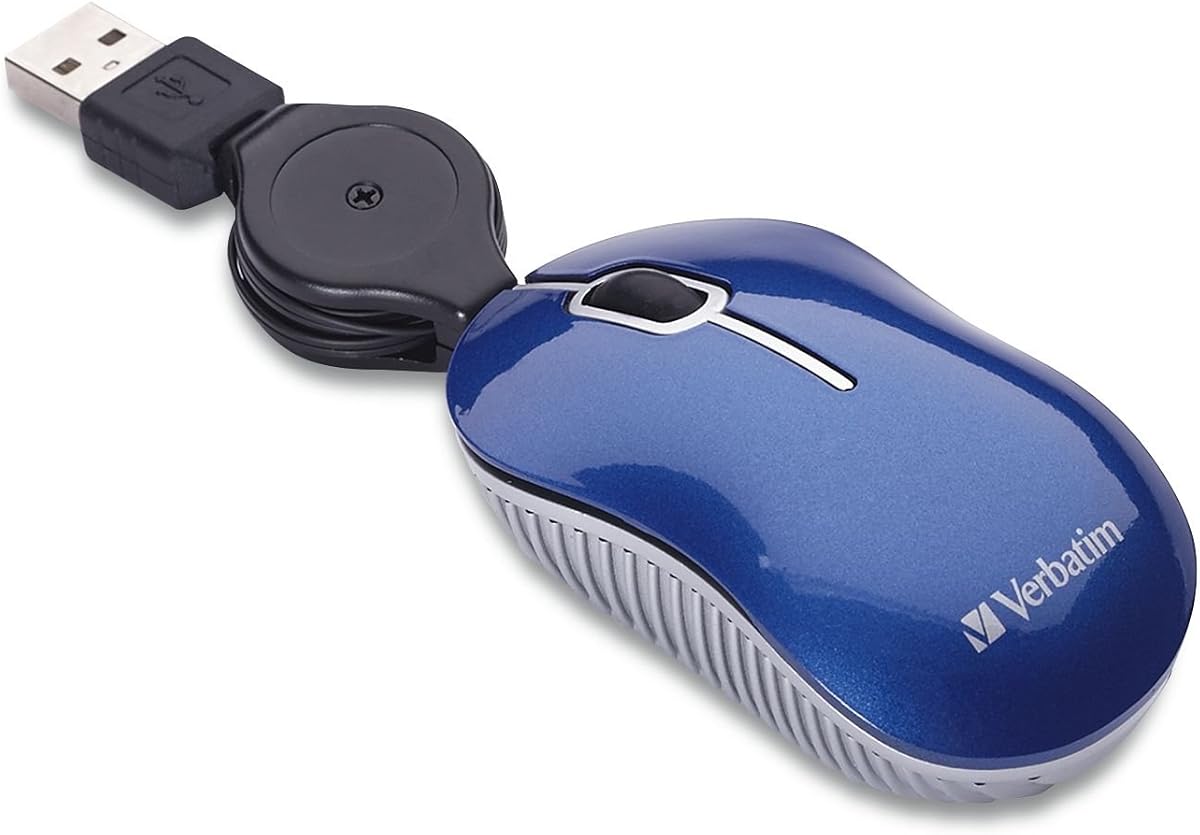
The Verbatim Mini Wired Mouse USB-A Travel Mouse with 27-inch Retractable Cable is a straightforward option for anyone who wants a compact pointer without managing batteries or radio connections. It carries a 4.2 rating and emphasizes portability, responsive optical tracking, and immediate plug-and-play operation.
We may earn a commission when you buy through this link, at no additional cost to you.
Its retractable cable is the standout feature. The 27-inch length provides enough reach for a laptop or desktop setup, yet the cable can retract to avoid the loose loops and tangles that commonly develop when a conventional wired mouse is packed into a briefcase or laptop bag.
Because it is wired, the mouse cannot offer the cable-free freedom of a wireless model. It also needs a USB-A port, and its listed compatibility includes older Windows versions rather than a broad modern operating-system range. However, the absence of batteries, charging cables, and pairing steps makes the setup exceptionally predictable.
This mouse is a sensible choice for students, frequent fliers, and office workers who carry a computer bag regularly but want a dependable accessory with almost no maintenance. It is also well suited to controlled workspaces where radio interference is a concern or USB-A is more convenient than Bluetooth.
The retractable cable keeps the mouse tidy inside a pocket or laptop sleeve. That makes it one of the simplest choices for travelers who dislike carrying a loose cord between their computer and mouse.
There are no batteries to replace, no receiver to store, and no Bluetooth device to pair. Connecting the mouse to a compatible USB-A port is enough to begin using its optical tracking.
We may earn a commission when you buy through this link, at no additional cost to you.
The second Verbatim Mini Wired Mouse adds explicit USB 2.0 and USB 1.1 support to the same travel-friendly concept. With a 4.2 rating, it delivers a compact optical design, a retractable 27-inch cable, and a direct connection that requires neither batteries nor a wireless receiver.
We may earn a commission when you buy through this link, at no additional cost to you.
The wider standard support is useful for older or mixed-purpose computer environments. A user can move between systems with different USB generations without needing an adapter, as long as the computer provides a compatible USB-A connection. The retractable cable further improves the experience by keeping the cord controlled during travel.
Like other wired choices, it cannot offer complete wireless freedom, and its product information lists a more limited set of operating systems than some competing models. It also does not include features such as adjustable sensitivity, silent clicks, or rechargeable power. Those omissions are reasonable for a basic travel mouse focused on compactness.
This is a strong alternative for buyers who prioritize durability of the connection, broad USB-generation support, and simple operation. It suits shared offices, classrooms, and travel kits where a mouse should work immediately after being plugged in.
Support for both USB 2.0 and USB 1.1 gives this model a practical advantage in older computer setups. It remains useful as a simple shared-device accessory when compatibility matters more than wireless flexibility.
The retractable cable keeps the mouse easier to place in small compartments. Once extended, the cord allows normal positioning on a desk while avoiding the need to wrap it around the body.
We may earn a commission when you buy through this link, at no additional cost to you.
This Wireless Bluetooth Mouse stands out for offering 2.4 GHz, Bluetooth 4.0, and Bluetooth 5.0 modes in a compact rechargeable package. It earns a 4.4 rating and adds features that appeal to mobile workers, including silent clicks, a 1200 DPI optical sensor, and an included travel case.
We may earn a commission when you buy through this link, at no additional cost to you.
The three-mode design provides useful flexibility. A user can employ the USB receiver when convenient, or connect through Bluetooth when working with a compatible tablet or laptop without occupying a USB port. The magnetic receiver-storage area on the underside helps keep the small adapter from disappearing inside a bag.
The rechargeable battery eliminates routine battery replacement, while a charging indicator shows red during charging and green when complete. A sleep mode reduces power use after inactivity. These benefits are balanced by a more involved Bluetooth pairing process and limitations on older desktop systems, which may not support all wireless modes.
The mouse is best for frequent travelers who alternate among computers, tablets, and shared workspaces. It is particularly attractive in libraries, conference rooms, and other places where silent operation and a rechargeable design are more useful than the absolute simplicity of a wired model.
Supporting 2.4 GHz alongside two Bluetooth versions lets the mouse adapt to different devices. This is useful when a traveler wants one compact accessory for a USB-equipped computer, a modern tablet, and a laptop with limited USB access.
Silent buttons can be valuable in shared offices and quiet public settings. The rechargeable power system, status light, and automatic sleep mode reduce the ongoing attention normally associated with portable mice.
We may earn a commission when you buy through this link, at no additional cost to you.
The Logitech M187 Wireless Mini Mouse is a familiar compact design for travelers who prefer a minimal setup. It carries a 4.2 rating and uses a small 2.4 GHz receiver that can remain in the USB port or be stored inside the mouse when it is not being used.
We may earn a commission when you buy through this link, at no additional cost to you.
The shape is designed for either hand and is small enough to fit easily into a laptop bag. Its wireless construction provides more freedom than the built-in touchpad while preserving the familiar response and layout of a conventional desktop mouse. Setup only requires connecting the receiver and beginning to use the pointer.
The model does not offer adjustable DPI, silent clicks, rechargeable power, or a choice of wireless standards. It is a focused three-button device intended for general productivity rather than specialized control. Battery replacement and receiver storage remain minor tasks compared with maintaining a wired cord.
This Logitech option makes sense for buyers who already recognize the M187 platform or want a small mouse for occasional travel use. It is particularly useful for anyone spending a few weeks working away from a primary desk and needs a familiar peripheral that can be packed immediately after use.
The nano receiver can remain connected or travel inside the mouse. This small but thoughtful storage solution helps preserve USB access and reduces the chance of leaving the receiver behind.
The compact body is shaped to accommodate either hand, making it suitable for shared environments. It offers a practical alternative to a touchpad without asking the user to adapt to a highly unconventional layout.
We may earn a commission when you buy through this link, at no additional cost to you.
The Wireless Cute Mini Computer Mouse is an affordable, pocket-oriented option with a 2.4 GHz connection and 1000 DPI optical tracking. Its 3.9 rating is the lowest in this group, yet the core travel features are appropriate for buyers seeking a simple secondary mouse.
We may earn a commission when you buy through this link, at no additional cost to you.
The mouse is small enough for a pocket and includes receiver storage on its underside. Connecting the USB receiver is enough to begin using it, with no driver installation required. Its smooth, curved shell is intended to provide a comfortable grip for users with smaller hands, while the three-button layout remains familiar.
The main drawback is that a required AAA battery is not included. Users must supply one before use, and a lightweight wireless mouse may need regular battery attention. The product also offers fewer advanced features than the multi-mode and rechargeable alternatives, but that simplicity can be an advantage for a secondary travel device.
This model is a sensible choice for children, students, and occasional travelers who need a dedicated pointer that is easy to carry. It works particularly well as a compact backup mouse kept in a laptop sleeve or shared travel pouch.
The compact body is designed to occupy minimal space in a pocket, school bag, or laptop sleeve. Its small size makes it easy to keep a dedicated mouse close at hand without carrying a full-size peripheral.
The 1000 DPI sensor and familiar three-button configuration cover standard navigation and clicking tasks. Receiver storage beneath the mouse helps organize the only accessory needed for wireless operation.
We may earn a commission when you buy through this link, at no additional cost to you.
The Logitech M170 Compact combines a 2.4 GHz connection with a 4.5 rating and an emphasis on efficient wireless operation. Although it is compact enough for a bag, it is somewhat larger than the most aggressively pocket-sized products in the list, offering a slightly more substantial shape for extended use.
We may earn a commission when you buy through this link, at no additional cost to you.
Its advertised 12-month battery life and automatic sleep function reduce the need for frequent battery changes. A wireless range of up to 33 feet provides freedom from the desk, while controlled line-by-line scrolling and optical tracking support accurate navigation across nearly any surface.
Like the other receiver-based Logitech models, it occupies a USB port while in use. It also does not provide rechargeable power, silent switches, Bluetooth, or adjustable DPI. The product information further lists compatibility across Windows, macOS, Linux, Chrome OS, iPadOS, and Android, making it one of the more broadly platform-friendly options.
This mouse is best for someone who wants a compact wireless device with fewer charging interruptions and broad operating-system support. It suits travelers, students, and office workers who value dependable range and battery efficiency over having the smallest possible footprint.
The combination of a 12-month advertised battery life and automatic sleep helps the mouse remain practical between trips. A user can pack it without planning to recharge the device routinely.
Support for major desktop and mobile operating systems gives the M170 flexibility beyond a single computer type. Optical tracking and controlled scrolling further improve its usefulness for general productivity.
We may earn a commission when you buy through this link, at no additional cost to you.
The FMOUSE Ultra-Mini 2-in-1 stands apart with a 4.2 rating and a feature set unlike the other travel mice in the group. It combines a thumb-sized Bluetooth mouse with a microSD card reader, creating a compact accessory for moving files as well as controlling a computer.
We may earn a commission when you buy through this link, at no additional cost to you.
The body measures 3.07 by 1.49 by 0.87 inches and weighs only 30 grams, making it one of the smallest options available. Its 120mAh lithium battery supports charging while the mouse remains in use, and the included USB-C cable doubles as a lanyard. Three DPI levels—800, 1200, and 1600—allow the user to adjust sensitivity.
The integrated card reader supports TF cards up to 2TB, and this version includes an 8GB card. Both functions can work simultaneously without switching modes or installing extra software. The trade-off is that the mouse relies on Bluetooth rather than offering a 2.4 GHz receiver, and the card reader adds little value for someone who never transfers files that way.
This is an excellent premium choice for mobile creators, photographers, and frequent travelers who want to minimize the number of accessories in a bag. It is also a practical gift for anyone who regularly moves files between a phone, camera, tablet, and computer.
The integrated TF card reader turns the mouse into a two-function travel accessory. Because both features operate simultaneously, users can control a device and move compatible files without carrying a separate reader.
At 30 grams and less than four inches long, the FMOUSE is designed to disappear into a pocket or small tech pouch. Its dimensions make it especially attractive for travelers who prioritize carrying less.
We may earn a commission when you buy through this link, at no additional cost to you.
The Bluetooth Mouse for Laptop Donut Pink combines the highest customer rating in the group, 4.7, with a colorful compact design and versatile wireless functions. It supports both Bluetooth and 2.4 GHz connections, allowing it to work across computers, tablets, and smartphones with a one-button mode switch.
We may earn a commission when you buy through this link, at no additional cost to you.
Its 1200 DPI optical sensor provides smooth tracking, and the silent-click design is useful in offices, libraries, classrooms, and other shared environments. The rechargeable battery is advertised to last up to 20 days, while support for use while charging helps maintain productivity during a long workday.
The distinctive pink appearance is not for everyone, although it gives the mouse a more personal look than conventional office equipment. It lacks a carrying case and offers fewer device modes than the three-mode wireless alternative, but the included 2.4 GHz option compensates for devices that do not support Bluetooth.
This is our preferred premium recommendation for a buyer who wants a travel mouse with strong feedback, quiet operation, attractive styling, and flexible connectivity. It works particularly well for students, café users, and professionals who switch frequently between a laptop and tablet.
Bluetooth and 2.4 GHz connectivity make the mouse adaptable across different computers and mobile devices. A single control switches modes, reducing the need to carry several input accessories.
Silent clicks and a compact pink finish give the mouse both functional and visual appeal. It offers a pleasant way to upgrade from a touchpad without introducing distracting click noise in shared spaces.
We may earn a commission when you buy through this link, at no additional cost to you.
The EEEKit Ultra Compact 3-Button USB Mouse is built for buyers who need to reclaim every bit of space in a laptop bag. It carries a 4.2 rating, measures 3 by 1.57 by 0.98 inches, and uses a retractable USB cable that extends to approximately 31.4 inches.
We may earn a commission when you buy through this link, at no additional cost to you.
Its three buttons provide the standard left-click, right-click, and scroll-wheel controls needed for everyday computing. The optical tracking system supports text selection and routine navigation, while plug-and-play operation eliminates driver installation and charging requirements.
The largest trade-off is physical scale. The product information specifically recommends checking the size chart and comparing the dimensions with a palm before buying. Users with larger hands may find a slightly larger model more comfortable during extended work. The mouse also needs a USB-A port and cannot connect through Bluetooth.
Despite that limitation, the EEEKit is a useful budget-oriented choice for students, children, and travelers who value physical compactness above advanced wireless functionality. It fits naturally into a pocket, pencil case, or small laptop pouch and remains ready for immediate use.
At just over three inches long, the mouse is built to fit where a full-size model cannot. Checking its dimensions before purchase helps avoid disappointment, particularly for users with larger hands.
The 31.4-inch cable extends far enough for normal desk positioning and retracts when packing. This eliminates the need to wrap a cord around the body and keeps the travel kit organized.
We may earn a commission when you buy through this link, at no additional cost to you.
A travel mouse should be small enough to carry, comfortable enough to use, and compatible with the devices you actually take on the road. The following factors help narrow the field before you choose between a wired pointer, a receiver-based wireless mouse, or a rechargeable Bluetooth model.
Choose the smallest shape you can comfortably control rather than focusing exclusively on the lowest possible size.
Prefer wired for zero maintenance, receiver-based wireless for easy desktop use, and Bluetooth for a receiver-free connection.
Check the operating system and Bluetooth version before choosing a multi-mode model, especially if you use an older device.
For ordinary travel productivity, 1000 or 1200 DPI is sufficient; adjust sensitivity only when a specific workflow requires it.
For infrequent travel, choose the power system that matches your habits; for long trips, carry a way to recharge or replace the battery.
Prioritize models that keep receivers, cables, and storage organized so the travel mouse does not create new clutter.
Choose silent buttons for shared spaces, and consider standard clicks only when tactile feedback matters more than noise level.
Verify both the device's port and its operating-system support before ordering, especially for older or mixed-device travel setups.
Before the first trip, fully test a new mouse with every computer and connection method you expect to use. For a wired model, connect it briefly to confirm that the USB-A port, scroll wheel, and buttons respond correctly. For a receiver-based mouse, install the batteries, connect the receiver, and test the pointer on more than one surface. Verify that a Bluetooth model is discoverable and that the selected device name is correct before relying on it away from a familiar setup.
Pack the mouse according to its design. Store a receiver in the mouse or in a dedicated pocket so it remains with the accessory. Do not force a retractable cable; extend only the length needed and allow it to retract gently. A small sleeve can protect the mouse from scratches and prevent it from shifting around a bag. For rechargeable models, carry the specified charging cable when the trip includes several days away from reliable power.
Keep the optical sensor clean and avoid tracking on dirty, reflective, or highly textured surfaces. Periodically remove loose dust from around the wheel and buttons with a dry cloth. Do not use liquids directly on the mouse. When storing it for an extended period, remove the batteries from replaceable-battery models, and keep the mouse away from extreme heat or moisture. A quick inspection before departure can reveal a loose receiver, low battery, or damaged connector while there is still time to address it.
A mini mouse provides a familiar three-button layout, making it easier to position a cursor, select text, and scroll in separate directions. Its compact body also avoids the bulk of a full-size mouse, so it can be carried in a laptop sleeve or tech pouch. Many users find the physical mouse more precise for extended desktop work than a touchpad.
A wired mouse is simpler because it needs no batteries, charging, pairing, or separate receiver. A retractable cord can keep it organized inside a bag. Wireless models offer greater freedom and may connect to tablets through Bluetooth, but they introduce batteries, pairing steps, or a small adapter that must also be carried.
It depends on the connector supplied with the mouse. A wired model with a USB-A plug usually requires a compatible USB-C adapter, while a Bluetooth model needs no physical port at all. A 2.4 GHz mouse also requires a USB-A receiver, so check the port and adapter requirements for every computer you plan to use.
No. A 1000 or 1200 DPI optical sensor is adequate for most document editing, browsing, and general productivity. Adjustable sensitivity can be helpful on small displays or crowded surfaces, but very high settings may feel too fast for ordinary use. Comfort, tracking stability, and portability often matter more than a higher resolution number.
Choose a model with receiver storage, then keep the adapter attached to the mouse whenever it is not plugged in. Several reviewed models include a dedicated compartment, while others use a magnetic storage area on the underside. Keeping the mouse and receiver in one small pouch during travel provides an additional safeguard.
Some can, provided the device supports the relevant Bluetooth profile and operating system. The Donut Pink Mouse and multi-mode wireless models support Bluetooth for broader device use, while the FMOUSE also lists Android and iPadOS compatibility. Check the product’s stated platform support before purchasing, and be aware that some computers cannot use every connection mode.
They are often better in quiet offices, libraries, conference rooms, and cafés because the reduced click noise is less likely to disturb others. The Donut Pink Mouse and three-mode wireless mouse explicitly offer silent-button operation. You can still feel a click for confirmation, but it produces less sound than a conventional mechanical switch.
Test the mouse with every device you intend to use, confirm that the connector or receiver is present, and inspect the battery or charging state. Also check the mouse on the surfaces you expect to use, since optical sensors can behave differently on fabric, glossy tables, or uneven materials. Finally, pack the correct cable or adapter in a place you can reach without unpacking everything.
The Logitech M187 Ultra Portable is the most balanced recommendation, combining a tiny body, 1000 DPI optical tracking, broad compatibility, and receiver storage. For buyers willing to spend more, the Donut Pink Mouse adds dual-mode connectivity, silent clicks, and rechargeable power, while the FMOUSE delivers an unusually compact 2-in-1 design with a card reader and adjustable DPI.
Prioritize the features that match your actual routine. Choose a wired retractable model when reliability and zero maintenance matter most, a 2.4 GHz mouse for simple desktop operation, or a Bluetooth option for working across laptops and tablets. If a small mouse feels uncomfortable, prioritize shape and hand fit over the smallest possible dimensions, especially for long work sessions.
Prices, availability, and product details can change, so check the current listing before making a purchase. Compare the size chart, connection requirements, included accessories, and operating-system support with the devices you will carry. A little preparation will help ensure that your chosen travel mouse is genuinely convenient rather than simply small.