
abxylute C6 Wireless Controller
4.3Editor score
Dual Hall Effect controls
Wired and wireless connectivity
High-frequency wired polling
Discover the best Mac game joysticks for arcade, flight, farming, and modern games, with features, compatibility, performance, and setup carefully compared.
Mac game joysticks range from compact modern controllers to full-size arcade sticks and specialized flight controls. The right choice depends on the games you play, the available desk space, your preferred connection method, and whether you value portability, precise inputs, or authentic button layouts.
This guide compares ten joysticks using their stated compatibility, control systems, connectivity, programmable features, construction, and customer ratings. It covers conventional gamepads, arcade sticks, a retro controller, a flight joystick, and a farm-simulation control, helping Mac players identify realistic options for different gaming styles.
Each pick highlights the product's strongest qualities and important limitations based on the supplied specifications. Some models are explicitly designed for macOS, while others list PC or console support without confirming Mac compatibility. Availability and prices change, so confirm the current listing and system requirements before ordering.
4.3Editor score

4.5Editor score

4.0Editor score
The table below places the ten products side by side, emphasizing control type, confirmed platform support, connection options, customization, and the type of Mac gaming experience each model is best suited to deliver.




The Hyperkin Trooper 2 is a straightforward USB arcade-style controller explicitly listed for PC, macOS, Linux, and Raspberry Pi. Its 4.1 rating reflects a generally capable design with a classic Atari feel, an ergonomic shape, and enough mapped controls for old-school arcade games, computer games, and retro-style console ports.
We may earn a commission when you buy through this link, at no additional cost to you.
Its most useful qualities are immediately apparent. The four-way joystick, six mappable buttons, and dedicated Escape control provide a practical layout for digital-direction arcade titles. A 10-foot USB cable offers flexibility in where the controller sits, while chamfered corners, a rubber grommet, and a solid base are intended to improve comfort and stability.
The trade-offs are meaningful. This is a wired stick with only six mappable buttons, so it will not suit modern games that depend on two analog sticks, a large button array, or trigger and bumper inputs. It also lacks the wireless flexibility and broader platform support found in contemporary gamepads.
This is a sensible recommendation for Mac players building an inexpensive retro or arcade setup, especially when a simple four-direction layout is preferred. Buy it for classic games, emulation, and uncomplicated desktop play; look elsewhere for a versatile modern controller or a customizable full arcade board.
The Trooper 2 focuses on the controls that arcade and retro games actually need. Its single four-way joystick and six mappable buttons keep the learning curve low while retaining menu access and essential action inputs.
Chamfered grips, a rubber joystick grommet, and a long USB lead favor steady handling. A wired connection also removes battery management and wireless pairing from the setup process.
We may earn a commission when you buy through this link, at no additional cost to you.
The Thrustmaster T-Flight Stick X is a dedicated flight-control joystick rated 4.2 stars. It is built around a single-handed stick, an integrated throttle, and a twist handle for rudder control, making it a more focused choice than a conventional gamepad for flight simulators and related PC games.
We may earn a commission when you buy through this link, at no additional cost to you.
Adjustable resistance allows the pilot to tune tension to different flying styles. A heavily weighted base helps prevent sliding, while twelve reprogrammable buttons, an exclusive mapping button, a preset button, and internal memory support changing profiles for different aircraft or simulation scenarios.
The largest limitation for this roundup is platform support. The product title and supplied information identify it as a PC joystick and do not explicitly confirm macOS compatibility. Its specialized layout also makes it a poor choice for ordinary console-style games or players who want a modern dual-stick controller.
The T-Flight Stick X remains a strong recommendation for a Windows flight-simulation setup, particularly for pilots who want throttle and rudder functions without separate desktop units. Mac owners should verify driver and game compatibility before buying rather than assuming the generic USB connection guarantees support.
Resistance adjustment lets users move between softer movement for gentle banking and firmer settings for demanding maneuvers. This is a meaningful advantage when one stick serves several aircraft types.
The integrated throttle and locking twist handle reduce desk clutter by combining several flight functions in one device. Stored presets make it easier to switch between configurations.
We may earn a commission when you buy through this link, at no additional cost to you.
The abxylute C6 is a modern wireless controller with a 4.3 rating and explicit support for Mac, macOS, Windows PC, Steam Deck, Android, iOS, and several other devices. It combines dual Hall Effect joysticks and triggers with wired, Bluetooth-dongle, and direct Bluetooth connectivity.
We may earn a commission when you buy through this link, at no additional cost to you.
Its 1000Hz polling applies to wired mode and Bluetooth-dongle mode according to the supplied details, while the dongle is recommended for low latency. The rechargeable 600mAh battery is stated to deliver as much as 18 hours of continuous play, and adjustable vibration, motion sensing, turbo functions, and programmable controls broaden its appeal.
Some compatibility details require attention. Although the title mentions Switch 1 and Switch 2, the body also notes that a dongle is the preferred low-latency method, and direct Bluetooth behavior can vary by platform. The product is therefore broad rather than perfectly uniform across every supported device.
This is our leading general-purpose Mac pick because it combines confirmed Mac support, modern analog controls, Hall Effect parts, and flexible connectivity. Choose the C6 for everyday gaming, emulation, Steam Deck use, or a controller that can move between a Mac and other compatible devices.
Dual Hall Effect joysticks and Hall Effect triggers are designed to reduce drift, dead zones, and physical wear. This makes the controller appealing for games where analog input accuracy and durability are priorities.
Use the cable for maximum polling frequency, the included dongle for low-latency wireless play, or Bluetooth for broad device compatibility. That flexibility suits a Mac setup shared with mobile devices.
We may earn a commission when you buy through this link, at no additional cost to you.
The MAYFLASH F300 is a full-size arcade fight stick rated 4.5 stars and explicitly compatible with macOS, Windows, Steam Deck, Android, and a wide range of console systems. Its strongest selling point is flexibility: it supports Sanwa Denshi components, XINPUT, DINPUT, and turbo functions.
We may earn a commission when you buy through this link, at no additional cost to you.
The open customization approach lets players replace the joystick and buttons or install preferred arcade parts. That makes the F300 useful not only as a ready-made stick for fighting games, arcade compilations, and classics, but also as a platform for building a personalized setup over time.
The obvious drawback is size. A full arcade stick occupies considerably more desk space than a compact controller or the Hyperkin Trooper 2. Some Mac games may also require the correct input mode or careful button mapping, so users should check individual game requirements before committing to a particular layout.
For Mac gamers who want authentic arcade controls and the freedom to customize, the F300 is the strongest all-around pick in this guide. It balances ready-to-use functionality with a mod-friendly foundation and broad system support.
The F300 accepts compatible Sanwa Denshi buttons and joysticks, allowing owners to improve components or adapt the stick to a preferred control style. Its accessible design-oriented construction makes it appealing to arcade enthusiasts.
XINPUT and DINPUT support covers two common PC control schemes, while console compatibility broadens the stick's usefulness. macOS is explicitly listed, making it a confident fit for the requested category.
We may earn a commission when you buy through this link, at no additional cost to you.
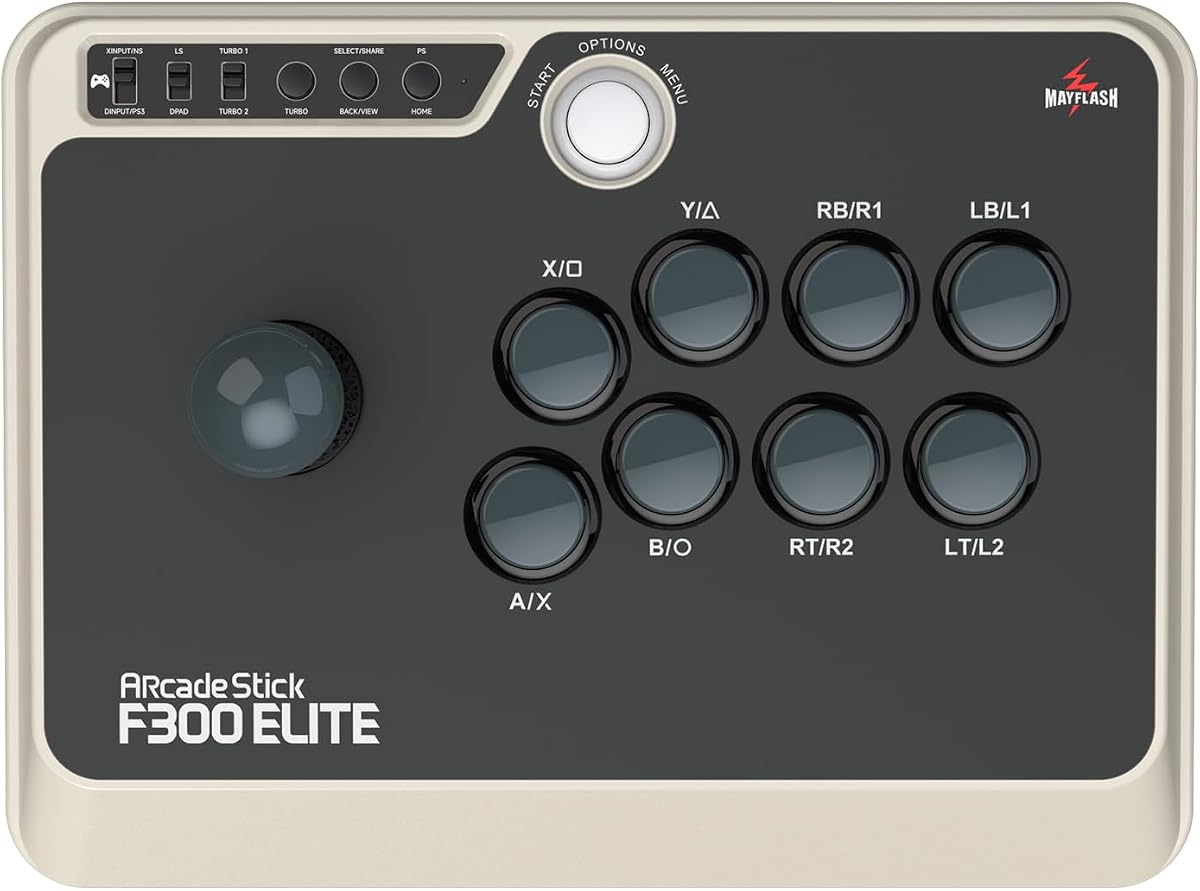
The MAYFLASH F300 Elite carries a 4.6 rating, the highest among the products reviewed, and comes equipped with nine Sanwa buttons and a precision four-way joystick. It is explicitly compatible with macOS, Windows, Steam Deck, Android, Switch, Xbox, and PlayStation systems.
We may earn a commission when you buy through this link, at no additional cost to you.
This model is a strong turnkey option for players who want recognizable arcade components without sourcing buttons and a stick separately. It supports XINPUT, DINPUT, and turbo functions, while the accessible internal platform allows the joystick and buttons to be switched as the owner's preferences evolve.
The main trade-off is the commitment to a larger, more specialized peripheral. It is less convenient for a small desk than a standard gamepad, and some users may prefer to save money and choose components individually with the standard F300. The premium hardware also makes it less compelling for casual Mac gaming.
Choose the Elite when you want a ready-made, high-rated arcade stick with established Sanwa parts and plan to use it seriously. It is particularly attractive to fighting-game, arcade, and retro players who value a stable control layout and the option to customize later.
Sanwa buttons and a precision four-way joystick give the Elite a more purpose-built arcade identity. These components support the responsive, digital input behavior expected in fighting games and classic arcade titles.
The included configuration means buyers can begin playing without an immediate parts hunt. At the same time, the accessible platform preserves room for component changes and personal control-layout adjustments.
We may earn a commission when you buy through this link, at no additional cost to you.
The Thrustmaster SimTask FarmStick is a specialized joystick for Farming Simulator 25 on PS5 and PC. Its 3.7 rating is the lowest in the group, but that figure should be considered alongside the narrow purpose: controlling tractors, loaders, construction equipment, and other farm machinery.
We may earn a commission when you buy through this link, at no additional cost to you.
A realistic three-axis movement system is joined by up to 33 programmable inputs across buttons, a thumbwheel, mini-stick, triggers, and rocker switches. Hall Effect magnetic sensors are intended to eliminate drift and wear, while the ambidextrous design can complement a racing wheel or another joystick.
This is not a general Mac controller in the supplied description. It does not explicitly list macOS, and a racing wheel is required for use alongside one. Its extensive machinery-oriented control set would also be excessive for typical action games, arcade titles, or everyday console play.
The FarmStick is best for PC players deeply invested in Farming Simulator 25 who want a dedicated machinery cockpit. Mac users interested in the product should first confirm operating-system and game compatibility; otherwise, the standard F300 or a modern gamepad will be a more suitable recommendation.
The three-axis joystick and extensive input set are designed around the repetitive, multi-axis demands of tractors and heavy equipment. That specialization gives it a level of control density that ordinary gamepads do not provide.
Its ambidextrous design can sit beside a racing wheel or pair with a second joystick. This makes it relevant to enthusiasts building a larger simulator setup rather than a single-controller desktop arrangement.
We may earn a commission when you buy through this link, at no additional cost to you.
The 8Bitdo Ultimate 2 is a polished wireless controller for PC, Apple, Steam, and Android, with a 4.5 rating. It uses TMR joysticks, a stable 2.4G connection, and a 1000Hz polling rate in 2.4G and wired modes for responsive modern gaming.
We may earn a commission when you buy through this link, at no additional cost to you.
Its standout feature is a trigger mode switch that lets users move between linear Hall Effect triggers and non-linear tactile triggers. It also provides customizable six-axis motion controls, rumble, turbo, two rear paddles, extra R4 and L4 bumpers, and tactile shoulder and directional controls. A multifunctional charging dock and USB-C adapter complete the package.
Despite being included in a joystick roundup, it is better understood as a modern gamepad. It may not satisfy someone specifically seeking a single four-way stick or a full-size arcade layout. Users should also verify how the listed Apple support behaves in their preferred games, since controllers often require game-specific pairing and mapping.
For Mac players who want a refined gamepad with strong wireless performance and a broad control set, the Ultimate 2 is an excellent alternative to the abxylute C6. It is particularly well suited to Steam, modern games, and setups that benefit from remappable rear inputs.
The stated sub-1ms latency, anti-interference design, and 1000Hz polling make the 2.4G mode appealing for fast-paced games. Wired mode is also available when reliability is the priority.
Switching between linear Hall Effect and tactile non-linear triggers lets players adapt the feel of acceleration or braking to different titles. Rear paddles and extra bumpers create additional shortcuts beyond the standard face-button layout.
We may earn a commission when you buy through this link, at no additional cost to you.
The Moonag Wireless Controller has a 4.3 rating and is designed for Windows PC, Nintendo Switch, iOS, and Android. It combines Hall Effect joysticks, 2.4G and wired connectivity, a stated 1000Hz polling rate, turbo, macro programming, vibration, and RGB lighting in a conventional gamepad shape.
We may earn a commission when you buy through this link, at no additional cost to you.
Its ergonomic housing and textured non-slip grip are intended to remain comfortable during extended sessions, while a balanced weight and responsive buttons are meant to reduce fatigue. A rechargeable 800mAh battery supports extended play, and the controller can also be used while charging through a cable.
The major limitation is that macOS is not explicitly included in the stated compatibility. It also expressly does not support Xbox or PlayStation consoles. As a result, it should not be selected as a confirmed Mac controller without checking the current product documentation or retailer listing.
Moonag is a capable option for a Windows gaming setup, particularly for players who value macros, RGB effects, and anti-drift sticks. For the Mac-focused audience, the similarly positioned abxylute C6 provides explicit Mac support and is the safer recommendation.
Hall Effect sensors are intended to reduce the gradual drift and wear associated with many conventional analog sticks. The result is a more consistent center position over extended use.
A 1000Hz polling rate in 2.4G and wired modes supports low-latency play. Turbo, macro buttons, dual vibration, and RGB lighting make the controller suitable for shooters, racing, sports, and action games.
We may earn a commission when you buy through this link, at no additional cost to you.
The Logitech G X56 H.O.T.A.S is a high-feature flight simulator controller with a 4.0 rating. It combines a joystick, twin throttles, numerous programmable inputs, adjustable stick force, RGB lighting, and Hall Effect sensors in a unit designed specifically for space and combat flight simulations on Windows.
We may earn a commission when you buy through this link, at no additional cost to you.
Its 16-bit aileron and elevator axes, four-spring adjustment system, throttle friction adjuster, and throttle lock allow pilots to tailor the physical feel of the controls. More than 189 programmable controls and a mini analog stick expand the range of functions available, while the layout is designed to keep controls under the fingers during VR use.
Mac support is not part of the stated system requirements, which specifically reference Windows versions and two USB 2.0 ports. The X56 also requires a substantial desk footprint and is far more specialized than a general game controller, so it offers little value outside detailed flight-simulation setups.
The X56 is a premium recommendation for Windows flight-simulator enthusiasts who prioritize realistic control feel and extensive customization. It is not a confirmed option for Mac, so players should look at the compatible C6 or an arcade stick unless their flight software explicitly supports this Logitech hardware.
Four spring settings let pilots tune resistance for different aircraft, control styles, and preferences. This physical adjustability is a key reason experienced simulator players favor a dedicated HOTAS unit.
Twin throttles include friction adjustment and locking, reducing the need for separate hardware. The extensive programmable layout keeps major aircraft systems accessible from a single desktop unit.
We may earn a commission when you buy through this link, at no additional cost to you.
The SPEEDLINK Competition PRO EXTRA is a digital USB joystick with a 3.9 rating and a design inspired by the original Competition Pro arcade machine stick. It targets PCs and Android devices and is aimed specifically at arcade, retro, and classic game collections.
We may earn a commission when you buy through this link, at no additional cost to you.
Its nostalgic enclosure and large joystick reproduce the appearance of a traditional arcade cabinet controller. The Anniversary Edition includes a collection of 20 retro games for download, adding a ready-made software component for users interested in older-style experiences rather than only the peripheral.
The supplied information does not explicitly list macOS support, so Mac compatibility should be verified before purchase. The stick is also limited to the basic needs of digital arcade games and does not offer modern features such as analog sticks, triggers, wireless connectivity, or extensive programmable inputs.
Choose the Competition PRO EXTRA for a dedicated retro setup where appearance and classic directional control matter most. It is a less certain fit for the broad Mac game market, but it provides an immediately recognizable arcade experience for supported systems and a bundled collection worth considering.
The design draws directly from the original Competition Pro cabinet stick, giving a retro setup visual character that modern gamepads cannot replicate. The large directional control also suits games built around discrete movement.
The bundled collection includes 20 downloadable retro games, making it easier to begin with a defined library. Buyers should verify compatibility and installation details for their chosen operating system before planning a Mac purchase.
We may earn a commission when you buy through this link, at no additional cost to you.
Choosing a Mac game joystick begins with the games, operating system, and control style you value most. Confirm explicit macOS support first, then compare input requirements, connection methods, programmability, and desk-space needs.
A USB connection does not automatically guarantee that a joystick will work on macOS. Games may also impose their own controller requirements, while specialized flight sticks can depend on Windows-only configuration utilities. Products such as the Hyperkin Trooper 2, abxylute C6, MAYFLASH F300, and F300 Elite explicitly identify macOS support, giving Mac-focused shoppers the clearest starting point.
Always verify macOS support. USB alone does not guarantee compatibility.
A four-way digital joystick works best for retro, arcade, fighting, and older platform games. Modern action, racing, and role-playing games generally benefit from two analog sticks, triggers, bumpers, and a conventional directional pad. Flight simulation requires axis-based movement and throttle control, while farm simulation needs a dense set of programmable industrial inputs.
Choose controls that match your games. Avoid buying arcade simplicity for modern analog play.
Wired devices provide a straightforward connection, consistent operation, and no battery management. The abxylute C6 supports wired, dongle, and direct Bluetooth modes, while the 8Bitdo Ultimate 2 combines 2.4G and wired options. Wireless freedom is convenient for couch or shared-device gaming, although low-latency dongle mode may perform differently from direct Bluetooth.
Prefer wireless for flexibility and wired for simplicity. Check latency mode.
The abxylute C6, Moonag controller, and 8Bitdo Ultimate 2 advertise 1000Hz polling in their relevant wired or receiver modes. Their Hall Effect or TMR sticks are intended to improve precision and resist the drift and wear commonly associated with analog controls. These features can benefit competitive games, though actual smoothness also depends on the game, computer, and connection.
High polling and Hall Effect sticks favor precision. Connection and software still matter.
The MAYFLASH F300 accepts Sanwa Denshi buttons and joysticks, while the F300 Elite arrives with those components and provides accessible internal construction. Customization is valuable when you want to replace worn parts, alter a layout, or build a stick around preferred components. Simpler controllers offer useful remapping features but usually cannot match the physical flexibility of a full arcade platform.
Choose an arcade stick if component-level customization matters to you.
The number of buttons alone does not determine usefulness. Consider face buttons, shoulder inputs, triggers, rear paddles, menu controls, directional movement, and programmable keys. The Hyperkin Trooper 2 offers six mappable buttons, the F300 includes a full arcade arrangement, the Thrustmaster flight stick provides twelve programmable buttons, and the Logitech X56 supports an exceptionally dense control set.
Map controls before shopping. Match every input to essential game actions.
A full-size arcade stick offers authentic controls but takes up much more room than a handheld gamepad. Flight and farm sticks are also specialized desktop devices designed to sit beside other equipment. The Hyperkin Trooper 2 uses a smaller single-stick format, and the abxylute C6 or 8Bitdo Ultimate 2 is easier to store and move between sessions.
Measure your desk before buying. Large sticks are not portable.
Some products depend on other equipment or very particular games. The Thrustmaster FarmStick requires a racing wheel when used in conjunction with one and is built around Farming Simulator 25 on PC and PS5. The Logitech X56 lists Windows requirements and two USB 2.0 ports. Specialty hardware can deliver excellent control, but only when the target software and hardware arrangement match.
Check game, system, and accessory requirements before specialty purchases.
Begin by confirming the stick's macOS compatibility, then connect it using the method specified in its documentation. Wired models should plug directly into the Mac, while Bluetooth controllers may require selecting the device from the system's Bluetooth menu. For controllers with a 2.4G receiver, insert the dongle first and pair through the product's required button sequence.
Launch the target game before assigning controls. Most modern games present a controller page that can detect the device, map buttons, adjust sensitivity, and assign secondary actions. Arcade sticks may also require selecting XINPUT, DINPUT, or another supported mode. If inputs appear on the wrong buttons, return to the mapping menu rather than repeatedly pressing controls during gameplay.
For longevity, keep arcade sticks level, avoid resting heavy objects on the housing, and do not force a misaligned stick or stuck button. Clean lightly with a soft dry cloth, protect the USB connector from dust, and follow the manufacturer's instructions for removable panels. Charge wireless controllers on the supplied dock when available, remove batteries for long-term storage if the manufacturer permits it, and inspect cables for damage before reconnecting them.
No. USB describes the connection method, but macOS support must be confirmed separately. The Hyperkin Trooper 2, abxylute C6, MAYFLASH F300, and F300 Elite explicitly list macOS, while several specialized flight and farm controllers specify Windows or PlayStation instead. Individual games may also have their own controller requirements, so check both the peripheral and software documentation.
The MAYFLASH F300 is the strongest general recommendation because it explicitly supports macOS, offers a traditional four-direction arcade layout, and accepts customizable Sanwa components. The F300 Elite is the higher-rated turnkey alternative for players who want a complete arcade stick immediately, while the Hyperkin Trooper 2 offers a smaller and simpler design for basic retro or arcade experiences.
Choose an arcade stick for digital fighting games, retro titles, classic arcade collections, and physical-button layouts. Choose a modern gamepad for action games, racing, role-playing games, and any title that benefits from two analog sticks, triggers, or rear paddles. The abxylute C6 and 8Bitdo Ultimate 2 serve the latter role, although only the C6 explicitly lists Mac support.
Hall Effect sensing is designed to reduce drift and physical wear because it measures magnetic fields rather than relying on a conventional contact mechanism. It is not a guarantee against every possible control problem, and software, firmware, calibration, dirt, and damage can still affect behavior. The abxylute C6 and Moonag controller both use Hall Effect sticks, while the 8Bitdo Ultimate 2 uses TMR joysticks.
Only when both the controller and the game support the required connection. The abxylute C6 explicitly supports Mac through wired, Bluetooth-dongle, and direct Bluetooth modes. The 8Bitdo Ultimate 2 lists Apple support and includes 2.4G and wired options. Pair the controller before launching the game, then remap any misplaced inputs in the game's controller settings.
A flight joystick can be excellent for compatible flight simulators, but the products in this guide present different platform limitations. The T-Flight Stick X is listed for PC, and the Logitech G X56 names Windows system requirements without confirming macOS. Mac users should verify the flight simulator, operating-system support, and driver requirements before purchasing either model.
No. The Hyperkin Trooper 2 provides a smaller four-way joystick with six mappable buttons and explicit macOS support, making it suitable for many retro and arcade titles. A full-size stick such as the F300 may be preferable for authentic button placement, customization, and more demanding fighting games. The best choice depends on the games and the space available on your desk.
Check the operating system, target game, required adapters, available ports, desk space, and whether other equipment is mandatory. The FarmStick is designed for Farming Simulator 25 on PC and PS5 and requires a racing wheel when used together with one. The Logitech X56 lists Windows requirements and two USB 2.0 ports. Confirming the entire setup prevents an expensive compatibility mistake.
The MAYFLASH F300 stands out as the most versatile Mac-ready arcade option, combining explicit macOS support, a customizable platform, and compatibility across PCs, consoles, Steam Deck, and Android. The abxylute C6 is the stronger general-purpose gamepad, offering Hall Effect controls, several connection modes, and broad platform support, while the Logitech G X56 represents the specialized premium flight-control experience.
Prioritize confirmed operating-system support, the control layout your games require, and the physical space available. Basic arcade play may be served by the compact Hyperkin Trooper 2, while serious fighting and retro sessions benefit from a full-size MAYFLASH platform. Modern games generally call for the dual-stick design of the abxylute C6 or 8Bitdo Ultimate 2 rather than a traditional single-stick joystick.
Ratings, product configurations, and prices can change, so review the current listing before buying. Check the Mac and game compatibility notes, included accessories, connection method, and any required adapters. With those checks completed, you can choose a Mac game joystick that matches your preferred games, setup, and desired level of physical control.