
Newmen GM325Pro
4.2Editor score
Full-size metal top plate
Detachable 1.8-meter USB cable
Software remapping and macros
Our expert Metal Mechanical Keyboards guide compares 10 models across switches, layouts, connectivity, build quality, RGB, and customization options.
Metal mechanical keyboards combine the tactile response and durability of mechanical switches with sturdy aluminum or steel construction. The best model for one person may be different for another: competitive players prioritize fast actuation, office users seek quieter operation, and enthusiasts often value hot-swapping, programmable controls, and flexible connectivity.
We compared all 10 keyboards using the supplied specifications, focusing on switch type, frame material, layout, connection methods, rollover, lighting, programmability, and practical extras. The list covers full-size, tenkeyless, compact, wired, wireless, office, gaming, and highly customizable models without overlooking important differences in ergonomics and intended use.
Each review shows where a keyboard stands out, what compromises accompany those strengths, and which user is most likely to appreciate it. Ratings and product details reflect the current source information, while prices and availability can change, so shoppers should verify the latest listing and feature details before making a purchase.
4.2Editor score

4.8Editor score

4.6Editor score
The table below provides a direct overview of the ten keyboards, highlighting their connection options, switch choices, structural highlights, and practical features so you can narrow the field before reading the full reviews.



The Newmen GM325Pro is a full-size wired mechanical keyboard that combines a rugged metal top plate with smooth linear red switches. Its 4.2 rating reflects a practical gaming package, but the appeal comes from the breadth of features offered: a 104-key layout, full-key rollover, side-edge RGB, shortcut controls, and customization software. It is a strong candidate for buyers who want a substantial keyboard without moving into enthusiast pricing.
We may earn a commission when you buy through this link, at no additional cost to you.
The fixed construction is a major advantage for stability. A metal top plate contributes rigidity, while the detachable 1.8-meter USB cable makes the keyboard easier to route, carry, and reconnect. Red switches provide quick, linear actuation without the pronounced tactile bump associated with brown or blue switches. The full-key rollover specification is particularly useful during games involving multiple simultaneous commands, and the dedicated number pad is beneficial for productivity shortcuts and number entry.
Customization is more capable than the lighting treatment alone might suggest. FN combinations provide access to media, calculator, and other functions, while the supplied software supports key remapping, macros, and lighting personalization. The limitation is that the RGB is confined to the keyboard's side lighting rather than individual keys. There are 13 preset rainbow effects, but shoppers seeking per-key illumination should look elsewhere. It is also permanently wired, with no wireless modes listed.
This is the best budget recommendation for gamers, students, and everyday typists who want a full-size metal mechanical keyboard. It does not need to compete with premium models in acoustic refinement or display features because its core value is the combination of a conventional layout, responsive switches, rollover support, and useful software. If the goal is a sturdy, feature-rich daily driver without overspending, the GM325Pro is a sensible place to start.
The 104-key format preserves a number pad, dedicated function row, and conventional navigation area. That makes the GM325Pro easier to transition to from a standard office keyboard, particularly for users who enter figures frequently or rely on application shortcuts.
A detachable cable is a meaningful convenience in a wired keyboard. It removes excess cable from the desk and allows the keyboard to be moved or packed without straining a permanently attached lead.
We may earn a commission when you buy through this link, at no additional cost to you.
The KEMOVE K94 is the most complete metal mechanical keyboard in this group, earning a 4.8 rating and serving as the guide's top overall recommendation. It combines a compact numpad layout with tri-mode wireless connectivity, QMK/VIA support, an LCD, a metal knob, hot-swappable sockets, and a layered construction designed to improve both feel and sound. The result is equally relevant to programmers, office users, and enthusiasts.
We may earn a commission when you buy through this link, at no additional cost to you.
Its connection flexibility is exceptional. Users can move among low-latency 2.4 GHz, Bluetooth, and USB-C wired operation, while the 8000mAh rechargeable battery supports extended wireless sessions. This makes the K94 adaptable to a desktop, laptop, or traveling setup. The LCD can show battery status and personalized GIFs, and the metal rotary knob provides quick access to frequently adjusted functions without occupying additional keyboard keys.
The deeper appeal is customization. QMK/VIA support allows keys to be remapped, macros to be created, and custom layers to be built, with a browser-based KEMOVE driver assisting with functions, macros, and RGB. VIA setup is specifically available in USB wired mode, which is worth remembering when setting up advanced layouts. Creamy switches, a gasket mount, and six-layer sound dampening produce a softer, fuller acoustic profile, while hot-swappable sockets make compatible switch changes possible without soldering.
The compact footprint is the principal tradeoff. Although the K94 retains a number pad and arrow keys, typists accustomed to a conventional full-size board may need time to adjust. South-facing RGB and custom keycap support broaden its visual and hobby potential. Even with that learning curve, its combination of wireless flexibility, open firmware, quality-focused construction, and an unusually useful screen makes the K94 the most versatile option here.
QMK and VIA support creates a broad layer of control for shortcuts, layers, and macros. It is particularly valuable for users who want their keyboard to adapt across gaming, writing, and productivity applications.
The LCD is not limited to a decorative logo. It can display battery information and personalized GIFs, giving the keyboard a useful focal point without taking up an entire extra screen.
We may earn a commission when you buy through this link, at no additional cost to you.
The AULA F75 Pro combines a metal-oriented custom keyboard design with 75% efficiency, wireless connectivity, and extensive enthusiast features. Its 4.6 rating reflects a well-rounded board that supports hot-swappable 3-pin and 5-pin switches, pre-lubed Reaper switches, RGB lighting, a multi-function knob, and side-printed PBT keycaps. The 81-key format offers an appealing middle ground between a full-size board and a compact gaming model.
We may earn a commission when you buy through this link, at no additional cost to you.
Connectivity is one of its strongest elements. Bluetooth 5.0, 2.4 GHz wireless, and USB wired operation allow it to serve PCs, laptops, tablets, phones, and gaming platforms, with up to five devices connected simultaneously. A 4000mAh battery supports wireless use. The hot-swap base makes switch replacement straightforward, while pre-lubed stabilizers and the supplied Reaper switches aim for smooth movement and a creamy mechanical sound.
Internally, the F75 Pro uses an extended integrated silicone pad, PCB single-key slotting, and five layers of filling material to improve resilience and reduce cavity noise. It also supports N-key rollover, programmable macros, a Windows-key lock, and a knob that can switch between gaming and office modes. Its 16.8-million-color RGB system includes 16 preset effects, ten music-rhythm effects, and adjustable brightness and speed. The side-printed gradient-black PBT keycaps help light pass through the legends while offering a distinctive appearance.
The first tradeoff is the compact 75% layout, which removes a dedicated function row and saves meaningful desk space. Users who rely on F1 through F12 should account for the alternate shortcuts. The second is that some advanced lighting and macro functions require the driver. Even so, the F75 Pro delivers an unusually polished package for a compact board, making it our premium recommendation for gamers, hobbyists, and users who switch among several devices.
The 81-key layout preserves arrow keys and essential controls while reducing desk usage. Its knob provides dedicated access to media, playback, lighting, and mode changes, compensating for the missing function row.
Hot-swappable sockets, pre-lubed stabilizers, side-printed PBT keycaps, and a multi-layer damping structure make this more than a standard gaming keyboard. It is designed to evolve with the owner's switch and keycap preferences.
We may earn a commission when you buy through this link, at no additional cost to you.
The Cherry KC 200 MX Silent is a full-size wired office keyboard designed around quiet, linear MX2A Silent RED switches. Its 4.5 rating and restrained styling make it appealing for shared workspaces, home offices, and anyone who wants mechanical key travel without constant clicking. The anodized metal plate gives the chassis a durable, professional foundation, while the lack of conspicuous RGB keeps the design appropriate for a work environment.
We may earn a commission when you buy through this link, at no additional cost to you.
Silent RED switches deliver a smooth linear action without a click, and the supplied specification lists an actuation lifespan of more than 50 million presses per key. This can be a meaningful advantage in offices, during video calls, or late at night. Full N-key rollover allows every key to register simultaneously, while anti-ghosting helps prevent incorrect entries when multiple combinations are pressed. These are functional details that matter in busy spreadsheets, editing applications, and games.
Cherry has also added practical office controls. White LEDs identify Caps Lock, Scroll Lock, and Num Lock, while four additional keys provide quick access to the calculator and volume control. Molded keycaps are designed for comfort, and laser-etched, abrasion-resistant legends are intended to remain legible over time. Two sturdy, non-slip fold-out feet provide stability and adjust the typing angle without requiring a separate wrist rest.
Those who need wireless, extensive onboard lighting, or extensive gaming software should consider other options. The KC 200 MX Silent is deliberately more traditional, with a fixed wired connection and an emphasis on dependable office operation. Nevertheless, for a buyer who values quiet linear mechanical switches, a metal office chassis, full rollover, and straightforward full-size functionality, it is one of the most mature and balanced choices in the roundup.
The silent red switch profile is ideal when mechanical feedback is welcome but audible clicking is not. It preserves a consistent bottom-out action while reducing the noise associated with clicky switches.
Status lights, calculator access, volume shortcuts, anti-ghosting, and full N-key rollover are details that can improve daily workflow without adding visual clutter or demanding a learning curve.
We may earn a commission when you buy through this link, at no additional cost to you.
The Cherry KC 200 MX Brown is the tactile counterpart to the Silent version of the same office keyboard. It uses MX2A Brown switches that provide a precise, noticeable bump without a click, paired with an anodized metal plate and a conventional full-size layout. Its 4.2 rating reflects a keyboard that focuses on dependable essentials rather than gaming aesthetics, wireless freedom, or enthusiast display features.
We may earn a commission when you buy through this link, at no additional cost to you.
Brown switches are often preferred by typists who want to feel each key actuate while keeping noise below that of traditional clicky switches. The listed durability figure of more than 100 million actuations per key supports the board's positioning as a long-term work keyboard. Its structure and mounting do not need to imitate a gaming model: a metal plate, sturdy feet, molded keycaps, and laser-etched legends create a sober, professional presentation.
The feature set is well suited to office work. White status LEDs appear in the Caps Lock, Scroll Lock, and Num Lock keys, and four extra keys offer quick access to the calculator and volume controls. Full N-key rollover and anti-ghosting help maintain accurate input during fast data entry or when several keys are held together. These are useful qualities for spreadsheets, word processing, and other applications where missed or duplicated commands would be disruptive.
The absence of conspicuous RGB, wireless connectivity, and dedicated media hardware is intentional rather than a shortcoming for the target buyer. A gamer seeking per-key effects may find another model more exciting, while an office user may prefer the understated experience. The Cherry KC 200 MX Brown is a compelling choice for people who prioritize tactile feedback, robust construction, long-term switch durability, and straightforward productivity features.
The tactile bump confirms an actuation before the key reaches the bottom, while the lack of a click keeps the acoustic profile restrained. This middle-ground switch style is versatile for both typing and general computer use.
A dedicated number pad, complete function row, fold-out feet, and molded keycaps make this a straightforward upgrade for a standard desktop arrangement. There is little to learn and no software setup is emphasized.
We may earn a commission when you buy through this link, at no additional cost to you.
The Redragon K552 is an 87-key tenkeyless mechanical gaming keyboard that offers a metal top plate, red switches, rainbow lighting, and software customization at an accessible level. Its 4.4 rating makes it a well-rounded option for gamers who want a compact desk footprint without abandoning wired reliability or programmable features. The tenkeyless format removes the number pad while preserving the core gaming and editing area.
We may earn a commission when you buy through this link, at no additional cost to you.
Linear red switches are designed for quick actuation and smooth operation, meeting the needs of players who press multiple keys rapidly. The keyboard provides full anti-ghosting across all 87 keys, so simultaneous commands can register correctly during competitive play. A sturdy metal top plate and anti-slip feet help it remain stable, while the braided USB connection adds a suitable desktop-oriented design.
The lighting is less flexible than that of many contemporary alternatives. Six presets cover breathing, wave, ripple, and reactive patterns, and brightness can be adjusted through shortcuts. However, this Rainbow LED version uses fixed color patterns rather than individually programmable colors. The included software still allows key remapping and macro assignment, which is valuable for game commands and productivity shortcuts.
Plug-and-play compatibility is another strength. The K552 works with Windows, macOS, Linux, and most gaming systems, while the tenkeyless design saves space for mouse movement. Its tradeoff is obvious: users who rely on a number pad will need to adapt, and lighting enthusiasts may want per-key RGB. For a straightforward wired gaming board, however, the combination of linear switches, anti-ghosting, macro software, and a metal upper panel is difficult to dismiss.
The tenkeyless design reduces desk width and creates additional space for wide mouse movements. It is a popular choice for competitive gaming where every extra bit of positioning room can be useful.
Dedicated software lets users remap keys and assign complex commands, expanding the board beyond its standard layout. It is a practical way to shorten repeated actions or prepare game-specific inputs.
We may earn a commission when you buy through this link, at no additional cost to you.
The Redragon K556 is a rugged, full-size RGB mechanical keyboard built around a brushed aluminum board. Its 4.6 rating reflects a strong balance of stability, familiar layout, switch flexibility, and visual customization. With 104 keys, it suits gamers and productivity users who want a number pad, arrow cluster, and function row in a sturdy desktop design.
We may earn a commission when you buy through this link, at no additional cost to you.
The brushed aluminum construction is designed to resist the flex associated with plastic frames, helping keep the keyboard steady during intensive sessions. Upgraded sockets accept nearly any 3-pin or 5-pin mechanical switch, and the installed Brown switches deliver a softer tactile bump that is comfortable for extended typing. This hot-swap support also makes the board accessible to users who want to experiment with different switch families later.
RGB is a major attraction. Twenty preset modes allow users to vary color, brightness, and flow speed without immediately opening the companion software. For deeper control, the software can create custom RGB effects and program macros with personal keybindings. The keyboard also supports full anti-ghosting, helping the 104 keys register accurately during rapid combinations. Wired plug-and-play operation works across Windows and Mac without requiring drivers.
The K556 does not offer wireless connectivity, so it is less suitable for people who need to move between several systems or prefer a completely cable-free desk. Its software is optional for basic use but necessary for the most advanced lighting and macro features. Even so, the rigid metal frame, hot-swappable sockets, generous RGB selection, and full-size layout make this an appealing all-around mechanical gaming keyboard.
A rigid brushed aluminum frame supports a steadier typing experience and conveys durability. It is a visual and physical upgrade compared with a lightweight plastic shell.
The upgraded hot-swap sockets accept common 3-pin and 5-pin switches. Users can change the feel without soldering, making the board approachable for first-time custom keyboard builders.
We may earn a commission when you buy through this link, at no additional cost to you.
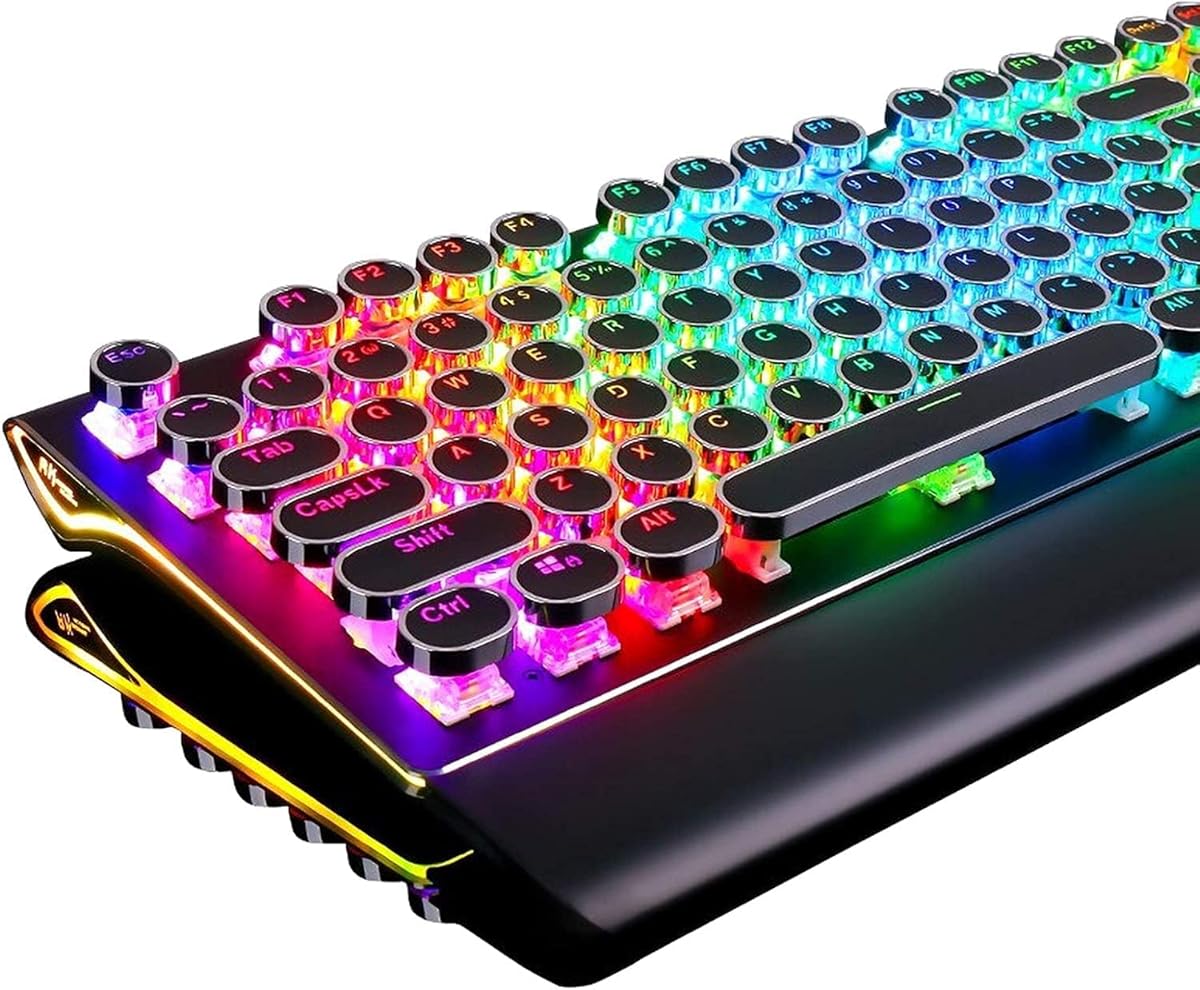
The RK Royal Kludge S108 stands apart with a retro typewriter design, round keycaps, an aluminum alloy panel, and a detachable wrist rest. It is a 108-key full-size mechanical gaming keyboard with a 4.6 rating, combining a distinctive appearance with tactile blue switches, extensive RGB lighting, and broad device compatibility. The style is intentionally unconventional, making it as much a statement piece as a functional input device.
We may earn a commission when you buy through this link, at no additional cost to you.
Blue switches deliver medium resistance, a noticeable tactile event, and an audible click. That feedback is useful for typists who want clear confirmation of each keypress and can suit gamers who prefer stronger switch feedback. The keyboard is wired and supports Windows, macOS, Linux, tablets, laptops, and desktop computers through plug-and-play operation. Its 108 keys are described as non-conflicting, helping every press register even when many keys are used together.
Lighting is unusually rich for a retro-inspired board. Per-key illumination offers up to 168 LED modes, with dynamic color changes, adjustable brightness, and speed. A transparent sidelight adds a second visual layer. Round keycaps can also be swapped with standard keycaps, allowing the user to preserve the vintage appearance or move toward a more conventional mechanical keyboard look.
The detachable ABS palm rest supports the wrists and reduces pressure during elevated typing or gaming. A matte-finish aluminum panel adds rigidity and scratch resistance. The main compromises are the pronounced click of the blue switches and the sizable visual footprint of the 108-key design. Neither matters for every user, but shoppers in quiet offices or with limited desk space may prefer a quieter, more compact option. For someone who wants a metal mechanical keyboard with genuine retro character, the S108 is the clear choice.
Vintage round keycaps and a typewriter-like silhouette are paired with per-key RGB, broad compatibility, and full-size anti-ghosting. The result appeals to buyers who want personality without giving up modern gaming functions.
The detachable wrist rest provides firmer support and can be removed when desk space is tight. That flexibility helps the keyboard accommodate both relaxed typing sessions and more competitive gaming arrangements.
We may earn a commission when you buy through this link, at no additional cost to you.
The SteelSeries Apex 5 is a premium gaming keyboard distinguished by an aircraft-grade aluminum alloy frame, a customizable OLED display, dynamic per-key RGB, and hybrid blue mechanical switches. Its 4.6 rating reflects a polished package for gamers, streamers, and enthusiasts who want more visual information and customization than a conventional mechanical board provides.
We may earn a commission when you buy through this link, at no additional cost to you.
The OLED screen can display GIFs, game information, Discord messages, and other content, making it genuinely interactive rather than a passive logo panel. It is particularly useful for displaying changing details without dedicating a separate monitor or screen overlay. The aluminum alloy frame contributes serious rigidity and durability, while dynamic per-key illumination adds reactive color schemes and other effects to the gaming environment.
Typing and gaming feedback comes from hybrid blue mechanical switches. These combine the tactile click and feedback associated with a blue switch with a smooth membrane layer, and the listed durability is 20 million keypresses. A premium magnetic wrist rest is included to provide full palm support during extended play. The complete dimensions are listed as 900 by 300 by 4 millimeters, illustrating the board's substantial desktop footprint.
The main limitations are fixed wired connectivity and the absence of hot-swappable sockets. Buyers cannot readily change the switches without soldering, and the board cannot operate wirelessly. Its size may also be a concern in compact workspaces. These are real compromises for buyers who value the Apex 5's aluminum construction, OLED, lighting, and wrist rest. For the intended audience, however, it is among the most visually complete and premium-focused metal mechanical keyboards in the roundup.
The OLED can present game information, messages, and custom GIFs. This turns the keyboard into a useful information surface, which is especially convenient for streamers and multiplayer players.
The aircraft-grade aluminum alloy frame provides a rigid foundation, while the magnetic wrist rest supports the palms. Together they create a substantial setup for long gaming or typing sessions.
We may earn a commission when you buy through this link, at no additional cost to you.
The ASUS ROG Strix Scope II X is a full-size metal mechanical gaming keyboard built for gamers, streamers, and daily productivity. It has a 4.6 rating and combines an aluminum top plate, PBT doubleshot keycaps, wired USB-C connectivity, pre-lubed ROG NX Snow V2 linear switches, and hot-swappable sockets. The design delivers a weighty, durable foundation without sacrificing the familiar utility of a 100% layout.
We may earn a commission when you buy through this link, at no additional cost to you.
The switch platform is a major strength. Users can choose the smooth, thocky feel of ROG NX Snow linear switches or the crisper tactile response of ROG NX Storm clicky switches, according to the product information. Both retain a dust-proof, wall-stem design and add an LED lens for stronger RGB illumination. Pre-lubed switches and hot-swappable sockets make it easier to explore different feels without immediately reaching for a soldering iron.
Acoustic refinement is handled through integrated sound-dampening foam and switch-dampening pads, which are intended to absorb pinging and echoes. The PBT doubleshot keycaps resist wear while maintaining their legends. A multi-function wheel supports media and lighting adjustments, F1 through F5 hotkeys provide access to Xbox Game Bar and recording functions, and every key is fully macro-programmable.
Ergonomically, the board offers three angle adjustments and includes a detachable wrist rest designed to position the hands comfortably. The package also includes a two-in-one keycap and switch puller, a ROG-themed spacebar, a USB cable, and a sticker. Its fixed wired connection and large full-size footprint are the main limitations. For users who want a sturdy, acoustically considered, fully programmable metal keyboard with easy switch customization, the Scope II X is an excellent final consideration.
Hot-swappable sockets make it possible to move between linear and clicky ROG NX options without soldering. The included puller also makes routine keycap and switch changes more convenient.
Sound-dampening foam and switch pads reduce unwanted ringing, while the detachable wrist rest and three angle settings support long sessions. These details make the board suitable for both focused work and gaming.
We may earn a commission when you buy through this link, at no additional cost to you.
A metal mechanical keyboard should match your devices, preferred switch feel, available desk area, and tolerance for customization. The following factors help separate durable daily drivers, compact gaming boards, quiet office models, and enthusiast-style options.
Layout determines which controls are available and how much room the keyboard occupies. A 100% or 104-key design includes a number pad, function row, arrow keys, and navigation cluster, making it the most convenient choice for spreadsheets, accounting, data entry, and shortcuts. A tenkeyless design removes the number pad to create more space for mouse movement. The 75% AULA F75 Pro saves additional room by reducing its function row, while the KEMOVE K94 takes a compact approach but retains a dedicated number pad. Choose according to desk space and actual habits rather than assuming a smaller layout is automatically more comfortable.
Switches define sound, feedback, and actuation feel. Linear switches travel smoothly without a tactile bump and are commonly associated with gaming, making the Newmen GM325Pro, Redragon K552, and ASUS ROG Scope II X natural choices. Brown switches add a noticeable bump without a click, as seen on the Redragon K556 and Cherry KC 200 MX Brown, and are often appreciated by typists. Blue switches provide a stronger tactile event and audible click, which the RK Royal Kludge S108 and SteelSeries Apex 5 emphasize. Silent red switches in the Cherry KC 200 MX Silent reduce noise while retaining a linear action. Sound is subjective, so consider where the keyboard will be used.
Wired keyboards provide a consistent connection with no charging routine and often suit competitive gaming or permanent desktop setups. Detachable cables, found on the Newmen GM325Pro, add convenience without creating wireless complexity. Tri-mode boards such as the KEMOVE K94 and AULA F75 Pro add 2.4 GHz and Bluetooth, allowing use across multiple computers, tablets, or phones. Wireless designs require attention to battery capacity and connection mode, while wired-only premium boards often concentrate their construction and feature budgets elsewhere. Verify platform compatibility, especially when switching between Windows, macOS, Linux, consoles, or mobile devices.
A metal top plate or frame generally increases rigidity, reduces unwanted flex, and creates a more substantial feel than a lightweight plastic shell. The Newmen GM325Pro, Redragon K552, Redragon K556, RK Royal Kludge S108, SteelSeries Apex 5, and ASUS ROG Scope II X all highlight metal construction, while the Cherry KC 200 models use an anodized plate. Construction is only one part of the feel: internal padding, mounting, switch lubrication, stabilizers, and case design also influence sound and responsiveness. A metal frame alone does not guarantee a premium typing experience.
Rollover describes how many keys the keyboard can register at the same time. Full N-key rollover is especially useful in games with multi-key commands and in high-speed office work. The Cherry KC 200 models, SteelSeries Apex 5, Newmen GM325Pro, and ASUS ROG Scope II X explicitly support full N-key rollover, while the Redragon K552 provides full anti-ghosting across 87 keys. Rapid red switches favor quick movement, but switch choice alone cannot replace reliable electronics. If competitive gaming is a priority, examine rollover, anti-ghosting, wired latency, and connection stability together.
Customization falls into several levels. Basic boards offer shortcut keys and preset lighting. Software-based models, including the Newmen GM325Pro, Redragon K552, Redragon K556, and AULA F75 Pro, allow remapping or macros, though their capabilities differ. The KEMOVE K94 goes further with QMK, VIA, layers, and a browser-based driver. Hot-swappable sockets provide a more physical form of customization, letting compatible switches change the feel without soldering. The AULA F75 Pro and Redragon K556 support 3-pin or 5-pin switches, while the ASUS ROG Scope II X uses the ROG NX platform. Advanced firmware has a learning curve, so consider how much setup time you genuinely want.
Lighting ranges from restrained status LEDs to elaborate per-key RGB, side illumination, and programmable displays. The Cherry KC 200 models offer practical status indicators without showy effects. The Newmen GM325Pro uses side-edge RGB, while the Redragon K552 uses fixed rainbow patterns. The AULA F75 Pro, Redragon K556, RK Royal Kludge S108, SteelSeries Apex 5, and ASUS ROG Scope II X provide richer per-key lighting. The KEMOVE K94 adds an LCD for battery status and custom GIFs, while the SteelSeries Apex 5 uses a larger OLED for game information and messages. Select effects for atmosphere or utility rather than brightness alone.
Comfort depends on layout, switch feel, case angle, and wrist support rather than a single feature. The RK Royal Kludge S108 and SteelSeries Apex 5 include detachable or magnetic wrist rests, while the ASUS ROG Scope II X offers three angle settings and a detachable rest. Cherry KC 200 models use sturdy fold-out feet. Larger full-size boards require more desk space, and wrist rests can interfere with a low mouse position if placed carelessly. Consider your desk depth, preferred wrist angle, and whether a numpad is genuinely useful before settling on a final form factor.
Begin by installing the keyboard in its preferred position and setting a comfortable angle. Users with fold-out feet should lower them gradually, while those with multi-position options should choose the setting that keeps the wrists neutral without forcing the hands upward. Connect a wired model with sufficient slack for the cable, or select the appropriate 2.4 GHz receiver or Bluetooth device on a wireless model. Test several keys before installing software or assigning macros so any basic connection issue can be isolated.
For software-enabled keyboards, install the designated driver or browser-based utility and update the keyboard before making extensive changes. Explore the macro editor, lighting controls, and key-remapping tools while keeping a written record of important assignments. On the KEMOVE K94, remember that the listed VIA setup path is available in USB wired mode. Users of hot-swappable boards should power the keyboard down before changing switches and confirm that the replacement switch has the correct pin configuration. Use the included pullers rather than pulling keycaps or switches with force.
For routine care, disconnect the cable or switch the keyboard off before cleaning. Use a soft brush or compressed air to remove loose dust from between keys, and wipe the metal surfaces with a lightly dampened microfiber cloth. Avoid liquids directly above the switches, and do not use harsh cleaners on keycaps or coated surfaces. Keep the keyboard away from prolonged moisture, excessive heat, and direct sunlight. Periodically inspect the cable connection, wireless charge level, feet, and wrist-rest attachment to make sure the setup remains stable and comfortable.
Metal mechanical keyboards generally feel more rigid and durable than comparable plastic models, and the metal portion can reduce visible flex. However, the overall typing experience also depends on switches, mounting, dampening, stabilizers, and keycaps. A well-built plastic keyboard may feel better than a poorly tuned metal one, so these features should be evaluated together.
Linear switches move smoothly without a noticeable bump or click, which many competitive gamers prefer. Tactile switches add a bump to confirm actuation, while clicky switches provide both a bump and an audible click. Silent variants reduce noise while modifying the standard switch profiles, as illustrated by the Cherry KC 200 MX Silent model's linear red switches.
They can be, because hot-swappable sockets allow switch changes without soldering. Beginners should verify whether the keyboard supports 3-pin, 5-pin, or both, and consult the manufacturer's instructions. A puller, light pressure, and a powered-off keyboard make the process safer and easier to reverse if a switch is installed incorrectly.
A wired keyboard is straightforward, requires no charging, and is often ideal for a permanent gaming or office station. A wireless model is more convenient when moving between devices or keeping a cleaner desk, but battery life and connection mode become additional considerations. The KEMOVE K94 and AULA F75 Pro support both wired and wireless operation, offering a flexible middle ground.
N-key rollover allows a keyboard to register every key pressed at the same time rather than limiting simultaneous input to a small number of keys. This can improve accuracy in games and fast productivity tasks. Several models in this guide explicitly support full N-key rollover, while anti-ghosting is the related practice of preventing unintended inputs.
A metal top plate mainly adds rigidity and a firmer physical feel; it does not automatically improve acoustics. Sound is shaped by internal dampening, case materials, mounting, switch choice, keycap construction, and stabilizer tuning. The AULA F75 Pro, SteelSeries Apex 5, and ASUS ROG Scope II X include added acoustic treatments for a more controlled sound profile.
These displays are useful when you want glanceable information such as battery status, game details, messages, or custom graphics. They are not necessary for accurate typing or gaming and can add cost, complexity, or visual distraction. The KEMOVE K94 LCD and SteelSeries Apex 5 OLED are best suited to buyers who value that functionality.
Choose full-size if you regularly use a number pad, need a complete function row, or want a familiar office layout. Choose tenkeyless or 75% if desk space, portability, and mouse positioning matter more. Compact layouts can require an adjustment period, so consider your existing shortcuts and whether losing the number pad will interfere with daily work.
The Newmen GM325Pro is the strongest budget selection, offering a full-size layout, red switches, a metal top plate, full-key rollover, and useful customization software. The KEMOVE K94 takes the overall recommendation with tri-mode wireless connectivity, QMK/VIA support, hot-swappable switches, sound dampening, a metal knob, and an LCD. For buyers seeking a premium compact configuration, the AULA F75 Pro combines wireless flexibility, five-device support, hot-swapping, extensive RGB, and a well-damped 75% layout.
The right choice ultimately depends on daily priorities. Quiet office users should compare the Cherry KC 200 MX Silent and Cherry KC 200 MX Brown, while dedicated gamers may favor the Redragon K552, Redragon K556, SteelSeries Apex 5, or ASUS ROG Scope II X. Retro style points toward the RK Royal Kludge S108. Prioritize switch feel, layout, connectivity, rollover, and construction in that order, and treat lighting, screens, and wrist rests as supporting features rather than the sole basis for a purchase.
Ratings, configurations, and availability can change, and the supplied listing details should always be checked before ordering. Prices are especially likely to fluctuate across retailers and promotions. Review the current switch type, connection requirements, software compatibility, included accessories, and warranty information, then compare the final cost with the features that will matter most in your daily setup.

