
JONSBO N3
4.5Editor score
Eight HDD and SSD bays
Server-grade hot-swap backplane
Dedicated hard-drive cooling
A mini NAS enclosure packs the essential parts of a network-attached storage system into a compact footprint, but the best example must balance drive capacity, airflow, hardware compatibility, and serviceability. The right choice depends on whether you need a two-bay desktop archive, a quiet home server, or a compact system built around a Raspberry Pi.
This guide compares ten mini NAS enclosures based on their stated drive bays, supported components, cooling arrangements, front connectivity, construction, and practical use cases. It covers both conventional PC-based NAS cases and dedicated external storage enclosures, including models designed for direct attached storage rather than networking.
Each selection highlights who should consider the enclosure and where it fits best within a broader storage strategy. Ratings and specifications reflect the supplied product information, while availability, configuration details, and prices can change. Always verify the current listing and component dimensions before purchasing.
4.5Editor score

4.6Editor score

4.1Editor score
As an Amazon Associate we earn from qualifying purchases.
The table below compares the ten enclosures by storage layout, system architecture, cooling, and connectivity. The list includes full Mini-ITX NAS cases, Raspberry Pi kits, and USB direct-attached storage units, so the best choice depends on whether you need network storage software or straightforward external capacity.



The JONSBO N2 Black is a compact Mini-ITX NAS enclosure that combines five 3.5-inch hard-drive bays with one dedicated 2.5-inch SSD position. Its 4.6 rating is the highest among the listed products, and its balanced approach makes it a compelling general-purpose choice for home users who want meaningful storage capacity without moving to a large desktop chassis.
We may earn a commission when you buy through this link, at no additional cost to you.
The enclosure measures 222.5 by 222.5 by 224 millimeters, which is compact relative to the number of drives it accommodates. Its aluminum construction and built-in 120mm fan are especially valuable in a multi-bay design where heat and vibration require attention. The removable upper cover should make the initial assembly process more approachable, while the front USB 3.2 Gen 2 Type-C, USB 3.0, and combined audio and microphone connections support routine use.
Component limits deserve careful attention. The case supports SFX power supplies up to 150 millimeters, Mini-ITX motherboards, low-profile expansion cards up to 197 millimeters, and CPU coolers no taller than 65 millimeters. These restrictions can be helpful for preserving the compact design, although they rule out some taller aftermarket coolers and full-size graphics cards.
The N2 suits a builder creating a compact home server for backups, shared documents, media, or lightweight virtualization. It is less suitable for someone who needs full-size ATX hardware, unrestricted expansion cards, or a large multi-fan cooling system. For those who can work within the documented clearances, it offers the most convincing mix of size, capacity, and build convenience in this group.
Five hard-drive bays provide enough room to separate operating data, backups, archives, and frequently accessed media. The additional 2.5-inch SSD position gives a builder a convenient place for cache or system storage without sacrificing one of the larger drive positions.
A removable upper cover reduces the difficulty of reaching internal connections, while the integrated 120mm fan provides a basic cooling solution. The modern Type-C port is especially convenient for compatible phones, tablets, and accessories.
We may earn a commission when you buy through this link, at no additional cost to you.
The JONSBO N4 Black stands apart with a small-footprint NAS chassis that combines steel construction, dark walnut wood accents, and a storage layout intended for both home-office and network-storage applications. Its 4.1 rating reflects a balanced package, and the design is especially appealing to builders who want server capability without the appearance of a generic rack enclosure.
We may earn a commission when you buy through this link, at no additional cost to you.
The case offers six 3.5-inch hard-drive bays and two 2.5-inch SSD bays. Four of the hard-drive positions are hot-swappable, while two are non-hot-swap, so builders gain flexibility without receiving the same level of immediate access for every drive. Its divided upper and lower compartments house the storage and motherboard sections, and the motherboard side supports Mini-ITX and Micro-ATX boards.
The included cooling is modest for a drive-heavy system: one 120mm fan is built in, and the front is designed to accept downdraft coolers. Other clearances are well defined, including support for SFX power supplies up to 125 millimeters, CPU coolers up to 70 millimeters, graphics cards up to 230 millimeters, and four PCI expansion slots. The 286 by 300 by 228 millimeter size remains suitable for a desk or media cabinet.
Choose the N4 Black when appearance, mixed drive support, and moderate expansion matter more than maximum drive count. It is a strong option for a stylish home server or a compact workstation that occasionally handles network storage duties. Buyers who need every bay hot-swappable or expect eight full-size drives should select a more specialized multi-bay chassis.
Six 3.5-inch bays are enough for a layered storage plan, while the two 2.5-inch positions can hold SSDs for caching, applications, or frequent-access data. Mixing drive types in one enclosure is convenient for flexible home and small-office use.
The walnut panels soften the visual character of a steel server chassis. That makes the N4 easier to place in a living area or office where a purely utilitarian case might feel out of place, provided its natural finish suits your setup.
We may earn a commission when you buy through this link, at no additional cost to you.
The 4+1 Bay DIY NAS Case is a straightforward enclosure for a compact, entry-level network server. It supports four 2.5-inch or 3.5-inch drive trays and one internal 2.5-inch position. Its 4.0 rating reflects a functional design with useful hot-swap and expansion features rather than a premium aesthetic or unusually broad hardware support.
We may earn a commission when you buy through this link, at no additional cost to you.
The Mini-ITX requirement gives the case a clear identity. It accommodates Mini-ITX motherboards measuring 17 by 17 centimeters, a Flex power supply up to 150 millimeters long, or a 1U power supply up to 190 millimeters. It also supports one full-height, single-slot PCI Express card, allowing a builder to add a suitable network, video, or other expansion card.
A hot-swap backplane simplifies drive maintenance, and two front USB 3.0 ports provide convenient access for transferring files or connecting peripherals. The included 80 by 80 by 25 millimeter replaceable fan offers a modest baseline for cooling. Because the enclosure is primarily designed for compact builds, careful attention to airflow and drive loading will be important during planning.
This case is best for a first NAS, a private-cloud experiment, or a small backup server assembled around Mini-ITX hardware. It gives more drive flexibility than a two-bay direct-attached enclosure and includes a genuine server-style backplane, but it is less expandable than six- or eight-bay alternatives. It is a sensible middle ground for builders who prioritize function and compact size.
The backplane and removable trays make it possible to service participating drives without opening the full system for every replacement. This convenience is valuable for backup arrays, although the enclosure does not provide the large drive count of the premium JONSBO N3.
Mini-ITX boards, Flex power supplies, and a single low-profile expansion card cover the essentials of a low-power NAS. The specification also gives you concrete dimensions to check before ordering a power supply or cooler.
We may earn a commission when you buy through this link, at no additional cost to you.
The GeeekPi N07 MiniTower is an unusual entry in the mini NAS enclosure category because it is built around a Raspberry Pi 5 and NVMe storage rather than conventional 3.5-inch hard drives. Its 4.1 rating and integrated OLED display make it especially interesting for compact network storage, monitoring, and lightweight home-server projects.
We may earn a commission when you buy through this link, at no additional cost to you.
The kit includes a mini tower case, low-profile ice tower cooler, N07 PCIe peripheral bottom board, GPIO expansion board, FPC cables, a screwdriver, and a screw pack. The peripheral board supports M.2 NVMe SSDs in 2230, 2242, 2260, and 2280 formats, making it compatible with a broad selection of compact and standard-length modules.
A 128-by-64 OLED display can present custom information, and the included Python library and code support customization. The stated monitoring options include system load, memory use, disk space, and network information. That makes the enclosure more of a small appliance project than a silent background box, particularly if you enjoy configuring status screens or lightweight dashboards.
Choose the N07 when you want a compact, energy-conscious network accessory built around a familiar single-board computer. It is less appropriate for large media libraries, multi-disk redundancy, or conventional 3.5-inch drives. For a single-purpose Raspberry Pi NAS with integrated NVMe storage and visual monitoring, it is a focused and appealing package.
By targeting the Raspberry Pi 5 directly, the kit avoids the need to source a separate enclosure, bottom board, display, and cooling solution. It is a convenient starting point for users who already understand the platform or want a ready-made compact base.
The OLED display turns basic system information into an immediately visible panel. Custom Python support provides room to tailor the screen, which can be especially useful for monitoring a home service, network workload, or storage capacity.
We may earn a commission when you buy through this link, at no additional cost to you.
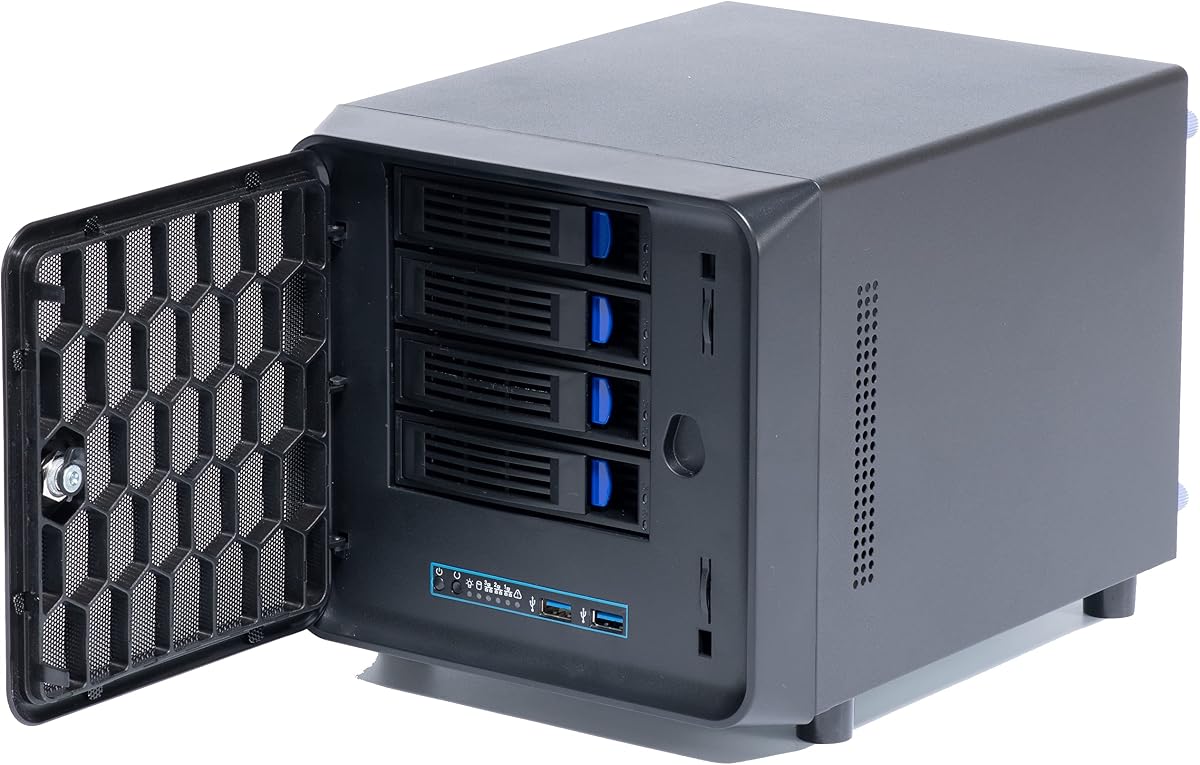
The JONSBO N3 is designed for builders who want high drive density in a compact NAS-style chassis. It accommodates eight 3.5-inch hard drives and one 2.5-inch SSD, all within a body measuring 233 by 262 by 298 millimeters. Its 4.5 rating makes it one of the strongest-rated enclosures here and supports its reputation as a premium, purpose-built storage case.
We may earn a commission when you buy through this link, at no additional cost to you.
The standout feature is its standard server-grade hot-swap backplane with dual SATA power connectors. A unified removable top cover and multi-disc pull-out structure simplify access, while separate upper and lower compartments and a dedicated radiator channel support more deliberate thermal management. Two 100mm fans are built into the hard-drive compartment for direct airflow around the storage devices.
Its component support is more generous than many competing mini cases. The N3 accepts Mini-ITX motherboards, an SFX power supply up to 105 millimeters, a CPU cooler as tall as 130 millimeters, and a graphics card as long as 280 millimeters. It also provides two PCI expansion slots. These allowances make it easier to build a capable small server rather than an extremely restricted appliance.
The N3 is a strong recommendation for media libraries, photographic archives, surveillance storage, or a private cloud serving a busy household or small office. Its eight hot-swap positions offer the right kind of scalability, although it is physically larger and more complex than a two- or four-bay alternative. Buyers should choose it when capacity and serviceability outweigh minimal footprint requirements.
The N3 concentrates substantial storage capacity into a chassis still suitable for a desk or media cabinet. That balance makes it practical for users who have outgrown a four-bay array but do not want a full-size tower devoted solely to storage.
The divided compartment layout and dedicated radiator channel help isolate the hard-drive cooling path from the motherboard area. Two directly mounted 100mm fans reinforce airflow where sustained drive operation creates the greatest concentration of heat.
We may earn a commission when you buy through this link, at no additional cost to you.
The CENMATE Aluminum 2 Bay is a direct-attached storage enclosure designed to add capacity without requiring a full PC or NAS operating system. It accepts two 2.5-inch or 3.5-inch SATA hard drives or SSDs, with stated capacity support of up to 20TB per drive. Its 4.3 rating reflects a useful and approachable design for local backups, media libraries, and file transfer.
We may earn a commission when you buy through this link, at no additional cost to you.
A built-in 2-inch fan cools the enclosure, and the aluminum-alloy body helps with heat dissipation. USB 3.0 interfaces provide a stated transfer rate of up to 5Gbps, while the included USB A and USB C cable improves connection choices. Tool-free hot-swap trays allow a drive to be replaced without shutting down the unit, a feature that can streamline maintenance when a direct-attached workflow supports it.
A USB host port permits daisy-chaining as many as three devices, with the manufacturer listing expansion up to 120TB. The enclosure is compatible with Windows 7 and later, Mac OS 9.1 and later, and Linux, and it operates as plug-and-play hardware without requiring NAS management features or RAID configuration through the enclosure itself.
This is a strong choice for someone who wants accessible external storage rather than a networked appliance. It is particularly useful for local editing workflows, offline backups, or sharing one enclosure among nearby computers. It should not be considered a NAS in the networking sense because the listing explicitly identifies it as DAS with no RAID or NAS functionality.
Hot-swappable, tool-free trays make it easy to move between drive sets or replace a failed disk. USB connectivity removes the need to assemble a motherboard, operating system, and power supply when the primary requirement is simple local storage.
The USB host connection supports daisy-chaining additional enclosures. That makes it possible to scale a direct-attached setup incrementally instead of replacing the entire unit whenever a larger archive is required.
We may earn a commission when you buy through this link, at no additional cost to you.
The JONSBO N4 White offers the same practical storage platform as the black N4 in a lighter, more decorative finish. It supports six 3.5-inch hard drives, including four hot-swappable positions, plus two 2.5-inch SSD bays. Its 4.1 rating makes it a credible option for a home office or living-room server where appearance is an important part of the build.
We may earn a commission when you buy through this link, at no additional cost to you.
The white exterior pairs with walnut wood panels to create a furniture-like appearance. Beneath that styling, the enclosure uses steel construction and a divided design for the motherboard and drive areas. Mini-ITX and Micro-ATX motherboards are supported, along with SFX power supplies up to 125 millimeters, CPU coolers up to 70 millimeters, and graphics cards up to 230 millimeters.
Four PCI expansion slots offer more room for specialized cards than many tiny Mini-ITX cases. The front panel includes a USB 3.2 Gen 2 Type-C port and a USB 3.0 port, while a 120mm fan is preinstalled. As with the black version, only four of the six hard-drive bays are hot-swappable, and the included cooling arrangement is relatively modest.
Choose the N4 White when you want a NAS that can sit comfortably in a brighter office, studio, or media unit. Its practical storage capacity and component flexibility are more important than a minimalist purely white aesthetic, so consider how the walnut accents will coordinate with the rest of your equipment. It is otherwise a strong fit for shared storage and compact server duties.
A NAS does not need to look purely industrial if it will remain in a frequently viewed room. The N4 White combines a light shell, natural wood accents, and restrained front connectivity for a more residential presentation.
Mini-ATX support and four PCI slots create room for a more conventional small-server configuration. The enclosure therefore balances visual appeal with useful hardware flexibility, even though it is not as drive-dense as the N3.
We may earn a commission when you buy through this link, at no additional cost to you.
The 8 Bay Mini ITX NAS case is a storage-focused enclosure designed for photographers, media builders, and small businesses that want straightforward drive expansion. It provides eight hot-swap bays for 3.5-inch hard drives and 2.5-inch SSDs, a substantial capacity within a relatively compact server case. Its 4.0 rating reflects a capable layout with a few important component restrictions.
We may earn a commission when you buy through this link, at no additional cost to you.
Cooling is the defining feature. Separate upper and lower air channels are intended to dissipate drive and motherboard heat without mixing their airflow. Three temperature-controlled silent fans support this arrangement. Each drive bay has dedicated power and read/write indicator lights, making it easier to identify activity and diagnose storage behavior during normal operation.
The case supports Mini-ITX and Micro-ATX motherboards, 1U and Flex power supplies, and CPU coolers up to 58 millimeters tall. That cooler clearance is the main limitation to check carefully. The package includes three fans, back panels, eight hard-drive stands, a SATA data cable, and assorted screws, but the motherboard, processor, and other core components are not included.
This enclosure is well suited to a Plex or Jellyfin media server, surveillance archive, studio collection, or private-cloud project. Its eight hot-swap bays make maintenance easier and future expansion straightforward. Select it when storage count and airflow matter more than processor cooling flexibility, and pair it with a suitably low-profile processor or compact cooler.
The dual-channel arrangement distinguishes this case from simpler stacked-drive designs. Keeping storage and motherboard airflow separate can reduce the chance that one hot component raises the temperature of another during sustained operation.
Hot-swap trays simplify replacement and expansion, while individual read/write and power indicators make drive activity visible. For a busy media library or business archive, that visibility reduces the time spent determining which drive is active or unresponsive.
We may earn a commission when you buy through this link, at no additional cost to you.
The CENMATE Aluminum 8 Bay is a large direct-attached storage enclosure for users who need more capacity than a two-bay desktop box can provide. It accepts 2.5-inch and 3.5-inch SATA hard drives or SSDs, with stated maximum capacity of 20TB per drive and 160TB across all eight positions. Its 4.3 rating is among the stronger results in this roundup.
We may earn a commission when you buy through this link, at no additional cost to you.
The aluminum-alloy enclosure incorporates two 2.9-inch fans to move heat away from the drives. USB 3.0 connectivity is stated at up to 5Gbps under UASP control, and a dedicated 12-volt, 20-amp power adapter supplies stable power for a fully populated system. USB Type-A and Type-C connectivity is included for broader desktop and laptop compatibility.
Tool-free hot-swappable trays make the enclosure convenient for maintaining a large archive, while a USB host port allows daisy-chaining with other units. The manufacturer lists expansion of up to 480TB across as many as three connected devices. The enclosure works with Windows, Mac OS 9.1 and 10, and Linux, and it does not require a driver for basic plug-and-play use.
Choose this model for local high-capacity storage, studio workflows, media editing, or offline backup sets where a network operating system is unnecessary. It is not a NAS enclosure with Ethernet, RAID management, or NAS software. Pay attention to the stated fan noise of approximately 40 to 50 decibels, and test drives individually if one fails to appear when the enclosure is populated.
Eight drive positions can consolidate media, project files, and backups into one direct-attached appliance. This is useful when files are edited locally and network latency or added configuration would offer little practical benefit.
Two larger fans are a sensible response to the heat generated by multiple 3.5-inch drives. A dedicated high-output power adapter is also important for maintaining stable operation when several disks are active at once.
We may earn a commission when you buy through this link, at no additional cost to you.
The K3 4 Bay Mini ITX is a compact enclosure aimed at builders creating a private cloud, software-router host, or entry-level TrueNAS or OpenMediaVault system. It supports four hot-swappable 3.5-inch or 2.5-inch SATA drives and has a 3.8 rating, the lowest among the products reviewed. It remains a practical choice for projects that prioritize a familiar four-drive layout and a small footprint.
We may earn a commission when you buy through this link, at no additional cost to you.
The enclosure accepts a 6.7 by 6.7-inch Mini-ITX motherboard and a compact Flex power supply, producing a reported overall size of 26.5 by 19 by 18 centimeters. Steel construction is specified as 1mm-thick SGCC, and the case weighs 3.5 kilograms. The compact dimensions are particularly useful beside a router, television, or in a small office cabinet.
A 120mm rear fan directs air through a channel intended to cool both the drives and motherboard, while side ventilation holes support additional airflow. Front access consists of a power button, two USB 2.0 ports, and a drive-status light. The older USB standard is the clearest compromise, as it will not match the transfer performance of modern USB 3.0 or USB-C connections.
The package includes the enclosure, one 120mm rear fan, a back panel, four hard-drive stands, a SATA data cable, mounting screws, and internal brackets. Motherboard, processor, memory, storage, and operating system are not included. Choose the K3 when you understand the differences between NAS software and a ready-made appliance and want to build a small, serviceable four-disk system yourself.
The reported dimensions keep the case close to the scale of a compact desktop accessory. That makes it practical for a home office, entertainment center, or small cabinet where a conventional full tower would be difficult to accommodate.
Tool-free hot-swap trays make drive installation and replacement more convenient. The combination of four 3.5-inch or 2.5-inch positions and compatibility with mainstream NAS operating systems gives DIY builders a clear path to private-cloud or backup use.
We may earn a commission when you buy through this link, at no additional cost to you.
The right mini NAS enclosure depends on the storage system you intend to build. Start with the number and type of drives you need, then verify cooling, motherboard, power-supply, expansion-card, and connector compatibility before considering appearance.
A true NAS enclosure is designed to hold a computer system that runs network-focused software and exposes storage over Ethernet. The JONSBO N2, N3, and N4 models, the DIY NAS cases, and the K3 fall into this broad category. The Raspberry Pi N07 can also provide network storage, although its architecture and capacity are different. By contrast, the CENMATE 2 Bay and 8 Bay products are explicitly direct-attached storage enclosures. They connect to one computer over USB and do not independently provide network services, RAID management, or a NAS operating system. Choosing the wrong category can lead to unnecessary expense or unmet expectations.
Count the drives you need now and the number you may add later. Two-bay direct-attached products suit focused local archives, while four-bay cases offer a useful balance for mirrored or multi-drive arrays. Six- and eight-bay models suit media libraries, surveillance retention, professional archives, and future expansion. Pay close attention to whether 3.5-inch hard drives, 2.5-inch SATA SSDs, or M.2 NVMe modules are supported. These are physically and electrically different formats. Also note that some chassis reserve a separate 2.5-inch position for an SSD, while others allow every bay to accept either size.
Mini-ITX is the most common platform among the PC-based cases in this guide, while the JONSBO N4 and 8 Bay enclosure also support Micro-ATX. A Mini-ITX board is generally easier to accommodate in a small chassis, but it offers fewer expansion slots and less freedom with processor coolers. Compare the stated motherboard dimensions and socket layout with the hardware you already own or intend to buy. Remember that motherboard support alone does not guarantee that every port, header, and component will be reachable after adding drives and cooling equipment.
Hard drives produce heat during sustained transfers, and a multi-bay NAS may operate continuously. The best cases use fans and separated airflow paths to prevent drive heat from reaching other components. The JONSBO N3 places two 100mm fans directly in the drive compartment, the 8 Bay case uses three temperature-controlled fans and dual air channels, and the JONSBO N4 includes one 120mm fan. Smaller cases may include only one compact fan. A larger CPU cooler can also obstruct drive airflow, so compare the enclosure's cooler-height limit with your planned processor cooling. Good case airflow and processor cooling are separate concerns, and both must be designed into the system.
Compact NAS cases use unusually small power supplies. The JONSBO N2 accepts SFX units up to 150 millimeters, the N3 accepts SFX units up to 105 millimeters, and the N4 accepts SFX units up to 125 millimeters. Several DIY models support Flex or 1U power supplies instead. Confirm the exact form factor, maximum length, wattage, and connector arrangement. Direct-attached enclosures have different requirements, with the CENMATE 8 Bay using a dedicated 12-volt, 20-amp adapter. A compatible enclosure still needs a power supply that delivers adequate current for the populated drive array and processor.
Mini-ITX systems commonly have one PCI Express slot, while the JONSBO N4 provides four and the JONSBO N3 provides two. Extra expansion may be useful for a network card, storage controller, or other accelerator, but it can also increase heat and complicate assembly. Front USB Type-C and USB 3.0 are convenient for routine data transfers and peripherals, whereas the K3's two USB 2.0 ports are functional but dated. For direct-attached models, check whether USB Type-C, USB Type-A, or both are provided and whether a host port permits daisy-chaining another enclosure.
Hot-swap capability makes a NAS easier to maintain because a failed or upgraded drive can be replaced without fully dismantling the system. The JONSBO N3 provides a standard server-grade backplane across eight hard-drive positions, and the 8 Bay DIY case similarly offers eight hot-swap bays. The JONSBO N4 supports four hot-swap hard-drive bays but has two non-hot-swap positions. The 4+1 and K4 designs focus on hot-swappable hard-drive trays. Direct-attached CENMATE enclosures also advertise tool-free hot-swapping, although their behavior remains governed by the host computer and connection.
The smallest multi-bay designs still require enough space for airflow, cabling, and comfortable access. The N2 is unusually compact for five hard-drive and one SSD position, whereas the N3 and eight-bay cases make room for more elaborate cooling and service access. The two JONSBO N4 versions use walnut accents for a more furniture-like appearance. Direct-attached products may produce audible fan noise, with the CENMATE listings estimating approximately 40 to 50 decibels. Consider the location of the final system: a quiet office, living room, and media cabinet each present different priorities.
Before installing drives, verify the motherboard, processor, memory, power supply, storage devices, and cooling hardware against the enclosure's documented limits. Assemble the system on a clean, well-lit surface, install the operating system or direct-attached utilities, and connect the network or USB cable only after the drives are secured. Label each drive and record its role so a later replacement is matched to the correct bay.
Maintain a steady environment with plenty of airflow around the enclosure. Do not block side or rear vents, and keep the unit away from enclosed cabinets unless adequate intake and exhaust paths are present. Check temperatures and fan noise after adding several drives, especially during sustained transfers. Back up critical information to another device or location rather than treating a RAID arrangement, hot-swap function, or external enclosure as a complete backup.
When replacing a drive, consult the operating system or enclosure documentation and follow the correct shutdown, removal, and insertion sequence. For a hot-swap NAS, confirm that the bay is supported and that the replacement disk has the correct interface and capacity. For direct-attached storage, confirm the host recognizes the enclosure before moving files. Clean dust from vents carefully, use cables and adapters rated for the intended data rate, and replace any drive showing repeated errors or unusual physical deterioration.
A mini NAS enclosure holds a small computer, such as a Mini-ITX or Raspberry Pi system, that runs network storage software and serves files over a network. A hard drive enclosure generally connects directly to one computer over USB and does not provide independent network access. The CENMATE models in this guide are explicitly direct-attached storage products rather than networked NAS systems.
Two drives are enough for a simple mirrored setup that protects against one drive failure. Three or more drives can support different RAID or backup arrangements, but they are not automatically safer because more drives also introduce more individual failure points. Many builders start with two, confirm their backup strategy, and add capacity later if the enclosure supports expansion.
No. The JONSBO N2, N3, and N4 cases support full-size 3.5-inch drives, and most of the other PC-based cases do as well. The Raspberry Pi N07 uses M.2 NVMe SSDs instead. Always check whether a case has dedicated SSD positions or universal 2.5-inch and 3.5-inch trays before ordering storage.
It makes maintenance and recovery more convenient because a supported drive can often be removed or replaced without a complete shutdown. It does not replace backups or guarantee that every data-loss scenario will be handled. A hot-swap enclosure should still be paired with tested backups and an appropriate operating-system procedure.
It depends on the case. The JONSBO N2 accepts a single low-profile expansion card up to 197 millimeters, the N3 supports cards up to 280 millimeters with two expansion slots, and the N4 allows cards up to 230 millimeters with four slots. Other Mini-ITX cases may support only one single-slot card, while the Raspberry Pi kit has no conventional expansion-card arrangement.
USB 3.0 is suitable for a computer that needs direct access to large files, such as a video-editing workstation, and it is simpler to set up. A network NAS is better when several devices need shared access, scheduled backups, centralized permissions, or continuous availability. Choose based on how the storage will be used rather than on transfer speed alone.
Many mini NAS cases require compact SFX, Flex, or 1U power supplies rather than standard desktop ATX units. Each case has a maximum supported length and a particular form factor, so verify both before purchasing. The drive configuration also affects power demand; a system with several spinning hard drives may need more wattage and a reliable connector than a minimal SSD-only installation.
Cooling is important because hard drives generate heat during sustained operation, and tightly packed cases restrict natural airflow. Cases with dedicated drive fans, temperature-controlled fans, or separated air channels are generally better suited to continuous use. A small case can still work, but it needs appropriate fans, unobstructed vents, and careful attention to the CPU cooler and drive arrangement.
The JONSBO N2 Black is the strongest all-around recommendation for a compact home server, combining five hard-drive positions, an SSD position, modern front connectivity, and a restrained footprint. The JONSBO N3 is the stronger choice when storage density and premium serviceability matter most, while the GeeekPi N07 MiniTower provides a focused, energy-conscious alternative for Raspberry Pi 5 users. These picks serve different architectures, but each offers a clear reason to choose it over a generic external drive box.
Prioritize the enclosure that matches your storage format, operating system, and growth plan. Verify drive sizes, hot-swap coverage, cooling clearances, power-supply dimensions, expansion slots, and connectors before ordering. A slightly larger or more specialized chassis can be more useful than a minimal design if it provides the airflow, service access, and drive flexibility that your workload actually requires.
Product configurations, listings, and prices can change, so review the current product page and technical documentation before making a final purchase. Confirm that every component in your planned build fits and that you have a separate backup plan. With those checks complete, you can choose an enclosure that supports not only the hardware you have today but also the storage capacity you are likely to need tomorrow.