
Logitech Ergo M575S Wireless Ergonomic Trackball Mouse, Black/Blue (910-007026)
4.6Editor score
Long-lasting AA battery
Customizable Smart Actions
Bluetooth and Logi Bolt
A trackball with long battery life can reduce charging interruptions while offering the space-saving convenience of thumb-operated cursor control. The strongest options pair dependable endurance with smooth tracking, comfortable shaping, flexible connectivity, and controls suited to work, study, creative tasks, or travel.
We compared all ten products using their stated specifications, customer ratings, battery systems, tracking methods, connection options, and ergonomic features. The list covers rechargeable models, battery-powered designs, multi-device configurations, adjustable sensitivity, programmable buttons, and options suitable for different operating systems.
Each review explains the product's strongest qualities, practical trade-offs, and ideal user. The top selections represent three distinct priorities: advanced everyday performance, value-focused comfort, and premium control, while product availability and current prices can change over time.
4.6Editor score

4.4Editor score

4.0Editor score
As an Amazon Associate we earn from qualifying purchases.
The comparison below highlights battery type, endurance, connection flexibility, tracking characteristics, and the most important functional differences among all ten trackballs.


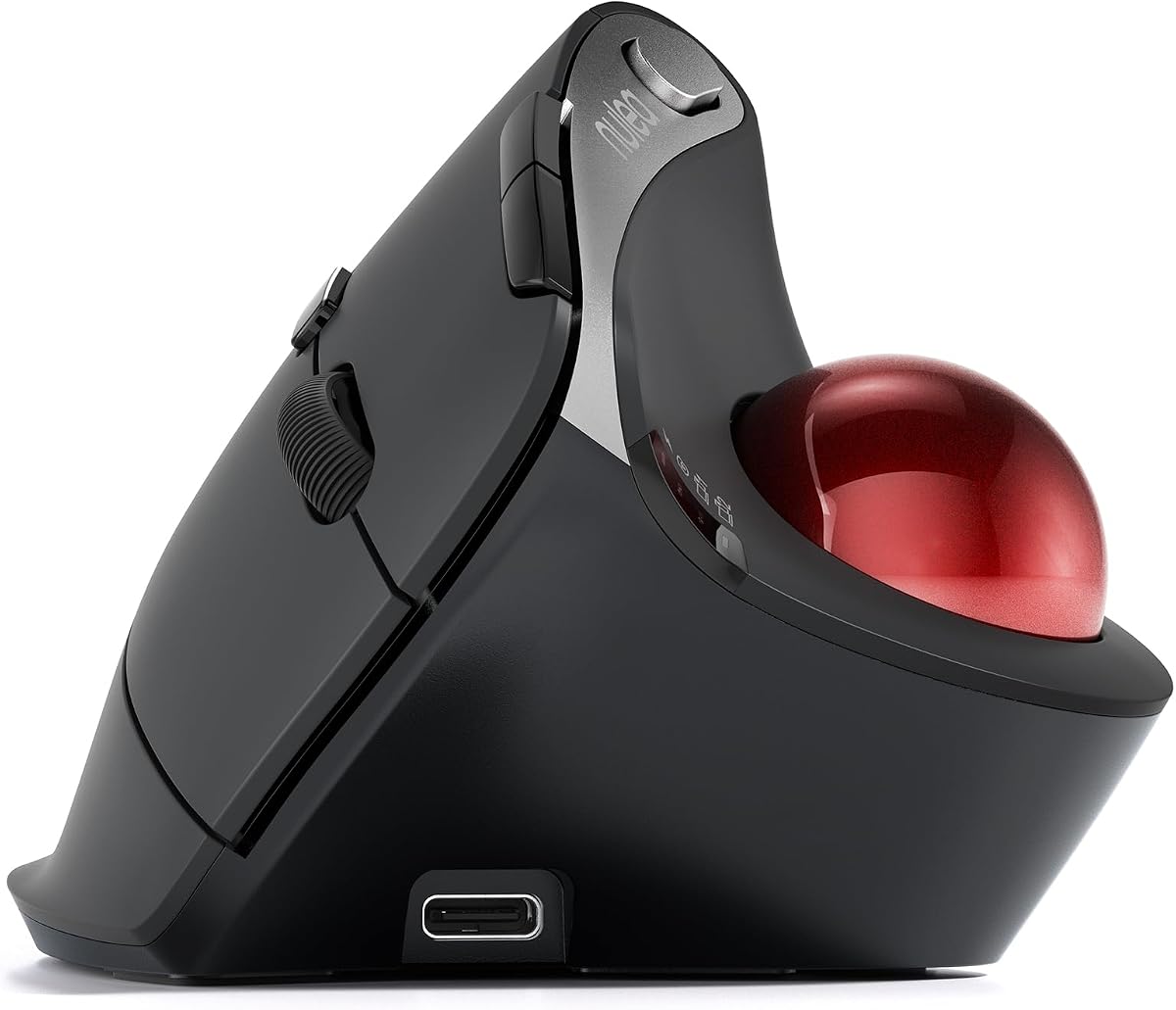


The Nulea M501 is a compact wireless trackball that combines an angled ergonomic shape, thumb control, and a rechargeable battery. Its 4.4 rating reflects a generally favorable reception, while the combination of three-device connectivity, four DPI levels, and six buttons gives it more everyday flexibility than a basic two-button pointing device. Its strongest appeal is the balance between useful controls and a relatively space-conscious footprint.
We may earn a commission when you buy through this link, at no additional cost to you.
The trackball drives the cursor without requiring the entire hand to travel across a desk, which makes the M501 suitable for compact workspaces, couches, beds, and other uneven or limited surfaces. Users can select among four DPI levels for different precision demands, and the rear and forward buttons help with common navigation tasks. Connection through Bluetooth or the included 2.4GHz receiver adds flexibility, while a button underneath the mouse simplifies device switching.
Its main compromise is that the six buttons are not programmable, which limits advanced workflow customization. The product information also describes a long-lasting rechargeable battery but does not provide a specific maximum runtime, so buyers cannot compare endurance against clearly quantified alternatives. Users should charge it with the included cable through a computer USB port or suitable 5V charger rather than a fast charger.
The M501 is a compelling choice for someone who wants cordless multi-device operation, adjustable sensitivity, and a trackball that does not occupy much room. It is especially attractive for travelers and users switching among a desktop, laptop, and tablet. The lack of programmable controls and exact runtime means it may not be the first choice for specialized workflows, but it remains a versatile general-purpose option.
The M501's angled body encourages the palm to remain relaxed while the thumb rolls the ball. Because cursor movement happens without sliding the hand, it can suit users who want to reduce repeated arm and wrist motion or work in a restricted area.
Supporting up to three devices by Bluetooth or USB receiver makes the mouse practical for mixed-platform workflows. The receiver stores underneath the device, reducing the chance of leaving a small essential accessory behind.
We may earn a commission when you buy through this link, at no additional cost to you.
The Logitech MX Ergo S Advanced Wireless Trackball Mouse is a feature-rich productivity device with a 4.4 rating. Its most impressive specification is a rechargeable battery that can provide up to 120 days of use on a full charge, with up to 24 hours available from a one-minute charge. A 20-degree tilt, sculpted shape, and soft rubber grip reinforce its ergonomic positioning for medium- to large-sized hands.
We may earn a commission when you buy through this link, at no additional cost to you.
This mouse is designed for users who regularly move between demanding workflows. A speed and precision toggle provides quick control over cursor behavior, while six customizable buttons, Smart Actions, and shortcuts in Logi Options+ add value for creative work, office software, and repetitive tasks. Quiet clicks can also make the device more considerate in shared or quiet environments.
Connectivity is handled through Bluetooth or the included Logi Bolt receiver, with an Easy-Switch button for moving between systems. USB-C charging is another advantage, although the cable is not included, so buyers may need a compatible USB Type-C to Type-C or USB Type-A to Type-C cable. Its premium feature set and specialized hand-size target also make it less universal than a simpler trackball.
Overall, the MX Ergo S is an excellent fit for power users who value long battery life, polished ergonomics, fast charging, and meaningful customization. It can serve as a central pointing device across a home office or professional multi-computer setup. For buyers who do not need programmable actions or premium comfort features, a lower-complexity model may be more appropriate.
The stated 120-day full-charge endurance removes the need to manage disposable batteries during normal use. When time is short, the one-minute charging option can supply a substantial working period, making the mouse convenient for travel and busy schedules.
Six customizable buttons, dedicated tracking-speed control, shortcuts, and Smart Actions distinguish the MX Ergo S from simpler trackballs. These features can streamline repetitive tasks when the Logi Options+ app is configured to suit the user's applications and habits.
We may earn a commission when you buy through this link, at no additional cost to you.
The Logitech Ergo M575S stands out with a 4.6 rating, the highest among the listed products, and delivers the core benefits of an ergonomic wireless trackball without a premium feature load. It supports three customizable buttons, time-saving shortcuts, and Smart Actions, while its thumb-operated design keeps the cursor moving without requiring the hand to travel across the desk.
We may earn a commission when you buy through this link, at no additional cost to you.
The device is particularly well suited to small or crowded workspaces. It can be used on almost any surface, which is useful when a conventional mouse would be awkward or inaccurate. Its sculpted shape supports the hand and encourages a better forearm position, and the included Logi Bolt receiver offers an alternative to Bluetooth for systems that benefit from a dedicated connection.
The M575S uses an included AA battery rather than a rechargeable cell, so it does not eliminate battery replacement entirely. This listing does not state a precise maximum runtime, although it is clearly positioned around long battery life. Buyers who prioritize the highest rating, established Logitech customization, and a compact form may find that trade-off easy to accept.
This model is an excellent general recommendation for office workers, students, and anyone seeking an approachable trackball with long-lasting power. It offers a simpler feature set than the MX Ergo S while retaining useful customization and cross-device convenience. It is especially attractive for users who prefer replacing a standard AA battery over remembering to recharge a built-in cell.
The M575S lets users move the cursor while keeping their hand in place, which reduces the surface area required for operation. Its sculpted construction also supports a relaxed grip and improved forearm alignment over long working periods.
Bluetooth and the included Logi Bolt receiver provide two familiar ways to connect. Three customizable buttons and Smart Actions add useful shortcuts without turning the mouse into a complicated control surface for newer users.
We may earn a commission when you buy through this link, at no additional cost to you.
This Logitech Ergo M575S Black Silver Ball version provides a 4.5 rating and a clear standout benefit: a stated battery life of up to 18 months. It uses an included AA battery and supports either Bluetooth or the included Logi Bolt receiver, offering a familiar low-maintenance alternative to a rechargeable trackball.
We may earn a commission when you buy through this link, at no additional cost to you.
Ergonomics receive particular attention. The sculpted shape is designed to keep the hand relaxed, support the forearm, and reduce muscle strain, while the product was developed with Logi Ergo Lab experts and certified by ergonomists. The quiet clicks are useful in offices and shared environments, and Logi Options+ lets users adjust cursor speed and configure three customizable buttons.
The less conspicuous limitation is that maximum battery life can depend on usage, power settings, and operating conditions, so an 18-month estimate should not be treated as a guarantee for every user. The feature set also stops at three customizable buttons, which may be modest for creative applications that benefit from more inputs. Its recycled-plastic construction does not affect function but adds a responsible-material detail.
The M575S is best for users who want a proven ergonomic form and exceptional stated endurance without maintaining a rechargeable battery. It works particularly well for general office productivity, document navigation, and smaller work areas. Anyone needing many shortcut buttons or a wired option should look toward a more specialized premium model.
An up-to-18-month stated runtime can provide one of the lowest-maintenance experiences in the group. Users can work for extended periods without charging or replacing a cell, although actual duration will naturally depend on how intensively the mouse is used.
The hand-supporting shape and thumb control help limit repeated movement. A stated 25% reduction in forearm muscle strain reinforces the product's suitability for users who spend long periods navigating documents, spreadsheets, and web applications.
We may earn a commission when you buy through this link, at no additional cost to you.
The TECKNET Wireless Trackball has a 4.5 rating and combines a rechargeable 500mAh battery with a 16-degree vertical angle. Its most attention-grabbing battery feature is the claim that a 15-minute charge powers a full day of use, offering a convenient way to top up during breaks rather than waiting for a full recharge.
We may earn a commission when you buy through this link, at no additional cost to you.
It supports two Bluetooth connections and one 2.4GHz receiver, allowing immediate switching among up to three devices. The stated wireless range reaches 34 feet, while five DPI settings from 100 to 1200 provide more sensitivity options than many competing designs. A silent mechanism and a shape intended for medium to large hands make it appealing to users who want a substantial, stable device.
New users may need time to adapt to thumb-operated pointing, and the manufacturer recommends spending one to two weeks becoming familiar with it. The 16-degree angle is less pronounced than the Nulea M506's 54-degree design, so buyers seeking a very upright posture may prefer another model. Its large dimensions may also feel less suitable for a minimalist desk.
The TECKNET is a strong choice for users who want fast charging, broad device switching, and adjustable tracking in one trackball. It is particularly useful for people alternating among a laptop, tablet, and desktop or for those who prefer a larger ergonomic body. The recommended adjustment period is a normal consideration for trackballs and should be considered alongside the longer-term comfort benefits.
The ability to obtain a full day of stated use from a 15-minute charge is particularly useful for people who do not want to interrupt their workflow for a long recharge. Its rechargeable cell also avoids the routine replacement of disposable batteries.
Five DPI levels allow users to move between slow, precise work and faster cursor travel. The adjustment button makes sensitivity changes accessible without opening a settings application, which is helpful during different types of work.
We may earn a commission when you buy through this link, at no additional cost to you.
The Nulea M506 is a vertically angled wireless trackball with a 4.6 rating, tying for the highest customer rating in this roundup. Its defining physical feature is the 54-degree structure, intended to keep the wrists and forearms in relaxed, natural positions. A contoured shell and textured palm surface add grip for office, design, and other extended tasks.
We may earn a commission when you buy through this link, at no additional cost to you.
The built-in rechargeable battery is rated to run for up to 21 days after a full charge, providing a clear endurance benchmark. Two Bluetooth channels and one USB receiver support switching among up to three devices, and a single button handles the transition. Four DPI levels—400, 800, 1200, and 1600—serve general navigation as well as design, photo editing, and multitasking.
This is not a silent model: the listing emphasizes crisp, audible click feedback rather than minimized noise. It also lacks a stated multi-device wired mode, although the wireless options are broad. For buyers concerned about hygiene or long-term ball performance, the tool-free detachable trackball is a significant advantage because dust and dirt can be removed without taking the mechanism apart.
The M506 is well suited to users who strongly prefer an upright hand posture and want a rechargeable trackball with a clearly stated battery estimate. It is a compelling option for creative professionals and frequent multitaskers, though it may be less suitable in a shared office where click noise matters. Its detachable ball and adjustable sensitivity make routine maintenance unusually straightforward.
The 54-degree body positions the hand and forearm differently from a low-profile trackball. That upright angle can be beneficial for users who want to keep the wrist relaxed, especially during long office or design sessions.
The trackball detaches quickly without tools, allowing users to remove accumulated dust and dirt. Keeping the ball clean helps maintain smooth rolling and reliable cursor control over time.
We may earn a commission when you buy through this link, at no additional cost to you.
The ELECOM Huge Plus is the most functionally elaborate model in the list, earning a 4.0 rating while offering a 52mm ball, ten programmable buttons, and three operating modes. Its built-in lithium-ion battery is stated to last up to five months per charge, giving it one of the strongest stated endurance figures among the rechargeable choices.
We may earn a commission when you buy through this link, at no additional cost to you.
Users can connect through Bluetooth, 2.4GHz wireless, or wired USB-C, and switch among up to three devices. The wired option is useful when latency concerns or uninterrupted operation matter, while the included USB-C-to-USB-A cable allows use while charging. Silent clicks reduce distraction, and the ball uses swappable MinebeaMitsumi steel bearings that can also be upgraded to ruby units.
Its large ball and broad button count may make it less suitable for a small desk or a user who prefers minimal controls. The 4.0 rating is the lowest in the group, which may warrant more caution for buyers who prioritize consistently strong customer feedback. Compatibility information is broad, covering major desktop, mobile, and ChromeOS environments, but users should still verify their exact operating system before purchasing.
The Huge Plus is best for power users who want a premium command surface, flexible connectivity, long battery life, and the ability to keep working while charging. It suits creative applications, advanced shortcuts, and multi-device desks. Buyers who only need smooth navigation and simple controls will likely find a smaller or less expensive trackball easier to manage.
Ten fully programmable buttons distinguish this model from most consumer trackballs. Users can map frequently used commands to dedicated controls, reducing repeated keyboard shortcuts and improving workflow efficiency.
Bluetooth, 2.4GHz, and wired USB-C provide useful choices for different setups. The wired mode can support continuous operation while charging, and the ability to move among up to three devices suits flexible workspaces.
We may earn a commission when you buy through this link, at no additional cost to you.
The Kensington Expert Wireless Trackball has a 4.2 rating and takes a traditional approach with a large 55mm ball, Diamond Eye optical tracking, and a patented scroll ring. Its detachable ergonomic wrist rest supports the hand and wrist, while the ambidextrous layout broadens its appeal to users who do not want a strongly handed design.
We may earn a commission when you buy through this link, at no additional cost to you.
Four customizable buttons, adjustable scroll speed, and adjustable cursor speed provide more control than a minimal trackball. Connectivity comes through built-in Bluetooth LE or a 2.4GHz USB dongle, and auto-sleep and power-saving settings help conserve the energy supplied by two included AA batteries. The wrist rest can be removed when a more compact setup is preferred.
The operating-system support is less expansive than newer models. Linux is not supported, Windows ARM-based computers are not currently supported, and older Windows or macOS versions may have different connection recommendations. Its 4.2 rating is also lower than those of the leading models, while the design lacks the multi-device switching and customizable workflows found in recent competitors.
The Expert Wireless remains a practical choice for users who prefer a substantial ball, a physical scroll ring, and the familiarity of replaceable AA batteries. It is well suited to traditional office navigation and shared ambidextrous setups. Buyers seeking current cross-platform flexibility or advanced software should verify compatibility carefully or consider a newer alternative.
The 55mm ball provides a broad rolling surface that many traditional trackball users may find familiar. Diamond Eye optical tracking supports precise cursor placement, while the patented scroll ring offers a physical method for navigating long pages.
The ambidextrous design and removable wrist rest provide more fitting flexibility than a strongly sculpted right-handed mouse. That makes the device useful in shared offices or for users whose preference changes between tasks.
We may earn a commission when you buy through this link, at no additional cost to you.
This Logitech MX Ergo S Advanced listing offers a 4.4 rating and emphasizes secure wireless productivity alongside substantial battery endurance. Its rechargeable system provides up to 120 days of use from a full charge and up to 24 hours from a one-minute charge, making it one of the strongest candidates for frequent, long-term use.
We may earn a commission when you buy through this link, at no additional cost to you.
The highlighted encrypted dongle distinguishes this version from the more general MX Ergo S listing. It also supports Bluetooth, six programmable buttons, a speed and precision toggle, and a 20-degree tilt. Logi Options+ adds shortcuts and Smart Actions, while the sculpted shape and soft grip are intended to improve comfort for medium- to large-sized hands.
The charging cable is not included, and users will need a compatible USB Type-C cable. The advanced controls also create more of a learning curve than a basic trackball, although experienced productivity users may appreciate the additional flexibility. As with any manufacturer endurance estimate, actual battery duration can vary with frequency of use and settings.
This model is an excellent selection for professionals who prioritize secure wireless communication, long battery life, fast charging, and customizable controls. It works especially well in multi-computer environments or wherever a dedicated encrypted receiver is preferred. Users who need the same core endurance with a more general connectivity package can compare the other MX Ergo S option.
The encrypted Logi Bolt receiver provides a dedicated wireless connection for users who prefer one over open Bluetooth. It is particularly relevant in shared or security-conscious professional environments where device pairing policies may matter.
A one-minute charge can deliver a stated 24 hours of use, offering a practical recovery option before meetings or travel. Full charging extends the same convenience to a stated 120 days, reducing routine charging interruptions.
We may earn a commission when you buy through this link, at no additional cost to you.
The Kensington SlimBlade Pro has a 4.1 rating and offers a low-profile alternative to large desk mice. Its rechargeable battery is stated to last four months per charge, while dual sensors track a 55mm ball accurately. The shape supports both right- and left-handed users and requires less arm and wrist movement than conventional pointing devices.
We may earn a commission when you buy through this link, at no additional cost to you.
Its connection options are unusually flexible for the category. Bluetooth, 2.4GHz through the included USB-A dongle, and wired use are all available, while the included 1.5-meter USB-C-to-USB-A cable charges the trackball. The low profile also helps it fit into tighter workspaces where a traditional mouse would require more room.
Programmability is a major strength, with eight sets of programmable buttons and configuration through KensingtonWorks. The software can feel more involved than the simpler controls found on less advanced models, so users should be willing to customize settings if they want to realize the device's full potential. The 4.1 rating suggests experiences may vary, making thoughtful comparison important.
The SlimBlade Pro is a good fit for users who want a thin, ambidextrous trackball with rechargeable endurance and extensive controls. It is particularly useful for shared desks, laptop-focused setups, and users who alternate between wireless and wired operation. Those wanting a more immediately simple pointing device may prefer a model with fewer programmable layers.
The slim body takes up less space than a conventional mouse and can be positioned in front of either hand. Its large ball and low height create a practical option for users who want a familiar trackball feel without a bulky wrist rest.
Bluetooth, 2.4GHz, and wired modes provide options for portable use, dedicated receivers, and uninterrupted operation. A stated four-month charge cycle reduces maintenance compared with disposable-battery designs.
We may earn a commission when you buy through this link, at no additional cost to you.
Choosing a long-battery trackball means balancing runtime, recharge convenience, physical comfort, control options, and compatibility. The most important factors vary depending on whether you work at one desk, travel frequently, switch among devices, or rely on detailed shortcuts.
Rechargeable trackballs remove routine battery replacements and are convenient for people who routinely plug devices into USB power. Their charge behavior varies considerably: the ELECOM Huge Plus claims up to five months, the Logitech MX Ergo S states up to 120 days, and the Nulea M506 lists up to 21 days. Some products, such as the TECKNET, also offer a short daily charging cycle. Replaceable-battery designs can be equally low-maintenance when the stated runtime is long. The Logitech M575S version with the Black Silver ball states up to 18 months from an included AA battery, while the Kensington Expert uses two AA batteries and sleep modes to conserve power.
A clear endurance figure makes comparison easier, but the most useful claim depends on your routine. A week-long specification may be sufficient for a traveler who charges nightly, while a multi-month claim is more relevant to someone who wants to ignore the mouse for extended periods. Stated maximums generally assume particular usage conditions, so treat them as comparative guidance rather than guaranteed results. Screen activity, connectivity, cursor movement, button use, and power-saving settings can all influence real-world runtime.
A trackball reduces the need to move the entire arm, but its body still needs to fit your hand and posture. The Nulea M506 has the most upright geometry at 54 degrees, while the Logitech MX Ergo S uses a 20-degree tilt and targets medium to large hands. The TECKNET is also designed for medium-large hands and may require a one-to-two-week adjustment period. The Kensington SlimBlade Pro emphasizes a low-profile, ambidextrous layout, while the Expert adds a detachable wrist rest. Consider palm support, grip texture, and whether your hand is right- or left-handed.
Smooth, accurate tracking is essential, particularly for design work, spreadsheets, and precise selection. Adjustable DPI provides a practical way to move between fine control and faster cursor travel. The Nulea M501 offers four levels, the TECKNET provides five, and the M506 includes four precision-oriented settings. The Logitech M575S supports cursor-speed adjustment through Logi Options+, while the MX Ergo S adds a dedicated switch between speed and high-precision tracking. Large-ball models such as the ELECOM and Kensington options may appeal to users accustomed to traditional trackballs.
Wireless freedom is most useful when the same mouse can move between several computers, tablets, or other supported systems. Bluetooth is convenient for cable-free pairing, while 2.4GHz receivers can be simple to operate and may be preferred in security-conscious environments. The Nulea M501, TECKNET, and M506 support three-device configurations. The ELECOM Huge Plus combines Bluetooth, 2.4GHz, and wired operation, and the Kensington SlimBlade Pro does the same. Some Logitech models also support an encrypted Logi Bolt receiver. Always check operating-system requirements, included adapters, and whether a receiver is stored inside the device.
Additional buttons can save time, but they only improve productivity when they are configurable for the applications you use. The Logitech MX Ergo S provides six customizable buttons, Smart Actions, and speed or precision controls. The ELECOM Huge Plus offers ten programmable buttons, and the Kensington SlimBlade Pro supports eight sets of programmable buttons. The M575S provides three customizable buttons, while the Nulea M501 has six physical buttons but does not support programming. Kensington Konnect and KensingtonWorks add configuration options to compatible Kensington devices, and Logi Options+ is central to the Logitech models.
Ball size influences both control and footprint. The ELECOM Huge Plus and Kensington devices use 55mm balls, while the ELECOM listing describes a large 52mm ball, offering a traditional trackball feel. Smaller models prioritize desk space and portability. The Nulea M506 has a tool-free detachable ball, making it easier to remove dust and maintain smooth rotation. Before buying, consider whether you prefer a large rolling surface, a compact body, a vertical posture, or a low-profile design. Product shape and hand size are personal, so adjustment time should be considered part of the purchase decision.
Cross-platform support is essential if you alternate among Windows, macOS, iPadOS, Android, or ChromeOS. The ELECOM Huge Plus lists a broad set of compatible systems, while the Logitech models are commonly positioned for PC and Mac workflows. Kensington's Expert is compatible with Windows, macOS, and Chrome OS, but not Linux, and does not currently support Windows ARM-based computers. KensingtonKonnect personalization is unavailable for Windows ARM systems, according to the supplied information. Check the complete compatibility list before ordering, especially for older or specialized systems.
Begin by charging a rechargeable model fully with the appropriate cable and installing the specified batteries in a replaceable-battery model. Connect through Bluetooth or the included 2.4GHz receiver, then use the underside button to select the desired device. Place the trackball where you can rest your palm naturally, keep your fingers over the primary buttons, and allow the thumb to roll the ball rather than pushing the whole device across the desk.
Adjust the cursor speed, DPI, or tracking mode once you begin working, and use the accompanying software to assign buttons or create shortcuts for frequently used commands. Test the settings in your most common applications because some interfaces respond differently to high or low cursor speeds. If the movement feels unfamiliar, begin with a slower setting and practice basic pointing, clicking, scrolling, and back-and-forth navigation before returning to your usual speed.
For care, keep the trackball away from excessive dust, crumbs, moisture, and direct heat. Remove loose debris carefully, and use the tool-free detachable design when available. Wipe the exterior with a soft dry cloth, avoid pushing objects into narrow gaps, and follow the manufacturer's charging guidance. For maximum stated battery life, use energy-saving options, power the device down during long periods of non-use, and replace batteries or recharge the built-in cell before extended travel.
It depends heavily on the battery technology and operating conditions. Some rechargeable models state multi-month endurance, while certain AA-powered designs claim up to 18 months. The Logitech MX Ergo S, Nulea M506, and ELECOM Huge Plus list 120 days, 21 days, and five months respectively. Compare the stated maximums, but also consider whether you prefer charging occasionally or replacing standard batteries.
A rechargeable model is usually better when a USB port is regularly available because it avoids ongoing battery purchases. An AA-powered model can be more convenient for travel or occasional use, especially when its stated runtime is exceptionally long. The best choice depends on charging habits, workspace access, and whether you prioritize a fully self-contained device or the lowest routine maintenance.
Most trackballs use the movement of the ball itself rather than optically scanning the underlying surface, so they can operate on many surfaces that are impractical for a conventional mouse. This is useful on a couch, bed, lap, or uneven work area. Smooth movement still matters, and a dirty ball can impair precision, so regular light cleaning is advisable.
Adaptation varies by person, previous pointing-device experience, and the model's shape. TECKNET specifically recommends allowing one to two weeks to become familiar with its trackball. New users can begin with a lower cursor speed, practice clicking and scrolling, and avoid making abrupt thumb movements until the required amount of rolling feels natural.
Yes, if the model supports multi-device pairing. The Nulea M501, TECKNET, and Nulea M506 support three devices, while the ELECOM Huge Plus offers Bluetooth, 2.4GHz, and wired modes across up to three devices. The Logitech models also support switching, and some use Logi Bolt receivers. Check the exact pairing process and operating-system compatibility before buying.
They are not necessary for basic navigation but can be valuable for office software, creative applications, and repeated workflows. The ELECOM Huge Plus, Logitech MX Ergo S, and Kensington SlimBlade Pro provide extensive customization, while simpler products offer fixed or fewer configurable controls. Buyers who do not want to manage software should prioritize models with clear physical buttons and straightforward operation.
Keep the ball and exposed rollers clean, protect the device from moisture, and use the supplied or manufacturer-approved charging method. The Nulea M506's detachable ball can be removed without tools for easier cleaning. Avoid fast chargers where the manufacturer advises otherwise, and do not use the charging cable or connection for purposes not covered by the product instructions.
A larger ball can feel more traditional and may provide a larger rolling surface for some users. The ELECOM Huge Plus, Kensington Expert, and Kensington SlimBlade Pro emphasize large balls for this reason. However, precision also depends on the tracking mechanism, sensitivity settings, ball cleanliness, and user control, so ball size alone does not guarantee a better experience.
The Logitech MX Ergo S stands out as the best-balanced advanced choice, combining up to 120 days of stated battery life, a one-minute charging boost, strong ergonomics, quiet clicks, and six customizable buttons. The Logitech Ergo M575S is the value-focused recommendation for its high rating, compact ergonomic design, and long-lasting replaceable battery, while the ELECOM Huge Plus takes the premium lead with five-month endurance, ten programmable buttons, and three connection modes.
Before buying, prioritize the type of battery system, physical fit, and controls you will actually use. A long runtime cannot compensate for a shape that causes discomfort, and programmable features add little value if you prefer simple operation. For travel, consider rechargeable quick-charge options; for shared desks, consider ambidextrous designs; and for specialized workflows, check the number of remappable controls and operating-system support.
Battery claims, software compatibility, and product availability can change, so confirm the latest specifications before purchasing. Comparing the current product listing with your own devices, desk space, and daily workload will lead to the most practical long-term choice. Use the linked listings to review the latest configuration, included accessories, customer feedback, and present availability.