
Handbrake Sim Racing
4.5Editor score
64-bit Hall-effect sensor
No driver installation required
Wide PC wheel compatibility
Our SIM Racing Handbrakes guide compares ten USB and hydraulic models for precision, adjustability, compatibility, installation, and drift-focused performance.
SIM racing handbrakes add a separate axis of control that can make slides, hairpin turns, rally stages, and emergency braking feel more convincing. A useful model should combine smooth analog input, dependable construction, accessible adjustment, and a mounting method that suits your wheel, desk, or dedicated cockpit.
We compared the ten products using their stated sensor resolution, platform support, construction, adjustability, cable or connection design, and listed compatibility with common steering wheels and racing games. The guide covers mostly plug-and-play PC models, one option with broader console claims, and a premium hydraulic handbrake for specialized rigs.
Each review explains the most useful qualities and practical limitations of its featured product, while the comparison table highlights the major differences. Ratings and specifications reflect the supplied product information, but availability, driver support, software compatibility, and prices can change, so confirm the current listing before buying.
4.5Editor score

4.4Editor score

The table below places all ten handbrakes side by side, emphasizing sensor type, construction, connection method, adjustability, and platform support. These differences matter because the most appropriate model depends on your operating system, wheelbase, rig, and preferred level of tactile customization.


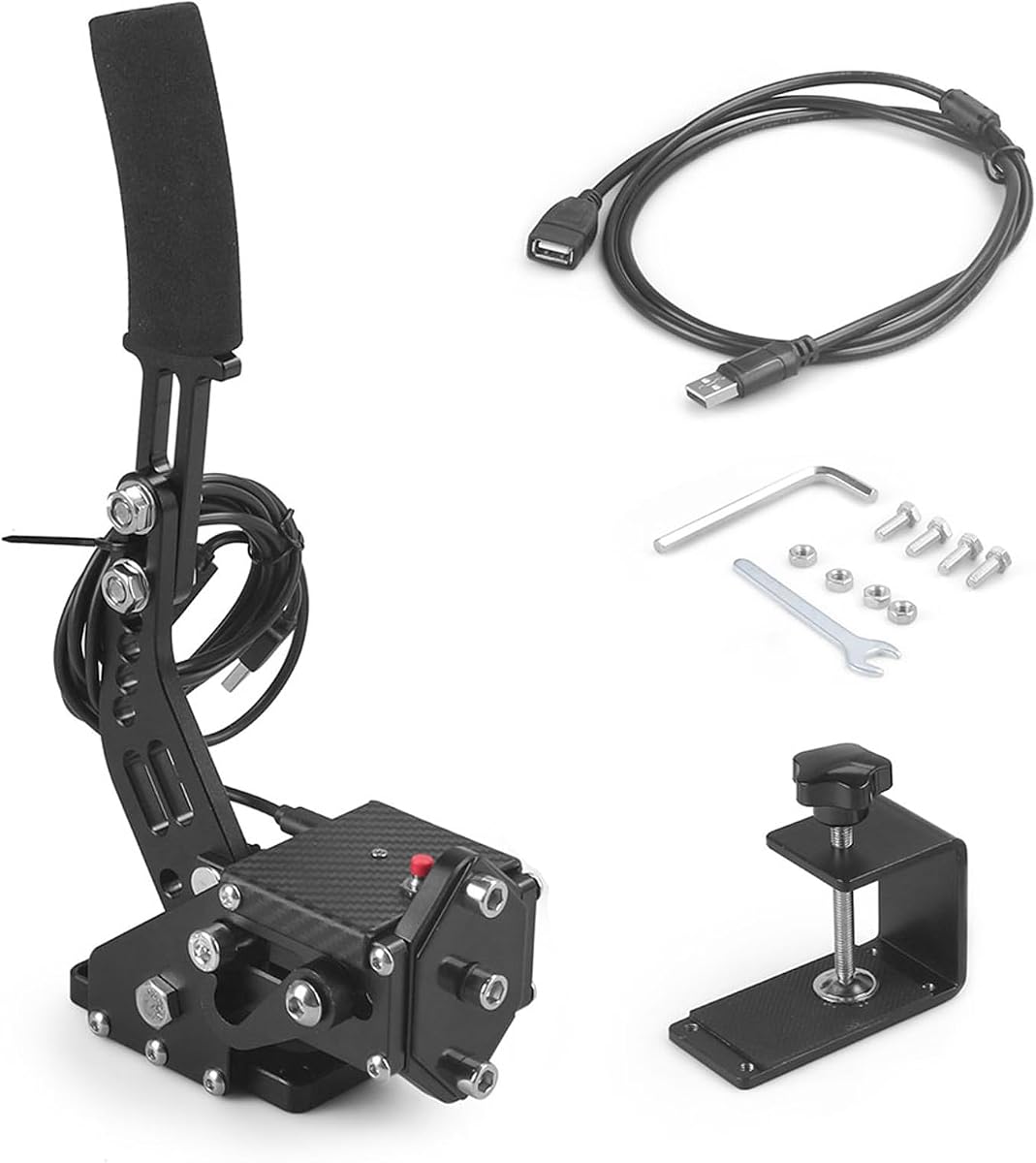


The aikeec USB Sim Racing Handbrake is a straightforward USB accessory rated 4.3 stars, with a design focused on giving PC racers a separate, adjustable handbrake axis. Its stated compatibility with Logitech G27, G29, G920, T300, and T500 wheels makes it a natural match for an existing entry-level or midrange sim setup.
We may earn a commission when you buy through this link, at no additional cost to you.
The strongest feature is its combination of plug-and-play USB operation and automatic Hall-sensor calibration. That means the unit does not depend on conventional game-controller axes or require a separate driver package, while the sensor is designed to maintain stable precision over time. The handle also adjusts in both height and angle, allowing it to fit more naturally beside different wheelbases, brackets, and cockpit layouts.
The important limitation is platform scope. It is designed for Windows PC and is explicitly not intended for Xbox One, PlayStation 4 or 5, or Mac. Game support is broad in principle, covering titles such as ETS2, ATS, Forza Horizon, Assetto Corsa, DiRT Rally 2, Project CARS, and WRC, but mapping requirements can differ by title.
This is a strong recommendation for PC players who want an easy way to add progressive handbrake control without assembling a complex hydraulic system. It is especially attractive if your wheel already belongs to one of the listed Logitech or Thrustmaster families and you need a flexible lever for rally, drifting, or occasional traction control.
Height and angle adjustment help the lever sit within comfortable reach of a wheel mounted on a desk, seat bracket, or dedicated rig. This is important because a handbrake that feels accurate in electronics can still be tiring if its position does not match the driver's natural arm movement.
The automatic Hall-sensor calibration removes much of the guesswork associated with potentiometer-based handbrakes. Connect the USB cable, confirm the control in the game, and perform the specified calibration sequence before using the lever for precision driving.
We may earn a commission when you buy through this link, at no additional cost to you.
The CXCESNS Sim Racing Handbrake is rated 4.2 stars and positions itself as a progressive, durable USB e-brake for Windows racers. Its 16-bit non-contact Hall sensor and claimed auto-calibration are designed to produce repeatable pull, hold, and release movement rather than a coarse digital lever.
We may earn a commission when you buy through this link, at no additional cost to you.
Construction is a major selling point. The body is described as 95-percent metal, with high-rigidity compression springs and an integrated motherboard connection intended to remain secure through repeated use. The lever supports adjustable height and angle, and the included 63-inch nylon USB cable should provide practical reach for many cockpit arrangements.
Setup is refreshingly simple because no drivers or separate software are required. However, the product remains PC-only: PlayStation, Xbox, and Mac systems are excluded, and game-specific mapping can vary. That limitation is reasonable for a device marketed primarily around PC steering wheels, but it should be confirmed before purchasing for a multi-platform racing setup.
Choose this model if you value a metal build, 16-bit input resolution, and minimal software setup. It is well suited to Logitech G25, G27, G29, G920, and G923 users, as well as Thrustmaster T300 and T500 owners who want smooth progressive braking for rally and drifting.
A progressive lever represents small and large pulls with different degrees of game input. That range is valuable when transitioning from normal cornering into a slide, because a driver can release pressure incrementally instead of choosing between a limited number of switch positions.
The mostly metal construction and rigid compression springs are intended to provide stability and consistent resistance. Buyers should still secure the unit according to the instructions, particularly when applying substantial force during repeated slides or emergency braking.
We may earn a commission when you buy through this link, at no additional cost to you.
The PXN HB S PC Handbrake is rated 4.4 stars and stands out as one of the most adaptable conventional handbrakes in the group. It combines an aluminum alloy body, 16-bit Hall-effect sensing, adjustable strength and travel, and interchangeable mounting orientations in a Windows-focused design.
We may earn a commission when you buy through this link, at no additional cost to you.
Its default 16mm travel can be shortened to 10mm by replacing the relevant part. Spring and damping-rubber changes let users tune handbrake force, while the grip can switch between vertical and horizontal positions. The horizontal arrangement more closely resembles a road-car parking brake, whereas the vertical format suits rally-style or alternate rig layouts.
Compatibility extends to PXN V3, V900, V9, V10, and V12 bases and Logitech G27, G29, G920, G923, T300, and T500 wheels. The trade-off is that it is limited to Windows PC, and drivers who want highly specific resistance or travel may need to experiment with the supplied components and included fixing clip.
This is our preferred all-around choice for PC racers who want more control over feel without moving to a premium hydraulic ecosystem. It suits dedicated rigs particularly well, although the included mounting hardware may also make it practical for a sturdy desk setup.
Independent adjustment of spring strength, damping material, and travel lets the lever evolve with your driving habits. A short, light setup may feel better for quick transitions, while a longer or firmer configuration can provide the sensation of a substantial mechanical handbrake.
The dual grip orientation is unusually useful in a mixed setup. Keep it vertical for quick access during rally stages, or mount it horizontally when recreating the handbrake placement of a conventional road car.
We may earn a commission when you buy through this link, at no additional cost to you.
The aikeec 64-Bit Handbrake carries a 4.4-star rating and uses CNC-machined aluminum and mild steel to create a lightweight but substantial frame. Its included clamp and automatic calibration system are especially relevant for PC racers who want quick installation without assembling a complete hydraulic handbrake kit.
We may earn a commission when you buy through this link, at no additional cost to you.
The 64-bit Hall-effect sensor is presented as a high-precision, non-contact solution that improves the realism of braking. The automatic system remembers the handbrake's starting point and travel, reducing setup time and helping maintain consistent behavior. It can also operate with either linear or non-linear games, a valuable distinction for a broad software library.
The list of supported titles includes Assetto Corsa, the DiRT Rally series, several Forza releases, Euro Truck Simulator 2, WRC 9, Richard Burns Rally, Project CARS, Live for Speed, and TOCA Pro Race Driver. The product is PC-only, and clamp installation may require care around different wheelbase frames, so checking clearances is essential.
This is a compelling choice for Windows users who value sensor resolution and straightforward clamp mounting. It is particularly well suited to rally specialists who want analog control across a large selection of games without relying on console-specific control schemes.
The supplied clamp can simplify placement beside a compatible wheelbase, reducing the need for separate drilling. Confirm the frame dimensions and available space before installation, especially if the wheel already uses a substantial bracket or cockpit profile.
Supporting both linear and non-linear games makes this model useful for a varied PC library. The exact behavior still depends on the selected title and the axes assigned through the game's control settings, so verify the listed mapping instructions after installation.
We may earn a commission when you buy through this link, at no additional cost to you.
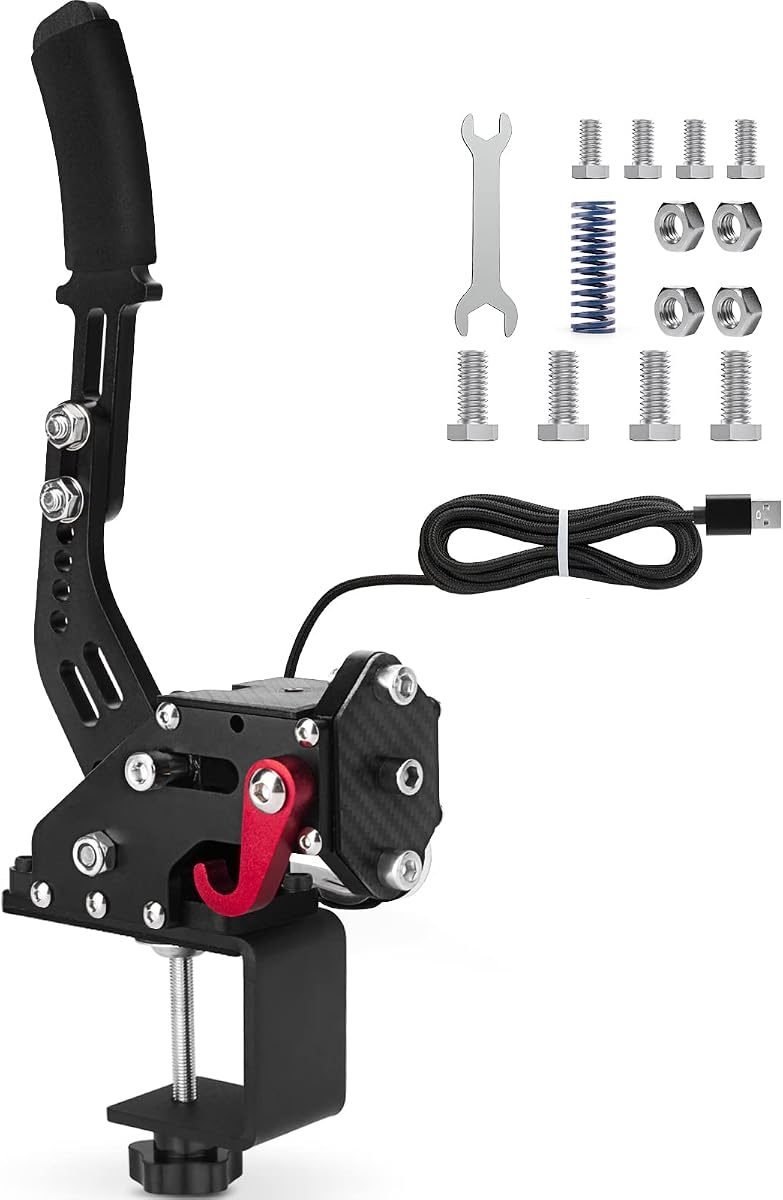
The Handbrake Sim Racing USB device has the highest listed rating in this comparison at 4.5 stars. It is a straightforward PC handbrake built around a 64-bit Hall-effect sensor, CNC-machined aluminum and mild steel, and a two-meter USB cable, making it a practical entry for many sim-racing setups.
We may earn a commission when you buy through this link, at no additional cost to you.
Its main appeal is the combination of useful resolution and minimal setup. No driver installation is required, and the unit is described as easy to assemble. The long USB cable gives drivers more freedom in placing the lever relative to a wheel, while the curved handle is intended to improve grip during fast transitions.
Compatibility covers Logitech G920, G923, G27, G25, G29, T300, and T500 wheels for PC use. It is not designed for PlayStation, Xbox, or Mac. Compared with some rivals, the published feature list gives less detail about force and stroke adjustment, making it better suited to buyers who prioritize straightforward installation over extensive tuning.
This is our best budget recommendation for Windows racers who want a modern Hall sensor and broad wheel compatibility without a complicated setup. It should serve casual drift players, rally enthusiasts, and drivers adding a handbrake to an existing PC cockpit, provided their game recognizes a standard analog axis.
The driver-free USB design shortens the path from unboxing to driving. Mount the device, connect the cable, assign the axis in the game, and complete any required calibration before using full braking force.
A two-meter cable provides more freedom than shorter leads when the handbrake must sit farther from the computer. It also makes the unit easier to position on either side of a cockpit, preserving access to the wheel and other controls.
We may earn a commission when you buy through this link, at no additional cost to you.
The 64-Bit PC/PS4/PS5 USB Handbrake has a 3.0-star rating and is the only product in the group explicitly advertising PlayStation compatibility alongside PC use. Its appeal is therefore platform breadth, particularly for racers who move between a Windows setup and supported console titles.
We may earn a commission when you buy through this link, at no additional cost to you.
The handbrake uses aluminum construction, a 64-bit Hall sensor, automatic calibration, and a reinforced spring. A fixing clip is included, while the 1.8-meter USB cable offers adequate reach for many installations. The device connects directly through USB and is described as requiring no additional drivers.
There are important ambiguities. The listing states PS4 and PS5 compatibility, but the same information limits compatibility to Windows 10, which is narrower than the Windows 7-and-newer support claimed by many alternatives. Console mapping can also vary by game, so buyers should confirm whether the target title recognizes the device and whether platform-specific instructions are available.
This product makes the most sense for a gamer whose priority is a single accessory across PC and console, rather than extensive force adjustment. Its lower rating and narrower operating-system statement warrant careful review of current customer feedback, but the platform claims could be valuable for a mixed gaming setup.
A handbrake that can be carried between supported PC and PlayStation setups may reduce the need for separate accessories. The actual console experience depends on title support and mapping, so confirm both before relying on the stated platform compatibility.
The relatively small footprint and direct USB connection are convenient for desks and portable arrangements. The included fixing clip provides a basic mounting solution, although permanent installation may be preferable for a high-force racing cockpit.
We may earn a commission when you buy through this link, at no additional cost to you.
The aikeec 64-Bit USB PC Handbrake is rated 4.3 stars and is defined by its 64-bit Hall sensor, 78-inch USB cable, and included clamp. It is aimed at Windows users who want long cable reach and a directly connected handbrake across a broad range of racing games.
We may earn a commission when you buy through this link, at no additional cost to you.
The extended cable is particularly useful for dedicated cockpits where the computer may sit well away from the driver's seating position. Its Hall sensor uses automatic calibration and a non-contact design intended to provide precise, stable input. The handle adjusts in height and angle to improve reach and accommodate different wheelbases and mounting structures.
The product supports Logitech G25, G27, G29, G920, G923, T300, and T500 wheels on Windows. It also covers major PC titles including Assetto Corsa, DiRT Rally 2, Project CARS, WRC, Forza Horizon, ETS2, and ATS. It does not support Xbox One, PlayStation 4 or 5, or Mac, which limits its appeal for multi-platform racers.
Buy this model if you need generous cable length and value a simple, independent USB control. It is a sensible match for rally, drifting, and general sim racing on PC, especially when the supplied clamp can be securely attached to a compatible cockpit frame.
The 78-inch lead gives the handbrake much more placement freedom than a compact desktop cable. That can make the lever easier to reach without stretching, reduce cable tension, and improve the overall ergonomics of a dedicated rig.
Automatic calibration and a non-contact Hall sensor are intended to provide repeatable braking without the wear associated with a mechanical potentiometer. Correct setup remains important, so use the game axis and calibration sequence specified for your title.
We may earn a commission when you buy through this link, at no additional cost to you.
The CNRAQR PC Racing Game USB Handbrake is a 4.2-star model built around a 16-bit non-contact sensor and low-carbon steel control system. It offers progressive linear handbrake input, a two-meter USB cable, and height adjustment in a compact design suited to PC sim racers.
We may earn a commission when you buy through this link, at no additional cost to you.
The 16-bit sensor is positioned as a meaningful upgrade over 14-bit alternatives because it provides finer control resolution. Its non-contact construction should also avoid the gradual degradation associated with physical potentiometer tracks. The curved handle and adjustable height are intended to create a comfortable grip and keep the lever within easy reach.
Installation is straightforward: connect the USB cable and map the control without installing drivers. The product supports Windows 11 and earlier versions, along with Logitech G25, G27, G29, G920, and G923 and Thrustmaster T300 and T500 wheels. It is not intended for consoles or Mac, and the supplied information gives less detail about customizing force than the PXN models provide.
Choose it when you want a portable 16-bit handbrake with enough cable reach for most rigs. It is a balanced pick for Windows users who value input resolution, easy setup, and compact dimensions without needing software-based tuning.
Sixteen-bit sensing provides finer control changes than lower-resolution inputs, allowing the game to interpret small handbrake adjustments more precisely. This can help during controlled slides where smooth modulation matters more than a dramatic single pull.
The compact frame and two-meter cable make this practical for users who move between desks and shared rigs. The included fixing clip and plate add mounting flexibility without requiring a permanent installation.
We may earn a commission when you buy through this link, at no additional cost to you.
The SIMSONN HB Pro V2 is the premium hydraulic handbrake in this guide and the only model with a supplied product designation that includes a V2 platform upgrade. It supports installation of a SIMSONN vibration-feedback module, while its upgraded structure replaces the limitations of the older HB Pro model.
We may earn a commission when you buy through this link, at no additional cost to you.
The control system is unusually advanced. It combines two independent 32-bit processors, a dedicated 16-bit high-resolution analog-to-digital converter, and a fully differential amplification chip. These components are intended to provide stable, low-latency signal processing, and Windows supports 16-bit HID game-controller axes for precise analog control.
Installation can use a wheelbase CAN port or a direct Type-C PC connection. The lever supports horizontal and vertical mounting, three angle positions, an extra 70HA rubber damper, software-controlled dead-zone settings, and RGB lighting that can display pressure. It also supports a 13-centimeter handle, with a 20-centimeter extended handle available as an option.
This is the choice for dedicated sim-racing enthusiasts who want authentic hydraulic resistance and software-level control. The lack of a supplied customer rating means long-term user feedback cannot be evaluated here, so buyers should confirm wheelbase support, connector availability, software requirements, and their preferred game configuration before purchasing.
A hydraulic mechanism changes the handbrake from a simple input controller into a physical resistance system. The included custom damper can fine-tune the feel, while the mounting orientation and angle settings help reproduce the placement of different types of vehicles.
SIMSONN Manager exposes dead-zone and lighting controls, and the optional vibration module adds another layer of feedback. These features make the HB Pro V2 more relevant to a permanent cockpit than a minimal desktop accessory, especially when other SIMSONN hardware is already in use.
We may earn a commission when you buy through this link, at no additional cost to you.
The PXN HBS 16-Bit Handbrake is rated 4.0 stars and provides a 16-bit Hall-effect sensor in a full aluminum alloy body weighing about 900 grams. It is designed for Windows users who want stable hardware, linear analog input, and a broad selection of resistance and mounting adjustments.
We may earn a commission when you buy through this link, at no additional cost to you.
Three spring options rated at 3kg, 5kg, and 10kg make it possible to change the lever's resistance. The stroke can be adjusted between 10mm and 16mm, and damping gel can be changed as well. Vertical and horizontal installation modes let the unit accommodate both road-car and rally-style layouts.
The complete accessory kit includes screws, wrenches, springs, damping gel, a USB cable, and a clamp. It connects through USB-B without requiring additional drivers and works with PXN V3, V9, V10, and V12 bases plus common Logitech wheels. The main drawbacks are its lower listed rating compared with the other PXN offering and the absence of console or Mac support.
This handbrake is a good fit for a PC racer who values granular tuning but does not need a hydraulic or software-managed system. Its stable weight, included hardware, and supported spring choices make it especially suitable for a permanent cockpit that can be adjusted as the driver's technique develops.
The included spring choices create a meaningful range between light and firm lever movement. This makes it easier to account for wheel force, desk stability, and personal strength while still retaining a consistent basic installation.
The aluminum alloy frame and stated 900-gram weight are intended to limit wobble and provide a planted feel. The included clamp helps keep the lever stable, while adjustable stroke and grip orientation support a personalized cockpit layout.
We may earn a commission when you buy through this link, at no additional cost to you.
The right handbrake depends on your platform, wheelbase, rig, driving style, and tolerance for setup. Sensor resolution, mechanical resistance, mounting hardware, and game support should be considered together rather than treating one specification as decisive on its own.
If you race on both PC and console, platform support may determine the shortlist before feel or materials do. Do not assume that every USB racing peripheral works with a console, and check whether the game recognizes an analog handbrake axis rather than relying on button-based controls.
Prioritize a non-contact Hall sensor with automatic calibration, then consider resolution as a secondary factor. Correct axis mapping and calibration matter at least as much as the headline bit depth during real driving.
Choose a USB model for straightforward PC use and broad game compatibility. Choose hydraulic hardware when authentic resistance, advanced feedback, permanent installation, and software tuning are central to your racing setup.
Look for at least one meaningful adjustment point, and prefer multiple springs if you expect to change driving styles. Match the lever's force to your wheel resistance, available mounting strength, and physical comfort.
A dedicated cockpit usually has more room for a clamp or permanent mount, while desk users should favor a stable platform and manageable force. Never rely on a light desk edge for a high-force lever without checking that it will not slip.
Search for the exact wheel model and game you use, then review current setup documentation. Confirm whether the game needs a linear axis, button-based input, or a particular calibration sequence.
Measure the distance from the computer or wheelbase connection point to the intended handbrake position. Also verify the connector type and available port before completing your setup.
Favor a complete, securely mountable package over an attractive frame with missing essentials. For heavy use, rigid mounting hardware and a stable base are more valuable than a small set of cosmetic extras.
Start by mounting the handbrake on the correct side of your wheel or cockpit and checking that it cannot interfere with steering, shifting, or pedal use. Secure the clamp, plate, or fixing clip according to the instructions, then connect the specified USB, USB-B, CAN, or Type-C cable. Because force and travel differ between models, test the resistance before beginning a race and loosen or adjust the mounting if the lever moves under pressure.
Open the racing game's control settings and assign the handbrake to the appropriate analog axis. Most products are designed to work without additional drivers, but you should still confirm the device appears in the game's controller list. Follow the manufacturer's automatic calibration procedure with the lever fully released, then test gentle, medium, and full pulls. If input feels reversed or jerky, correct the axis inversion, range, dead zone, or calibration rather than forcing the hardware.
For upkeep, wipe the handle and exposed mechanism with a soft, dry cloth and keep liquids away from the electronics. Check clamps and screws periodically, especially after a forceful slide or an impact. Do not spray cleaner directly onto the sensor, cable, or moving joint, and avoid pulling the device by its lead. Keep the USB or CAN connection strain-free, use a surge-protected computer where appropriate, and recalibrate if the resting position changes after the rig is moved or the equipment has been stored for a prolonged period.
A separate handbrake is optional, but it can add meaningful realism for rally, drifting, hill starts, and emergency braking. Some wheels include a handbrake or use keyboard and button inputs, yet a dedicated lever generally provides a wider range of analog positions. It can also make short, controlled adjustments easier when maintaining steering angle during a slide.
Most products in this guide are intended for Windows PC only, even when they are labeled as USB devices. One product advertises PS4 and PS5 compatibility, but it also lists a narrower Windows requirement and does not explain every console mapping detail. Always check the current listing and game-specific instructions before buying for a console.
The bit depth represents the resolution available to the control system, and a higher figure can provide finer input changes. Both the 16-bit and 64-bit models here use Hall-effect sensing rather than a mechanical potentiometer. In practice, correct calibration, stable mounting, and suitable game axis settings can be just as important as the headline resolution.
Most of the PC USB models are advertised as plug-and-play and do not require additional drivers. The SIMSONN HB Pro V2 is different because it uses SIMSONN Manager for functions such as dead-zone adjustment and lighting effects. Even with driver-free products, you must assign and calibrate the handbrake within the racing game's settings.
A hydraulic handbrake generally provides more substantial and authentic physical resistance, which some rally and drift drivers prefer. It can also support advanced features such as software-controlled dead zones, pressure lighting, or vibration hardware. A USB handbrake is usually simpler, lighter, and easier to install, making it the practical choice for many PC racers.
Mount it where you can operate it without moving your other controls and where the lever will not interfere with the wheel or pedals. A dedicated cockpit is generally easier to secure than a desk, and the included clamp, plate, or bracket should be checked for compatibility. Always pull-test the installation before applying full force.
Most supported PC titles can use the same hardware, but each game may assign axes and buttons differently. Check the handbrake in the game's controller settings and follow any title-specific calibration instructions. A game listed in the product description may still require a particular linear axis, dead-zone range, or button mapping.
First secure the base and check for movement, then verify the lever's resting position and recalibrate it with the handle fully released. Inspect the game axis for a nonzero dead zone and ensure the input direction is correct. If the lever feels inconsistent, contact the manufacturer because a faulty sensor should not be treated as a normal calibration issue.
The strongest general-purpose choice in this guide is the PXN HB S PC Handbrake because it combines 16-bit sensing, an aluminum alloy body, adjustable force and travel, and vertical or horizontal mounting. The Handbrake Sim Racing model stands out as a practical budget option, while the SIMSONN HB Pro V2 represents the premium end with hydraulic resistance, sophisticated processing, and software-based tuning.
Before buying, prioritize the platform you use, the wheelbase and cockpit you own, and whether you need simple direct control or extensive customization. A 64-bit sensor does not compensate for poor mounting, while a premium hydraulic unit adds little value if its connection method or software does not fit your rig. Confirm game support and axis-mapping requirements before completing the purchase.
Finally, remember that product availability, software support, customer feedback, and prices can change over time. Review the current Amazon listing, seller information, included accessories, and recent questions for the exact model you are considering. That final check helps ensure the selected SIM racing handbrake integrates with your current computer, wheel, game library, and cockpit.
