
VIKYLIN 4K 8MP Starlight PoE
4.2Editor score
8MP 4K resolution
Blue Iris support
98-foot IR range
Our Security Cameras for Blue Iris guide compares 10 options for indoor and outdoor monitoring, recording, night vision, connectivity, and smart detection.
Blue Iris is a powerful video management platform for recording, organizing, and monitoring multiple IP cameras, but choosing compatible hardware can be confusing. The best camera depends on whether you need indoor coverage, outdoor durability, high-resolution video, night vision, pan and tilt control, PoE, or dependable third-party integration.
The products in this guide were compared using the supplied specifications, compatibility claims, resolution, lens characteristics, lighting technology, recording options, network support, and physical design. The list covers Wi-Fi, wired, and PoE cameras with different feature sets, giving Blue Iris users options for homes, garages, driveways, yards, and small businesses.
Each review explains the camera's strongest attributes, practical trade-offs, and likely Blue Iris use case. Product details and ratings may change over time, as may pricing and retailer availability, so readers should verify current specifications and compatibility before making a final purchasing decision.
4.2Editor score

4.3Editor score

4.3Editor score
This side-by-side comparison highlights each camera's resolution, connectivity, low-light capability, and stated Blue Iris compatibility so readers can narrow the list before reviewing the detailed recommendations.


The Amcrest IP4M-1041B is a 4-megapixel indoor pan-and-tilt camera rated 4.0 by customers. It combines 2688-by-1520 video at 30 frames per second with a 90-degree field of view, making it a practical choice for Blue Iris users who want detailed indoor coverage without a fixed bullet-style housing.
We may earn a commission when you buy through this link, at no additional cost to you.
Its remote pan and tilt controls are particularly useful in a room with multiple activity zones, while two-way audio allows communication through a smartphone or compatible client. The camera uses H.265 compression to reduce file sizes and bandwidth demands, and its stated compatibility includes Blue Iris Professional, Amcrest Surveillance Pro, Amcrest NVRs, Synology, QNAP NAS, and other access methods.
Low-light performance is supported by a 1/3-inch 4MP progressive sensor and built-in infrared illumination reaching approximately 32 feet. The supplied information notes that digital zoom is only available in the Amcrest View Pro app because of hardware limitations, which may make using Blue Iris more important for a complete viewpoint and control workflow.
This is a strong recommendation for someone who wants a movable indoor camera and multiple recording destinations without using a cloud subscription as the primary storage method. Buyers should ensure their wireless network supports 2.4GHz, and they should review the available PoE, PoE injector, or switch separately because it is not included with the camera.
The 4MP sensor preserves more image detail than a conventional 1080p indoor camera, while remote pan and tilt reduce the need to position several fixed units. The wide lens also covers a substantial portion of a typical room.
Blue Iris Professional, local PC software, MicroSD storage, NVRs, NAS platforms, FTP, and optional cloud backup create several paths for managing recordings. This flexibility makes the camera useful in systems that evolve over time.
We may earn a commission when you buy through this link, at no additional cost to you.
The BOAVISION camera is a wireless outdoor pan-and-tilt model with a 4.1 customer rating. Despite the product title referring to 2K, the supplied specifications describe 1080p video, 4x digital zoom, 350-degree pan, and 120-degree tilt, so buyers should evaluate it as a 1080p camera.
We may earn a commission when you buy through this link, at no additional cost to you.
Automatic tracking is the distinguishing feature. When motion is detected, the camera can follow a moving object and begin recording, while a built-in floodlight and alarm siren can provide an active deterrent. Two-way talk adds another layer of usefulness, allowing communication through the associated mobile app.
Unlike many cameras limited to 2.4GHz, this model supports both 5GHz and 2.4GHz WiFi. That broader wireless support can make it easier to place the camera near a dual-band router, especially if the router separates its bands. The listed integration with Blue Iris, iSpy, Synology, and TinyCam directly addresses the needs of third-party video management users.
This camera makes sense for a buyer who values movement tracking, visible deterrence, and flexible wireless placement more than 4K detail. Confirm the camera's current Blue Iris connection method and supported streaming features before installation, and ensure the mounting location provides dependable power and a strong signal.
Automatic tracking reduces the chance that a moving subject leaves the camera's view, while the floodlight and siren are intended to make activity more visible and discourage unwanted approaches.
Support for both 5GHz and 2.4GHz networks gives this model more placement options than a 2.4GHz-only camera. The available network bandwidth also depends on the user's router and local wireless conditions.
We may earn a commission when you buy through this link, at no additional cost to you.
The VIKYLIN 4K Starlight PoE bullet camera earns a 4.2 rating and combines 8-megapixel 3840-by-2160-class detail with a 2.8mm lens and 112-degree viewing angle. It is a strong candidate for Blue Iris users who want a fixed outdoor camera with high-resolution evidence and broad scene coverage.
We may earn a commission when you buy through this link, at no additional cost to you.
Its advanced Starlight sensor is designed for low-light performance, while built-in infrared illumination extends night visibility to 98 feet. The camera also supports human and vehicle detection, with the supplied information claiming accuracy up to 99%, and can trigger recordings to MicroSD, an NVR, or FTP.
H.265+ coding is another important Blue Iris-related benefit because it is designed to reduce storage and bandwidth demands relative to H.264. RTSP and ONVIF support are also listed, and the product explicitly states that it works with Blue Iris and iSpy, making its third-party integration unusually clear.
The main trade-off is one-way audio rather than a full two-way conversation. PoE installation also requires compatible network equipment, and the camera's 112-degree lens is broad but fixed. It is well suited to yards, entrances, driveways, and other outdoor areas where detail and low-light capture matter.
The 8MP sensor provides a substantial increase in image detail over 1080p models. That extra resolution can help users identify smaller subjects and inspect a wider scene later in Blue Iris.
H.265+ is valuable for systems that retain continuous recordings. Reduced file sizes can help reduce storage pressure, although actual results depend on scene activity, recording settings, and the storage system.
We may earn a commission when you buy through this link, at no additional cost to you.
The Amcrest ASH21-B is a 1080p indoor pan-tilt-zoom camera with a 4.0 rating. It is designed for baby, pet, and general room monitoring and includes a 93-degree viewing angle, remote zoom, motion tracking, and hardware-assisted human detection.
We may earn a commission when you buy through this link, at no additional cost to you.
Its AI human-detection function runs on a built-in chipset rather than requiring a cloud subscription. When enabled, smart tracking can follow motion and automatically begin recording. The camera also offers an adjustable sound-alarm mode, allowing users to select thresholds for sounds such as a crying baby or barking dog.
Recording can go to MicroSD, an Amcrest NVR, or third-party software through RTSP, SDK integration, and Blue Iris. The supplied information notes limited compatibility with Amcrest View Pro through RTSP and no compatibility with Amcrest Cloud, so Blue Iris support becomes particularly important for users seeking a flexible local setup.
This model is a good fit for a nursery, pet area, or indoor living space where a movable camera and human filtering are more useful than 4K resolution. It supports remote sharing with multiple family members, but the 2.4GHz-only requirement should be checked before purchase.
Running human detection on the camera's chipset can reduce dependence on cloud analysis. This is useful for users who prefer local recording and access through Blue Iris or another supported platform.
The adjustable VOX mode broadens the camera beyond visual monitoring. Users can receive notifications when nearby sound crosses a chosen threshold, making it particularly relevant for baby and pet monitoring.
We may earn a commission when you buy through this link, at no additional cost to you.
The Anpviz 5MP PoE turret is a 4.3-rated wired camera designed for professional-style network installations. Its 2880-by-1620 sensor operates at 25 frames per second, and the fixed 2.8mm F1.6 lens supplies a broad 110-degree view of driveways, yards, and porches.
We may earn a commission when you buy through this link, at no additional cost to you.
This is one of the clearest choices for Blue Iris because the supplied information specifically names Blue Iris, iSpy, and Milestone software. It also supports ONVIF PoE NVRs, Synology NAS through NFS, and QNAP NAS, giving integrators multiple centralized storage options.
Smart dual-light night vision combines infrared illumination reaching 98 feet with integrated warm lights for full-color low-light images. Human detection is designed to distinguish people from animals and foliage, while H.265 and H.264 options allow flexibility in storage and processing.
The camera requires an NVR according to its title and does not support a dedicated app, which makes it less convenient for users who want standalone phone viewing. In return, it offers a durable metal body, IP66 protection, lightning protection, and a professional network-oriented feature set.
Explicit support for Blue Iris, iSpy, Milestone, ONVIF NVRs, and NAS platforms makes this camera well suited to centralized recording. It is a better fit for a planned network installation than a standalone consumer camera.
The dual-light approach gives the camera options for both monochrome infrared coverage and warmer full-color imagery. This can make low-light scenes more useful while retaining long-range night visibility.
We may earn a commission when you buy through this link, at no additional cost to you.
This pan-and-tilt dome camera is rated 3.9 and provides 1080p video in a wireless outdoor housing. Its 355-degree horizontal rotation and 90-degree vertical tilt allow a single unit to cover a larger area than a conventional fixed camera.
We may earn a commission when you buy through this link, at no additional cost to you.
The product explicitly lists compatibility with Blue Iris, iSpy, ZoneMinder, SecuritySpy, VLC, and ONVIF NVRs. It supports motion-triggered snapshots through the iCSee app, email, and FTP, while maximum 128GB MicroSD storage provides another local recording option.
Four infrared LEDs and four white LEDs support day-and-night imaging, and two-way audio allows users to speak and listen through the mobile app. The alloy housing carries an IP66 weatherproof rating and is specified for operating temperatures from -4 to 140 degrees Fahrenheit.
The most important limitation appears in the supplied information: the camera does not work with a web interface. That is not necessarily a problem for a Blue Iris installation, but it reduces standalone flexibility. Buyers should confirm the exact RTSP or ONVIF workflow they intend to use before finalizing setup.
The wide mechanical rotation and tilt can cover entrances, garden areas, or parking spaces without requiring several fixed cameras. This lowers the number of devices and associated network connections.
MicroSD, email, FTP, and third-party software support offer different ways to capture and distribute events. Blue Iris users can place the camera into a centralized workflow instead of relying only on the vendor app.
We may earn a commission when you buy through this link, at no additional cost to you.
The Amcrest IP8M-2496EB-V2 is an 8-megapixel 4K outdoor bullet camera with a 4.3 rating. Its 2.8mm lens creates a 125-degree field of view, giving Blue Iris users a wide scene from a single fixed installation while preserving considerably more detail than 1080p cameras.
We may earn a commission when you buy through this link, at no additional cost to you.
The camera is explicitly suited to professional PC recording through Amcrest Surveillance Pro or Blue Iris Professional. It also works with Amcrest Cloud, MicroSD cards up to 256GB, Amcrest NVRs, Synology and QNAP NAS, FTP, and several browsers through the appropriate extension. Dual H.265 and H.264 compression gives administrators a choice between efficiency and compatibility.
Low-light performance comes from a 1/2.7-inch 8MP progressive CMOS sensor and built-in infrared illumination reaching 98 feet. The IP67 housing supports outdoor deployment, while tripwire, intrusion, trigger, and event features can help define meaningful activity boundaries.
Its main installation caveat is that a PoE injector or switch is required and sold separately. The lens is also extremely wide, which may create edge distortion or make smaller distant subjects harder to identify. Even so, the combination of resolution, storage flexibility, and explicit Blue Iris Professional support makes this the most complete option in the group.
The 8MP sensor preserves fine detail across a broad field of view, helping when an event occurs away from the center of the image. Blue Iris users can then review the footage at greater magnification than 1080p footage permits.
Local MicroSD, NVR, NAS, FTP, PC-based Blue Iris recording, and optional cloud backup allow different levels of redundancy. That makes the camera suitable for both primary and secondary coverage roles.
We may earn a commission when you buy through this link, at no additional cost to you.
The VIMTAG 4MP camera is rated 4.4 and combines dual-band WiFi 6, wired power, 4MP recording, full-color night vision, and a weather-resistant IP65 enclosure. It is designed for continuous indoor or outdoor monitoring, including pet, child, driveway, garage, and backyard use.
We may earn a commission when you buy through this link, at no additional cost to you.
Smart detection can identify motion, people, and sound at distances up to 33 feet, while a built-in LED light supports color imagery in low-light conditions. Two-way audio and the Canny Cam app make it a capable standalone consumer camera, and recordings can be stored continuously on MicroSD up to 512GB.
The supplied specifications do not explicitly state Blue Iris, RTSP, or ONVIF compatibility. That distinction matters for this guide because a strong mobile-app experience does not automatically translate into reliable third-party integration. Users should confirm the current technical support response or documentation before choosing it for Blue Iris.
Its dual-band WiFi 6 and 4MP output are attractive, and cloud recording is available as an optional subscription. However, those cloud features should not be confused with a confirmed Blue Iris workflow, so the camera is better viewed as a versatile option to verify rather than one of the list's most straightforward integration choices.
Dual-band WiFi 6 allows the camera to use either 2.4GHz or 5GHz depending on network conditions. This can improve placement flexibility and reduce congestion on crowded wireless networks.
The wired power connection supports uninterrupted operation, and MicroSD storage can hold continuous recordings. Color night vision adds useful context when a subject passes through a low-light area.
We may earn a commission when you buy through this link, at no additional cost to you.
The eufy Security E30 is a 2K outdoor floodlight camera with a 4.4 rating. It combines a 360-degree rotating camera body with 2,000-lumen motion-activated LEDs, aiming to provide both visible deterrence and detailed color video in low-light conditions.
We may earn a commission when you buy through this link, at no additional cost to you.
Built-in AI detects and follows humans and vehicles, automatically panning and tilting to keep a subject in view. A scheduled patrol mode can also move the camera through preset areas, making it useful for monitoring wider portions of a yard or driveway.
A power amplifier is designed to improve wall penetration and increase the effective signal range of a 2.4GHz connection. Constant hardwired power and IP65 weather protection support uninterrupted outdoor operation, while the integrated floodlight provides stronger illumination than a standard camera with small infrared or white-light LEDs.
The supplied data does not identify Blue Iris, RTSP, or ONVIF support, so compatibility must be confirmed before purchase. With 2K resolution and advanced tracking, the E30 is appealing as a standalone smart camera, but a Blue Iris buyer should avoid assuming that every consumer-app feature is accessible through the video management platform.
The bright motion-activated floodlight can illuminate a driveway or yard and make activity more visible. It also provides the camera with a color view when infrared-only imaging would be less informative.
AI-driven panning and tilting help maintain visibility as a person or vehicle moves. The scheduled patrol function adds broader coverage when no immediate motion is detected.
We may earn a commission when you buy through this link, at no additional cost to you.
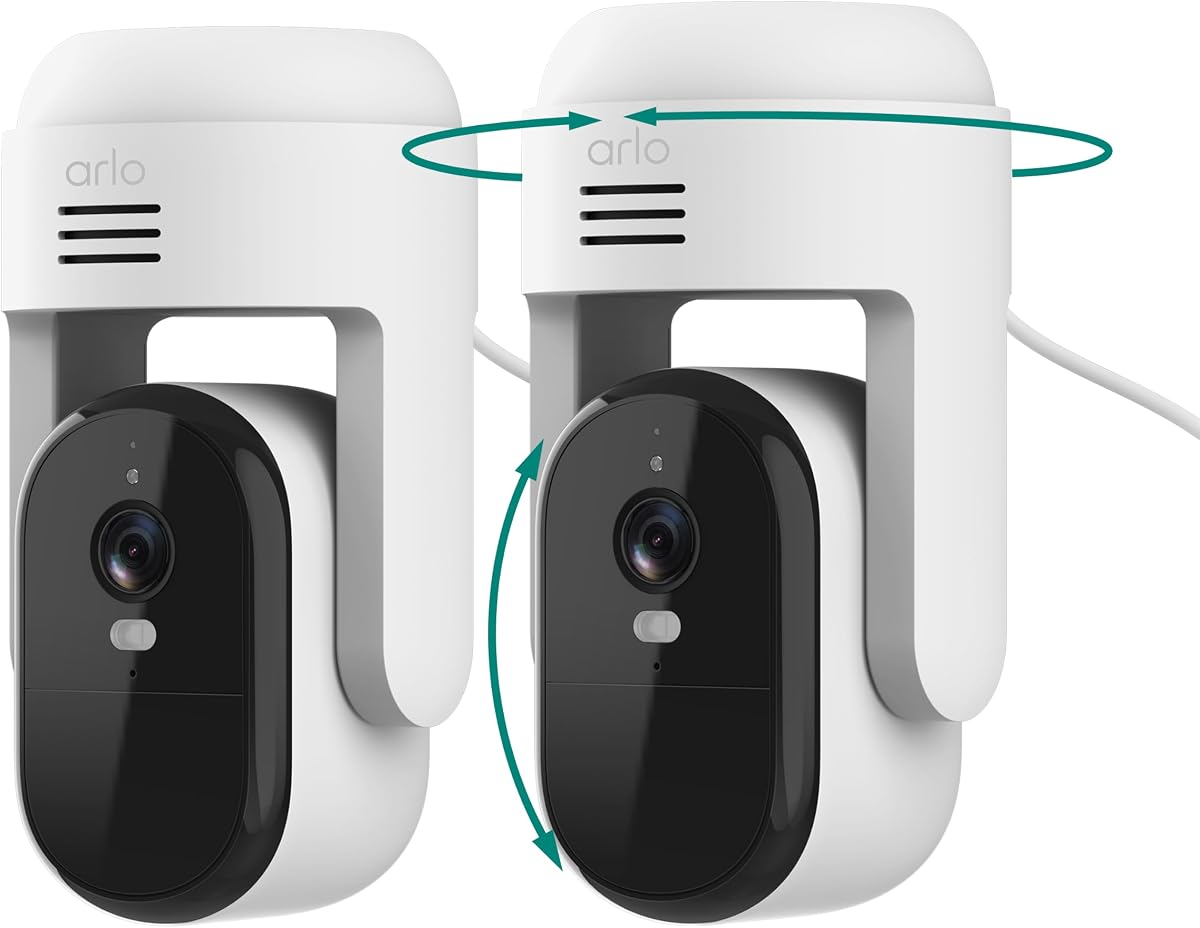
The Arlo Essential Outdoor Pan Tilt Zoom is a two-camera 2K wired system with a 4.4 rating. Each camera offers 360-degree pan, 180-degree tilt, 12x zoom, dual-band WiFi, and continuous plug-in power, making it a convenient way to cover two outdoor areas.
We may earn a commission when you buy through this link, at no additional cost to you.
Smart Detection categorizes people, vehicles, pets, and packages, while Advanced Audio Detection can recognize sounds such as breaking glass, barking, or a child screaming. Color Night Vision, an integrated spotlight, and a remote siren add options for monitoring and intervention.
Live streaming and basic alerts work without a subscription. The Arlo Secure Early Warning System adds 60-day video history, AI detection, and emergency response during its trial, but a paid plan is required afterward. Smart-home support includes Alexa, Samsung SmartThings, IFTTT, and Google Home.
No Blue Iris, RTSP, or ONVIF compatibility is stated in the supplied information, so buyers should verify integration before selecting this set. Its strongest appeal is the ready-made two-camera configuration and polished consumer features, rather than confirmed support for a professional third-party video platform.
The two-camera bundle can cover separate sides of a property without requiring users to source matching units. Each camera retains the same 2K, dual-band, and continuous-power feature set.
Recognition of people, vehicles, pets, packages, and notable sounds makes notifications more useful than simple motion alerts. Subscription-dependent features should be considered carefully when planning long-term operation.
We may earn a commission when you buy through this link, at no additional cost to you.
The right Blue Iris camera depends on its connection method, streaming compatibility, physical location, image quality, and recording needs. The following factors help separate cameras that are technically suitable from those that are merely marketed for general smart-home use.
Start with explicit compatibility, not an assumption based on the camera being Wi-Fi enabled. Some products in this guide name Blue Iris directly, while others provide RTSP or ONVIF support without stating a specific Blue Iris workflow. Review the manufacturer's current documentation, connection instructions, and any protocol limitations before purchasing.
Choose a camera with confirmed Blue Iris support when reliable integration is the primary requirement. Do not assume that an app, cloud service, or 2.4GHz connection automatically makes a camera compatible.
Resolution affects how much detail remains visible when a subject occupies a small part of the frame. The list spans 1080p, 2K, 4MP, and 8MP 4K models, allowing users to balance image detail against bandwidth, storage, and processing requirements.
Choose 4K or 8MP for wide outdoor scenes, distant entry points, or detailed identification. A 1080p model can be sufficient for an indoor room or a small area viewed at close range.
A fixed wide-angle lens offers broad coverage but may make distant objects smaller. Pan-and-tilt cameras add mechanical movement, while fixed bullet and turret designs are often easier to aim accurately. The 90-degree, 93-degree, 110-degree, 112-degree, and 125-degree lenses in this guide differ noticeably in scope.
Use a very wide lens for open areas where broad visibility is more important than distant detail. Choose a movable camera when the important activity zone can shift or when one device needs to cover several directions.
Night capability varies from standard infrared illumination to Starlight sensors and dual-light systems that combine infrared with visible color lighting. Infrared ranges in the list extend from approximately 32 feet to 98 feet, while the VIMTAG and eufy options emphasize visible color illumination.
Match the lighting method to the scene. Long-range infrared suits darkness around yards and driveways, while full-color lighting can reveal clothing and vehicle colors when motion activates the source.
Wi-Fi cameras offer the simplest installation, but radio range and congestion can affect reliability. PoE models use Ethernet for both network communication and power, reducing signal instability and simplifying placement away from routers. Several Wi-Fi choices support only 2.4GHz, while others provide dual-band connectivity.
Use PoE for a permanent multi-camera system when running Ethernet is practical. For wireless locations, confirm router support and sufficient signal strength before mounting the camera.
Blue Iris users may record continuously, use motion-based rules, or combine local storage with off-site backups. Relevant options in the group include MicroSD, NVRs, NAS platforms, FTP, optional cloud services, and direct PC recording through Blue Iris Professional.
Decide where the primary footage should live before selecting hardware. Check capacity requirements, expected retention period, and whether continuous recording is practical with the chosen codec and resolution.
Human detection, vehicle detection, pet recognition, package alerts, sound detection, and automatic tracking can make event notifications more meaningful. These features are implemented differently across the products, and some operate on-device while others depend on vendor services or paid plans.
Prioritize the detection types that match your environment. Hardware-based detection can be attractive for local privacy and predictable operation, while broader object recognition may require checking ongoing service requirements.
Exterior cameras need an appropriate ingress rating, dependable power, and a suitable operating range. The outdoor models in this guide include IP65 and IP67 housings, metal or alloy construction, and infrared illumination designed for exterior use.
Avoid placing an indoor-only model in damp or exposed locations. For exterior installations, verify the enclosure rating, cable routing, mounting security, and whether PoE or nearby power is available.
Begin by installing the camera in its intended position and connecting it to the same local network as the Blue Iris system. For PoE models, connect the camera to a compatible PoE switch or injector; for Wi-Fi models, confirm that the network uses a supported band and that the signal remains strong at the mounting location. Download the manufacturer's setup application when it is needed to complete initial configuration.
Add the camera to Blue Iris using the documented connection method. This may involve an ONVIF discovery process, RTSP stream address, or a vendor-specific integration. Once the live view is working, create recording rules for continuous, motion-based, or scheduled coverage, and adjust sensitivity so moving leaves, shadows, or animals do not create unnecessary events.
Camera placement, maintenance, and account security determine how useful the system remains over time. Aim the lens to cover the intended area, keep the lens clean, protect power connections from moisture, update firmware when available, use strong account credentials, and restrict remote access. Review recorded clips regularly so that storage, field of view, and alert settings continue to match your actual priorities.
Blue Iris provides a centralized environment for live viewing, recording, playback, motion rules, alerts, and camera organization. Depending on the camera and Blue Iris configuration, it can record continuously, capture events, maintain multiple camera feeds, and integrate with other parts of a home or business monitoring setup. It does not add missing camera hardware features, so resolution, night vision, and tracking remain limited by the selected device.
No. A camera may use Wi-Fi without exposing a stream or ONVIF interface that Blue Iris can use. Compatibility should be confirmed through the camera's current documentation or by testing the prescribed connection process. Several products reviewed here explicitly mention Blue Iris, while others have strong consumer features but no stated Blue Iris, RTSP, or ONVIF support.
PoE is often preferable for permanent installations because Ethernet provides a stable network connection and supplies power through the same cable. It avoids Wi-Fi congestion and weak-signal problems, although it requires compatible switches or injectors and suitable cable runs. Wi-Fi is easier to install and reposition, making it useful where wiring is inconvenient.
Not always. A 4K camera can preserve more detail when the subject is distant or occupies a small portion of the scene, but lens quality, sensor performance, lighting, encoding, and network bandwidth all affect the final image. For close indoor use, a well-positioned 1080p camera may provide sufficient clarity with less storage and processing demand.
Blue Iris can support continuous recording when the camera provides a suitable feed and the computer has sufficient storage and processing resources. The selected camera may also offer its own MicroSD, NVR, NAS, FTP, or cloud options. Users should compare continuous requirements with motion-based recording, retention time, codec efficiency, and the number of simultaneous feeds.
The best choice depends on the area's lighting and desired level of detail. Long-range infrared is useful for general nighttime coverage, while a visible floodlight or dual-light system can produce clearer full-color footage when motion occurs. A wide lens can cover the driveway, but its ability to identify a subject from a distance depends on resolution and lens focal length.
Those filters can reduce the number of irrelevant motion events, especially in yards or busy entrances. Whether the camera performs detection locally or through a vendor cloud service, and whether Blue Iris can use those classifications, varies by model. Buyers who prioritize third-party integration should verify both device detection and Blue Iris rule support.
Use a strong, unique account password, enable the security options offered by the camera and Blue Iris, and avoid exposing administrative interfaces directly to the internet. Keep the system on a trusted network, restrict remote access through a secure connection, and update camera and software firmware regularly. Local recording can remain available even when cloud services are optional or inactive.
The Amcrest UltraHD 4K Outdoor Bullet is the most complete choice for users who want detailed 4K imagery, broad coverage, and explicit Blue Iris Professional support. The VIKYLIN 4K Starlight PoE camera offers another strong high-resolution option with ONVIF, RTSP, efficient H.265+ encoding, and a 98-foot night-vision range, while the Anpviz 5MP PoE Turret stands out for professional third-party compatibility and a metal, weather-resistant housing.
For a smaller system, prioritize the camera that matches the scene and the user's willingness to run wiring. A 1080p pan-and-tilt model can provide useful indoor flexibility, while a fixed PoE camera generally creates a more dependable permanent installation. The most important step is confirming that the selected model exposes a supported connection method for the intended Blue Iris version.
Ratings, product features, software compatibility, and retailer availability may change, and prices fluctuate over time. Review the latest manufacturer documentation, compare the camera against the current Blue Iris setup, and check all required accessories before ordering. That final check can prevent a costly mismatch between the camera's connection method and the intended recording environment.