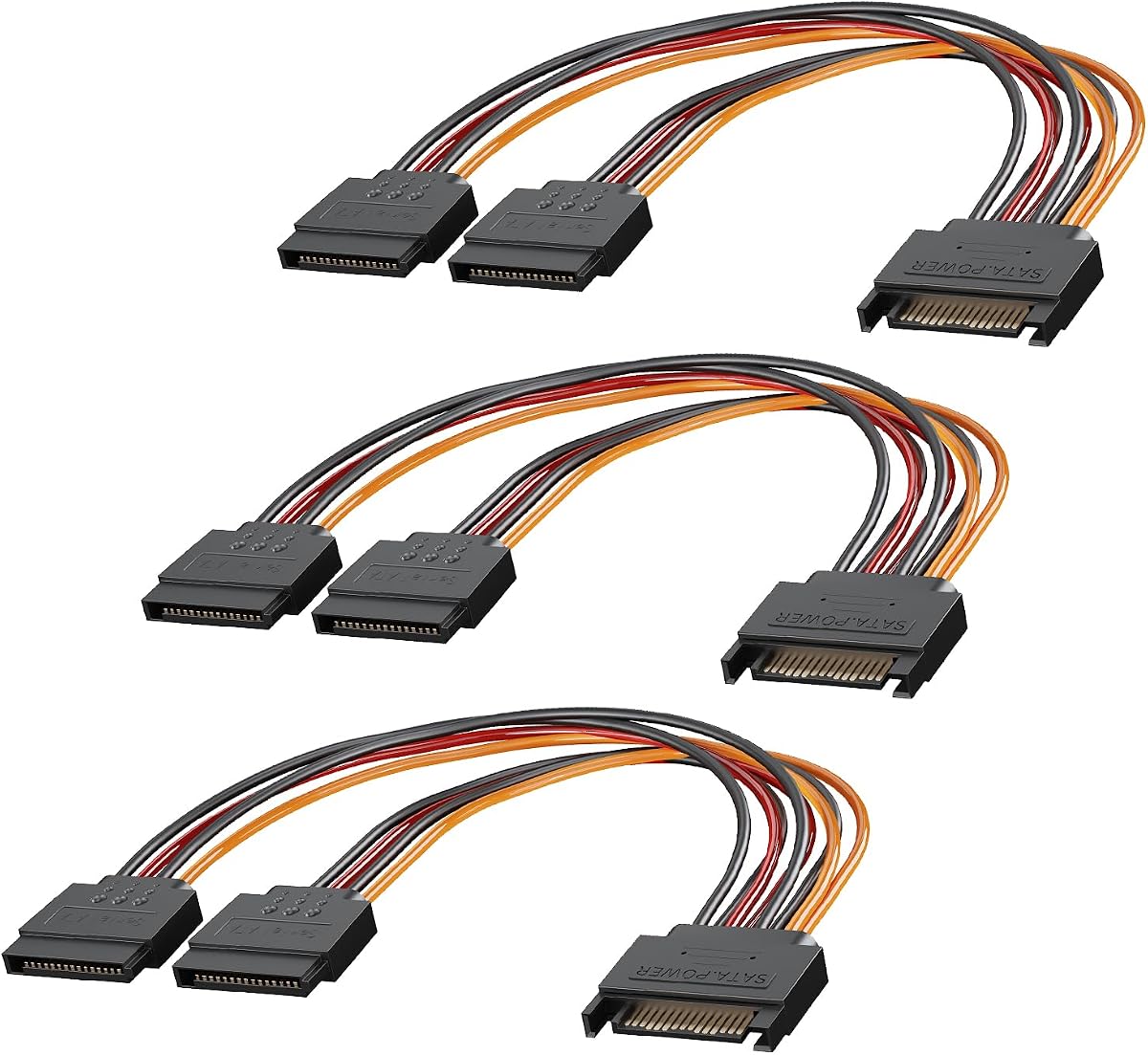
3-Pack 15 Pin SATA Splitter
4.7Editor score
Three eight-inch splitters included
One male to two female
Supports common SATA storage devices
Discover the best SATA Power Splitters, comparing connector counts, cable length, compatibility, ratings, and features for drives and servers.
SATA power splitters make it easier to connect multiple hard drives, SSDs, optical drives, and compatible expansion cards to a single available power connection. A useful splitter should match your device count, provide secure 15-pin SATA connections, and offer enough cable length for tidy routing inside a desktop or server chassis.
This guide compares ten SATA power splitters using the supplied product details, including supported connector configurations, intended HDD, SSD, and optical-drive applications, cable length, construction details, and customer ratings. The list covers one-to-two, one-to-three, one-to-four, one-to-five, and one-to-six designs, as well as kits with different data-cable arrangements.
The top selections represent different priorities, including a budget-friendly two-way splitter, a compact option for close-range connections, and a multi-pack with latching design. Product ratings, configurations, and availability can change over time, so readers should confirm the current listing details before purchasing a splitter for their particular system.
4.7Editor score

5.0Editor score

4.8Editor score
The table below compares all ten splitters by output count, cable configuration, length, and primary use, making it easier to identify the option that fits a particular drive setup.


This 3-Pack 15 Pin SATA Power Splitter Cable takes one 15-pin SATA male power connector and divides it into two 15-pin SATA female outputs. It carries a 4.7 rating and stands out for offering three complete splitters in one pack, making it a practical choice for systems that need more than one extra drive connection. Its stated compatibility covers hard disk drives, solid-state drives, and optical drives.
We may earn a commission when you buy through this link, at no additional cost to you.
The main advantage is the practical balance between output count and cable length. At eight inches, each splitter offers enough room to connect adjacent storage devices without introducing a large bundle of excess wire. The straightforward installation also helps: the male end connects to a SATA power socket on the power supply, while the two female ends connect to compatible devices. No tools or driver installation are required.
The trade-offs are straightforward. This is a two-output design rather than a high-density splitter, so users with many drives will need several units or a different configuration. The supplied details do not mention locking latches or a right-angle connector arrangement, which may matter in particularly tight cases or installations where accidental disconnects are a concern.
This is an appealing selection for budget-conscious builders adding a couple of SATA-powered devices, particularly when the value of receiving three cables in one pack is important. It is less suited to a storage-heavy server that would benefit from one input feeding several outputs, but for common desktop expansions it offers a straightforward and economical solution.
The two-output format is familiar and easy to plan around. It works especially well when a system has one available SATA power socket but two drives that need to be connected nearby.
Because the package includes three units, a builder can install them in different areas or keep a spare available. That makes the pack more versatile than a single standalone splitter.
We may earn a commission when you buy through this link, at no additional cost to you.
This six-way SATA power splitter is designed for users who need to connect more storage hardware than a conventional two-output Y cable can accommodate. It converts one 15-pin SATA male connector into six separate SATA power connectors, with a 4.7 customer rating. The stated device support includes hard drives, SSDs, and optical drives.
We may earn a commission when you buy through this link, at no additional cost to you.
Its primary strength is consolidation. A storage-focused desktop, workstation, or server may have several SATA-powered devices but only a limited number of conveniently located power sockets. By feeding multiple devices from one source, this splitter can simplify the physical layout and reduce the number of separate supply connections that need to be routed through the chassis.
The main concern is that six outputs create a larger cable assembly than a two-way splitter. Cable managers, drive cages, and compact cases may have less room to accommodate all six branches. The supplied product information also does not identify a locking mechanism, so users should route the branches carefully to avoid movement or accidental unplugging.
This splitter is best for a planned multi-drive installation where high output density matters more than minimal cable size. It is less appropriate for a simple two-drive upgrade, but it may be particularly useful for a compact NAS-like system, a server, or a desktop with several HDDs and SSDs that need to be supported from a limited set of supply connectors.
A single six-output branch can simplify installations involving numerous drives. It is particularly relevant where the power supply has fewer accessible SATA sockets than the system has storage devices.
The multiple branches require adequate clearance around the drive cage. Measuring the available route and ensuring that the connectors can be fully seated is important before installation.
We may earn a commission when you buy through this link, at no additional cost to you.
The StarTech.com PYO4SATA turns one SATA power plug into four SATA power receptacles in a single 15.7-inch, or 400-millimeter, cable. It carries a 4.7 rating and combines a useful four-way configuration with a length that offers more freedom than a short Y adapter. The supplied details specifically emphasize its durable construction.
We may earn a commission when you buy through this link, at no additional cost to you.
Four outputs provide a middle ground between a simple two-way splitter and a denser six-way design. That balance can be useful for a desktop or workstation containing two to four SATA-powered devices. The 400-millimeter cable gives enough distance to reach devices in different bays without requiring the shortest possible in-chassis connections.
As with any passive splitter, the cable does not create additional power capacity. The connected equipment must remain within the power supply's capabilities, and the builder should consider both drive-startup demand and the total load placed on the originating supply. The product information does not provide detailed current or wire-gauge specifications, so those should not be inferred beyond what is explicitly listed.
This is a strong option for a builder who values a recognized brand, four-way coverage, and generous length. It is particularly appropriate for a multi-drive PC where one accessible power socket needs to serve several HDDs, SSDs, or optical devices. Buyers seeking only one additional output would be better served by a simpler two-way model.
At 15.7 inches, the cable offers meaningful placement flexibility. It can span several drive positions or reach around a drive cage while retaining enough flexibility for internal cable management.
Four outputs suit systems with several SATA devices without creating the larger branch bundle associated with a six-way splitter. It works well as a middle option.
We may earn a commission when you buy through this link, at no additional cost to you.
This two-pack divides one 15-pin SATA male connector into five 15-pin SATA female connectors, with each cable measuring 21 inches. It has a 4.8 rating, placing it among the strongest customer-rated options in the list. The product is intended for SATA HDD and SSD installations that need several device connections from one available supply socket.
We may earn a commission when you buy through this link, at no additional cost to you.
The description highlights high-quality wire, easy bending, toughness, wear resistance, and connectors designed to plug and unplug easily. Its length also provides generous routing options inside larger cases. A five-way branch is especially helpful when a system has several drives but the power supply's SATA connectors are grouped in an inconvenient location.
The product information includes an important compatibility warning: the male and female ends are only appropriate for devices with SATA power ports, and connecting incompatible ports could damage components. Users should verify both the supply connector and device sockets before installation. The wide five-way branch may also be awkward in a small enclosure, and the listing does not mention locking latches.
This splitter is a good fit for a planned expansion involving several SATA devices, especially when routing distance is important or two separate power-expansion points are needed. For a compact case with only two drives, its capabilities are unnecessary. For a storage-dense system, however, the two-pack and 4.8 rating make it an attractive all-around option.
The one-to-five layout can power multiple drives from one accessible source. It is useful for users who have more storage devices than nearby SATA supply sockets.
The product is specifically designed for 15-pin SATA power connections. Confirming the shape and function of every device socket helps avoid an incorrect connection.
We may earn a commission when you buy through this link, at no additional cost to you.
CableCreation's two-pack uses a 90-degree SATA splitter design to add a second SATA power connection without taking up as much room as a straight cable arrangement. It carries a 4.8 rating and includes two six-inch splitters, giving users two installations or a spare. The angled design is the product's most distinctive feature for systems with limited internal clearance.
We may earn a commission when you buy through this link, at no additional cost to you.
The listing also highlights easy-grip connector treads, which are useful when a cable must be removed in a tight area. Its stated applications include powering two Serial ATA hard drives, SSDs, optical drives, DVD burners, and PCI cards from one computer power-supply connection. The supplied details also mention 24 months of replacement coverage for defective products and ongoing technical support.
The principal limitation is its short length. Six inches is enough for adjacent components, but it may be insufficient when the origin and destination sockets are separated by a larger section of the chassis. It also provides only two outputs, so storage-heavy systems will need additional branches or a different splitter. Buyers should also verify that the devices they intend to power accept 15-pin SATA power connectors.
This is the strongest recommendation for a cramped build where connector orientation and service access matter. It suits a two-drive upgrade more than a large storage array, but the angled layout, two-pack format, 4.8 rating, and stated support coverage make it a polished choice for desktop builders.
The 90-degree arrangement can reduce the space required beside a drive or socket. That makes the splitter helpful in compact cases and crowded drive cages.
The familiar one-to-two configuration is easy to understand and install. It is a sensible choice when a desktop needs exactly one additional SATA-powered device.
We may earn a commission when you buy through this link, at no additional cost to you.
The J&D 15 Pin SATA Power Y Splitter breaks one male SATA power connector into two female outputs. It has a 4.6 rating, and its most useful construction details are the lock connector design, flexible PVC jacket, and 18 AWG tinned copper wire. The package contains two eight-inch splitters for separate placements or future expansion.
We may earn a commission when you buy through this link, at no additional cost to you.
Locking connectors are the distinguishing benefit. They help prevent accidental disconnections, which is valuable in a desktop that may be moved or serviced and in an installation where the cable is routed under tension. The stated wire and jacket construction also supports the product's positioning as a dependable option for SATA hard drives, disk drives, SSDs, and SATA optical drives.
The two-output format is less versatile than the three-, four-, five-, and six-way products in the guide, and the 4.6 rating is slightly below the higher-rated choices. The supplied information does not state a bendable strain-relief design or right-angle connector option. Users who need a large number of outputs will need to consider a higher-density splitter instead.
This product is best for a two-drive desktop where secure connections and straightforward cable management are priorities. The locking design and two-pack format also make it useful for builders who may undertake more than one installation. It is a dependable, specification-focused alternative to a basic Y cable.
A latch can make a connection less likely to loosen during routine servicing. That is helpful for a desktop that may be opened and worked on periodically.
The stated 18 AWG tinned copper construction gives the product a more defined electrical specification than many generic splitter listings. It remains important to pair it with a suitable power supply.
We may earn a commission when you buy through this link, at no additional cost to you.
The StarTech PYO2LSATA is a six-inch SATA power Y splitter designed to add an extra SATA power outlet to a PC power supply. It has a 4.6 rating and features latching connectors that help secure the attached devices. Its short, straightforward design is aimed at users who need one additional power connection close to an existing socket.
We may earn a commission when you buy through this link, at no additional cost to you.
This cable is most useful when a drive, optical device, or compatible expansion card sits near a power-supply rail but the nearest available SATA connector is already occupied. Rather than replacing the supply or rerouting a longer cable, the user can divide an existing connection into two. The latching feature adds stability without changing the familiar 15-pin SATA format.
The six-inch length is both its strength and its limitation. It can simplify compact installations and reduce excess wire, but it will not reach a distant drive bay. The product is also a single splitter rather than a multipack, and the supplied details do not include wire-gauge information or a stated warranty. It provides one additional outlet, not a high-density expansion solution.
This splitter is a good option for a small upgrade involving one nearby SATA-powered device. Users with several drives, a larger case, or a need for a spare should look at a multipack or longer design. For its intended purpose, however, it offers a simple way to add an outlet while helping the connection stay secure.
The short lead can reduce excess cable inside a tight case. It is particularly useful for an additional drive positioned directly beside the relevant power supply.
The locking design helps keep connected devices seated. That is useful where cable movement or routine maintenance could otherwise create a loose connection.
We may earn a commission when you buy through this link, at no additional cost to you.
This SATA 1-to-3 splitter converts one 15-pin SATA male connector into three 15-pin female power connectors, and it holds a perfect 5.0 rating in the supplied data. Its 16.5-inch length and 18 AWG side-by-side cable construction make it a versatile option for PCs, NAS-style systems, servers, and conventional desktop storage expansions.
We may earn a commission when you buy through this link, at no additional cost to you.
Three outputs offer an effective balance between a basic Y splitter and a high-density harness. A user can add two additional SATA-powered devices while retaining the original connection, which is useful for systems with three or four drives. The extra length also gives builders more freedom to route the cable around a drive cage and reduce tension on connected devices.
The supplied information states that the SATA connector carries 3.3-volt, 5-volt, and 12-volt outputs, with individual current and power figures for each voltage. It also identifies the wiring as 18 AWG and describes it as low-impedance for stable transmission. These details are more specific than those provided for many generic alternatives, although the splitter still cannot overcome the total output limits of the connected power supply.
This is the most flexible all-around recommendation for users who want a moderate number of outputs without an oversized branch bundle. It is well suited to a multi-drive desktop or storage-oriented system where three SATA devices can be reached from one power source. Buyers should still confirm that the chassis provides enough clearance for the three branches.
A three-output splitter can serve a small cluster of drives without reaching the higher density of a five- or six-way cable. It is a common middle ground for desktop builders.
The listed 18 AWG wiring, supported voltages, and low-impedance description make this product easier to evaluate than a splitter with only generic compatibility claims.
At 16.5 inches, the cable offers enough length to move between drive positions. That can make routing easier and reduce the need for sharply bent or strained leads.
We may earn a commission when you buy through this link, at no additional cost to you.
This four-pack is a broader SATA cable kit rather than a group of identical power splitters. It includes two straight SATA data cables, two 90-degree right-angle data cables, a 4-pin LP4 Molex-to-dual-15-pin-SATA power adapter, and a 15-pin-SATA-to-dual-SATA power extension splitter. It has a 4.7 rating and supports SATA I, SATA II, and SATA III devices.
We may earn a commission when you buy through this link, at no additional cost to you.
The kit's main advantage is breadth. A builder setting up a new PC or storage expansion can obtain both data and power connections in one package. The right-angle data cables are useful in small-form-factor cases, while the straight cables suit conventional layouts. The included power options cover legacy Molex-equipped systems as well as systems with 15-pin SATA supply connectors.
Because the package is not exclusively a set of SATA power splitters, buyers focused only on adding a power outlet may find that it contains more than they need. It also does not provide the same number of independent high-density power branches as the dedicated one-to-three, one-to-four, or one-to-six products. Users should inspect the entire contents before assuming it matches a specific upgrade plan.
This kit makes the most sense for a general PC build, refresh, or storage expansion that needs several cable types. It is a strong convenience option for a first-time builder assembling a desktop, while an experienced user with a narrowly defined power requirement may prefer a dedicated splitter with the exact number of outputs needed.
The combination of SATA data cables and power splitters reduces the need to source each cable type separately. That makes the package useful for a broader desktop build.
The included 90-degree data cables can improve clearance around narrow drive bays and reduce the need for sharply angled SATA data leads.
Both a Molex-based power adapter and a SATA power splitter are included. This gives builders options for older and newer power-supply configurations.
We may earn a commission when you buy through this link, at no additional cost to you.
This 20-centimeter SATA power Y splitter divides one 15-pin SATA power interface into two outputs and is supplied as a two-pack. It carries a perfect 5.0 rating. The flat, compact format is designed to add a drive without creating excessive cable clutter, while the 18 AWG pure copper core and flexible PVC jacket provide a clearly specified construction.
We may earn a commission when you buy through this link, at no additional cost to you.
The product supports 3.3-volt, 5-volt, and 12-volt outputs and is described as suitable for hard drives, optical drives, DVD drives, SSDs, HDDs, and PCI cards equipped with 15-pin SATA connectors. Its short flat cables can lie more neatly beneath or beside a drive than a round cable of comparable length, potentially improving airflow and reducing visual clutter in a compact chassis.
Twenty centimeters is the defining limitation. This splitter is intended for components that sit close to the originating SATA power socket, and it may not reach a drive in a distant bay. Its two-output layout also cannot accommodate a larger storage expansion. Users should confirm both physical reach and the 15-pin SATA power requirement before buying.
This is a top choice for a nearby secondary drive or a tightly packed installation where cable length and clutter matter most. The two-pack, perfect rating, flat design, and defined wire construction make it particularly attractive for simple desktop storage additions.
The low-profile leads can sit more neatly around a drive than a bulky round cable. This is useful where airflow and visual organization both matter.
The compact length is helpful when the added device is near an existing SATA power socket. Builders with distant drive bays should select a longer splitter instead.
The listed 3.3-volt, 5-volt, and 12-volt support makes the intended electrical format easy to identify before installation.
We may earn a commission when you buy through this link, at no additional cost to you.
The right SATA power splitter depends on device count, available space, connector security, power-supply capacity, and the specific equipment that needs to be powered. These factors help narrow the options without overlooking important compatibility requirements.
Match the splitter to the actual number of connected devices rather than buying extra outputs unnecessarily. A high-density branch can make installation harder if most of its sockets remain unused.
Choose only a splitter whose male plug and female receptacles match the equipment. Confirming connector standards before purchase helps prevent an incorrect or damaging connection.
Longer is not automatically better inside a chassis. Excessive slack can interfere with airflow, so measure the route and favor a controlled, tidy installation.
Choose right-angle routing when space is tight. Use straight connectors when they provide easier access or when the device sits in a position with abundant clearance.
Choose a splitter for routing convenience, not as a substitute for a supply with adequate capacity. Verify the system's power requirements before adding several devices.
Favor a locking design when loose connections would be inconvenient or disruptive. Check that the latch can be released in the available space.
Choose a compact flat splitter for a nearby device. Select a wider branch only when the extra outputs justify the space they consume.
Consider the number of planned additions, not just the package quantity. A multipack is valuable when the build genuinely requires several expansion points.
Before installing a splitter, switch off the computer and disconnect the power supply according to the system's safety procedure. Identify one available 15-pin SATA power socket, inspect it for damage, and confirm that every connected device uses the matching 15-pin SATA power interface. Arrange the intended cables and devices before seating any connection.
Connect the splitter's male plug firmly into the SATA power socket on the power supply. Route the branch cables with gentle curves and avoid pinching them against fans, drive cages, sharp sheet-metal edges, or other moving parts. Attach each female output to a compatible device, taking care not to force a connector that does not align naturally. If the product has latches, engage them only after the plug is fully seated.
For maintenance, power down the system and disconnect the devices before removing a splitter. Inspect the connectors for dirt, bent pins, damaged insulation, or excessive cable strain. Keep the cable away from heat sources and avoid sharply folding the conductors at the branch points. When a system is running, do not plug or unplug SATA power cables, because doing so can interrupt power to a connected drive.
A SATA power splitter divides one 15-pin SATA power connection into multiple female outputs. It lets a user power several compatible hard drives, SSDs, optical drives, or expansion cards when the power supply does not have enough conveniently located SATA connectors. The splitter changes cable routing, not the power supply's total capacity.
Yes, provided the splitter has enough outputs and the connected devices use compatible 15-pin SATA power connectors. You must also ensure that the total power demand, including drive startup requirements, remains within the originating power supply's capabilities. A one-to-three or one-to-four splitter is commonly considered for a small multi-drive desktop.
No. A SATA power splitter carries electrical power and has one male and multiple female 15-pin power connectors. A SATA data cable connects the storage device to a motherboard or controller and does not replace a power splitter. A complete hard-drive installation generally requires both a data connection and a suitable power connection.
Choose a short splitter for a drive positioned close to an available power socket. A longer design is better when devices occupy different drive bays or sit farther from the power supply. Measure the intended route first, because a longer cable can add clutter and a very short cable can create strain at the connector.
Only if the splitter or included adapter specifically provides the correct Molex-to-SATA conversion. Most standard SATA power splitters accept a 15-pin SATA male plug rather than a four-pin Molex plug. The four-pack SATA kit is the option in this list that includes both a four-pin Molex-to-dual-SATA power adapter and a SATA-to-dual-SATA power splitter.
The splitter does not reduce a fixed power allowance in the same way a budget product might, but all devices share the originating power supply's capacity. The combined load must remain within the supply's limits, and cable and connector quality can affect how efficiently power is delivered. Users should not treat a splitter as extra power capacity.
They can be useful in systems that are moved, serviced, or routed under strain because they help keep the connection seated. They are not mandatory in every static desktop installation, but they add security where accidental disconnection would be inconvenient. Make sure there is enough room to operate the latch.
It depends on the splitter's output count, which ranges from two to six among the products reviewed. Connect only as many devices as the cable is designed to support and as many as the power supply can handle. Unused outputs can remain unoccupied, provided the cable is routed without kinking or excessive strain.
The 3-Pack 15 Pin Splitter is a strong budget-oriented option for common two-drive expansions, while the SATA 1-to-3 splitter stands out as the most versatile recommendation for moderate multi-device builds. The CableCreation 2-Pack splitter is ideal when tight-space cable management and right-angle routing are the leading priorities. Each offers a different balance of output count, length, packaging, and construction.
Prioritize the number of outputs your build actually needs, then confirm connector compatibility and measure the available cable route. Check whether the power supply can support every connected device, consider latching or locking features for stability, and ensure the branch assembly will fit around the drive cage. Buying the correct configuration prevents both unnecessary bulk and routing frustration.
Ratings, product configurations, and availability can change, so consult the current product listing before making a final decision. Comparing the present connector arrangement, included accessories, cable length, and support details against your system will help ensure that the selected SATA power splitter integrates cleanly into the finished build.
