
TP-Link AX1800 WiFi 6 Router
4.4Editor score
Dual-band Wi-Fi 6
1.8 Gbps aggregate bandwidth
Four high-gain antennas
OpenVPN and PPTP servers
The best router for 700 Mbps Internet guide compares ten options for speed, coverage, wired ports, features, security, and everyday performance.
A router for 700 Mbps Internet must do more than support a fast connection. It should distribute that speed efficiently among busy devices, maintain a stable signal through the home, and provide suitable wired and wireless ports without introducing unnecessary complexity. The right choice depends on your home size, device mix, provider, and willingness to manage advanced features.
We compared the supplied specifications for ten routers, focusing on wireless generation, aggregate throughput, coverage claims, multi-gig connectivity, device capacity, security tools, and practical management features. The list covers affordable dual-band models, tri-band and Wi-Fi 7 routers, a cable modem-router combination, and a portable 5G travel router for users who need flexible connectivity.
Each pick demonstrates a different way to handle a 700 Mbps plan: the Archer AX21 emphasizes straightforward value, the Flint 2 targets low-latency enthusiasts, and the MUDI 7 combines cellular failover with travel-oriented features. Other recommendations prioritize 6 GHz wireless, multi-gig ports, broad household capacity, or an integrated cable modem. Product availability and pricing can change, so confirm current details before buying.
4.4Editor score

4.5Editor score

4.4Editor score
The comparison below highlights each router's wireless standard, headline performance, wired connectivity, and intended use, making it easier to identify the model that best fits a 700 Mbps connection and your home network.





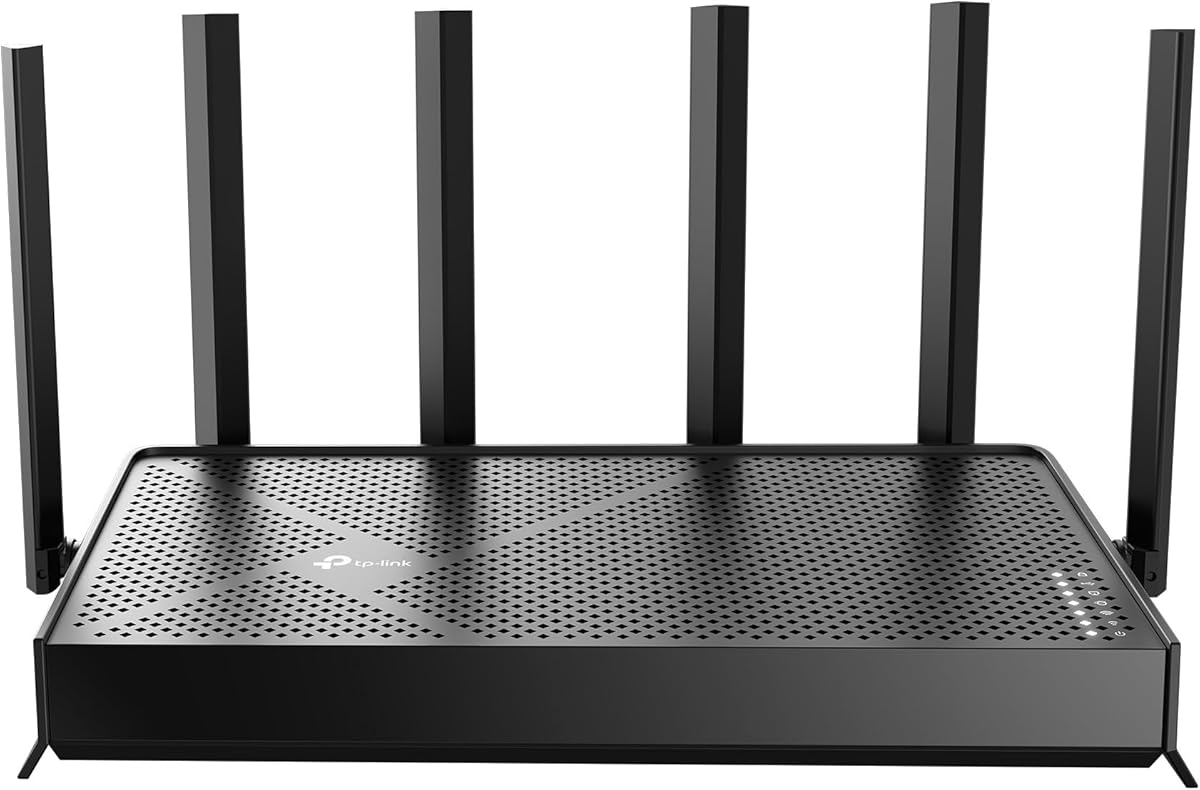

The TP-Link Archer AX21 V5 is a dual-band Wi-Fi 6 router that combines 1.8 Gbps of aggregate theoretical bandwidth with an approachable feature set. Its 4.4 rating reflects a well-balanced option for a 700 Mbps household plan. The router offers up to 1,200 Mbps on the 5 GHz band and up to 574 Mbps on 2.4 GHz, giving modern clients access to a fast, less crowded connection.
We may earn a commission when you buy through this link, at no additional cost to you.
Its most useful strengths are OFDMA, Beamforming, four high-gain antennas, and an advanced front-end module. Those technologies help the router serve simultaneous clients and direct signal toward distant devices, which matters when several people stream, game, or make video calls. The Archer AX21 also supports OpenVPN and PPTP server functions, and its compatibility with major internet providers makes it suitable for users who already have a compatible modem or gateway.
The main limitation is that this is a dual-band router without a 6 GHz band. A 700 Mbps line can feed it effectively, but it offers less room for future wireless standards than the tri-band Wi-Fi 6E and Wi-Fi 7 alternatives. It also requires a separate modem, so buyers taking cable internet should compare this model with the Nighthawk CAX30 combo. These are reasonable compromises for users who want proven Wi-Fi 6 performance without advanced configuration.
The Archer AX21 is the strongest general recommendation for most 700 Mbps households. It balances speed, range, device capacity, security-minded design, and uncomplicated operation. Choose it when you want a dependable dual-band router at a practical level of complexity, while avoiding it if your priority is a 6 GHz network, multi-gig wired ports, or built-in cable modem functionality.
The 1.8 Gbps aggregate rating gives the Archer AX21 useful headroom above a 700 Mbps internet plan. More importantly, its 1,200 Mbps 5 GHz maximum is high enough to prevent the wireless link from becoming the immediate bottleneck for many compatible clients.
Beamforming, OFDMA, four high-gain antennas, and the front-end module work together to improve signal direction and concurrent transmission. The result is a practical router for apartments and many single- or multiroom homes.
We may earn a commission when you buy through this link, at no additional cost to you.
The GL.iNet GL-E5800 NA MUDI 7 is a premium travel router that can use 5G cellular service, wired Ethernet, Wi-Fi repeating, or USB tethering. It carries a 4.4 rating and offers tri-band Wi-Fi 7, a 2.8-inch touchscreen, and automatic multi-WAN failover. That combination makes it far more specialized than a conventional home router.
We may earn a commission when you buy through this link, at no additional cost to you.
For a 700 Mbps connection, its Qualcomm Dragonwing MBB Gen 3 platform and 2.5 Gbps Ethernet WAN/LAN port provide ample headline capacity. The 5G modem can deliver up to 4.67 Gbps, while Wi-Fi 7 is rated at 688 Mbps on 2.4 GHz, 2,882 Mbps on 5 GHz, and 5,765 Mbps on 6 GHz. The router can support up to 64 connected devices and offers 2.5G wired connectivity plus a 10 Gbps USB-C port.
Its limitations stem from the travel-oriented design. There is no full set of high-speed LAN ports, and cellular operation requires an appropriate carrier plan or compatible SIM configuration. The built-in 5,150 mAh battery and touchscreen are convenient, but a permanently installed home router may provide more consistent antenna placement and broader expansion options. VPN throughput figures also depend on local network conditions, VPN location, and provider.
This is the pick for a traveler, remote worker, mobile business, or household that values cellular resilience over conventional home-router simplicity. For a fixed 700 Mbps home with no need for backup, a desktop-style router or mesh system may be more appropriate. With multi-WAN failover, eSIM flexibility, and substantial wireless performance, however, the MUDI 7 delivers a genuinely distinctive premium package.
Quad-path multi-WAN can combine Ethernet, wireless repeating, USB tethering, and 5G. If a primary link fails, traffic can move to another available connection, which is particularly useful for temporary workspaces and mobile operations.
Tri-band Wi-Fi 7 provides a dedicated 6 GHz option, while the built-in eSIM and two nano-SIM positions let users change cellular access without locating a local SIM. The touchscreen simplifies everyday network switching and monitoring.
We may earn a commission when you buy through this link, at no additional cost to you.
The NETGEAR Nighthawk CAX30 combines a DOCSIS 3.1 cable modem with an AX2700 dual-band Wi-Fi 6 router. Its 4.1 rating places it below the leaders, but integrated hardware can simplify a cable installation substantially. It supports Xfinity plans up to 800 Mbps, Spectrum up to 1 Gbps, and Cox up to 1 Gbps, making it directly relevant to many 700 Mbps subscribers.
We may earn a commission when you buy through this link, at no additional cost to you.
The multi-gig DOCSIS 3.1 platform has enough throughput potential for fast cable plans, while the router section offers up to 2,000 square feet of claimed coverage and support for more than 25 connected devices. Four Gigabit Ethernet ports are available for a desktop, game console, smart television, or other wired device. The Nighthawk app provides guided setup, Wi-Fi management, speed tests, device pausing, and guest-network controls.
The most important trade-off is provider compatibility. The router is intended for cable service and is not compatible with Verizon, AT&T, CenturyLink, DirecTV, DISH, or bundled voice plans. ISP activation is also required. Its Ethernet ports stop at Gigabit rather than multi-gig, and its dual-band wireless design lacks the extra 6 GHz capacity found in higher-end alternatives. A separate router may offer broader LAN connectivity for advanced home networks.
The CAX30 is a compelling recommendation for compatible cable customers who want one box to handle the modem and wireless network. It is less suitable for fiber, DSL, satellite, or unsupported cable providers. If your provider is listed and activation is straightforward, the integration removes one piece of equipment and leaves room for a 700 Mbps plan while still supporting modern Wi-Fi 6 clients.
Combining a DOCSIS 3.1 modem and Wi-Fi 6 router reduces the number of devices in the setup. For subscribers with a supported provider, that can also reduce desktop clutter and simplify initial configuration.
The AX2700 radio system is intended for moderate homes and busy client lists, while four Gigabit Ethernet ports provide stable wired options for devices that benefit from lower latency or consistent throughput.
We may earn a commission when you buy through this link, at no additional cost to you.
The GL.iNet Flint 2 is an enthusiast-oriented Wi-Fi 6 router with a 4.5 rating, the highest among the listed products. It uses an eight-stream design, provides dual 2.5 Gbps Ethernet ports, and includes 1 GB of DDR4 memory plus 8 GB of eMMC storage. Those specifications make it especially compelling for users who want control, extensibility, and low-latency networking.
We may earn a commission when you buy through this link, at no additional cost to you.
Its headline wireless speed is up to 6 Gbps, while the two 2.5G ports are useful for a fast modem connection, wired backhaul, a high-speed NAS, or a demanding gaming PC. The router can serve more than 100 connected devices according to the supplied information. VPN performance is also notable, with stated WireGuard speeds up to 900 Mbps and OpenVPN speeds up to 880 Mbps, subject to the ISP, environment, server location, and VPN service.
The primary compromise is that it remains a dual-band Wi-Fi 6 product without a 6 GHz radio. It also asks buyers to update the firmware during initial setup to improve performance. While the 1 GB memory and eMMC storage create room for plugins and advanced use, the web administration interface may be more involved than a basic TP-Link interface. None of these points prevents it from serving a 700 Mbps plan, but they make it more compelling for experienced users than first-time router buyers.
The Flint 2 is an excellent recommendation for gamers, VPN users, technical households, and anyone with high-speed wired storage. It handles far more than 700 Mbps in its intended configurations, so performance can come from reducing bottlenecks elsewhere. Choose it when 2.5G ports and flexibility matter more than having a newer 6 GHz band.
Two 2.5 Gbps Ethernet ports give the Flint 2 room to use high-speed internet more effectively. A 700 Mbps line can feed the router comfortably, and compatible wired devices can take advantage of substantially higher local transfer capability.
Substantial memory and storage, AdGuard Home support, and high VPN throughput make this more than a basic dual-band router. It is a strong fit for users who want to tune services and connect advanced equipment.
We may earn a commission when you buy through this link, at no additional cost to you.
The NETGEAR Nighthawk RS700S is a dedicated tri-band Wi-Fi 7 router designed for high-capacity homes and fast internet plans. It carries a 4.4 rating and advertises up to 19 Gbps across its three bands, a 12-stream layout, coverage for up to 3,500 square feet, and support for as many as 200 devices. It is an ambitious option for a 700 Mbps household with many active clients.
We may earn a commission when you buy through this link, at no additional cost to you.
A 10 Gbps WAN port allows the router to accept a suitable fiber or other multi-gig connection, while one 10 Gbps LAN port and four 1 Gbps LAN ports support demanding wired devices. The dedicated tri-band layout includes 2.4 GHz, 5 GHz, and 6 GHz, offering more distinct spectrum than dual-band Wi-Fi 7 models. MU-MIMO and OFDMA help serve simultaneous clients, and the Nighthawk app supports remote management, guest networks, speed tests, and device controls.
The trade-offs are cost, complexity, and the fact that a 700 Mbps plan does not require the router's full potential. Some existing gateways or modem-router combinations may require bridge mode. Walls, floors, and interference can reduce the stated range, and a larger or multistory property may still benefit from an Orbi mesh system. Older clients will not benefit from every Wi-Fi 7 feature even though the router remains backward compatible.
The RS700S is most appropriate for users who expect their service, client devices, and wired ecosystem to grow quickly. It is particularly attractive for large homes with a modern device mix and a multi-gig provider. For a smaller household with a 700 Mbps plan, it may be more capability than needed, but it offers excellent headroom without requiring a mesh system on paper.
The 6 GHz band creates additional wireless capacity and can reduce congestion on the traditional bands. That separation is particularly useful when many capable phones, computers, televisions, and gaming devices compete for the same home network.
The 10 Gbps WAN port is ready for high-capacity fiber or other multi-gig service. For a 700 Mbps plan, it provides useful headroom while the 10 Gbps and four 1 Gbps LAN ports accommodate storage, gaming rigs, and smart TVs.
We may earn a commission when you buy through this link, at no additional cost to you.
The TP-Link AX3000 Wi-Fi 6 router is a budget-focused dual-band model with a 4.4 rating. It offers up to 2,402 Mbps on 5 GHz and 574 Mbps on 2.4 GHz, producing 2.976 Gbps of aggregate theoretical capacity. That is ample wireless headroom for a 700 Mbps internet plan when connected devices are suitably close and capable.
We may earn a commission when you buy through this link, at no additional cost to you.
OFDMA lets multiple clients share a band more efficiently, while four external antennas and Beamforming support stronger, more directed coverage. Target Wake Time is designed to reduce client power consumption, and the revised case and larger heat sink are intended to manage cooling. The router also supports VPN server and client functions, works with Alexa, and includes basic TP-Link HomeShield tools for network security, parental controls, and quality of service.
Its limitations are the same ones commonly associated with budget-oriented dual-band Wi-Fi 6 routers. There is no 6 GHz band, and the wired specification does not include multi-gig ports. A separate modem is required for most internet providers. It is also a conventional home router rather than a travel, cellular, or integrated cable modem model, so buyers seeking those capabilities will need a different recommendation.
This is a sensible pick for budget-conscious households that want modern Wi-Fi 6 without moving to Wi-Fi 6E or Wi-Fi 7. It works especially well for apartments and moderate homes where 5 GHz performance matters more than cutting-edge band access. Users should update the firmware as recommended and place the router centrally to make the most of its four external antennas.
A 2,402 Mbps 5 GHz maximum gives compatible devices substantial capacity within a 700 Mbps plan. The lower 2.4 GHz band remains useful for IoT equipment, smart home controls, and longer-range connections.
OFDMA improves simultaneous transmission to multiple clients and can reduce latency and jitter during busy periods. Beamforming and four high-gain antennas help the router direct usable signal through common home layouts.
We may earn a commission when you buy through this link, at no additional cost to you.
The TP-Link Archer AXE75 is a tri-band Wi-Fi 6E router with a 4.3 rating. It provides up to 2,402 Mbps on both the 5 GHz and 6 GHz bands and 574 Mbps on 2.4 GHz, for a stated aggregate of 5,400 Mbps. This makes it one of the more approachable ways to add a dedicated 6 GHz band to a home supporting a 700 Mbps plan.
We may earn a commission when you buy through this link, at no additional cost to you.
The 6 GHz spectrum offers more bandwidth and less congestion than the traditional bands, benefiting compatible recent devices. A 1 GHz dual-core processor and 512 MB of memory support the router's processing demands, while the housing design is intended to dissipate heat efficiently. OFDMA improves capacity for simultaneous clients, and EasyMesh compatibility allows users to add compatible routers, extenders, or wireless powerline adapters to address larger homes.
The trade-off is client compatibility. Older phones, laptops, TVs, and household products cannot use the 6 GHz band and will continue communicating over 2.4 or 5 GHz. The router also lacks multi-gig Ethernet, which could become relevant if a future plan exceeds Gigabit. VPN server and client support and basic HomeShield features add utility, but advanced users may find the more recent and powerful models more flexible.
The AXE75 is a good middle ground for households with several Wi-Fi 6E-capable devices that want cleaner, faster wireless without moving all the way to Wi-Fi 7. It is especially suitable if a nearby 5 GHz environment is crowded. If almost none of your devices support 6 GHz, a conventional dual-band router may deliver a more economical fit.
The 6 GHz band can offer wider available channels and less interference from legacy 2.4 and 5 GHz equipment. Compatible modern clients can take advantage of its additional bandwidth while the other bands continue serving older devices.
EasyMesh compatibility makes the AXE75 a practical central node for a larger home. Users can add compatible equipment when physical obstructions or dead zones become an issue rather than replacing the entire system immediately.
We may earn a commission when you buy through this link, at no additional cost to you.
The TP-Link Archer BE230 is a dual-band Wi-Fi 7 router that combines modern wireless features with practical multi-gig Ethernet. It has a 4.2 rating, up to 2,882 Mbps on 5 GHz, and up to 688 Mbps on 2.4 GHz. Its most attractive feature for a 700 Mbps household may be the presence of two 2.5 Gbps ports rather than the maximum wireless throughput.
We may earn a commission when you buy through this link, at no additional cost to you.
The WAN/LAN 2.5 Gbps port can connect to a compatible modem or gateway without limiting the router to Gigabit. A second 2.5 Gbps LAN port and three 1 Gbps LAN ports support a fast wired computer, network storage, and other networked equipment. Internally, a 2 GHz quad-core processor is designed for higher throughput. The router uses Multi-Link Operation, Multi-RUs, and 4K-QAM, although actual benefits depend on compatible clients.
The principal limitation is that this is a dual-band model with no 6 GHz support. It therefore lacks the dedicated high-speed spectrum of the AXE75, BE550, BE600, RS700S, or MUDI 7. Its claimed coverage of up to 2,000 square feet and 60 devices is solid for a 700 Mbps plan, but walls, interference, and client capabilities still determine the real result. A separate modem remains necessary for most providers.
Choose the Archer BE230 when your existing service or local devices are multi-gig but you do not need a 6 GHz band. It gives a 700 Mbps user modern Wi-Fi 7, two high-speed Ethernet ports, and easy management without moving to a larger tri-band system. It is a particularly balanced recommendation for users planning to upgrade wired equipment over time.
The 2.5 Gbps WAN/LAN port and separate 2.5 Gbps LAN port make the Archer BE230 useful for high-speed modems, NAS systems, and recent computers. A 700 Mbps plan fits comfortably within this wired capability.
Multi-Link Operation, Multi-RUs, and 4K-QAM offer a modern wireless foundation even without 6 GHz. EasyMesh support provides an option for extending the system as coverage needs change.
We may earn a commission when you buy through this link, at no additional cost to you.
The TP-Link Archer BE600 is a tri-band Wi-Fi 7 router built for households that want extensive wireless and wired headroom. Its 4.2 rating reflects a modern platform, while the supplied specifications describe up to 5,765 Mbps on 6 GHz, 2,882 Mbps on 5 GHz, and 1,032 Mbps on 2.4 GHz. It easily accommodates a 700 Mbps connection while supporting more demanding clients and local traffic.
We may earn a commission when you buy through this link, at no additional cost to you.
Multi-Link Operation combines bands for stronger, more consistent connections, while Multi-RUs, 4K-QAM, and support for 320 MHz channels exploit the benefits of Wi-Fi 7 on compatible equipment. The router is rated for coverage up to 2,600 square feet and 120 devices. Its Ethernet configuration is especially strong, with one 10 Gbps WAN/LAN port, one 2.5 Gbps WAN/LAN port, and three 2.5 Gbps LAN ports.
The practical issue is whether those features match your devices and expected growth. Older equipment will not benefit from the 6 GHz band or advanced Wi-Fi 7 mechanisms, and a 700 Mbps plan does not need 10 Gbps networking. More capable hardware can also create a more complex setup and put greater emphasis on correct placement and current firmware. The supplied product information does not identify it as a dedicated gaming or travel router, so those priorities belong to other options.
The Archer BE600 is best for users who want long-term headroom, a modern tri-band network, and high-speed wired expansion. It is a strong choice for a large home with recent Wi-Fi 7 devices or a household planning to add network storage and faster clients. For a smaller home using only older devices, a less advanced model may deliver the same 700 Mbps service more simply.
A 10 Gbps WAN/LAN port, multi-gig LAN options, and tri-band Wi-Fi 7 create a platform that can adapt as internet plans, client devices, and local storage become faster.
The stated capacity of up to 120 devices and 2,600 square feet suits busy households. MU-MIMO, OFDMA, Multi-Link Operation, and beamforming work together to improve concurrent wireless service.
We may earn a commission when you buy through this link, at no additional cost to you.
The TP-Link Archer BE550 is a tri-band Wi-Fi 7 router with a 4.0 rating and a focus on balanced multi-gig connectivity. It offers 5,760 Mbps on 6 GHz, 2,880 Mbps on 5 GHz, and 574 Mbps on 2.4 GHz. For a 700 Mbps plan, it provides abundant wireless capacity, but its defining strength is the set of five 2.5 Gbps Ethernet ports.
We may earn a commission when you buy through this link, at no additional cost to you.
One 2.5 Gbps WAN port and four 2.5 Gbps LAN ports make it straightforward to connect a multi-gig modem, high-speed NAS, modern desktop, or other demanding equipment without separate adapters. The router supports Multi-Link Operation, Multi-RUs, 4K-QAM, and 320 MHz channels, while six positioned antennas and Beamforming assist with coverage and interference management. EasyMesh compatibility provides an expansion path for larger homes.
Its 4.0 rating is the lowest in the group, which is worth considering alongside the otherwise capable specification. It lacks a 10 Gbps port, so the Archer BE600 may make more sense for buyers prioritizing maximum wired speed. The 6 GHz benefits still depend on compatible clients, and actual coverage is affected by walls, distance, and interference. Like other standalone routers, it requires a separate modem for most providers.
The Archer BE550 is a strong all-around option for a 700 Mbps household that wants several 2.5G wired connections, a modern tri-band radio setup, and mesh expansion. It is particularly well suited to a home network involving several modern computers, consoles, or a network storage system. Choose it over the BE600 if a full set of 2.5G ports provides more practical value than a single 10 Gbps port.
Four 2.5 Gbps LAN ports are unusual at this level and make it easier to connect several modern wired devices. The 2.5 Gbps WAN port also accommodates faster service without relying on a Gigabit-only interface.
The 6 GHz band adds capacity for compatible clients, while a separate WPA3-protected IoT network can keep selected smart devices away from the main trusted network. EasyMesh makes later coverage expansion straightforward.
We may earn a commission when you buy through this link, at no additional cost to you.
A useful router selection begins with the service you already have and the devices you actually use. For a 700 Mbps plan, wireless generation, coverage, Ethernet speed, management, and resilience matter more than an oversized headline throughput number.
Start by confirming how your 700 Mbps service is delivered. Most standalone routers connect to a compatible cable, fiber, DSL, or satellite modem through Ethernet, and a separate modem is required for most providers. The NETGEAR Nighthawk CAX30 is the exception in this group because it combines a DOCSIS 3.1 cable modem and Wi-Fi 6 router, but its compatibility is limited to listed cable providers and plan levels. An existing ISP gateway may also need to be placed in bridge mode before a more capable router takes over. Checking provider approval, connection type, and required hardware in advance prevents an otherwise suitable router from becoming a complicated installation.
Choose a router that directly supports your service and the WAN speed you actually receive. A 2.5 Gbps WAN port is useful for current multi-gig plans, while a Gigabit port is sufficient for a 700 Mbps connection.
A 700 Mbps connection is fast enough to benefit from Wi-Fi 6, while Wi-Fi 6E and Wi-Fi 7 add newer capabilities and more headroom. Dual-band designs use 2.4 and 5 GHz, tri-band models add a 6 GHz band, and the MUDI 7 also incorporates 5G cellular connectivity. The 6 GHz band can provide additional clean spectrum, but only compatible clients can use it. Older phones, televisions, appliances, and laptops will remain on 2.4 or 5 GHz. Rather than selecting solely by generation, check the specifications of your most frequently used wireless devices and choose a band layout that gives them access to the best available spectrum.
For most current homes, dual-band Wi-Fi 6 is sufficient. Choose Wi-Fi 6E or Wi-Fi 7 when several recent clients support the newer bands or you expect to upgrade devices over time.
Coverage claims provide a useful starting point, but the router's placement, building materials, floor plan, and client transmit power determine the real result. A compact apartment may be served well by a dual-band model, while a multistory home can develop dead zones around structural walls and long corridors. The AX21 and AX3000 rely on external antennas, while the RS700S, BE600, and BE550 claim larger coverage areas. EasyMesh support on the AXE75, BE230, and BE550 makes a staged expansion possible. If your property is large or unusually obstructed, a capable central router plus mesh nodes may serve better than expecting one powerful unit to cover every room.
Measure weak spots before buying and plan to position the main router centrally. Choose mesh expansion when the layout, floors, or walls are likely to obstruct a single unit.
Wireless specifications cannot compensate for an undersized wired network. A 700 Mbps internet line requires only Gigabit Ethernet to carry its full speed, but multi-gig ports can improve local transfers and prepare the home for faster service. The Flint 2 has two 2.5 Gbps ports, the Archer BE230 has a 2.5 Gbps WAN/LAN port plus a 2.5 Gbps LAN port, and the BE550 provides one 2.5 Gbps WAN and four 2.5 Gbps LAN ports. The BE600 and RS700S go further with 10 Gbps ports. Consider how many computers, network storage systems, televisions, and game consoles you plan to connect before paying for faster interfaces.
Use Gigabit ports for ordinary 700 Mbps service unless local storage or future multi-gig access justifies a premium. Count the exact number of wired devices you expect to use.
Households often choose a router based on headline wireless speed while overlooking the number of devices requesting service at once. Phones, televisions, speakers, cameras, consoles, laptops, and smart appliances can all create persistent background traffic. OFDMA, MU-MIMO, Multi-Link Operation, and tri-band layouts improve concurrent handling, but claimed device counts are not guarantees of identical performance for every client. The AX21 and AX3000 suit more modest device loads, the Flint 2 is positioned for more than 100 devices, and the BE600 and BE550 target still larger environments. Prioritize capacity features when multiple people stream, game, work remotely, or use video calls at the same time.
Choose capacity and concurrency features for the busiest period in your home, not for the total number of registered devices. A smaller network with balanced traffic can perform better on a modest router.
A router controls access for every connected device, making its security posture part of the buying decision. Look for WPA3 support, firewall protection, parental controls, guest networks, IoT segmentation, and automatic firmware updates. TP-Link HomeShield, NETGEAR Armor options, and the Flint 2's AdGuard Home support add different layers of control, although some advanced protection services require a separate subscription. Management style also matters. The Tether and Nighthawk apps simplify setup and routine control, while the GL.iNet interfaces and touchscreen provide more direct access to advanced networking options. Choose the platform you can understand and maintain.
Prioritize WPA3, current firmware, unique administrator credentials, and a separate guest or IoT network. Do not rely on a basic default password.
Low latency, local network speed, and VPN throughput may matter more than aggregate wireless bandwidth for certain users. The Flint 2 is explicitly designed as a gaming router and includes two 2.5 Gbps ports, substantial memory, and high stated WireGuard and OpenVPN performance. Other models support VPN client or server functions, allowing selected devices to reach remote services or outside users to reach a home network. A wired connection to a gaming PC or console can remain the most consistent approach for competitive play. When considering VPN figures, remember that actual results depend on the internet provider, network environment, server location, encryption settings, and VPN service.
Choose the Flint 2 for gaming and advanced VPN use. For general browsing and streaming, prioritize coverage, capacity, and ease of use instead.
A standard home router assumes that a fixed broadband connection remains available. The GL.iNet MUDI 7 takes a different approach by adding 5G cellular service, eSIM and nano-SIM access, Wi-Fi repeating, USB tethering, and a rechargeable battery. Its quad-path multi-WAN failover can shift traffic when a primary connection drops. That makes it valuable for travel, temporary offices, mobile work, retail events, and households seeking an optional cellular backup. It is less of a natural fit for a permanent installation because it lacks a conventional collection of multi-gig LAN ports. Mobile workflows and continuity are its defining strengths, not basic household value.
Choose the MUDI 7 when cellular failover or portable use is important. Use a conventional router when fixed Ethernet service is stable and sufficient.
Begin with a clean setup and correct placement. Unplug the old router, connect the new device to the modem or gateway with Ethernet, and position it in an open, central location rather than inside a cabinet or beside other electronics. Power it up, connect to the management interface, change the administrator credentials, and complete the setup application. Users of the NETGEAR CAX30 should confirm provider compatibility and complete the required ISP activation instead of attempting an unsupported setup.
After the network is online, update the firmware before making extensive changes. The Flint 2 particularly benefits from an initial firmware update according to its supplied instructions. Then configure separate names for the 2.4 GHz and 5 GHz bands, or enable band steering where available, and create a separate guest or IoT network for devices that do not need access to computers, printers, or local storage. For a 6 GHz router, confirm that your priority clients support the band and assign compatible devices appropriately.
Treat the router as the center of the home network. Keep its software current, use a strong Wi-Fi encryption mode, avoid exposing administrative pages to the internet, and periodically review connected clients. If performance drops, move the unit away from obstructions, test near the router to separate internet issues from Wi-Fi issues, and use wired speed tests when available. For the MUDI 7, monitor cellular data use, maintain the battery, and keep the firmware current when changing networks.
No. A 700 Mbps plan can be delivered effectively by a capable dual-band Wi-Fi 6 router, provided the client, signal conditions, and local network are suitable. Wi-Fi 6E and Wi-Fi 7 offer additional capacity, newer features, and multi-gig wired options, but those benefits are most valuable when compatible devices and faster service are present. Choose a simpler Wi-Fi 6 model for basic coverage and lower complexity.
A combination makes sense if your service is compatible cable internet and you want one device to handle both functions. The NETGEAR Nighthawk CAX30 is approved for specific Xfinity, Spectrum, and Cox plan levels, and ISP activation is required. Fiber, DSL, satellite, and unsupported cable providers need a separate modem or gateway paired with the router through Ethernet.
A Gigabit Ethernet port can carry a 700 Mbps connection with ample room to spare, so 2.5 Gbps is not required for the internet line itself. Multi-gig ports become useful for local transfers, network storage, compatible service upgrades, and avoiding a single Gigabit bottleneck. Consider them if you already own modern high-speed wired devices or expect your plan to grow.
The router can support the plan, but a client may not receive the full rate over wireless. Distance, walls, interference, radio congestion, device capabilities, and the internet provider's network all affect the result. A compatible Wi-Fi 6 or newer client located near the router with a clear path will have the best chance of approaching the available speed, while wired Ethernet offers the most consistent performance.
Yes, compatible clients and a compatible service are needed to benefit from 6 GHz. A tri-band Wi-Fi 6E or Wi-Fi 7 router can provide a 6 GHz network, but older phones, laptops, televisions, and smart-home devices generally remain on 2.4 or 5 GHz. Check your frequently used devices before making 6 GHz availability a primary buying reason.
Not automatically. A well-positioned standalone router can cover many apartments and modest homes effectively, especially with dual-band or tri-band Wi-Fi 6. Mesh or EasyMesh becomes more useful in large homes, multistory layouts, or buildings where walls create dead zones. Several recommended models support EasyMesh, allowing you to add nodes selectively when a measured coverage problem demands it.
Change the administrator password, use WPA3 or the strongest compatible Wi-Fi security option, and install the latest firmware. A separate guest network can isolate visitors, while an IoT network can limit access for supported smart devices. Disable remote administration unless you have a specific need for it, and review connected devices and parental controls periodically through the router's app or management interface.
A better router can improve local wireless coverage, concurrency, and device handling, but it cannot guarantee more speed from a constrained provider network. Test directly with Ethernet, compare results at different times, and check with the provider if wired performance also falls short. If Ethernet is stable, upgrading the router may solve household congestion; if it is not, the service or ISP equipment may be the limiting factor.
The TP-Link Archer AX21 is the most practical overall recommendation for a typical 700 Mbps household because it combines Wi-Fi 6, strong 5 GHz capacity, beamforming, and broad provider compatibility in a conventional router design. The GL.iNet Flint 2 is the stronger enthusiast choice with its higher rating, two 2.5G ports, substantial memory, and advanced VPN capabilities, while the MUDI 7 stands apart for travelers and users who require 5G backup and portable operation.
Prioritize compatibility, signal coverage, and the needs of your most active devices before focusing on the largest possible speed number. A compatible cable subscriber may prefer the Nighthawk CAX30's integrated approach, a large home may benefit from the RS700S or Archer BE600, and users planning several multi-gig wired connections should examine the Flint 2, BE230, or BE550. Older and mixed-device households can get excellent results from a simpler dual-band Wi-Fi 6 router.
Finally, check current pricing, provider approval, port availability, and device specifications before ordering. Prices and configurations can change, and a 700 Mbps plan is only one part of the equation. The right router is the one that covers your space, supports the clients you use, provides the necessary wired connections, and remains manageable for the people responsible for maintaining the network.