
Thermaltake Vision 330 CR ARGB
4.0Editor score
One-piece curved tempered glass
Six ARGB PWM fans included
Supports 360mm radiators
Tool-free panel removal
Discover the best PC Case with Curved Glass in 2026, comparing viewing angles, cooling support, compatibility, build quality, and features for builders.
A PC case with curved glass combines a dramatic viewing experience with the practical need to protect internal components. The right enclosure should frame your hardware attractively while supporting your motherboard, graphics card, cooling hardware, and preferred cable-management layout. Curve shape alone does not guarantee a good build, so fit, airflow, serviceability, and visual quality must be considered together.
This guide compares ten curved-glass cases across ATX, micro-ATX, and E-ATX formats, with particular attention to panel design, radiator clearance, component limits, included fans, displays, dust filtration, and installation features. The list covers compact mid-towers, spacious full towers, digital-display models, and premium showcase enclosures, helping builders find the right balance for their system.
Each recommendation highlights a different reason to consider a curved-glass case, from extensive cooling support and panoramic panels to coordinated lighting and integrated monitoring. Ratings and product details are based on the supplied listings, while availability, configurations, and prices can change. Buyers should verify the current listing and confirm compatibility with their exact components before ordering.
4.0Editor score

4.6Editor score

5.0Editor score
The table below places all ten curved-glass cases side by side, making it easier to compare enclosure size, supported hardware, cooling provisions, display features, and structural design before making a final choice.




The JONSBO TK-3 Black combines a one-piece curved glass panel with a 270-degree viewing angle, giving internal components an unusually open and continuous presentation. Its 4.6 rating reflects a broadly favorable balance of display appeal, expansion, and build flexibility. The result is particularly effective for systems where the graphics card, motherboard, cabling, and lighting are intended to become part of the room rather than disappear inside a conventional enclosure.
We may earn a commission when you buy through this link, at no additional cost to you.
Cooling is the TK-3's major technical strength. The listed layout provides ten fan positions and can support dual 360mm all-in-one coolers, with additional mounting options for 120mm and 140mm fans. It accepts ATX power supplies up to 220mm, CPU coolers up to 165mm, and graphics cards up to 420mm. The separated cabinet arrangement also supports ATX, micro-ATX, ITX, and back-plane motherboards, including BTF layouts that help conceal connector cables.
The compromises are largely about configuration rather than core usability. Most listed cooling hardware is optional, so builders must account for the fans and radiator they want rather than assuming the complete cooling arrangement is supplied. The curved glass arrives with an explosion-proof film that the listing says not to remove. Finally, the one-piece panel is a substantial visible surface, so careful handling during installation is especially important.
This is an excellent choice for builders who want a dramatic curved showcase and have aggressive cooling or upgrade plans. It offers more flexibility than a typical preconfigured mid-tower while remaining smaller than the full-tower options in this guide. Verify power-supply and motherboard clearance, plan the fan arrangement, and allow extra care around the curved panel.
The one-piece, column-free panel avoids interrupting the hardware view with a central frame. That makes the TK-3 especially compelling for builds with coordinated lighting, visible coolant loops, or a large graphics card that defines the internal layout.
With ten fan positions and room for large all-in-one radiators, the enclosure is better suited to future cooling changes than a simple four-fan design. Builders should map their chosen radiator and motherboard layout against the supplied position diagrams before ordering.
We may earn a commission when you buy through this link, at no additional cost to you.
The darkFlash L280 uses three glass surfaces and curved viewing elements to create a more elaborate showcase than a conventional single-panel case. Its integrated screen reports CPU and GPU temperatures and usage, giving the enclosure both decorative and monitoring roles. The 4.3 rating and included four-fan configuration make it a practical option for builders who want an immediately recognizable display without assembling every visible element from scratch.
We may earn a commission when you buy through this link, at no additional cost to you.
The internal layout supports graphics cards up to 410mm and radiators up to 360mm, which covers many modern gaming systems. Storage capacity includes up to three SSDs and two HDDs, while a bottom dust filter is intended to help limit debris around the intake area. Snap-on construction, dedicated cable-management provisions, and rear mounting holes are all intended to simplify assembly and maintenance.
There is one important accessory note in the supplied information: the RGB hub controller is not included. The case is advertised with four PWM ARGB fans, but buyers should confirm how lighting is expected to be powered and controlled. The listing also mentions a one-year assurance, so prospective buyers should review the stated coverage and current seller terms. Its three-glass configuration may also require more care during transport and installation than a single-panel design.
Choose the L280 if you value multiple viewing angles, an integrated temperature display, and a substantial glass-heavy appearance. It is especially suitable for a gaming system where the interior is intended to remain visible during operation. Confirm controller requirements and plan your radiator placement before beginning the build.
The built-in display provides a convenient view of CPU and GPU temperatures and utilization. That information can help a builder verify cooling behavior at a glance, although the display is not described as a full control interface for the complete lighting system.
Three side panels create a broad display area, making the case effective for components with integrated lighting. The trade-off is that more exposed glass means more surfaces to clean and more opportunity for fingerprints or accidental contact during servicing.
We may earn a commission when you buy through this link, at no additional cost to you.
The CORSAIR Frame 4500X RS-R delivers a single-piece curved glass panel across the front and side, creating an uninterrupted view of the hardware. It carries a 4.6 rating and pairs the display-focused exterior with a modular internal system. The included side-mounted 120mm fans use reverse-rotor designs so they pull cool air inward while presenting their RGB lighting toward the viewer.
We may earn a commission when you buy through this link, at no additional cost to you.
Its most unusual feature is the FRAME modular system. Builders can replace the motherboard tray, substitute a cable cover for the side fans, or change the power-supply shroud to a design with vertical graphics card mounting. The steel InfiniRail system also allows 120mm and 140mm fans to slide into different roof positions, which is helpful when working around radiators, memory, or a tall CPU cooler.
The listing explicitly states that only three fans are included and that other featured components are not supplied. That means the case should be evaluated as a highly configurable platform rather than a complete cooling package. The modular design also requires extra planning compared with a conventional fixed-layout chassis. Buyers should verify which replacement pieces they want and how each component affects access, airflow, and display coverage.
The Frame 4500X RS-R is our top all-around recommendation for a builder seeking premium visual design without giving up thermal options. The combination of panoramic glass, flexible fan mounting, and replaceable internal elements makes it especially appealing to enthusiasts who enjoy planning and evolving a system. It is less convenient for someone who wants a fixed, fully equipped configuration with no additional decisions.
Using a single piece of curved glass across the front and side produces a cleaner presentation than several framed panels. The uninterrupted view gives the graphics card, motherboard, and lighting arrangement greater visual importance.
Replaceable trays, shrouds, and side elements allow the layout to evolve with the system. This flexibility is valuable for builders who may move from a conventional presentation to a cleaner display or vertical GPU arrangement later.
We may earn a commission when you buy through this link, at no additional cost to you.
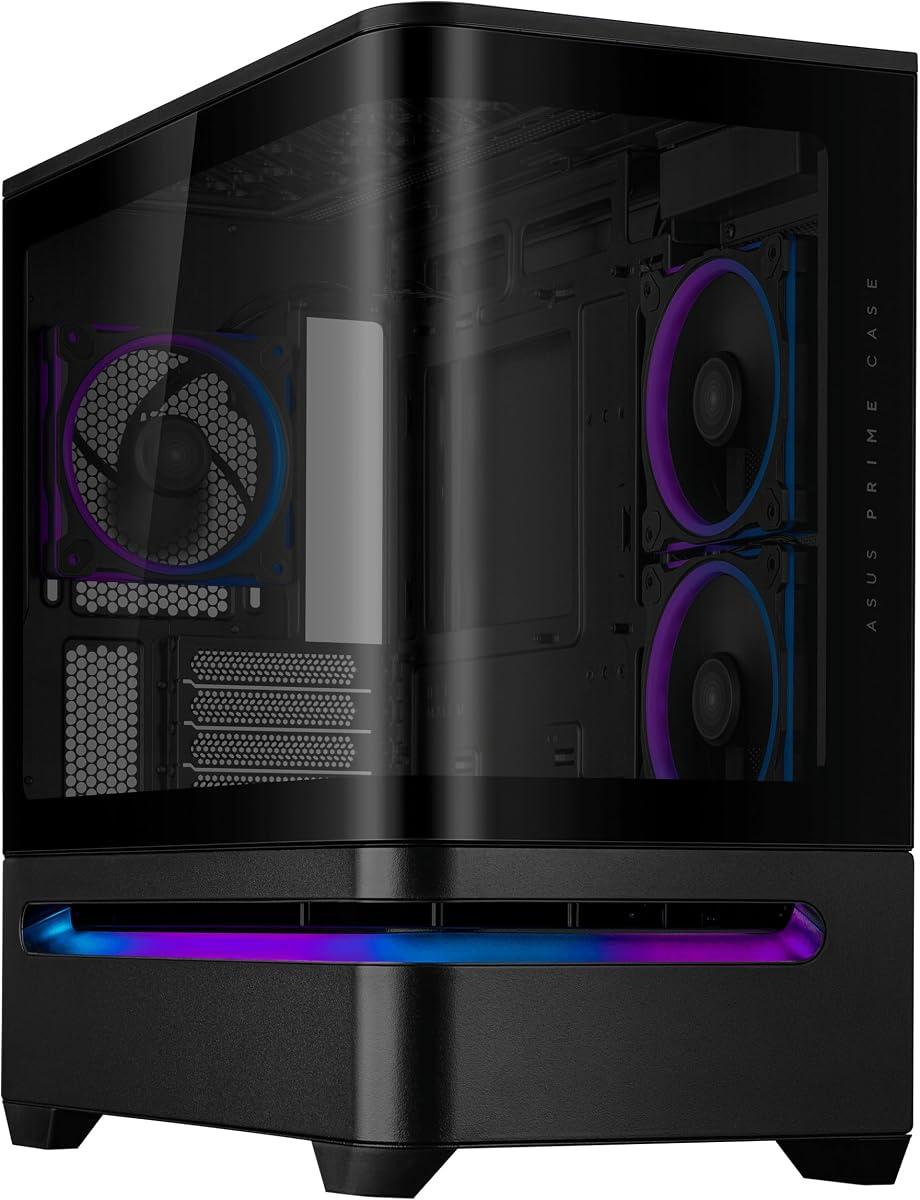
The ASUS Prime AP202 Black uses a curved tempered-glass panel that flows from the front to the side, giving a micro-ATX system a near-panoramic presentation. Its 4.7 rating is among the strongest in this list. The design focuses on a restrained, coordinated appearance, with an integrated ARGB light band designed to work with Aura Sync.
We may earn a commission when you buy through this link, at no additional cost to you.
A detachable rail makes the glass panel safer to remove and reattach, which is important in a case where the curved panel is a major part of the appearance. A patented slot vent is positioned to help graphics card cooling, while the continuous glass presents both the motherboard area and expansion hardware from a broad viewing angle. The result is a balanced design for a compact gaming or productivity system.
The main limitation is scale. As a micro-ATX case, it is most appropriate for builders using that motherboard format or a smaller board, rather than anyone requiring a full ATX layout. The supplied data does not detail the number or type of included fans, so cooling requirements should be confirmed from the current listing. The premium-looking glass also creates an additional surface that will show dust and fingerprints.
The AP202 Black is a strong choice for builders who value clean industrial styling, integrated lighting, and a smaller footprint. It offers a polished showcase without the complexity of a fully modular case. Confirm board format and cooling requirements, and plan for the careful handling required by any large curved glass surface.
The easy-detach rail supports repeated removal and reattachment of the curved panel. That is valuable during initial assembly and later maintenance because it reduces the need to force or awkwardly lift a large display surface.
The patented slot vent gives additional attention to graphics card cooling. In a compact enclosure, directing airflow toward a major heat source is an important design consideration for stable performance.
We may earn a commission when you buy through this link, at no additional cost to you.
The Antec C8 Curve Wood combines a wide curved tempered-glass panel with an exotic wood front panel, creating one of the more distinctive appearances in the guide. It is a full-tower E-ATX case rather than a compact mid-tower, and the dual-chamber arrangement is intended to separate components and provide more room for a large, high-end build. Its 4.4 rating reflects a strong design proposition with clear cooling potential.
We may earn a commission when you buy through this link, at no additional cost to you.
The case can accommodate three 140mm or two 160mm fans at both the top and bottom. It also supports thick 360mm radiators simultaneously at the top, bottom, and side, giving serious builders numerous water-cooling arrangements. A full bottom cut-out accepts interchangeable 120mm and 140mm fan brackets, while back-connector motherboards can help create a cleaner rear cable arrangement.
No fans are included, so the listed cooling positions are mounting options rather than an equipped cooling package. The full-tower format and dual-chamber construction also require more desk or floor space and more deliberate cable routing than a mid-tower. Because the case supports a more specialized wood aesthetic, it may not fit setups that favor a completely uniform black, white, or industrial appearance.
The C8 Curve Wood is ideal for a showcase workstation or enthusiast gaming system where room, radiator flexibility, and natural materials are priorities. It is a less convenient choice for a small desk or for a builder expecting a ready-to-install fan configuration. Confirm available space and plan the complete cooling and cable layout before purchasing.
Support for thick 360mm radiators in three locations is among the strongest specifications in this guide. A builder can use a large top radiator, a lower radiator, and a side position, subject to the final clearance and mounting arrangement.
The wood front panel softens the technical appearance of a large glass-and-metal chassis. It is a distinctive option for interiors where warmer materials fit better than an entirely industrial or gaming-oriented design.
We may earn a commission when you buy through this link, at no additional cost to you.
The white JONSBO TK-3 offers the same dramatic 270-degree, one-piece curved-glass presentation as the black version, but in a bright finish suited to light-themed interiors. Its 4.8 rating is the highest among the ten products. For builders searching for a visually expansive curved-glass case, the combination of visibility, board support, and cooling positions is difficult to overlook.
We may earn a commission when you buy through this link, at no additional cost to you.
The listed specification supports ATX, micro-ATX, ITX, and BTF motherboards, along with an ATX power supply up to 220mm, CPU coolers up to 165mm, and graphics cards up to 420mm. Ten fan positions provide room for a dense airflow arrangement, and the case can support dual 360mm all-in-one coolers, with an upward orientation designed to move heat away from lower areas of the chassis.
As with the black TK-3, most cooling components are optional. The configuration shown in the specifications is a menu of supported options, not a statement that all those fans and radiators arrive in the box. The explosion-proof film on the curved glass should remain attached according to the listing, meaning the final visual result will include that protective layer. The white finish will also need regular care to preserve its appearance.
This model is a strong recommendation for a white-themed ATX system that prioritizes a panoramic display and flexible cooling. Its strong rating supports the shortlist, but the omitted cooling hardware is the main issue to account for. Use the compatibility information to prepare a complete parts plan, and handle the large curved panel carefully throughout assembly.
The white chassis and broad glass surface can complement white components, neutral desks, and understated RGB. It offers a more dramatic enclosure than a conventional solid-sided case without introducing a separate wooden or industrial accent.
Compatibility for large graphics cards, ATX power supplies, BTF motherboards, and dual 360mm radiators makes the TK-3 viable for elaborate builds. The drawback is that the enclosure offers mounting flexibility rather than a preinstalled collection of cooling parts.
We may earn a commission when you buy through this link, at no additional cost to you.
The Iota C70 BK Curve combines a 270-degree high-transparency view with four preinstalled Gamma F12 Elite fans, giving buyers a more complete starting point than cases that arrive without cooling hardware. It also includes a real-time Ocypus digital display for CPU and GPU operating temperatures. The 4.3 rating makes it an appealing all-around choice for a visually oriented ATX or micro-ATX gaming build.
We may earn a commission when you buy through this link, at no additional cost to you.
The case uses 0.7mm SPCC metal panels and provides a front-to-rear airflow path. It supports 360mm all-in-one radiators, CPU air coolers up to 160mm, and both 120mm and 140mm fans. Component limits include 445mm for the graphics card and 240mm for the power supply. Magnetic dust filters appear at both the top and bottom, while the rear uses micro-mesh perforations for additional protection.
The digital display must be connected to a USB 2.0 port, which means it occupies an internal or available header connection and adds a small dependency to the build. The curved high-transparency glass will readily collect fingerprints, so a microfiber cloth will be useful for maintenance. As with any large showcase panel, careful removal and installation are necessary to prevent damage.
The C70 is a compelling choice for a builder who wants a panoramic case, several fans already installed, and integrated temperature monitoring. It is especially useful for first-time builders who prefer not to select every fan and radiator themselves. Confirm that the required USB 2.0 connection is available and plan your cooling additions around the 160mm CPU cooler limit.
Four included fans reduce the number of immediate decisions for a new build. They can establish the initial airflow path while the builder assesses whether a larger radiator or additional intake is needed for the chosen hardware.
The integrated Ocypus display provides ongoing CPU and GPU temperature information, with selectable temperature units. Its USB 2.0 requirement should be accounted for before the case is taken out of its planned cable-routing position.
We may earn a commission when you buy through this link, at no additional cost to you.
The Thermaltake Vision 330 CR ARGB arrives with six 120mm Infinity ARGB PWM fans, making it one of the most complete curved-glass configurations in the guide. Its one-piece curved tempered-glass front and side panel creates open viewing angles, while the white Snow finish offers a bright alternative to traditional dark gaming cases. The listed 4.0 rating is the lowest in the group, but the supplied hardware gives the design clear appeal.
We may earn a commission when you buy through this link, at no additional cost to you.
The included fan arrangement places fans at the bottom and side as intakes and another at the rear as exhaust, leaving the top available for an AIO cooler. Up to nine 120mm fans can be fitted in total. The chassis accommodates radiators up to 360mm, graphics cards up to 420mm, CPU coolers up to 175mm, and power supplies up to 250mm.
Hidden-connector support is another meaningful feature for clean builds. The case includes cutouts for examples such as ASUS BTF, MSI Project Zero, and Gigabyte Project Stealth motherboards, allowing compatible systems to route cables out of sight. Push clips and hinged panels support tool-free removal, though the full tempered-glass assembly still deserves careful handling. The included fan layout is explicitly oriented toward builders installing an AIO at the top.
This case is well suited to a builder who wants a bright, illuminated showcase with a substantial set of fans already supplied. It may be less compelling if every included fan must be replaced, or if the planned system uses a motherboard without hidden connectors. Review the top AIO arrangement and current component limits before finalizing the build.
The included Infinity ARGB PWM fans provide an immediate airflow and lighting foundation. Their placement creates a front-to-rear path while reserving the roof for a radiator, a common layout for builders planning an all-in-one cooler.
Hidden-connector cutouts can eliminate much of the clutter around the motherboard tray. This support only applies to compatible boards, so a builder should confirm the exact motherboard model and its connector arrangement.
We may earn a commission when you buy through this link, at no additional cost to you.
The ASUS Prime AP202 White Edition combines a seamless curved tempered-glass panel with an integrated ARGB light band, offering a clean, coordinated appearance for light builds. Its 4.4 rating places it solidly among the compact options. The panel extends from the front to the side, giving a micro-ATX system a broad view of the motherboard, expansion area, and internal lighting.
We may earn a commission when you buy through this link, at no additional cost to you.
The easy-detach rail is one of the design's most practical details. It allows the glass panel to be removed and reattached more safely, which helps during initial assembly and later upgrades. The patented slot vent focuses airflow toward the graphics card, an especially useful feature in a compact enclosure, while Aura Sync provides a straightforward way to coordinate the case's integrated lighting with compatible components.
As a micro-ATX mid-tower, the AP202 is not intended for builders who require a full-size ATX board. The supplied product information also does not clarify the included cooling configuration, so a buyer should check the current package contents and fan requirements. White surfaces and clear glass both benefit from routine cleaning, particularly in a visible desk or entertainment setup.
The White Edition is an attractive option for a compact system where visual consistency matters. It delivers the core curved-glass experience without requiring the larger footprint or higher feature load of a full-tower premium model. Confirm motherboard format, inspect the current package details, and plan the cooling layout before ordering.
The white finish and integrated light band create a unified look when paired with matching components. Aura Sync support can also coordinate the enclosure with other compatible hardware, reducing the need for multiple separate lighting ecosystems.
The continuous glass gives the AP202 a more expansive appearance than the smaller motherboard format might otherwise suggest. The slot vent preserves a cooling focus around the graphics card despite the compact interior.
We may earn a commission when you buy through this link, at no additional cost to you.
The ASUS ROG Cronox White Edition is the most feature-rich enclosure in this guide, combining curved tempered glass, an aluminum-trimmed frame, and a hinged 9.2-inch display module. Its 5.0 rating gives it the strongest listed customer score. The case is intended as a premium gaming showcase for E-ATX systems, using a panoramic panel and integrated display to make system information and internal hardware central parts of the presentation.
We may earn a commission when you buy through this link, at no additional cost to you.
Hidden-connector support lets compatible ATX boards conceal wiring and maintain a clean internal view. A patented rotatable side-fan bracket lets the builder change the airflow channel, while the case supports up to fourteen 120mm fans. Graphics card support extends to 400mm, and a robust holder plus patented slot clamps help stabilize long cards. Cooling capacity includes up to two 360mm radiators.
The large display can show system statistics, notifications, a digital clock, or custom visuals, making the enclosure a functional centerpiece rather than merely a protective box. The trade-off is the physical scale of a full-tower design and the amount of configuration required to make use of its many features. The supplied information does not state that a full fourteen-fan or dual-radiator cooling package is included.
The Cronox is the clear premium recommendation for a builder who wants an expansive curved-glass enclosure, a large integrated display, and extensive cooling flexibility. It is best suited to a gaming room where the case can be prominently positioned. Before ordering, check desk clearance, plan the display and hidden-connector cables, and build a cooling layout that matches the system.
The hinged 9.2-inch screen can present operating data, alerts, clock information, or custom content. Because it is part of the enclosure rather than a separate desk accessory, it remains visible alongside the curved panel and internal components.
Support for fourteen 120mm fans, two 360mm radiators, and graphics cards up to 400mm provides broad thermal planning room. The rotatable side bracket and GPU support hardware help adapt the airflow and stability features to different layouts.
We may earn a commission when you buy through this link, at no additional cost to you.
A curved-glass case should be selected around your hardware and build priorities rather than appearance alone. Motherboard format, graphics card length, cooling arrangement, display placement, and maintenance needs will determine which enclosure works best.
Begin with the motherboard standard because it sets the most basic compatibility boundaries. The JONSBO TK-3, darkFlash L280, CORSAIR Frame 4500X, Iota C70, and Thermaltake Vision 330 support ATX, with the JONSBO, Iota, and Thermaltake models also listing micro-ATX and ITX. The ASUS Prime AP202 is a micro-ATX-focused mid-tower, while the Antec C8 Curve Wood and ASUS ROG Cronox are full-tower E-ATX options. Check not only the board format but also CPU cooler, power supply, and cable-routing requirements, since a compatible case can still be difficult to populate if its clearances are tight for your specific parts.
Modern graphics cards can be among the longest and heaviest components in a build, so compare the stated length limit before selecting an enclosure. The listed limits range from 400mm in the ROG Cronox to 445mm in the Iota C70. The JONSBO TK-3 supports up to 420mm, as do the Thermaltake Vision 330 and ASUS Prime AP202 models, while the darkFlash L280 supports up to 410mm. The Antec C8 listing does not state a numerical GPU limit in the supplied data, so buyers should verify the exact specification. Length clearance is only part of the equation: the card must also fit around radiators, the front intake, cable areas, and any support bracket.
Cooling support determines how easily the case can handle a high-power processor and graphics card. The JONSBO TK-3 supports ten fan positions and dual 360mm all-in-one coolers. The Thermaltake includes six 120mm ARGB PWM fans and supports up to nine 120mm fans, with a layout designed around a top AIO. The Antec C8 allows thick 360mm radiators at the top, bottom, and side simultaneously. The ROG Cronox supports as many as fourteen 120mm fans and up to two 360mm radiators. For every case, confirm the actual fan and radiator mounting pattern rather than relying only on the headline count.
A wide curved panel can make the system feel larger and more dramatic, but the viewing style varies. The JONSBO TK-3 and Iota C70 use a 270-degree view, while the CORSAIR Frame 4500X and Thermaltake Vision 330 use one-piece glass across the front and side. The ASUS Prime AP202 extends curved tempered glass from the front to the side, and the darkFlash L280 uses a three-glass arrangement. Larger, exposed panels demand more careful handling and routine cleaning. The JONSBO listing also specifies that its explosion-proof film should not be removed, so buyers should understand what the final protected surface looks like.
A visible-glass build reveals cable clutter as readily as it reveals polished components. Several cases address this directly. The JONSBO TK-3 supports BTF motherboards, the Thermaltake Vision 330 has cutouts for several hidden-connector platforms, and the ROG Cronox supports compatible ATX hidden-connector boards. The darkFlash L280 also advertises cable-management provisions and a snap-on interior. If your chosen motherboard lacks hidden connectors, look for adequate routing space behind the tray, removable covers, or dedicated channels. A full-tower can offer more room to separate cables, while a compact micro-ATX design may require more deliberate planning.
Some curved-glass cases add a digital display that turns the enclosure into a monitoring hub. The darkFlash L280 reports CPU and GPU temperatures and utilization, while the Iota C70 includes an Ocypus display with selectable temperature units and requires a USB 2.0 connection. The ROG Cronox takes the concept further with a hinged 9.2-inch module capable of showing system statistics, notifications, clock information, or custom visuals. Displays are useful for quick system checks, but they also add cable requirements, software considerations, and an additional surface that must be positioned for viewing.
A case should remain pleasant to use after the initial build. The Iota C70 uses magnetic dust filters at the top and bottom, micro-mesh rear perforations, tool-free installation, and a snap-on quick-release front glass. The Thermaltake Vision 330 and ASUS Prime AP202 support tool-free or rail-assisted panel removal. The CORSAIR Frame 4500X uses a modular system that can change as the build evolves, while the ROG Cronox includes a rotatable side bracket. Steel construction, removable panels, accessible filters, and clear mounting points are worth comparing because they determine how easily the system can be maintained.
Before assembling the system, install the motherboard, power supply, storage, and cooling hardware according to the case manual, then confirm that every cable can reach its intended header without being forced around the curved panel. Route power and data cables behind the tray first, leaving service loops near their connections. If the case includes a digital temperature display, connect its required USB header before the motherboard is secured, and verify that the screen remains visible from the intended viewing position.
When adding fans and radiators, match airflow direction to the case design rather than simply filling every mounting position. Test the system with the intended fan configuration and monitor CPU and GPU temperatures under realistic workloads. Confirm that the graphics card has clearance from side fans, that radiator tubes can bend without strain, and that a large display or glass panel does not interfere with access to connectors. The larger the glass area, the more important it is to avoid pressing against the panel while working inside.
Curved tempered glass requires gentle care. Remove power before opening the chassis, support the panel with both hands where possible, and avoid setting tools or components against the glass. Clean it with a soft microfiber cloth and a suitable electronics-safe cleaner, avoiding harsh liquids and abrasive pads. Remove dust from filters and vents periodically, inspect exposed edges for damage, and keep the listed protective film attached where the manufacturer instructs. A clean panel and orderly interior preserve the visual impact that motivated the purchase in the first place.
Curved glass is usually a type of tempered glass shaped into a curved panel, so the two terms can describe related rather than mutually exclusive features. A curved panel can provide a wider, less obstructed view of internal components, while tempered glass provides structural strength. Buyers should focus on panel construction, mounting quality, protection, and ease of removal rather than treating curvature as the only measure of quality.
No, not inherently. Cooling performance depends on the chassis airflow path, fan and radiator positions, mesh or vents, filters, and the hardware installed. Cases in this guide support large radiators and numerous fan positions, but every optional fan must be installed in the correct direction. Plan the airflow before ordering, especially in compact models, and use the case's included positioning guidance.
It can, particularly if the glass has a glossy finish. A high-transparency or dark panel may also make small dust marks and fingerprints more visible. Keep a soft microfiber cloth nearby, clean the panel with an electronics-safe product, and clean removable filters on a regular schedule. Avoid abrasive pads and spraying liquid directly onto the glass.
Follow the manufacturer's instructions for the specific panel. The JONSBO TK-3 listing explicitly says not to remove its explosion-proof film, and doing so could violate the recommended protective procedure. Other cases may ship with a removable film intended to be taken off after installation. If the instructions are unclear, retain the film until you have contacted the manufacturer.
The list includes micro-ATX-focused designs such as the ASUS Prime AP202, versatile ATX mid-towers, and full-tower E-ATX models from Antec and ASUS ROG. Some ATX cases also support micro-ATX and ITX boards. Confirm that the case supports your chosen board, then check CPU cooler height, power supply length, GPU length, storage position, and cable-routing requirements.
They need no more structural maintenance than other cases, but exposed glass demands more frequent surface cleaning. Models with removable magnetic filters, such as the Iota C70, make dust control easier because filters can be cleaned away from the interior. Tool-free panels and rail-assisted removal can also make routine servicing less disruptive.
Yes, several models explicitly support 360mm radiators. The JONSBO TK-3 can support dual 360mm all-in-one coolers, the Thermaltake Vision 330 accommodates radiators up to 360mm, and the Antec C8 supports thick 360mm units in three locations. The ROG Cronox supports up to two 360mm radiators. Always verify the exact position, radiator thickness, tube routing, and component conflicts before purchasing.
They provide quick access to temperatures, utilization, notifications, clock information, or custom visuals without occupying a separate monitor. The darkFlash L280 and Iota C70 focus on temperature monitoring, while the ROG Cronox offers a larger hinged screen. Consider visibility, required USB connections, update or software needs, and whether the display location suits your desk or entertainment setup.
The CORSAIR Frame 4500X RS-R stands out as the most versatile all-around recommendation, combining a panoramic single-piece panel, modular internal elements, and flexible fan positioning. The Thermaltake Vision 330 CR ARGB is a strong value-oriented choice for builders who want six ARGB PWM fans already included, while the ASUS ROG Cronox White Edition delivers the most premium presentation with its large hinged display, extensive fan capacity, and full-tower space.
For most builders, compatibility should guide the final decision. A dramatic 270-degree panel is not useful if a radiator, graphics card, or power supply does not fit, and an included fan count does not help if those fans block a radiator. Consider the motherboard format, GPU length, CPU cooler height, power supply dimensions, hidden-connector support, and serviceability together before focusing on final appearance.
Ratings, product configurations, and prices can change, so check the current listing and package contents before purchasing. A curved-glass case is a long-term home for your components, and taking the time to compare fit, cooling, displays, and maintenance will produce a more satisfying final build.