
GIGABYTE B650 AORUS Elite AX
4.4Editor score
AM5 Ryzen 9000 support
Four DDR5 memory slots
PCIe 5.0 NVMe support
WIFI6E and 2.5GbE
Our Motherboard for Neural Network guide compares 10 AM5, AM4, LGA1851, and workstation boards for AI acceleration, memory, storage, networking, and power.
A motherboard for neural network computing must coordinate the processor, memory, graphics hardware, fast storage, networking, and power delivery without creating bottlenecks. The best choice depends on whether the system will train models, run inference, process large datasets, or handle a mixed workload requiring serious expandability and dependable thermals.
This guide compares ten motherboards built around AMD AM4, AM5, Intel LGA1851, and the Threadripper platform. We evaluated the supplied processor compatibility, power-stage designs, memory support, PCIe and M.2 capabilities, networking, cooling features, onboard connectivity, and practical management options rather than relying on a single specification.
Each review explains where a board fits, highlights its strongest neural-network-related capabilities, and notes meaningful limitations. The overall list includes mainstream gaming boards, creator-oriented ATX models, premium X870E and Z890 platforms, and a Threadripper workstation. Availability and pricing can change, so verify current listings before purchasing.
4.4Editor score

4.3Editor score
4.3Editor score
The comparison below organizes each motherboard by socket, power delivery, memory, storage, and networking features. These characteristics indicate which systems can support neural-network accelerators, high-bandwidth datasets, and demanding multi-GPU or workstation configurations.


The GIGABYTE B650 AORUS Elite AX is a balanced AM5 platform with a 4.4 rating and broad Ryzen 9000, 8000, and 7000 series support. It combines a 14+2+1 power design, four DDR5 slots, PCIe 5.0 storage support, and modern networking without moving into a creator-focused or workstation feature set.
We may earn a commission when you buy through this link, at no additional cost to you.
Its twin 14+2+1 phases use 70A power stages on an eight-layer, two-ounce-copper PCB, giving it a more substantial foundation than entry-level boards. The 6mm heatpipe, covered MOSFET heatsinks, M.2 Thermal Guard, and PCIe armor improve the suitability of the platform for sustained compute work. Front and rear USB-C connectivity also helps with streamlined peripheral management.
The main limitation is storage flexibility. A neural-network workstation may need several high-capacity NVMe drives for datasets, model checkpoints, and temporary working files, while the board's listed features emphasize one principal PCIe 5.0 M.2 path rather than a larger multi-drive arrangement. WiFi 6E is also less forward-looking than the WiFi 7 found on several higher-ranked alternatives.
Despite those limitations, this is a persuasive general-purpose neural-network motherboard when the goal is a capable AM5 build without moving to a creator or professional workstation. It suits users with a discrete GPU who need fast memory, current processor support, solid networking, and a proven ATX platform. The B650 AORUS Elite AX earns the Best Budget badge by covering the essentials at a practical tier.
The 70A power stages, reinforced PCB, and comprehensive cooling create a sound base for high-power Ryzen processors. That foundation matters when neural-network software keeps the CPU, GPU, memory, and storage subsystem busy at the same time.
PCIe 5.0 M.2 support allows compatible flash storage to operate on the newest generation of link, while 2.5GbE handles large transfers more effectively than a basic gigabit connection. WiFi 6E adds a convenient wireless option for flexible workspaces.
We may earn a commission when you buy through this link, at no additional cost to you.
The Asus ROG Strix B550-F Gaming WiFi II carries a 4.6 rating, the highest among the listed products, and offers an established AM4 route for neural-network systems. It supports Ryzen 3000 and 5000 processors, including listed 5000 and 4000 G-series desktop processors, making it relevant for builders who already own compatible hardware.
We may earn a commission when you buy through this link, at no additional cost to you.
Its 12+2 teamed power stages, ProCool connector, alloy chokes, and durable capacitors form a robust VRM. Connectivity includes PCIe 4.0 readiness, dual M.2 slots, USB 3.2 Gen 2 Type-C, HDMI 2.1, DisplayPort 1.2, WiFi 6E, and Intel 2.5Gb Ethernet. That combination is well suited to a discrete-GPU inference or development system.
The central trade-off is platform age. DDR4 memory can be more accessible than DDR5 in some markets, but it also has lower native bandwidth headroom than newer systems. More importantly, the supplied compatibility does not extend to AM5 or Ryzen 9000 processors, and the listed storage support is PCIe 4.0 rather than PCIe 5.0.
The board remains a practical choice for a value-conscious neural-network build using a supported Ryzen processor and existing DDR4 memory. It is especially attractive for users who prioritize the strong listed rating, 2.5Gb networking, and mature BIOS Flashback feature over having the newest CPU and storage platform. A new build intended for long-term expansion is better served by an AM5 model.
This motherboard lets builders reuse a compatible Ryzen 3000- or 5000-series processor and DDR4 memory. That can reduce the need to replace several major components at once, although it locks the finished system into the older platform.
Onboard 2.5Gb Ethernet is useful for moving training data and checkpoints between machines. WiFi 6E adds flexibility, although wired networking remains preferable for sustained large transfers and latency-sensitive workflows.
We may earn a commission when you buy through this link, at no additional cost to you.
The ASUS TUF Gaming B850-PLUS WiFi is an AM5 board designed for advanced AI PCs, with a 4.4 rating and support for Ryzen 9000, 8000, and 7000 series desktop processors. Its 14+2+1 80A DrMOS power stages and eight-layer PCB provide a stronger foundation for sustained high-performance computing.
We may earn a commission when you buy through this link, at no additional cost to you.
The board includes one PCIe 5.0 M.2 slot and two PCIe 4.0 M.2 slots, all equipped with heatsinks. A PCIe 5.0 x16 slot supports current high-end graphics hardware, while WiFi 7, 2.5Gb Ethernet, rear USB 20Gbps Type-C, and a front USB 10Gbps Type-C header cover contemporary connectivity requirements.
Compared with the ProArt X870E-CREATOR, it has one fewer M.2 slot and lacks 10Gb Ethernet. Those omissions may matter for multi-drive model libraries, clustered storage, or large dataset transfers over a local network. Its primary x16 connection is also a single listed slot, so it does not present the same explicit multi-accelerator layout as the Threadripper board.
For a neural-network system that needs modern AM5 performance, several NVMe drives, and fast wired networking, the TUF B850-PLUS is an excellent all-around choice. It balances features without adopting the full ProArt or TUF X870 specification. It is particularly attractive when WiFi 7, USB-C, and a current graphics slot matter more than 10Gb LAN or additional storage connectors.
All three M.2 positions have thermal hardware, which is useful when fast solid-state drives continuously exchange datasets and model files. The mix of one PCIe 5.0 and two PCIe 4.0 slots gives builders a useful balance of leading-edge and conventional storage.
USB 20Gbps and 10Gbps Type-C connections simplify the use of high-speed external storage and docks. The 2.5Gb Ethernet port is a practical middle ground for moving substantial project files between a neural-network workstation and other systems.
We may earn a commission when you buy through this link, at no additional cost to you.
The ASUS ProArt Z890-CREATOR WIFI brings exceptional connectivity to the neural-network shortlist. It carries a 4.4 rating, supports Intel Core Ultra Series 2 9, 7, and 5 desktop processors, and uses 16+2+1+2 teamed power stages to create a robust LGA1851 foundation.
We may earn a commission when you buy through this link, at no additional cost to you.
Its five M.2 slots include one PCIe 5.0 position and four PCIe 4.0 positions, making it one of the strongest storage choices here. Two PCIe 5.0 x16 slots provide room for powerful graphics hardware, while dual Thunderbolt 5, a Thunderbolt 4 port, 10Gb and 2.5Gb Ethernet, and WiFi 7 cover high-speed peripherals and networking.
AI-oriented software adds another layer of convenience through AI Overclocking, AI Cooling II, AI Networking II, AI Advisor, and NPU boost. The board also offers convenient installation features such as M.2 Q-Latch, Q-Slide, PCIe Slot Q-Release Slim, BIOS FlashBack, and Q-Connector, reducing the risk of mistakes during complex workstation assembly.
This motherboard is ideal for an Intel-based neural-network workstation that needs abundant storage and high-speed data movement. Its five M.2 slots make it a particularly compelling choice for separate operating-system, dataset, checkpoint, and cache drives. Buyers should verify processor, accelerator, and operating-system support as part of the complete system design rather than assuming all AI workloads use the same hardware.
Five storage positions offer greater separation than most alternatives in the list. Neural-network projects can benefit from dedicated drives for source data, intermediate tensors, checkpoints, and the operating system, reducing contention when multiple workflows run together.
ProArt Creator Hub, color-management support, BIOS FlashBack, and ASUS Control Center Express add setup and management conveniences. Security features include USB port management, software blacklisting, and controls for the Windows registry through Regedit options.
We may earn a commission when you buy through this link, at no additional cost to you.
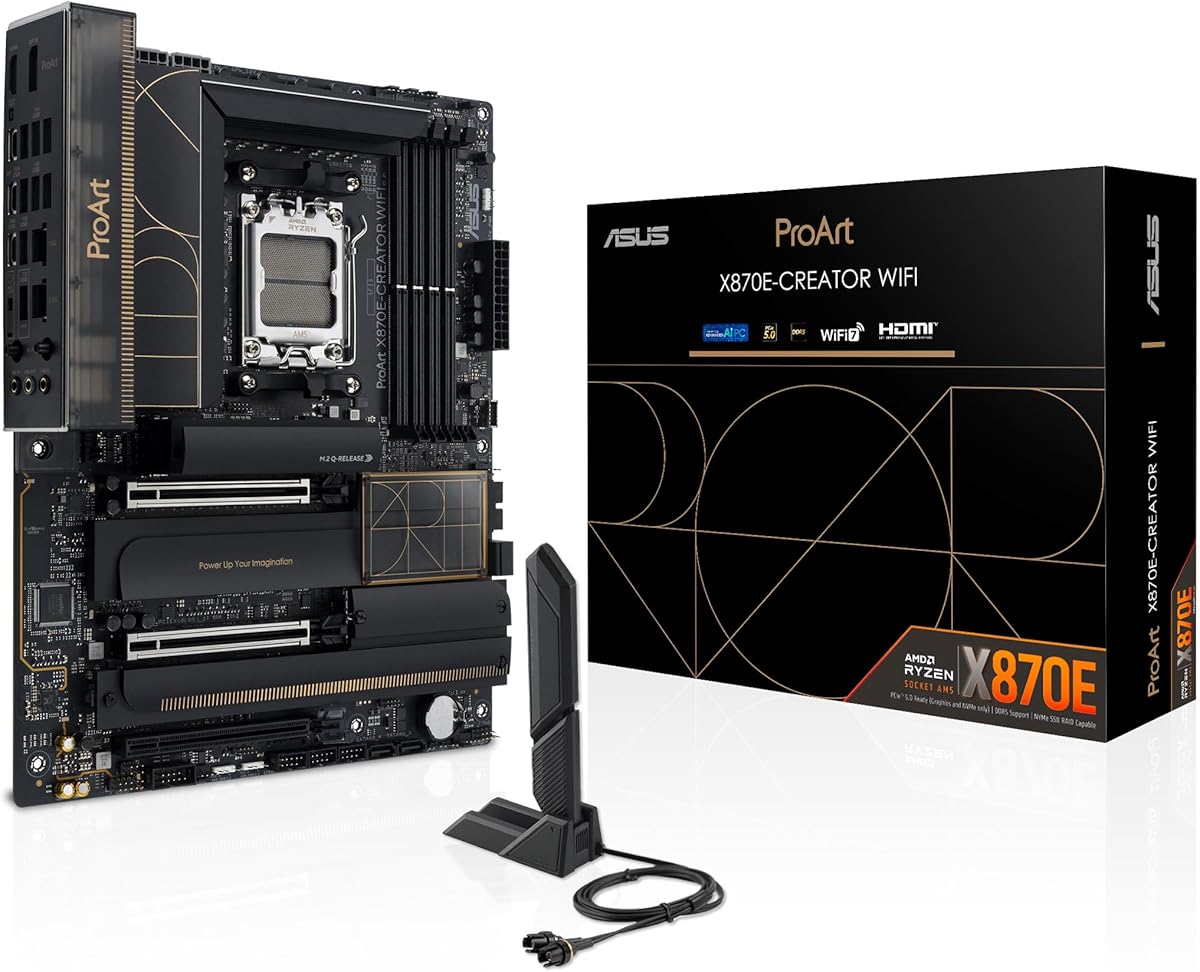
The ASUS ProArt X870E-CREATOR WiFi is a premium AM5 motherboard aimed at demanding AI and creator systems. It has a 4.3 rating, supports Ryzen 9000, 8000, and 7000 series processors, and combines a 16+2+2 teamed power design with a full PCIe 5.0 graphics slot.
We may earn a commission when you buy through this link, at no additional cost to you.
Storage and data-transfer capabilities distinguish the board. Two PCIe 5.0 and two PCIe 4.0 M.2 slots provide four high-speed storage positions, while dual USB4 ports and a front USB 20Gbps connector support 30W Power Delivery and Quick Charge 4+. WiFi 7, 10Gb Ethernet, and 2.5Gb Ethernet allow a builder to choose between high-speed wired transfers and convenient wireless connectivity.
AI Overclocking, AI Cooling, AI Networking II, Dynamic OC Switcher, and Core Flex provide software controls for optimizing a performance-focused system. These features are particularly relevant when sustained compute loads make power delivery, cooling, and network behavior important. They do not change the fundamental need to select a compatible processor and suitable accelerator.
The ProArt X870E-CREATOR is the premium choice for an AM5 neural-network workstation requiring a strong mixture of expansion, fast storage, modern networking, and creator-oriented controls. It is less attractive when a basic inference machine will use one GPU and one or two drives. For that use, the MSI PRO B850-V EVO or GIGABYTE B650 AORUS Elite AX may deliver a more economical fit.
Two PCIe 5.0 M.2 slots can serve high-bandwidth system media and active datasets, while two PCIe 4.0 slots expand capacity for checkpoints and less frequently accessed files. This mix offers flexibility without requiring every drive to use the newest interface.
The 10Gb port is a major advantage when datasets are shared between several neural-network systems over a local network. The included 2.5Gb connection offers a second wired option, and WiFi 7 supports flexible access where cabling is inconvenient.
We may earn a commission when you buy through this link, at no additional cost to you.
The ASUS TUF Gaming X870-PLUS WiFi is a strong all-around AM5 choice, carrying a 4.5 rating and supporting Ryzen 9000, 8000, and 7000 series processors. Its 16+2+1 design uses 80A SPS power stages, an eight-layer PCB, ProCool connectors, alloy chokes, and durable capacitors for a robust compute foundation.
We may earn a commission when you buy through this link, at no additional cost to you.
Four M.2 slots give the board more storage flexibility than most of the mainstream models in the list. The listed connectivity includes WiFi 7, 2.5Gb LAN, USB4 at 40Gbps, SATA 6Gbps, and USB 20Gbps Type-C. This makes it suitable for systems that need fast external media, substantial internal storage, and a modern desktop interface.
ASUS's AI Overclocking, AI Cooling II, and AEMP features simplify configuration, while Dynamic OC Switcher, Core Flex, and PBO Enhancement give users additional tuning options. The 2.5Gb Ethernet connection is sensible for many single-workstation setups, although the ProArt models offer 10Gb LAN for substantially larger shared transfers.
The TUF X870-PLUS is a compelling recommendation for a neural-network computer that combines a modern Ryzen processor, discrete graphics accelerator, and multiple fast drives. It provides many of the desirable X870 features without expanding into workstation memory or multi-GPU architecture. It suits users who want USB4, WiFi 7, and AI-assisted controls but do not require enterprise networking.
Four M.2 positions allow storage to be divided by workload rather than consolidated into one crowded device. A neural-network builder could separate the operating system, active training set, model checkpoints, and output files to improve workflow organization.
The 80A power stages and AI Cooling II features support a stable configuration under heavy load. AI Overclocking and PBO Enhancement also provide approachable paths to tuning, although stability should always be validated with the selected processor and memory.
We may earn a commission when you buy through this link, at no additional cost to you.
The MSI MAG X870E Gaming MAX WiFi is built around the X870E chipset and supports Ryzen 9000, 8000, and 7000 processors. Its 4.0 rating is the lowest among the ten products, but the board still presents a compelling combination of high-speed memory, PCIe 5.0 expansion, and 5G networking.
We may earn a commission when you buy through this link, at no additional cost to you.
Its 12 Duet Rail power phase uses 60A SPS components, while seven-watt-per-meter-kelvin MOSFET thermal pads, choke pads, an extended heatsink, a chipset heatsink, and EZ M.2 Shield Frozr II support cooling. Four DDR5 DIMM slots are rated for up to 8200+ MT/s overclocking in a one-DIMM, one-rank configuration.
Storage comprises one PCIe 5.0 x4 M.2 slot and two PCIe 4.0 x4 slots, all protected by Frozr II shields. A PCIe 5.0 x16 slot with Steel Armor II supports current graphics hardware, while WiFi 7, Bluetooth 5.4, 5Gbps Ethernet, and USB4 with display output provide flexible connectivity.
The board is a good fit for a high-memory-bandwidth neural-network system where fast DDR5 and a modern accelerator are priorities. It may not be the first choice for a large multi-drive model archive because it offers three M.2 positions, and its lower rating deserves attention. Prospective buyers should compare available memory kits and their supported specifications before assuming the maximum speed will be reached.
The board's stated 8200+ MT/s overclocking capability is attractive for workloads sensitive to memory bandwidth. Actual performance depends on the processor's memory controller, the selected kit, board BIOS, and whether one or multiple modules are installed.
A 5Gbps Ethernet connection is a notable step above 2.5GbE for moving large datasets within a local network. WiFi 7 and Bluetooth 5.4 provide additional flexibility for mobile and wireless development workflows.
We may earn a commission when you buy through this link, at no additional cost to you.
The ASUS B650E MAX Gaming WiFi W combines a white ATX design with an advanced AI PC positioning. It has a 4.4 rating, supports Ryzen 9000, 8000, and 7000 processors, and provides DDR5, PCIe 5.0, three M.2 positions, WiFi 6E, and 2.5Gb Ethernet.
We may earn a commission when you buy through this link, at no additional cost to you.
Its 8+2+1 phase design uses a six-layer PCB, alloy chokes, and durable capacitors. Cooling includes VRM and M.2 heatsinks, a chipset heatsink, hybrid fan headers, and Fan Xpert 2+. The power specification is less elaborate than the 14+2+1, 16+2+1, and 16+2+2 configurations elsewhere in the list, so buyers focused on maximum sustained power should examine the selected CPU and cooling arrangement carefully.
Connectivity remains well suited to an AI desktop. The board has a PCIe 5.0 x16 slot, a PCIe 5.0 M.2 slot, Realtek 2.5Gb Ethernet, rear 10Gbps Type-A and Type-C ports, and front USB 5Gbps Type-C. A pre-mounted I/O shield, BIOS FlashBack, Q-Antenna, and Q-LED Core improve installation and troubleshooting.
This model is especially attractive for a white-themed neural-network workstation that needs current AM5 support and high-speed storage. It also appeals to builders who value Aura Sync and three addressable RGB Gen 2 headers. For highly specialized multi-drive or professional workstation needs, a board with more M.2 positions, 10Gb networking, or workstation memory support may be a better match.
The white PCB allows builders to coordinate a complete system around a light-colored case and components. This does not affect processing performance, but it can make a workstation more visually consistent with a dedicated office or creative installation.
The pre-mounted I/O shield, BIOS FlashBack, Q-Antenna, and Q-LED Core reduce common installation hurdles. Flashback is particularly useful when troubleshooting a new system because it allows firmware recovery without relying on a fully operational processor.
We may earn a commission when you buy through this link, at no additional cost to you.
The MSI PRO B850-V EVO WiFi offers a modern, practical foundation for neural-network computing. It carries a 4.3 rating, supports Ryzen 9000, 8000, and 7000 series processors, and uses a 12 Duet Rail power system with the B850 chipset. Its feature balance makes it particularly compelling for a single-workstation AI system.
We may earn a commission when you buy through this link, at no additional cost to you.
Four DDR5 slots support memory speeds up to 8200+ MT/s in the stated one-DIMM, one-rank configuration. A PCIe 5.0 x16 slot with Steel Armor accommodates a modern graphics accelerator, while three M.2 positions cover an operating system drive, active dataset, and checkpoint or cache drive. One M.2 slot is PCIe 5.0 x4, and the other two are PCIe 4.0.
The 5G LAN connection is faster than 2.5Gb Ethernet and useful for transferring large project files within a local network. WiFi 7 and Bluetooth 5.4 add wireless flexibility, while rear USB 10Gbps Type-C and 7.1 HD Audio with Audio Boost cover practical desktop connections. Frozr Guard cooling includes thermal pads, an extended heatsink, a chipset heatsink, and an EZ M.2 Shield.
The PRO B850-V EVO is the Editor's Choice because it combines a current processor platform, fast memory potential, 5G networking, and sufficient storage without moving into a professional multi-GPU design. It is well matched to developers, researchers, and advanced enthusiasts building a dedicated inference, training, or experimentation system. Builders needing many storage devices or 10Gb networking should consider an X870E alternative.
The board includes enough storage and connectivity for a focused neural-network desktop without requiring workstation memory. A single modern accelerator, several NVMe drives, and 5G networking can support development, model testing, and sustained inference or training workflows efficiently.
The advertised memory ceiling is useful for memory-intensive workloads, but the stated maximum assumes a specific one-DIMM, one-rank configuration. Buyers should select a qualified kit and confirm QVL or supported specifications rather than relying on the headline speed alone.
We may earn a commission when you buy through this link, at no additional cost to you.
The ASUS Pro WS TRX50-SAGE WIFI CEB is the specialist option in this guide, built for AMD Ryzen Threadripper PRO 7000 WX and Threadripper 7000 processors. It supports CPUs with as many as 96 cores, up to 1TB of ECC R-DIMM DDR5 memory in a one-DIMM-per-channel configuration, and multi-GPU expansion.
We may earn a commission when you buy through this link, at no additional cost to you.
Its 36 power stages, two 8-pin CPU power connectors, massive VRM cooling, chipset and M.2 heatsinks, and M.2 thermal pad indicate a design intended for sustained professional workloads. Three PCIe 5.0 x16 slots create room for multiple accelerators, while WiFi 7, 10Gb and 2.5Gb LAN, three M.2 slots, front and rear USB 20Gbps Type-C, and SlimSAS NVMe support provide extensive I/O.
Server-grade IPMI support is another defining feature. With compatible ASUS IPMI expansion cards and Control Center Express, administrators can access hardware and software monitoring and management functions remotely. That is useful in a shared lab, rack, or managed computing environment where local physical access may be limited.
This motherboard is intended for institutional or professional neural-network systems that need extreme CPU scale, ECC memory, and multiple GPU support. Its CEB form factor, Threadripper requirement, and specialized infrastructure make it much less convenient for an ordinary compact desktop. Its 3.6 rating is the lowest in the list, but the rating should be considered alongside the unique hardware platform and intended professional use.
Three PCIe 5.0 x16 slots create a direct path for multiple graphics or AI accelerators. This is a major advantage for model-parallel training and other designs that divide a workload across several devices rather than relying on one accelerator.
Up to 1TB of ECC R-DIMM memory supports very large datasets and provides error correction for demanding operations. IPMI-capable monitoring adds operational value in facilities where the system can be maintained remotely.
We may earn a commission when you buy through this link, at no additional cost to you.
The right neural-network motherboard is the one that supports your processor, accelerator, memory capacity, storage plan, and operating environment without creating a hidden bottleneck. Prioritize platform compatibility and workload requirements before considering aesthetics or secondary features.
Start with the CPU family already in your possession or the exact processor you intend to buy. The boards here cover AM4, AM5, LGA1851, and the sTR5 Threadripper platform, and those sockets are not interchangeable. Within AM5, compatibility also varies by generation, so the advertised Ryzen 9000, 8000, and 7000 support should be checked against the precise processor and any firmware requirements.
Neural-network performance usually depends heavily on the graphics or accelerator card, but the motherboard must provide the correct slot, enough lanes, and the physical clearance for it. A PCIe 5.0 x16 slot can host current high-end graphics hardware, while systems using multiple accelerators may need several full-length slots. Check both slot topology and accelerator compatibility because the physical connector alone does not guarantee the intended lane configuration.
Large datasets, model parameters, intermediate tensors, and batch processing can place substantial demands on system memory. DDR5 platforms provide newer memory support, while high-speed overclocking specifications can help bandwidth-sensitive workloads. Workstation-class Threadripper boards can support up to 1TB of ECC R-DIMM memory, a meaningful distinction for datasets that exceed ordinary consumer memory capacities. Actual memory speed also depends on module population and processor support.
Fast solid-state storage improves how quickly datasets, checkpoints, and temporary tensors can be read. The boards offer between three and five M.2 positions, with one or two PCIe 5.0 slots depending on the model. Consider whether the operating system, training data, model files, and scratch space will live on separate drives. M.2 heatsinks are also valuable because sustained transfers can produce significant heat.
Power stages, VRM layers, and cooling determine how comfortably the board handles a high-power processor during sustained workloads. The range in this guide includes 8+2+1 designs through 36-stage workstation solutions, so the appropriate level depends on the selected CPU and intended duration of heavy compute. Pair the motherboard with adequate case airflow, a capable CPU cooler, and carefully managed GPU and storage temperatures.
Models and datasets can be extremely large, making network speed relevant during development and collaboration. Options here range from 2.5Gb Ethernet to 5G and 10Gb LAN, with several boards also including WiFi 6E or WiFi 7. Wired Ethernet is generally preferable for sustained transfers between workstations, while wireless connectivity is more convenient for mobile development setups. A second network speed can be useful for separating traffic.
USB-C, USB4, and Thunderbolt can make external high-speed storage, docks, and display arrangements more practical. A board with a 20Gbps Type-C port can be beneficial when moving archive data between a neural-network workstation and portable storage. Confirm port placement, data-rating details, and display-output compatibility, and remember that an external enclosure may still be limited by its own controller and interface.
A personal development system may need only a BIOS and onboard diagnostics, while a shared professional machine may benefit from IPMI, detailed monitoring, and remote management. Form factor also matters because the Threadripper CEB board has different spatial and power requirements from the ATX models. Check case support, rear-panel clearance, expansion-card room, and connector availability before finalizing the platform.
Begin by installing the processor, compatible memory, storage, and accelerator according to the motherboard manual. Apply the supplied thermal material correctly, use the specified CPU power connections, and confirm that memory modules are seated in the slots and positions listed for the intended configuration. Install the operating system before adding the full software stack so that firmware, chipset, and accelerator drivers can be updated in a controlled sequence.
After the first boot, update the motherboard firmware, chipset drivers, network interface drivers, and accelerator software. Enable the operating system and storage features required by the neural-network framework, then validate memory stability, storage throughput, networking performance, and sustained processor temperatures. A successful benchmark or short test is not necessarily proof of long-term stability, so use a representative workload and monitor the system throughout.
For ongoing care, keep airflow paths clear, clean dust from heatsinks and filters, and verify that storage and expansion cards remain secure. Monitor temperatures and component temperatures with dependable software, preserve the board's thermal pads and heatsinks, and avoid changing BIOS power settings without testing the resulting configuration. Back up important model checkpoints and datasets independently of the motherboard because the board itself does not replace data protection.
A dedicated AI motherboard is helpful when the workload requires multiple accelerators, server-grade memory, extensive storage, or remote management. For a single-GPU development or inference system, a current AM5, AM4, or LGA1851 ATX board can be sufficient. The processor, accelerator, memory, cooling, and power delivery still need to be balanced as a complete system.
AM5 provides access to newer Ryzen 9000, 8000, and 7000 processors and DDR5 memory, while AM4 supports Ryzen 3000 and 5000 processors with DDR4. Newer platforms can offer more memory bandwidth and PCIe 5.0 storage, but an AM4 system can still handle neural-network tasks when its processor and accelerator are suitable. Existing hardware ownership and memory availability can make AM4 more economical.
It is not strictly necessary for model training, but it can be useful for fast external storage, docks, and additional displays. USB4 and Thunderbolt provide a convenient way to attach high-speed peripherals without occupying internal expansion slots. The motherboard must also support the desired device, and the attached enclosure or dock needs to meet the same performance expectations.
The correct number depends on dataset size, checkpoint frequency, and whether you want dedicated operating-system, data, and scratch drives. Three slots can cover a focused single-workstation configuration, while four or five provide more separation for larger projects. Capacity, sustained throughput, and thermal protection matter as much as the raw slot count.
WiFi 7 is useful for flexibility, access to shared resources, and occasional transfers, but wired Ethernet is usually preferable for repeated movement of very large files. Boards with 2.5Gb, 5G, or 10Gb Ethernet provide a better foundation for a local data network. Choose wireless primarily when the deployment makes cabling impractical.
It depends on the model software, workload, accelerator type, and motherboard's physical and electrical slot layout. The Threadripper workstation model explicitly lists three PCIe 5.0 x16 slots and multi-GPU support, making it the clearest choice in this guide for multiple accelerators. Other boards have fewer expansion slots or require careful verification of lane sharing and physical clearance.
Capacity is the first concern because datasets, parameters, and intermediate results can consume substantial memory. DDR5 platforms are appropriate for new AM5 and LGA1851 systems, while the Threadripper option supports up to 1TB of ECC R-DIMM memory in a one-DIMM-per-channel configuration. For workstation deployments, ECC support and the ability to replace failed memory can be especially important.
A stable memory configuration should be the priority, and automatic performance profiles may be sufficient for most workloads. Manual tuning can improve bandwidth in some memory-intensive jobs, but it adds another variable when diagnosing errors or instability. The advertised 8200+ MT/s figures are conditioned on specific module configurations, so verify processor and qualified-memory support before attempting that level.
The GIGABYTE B650 AORUS Elite AX stands out as the Best Budget selection because it covers current AM5 processors, DDR5 memory, PCIe 5.0 storage, and 2.5Gb networking in a conventional ATX design. The MSI PRO B850-V EVO WiFi earns the Editor's Choice for its modern platform, high memory potential, triple M.2 layout, and unusually capable 5G networking.
For premium AMD builders, the ASUS ProArt X870E-CREATOR WiFi provides the most balanced combination of 16+2+2 power stages, four M.2 slots, dual USB4, and 10Gb Ethernet. The ASUS ProArt Z890-CREATOR WIFI is the corresponding high-expansion Intel option, while the ASUS Pro WS TRX50-SAGE WIFI CEB is the specialist choice for Threadripper, ECC memory, and multiple accelerators.
Before purchasing, verify the exact processor, accelerator, memory configuration, case clearance, and software requirements. Current listings and prices can change, and a board that appears suitable may require specific firmware, qualified components, or updated drivers. Prioritizing those compatibility details will deliver a more dependable neural-network system than choosing on a single headline specification.