
ROG NUC (2025) Gaming Mini PC
3.5Editor score
GeForce RTX 5070 Mobile
Intel Core Ultra 9
Triple-fan cooling system
Explore the best mini PC for racing games, comparing graphics, processors, memory, cooling, connectivity, and gaming performance.
A mini PC for racing games must balance fast frame delivery, responsive handling, realistic visuals, and practical cooling within a compact enclosure. Integrated graphics can work well for lighter simulations, while a dedicated mobile GPU offers more headroom for demanding titles, high-resolution displays, ray tracing, and advanced visual settings.
This guide compares ten mini PCs using their supplied specifications, including processor and graphics capabilities, memory, storage, display support, networking, cooling, upgrade options, and customer ratings. It covers affordable everyday systems through powerful enthusiast models, showing how each option fits different racing genres, displays, budgets, and performance expectations.
The picks reveal where integrated Radeon systems shine, when a dedicated RTX GPU becomes worthwhile, and which features matter for sim racing, cockpit setups, online multiplayer, and triple-screen use. Product availability and prices can change, so readers should verify the current configuration, display support, and accessory requirements before purchasing.
3.5Editor score

4.6Editor score

4.4Editor score
The table below compares each mini PC's processor, graphics, memory, storage, display support, connectivity, cooling, and gaming positioning to help identify the right fit for different racing-game demands.


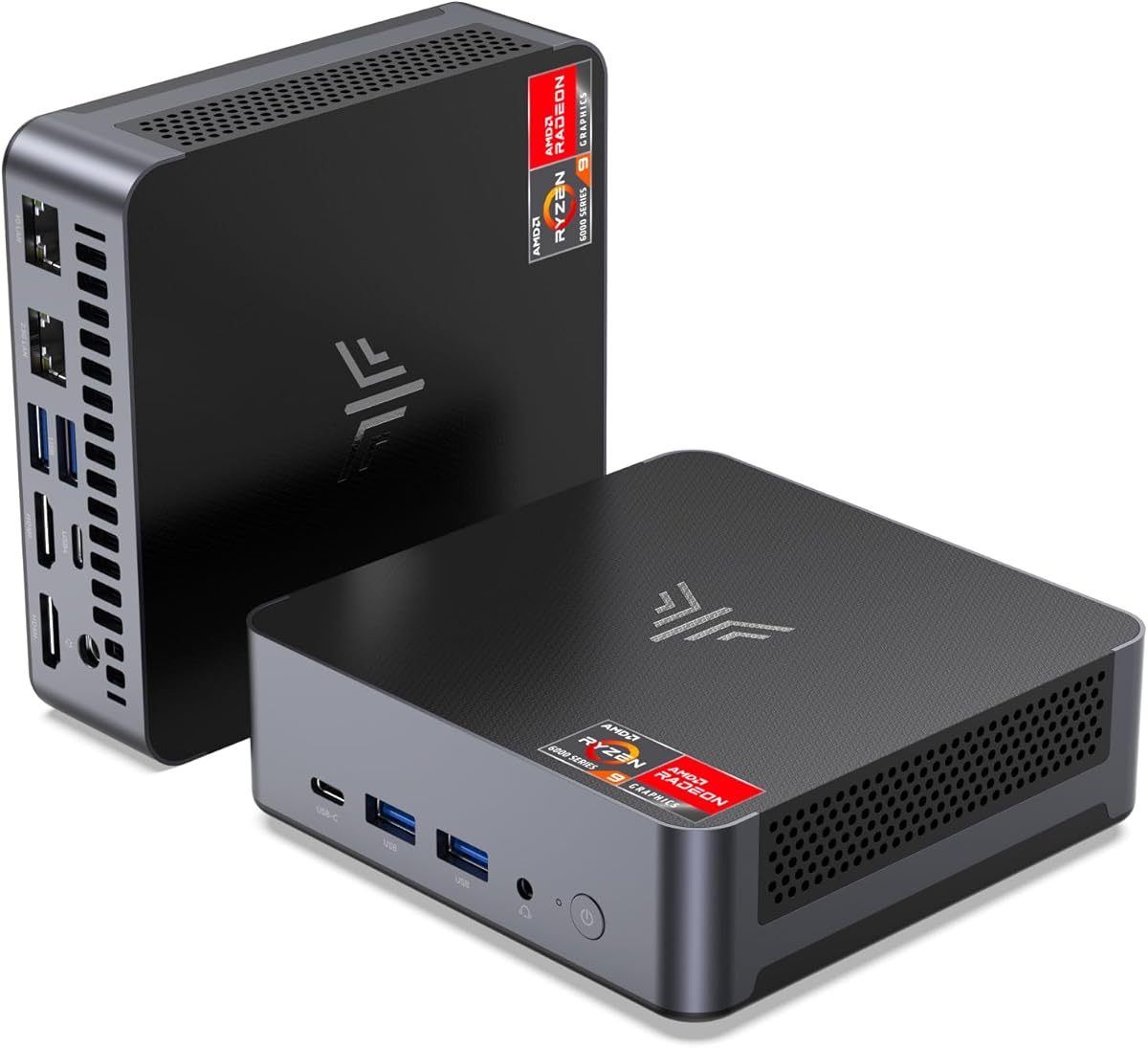


The ACEMAGICIAN S3A stands out as a well-balanced compact PC for racing games because it combines the Ryzen 7 H 255 processor, Radeon 780M integrated graphics, 16GB of fast LPDDR5 memory, and a 512GB PCIe 4.0 SSD. Its 4.6 rating also makes it one of the stronger-reviewed systems in this group, although performance still depends on the particular racing title, graphics settings, and monitor resolution.
We may earn a commission when you buy through this link, at no additional cost to you.
The eight-core, sixteen-thread processor can reach 4.9GHz, providing useful headroom for simulation software, background applications, streaming utilities, and multiplayer launchers. Radeon 780M graphics based on RDNA 3 are considerably more capable than basic entry-level integrated graphics, making the S3A a sensible option for 1080p-oriented racing experiences and lighter esports titles. Support for three 4K displays also suits a multi-screen cockpit arrangement, provided individual games and the graphics settings can drive the selected outputs.
Three power modes are especially relevant to racing. Silent Mode can reduce fan noise during menus or less demanding sessions, Auto Mode offers a balanced operating profile, and Performance Mode raises the power envelope to 54W. The dual-fan cooling system and stated noise level of as low as 35dB in Silent Mode are useful in a living room or sim-racing cockpit. The clear limitation is that integrated graphics will not match the raster performance, ray-tracing options, or high-refresh headroom of a dedicated mobile GPU.
The S3A is best for buyers who want strong integrated graphics, flexible power controls, fast memory, and a compact multi-display machine without moving to the premium enthusiast tier. It should suit players who regularly use 1080p displays, value compactness, and want one system for gaming, browsing, and general productivity. Those seeking the highest settings at 1440p or ultrawide resolutions should instead prioritize a dedicated GPU or a more powerful integrated system.
Silent, Auto, and Performance modes let racers tune the system around fan noise, efficiency, or maximum processing power. The ability to change modes is particularly helpful when switching between menus, online practice, and longer races.
HDMI 2.0, DisplayPort 2.0, and full-function USB4 Type-C outputs support up to three 4K displays. That makes the S3A relevant to triple-screen layouts, provided the selected title and settings can handle the combined workload.
We may earn a commission when you buy through this link, at no additional cost to you.
The BOSGAME M5 AI is the specification-heavy option in this roundup, combining the Ryzen AI Max+ 395 with Radeon 8060S integrated graphics, 128GB of LPDDR5X-8000 memory, and a 2TB PCIe 4.0 SSD. Its 4.3 rating and advanced platform make it appealing to racers who also need local AI tools, 8K media work, development, or heavy multitasking, though the hardware is extravagant for ordinary game libraries.
We may earn a commission when you buy through this link, at no additional cost to you.
The processor provides 16 Zen 5 cores, 32 threads, a 5.1GHz boost clock, 64MB of L3 cache, and 126 TOPS of total AI compute. More important for racing is the Radeon 8060S with 40 RDNA 3.5 compute units and access to a large dynamic memory allocation. The supplied listing specifically states that it can play AAA titles at 1440p high settings, giving it the strongest integrated-graphics proposition here.
The M5 also supports four 8K at 60Hz monitors through HDMI 2.1, DisplayPort 1.4, and dual USB4 connections. Dual 2.5GbE Ethernet, Wi-Fi 7, and Bluetooth 5.4 make it well suited to high-speed wired racing setups, streaming, local simulation tools, and network experimentation. Two M.2 slots allow the installed 2TB drive to be supplemented, and the claimed total capacity can reach 8TB or be configured for RAID.
This is the mini PC for someone who wants no discrete graphics card but still expects unusually high gaming performance, abundant memory, and exceptional connectivity. Its disadvantage is straightforward: most buyers will not recover the full value of such an advanced platform through racing games alone. Choose it when the additional workstation and AI capabilities are genuine priorities rather than speculative requirements.
The Radeon 8060S is the decisive feature. Its large compute-unit count and shared high-speed memory pool make it a credible option for 1440p racing when a dedicated GPU is unnecessary.
With 128GB of LPDDR5X and four supported 8K outputs, the M5 can host complex multi-display arrangements and demanding background workloads. It also gives simulation software and AI-assisted tools abundant working memory.
We may earn a commission when you buy through this link, at no additional cost to you.
The BOSGAME P6 pairs the Ryzen 9 6900HX with Radeon 680M graphics, 24GB of LPDDR5X memory, and a 1TB PCIe 4.0 SSD. Its 4.6 rating is tied for the highest among the listed products, and the eight-core, sixteen-thread processor reaches 4.9GHz. That makes it a capable multitasking platform even though its integrated GPU targets light gaming rather than high-end simulation graphics.
We may earn a commission when you buy through this link, at no additional cost to you.
The supplied details specifically mention smooth 1080p video editing, two or three lightweight virtual machines, and esports titles such as Counter-Strike 2 at high settings. For racing, the CPU has ample capacity for a game, Discord, telemetry software, a browser with many tabs, and voice chat running together. The 24GB memory allocation also gives modern titles and multitasking applications more breathing room than an 8GB configuration.
Triple 4K at 60Hz output is possible through HDMI, DisplayPort, and USB-C, which is useful for cockpit-style layouts where each display has a defined function. Dual one-gigabit Ethernet ports, Wi-Fi 6E, Bluetooth 5.3, and USB4-like full-function USB-C improve flexibility. Storage can be expanded with a second M.2 NVMe drive up to a stated total of 8TB, which is useful for large game installations and telemetry recordings.
The P6 is most convincing for racers who prioritize CPU headroom, quiet operation, a roomy memory configuration, and multi-screen productivity over maximum gaming graphics. It can handle esports and lighter driving games well. For photorealistic simulations at high settings or high-resolution triples, however, the Radeon 680M is the main limitation, and a Radeon 780M or dedicated-GPU system would be more appropriate.
Phase-change materials, a CPU heatsink, and dedicated memory and drive heat sinks support stable operation. A stated noise level below 36dB makes the P6 appealing for living-room or dedicated cockpit installations.
Two Gigabit Ethernet ports allow a dedicated gaming connection or more advanced router configurations. Wi-Fi 6E provides a convenient alternative when cabling is not practical.
We may earn a commission when you buy through this link, at no additional cost to you.
The BOSGAME E5 11 Pro is a straightforward mini PC for racers who want a capable daily driver, a large SSD, and enough memory for older or lighter games. It combines the Ryzen 5 5300U processor, 16GB of DDR4 memory, and a 1TB M.2 PCIe SSD. Its 4.3 rating reflects a generally positive reception, though it does not target the latest high-end racing simulations.
We may earn a commission when you buy through this link, at no additional cost to you.
The processor provides four cores and eight threads with boost speeds up to 3.8GHz, while Radeon integrated graphics operate at a maximum stated frequency of 1500MHz. These specifications are sufficient for light games, menus, management tools, and less demanding driving titles, but they lack the graphics headroom needed for demanding AAA simulations with advanced effects at high resolutions.
HDMI 2.0, DisplayPort, and Type-C outputs support three 4K at 60Hz displays. Dual Gigabit Ethernet, two USB 3.2 Type-A ports, USB 2.0, and a 3.5mm combo jack cover the needs of a basic sim-racing station. The storage can be expanded to a stated maximum of 4TB, reducing the need to replace the original SSD immediately.
The E5 11 Pro is best for budget-conscious buyers using older racing games, arcade-style driving titles, or an inexpensive second system. It also works well for a cockpit display PC, telemetry dashboard, or general-purpose companion machine. It is not the right pick for a single system intended to run demanding modern simulations at high graphics settings.
The included 16GB of DDR4 is more useful for gaming and multitasking than many entry configurations. It also makes the system a practical general-purpose computer when the racing software is not the main workload.
Triple-display support and dual wired networking offer a surprisingly complete foundation. The older graphics remain the deciding constraint for visual fidelity.
We may earn a commission when you buy through this link, at no additional cost to you.
The KAMRUI AM21 combines a Ryzen 7 8745HS processor with Radeon 780M graphics, 16GB of DDR5 memory, and a 1TB PCIe 4.0 SSD. Its 4.4 rating and upgradeable memory make it an appealing option for 1080p racing, particularly when future memory expansion is likely. The processor offers eight cores, sixteen threads, a 3.8GHz base clock, and boost speeds up to 4.9GHz.
We may earn a commission when you buy through this link, at no additional cost to you.
The Radeon 780M uses RDNA 3 architecture and is presented as a capable 1080p gaming solution. For racing games, that makes the AM21 better suited than basic Radeon and Vega systems, particularly when paired with a 60Hz or 120Hz 1080p monitor. AV1 support can also be useful for media playback, while the general CPU power is more than adequate for games, overlays, Discord, and telemetry applications.
Unlike systems with fixed onboard memory, the AM21 has two SO-DIMM slots and supports memory expansion up to 96GB. It also includes two M.2 2280 PCIe 4.0 slots, with total storage stated as expandable up to 4TB. Dual Gigabit Ethernet, Wi-Fi 6, Bluetooth 5.2, USB4 with 40Gbps bandwidth and 100W power delivery, and a second USB-C port provide strong peripheral flexibility.
This is a good choice for racers who prioritize 1080p gaming, upgradeability, and a broad port selection. It can serve as a powerful general-purpose mini PC and may suit display-heavy or sim-racing arrangements. The main caveat is that the 16GB starting configuration is modest for a new enthusiast system, and dedicated-GPU performance remains outside its reach.
Two SO-DIMM slots mean buyers do not have to settle for the shipped 16GB if a racing setup later needs more memory. This is a meaningful advantage over many thin-and-light mini PCs with soldered components.
USB4, two Gigabit Ethernet ports, Wi-Fi 6, and multiple display outputs make the AM21 adaptable to desktop, cockpit, and networked racing environments.
We may earn a commission when you buy through this link, at no additional cost to you.
The ACEMAGIC M1 is a compact Ryzen 7 7735HS mini PC with Radeon 680M graphics, 24GB of LPDDR5 memory, and a 1TB NVMe SSD. Its 4.3 rating reflects a solid general-purpose platform, and the included Windows 11 Pro installation plus VESA bracket make it convenient for a dedicated racing-display role behind a monitor or television.
We may earn a commission when you buy through this link, at no additional cost to you.
The processor provides eight cores and sixteen threads, a 16MB cache, and speeds up to 4.75GHz. That is enough CPU power for esports racing games, light simulation titles, and background applications. The Radeon 680M has 12 graphics cores and a stated maximum frequency of 2200MHz, making it suitable for 1080p light gaming and 4K media playback, but not demanding high-setting simulations.
HDMI, DisplayPort, and Type-C outputs support a triple-display arrangement at 4K. The second M.2 NVMe slot gives owners a straightforward way to add storage, useful when separating game libraries from system files. At only 128.2 by 128.2 by 41mm, the chassis is easy to place beneath a display, beside a wheelbase, or behind a multi-screen cockpit.
The M1 is a good fit for racers who want a small, preconfigured system for a dashboard, secondary display, or relatively light games. Its 24GB memory and 1TB drive are generous for that role. Buyers should not choose it for maximum texture quality, high-refresh 1440p racing, or the most demanding simulator settings.
The square chassis and included VESA mount make the M1 easy to place behind a display. Its compact footprint is particularly helpful around a multi-screen racing rig where space is already limited.
Windows 11 Pro, an HDMI cable, power adapter, and mounting bracket are included according to the product details. That simplifies installation for users who want a dedicated racing dashboard PC.
We may earn a commission when you buy through this link, at no additional cost to you.
The C4 SE Mini PC is the budget-focused pick, combining a Ryzen 5 3500U processor, Radeon Vega 8 graphics, 8GB of DDR4 memory, and a 256GB NVMe SSD. Its 4.4 rating is strong for an entry-level system, though gaming expectations should remain realistic. It is best viewed as an inexpensive companion for light racing games, display duties, or general computing.
We may earn a commission when you buy through this link, at no additional cost to you.
The four-core, eight-thread processor boosts to 3.7GHz and handles office work, 4K video playback, casual gaming, and light multimedia creation. Auto Power On, RTC Wake, and Wake-on-LAN add value for kiosks, digital signage, remote management, and a dedicated dashboard machine. These features can matter more to a race-day operator than raw graphics power.
Dual SO-DIMM slots allow memory expansion up to 32GB, and a second M.2 PCIe 3.0 slot is available for storage. Triple 4K at 60Hz output works through HDMI 2.0, DisplayPort, and USB-C. Dual Gigabit Ethernet, dual-band Wi-Fi 5, Bluetooth 5.0, and several USB ports provide enough connectivity for a basic racing station or network-attached display device.
Choose the C4 SE if your goal is to assemble a low-cost setup for older or lightweight racing titles, or to add a secondary PC without investing heavily. Expanding memory and adding storage would be advisable before demanding games. A system with stronger Radeon graphics is the better choice for modern AAA simulations, high settings, and high-refresh competitive play.
The C4 SE covers standard productivity, media, and casual gaming tasks in a compact enclosure. It gives buyers a functional starting point without the cost and complexity of an enthusiast gaming system.
Auto Power On and wake functions are valuable for managing a dashboard or signage display without physical access. Dual wired networking also offers flexibility for connected sim-racing environments.
We may earn a commission when you buy through this link, at no additional cost to you.
The ROG NUC (2025) is the dedicated-GPU choice, pairing an Intel Core Ultra 9 Series 2 ARL-HX processor with an NVIDIA GeForce RTX 5070 Mobile GPU, 32GB of DDR5 memory, and a 2TB NVMe SSD. Its 3.5 rating is the lowest in this group, so buyers should investigate current customer feedback, but the core hardware is clearly aimed at more demanding gaming than the integrated systems here.
We may earn a commission when you buy through this link, at no additional cost to you.
The dedicated RTX 50 Series mobile GPU is the major advantage for racing. It offers substantially more graphics capability than Radeon 780M, Radeon 680M, or Radeon Vega 8, making it the logical selection for high-refresh displays, high resolutions, ray tracing, advanced effects, and modern AAA simulations. Intel's platform provides up to 200-plus platform TOPS and is described as delivering an 18-percent generation-over-generation improvement.
Cooling is handled by three fans and dual vapor chambers, which is important when a compact system must sustain CPU and GPU loads during long races. The 32GB of DDR5 and 2TB SSD provide a strong gaming and storage foundation, while Thunderbolt 4 supports high-speed peripherals and external displays. ASUS ROG aesthetics, Aura Sync lighting, and a top-mounted power button complete the enthusiast feature set.
The ROG NUC is the premium recommendation for racers who want one compact system to handle demanding simulations, high settings, and advanced graphics without relying on integrated performance. It also serves well as a high-end gaming and streaming machine. Its substantial cost, relatively low rating, and power demands make it less rational for casual players or display-only secondary systems.
A dedicated RTX 5070 Mobile GPU provides the graphics headroom needed for advanced racing effects, high refresh rates, and demanding resolutions. This is the most convincing specification for enthusiast simulator setups.
Three fans and dual vapor chambers help manage the combined heat generated by a powerful CPU and mobile GPU. Sustained cooling is essential for preserving frame consistency during long online races.
We may earn a commission when you buy through this link, at no additional cost to you.
The ACEMAGIC K1 combines a Ryzen 7 7735HS processor, Radeon 680M graphics, 24GB of LPDDR5 memory, a 512GB M.2 SSD, and Windows 11 Pro. Its 4.3 rating makes it a credible compact option for light gaming, and the 24GB memory is particularly useful for modern racing software, Discord, telemetry, and several background applications.
We may earn a commission when you buy through this link, at no additional cost to you.
The processor supplies eight cores and sixteen threads with speeds up to 4.75GHz. Radeon 680M graphics run at a stated 2200MHz, which is appropriate for Dota 2 and other casual or lighter games, plus 4K media and moderate simulation settings. Buyers should not interpret its gaming label as promising high-end AAA performance comparable to Radeon 780M systems or the RTX-equipped ROG NUC.
Two M.2 2280 slots support storage expansion up to 4TB, allowing the included 512GB drive to be supplemented with a larger game drive. HDMI, DisplayPort, and Type-C outputs support triple 4K visuals. The 5 by 5 by 1.6-inch chassis, Windows installation, HDMI cable, power adapter, and VESA bracket make it convenient for setting up a dedicated racing display quickly.
The K1 is attractive for racers who want a ready-made, compact system with generous memory but do not need dedicated graphics. It works well for esports-style titles, secondary displays, and lighter simulation setups. Upgrading the storage is advisable for large libraries, while users wanting advanced graphics should consider a Radeon 780M or discrete-GPU alternative.
Twenty-four gigabytes of LPDDR5 gives racing applications and background tools comfortable room. The listed 5500MT/s speed also supports responsive multitasking.
The small chassis and included VESA bracket simplify placement behind a racing display. Preinstalled Windows 11 Pro also reduces initial setup work.
We may earn a commission when you buy through this link, at no additional cost to you.
The GMKtec K16 is a connectivity-focused mini PC with a Ryzen 7 7735HS processor, Radeon 680M graphics, 32GB of 6400MT/s LPDDR5 memory, a 512GB NVMe SSD, and a 4.4 rating. It is a strong value for racers who need abundant memory, multiple displays, fast networking, and an easy path to a more powerful external graphics solution.
We may earn a commission when you buy through this link, at no additional cost to you.
The eight-core, sixteen-thread processor boosts to 4.75GHz, while Radeon 680M handles light gaming and media creation. The included 32GB of memory is generous and can absorb game files, applications, and background services without becoming the immediate bottleneck. Two M.2 2280 slots support up to 8TB per slot, providing a clear path to a much larger racing library.
The standout feature is Oculink, which offers a high-speed direct interface for an external GPU. That creates a practical route to substantially stronger gaming performance without replacing the entire mini PC, although buyers must account for the cost, power, and space of a separate graphics solution. Dual 2.5GbE ports, Wi-Fi 6E, and 40Gbps USB4 also make the system unusually flexible for a compact PC.
HDMI 2.0, DisplayPort 1.4, and USB4 with DisplayPort support up to three displays. Quiet, Balanced, and Performance modes operate at stated power levels of 28W, 35W, and 40W, while dual fans improve cooling. The K16 is ideal for a multi-screen cockpit or enthusiast system that may later use Oculink; buyers prioritizing immediate high-end gaming should select the ROG NUC instead.
Oculink can connect an external GPU to the K16 with a high-speed direct link. This makes the system attractive to buyers who want strong integrated performance now and dedicated graphics later.
Dual 2.5GbE Ethernet supports advanced configurations, high-speed transfers, or dedicated links. Wi-Fi 6E provides a convenient wireless alternative when a physical connection is inconvenient.
We may earn a commission when you buy through this link, at no additional cost to you.
Choosing a racing mini PC requires balancing graphics performance, CPU speed, memory, cooling, display support, and network options against the requirements of your favorite games and cockpit layout.
Integrated graphics are the main reason mini PCs can be affordable, quiet, and compact. Radeon 780M systems offer the strongest balanced option in this group, while Radeon 680M and Vega 8 are better suited to esports, arcade-style games, and lighter simulations. The Radeon 8060S in the BOSGAME M5 pushes integrated performance further, but the ROG NUC's dedicated RTX 5070 Mobile GPU is the clearest option for demanding titles, ray tracing, and high-refresh high-resolution displays.
Choose integrated graphics for 1080p-oriented racing and general-purpose use. Choose a dedicated GPU when visual settings, resolution, refresh rate, VR support through separate hardware, or simulation realism matter more than initial cost.
A modern eight-core processor with sixteen threads provides a useful balance for the game itself, voice chat, telemetry, Discord, browser tabs, and background recording. The Ryzen 7 H 255, 8745HS, and 7735HS all fit that general profile, while the Ryzen AI Max+ 395 provides exceptional multicore and accelerator capability. Older or lower-tier processors can run lighter games but may feel less comfortable when several utilities are active.
Prioritize clock speed and core count over marketing labels alone. For online racing, sufficient memory and stable networking can matter just as much as additional CPU cores.
Modern racing games, plus Discord, a browser, telemetry, and other utilities, benefit from more than the bare minimum. A 16GB configuration is reasonable for many 1080p games, 24GB offers extra comfort, and 32GB is ideal for simulation libraries, streaming, and heavy multitasking. The 128GB in the M5 is useful for specialized workloads rather than ordinary gaming alone.
Prefer at least 16GB, ideally 24GB or 32GB, and favor systems with accessible memory slots. Fixed LPDDR memory cannot be upgraded, so check the stated configuration before purchasing.
Modern racing titles can consume substantial space, and texture packs, telemetry logs, videos, and updates add more over time. A 1TB drive provides a more comfortable starting point than 256GB or 512GB, while a second M.2 slot makes future expansion straightforward. The K16 and P6 support particularly high stated storage capacities, and the M5 combines a 2TB drive with a second slot.
Check whether the second storage bay uses NVMe rather than SATA and whether a slot is already occupied. A dedicated game drive can also help separate large libraries from the operating system.
A compact gaming PC generates heat, and sustained thermal throttling can undermine frame consistency. Dual-fan systems such as the S3A and K16, and the three-fan ROG NUC, are designed for sustained workloads. The P6's stated sub-36dB operation is attractive for living-room setups. Adjustable power modes can also help balance noise and speed during different parts of a gaming session.
Look for more than one fan, effective heat sinks, and multiple performance profiles. Clean vents and sensible placement matter as much as the advertised cooling architecture.
Racing setups often use multiple screens for instrumentation, mirrors, telemetry, and a primary game view. Triple-display support is common among the stronger choices, while the BOSGAME M5 goes further with four 8K outputs. USB4 and DisplayPort Alt Mode add flexibility, but buyers should confirm that the selected outputs, resolution, and refresh rate can be driven simultaneously at the intended settings.
Match display capability to the graphics tier. A powerful system at 4K may still struggle with demanding simulations, while an entry model may be ideal for a dashboard that only needs to mirror telemetry.
Competitive racing benefits from stable, low-latency networking. Dual Gigabit Ethernet is common, while 2.5GbE, Wi-Fi 6E, and Wi-Fi 7 offer more bandwidth and flexibility. USB4 is valuable for fast storage and external graphics, and sufficient USB-A ports remain important for wheelbases, force-feedback bases, hand controllers, keypads, and steering-button boxes.
For a fixed cockpit, wired Ethernet is generally preferable. Verify the specific ports required by a wheelbase or telemetry device before buying, and avoid assuming every USB-C port offers full video, data, and charging functionality.
The most useful upgrade paths are accessible memory slots, extra M.2 storage positions, and support for external graphics. The KAMRUI AM21 has replaceable SO-DIMMs and two M.2 slots, while the GMKtec K16 provides Oculink for a future eGPU. Conversely, systems with fixed onboard memory may need a full replacement when their initial capacity is no longer sufficient.
Choose a system that can grow with your game library and setup. Future-proofing is particularly valuable for sim racers who may later add displays, a dedicated GPU, faster storage, or more background applications.
Begin by checking that the mini PC's operating system, graphics driver, and firmware are current. Install the racing game and its required anti-cheat or launcher software, then configure graphics settings for the target monitor. Test a short race at the intended resolution and refresh rate before changing multiple settings at once, and keep the game client, telemetry tools, and voice-chat applications updated.
Place the system on a hard, ventilated surface rather than inside a closed cabinet. Leave clearance around the vents, clean dust from the openings periodically, and avoid placing fabric or racing seats directly against the chassis. For a cockpit, secure cables so they do not interfere with fans or storage connections, and use a direct Ethernet connection when consistent online performance matters.
Use the available silent, balanced, or performance modes according to the session. A quieter mode is useful during menus or spectator viewing, while a performance mode can help during demanding races. Monitor temperatures and frame behavior during long events, keep storage headroom available, and back up valuable telemetry, profiles, and custom setups to external storage.
Yes, many of the systems support three simultaneous displays, but the graphics must manage the combined resolution and refresh rate. Radeon 680M models are best for dashboards and lighter games, while Radeon 780M, Radeon 8060S, or a dedicated RTX GPU offer more headroom. Confirm that the game supports the chosen output combination and that USB4 video mode is available when needed.
A dedicated GPU is not necessary for every racing game. Integrated Radeon 780M or Radeon 8060S systems can provide a strong experience in many supported titles, especially at 1080p. A dedicated RTX GPU becomes more attractive for advanced effects, ultrawide or high-resolution displays, high refresh rates, and demanding modern simulators. The intended games and monitor are the decisive factors.
At least 16GB is a practical starting point for modern racing games and common background applications. A 24GB configuration provides additional comfort for browsers, telemetry, and multitasking, while 32GB suits larger libraries and demanding setups. Systems with replaceable memory offer the best flexibility, while fixed-memory models should be configured carefully before purchase.
Wired Ethernet is generally preferable because it offers a stable connection with minimal wireless interference and predictable latency. The mini PCs in this guide include dual Gigabit Ethernet options, while the M5 and K16 provide faster 2.5GbE ports. Wi-Fi 6E or Wi-Fi 7 can still work well, but a strong router, nearby access point, and unobstructed signal remain important.
Most modern steering wheels and force-feedback bases use USB, and these systems provide multiple USB-A and USB-C connections. Compatibility still depends on the wheel's requirements and the operating system. Check the number and type of available ports, especially when using USB4 displays, external graphics, and other accessories simultaneously.
They can, particularly when using a high-power processor and a dedicated mobile GPU in a compact chassis. Systems with multiple fans, vapor chambers, effective heat sinks, and selectable performance modes are better suited to sustained racing. Keeping vents clear and avoiding enclosed cabinets helps the cooling system maintain stable performance.
It can be worthwhile when a compact system has a fast interface, adequate power delivery, and enough chassis and desk space for the graphics card and power supply. The GMKtec K16 specifically includes Oculink, making it a notable option for this approach. Compare the total cost and power requirements with buying a mini PC that already includes a stronger GPU.
The best experience comes from a balanced combination of capable graphics, sufficient memory, stable cooling, responsive storage, and low-latency networking. Matching the system to a 1080p, 1440p, or ultrawide monitor is just as important as selecting a fast processor. Frame consistency, input responsiveness, and reliable online connectivity should guide the final choice.
The ACEMAGICIAN S3A is the most balanced recommendation because its Ryzen 7 H 255, Radeon 780M graphics, adjustable power modes, fast memory, and triple-display support cover the core needs of a modern 1080p racing setup. The BOSGAME M5 AI is the advanced integrated option, while the ROG NUC (2025) is the premium recommendation when a dedicated RTX 5070 Mobile GPU and maximum graphics capability justify the higher cost.
For value-focused buyers, the C4 SE Mini PC is the budget pick, but it is best treated as a light-gaming or secondary-racing system. The BOSGAME P6 and KAMRUI AM21 provide stronger integrated performance, while the ACEMAGIC M1, K1, and GMKtec K16 make sense for multi-screen dashboards, compact deployments, and future expansion. Choose the display resolution, game requirements, memory capacity, and networking needs together rather than focusing on one specification.
Before buying, verify the current configuration and availability, confirm that all required ports and display modes work together, and check whether a second storage slot or upgradeable memory is included. Prices and promotions can change, so comparing the complete system today is more reliable than relying on a single launch promotion or isolated specification.