
Infomir MAG555
4.0Editor score
Official Google TV platform
4K at sixty frames
Dual-band Wi-Fi
Ethernet connectivity
Media Streamer for Netflix guide compares 10 models across 4K quality, Netflix access, app support, portability, connectivity, and ease of use for home viewing.
A media streamer for Netflix can turn an ordinary television into a flexible entertainment hub, but the strongest choice depends on how you watch. Screen size, picture quality, internet reliability, storage, portability, and app compatibility all influence whether a device feels convenient or frustrating.
This guide compares ten streaming options across core features such as 4K output, Netflix access, voice controls, wireless connectivity, local media support, and portability. It includes certified Google TV devices, Android TV boxes, a Linux-based player, and older streaming hardware still worth understanding for collectors or secondary-room use.
Each review highlights the product's strongest benefits, practical limitations, and ideal buyer. The RayNeo Pocket TV Pro leads for portable Dolby Vision viewing, while the RockTek GX1 stands out for premium home-theater specifications. Ratings and product details reflect the supplied listings, and prices can change.
4.0Editor score

5.0Editor score
4.3Editor score
The comparison below places every listed device according to platform, video capabilities, connectivity, and practical extras. The mix makes clear that the most suitable Netflix streamer depends on whether you prioritize a full home entertainment system, a portable cinema experience, a simple connected TV, or local-file flexibility.


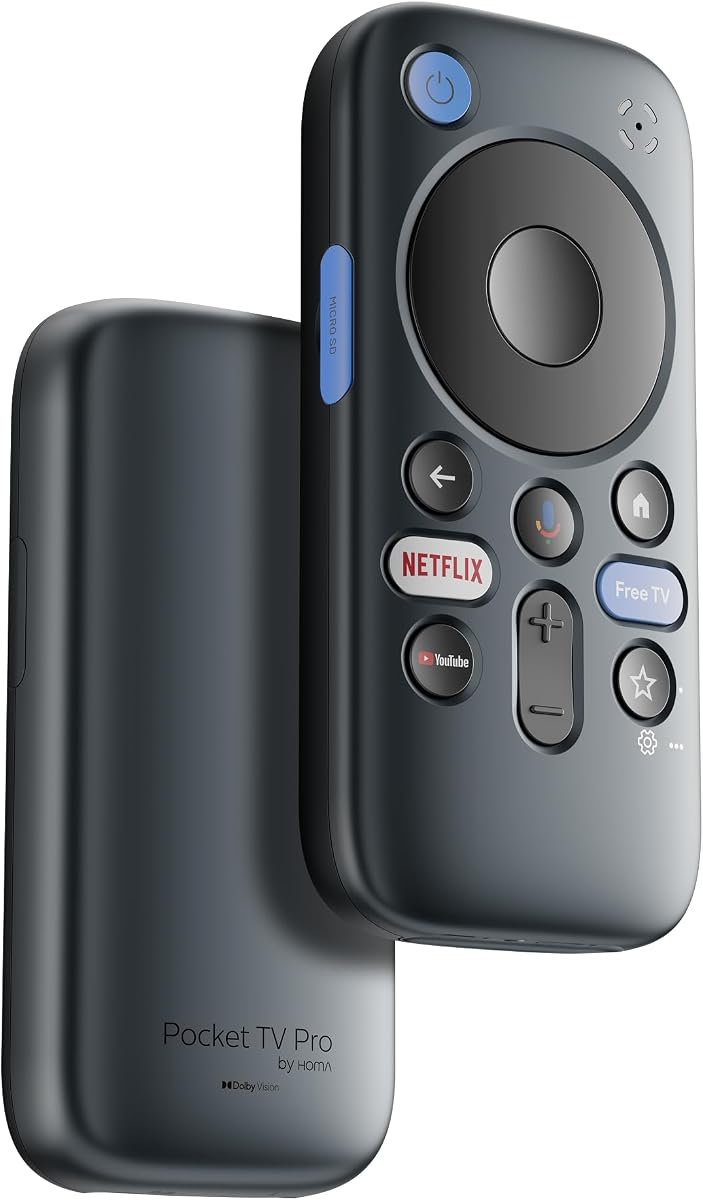
The RayNeo Pocket TV Pro is an unusual media streamer for Netflix because it is designed to feed compatible RayNeo GT and GT Max AR glasses rather than serve as a conventional box that sits beneath a television. Its 4.3 rating reflects an ambitious combination of portable streaming, native Netflix access, and a Dolby Vision-oriented glasses experience. The strongest feature is the ability to carry a personalized entertainment setup beyond the living room.
We may earn a commission when you buy through this link, at no additional cost to you.
The device uses an Amlogic S905X5M-J chip, a Vision 4000 display engine, 3GB of memory, and 64GB of built-in storage. It supports real-time SDR-to-HDR conversion, while full Dolby Vision is specifically listed for the GT and GT Max glasses. A 6,500mAh battery can power the streamer and glasses for up to 5.5 hours, making the system relevant to flights, commutes, and hotel stays where a television and reliable Wi-Fi connection may be unavailable.
There are important boundaries. The Pocket TV Pro is engineered for RayNeo glasses and does not work with other brands of AR glasses. Dolby Vision is unavailable on the Air series, and the device's value depends on owning compatible hardware. Its more specialized design also means it does not replace a conventional living-room streamer for every household.
Choose the RayNeo Pocket TV Pro if you already own compatible GT-series glasses and want Netflix, downloaded content, and high-fidelity portable viewing in one travel-focused package. For viewers seeking only a conventional television streamer, one of the Google TV models offers a simpler and more broadly applicable solution.
The integrated battery removes the need for a nearby outlet during many viewing sessions, while dual-band Wi-Fi and built-in Chromecast support flexible connectivity. The microSD expansion option also makes it practical to prepare local content before traveling.
Frame-by-frame dynamic metadata is designed to preserve contrast, deeper blacks, and brighter highlights on the compatible GT or GT Max MicroOLED display. That makes this more relevant to picture-quality-focused portable viewers than an ordinary stick-shaped streamer.
We may earn a commission when you buy through this link, at no additional cost to you.
The Phantom Dcolor GD2 is a certified Android TV 12 streamer designed for people who want Netflix and familiar streaming apps in a straightforward television box. Its 4.2 rating reflects a well-rounded feature set that includes 4K Netflix support, Google Assistant, Chromecast, and smart-home control. It is less exotic than the RayNeo system but more approachable for a normal living room.
We may earn a commission when you buy through this link, at no additional cost to you.
Its hardware includes a quad-core 64-bit Cortex-A35 processor, ARM Mali-G31 MP2 graphics, 2GB of DDR4 memory, and 32GB of eMMC storage. Dual-band 2.4GHz and 5GHz Wi-Fi helps support stable streaming, while the voice remote provides another way to launch content, ask questions, and control compatible devices around the home.
The main limitation is that 2GB of memory and 32GB of storage are modest by current standards. Heavy app use can reduce available storage, and the CPU is not positioned as a high-end gaming platform. Nevertheless, the stated focus is smooth everyday entertainment and 4K Netflix streaming, which is a sensible target for a compact media box.
This Dcolor is best for buyers who prioritize certified Android TV, Netflix 4K, voice control, and Chromecast without needing the most advanced codec support or premium picture-processing features. It is a practical all-rounder for a second television, guest room, or main entertainment setup.
Google Assistant, the Google Play Store, and Chromecast make the GD2 feel like an extension of a modern smart television. Search, app management, casting, and compatible smart-home control are available through the included remote.
The box supports Netflix 4K streaming and includes dual-band Wi-Fi for flexible placement around the room. Its HDMI cable and remote make it straightforward to add streaming to an existing television or a second viewing area.
We may earn a commission when you buy through this link, at no additional cost to you.
The RockTek GX1 combines Google TV with an emphasis on high-end audiovisual formats, making it the strongest conventional home-theater choice in this list. Its perfect 5.0 rating comes with clear advantages: 4K Dolby Vision, HDR10+, Dolby Atmos, Wi-Fi 6, and several AI picture-processing features. It is designed for viewers who want more than basic app access.
We may earn a commission when you buy through this link, at no additional cost to you.
The Realtek RTD1325 processor provides the core performance, while AIPQ picture optimization, AISR super-resolution, and QMS quick media switching support clearer images and smoother transitions. Google Cast, Hey Google voice commands, and smart-home integration add practical convenience. Together, these features create a streamer that can take advantage of a compatible television, receiver, and surround-sound system.
Picture and sound capabilities still depend on the rest of the setup. The television must support the relevant resolution and HDR format, while Dolby Atmos requires a compatible audio system and properly encoded content. The manufacturer also notes that firmware updates may improve performance or resolve certain issues, making software maintenance part of ownership.
The GX1 is a strong recommendation for a main room where Netflix is one part of a broader home-entertainment strategy. Its combination of modern streaming features, advanced image processing, and robust connectivity makes it more future-facing than the older or more specialized alternatives in the guide.
Dolby Vision, HDR10+, and Dolby Atmos support gives the GX1 a broad foundation for high-quality films and series. The benefit is most visible when the television, soundbar, and content are properly matched.
AIPQ, AISR, and QMS are intended to refine clarity, perceived detail, and media-switching smoothness. These features make the device more attractive for picture-focused users than an entry-level streaming box with little processing beyond 4K output.
We may earn a commission when you buy through this link, at no additional cost to you.
The Infomir MAG555 is a conventional Google TV streamer that prioritizes licensed apps, 4K output, and stable connectivity. Its 4.0 rating reflects a solid platform for Netflix and other authorized services, with support for Netflix, Prime Video, Disney+, and YouTube through the Google Play Store. It is an attractive option when straightforward operation matters more than specialty features.
We may earn a commission when you buy through this link, at no additional cost to you.
The Amlogic S905Y4-B chipset drives 4K Ultra HD playback at up to 60 frames per second with Dolby Audio support. Dual-band Wi-Fi with 2×2 MIMO, a dedicated Ethernet connection, HDMI 2.1, and two USB ports provide useful wired and wireless options. The voice remote adds Google Assistant navigation, and the compact enclosure measures only 106 by 106 by 23.5 millimeters.
Storage details are limited, and the device does not offer the extensive local-media or specialist picture-processing features found elsewhere in this list. In addition, users must purchase their own Netflix subscription and may need to download apps through the Play Store. That is not a flaw, but it places the MAG555 in the mainstream smart-TV ecosystem rather than the enthusiast category.
Choose the MAG555 for a bedroom, secondary television, or main room where Netflix and other Google TV apps should work without a complicated setup. Its combination of licensed services, 4K support, voice control, Ethernet, and dual-band Wi-Fi makes it an easy recommendation for everyday streaming.
Running official Google TV 12 means Netflix, Prime Video, Disney+, YouTube, and other Play Store applications appear in a familiar interface. Personalized recommendations also make navigating a large catalog less cumbersome.
The dedicated Ethernet port offers a stable option for a stationary home setup, while dual-band Wi-Fi provides placement flexibility. HDMI 2.1 and USB connectivity also support modern televisions and external accessories.
We may earn a commission when you buy through this link, at no additional cost to you.
The NEUMI Atom 4K Max is built around local and network media rather than being marketed as a dedicated Netflix streamer. Its 1.0 rating is the lowest among the listed products, so buyers should not treat it as the safest recommendation for mainstream streaming. Its appeal lies in extensive file-format support, USB and microSD playback, and the ability to browse media stored on a NAS or Windows SMB shared folder.
We may earn a commission when you buy through this link, at no additional cost to you.
HDMI output reaches 2160p at 60Hz with H.265/HEVC and H.264 support. Optical and analog AV outputs broaden compatibility with older televisions and stereo systems, and the included remote can learn a television's volume controls. Supported media includes common video, music, image, and subtitle formats across FAT32, exFAT, and NTFS storage.
The strongest caution is that network streaming is described as smoothest up to 1080p, while high-bitrate 4K files are best handled from USB or microSD. Netflix access is not among the supplied features, making the Atom less relevant to the core keyword. Its unattended playback, resume, folder looping, portrait rotation, clock, and fanless design are valuable for dedicated media or digital-signage use.
Choose this player if you manage your own files and want flexible local playback, NAS access, and compatibility with legacy audio-video equipment. If Netflix is your primary service, a certified Google TV device will offer a more direct and supported path.
Two USB ports and a microSD slot make the Atom flexible for large local libraries. It supports a wide assortment of video, audio, image, and subtitle formats, including popular MKV, MP4, MOV, and FLAC files.
Automatic startup playback, resume support, continuous folder looping, and portrait rotation are useful for dedicated installations. The fanless construction also keeps operation quiet where background noise would be distracting.
We may earn a commission when you buy through this link, at no additional cost to you.
The Raxxio MAG544w3 is a Linux-based set-top box intended for compatible, user-configured third-party services. Its 4.0 rating is respectable, but it should not be confused with a Google TV or Android TV product. The device does not run Android apps, and no channels, subscriptions, or streaming content are included.
We may earn a commission when you buy through this link, at no additional cost to you.
Its Amlogic S905Y4 chipset supports up to 4K HDR output with AV1 and HEVC decoding on compatible televisions. Ethernet and dual-band Wi-Fi allow the user to choose between a wired connection or flexible placement, while Dolby Digital Plus output can provide enhanced audio when the television, sound system, provider, and content all support it.
The decisive issue is provider compatibility. Users must confirm that a third-party provider supports the MAG544w3, obtain an appropriate account, and configure the service themselves. Not every provider works with every Linux set-top box, so the device should never be purchased under the assumption that Netflix is automatically included.
This Raxxio is best for an informed buyer who already uses a compatible provider and wants efficient 4K media playback in a compact box. For Netflix-centered shopping, the Google TV choices offer more direct app access and a simpler path from setup to playback.
AV1 and HEVC decoding can be valuable with efficiently encoded media, particularly on newer televisions. The box is built for 4K HDR playback when the connected display and source support the required formats.
The hardware is only one part of the experience. A compatible provider, account, and supported software configuration are required, making advance research more important than it would be with a self-contained Netflix streamer.
We may earn a commission when you buy through this link, at no additional cost to you.
The Roku 3 is a 2014-era streaming media player whose simplicity remains its defining advantage. Its 4.4 rating is solid, and the interface concentrates popular television and movie services in one place. Netflix access is part of the core experience, with units manufactured after November 2026 including a dedicated Netflix shortcut button.
We may earn a commission when you buy through this link, at no additional cost to you.
The player streams up to 1080p HD video and supports extended-range dual-band wireless performance. Its most distinctive feature is the included in-ear headphones connected to the remote, allowing private audio while the picture continues on the television. The free iOS and Android application can serve as a remote and can browse channels or send personal photos and music to the television.
Its age is unavoidable. There is no 4K output, and the hardware lacks the newer processing, codec, voice, and connectivity capabilities found in current Google TV devices. Support and app behavior can also evolve on older platforms, making the Roku 3 more appropriate as a secondary device than as a new main-room centerpiece.
Choose the Roku 3 for an older television, a simple secondary screen, or a buyer who values an uncomplicated interface and private headphone listening more than 4K. It remains recognizable and easy to use, but current models should be prioritized when long-term capability matters.
Roku's channel-based interface makes Netflix and other popular services accessible without navigating a dense smart-TV environment. One-stop search and quick-access buttons can reduce the number of steps needed to begin watching.
The headphone jack on the included remote is a practical feature for shared rooms or late-night viewing. It allows the user to hear the program while the television continues displaying its picture.
We may earn a commission when you buy through this link, at no additional cost to you.
The LG ST600 is a 2011 smart-TV upgrader designed to add streaming and internet functions to a television that lacks them. Its 3.8 rating reflects a device that may still serve a narrowly defined purpose: giving older compatible equipment access to Netflix, Vudu, YouTube, CinemaNow, Hulu Plus, Picasa Web Albums, and Twitter.
We may earn a commission when you buy through this link, at no additional cost to you.
Integrated Wi-Fi connects the box to a home network, while HDMI output carries the picture and sound to the television. The LG App Store was intended to provide hundreds of downloadable applications, and an integrated browser supports additional online access. These features were meaningful when the device was introduced, creating an accessible bridge from basic television viewing to online entertainment.
Today, however, the platform is extremely old. Modern Netflix requirements, app compatibility, security expectations, and streaming formats have advanced considerably. The supplied features do not mention 4K, HDR, modern voice assistants, Chromecast, or current app standards, so users should verify service availability before relying on it.
Choose the ST600 only for an older television or a collector seeking a historically interesting example of an early smart-TV upgrader. For regular Netflix viewing today, a current certified Google TV device provides a far more dependable and capable path.
The device can turn a television without modern streaming into a basic internet entertainment screen. That makes it relevant when replacing an entire television would be unnecessary for a secondary-room or retro setup.
A 2011 release date matters because app support and Netflix technical requirements change over time. Potential owners should confirm that the necessary Netflix application remains usable on the platform before making a purchase.
We may earn a commission when you buy through this link, at no additional cost to you.
This Raxxio MAG555 is a hardware-only Google TV player with a 3.8 rating. It offers 4K HDR playback, Dolby Digital audio, dual-band Wi-Fi, Bluetooth 5.0, and a voice remote, which gives it a useful set of modern conveniences. Netflix is not automatically included; users must install the app and hold a valid subscription.
We may earn a commission when you buy through this link, at no additional cost to you.
The Amlogic S905Y4-B2 processor and 2GB of RAM support navigation and media playback, while 16GB of internal storage can be expanded through USB. The official Google TV interface organizes installed applications and recommendations in one place, and the Bluetooth voice remote can search within apps, control playback, and navigate menus where compatible software permits.
Its rating is the main concern. The supplied listing does not provide enough detail to explain why the score is lower than that of the Infomir MAG555, even though both share the MAG555 name and Google TV foundations. Storage is also limited, and long-term app compatibility should be checked against current Google Play requirements.
Choose this model if its current specifications and warranty terms are attractive and you want an official Google TV interface with a voice remote. For a better-supported choice in the same general category, the Infomir MAG555 offers more detail about networking, ports, and licensed streaming services.
The operating system provides a familiar home screen, Play Store access, and integrated assistant features. It is a more modern platform than the Linux-based alternatives, although it remains a hardware-only purchase rather than a bundled service package.
Dual-band Wi-Fi, Bluetooth 5.0, and USB expansion give the player more flexibility than older streaming boxes. The Bluetooth remote can reduce line-of-sight clutter around the television cabinet.
We may earn a commission when you buy through this link, at no additional cost to you.
The NVIDIA Shield TV Pro is a compact 4K Ultra HD streaming device built around a Tegra X1 Plus processor, 2048MB of memory, and 8GB of internal storage. Its 2.0 supplied rating is the second lowest in the guide, and the limited product information makes it difficult to recommend without qualification. The product name nevertheless signals a device aimed at 4K entertainment and local flexibility.
We may earn a commission when you buy through this link, at no additional cost to you.
Wi-Fi and Ethernet connectivity provide both wireless convenience and a wired option for a fixed home setup. A microSD slot adds expandable storage, while the compact enclosure suits placement near a television. The supplied listing includes the model identifier W125800849 but provides no further detailed feature descriptions, so this review does not infer unsupported performance claims.
The low rating deserves attention. It may reflect customer satisfaction, listing-specific feedback, or conditions that cannot be determined from the available facts. Buyers should examine current customer reviews and verify the device's Netflix application status, firmware support, and accessory condition before purchasing.
The Shield TV Pro is best approached as a specialized 4K media box rather than an automatic recommendation. It makes sense for an informed buyer who recognizes the platform, values Ethernet and expandable storage, and has checked that its software and Netflix experience still meet current expectations.
The device combines 4K Ultra HD output with a small footprint, making it relatively easy to position behind or beside a television. Tegra X1 Plus hardware provides the processing foundation for more demanding media tasks than basic streaming sticks.
The supplied 2.0 rating and minimal listing details warrant extra care. Checking recent user feedback, supported apps, software updates, and included accessories can help buyers make a more informed decision.
We may earn a commission when you buy through this link, at no additional cost to you.
The right Netflix streamer should fit your television, room, connection, and viewing habits. Platform certification, video formats, audio support, navigation, storage, connectivity, and portability matter more than any single headline specification.
For the most direct Netflix experience, begin with a device that explicitly lists Netflix access and uses a current licensed platform. Google TV devices offer the Google Play Store, a familiar home screen, Google Cast, Google Assistant on supported models, and a broad collection of authorized applications. A certified device is generally more reassuring than an unidentified box that merely claims to support popular streaming services.
Prioritize official Netflix support, current Google Play compatibility, and a manufacturer that provides useful product documentation.
A 4K-capable streamer is most useful when paired with a 4K television, but resolution alone does not guarantee a superior image. Dolby Vision, HDR10+, HDR10, and advanced processing features can improve contrast, color, and perceived detail when the television, source content, and settings all support them. Older devices may deliver serviceable HD pictures while lacking support for newer formats.
Match the output to the display and the formats you actually stream rather than paying for capabilities the rest of your system cannot use.
Netflix streaming depends on more than hardware output. The device needs a compatible Netflix application, appropriate Widevine support where required, a stable network connection, and software that remains current enough to meet the service's changing standards. Android and Google TV platforms are easier to evaluate in this respect than a specialized Linux box with provider-dependent configuration.
Check that Netflix is explicitly mentioned and verify the device's current app and firmware status before purchasing.
Dolby Atmos, Dolby Digital Plus, optical output, HDMI, and legacy audio connections serve different setups. Atmos can improve a compatible home theater, while optical or analog output may be valuable when connecting older equipment. Check the specifications of both the streamer and television or sound system because codec support must be present throughout the signal chain.
Prioritize the audio formats your receiver or television can decode and the connectors your room already uses.
Dual-band Wi-Fi is useful because 5GHz networks can offer more available bandwidth than 2.4GHz networks, although real performance depends on the router, distance, walls, and interference. Wi-Fi 6 may improve efficiency on compatible networks. Ethernet remains valuable for stationary setups because it reduces dependence on wireless conditions, while Bluetooth can simplify remote or accessory pairing.
Use Ethernet for a fixed media console when possible, and choose dual-band or Wi-Fi 6 for flexible wireless placement.
Storage determines how many streaming apps, cached files, or downloaded movies you can keep on the device. For Netflix on a television, the service generally uses its own streaming and download ecosystem rather than turning the box into a conventional file server. Some local-media players offer much broader USB, microSD, NAS, and network-file support, but they may not provide the same straightforward Netflix application experience.
Choose generous storage for app-heavy use, or favor a dedicated local player if maintaining your own media library is the main objective.
A portable streamer needs more than a compact enclosure. It should have a practical power source, reliable wireless connectivity, and a way to display video. The RayNeo Pocket TV Pro uniquely combines a rechargeable battery with compatible AR glasses, making it appropriate for travel and personal viewing. Conventional boxes usually depend on a television, an outlet, and a stationary HDMI connection.
Choose portability only when you need it; a mains-powered home device is usually simpler and more versatile for everyday Netflix viewing.
A good interface reduces the effort required to find a title, launch Netflix, switch apps, or adjust settings. Voice remotes, quick-access buttons, mobile companion apps, and unified search can all help, but interface speed also depends on processor and memory. A feature-rich device can still feel cumbersome if navigation is slow, so balance advanced specifications with day-to-day usability.
Prioritize fast navigation, clear Netflix access, useful remote functions, and dependable software over features you will rarely use.
Begin by placing the streamer near the television, connecting it with HDMI, and powering it on. Complete the guided setup, connect to the desired Wi-Fi network, sign in to any existing television account, and install the Netflix app from the relevant store. Google TV and Android TV devices normally guide users through Google Assistant, app installation, playback preferences, and account setup.
After installation, open Netflix, sign in with an eligible subscription, confirm that the television and streamer are set to the correct input, and adjust the picture and sound settings. Use HDMI and audio capabilities matched to the television or receiver, and check that the selected resolution or HDR mode is supported by every device in the chain. For portable models, charge the battery fully and confirm that the required RayNeo glasses are paired before leaving home.
For care, keep the device ventilated and away from enclosed cabinets that trap heat. Follow the manufacturer's guidance for firmware and app updates, use a surge-protected outlet where appropriate, and handle HDMI and power cables without sharp bends. Clean the enclosure with a dry or lightly dampened soft cloth, avoid pushing debris into ports, and back up important local-media files stored on USB drives or memory cards.
Yes. A streaming device provides the hardware and app, but it does not normally include a Netflix subscription. You must sign in with an eligible Netflix account and pay for the plan you choose. The selected device also needs a compatible Netflix application and current software support.
The RockTek GX1 is the strongest premium choice in this guide for 4K Dolby Vision, HDR10+, Dolby Atmos, and Wi-Fi 6. The Phantom Dcolor GD2 and Infomir MAG555 also support 4K Netflix. Your television, sound system, internet service, and Netflix plan must support the desired quality for the full benefit.
Google TV provides a more integrated and current television experience, with Google Cast, Google Assistant on supported devices, a unified interface, and access to the Google Play Store. A certified Android TV box can also be suitable, but its update support and interface quality vary by manufacturer. Certification and current Netflix compatibility are more important than the platform label alone.
Usually, yes. Most streaming boxes connect to any television with a compatible HDMI input, including older sets. A Linux-based provider device may also offer optical or analog outputs. The television itself does not need built-in smart apps, although native 4K or HDR requires suitable display hardware.
No. Wi-Fi 6 can improve efficiency, reduce congestion, and support faster connections on compatible networks, but actual streaming quality also depends on the router, internet service, device placement, and Netflix server delivery. The RockTek GX1's Wi-Fi 6 support is most valuable within a modern home network.
Netflix supports offline viewing on eligible mobile devices, but the offline feature depends on the particular streaming platform and device. The Pocket TV Pro's local storage and microSD expansion allow preparation of compatible local files, while its description specifically mentions downloading a movie library. This should not be treated as identical to Netflix's own download system without confirming current app behavior.
It can be, especially if you already own compatible glasses. The RayNeo Pocket TV Pro combines a rechargeable battery, 5.5 hours of stated use, local storage, and a personal AR display. It is far more specialized than a conventional streaming box, so travelers who do not own compatible RayNeo hardware should consider other portable screens instead.
Only after checking Netflix compatibility and firmware support. The Roku 3 and LG ST600 can offer a simple way to stream on older televisions, but they lack modern 4K, voice, casting, and codec capabilities. For regular long-term Netflix viewing, a current certified Google TV device is generally the more future-oriented choice.
The RayNeo Pocket TV Pro is the standout for portable Dolby Vision viewing with compatible AR glasses. The RockTek GX1 is the strongest conventional home-theater option, while the Infomir MAG555 provides a balanced and budget-conscious Google TV experience. Each serves a distinct viewing need rather than attempting to be ideal for every room.
Most households should prioritize a certified platform with reliable Netflix access, fast navigation, dual-band Wi-Fi, and the output formats their television supports. Start with the display and audio equipment you already own, then choose between a straightforward Google TV box, a feature-rich 4K streamer, or a local-media player based on how you actually watch.
Before purchasing, compare the current product listing, app support, warranty terms, customer feedback, and current price. Streaming hardware, Netflix requirements, and service features change over time, so verifying the latest details can prevent an outdated model from becoming an expensive compromise.