
2026 Mac OS Shortcuts Sticker
4.6Editor score
52 essential macOS shortcuts
Residue-free vinyl adhesive
Fits multiple MacBook models
MacBook Neo accessories can make a new laptop more practical, private, and easier to carry. The right additions range from protective shells and privacy filters to connectivity hubs, shortcut guides, and small port covers, each solving a different everyday problem.
The products in this guide were compared using the supplied specifications, compatibility details, included components, intended use, and customer ratings. The list covers protection, display privacy, charging, external displays, shortcut learning, and port maintenance without assuming that every accessory is needed.
Each review explains what the product does best, who will benefit from it, and where its limitations may matter. Rankings reflect the information available for the October 2026 guide, while product availability, configurations, and retailer listings can change over time.
4.6Editor score
4.6Editor score

4.2Editor score
As an Amazon Associate we earn from qualifying purchases.
This side-by-side comparison organizes the ten accessories by protection, privacy, connectivity, learning support, and maintenance. Model compatibility and included components are especially important because MacBook Neo accessories designed for other sizes or model numbers may not provide the intended fit.


The 2026 Mac OS Shortcuts Sticker is a compact reference for people who want essential macOS commands visible without repeatedly searching for them. It holds 52 frequently useful shortcuts and earns a 4.6 customer rating. Its greatest advantage is accessibility: the commands sit in the user's sightline near the palm rest, where a quick glance can reveal the needed key combination.
We may earn a commission when you buy through this link, at no additional cost to you.
The layout groups commands into practical areas such as Basics, Navigation, Finder, Screenshots, and System. That organization is more useful than an unstructured collection of symbols because it lets new users connect an action with the category in which it belongs. The ultra-thin 0.10mm vinyl is designed to remain comfortable under the wrists, while the matte, water-repellent surface is better suited to daily coffee, sweat, and fingerprint exposure than a delicate paper reference.
The adhesive is described as residue-free, and the removable construction allows the sticker to come off when it is no longer wanted. Color selection also accommodates different finishes: lighter options are intended for silver, starlight, sky blue, blush, and citrus MacBooks, while clearer light options suit dark finishes such as midnight, space black, and indigo. Opaque black and pink are listed as alternatives for any model. The main limitation is that a curated set of 52 shortcuts cannot cover every macOS command.
This is an excellent choice for students, newcomers, frequent travelers, and anyone who wants a small visual reminder without adding hardware to a bag. It also offers a more focused fit than the Synerlogic sticker in this list because its specifications explicitly include the 2026 13-inch MacBook Neo. For users seeking an inexpensive, removable productivity aid, it is the most straightforward recommendation in the guide.
Keeping commands near the palm rest reduces the need to pause a task and search online. The grouped design also makes unfamiliar combinations easier to remember after repeated use.
The thin matte vinyl is intended to tolerate moisture, smudges, and frequent wrist contact. Residue-free removal adds further flexibility for users who periodically reorganize their setup.
We may earn a commission when you buy through this link, at no additional cost to you.
The MOSISO Compatible with MacBook Neo Case 13 inch 2026 A3404 A18 Pro Chip combines a transparent shell with keyboard covers, a screen protector, and a small storage bag. Its 4.5 rating reflects a generally positive response, and the bundle is especially appealing to buyers who want coordinated protection without selecting each item separately.
We may earn a commission when you buy through this link, at no additional cost to you.
The hard shell is made from engineering polycarbonate and is designed to cover the sides against scratches, scuffs, dust, and minor impacts encountered in a bag, on a desk, or during travel. Its high-transparency finish is intended to retain the appearance of the laptop, while a smooth surface helps reduce visible fingerprints. The product description also emphasizes crack-resistant construction, although no specific impact-test standard is supplied.
Installation does not require tools. The top and bottom pieces seat with a gentle push and can be removed when needed, while the thin construction avoids adding substantial bulk. The two dustproof keyboard covers and clear screen protector broaden the bundle's usefulness against spills and everyday wear. A storage pouch rounds out the package, although its compact dimensions mean it is primarily intended for smaller accessories rather than serving as a full laptop sleeve.
The most important buying consideration is compatibility. This model is specified for the 13-inch 2026 MacBook Neo with the A18 Pro chip and model number A3404, and the seller explicitly asks buyers to verify the identifier on the bottom of the laptop. It is a strong recommendation for owners of that exact configuration who value a clear appearance and a ready-made protection bundle.
The clear polycarbonate shell reveals the laptop's finish while adding a layer against everyday marks. Its two-piece design makes installation and removal straightforward.
Two keyboard covers, a screen protector, and a storage pouch turn the case into a coordinated kit. The added pieces target several common sources of wear at once.
We may earn a commission when you buy through this link, at no additional cost to you.
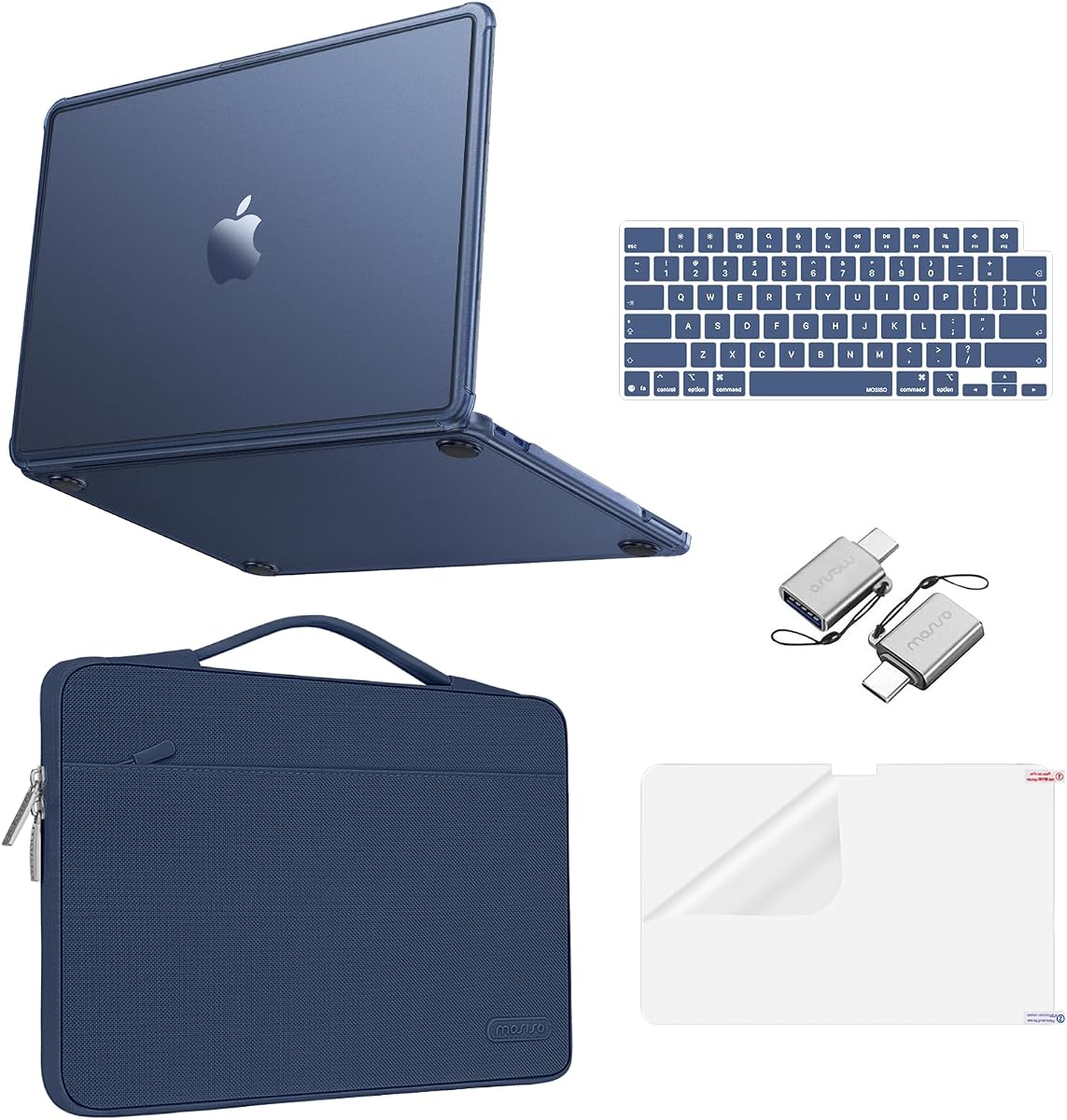
The MOSISO Compatible with MacBook Neo Case 13 inch 2026 A3404 A18 Pro Chip is a broad protection bundle with a 4.6 rating. It combines a matte hard case, a portable laptop sleeve, two keyboard covers, and a screen protector, making it the most travel-oriented option among the case kits reviewed here.
We may earn a commission when you buy through this link, at no additional cost to you.
Its matte finish is engineered to resist fingerprints, smudges, and visible scuffs, which can make a substantial difference during daily use. The case is intended to shield against the scratches and minor bumps associated with commuting, shared workspaces, and general handling. The accompanying sleeve adds a soft layer for storage, while its 360-degree design and carrying handle offer a convenient way to move the laptop between a home, office, classroom, or travel setting.
The sleeve's stated internal dimensions are 13.39 by 9.25 by 0.79 inches, with a slightly larger exterior for handling and the front pocket. It is made from lightweight polyester, and the product description notes that it can fit into a briefcase or backpack without excessive bulk. Those dimensions are close-fitting, so owners using a larger workspace or carrying the laptop with accessories may need more room. The kit is also specific to model A3404 rather than a universal MacBook accessory.
This package is a strong fit for commuters, students, office workers, and anyone who wants protection for both the laptop and the keyboard. It offers the clearest combination of case, sleeve, and screen coverage in the guide. Buyers should confirm the model number before ordering, but for the correct configuration it is a convenient, well-rounded way to protect a MacBook Neo.
The matte shell is designed to conceal fingerprints and minor scuffs better than a highly reflective surface. That makes it practical for people who frequently handle the laptop.
A padded sleeve and compact carrying handle provide a separate layer during transport. The close dimensions also help keep the laptop from shifting loosely inside a larger bag.
We may earn a commission when you buy through this link, at no additional cost to you.
The MOSISO Compatible with MacBook Neo Case 13 inch 2026 Release A3404 uses a quilted, puffy polyester sleeve to provide a softer carrying experience. With a 4.6 rating, it is a polished choice for buyers who want the visual character of a padded sleeve together with a hard case and keyboard coverage.
We may earn a commission when you buy through this link, at no additional cost to you.
The hard component protects against daily scratches, scuffs, and minor bumps, and it is designed to slide off without leaving the laptop marked. The sleeve adds a plush interior intended to cushion against impacts while the laptop is stored. Its square quilted construction gives the bundle a more tactile and decorative appearance than a plain fabric sleeve, while remaining light enough for daily commuting.
The sleeve's listed internal dimensions are 12.99 by 8.66 by 0.79 inches, and the external measurements are 13.38 by 9.25 by 0.79 inches. These measurements make the case closely sized for the target laptop, which reduces wasted space but leaves little room for a thick charger or other bulky accessories. Two keyboard covers and a screen protector are included for broader protection.
The main requirement is exact A3404 compatibility; the listing is not presented as a universal solution for other MacBook models. Within that limitation, it is a strong option for students and commuters who prioritize a cushioned sleeve. It may appeal especially to users who want a case that looks less technical than a conventional business sleeve.
The plush interior cushions the laptop during storage and transport. It also gives the product a distinctive quilted appearance that stands apart from simple fitted sleeves.
The shell, keyboard covers, and screen protector cover several vulnerable areas. It reduces the need to assemble a basic protection set one accessory at a time.
We may earn a commission when you buy through this link, at no additional cost to you.
The EooCoo for MacBook Neo Case 13 inch 2026, Scratch Resistant, Crystal Clear has a 4.7 rating, the highest among the products in this guide. It combines a transparent hard-plastic shell with a keyboard cover, screen protector, and USB-C-to-USB-A adapters in a compact package.
We may earn a commission when you buy through this link, at no additional cost to you.
The clear material allows the color and design of the MacBook Neo to remain visible, while the ultra-slim construction adds little bulk. Its full edge wrap is intended to protect against scratches, scuffs, fingerprints, dust, and minor bumps. Because the shell is transparent, the included screen protector and keyboard cover blend into the overall appearance rather than dominating it.
The adapters are a distinctive addition. They provide a convenient way to connect a USB-A peripheral when the user does not have an adapter available. The keyboard cover is intended to limit exposure to spills and debris, and the screen protector adds a basic layer against scratches and oily marks. As with the other case products, compatibility is limited to the 13-inch 2026 A3404 model with the A18 Pro chip.
This kit works well for students, office workers, freelancers, and travelers who want a minimal shell plus several useful extras. Its strongest selling point is the combination of a high customer rating, clear design, low bulk, and adapter inclusion. It is a particularly attractive selection for owners who expect to use legacy USB-A accessories alongside their MacBook Neo.
The thin shell wraps around the laptop while preserving its original appearance. It is suited to users who want protection without changing the visual character of the device.
Two USB-C-to-USB-A adapters support connection to compatible peripherals. They are small enough to remain practical for office, classroom, and travel use.
We may earn a commission when you buy through this link, at no additional cost to you.
The VENTION 6-in-2 USB C Hub is the guide's most connectivity-focused option. It combines a fixed USB-C connection with a detachable magnetic USB-C plug, adds HDMI and multiple USB ports, and supports pass-through charging. Its 4.2 rating is lower than those of the protection products, but its feature set addresses a different and often more technically demanding need.
We may earn a commission when you buy through this link, at no additional cost to you.
The hub is specified for up to 80Gbps bandwidth and supports high-resolution display configurations, including 4K at 240Hz through the USB-C path and 4K at 60Hz through HDMI. The magnetic connector allows the adapter to be attached and removed with less repeated handling of the laptop's port. A seven-shaped single-plug alternative is suggested for compatibility with cases that obstruct the standard dual-plug arrangement.
Charging is handled through dedicated USB-C Power Delivery connections, with maximum pass-through charging listed at 140W and up to 100W through the standard PD port. The enclosure uses an aluminum alloy shell for durability and heat dissipation. Additional ports include two USB-A 3.0 connections, one USB 3.2 Gen 1 Type-C port, and HDMI, creating a practical one-cable station for displays and peripherals.
This is a good match for owners who regularly connect external monitors, storage, or USB-A devices. Buyers should verify that the host, display, cable, and monitor all support the desired resolution and refresh rate. They should also consider their case because the connector may not sit flush with a protective shell. With those constraints in mind, it is the strongest connectivity upgrade in the roundup.
HDMI, USB-A, and USB-C connections reduce the need for separate adapters. The hub is intended for office setups that combine a MacBook Neo with multiple wired accessories.
The advertised 8K and high-refresh modes depend on a compatible Thunderbolt-enabled host and matching display chain. Buyers should verify those capabilities before expecting maximum output.
We may earn a commission when you buy through this link, at no additional cost to you.
The Magnetic Privacy Screen Protector for MacBook Neo 13-inch is designed for people who regularly handle confidential information in shared or public spaces. It uses a magnetic attachment rather than adhesive and carries a 4.2 rating. The product is specified for the 2026 A3404 model with the A18 Pro chip.
We may earn a commission when you buy through this link, at no additional cost to you.
Its defining feature is directional privacy. The filter is designed to limit visibility beyond approximately plus or minus 30 degrees while retaining a frontal view of the display. A high-transparency PET layer is intended to preserve clear, vivid images, while anti-glare and blue-light-blocking treatments address reflections and visual discomfort during extended use. The material is also described as scratch resistant.
Magnets positioned near the top bezel allow the filter to be installed or removed in about a second without adhesive residue. At 0.065mm, it is extremely thin and is designed to fit with many protective cases without preventing the lid from closing normally. Its portability also makes it practical to carry only when a privacy filter is needed.
The trade-off inherent to all privacy screens is the restricted viewing angle. Users who frequently position a display off to the side may find this inconvenient, and the filter can also reduce perceived brightness or clarity depending on ambient light. Even so, it is an excellent choice for airport, cafe, and office work where shoulder surfing is a concern, especially for buyers who want frequent, residue-free removal.
The limited side viewing angle helps conceal documents, messages, and financial information. It is most useful in cafes, airports, shared offices, and other semi-public spaces.
The filter can be added when needed and removed when it is not. Adhesive-free attachment also avoids residue and makes repeated use more convenient.
We may earn a commission when you buy through this link, at no additional cost to you.
The Peslv Magnetic Privacy Screen for Macbook Neo 13 Inch is a feature-rich privacy filter for the A3404 model. Its 4.2 rating aligns with the other privacy product, but the product description provides a more extensive account of its optical treatment, magnetic mounting, and storage solution.
We may earn a commission when you buy through this link, at no additional cost to you.
The screen limits visibility to the area directly in front of the display, with a stated range of plus or minus 30 degrees. Its filter layer is advertised to reduce blue light by 95% and ultraviolet light by 92%, while the matte, anti-glare surface is said to intercept 95% of reflected light. A scratch-resistant layer adds another layer of daily protection, and the high-transmission material is designed to maintain high-definition image quality.
Installation relies on a reinforced magnetic strip along the top edge. Users align it with the top bezel and press gently, allowing the filter to attach in about a second. A storage clip is included so the screen can be removed and kept nearby when privacy is not required. The product is modeled to the real screen dimensions and is intended for the 13-inch 2026 MacBook Neo with the A18 Pro chip.
This is a premium choice for users who spend substantial time in public locations, value detailed eye-protection specifications, or want a removable filter with dedicated storage. The trade-off remains the constrained side-viewing angle. It may also darken the perceived display in bright surroundings, although the listed anti-reflective properties are intended to improve comfort. For privacy-conscious users who switch between shared and open workspaces, it is a particularly complete solution.
Blue-light reduction, ultraviolet filtering, and anti-glare treatment address different viewing concerns. Together with scratch resistance, they create a more comprehensive screen accessory.
The included storage clip makes it practical to remove the filter at a desk and bring it out in a café, airport, or shared office. Strong magnets help keep it positioned during use.
We may earn a commission when you buy through this link, at no additional cost to you.
The Synerlogic Mac OS Shortcuts Sticker is a well-regarded reference for MacBook Air and Pro users, earning a 4.6 rating. It displays important keyboard shortcuts directly on the device and is designed to work across CPU types and macOS versions. Its broad platform support makes it a useful product in its own right.
We may earn a commission when you buy through this link, at no additional cost to you.
The sticker is intended for beginners, experienced users, students, professionals, creatives, and seniors who want a quick reference without opening a web page. It uses laminated vinyl, and the printed commands are designed to remain readable during normal use. The Shift symbol is identified on the sticker so users can interpret more complex combinations correctly.
Its most important limitation is explicit in the product data: it is not intended for the MacBook Neo or 11-inch and 12-inch MacBook models. The listing instead points users toward a separate universal version. The adhesive is described as stronger than earlier versions, but it may leave a light residue after removal; the seller states that this can be wiped away with a soft cloth and warm, soapy water. Proper installation also matters, because peeling the entire backing at once can create more air bubbles.
This sticker is a good fit for owners of an existing MacBook Air or Pro, particularly students learning macOS or anyone who wants a permanent visual reminder. It should not be selected as a dedicated MacBook Neo purchase because of the stated incompatibility. For a shortcut aid expressly designed for the MacBook Neo, the first product in this guide is the more relevant choice.
The sticker is designed for MacBook Air, MacBook Pro, iMac, and Mac Mini systems regardless of processor type. That broad scope is valuable for users with more than one Apple computer.
Applying the decal gradually can reduce bubbles. Users should also account for the possibility of light residue when removing it after prolonged use.
We may earn a commission when you buy through this link, at no additional cost to you.
The CaseBuy Apple MacBook Neo Accessories, 7Pack Dust Plug Covers is a compact maintenance set designed for the 2026 13-inch MacBook Neo with the A18 Pro chip and model A3404. It has a 4.7 rating and focuses on keeping exposed openings clean rather than adding bulk around the entire computer.
We may earn a commission when you buy through this link, at no additional cost to you.
The plugs are made from flexible silicone intended to protect ports from scratches, debris, and liquid splashes. The included selection covers three USB-C ports, MagSafe 3, HDMI, SDXC, and the headphone jack. Two webcam covers are also included, creating protection for the camera and another frequently exposed opening.
The low-profile design is intended to maintain the laptop's appearance, and the plugs are designed to remain secure during ordinary use while coming out without residue. Insertion and removal are described as effortless, although users should never force a plug into an opening that does not match. The set also includes a small plastic storage case, which is useful for keeping unused pieces together.
This product makes sense for people who work in dusty environments, travel frequently, or prefer to keep ports covered while the laptop is stored. The trade-off is obvious: protected ports need to be uncovered before peripherals can be connected, and the plugs are specific to the A3404 layout. It is a sensible, targeted supplement rather than a replacement for a full protective case.
The set includes plugs for USB-C, MagSafe 3, HDMI, SDXC, and audio connections. This broad port coverage is more useful than a single-piece dust plug alternative.
Soft silicone is intended to avoid scratching the laptop while remaining easy to insert and remove. The compact design adds minimal visual bulk when ports are covered.
We may earn a commission when you buy through this link, at no additional cost to you.
The right MacBook Neo accessory depends on the problem it needs to solve, but exact model compatibility and intended use should come first. Consider protection, privacy, connectivity, learning, and port maintenance separately before deciding which products deserve space in your setup.
Most protective accessories in this guide are designed specifically for the 13-inch 2026 MacBook Neo with the A18 Pro chip, identified as model A3404. A case that resembles the correct laptop visually may still have different cutouts, dimensions, hinge clearance, or port positions. Check the model identifier on the bottom of the device before ordering a shell, screen filter, or port accessory. This is especially important when a listing contains the phrase compatible with, since that wording can cover several products and configurations without guaranteeing every detail.
A good accessory should address a clear need rather than simply add another object to your bag. A commuter may prioritize a padded sleeve, a frequent traveler may prefer a privacy filter, and a desk-based professional may need a multiport hub. The keyboard and screen protection bundled with several cases may be useful, but the most important feature should match how the laptop is used. This approach also prevents buying several products that perform essentially the same job.
Protection can include the top and bottom shells, keyboard covers, screen protectors, and a padded carrying sleeve. Hard cases help with scratches and minor bumps, while sleeves mainly protect during storage and transport. A good bundle may combine hard and soft protection, but buyers should check whether the keyboard covers are dustproof, spill-resistant, or simply thin protective films. A clear screen protector and a hard shell also serve different purposes and should not be treated as interchangeable.
Privacy screens are most useful in public or shared environments, but they narrow the visible viewing angle. Both privacy products in this guide target a direct front view around plus or minus 30 degrees, so users should consider whether they regularly sit at an angle to an external display. Magnet-based attachment is convenient because it permits frequent removal without adhesive, while anti-glare and blue-light features can improve comfort. Bright ambient lighting and monitor placement can still affect the viewing experience.
A USB-C hub's advertised resolution and refresh rate depend on the entire connection chain. The host computer, hub, cable, display, and display settings must support the desired output. Buyers should also consider port placement, charging requirements, device compatibility, and whether a protective case will obstruct the connector. The VENTION hub includes a detachable magnetic design and a case-compatible single-plug option, but even these features do not guarantee maximum output in every setup.
Port covers are valuable only if their dimensions and shapes match the openings they are meant to protect. A complete set can cover several USB-C ports, MagSafe 3, HDMI, SDXC, the headphone connection, and the webcam. Users should still check the included inventory carefully because the named total and the category count may not read identically. Low-profile silicone is suitable for storage and transport, but every covered port must be opened before a cable can be connected.
MacBook accessories are often used in public, and excessive bulk can make a laptop less pleasant to carry. Thin vinyl stickers, clear polycarbonate cases, magnetic filters, and low-profile port plugs all minimize interference. Padding and larger carrying cases add more bulk but can improve impact protection. The right balance depends on whether the laptop spends more time on a desk, inside a backpack, or being moved between locations.
Adhesive stickers, magnetic filters, snap-fit shells, and silicone plugs each use a different installation method. Stickers require careful alignment to minimize bubbles, magnetic filters can be removed in seconds, and hard cases may take more effort to seat or remove. New adhesive may leave residue, while magnetic systems avoid glue but can interfere with cases. Consider how often you plan to add or remove each accessory before choosing a design.
Start by confirming that every model-specific accessory matches the identifier on the bottom of the MacBook Neo. Install the hard case on a clean, dry surface, align the cutouts, and seat each section gradually rather than forcing a corner. Keyboard and screen films should also be applied in a dust-free area, and privacy filters should be aligned with the top bezel so the magnetic strip sits evenly.
Use shortcut stickers where they will not interfere with typing and remove them occasionally to check for residue. Keep privacy filters in their included storage clip when not required, and clean them with a suitable soft, lint-free cloth rather than aggressive solvents. Port plugs should be removed before connecting cables, while webcam covers can remain in place whenever camera access is not needed.
For hubs and sleeves, inspect connectors for debris and avoid forcing plugs into ports. Let the hub's aluminum housing dissipate heat during extended display use, and keep the laptop case from pinching the connector or cable. Periodic gentle cleaning, careful storage, and removal of accessories before transport will help preserve both the MacBook Neo and its add-ons.
Most of the model-specific cases, privacy screens, and dust plugs are designed for the 13-inch 2026 MacBook Neo with the A18 Pro chip, identified as model A3404. Check the model number printed on the bottom of the laptop before ordering. The shortcut stickers differ: the first one explicitly supports MacBook Neo, while the Synerlogic sticker explicitly excludes it.
No. The MOSISO and EooCoo bundles include multiple layers of protection. Depending on the specific set, the package may contain a hard shell, two keyboard covers, a screen protector, a storage bag, USB-C-to-USB-A adapters, or a padded carrying sleeve. Read the included-items list to determine exactly which accessories come with the chosen listing.
The Magnetic Privacy Screen Protector is described as ultra-thin and case-friendly, so it is intended to fit with many protective cases. The Peslv product also uses a thin magnetic design, but buyers should still check the precise dimensions and lid clearance of their selected case. A snug fit is important because the filter should not lift at the edges.
The product description warns that the standard dual-plug connection may not fit properly when a bottom case is installed. It recommends the seven-shaped single plug for case compatibility, although the seller notes that this may affect appearance and connection stability. The hub should therefore be tested with the exact case and workspace arrangement you intend to use.
The listing advertises HDMI output up to 4K at 60Hz and USB-C display support up to 8K at 60Hz or 8K at 240Hz under the appropriate conditions. The most advanced modes require a compatible Thunderbolt-enabled host and a supporting display and cable chain. Actual performance also depends on macOS display settings and the capabilities of the connected monitor.
The 2026 Mac OS Shortcuts Sticker is described as using residue-free adhesive. The Synerlogic sticker may leave a light residue, although the seller says it can be removed with a soft cloth and warm, soapy water. Both stickers benefit from careful, gradual installation, and removing one earlier rather than leaving it indefinitely can simplify cleanup.
The CaseBuy silicone plugs are intended to protect ports from dust, debris, scratches, and liquid splashes. They are useful barriers against minor incidental exposure, but they should not be treated as a guarantee against spills or immersion. Ports must remain uncovered when a cable is connected, and the plugs should be removed and inspected after any liquid reaches the laptop.
Most users do not. A hard case or sleeve is valuable for everyday protection, while a privacy filter is most relevant in public spaces. A hub becomes useful when you regularly connect displays and peripherals, shortcut stickers help users learn commands, and port plugs suit owners who keep the laptop stored in dusty environments. Start with the accessory that solves the problem you actually encounter most often.
The 2026 Mac OS Shortcuts Sticker is the most focused recommendation for users who want a simple productivity aid, while the MOSISO Matte Protection Kit offers the broadest combination of case, sleeve, keyboard, and screen protection. The Peslv Magnetic Privacy Screen stands out for users who need detailed light filtration and removable privacy in shared spaces.
Prioritize exact model compatibility before any other feature. The A3404 designation covers most of the protective products reviewed here, but the VENTION hub depends on port clearance, and the Synerlogic shortcut sticker is not intended for the MacBook Neo. Within those constraints, choose the product category that solves a recurring need rather than assembling every type of protection at once.
Product configurations, included components, and retailer listings can change, so confirm the current description before purchasing. Checking the model number, accessory dimensions, connection requirements, and installation method will help ensure that the selected MacBook Neo accessory works as intended.