
HP LaserJet Enterprise MFP M634z
55 ppm print speed
150-page duplex ADF
2,300-sheet input capacity
Three-bin stapler stacker
Discover the best laser printer for large workgroups, with expert comparisons of speed, capacity, security, connectivity, and multifunction features.
A laser printer for large workgroups must handle substantial daily demand without creating frequent interruptions. The most useful models combine fast output, dependable paper handling, economical toner options, secure networking, and controls that simplify deployment across busy offices. Color and monochrome models each serve distinct needs.
This guide compares ten business laser printers using the specifications supplied for each product. We examine print speed, paper capacity, duplex printing, scanning, security, connectivity, toner yield, and expandability. The list includes dedicated printers and all-in-one models, allowing administrators to match capabilities to their actual workflows.
Each review identifies the reason a printer appears in the guide, along with its most important trade-offs. The selections range from relatively accessible monochrome options to feature-rich enterprise systems. Product availability and pricing can change, so readers should confirm current specifications, accessories, toner compatibility, and costs before purchasing.

4.4Editor score
4.3Editor score
The table below compares the ten shortlisted printers by their core workgroup features. It highlights the differences in output speed, paper handling, connectivity, and multifunction capability, including options for color output, scanning, and secure authentication.


The Brother MFC-L8930CDW is the most complete all-around choice in this guide for large workgroups that need professional color output alongside dependable monochrome documents. Its supplied rating is 4.4, and the combination of 33 ppm printing, duplex copying, advanced scanning, a seven-inch touchscreen, and layered security makes it especially versatile. Rather than forcing separate workflows onto different devices, it consolidates printing, scanning, copying, document handling, and network administration in one machine.
We may earn a commission when you buy through this link, at no additional cost to you.
Its standout strength is the balance between productivity and usability. Print and copy speeds reach 33 ppm, while the 80-page automatic document feeder supports two-sided scanning at up to 104 images per minute. Users can scan directly to cloud services, email, SharePoint, and other destinations, and the legal-size glass accommodates oversized originals. Searchable and editable Microsoft Office documents add another layer of practical value for administrators who need to move paper into structured electronic workflows without sending every page to a separate workstation.
Paper handling is appropriately substantial without making the device excessively complicated. A multipurpose tray supports envelopes and custom media, while the 25 percent smaller design is intended to preserve useful counter space. Toner choices are a major strength: included cartridges provide 3,000 black pages and 1,800 color pages, while the TN635XXL high-yield replacements extend those figures to 7,500 black and 6,500 color pages. The exact ownership cost will depend on page mix, but these options give a high-volume office more control over supply replacement intervals.
Security and administration are also unusually well integrated. Triple Layer Security is intended to protect the device, network, and documents in transit, while the built-in NFC card reader enables badge-based authentication. Dual-band Wi-Fi and Gigabit Ethernet provide flexible wired and wireless deployment, and as many as 64 customized touchscreen shortcuts can turn recurring jobs into one-touch operations. The trade-offs are the larger physical footprint compared with a dedicated monochrome printer and the added expense associated with color laser printing. For groups that print brochures, charts, labels, presentations, and ordinary business documents, those costs are justified by avoided outsourcing and fewer separate devices.
The MFC-L8930CDW is the best recommendation for large workgroups seeking a balanced enterprise printer without moving into the most specialized finishing category. It suits offices that value color, advanced scanning, secure workflows, flexible connectivity, and useful touchscreen customization. Before buying, administrators should confirm the exact toner, optional paper trays, and network requirements for their location. Even without those optional investments, the core model offers the speed, capacity, and document features needed for sustained daily production.
The all-in-one design reduces the need to send routine documents to separate scanners and copiers. Fast duplex scanning, direct cloud destinations, Office-document output, and customizable shortcuts make this printer useful for both document-heavy departments and centralized administrative teams.
Layered protection and integrated NFC badge authentication are especially relevant when several employees share one machine. These controls can help administrators limit unauthorized use while protecting sensitive information as it moves through the office network.
We may earn a commission when you buy through this link, at no additional cost to you.
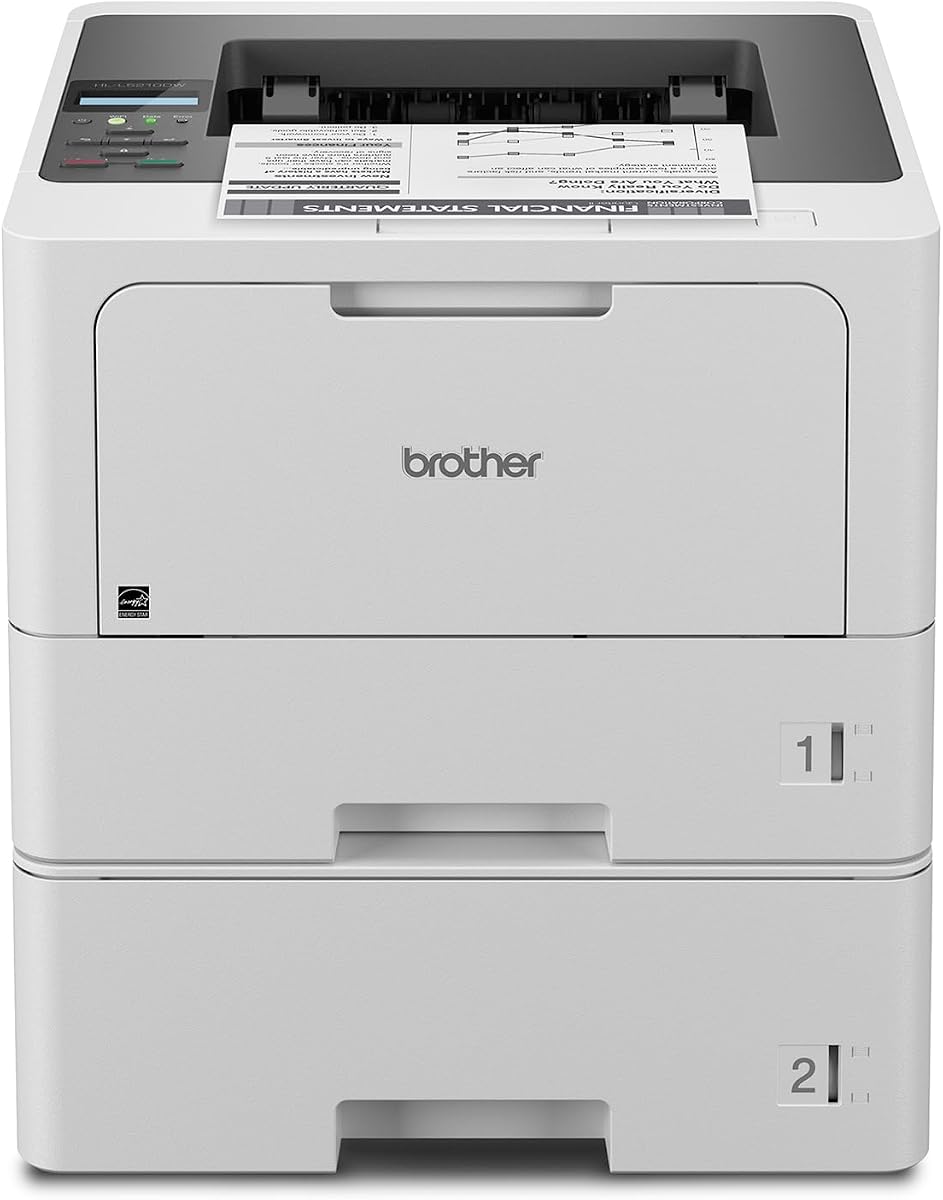
The Brother HL-L5210DWT offers one of the strongest combinations of speed, capacity, and essential workgroup features in the roundup. It carries a supplied rating of 4.3 and prints monochrome documents at up to 48 ppm, making it a practical choice for organizations whose daily volume consists primarily of contracts, reports, forms, internal documents, and shipping materials. Its dedicated-printer design concentrates on fast output and convenient paper handling rather than adding scanning and copying hardware.
We may earn a commission when you buy through this link, at no additional cost to you.
Paper management is a major advantage. The two built-in trays hold 250 and 520 sheets, while a 100-sheet multipurpose tray handles envelopes and custom media. With the appropriate optional tray, total capacity expands to 1,390 sheets. That combination is useful for teams with mixed paper sizes or recurring batches of standard media, because users can keep letter and legal stock separated instead of repeatedly changing the main tray. Automatic duplex output also helps control paper consumption during multi-page document runs.
Networking is designed for a shared workplace rather than a single desk. Built-in Gigabit Ethernet and dual-band wireless support allow administrators to choose the most suitable infrastructure, and mobile printing is supported for compatible devices. Triple Layer Security adds device, network, and document protections. Although the supplied information does not mention an integrated badge reader, the printer still provides a more serious security foundation than a basic home-oriented laser model.
Toner flexibility strengthens its value proposition. A 3,000-page genuine cartridge is included, and the TN920XXL super high-yield replacement supports up to 11,000 pages. That longer replacement interval can reduce the frequency of supply changes in a busy office. The main limitation is functional rather than quality-related: there is no integrated scanner or copier, so workflows that require analog document capture need a separate device. It also produces only monochrome output, which may be a problem for marketing teams that regularly create color presentations or visual proposals.
For a large workgroup with steady monochrome demand, the HL-L5210DWT is an excellent value-oriented selection. It offers enough speed, standard capacity, connectivity, security, and toner efficiency to serve a busy shared team without moving into the largest enterprise finishing systems. It is best suited to accounting, legal, logistics, operations, and administrative groups that print consistently and do not need color or integrated scanning. Verify the availability of the optional high-capacity tray before purchase if uninterrupted, mixed-media runs are essential.
Separate 250- and 520-sheet trays let administrators assign different media without constantly replacing stock. The multipurpose tray adds flexibility for envelopes and specialty paper, while the optional expansion tray raises total capacity for sustained production.
Gigabit Ethernet, dual-band wireless, and mobile printing cover common office connection methods. Triple Layer Security provides an important baseline for a shared device used by multiple employees throughout the workday.
We may earn a commission when you buy through this link, at no additional cost to you.
The HP LaserJet Enterprise M406dn is a straightforward enterprise monochrome printer aimed at workgroups that want a manageable device with dependable output. Its supplied rating is 4.4, and the 42 ppm print speed is sufficient for continuous document production. Automatic two-sided printing saves paper without requiring users to change a setting for every job, while the 2.7-inch color display makes common functions accessible directly from the device.
We may earn a commission when you buy through this link, at no additional cost to you.
Its primary strength is operational simplicity. HP describes the M406dn as easy to use and simple to manage, which matters when a printer is shared by employees with different levels of technical experience. It supports card reader solutions, direct printing from the compact display, and compatibility with HP and third-party business solutions. The supplied information also identifies HP FutureSmart firmware, which can receive feature updates intended to optimize the device over time.
Security is treated as a core requirement rather than an add-on. HP Wolf Enterprise Security uses defensive layers to detect and attempt to stop malware, while the broader security approach is intended to protect the printer, network, and business data. This makes the M406dn a sensible choice for organizations with formal IT requirements, even though its physical control panel is modest compared with the large touchscreens found on premium all-in-one systems.
The most important trade-off is connectivity. Built-in Ethernet is well suited to an office network, and third-party solutions may provide broader deployment options, but the supplied specifications do not list built-in Wi-Fi. Buyers who require direct wireless access should confirm their infrastructure plans before finalizing this model. The printer also lacks an integrated scanner, so it is a better fit for teams that only need dependable monochrome output than for offices seeking a shared digital document hub.
Overall, the M406dn serves as a sensible middle ground between a basic laser printer and a heavily equipped enterprise system. It offers stronger management and security positioning, a useful color display, and automatic duplex output without adding scanning complexity. It is particularly appropriate for a hardwired legal, finance, or administrative office where predictable monochrome output and centralized oversight matter more than wireless convenience or color printing.
The 2.7-inch color display gives users a clear way to access print and configuration functions. Direct printing from the panel and card reader support further reduce the need to move routine tasks to a computer.
FutureSmart firmware provides a path for later feature updates, while solutions for card readers and centralized control support more structured deployments. This makes the printer a practical foundation for managed office environments.
We may earn a commission when you buy through this link, at no additional cost to you.
The Brother MFC-L6810DW is built for demanding monochrome workgroups that need more than a basic shared printer. Its supplied rating is 4.1, while print and copy speeds of up to 52 ppm place it among the fastest devices in this guide. It also includes scanning, duplex copying, wireless networking, enterprise security, and a seven-inch touchscreen, making it a capable central device for offices handling large quantities of monochrome paperwork.
We may earn a commission when you buy through this link, at no additional cost to you.
Scanning is one of its most impressive features. The 80-page automatic document feeder performs single-pass, two-sided scanning at up to 200 images per minute, and the large glass supports legal-size documents. Users can send scans to popular cloud destinations from the touchscreen. This combination of speed and destination flexibility is particularly useful for administrative teams converting records, while the 250-sheet output tray helps manage completed print jobs.
Capacity and toner options reinforce its high-volume positioning. A 520-sheet paper tray, 100-sheet multipurpose tray, and optional trays raise total capacity to 1,660 sheets. The included Brother Genuine cartridge provides 8,000 pages, while the TN920UXXL ultra high-yield replacement is rated for 18,000 pages. These long replacement intervals help keep a busy machine productive and reduce the operational burden associated with frequently changing toner.
Triple Layer Security protects the device, network, and documents in transit, and an integrated NFC card reader supports badge authentication. That makes the MFC-L6810DW especially appropriate for shared access in departments where accountability is important. The main compromises are its monochrome-only output and the extra counter space required by the all-in-one chassis. It is also more functionally complex than a dedicated printer, so users who do not need scanning or copying may get little benefit from the additional hardware.
This model is a strong recommendation for mid to large workgroups that print primarily in monochrome but also need rapid document conversion. Legal departments, finance teams, insurance offices, and operations groups can benefit from its combination of speed, capacity, and secure authentication. Buyers should confirm optional tray compatibility and intended paper formats before installation. For organizations that need color as well, the MFC-L8930CDW or HL-L8430CDWT offers a more appropriate balance.
The 80-page feeder captures both sides in a single pass at up to 200 images per minute. Legal-size glass and direct cloud scanning turn the machine into a useful intake point for large administrative workflows.
Standard media, custom paper, and optional expansion trays support long printing sessions. The 250-sheet output tray provides room for sorted or batched documents without constant removal.
We may earn a commission when you buy through this link, at no additional cost to you.
The Brother HL-6210DW is a speed-focused dedicated printer for large workgroups with sustained monochrome output. Its supplied rating is 4.1, and the 50 ppm rate makes it well suited to batch printing, forms, internal reports, and high-volume administrative documents. It keeps the feature set focused on printing instead of including a scanner or copier, which may reduce complexity and make it a better operational fit for teams that already have separate document-capture equipment.
We may earn a commission when you buy through this link, at no additional cost to you.
The 520-sheet main tray gives it a substantial starting point for daily production, and the 100-sheet multipurpose tray supports envelopes and custom media. With suitable optional trays, total input capacity can reach 1,660 sheets. That level of expandability supports longer runs and mixed media, reducing the need for staff to refill paper during busy periods. Duplex printing is also included, helping lower paper usage for multi-page documents.
Connectivity is notably flexible. Built-in Gigabit Ethernet and dual-band wireless networking support shared office deployment, while mobile printing allows compatible devices to send jobs. These options let administrators place the printer according to workflow and network conditions rather than requiring a direct cable connection for every user. Triple Layer Security adds protection for the network, device, and documents in transit, which is important for a machine intended for shared business use.
Toner efficiency is another reason to consider this model. Brother Genuine ultra high-yield replacement cartridges support up to 18,000 pages, which can reduce replacement frequency in demanding environments. As with all high-volume printers, the eventual cost per page depends on utilization and the exact cartridge configuration. Users should not judge the machine only by its acquisition point; matching cartridge yield to actual print volume can be more meaningful for a large workgroup.
The HL-6210DW is a good choice for teams that want fast monochrome output, strong paper handling, and flexible networking without paying for an all-in-one chassis. Its drawbacks are the absence of scanning and a touchscreen, which may be limiting for mixed digital workflows. It is best suited to organizations with dedicated document capture elsewhere and a clear need for dependable, fast, network-ready printing. Confirm optional tray compatibility and toner model details before finalizing the installation plan.
A 520-sheet main tray and expandable capacity support sustained output with mixed media. The multipurpose tray keeps less common paper types accessible without displacing the standard stock.
Wired Gigabit Ethernet and dual-band wireless make the printer useful in different office layouts. Mobile printing support helps employees send documents from compatible devices when the shared machine is not nearby.
We may earn a commission when you buy through this link, at no additional cost to you.
The Brother MFC-L5915DW is a well-rounded monochrome all-in-one for busy teams that print, copy, and scan in substantial volume. Its supplied rating is 4.3, and the 50 ppm print and copy rate is among the strongest in the selection. It offers automatic two-sided printing, a 70-page document feeder, a legal-size glass, wireless networking, and support for 18,000-page replacement toner, making it a capable central machine without reaching the physical scale of premium enterprise systems.
We may earn a commission when you buy through this link, at no additional cost to you.
The document feeder is particularly useful for administrative work. It performs single-pass, two-sided scanning at up to 56 images per minute, helping users process multipage records without manually turning pages. The large glass supports legal-size originals, so a single device can handle more than standard letter documents. These features make the printer suitable for departments where a separate scanner would otherwise create another shared bottleneck.
Connectivity includes Gigabit Ethernet and dual-band Wi-Fi, allowing the machine to join either wired or wireless office networks. Mobile printing support broadens access for users working away from a desk. Its 50 ppm engine also makes it well suited to large monochrome document runs, while duplex output reduces paper use. Automatic document handling and fast copying make it more versatile than the dedicated Brother HL-6210DW and HL-L6310DW models.
For operating efficiency, the included Brother Genuine cartridge provides 3,000 pages and the TN920UXXL ultra high-yield replacement supports 18,000 pages. The long-yield option is valuable for sustained workloads, though administrators should monitor real page volume and select supplies accordingly. As a monochrome device, it cannot replace a color printer for charts, marketing collateral, or color-coded forms. That limitation is reasonable for teams focused on contracts, invoices, operational records, and other text-heavy documents.
This MFC-L5915DW is a persuasive recommendation for a large workgroup that wants high speed without moving into a very large enterprise all-in-one. It suits legal, accounting, real estate, logistics, and administration. The ideal buyer values scanning and copying as much as printing, needs dependable wireless access, and does not require color. Confirm the available paper configuration and toner supplies for the intended environment before purchase.
Single-pass duplex scanning and 50 ppm copying reduce handling time for multipage jobs. A 70-page feeder and legal-size glass give users room to process mixed-size records on one machine.
Long-yield toner support can reduce replacement frequency, while duplex printing helps reduce paper consumption. Together, these features keep attention on the work rather than on repetitive machine maintenance.
We may earn a commission when you buy through this link, at no additional cost to you.
The HP LaserJet Enterprise M507n is positioned around dependable enterprise printing, centralized administration, and security rather than a single headline speed figure. Its supplied rating is 4.0. The product data emphasizes consistent document quality, built-in Ethernet, more than 200 embedded security features, optional mobile printing, and tools for adding devices, applying policies, and managing configurations at scale. It is most relevant to organizations with an established IT management process.
We may earn a commission when you buy through this link, at no additional cost to you.
Centralized control is the strongest distinguishing feature. HP Web JetAdmin supports device additions, solution updates, feature management, and application of corporate policies, while HP JetAdvantage Security Manager assists with security configuration. For a company deploying many printers, these tools can make the M507n easier to govern than a standalone unit. A shared network printer should be treated as an endpoint with access to documents, and this model places substantial emphasis on protecting that endpoint.
The security approach extends beyond simple password controls. The supplied information states that embedded features help protect printer information, thwart malware, and continually detect and stop attacks. Optional mobile printing allows smartphones and tablets to send jobs, generally without requiring a separate app, which can improve convenience for staff who do not regularly work at a fixed computer. Built-in Ethernet provides the primary wired connection for a managed office environment.
Toner planning is another administrative benefit. Original HP 89A and 89X cartridges are designed for the printer, while optional 89Y extra high-yield cartridges can extend replacement intervals. Using supported supplies can help reduce reprints, wasted consumables, and service calls. The exact page yield and availability depend on the selected cartridge, so buyers should compare those figures with their expected monthly demand rather than assuming every configuration performs identically.
The M507n is a sound choice for established enterprises that value management depth and security over wireless convenience or multifunction convenience. It may be less compelling for small teams that need the simplest possible setup, color output, or integrated scanning. The supplied data does not list a specific print speed or input capacity, so those specifications should be verified before deployment. Its strongest case is a managed fleet in which centralized policy enforcement is a business requirement.
Web JetAdmin and JetAdvantage Security Manager support centralized device addition, policy application, solution updates, and configuration. These tools are valuable when consistency and centralized oversight matter across multiple offices.
The embedded security approach is designed to protect printer information, resist malware, and detect attacks. For sensitive environments, that endpoint-level focus is more meaningful than simply offering a network connection.
We may earn a commission when you buy through this link, at no additional cost to you.
The HP LaserJet Enterprise MFP M634z is the premium selection for large workgroups that need maximum paper handling, serious finishing, and enterprise document controls in a single system. No numeric rating was supplied for this product, so this guide does not assign one. It prints, scans, copies, and faxes professional-quality monochrome documents while reaching 55 ppm, matching the highest stated print speed in the roundup.
We may earn a commission when you buy through this link, at no additional cost to you.
Its standout feature is the loaded paper configuration. Three additional 550-sheet trays on a wheeled stand bring total input capacity to 2,300 sheets, supporting paper from 4-by-6-inch media through legal size. The output system includes a 1,000-sheet three-bin stapler and stacker with job offset. This is far more useful than a basic output tray for offices producing sorted packets, multi-copy sets, stapled documents, or large administrative batches.
The scanner is equally capable of supporting high-volume workflows. A 150-page automatic document feeder performs single-pass, two-sided scanning, and the nine-inch color touchscreen offers generous space for operating the device. Features designed to detect potential errors or missed pages and verify scanning orientation and size are particularly valuable when a large digital conversion job must be complete and accurately organized. The combination creates a document-production hub rather than a simple printer.
Performance and security are both enterprise focused. The stated 5.2-second first-page-out time helps reduce waiting on shorter jobs, while duplex printing and energy-efficient toner technology are intended to balance productivity with resource use. JetIntelligence combines performance, energy efficiency, and security, and the embedded protections are designed to safeguard sensitive data, resist malware, and detect attacks. Built-in Ethernet supports structured deployment in a managed enterprise network.
The M634z is ideal for legal document production, central administration, accounting, government, and other operations that cannot tolerate frequent paper jams or output interruptions. Its trade-offs are its substantial physical footprint, large configuration, and premium acquisition cost. It may be excessive for a team that produces relatively short runs, and the wheeled stand and multiple trays may not suit every office layout. When volume, finishing, and high-capacity scanning justify a premium system, however, it delivers the most complete workload coverage in this list.
The three-bin stapler and stacker can organize large batches into finished sets, while job offset helps separate documents. These capabilities are particularly useful where employees repeatedly collate, sort, or distribute printed packets.
A 2,300-sheet input configuration means fewer refills during extended production. The wheeled stand and multiple paper sizes also make it easier to separate media and keep frequently used stock readily available.
We may earn a commission when you buy through this link, at no additional cost to you.
The Brother HL-L8430CDWT is a dedicated business color laser printer with a supplied rating of 4.6, the highest numerical rating among the products in this guide. It prints at up to 33 ppm and produces vibrant color alongside sharp black output. For workgroups that need a dedicated color printer rather than a multifunction device, its combination of paper capacity, toner options, wireless connectivity, and secure access is especially compelling.
We may earn a commission when you buy through this link, at no additional cost to you.
The dual paper trays provide a 250-sheet tray and a 520-sheet tray, supporting mixed media without constant stock changes. Total capacity can expand to 1,340 sheets with an optional tray, while a 50-sheet multipurpose tray handles custom media and envelopes. This arrangement gives color printing a level of paper handling usually associated with larger enterprise systems, without adding a scanner and copier to the footprint.
Toner configuration supports both quality and operating efficiency. Included Brother Genuine cartridges provide 3,000 black pages and 1,800 color pages, while TN635XXL high-yield replacements extend capacity to 7,500 black and 6,500 color pages. Administrators can therefore align cartridge selection with the actual color-to-monochrome page mix. The ability to print in color without an all-in-one model can also be convenient for organizations that already have separate scanning equipment.
Wireless networking and a 2.7-inch color touchscreen make everyday operation straightforward. The touchscreen supports menu navigation, direct printing from popular business cloud services, and mobile-device printing. Triple Layer Security protects the device, network, and documents in transit, while an integrated NFC card reader supports badge authentication. That last feature is a meaningful differentiator for shared professional color devices, where access can be tied to individual employees.
The HL-L8430CDWT is best recommended for workgroups producing professional color documents, marketing materials, charts, labels, proposals, and conventional office files. It may be unnecessary for teams that only print black text, and its modest 2.7-inch display is less convenient than the seven-inch touchscreen on the MFC-L8930CDW. It is also not suited to workflows requiring integrated copying or scanning. Within the dedicated color-printer category, however, it is the strongest balance of speed, capacity, security, and rated customer satisfaction in the supplied data.
A dedicated color printer can be more practical when scanning and copying are handled elsewhere. It preserves high color output speed while keeping the device focused on the jobs for which the team selected it.
Sharp black text and vibrant color are supported by dual paper trays, a multipurpose tray, and flexible toner yields. The configuration is suitable for recurring business graphics, presentations, proposals, and mixed office documents.
We may earn a commission when you buy through this link, at no additional cost to you.
The Brother HL-L6310DW is a high-speed enterprise monochrome printer designed for mid to large workgroups. Its supplied rating is 4.2, and its 52 ppm output places it among the fastest dedicated models here. It combines serious paper capacity, wireless connectivity, secure badge access, high-yield toner, and deployment tools in a focused printer without a scanner, copier, or large control panel.
We may earn a commission when you buy through this link, at no additional cost to you.
Its paper system is built for sustained production. A 520-sheet main tray, 100-sheet multipurpose tray, and 250-sheet output capacity handle routine documents, envelopes, custom media, and completed jobs. Optional trays expand total input capacity to 1,660 sheets. An optional cabinet can store paper and supplies while converting the unit into a floor-standing configuration, which may be valuable where counter space is limited.
Toner life is another major operational advantage. The included Brother Genuine cartridge provides 6,000 pages, and the TN920UXXL ultra high-yield replacement supports 18,000 pages. For offices with predictable, high monochrome volume, fewer replacement events can improve uptime and simplify supply planning. Actual results will depend on document density and the exact configuration, so buyers should compare expected usage with the cartridge page ratings.
Security and fleet management are unusually comprehensive for a dedicated printer. Triple Layer Security helps protect the network, device, and documents in transit, while the integrated NFC card reader allows badge authentication. Device management solutions can distribute configurations, security settings, firmware updates, and task automation across multiple printers. This makes the HL-L6310DW a good candidate for standardized deployment across departments or locations.
The principal trade-offs are functional. It cannot produce color and lacks an integrated scanner, so it will not serve mixed office workflows on its own. It is also more advanced than a small-office laser printer, which may be unnecessary for teams with modest daily volume. For a large workgroup printing contracts, invoices, shipping labels, records, and internal monochrome documents, the HL-L6310DW nevertheless offers an attractive combination of speed, expandable capacity, secure access, and fleet-ready management.
Centralized distribution of configurations, security settings, firmware updates, and task automation reduces repetitive setup work. These capabilities suit organizations that value consistent behavior across a fleet of shared printers.
The dedicated design keeps the machine focused on high-volume monochrome output. An optional cabinet and additional trays allow it to grow vertically when floor-standing paper storage becomes preferable to counter space.
We may earn a commission when you buy through this link, at no additional cost to you.
Choosing a workgroup laser printer requires balancing page volume, document types, security requirements, paper handling, and the capabilities employees need each day. The right device should reduce interruptions without introducing unnecessary complexity or expense.
Print speed is one of the clearest indicators of whether a printer can keep pace with a busy workgroup. Models in this guide range from 33 ppm for professional color output to 55 ppm for the most demanding monochrome workloads. A 50 or 52 ppm machine is useful for organizations producing large quantities of contracts, invoices, forms, reports, and operational records throughout the day. Color users may find 33 ppm sufficient because color pages generally involve more complex processing than monochrome pages.
Choose speed based on peak demand, not only the daily average. Consider large arrivals of invoices, end-of-quarter reports, project packets, and batched shipping documents. A faster engine can improve queue management, but print speed alone does not determine real-world responsiveness. Paper handling, processing, network performance, and file complexity also influence the time employees wait for completed jobs.
Monochrome lasers are usually the better fit for departments that mainly produce contracts, accounting records, technical documents, and internal correspondence. They concentrate capacity on text-heavy output and can be paired with separate color devices when occasional color jobs arise. Color laser models are more appropriate for marketing teams, design departments, customer-facing proposals, charts, labels, and mixed office workflows.
Color output requires a different operating-cost calculation because color toner is generally used at a faster rate than black toner. Compare included and high-yield cartridge ratings, and estimate the expected proportion of color pages. A printer that handles the right tasks on one device can save outside printing and service fees, but a focused monochrome device may be more economical for teams that rarely need color.
Large workgroups benefit from multiple input sources so employees do not need to replace standard paper every time a job requires envelopes or legal-size media. The featured models offer standard capacities ranging from a 520-sheet main tray to much larger enterprise configurations, with several supporting optional expansion. The HP M634z reaches 2,300 sheets of total input capacity, while multiple Brother models expand to approximately 1,660 sheets.
Check more than the headline maximum. The number of standard trays, the size of the multipurpose tray, supported paper formats, output capacity, and whether an optional cabinet or wheeled stand is required all affect daily usability. Separate trays also let administrators keep different media loaded simultaneously. Confirm accessory compatibility and available floor space before assuming the published expansion figures will fit the intended office.
An all-in-one printer combines printing with scanning and copying, sometimes adding fax. This can streamline shared office workflows by giving employees one destination for output and document capture. The Brother MFC-L8930CDW adds cloud, email, SharePoint, and Office-document scanning destinations, while the MFC-L6810DW and MFC-L5915DW provide fast monochrome document feeds and legal-size glass.
Dedicated printers are often simpler and can be less costly when scanning and copying are handled by other devices. They may also be easier to place and maintain. Choose an all-in-one when eliminating a separate shared scanner would materially improve workflow. Choose a dedicated printer when office space, administration, or dedicated document equipment makes multifunction capability less valuable.
Shared printers need a reliable way to accept jobs from employees and administrators. Gigabit Ethernet provides a stable wired connection, while dual-band wireless supports flexible placement and mobile-device access. Several Brother models also support direct cloud printing, and the HP M406dn includes a color display for direct operation. Buyers should verify the exact connection methods required by their network rather than assuming every enterprise laser includes wireless.
For larger fleets, management capabilities can be more important than individual convenience features. Device management tools can distribute configurations, firmware updates, security settings, and automated tasks consistently. Centralized policy tools also help administrators maintain a consistent printing environment. A device that fits current needs but can also be centrally maintained is usually a safer long-term choice for a large workgroup.
A network printer can expose documents and administrative functions, so security belongs in the initial selection process. Brother models emphasize Triple Layer Security, while the HP enterprise devices use embedded defensive features designed to resist malware, detect attacks, and protect data. These protections are relevant when the printer is reachable by many employees or connected to sensitive business systems.
Shared devices deserve particular attention. The Brother MFC-L8930CDW, MFC-L6810DW, HL-L8430CDWT, and HL-L6310DW include integrated NFC card readers for badge authentication. If the office already uses contactless badges, this can simplify user identification. Organizations should also consider how the printer will be isolated, monitored, and updated according to internal IT policy, even when the device includes advanced built-in protections.
Toner page ratings and replacement intervals influence the administrative burden of a high-volume printer. The featured models support cartridges ranging from several thousand pages to 18,000 pages for high-volume monochrome use. Brother's color options include 7,500-page black and 6,500-page color high-yield cartridges. These figures can reduce the frequency of consumable changes when they match the actual workload.
Do not rely on page ratings alone. Document density, page size, color usage, and print coverage influence consumption. The most efficient configuration is the one that minimizes interruptions without adding unused supplies. Organizations should also confirm that the genuine or manufacturer-supported cartridge specified for the model is readily available, especially if the device will handle essential daily workflows.
Large workgroup output sometimes needs more than a basic paper tray. The HP MFP M634z provides a three-bin stapler and stacker with job offset, a substantial finishing option for sorted or stapled document sets. Other models emphasize controls instead: the MFC-L8930CDW and MFC-L6810DW have seven-inch touchscreens, while the HL-L8430CDWT uses a 2.7-inch display and the M406dn also offers a compact color screen.
Consider who will operate the device and what tasks users perform most often. A large touchscreen can make cloud scanning, presets, and complex workflows easier, while a compact display is adequate for conventional printing. Dedicated finishing equipment adds convenience only when the office routinely produces multi-copy sets or packetized documents. Match the interface and output system to the workflow rather than assuming the largest configuration is always necessary.
Begin by confirming the correct paper, toner, and optional tray configuration for the model. Load each tray with the appropriate media, adjust guides so sheets sit flat, and avoid mixing formats unless the printer and paper path are designed for that use. Using supported supplies and matching the configured media to each tray helps maintain reliable output, especially during long duplex or mixed-media jobs.
Set up networking and security according to the organization's policy. Connect through Gigabit Ethernet where consistent centralized management is preferred, or use the available dual-band wireless networking when placement flexibility is more important. Configure device settings, firmware, cloud destinations, user authentication, and direct-print services before distributing the printer widely to employees. Shared machines should have clear access procedures and an assigned administrator.
For routine care, keep the machine in a clean, open area and follow the manufacturer’s instructions for roller and transfer-unit cleaning. Use the correct genuine or specified toner and avoid unverified refilling practices. Monitor paper jams, unusual print density, feeder errors, and network changes, and address them promptly before they interrupt a major production run. A proactive service schedule and ready supply of the correct high-yield cartridge can keep the device available when the workgroup needs it most.
The right speed depends on peak volume and the complexity of the documents being produced. Printers around 42 to 50 ppm are useful for sustained office output, while 52 to 55 ppm models offer more headroom during heavy batch periods. Color-focused workgroups may find 33 ppm sufficient, particularly when they print fewer pages overall. Administrators should consider the busiest period rather than only the average daily count.
A monochrome printer is generally more economical for contracts, invoices, internal reports, forms, and other text-heavy output. A color laser is preferable when employees routinely produce charts, branded proposals, labels, presentations, or customer-facing materials. Some offices use a monochrome model for the main volume and a smaller color device for lower-volume color work. The best choice follows the actual page and color mix.
High capacity reduces the frequency with which employees must refill stock during long print runs. Multiple trays also allow different media to remain loaded at the same time, which is useful when legal-size paper, envelopes, and standard media are all part of regular workflows. Expansion options let administrators increase capacity as demand grows, provided the room, stands, and compatible accessories are available.
Look for network protection, firmware management, document safeguards, and controls appropriate to a shared device. Several models in the guide include layered security features, and the most relevant Brother options provide NFC card readers for badge authentication. Organizations should also consider how the printer is connected to the network, who can access its settings, and how software and firmware are monitored and updated.
An all-in-one is usually preferable when employees regularly need to scan, copy, and print in one place. Fast duplex feeders, legal-size glass, and direct cloud or email destinations can eliminate trips to a separate scanner. A dedicated printer is often simpler and more focused on high-volume output, making it a better choice when the office already has dedicated document-capture equipment or needs less multifunction hardware.
High-yield cartridges can reduce replacement frequency when a printer handles enough pages to use the additional capacity efficiently. Several featured devices support replacement cartridges rated for 11,000 to 18,000 monochrome pages, while Brother color models offer high-yield black and color options. Actual consumption varies with coverage, page size, and color use, so page ratings should be compared with realistic monthly demand.
Ethernet usually offers the most consistent connection and can simplify centralized administration, which makes it attractive for a heavily used machine. Dual-band Wi-Fi gives administrators more placement flexibility and can support mobile access. The right choice depends on network infrastructure, employee printing habits, and the printer’s supported connections. Some organizations use Ethernet for a primary device and wireless for secondary locations.
Yes, although the required work is usually less demanding than with many office copiers. Keep the paper path clean, use the specified toner, load media correctly, and follow the manufacturer’s guidance for consumable replacement and internal cleaning. Promptly investigate repeated jams, feeder errors, fading, or unusual sounds. Preventive care and a reliable supply of compatible toner help protect uptime during critical document runs.
The Brother MFC-L8930CDW is the strongest all-around recommendation because it combines 33 ppm color printing, advanced duplex scanning, a seven-inch touchscreen, flexible networking, high-yield toner, and NFC badge authentication. It suits groups that want one device to handle printing, copying, scanning, and secure digital workflows. The HP LaserJet Enterprise MFP M634z is the premium choice for maximum capacity, 55 ppm output, high-speed scanning, and professional stapling and stacking.
For a more focused monochrome setup, the Brother HL-L5210DWT offers an accessible balance of 48 ppm speed, two standard trays, wireless and wired networking, and high-yield toner. Buyers should prioritize workload fit: choose color for visual and customer-facing documents, an all-in-one for scanning and copying, and sufficient paper capacity for peak runs. Security and centralized management deserve equal attention because a shared printer becomes part of the office network and document infrastructure.
Specifications provide a strong starting point, but real operating cost and productivity depend on page volume, media use, and the chosen accessories. Review current availability, toner compatibility, tray support, and installation requirements before ordering. Prices and promotions change over time, so checking the current listing and comparing the complete configuration helps ensure the selected printer remains suitable for the workgroup’s long-term needs.