
AboveTEK MacBook and Surface Locking Station
4.5Editor score
Fits 12-to-16-inch laptops
Two-meter keyed security cable
Adjustable viewing-angle hinge
Laptop security locks provide a practical physical barrier against opportunistic theft in offices, classrooms, coffee shops, libraries, retail spaces, and other shared environments. A useful lock must fit the device correctly, connect securely to a fixed point, and remain convenient enough to use every time the laptop is left unattended rather than being kept permanently in a drawer.
This guide compares ten laptop security locks based on the information available for each product, including supported security slots, cable length, locking method, device compatibility, anchor options, and intended applications. The list covers traditional Kensington-style locks, Dell wedge-slot models, keyless combination designs, universal adapters, adhesive anchor systems, and a foldable locking station.
Each review explains the strongest reason to consider the lock, along with compatibility limitations and practical trade-offs that should influence a purchase. The top recommendations are selected for their combination of versatility, security features, ease of use, and device coverage. Product availability and prices can change, so readers should verify the current listing and fit before ordering.
4.5Editor score

4.7Editor score

4.3Editor score
As an Amazon Associate we earn from qualifying purchases.
The table below compares all ten locks by locking mechanism, supported slot or attachment method, cable design, and principal use case. Compatibility is the most important distinction, because a strong security lock is only effective when it connects correctly to the intended device and fixed anchor.


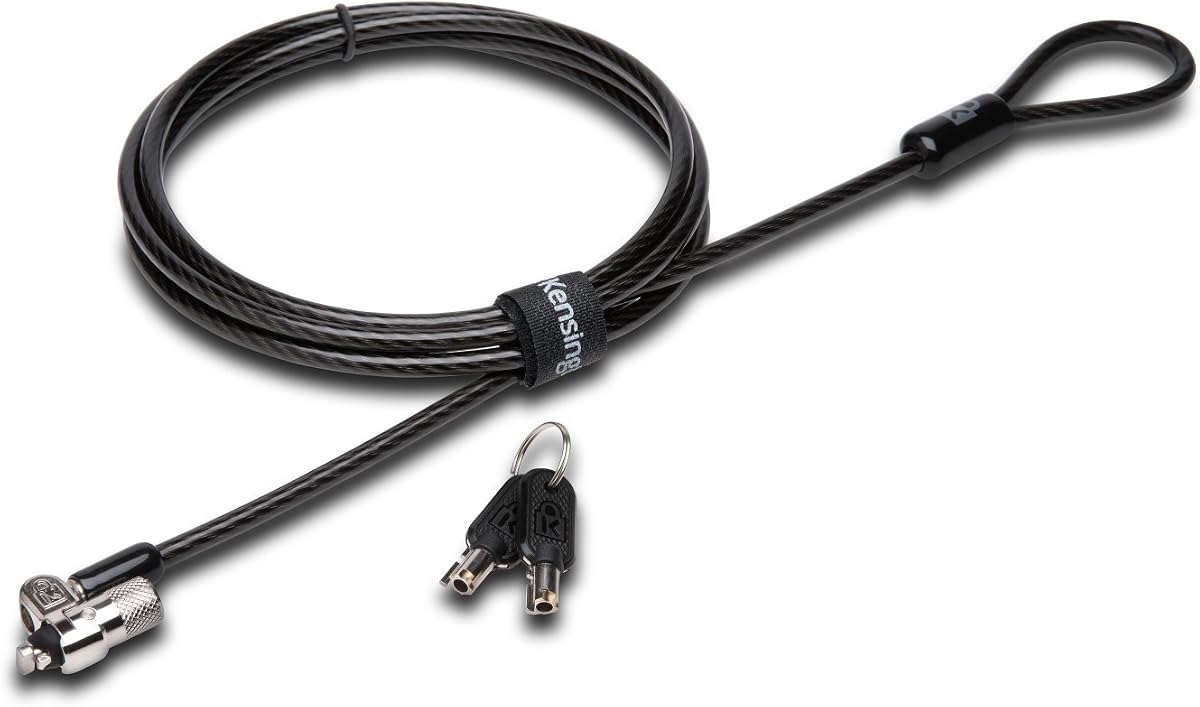


The Kensington Combination Cable T-Bar Standard Lock, model K64673AM, is a straightforward security solution for devices with a standard Kensington-sized slot. It carries a 4.4 rating and combines a resettable four-wheel combination with a six-foot carbon steel cable. That combination of keyless operation and broad device support makes it a practical choice for offices, shared workspaces, and anyone who does not want to manage a physical key.
We may earn a commission when you buy through this link, at no additional cost to you.
The four-wheel code provides 10,000 possible combinations, allowing the user to set a code that can be changed when needed. A push-button mechanism supports one-handed attachment, which can be valuable in a café or library where the lock must be connected quickly. The cut-resistant carbon steel cable gives the user enough reach to loop around a desk, table, or another fixed structure while providing a useful degree of movement for the connected device.
Compatibility is the main limitation. The lock is intended for standard Kensington-style slots found on many HP, Lenovo, Acer, Asus, and other laptops, as well as compatible desktops, monitors, docking stations, projectors, and hard drives. It does not fit Dell or Alienware wedge-style slots, and it may not work with newer Dell laptops and tablets that use the Noble slot. Buyers should also confirm that the device actually has a security slot before relying on an alternative attachment method.
This is an attractive recommendation for users of standard-slot devices who value keyless convenience and do not need one lock to support several slot formats. The combination is easy to operate, the cable is long enough for normal anchoring, and the lock avoids the overhead of key management. For compatible hardware, it delivers a balanced and economical way to deter opportunistic theft.
The resettable four-wheel code eliminates the need to carry, store, or replace a key. Once the code is set, attaching the lock is designed to be quick enough for routine use in a shared office or public space.
The T-Bar head is intended for the standard Kensington slot found on a broad range of laptops and other electronics. Its six-foot carbon steel cable and plastic sheathing support both theft deterrence and practical tethering around a fixed anchor.
We may earn a commission when you buy through this link, at no additional cost to you.
The Universal Laptop Security Lock offers a 4.1 rating and tackles one of the most common gaps in conventional laptop security: devices without a dedicated Kensington-style slot. Rather than inserting a lock head into the computer, it uses an anchor adapter fitted into a 3.5mm headphone or auxiliary port. The adapter is then secured with a screw and connected to the combination lock and cable.
We may earn a commission when you buy through this link, at no additional cost to you.
The product is described as compatible with MacBook, Surface, Dell, Lenovo, and other major laptop, tablet, and notebook brands that have a compatible audio port. Its 1.7-meter cut-resistant steel cable offers substantial reach for tethering to a desk, table, or fixed structure. A resettable four-digit lock provides 10,000 possible combinations, while a flick-switch mechanism is intended to make locking and unlocking fast.
The audio-port approach is more versatile than a standard-slot lock, but it is not universally compatible with every modern device. Some newer laptops and tablets have removed the round headphone jack, and the user must be able to use that port without interrupting essential audio or charging functions. The adapter is installed in seconds according to the product description, but careful setup is important because the screw tightens against the port.
This lock is most useful for someone who uses several devices or owns hardware that lacks a standard security slot. It is a compelling option for offices, cafés, schools, showrooms, and retail counters where a broad range of computers may need temporary tethering. It is less suitable when the device lacks a 3.5mm port or when the port must remain completely unobstructed for docked audio equipment.
The included anchor adapter turns a compatible audio port into a locking point. This approach allows the cable to secure devices that cannot accept a standard Kensington T-Bar or nano-sized lock head.
With a 1.7-meter cable and a keyless combination mechanism, the system can move between desks, tables, and fixed points. It is also marketed for tablets, smartphones, notebooks, and display equipment that have compatible ports.
We may earn a commission when you buy through this link, at no additional cost to you.
The Kensington T-Bar Standard Keyed Lock, model K65035AM, has a 4.5 rating and is designed for laptops and other devices that use a standard Kensington security slot. It combines a keyed tubular mechanism with a six-foot carbon steel cable and plastic sheath. The smaller pivoting lock head is intended to fit securely without interfering with access to nearby ports.
We may earn a commission when you buy through this link, at no additional cost to you.
Hidden Pin technology is used to resist picking, while the special hinge is designed to eliminate awkward cable angles. The lock can secure a wide range of equipment, including laptops, desktops, TVs, monitors, hard drives, docking stations, and projectors. Its keyed format is particularly relevant in managed business environments where access can be controlled by issuing a key to authorized staff.
Device compatibility remains the decisive issue. The lock does not support newer Dell systems that use a wedge lock slot, and some HP models, including certain EliteBook X2 tablets and Chromebooks, use the smaller NanoSaver slot instead. Kensington provides separate model references for those formats. A buyer should check the computer's technical specifications rather than assuming that every notebook accepts a standard T-Bar.
For a business or individual with a compatible standard-slot device, this is a durable and established approach to physical security. The key-based system avoids entering a code, and the compact head and sheathed cable should suit regular tethering around a desk or table. It is an especially sensible option when multiple authorized users already understand the organization's key-control process.
The keyed tubular mechanism allows a business to retain control over who can release the cable. Anti-pick features add resistance to casual tampering while keeping the basic operation familiar.
The compact 10mm pivoting head is intended to accommodate thin devices while preserving access around the security slot. The hinge allows the cable to sit at a more natural angle and rotate as the device is repositioned.
We may earn a commission when you buy through this link, at no additional cost to you.
The Kensington NanoSaver Keyed Laptop Lock, model K64444WW, offers a 4.4 rating and a compact solution for selected HP and Lenovo laptops with a nano-sized security slot. The small format is important because most laptops use a standard T-Bar slot, while some ultraportable devices have a noticeably smaller opening. The lock provides a six-foot carbon steel cable with a plastic sheath while preserving a relatively small footprint.
We may earn a commission when you buy through this link, at no additional cost to you.
The pivoting and rotating cable head supports one-handed operation and allows the device to be positioned more freely. Rather than relying on a large anchor, the low-profile head is intended for slim notebooks where a standard lock could be inconvenient. Kensington also provides a Register & Retrieve program, allowing owners to register the key information and request replacement assistance if the key is lost or stolen.
Its scope is deliberately narrow. The product is for select HP and Lenovo laptops with the appropriate nano slot, not for standard Kensington devices, Dell wedge slots, or Noble-style openings. The buyer must inspect the device or check its specifications to determine the slot size. A visually small opening is not always enough to confirm compatibility, so using the manufacturer's lock selector is the safer approach.
This recommendation is strongest for a compatible thin HP or Lenovo notebook that needs a discreet keyed tether. It preserves the everyday usability of the device, offers a long enough cable for normal anchoring, and provides a more organized answer to lost-key concerns. If the device has a standard slot instead, the Kensington T-Bar or Universal 3-in-1 model will be a more appropriate purchase.
The nano-sized head addresses a specific and common problem on ultraportable laptops. It provides a dedicated lock connection where a standard T-Bar head would not be suitable.
The Register & Retrieve program provides a structured way to store the relevant key information. This can be valuable in offices where a lost key would otherwise delay replacement and disrupt device access.
We may earn a commission when you buy through this link, at no additional cost to you.
The Kensington Combination Laptop Lock for Nano Size Security Slot, model K60214WW, has a 4.3 rating and brings keyless operation to compatible slim laptops. It uses a resettable four-wheel code with 10,000 possible combinations, attached to a five-foot carbon steel cable. The slim lock head is designed to let a thin device lie flat and stable while it is secured.
We may earn a commission when you buy through this link, at no additional cost to you.
A pivoting head and rotating anchor improve positioning around the security slot. The head can rotate 360 degrees, while the cable can rotate up to 90 degrees, helping keep nearby ports accessible. An anti-shearing plastic sleeve is incorporated into the cable to protect surfaces from damage during normal use. These details distinguish it from simpler straight-cable designs.
The main compromise is device support. This is a nano-slot product, not a general-purpose lock for standard Kensington openings. Buyers with HP, Lenovo, or other compatible thin devices should verify the exact slot dimensions, while owners of a standard-slot notebook will need a different model. The five-foot cable is also shorter than the six-foot or longer cables offered by many alternatives.
For the right device, this is a convenient and well-considered lock. It avoids keys, has a user-friendly combination interface, and offers enough articulation to work around a constrained port layout. It is well suited to individual professionals, students, and shared workspaces that need a compact tether for a compatible nano-slot laptop rather than a universal multi-device system.
A resettable combination removes key storage from the routine. The four wheels provide 10,000 possible codes while keeping the lock body small enough for thin laptops.
The rotating lock tip and pivoting cable reduce the awkward angles that can block adjacent ports. This makes the device easier to use while it remains connected to an anchor.
We may earn a commission when you buy through this link, at no additional cost to you.
The Kensington N17 Dell Laptop Computer Lock, model K68008WW, is a 4.3-rated solution for Dell and Alienware devices that use the wedge-type security slot. Its combination mechanism provides 10,000 possible four-wheel codes, with a push-button design that supports one-handed attachment. A six-foot cut-resistant carbon steel cable anchors to a desk, table, or another fixed structure.
We may earn a commission when you buy through this link, at no additional cost to you.
The defining feature is the specialized lock engagement. Rather than trying to make a standard T-Bar fit a differently shaped slot, the N17 is designed specifically for the hardware format used by the compatible Dell and Alienware laptops it supports. This focused design can provide a more secure and stable connection than using an adapter intended to bridge incompatible openings.
Users should still identify the slot before buying. Dell has used multiple security-slot formats, and the product information for other standard-slot Kensington locks explicitly notes that newer Dell systems may use the Noble slot. The N17 should therefore be selected only after confirming that the laptop has the wedge slot that this model is designed to engage.
For a compatible Dell or Alienware notebook, the N17 is a focused, convenient choice. It combines keyless operation with a long cable and a connection purpose-built for the relevant slot. It is especially useful for managed Dell-heavy offices, home offices with a matching device, and public displays where the laptop should remain tethered without requiring a physical key.
The lock head is designed around Dell's wedge-style slot, creating a more appropriate interface than a universal or standard-slot alternative. The connection is intended to resist pulling and everyday tampering.
The push-button combination system can be operated with one hand. Because the code is resettable, the user can establish a memorable combination and alter it when needed.
We may earn a commission when you buy through this link, at no additional cost to you.
The Multi-Device Cable Lock has a 4.3 rating and includes two ways to connect a device. A standard lock head fits many laptops with a conventional security slot, while the included anchor plate provides an option for tablets, smartphones, and laptops that lack one. The product is marketed for MacBook, iPad, Microsoft Surface, Kindle, Samsung, Android tablets, phones, monitors, and projectors.
We may earn a commission when you buy through this link, at no additional cost to you.
For a device with a security slot, the user inserts the lock head and loops the cable around a fixed object. For a device without a slot, the adhesive-backed anchor plate is attached to a hard surface and the cable is secured through it. The stainless steel lock head rotates through 360 degrees, while the 6.5-foot cut-resistant twisted steel cable has a PVC coating for handling and surface protection.
The adhesive method requires careful thought. The listing warns that certain models require the I3C adhesive security plate, so compatibility should be confirmed before purchase. Adhesive installation may also be difficult to reverse, and the strength of the bond varies with the device's surface material, cleanliness, and finish. Users should avoid placing the anchor where removal could damage a coating or display.
Despite those caveats, this is a useful kit for a mixed collection of electronics. It provides dedicated slotted-laptop protection and a path for devices without slots, all in one package. The keyed head and generous cable make it suitable for cafés, offices, showrooms, and temporary displays where the ability to connect different equipment is more important than maintaining a single standardized lock system.
The standard head serves laptops with a conventional security slot, while the anchor plate adds coverage for compatible devices that do not have one. This makes the kit useful for mixed hardware collections.
An adhesive anchor can provide a temporary locking point, but its security depends on the surface and the bond. Users should confirm the included plate is appropriate for the device and avoid surfaces where removal could cause damage.
We may earn a commission when you buy through this link, at no additional cost to you.
The AboveTEK MacBook and Surface Locking Station combines a laptop cradle, keyed lock, and 2-meter cable into a desktop-oriented security system. It carries a 4.5 rating and is designed for 12-to-16-inch laptops, including MacBook, MacBook Air, Surface Pro, and Chromebook models. Adjustable arms accommodate device widths from 11.1 to 15.7 inches, giving it broader coverage than a single-slot cable lock.
We may earn a commission when you buy through this link, at no additional cost to you.
The physical locking station does more than resist theft. Its pivot hinge supports viewing angles from 45 to 125 degrees, allowing the screen to remain at a comfortable position while the laptop is secured. A non-slip surface helps maintain stability, and the listed heat-dissipating construction is intended to reduce heat buildup during extended use. Dual lock clips measuring 6.8mm and 9.8mm provide accommodation for different device thicknesses.
Constructed from zinc alloy and ABS, the station weighs 0.94 pounds, or 427 grams, and folds for portability. The included long cable can be attached to a fixed structure, and desk mounting options are also provided. This makes it suitable for an office, shared study room, library, or retail display where the laptop is expected to remain stationary for extended periods.
Its advantages come with a bulk trade-off. A full locking station is less discreet and less convenient for frequent travel than a compact cable lock. It is also a more elaborate solution than necessary if the only goal is to prevent a quick grab-and-go theft. For a semi-permanent desk setup, however, it offers an excellent combination of restraint, adjustability, and everyday usability.
The hinge lets the user adjust the display angle while the computer remains connected. This reduces the chance that a security solution will make a laptop difficult to use during a long study or work session.
Adjustable arms and two clip sizes allow the station to accommodate many laptop dimensions and thicknesses. The folding, relatively lightweight design also makes it easier to move between work locations when needed.
We may earn a commission when you buy through this link, at no additional cost to you.
The AboveTEK Multi-Device Anchor Kit has a 4.4 rating and is intended for tablets, smartphones, laptops, notebooks, and other mobile electronics that may not have a conventional security slot. The set includes two sets of adhesive stickers and anchor plates, two keys, and a six-foot cut-resistant galvanized steel cable. This makes it easier to secure more than one device or to keep a spare anchor available.
We may earn a commission when you buy through this link, at no additional cost to you.
Industrial-grade 3M adhesive is used to secure the plates to flat surfaces. The product information states that the adhesive is strong enough to resist attempts to pull a device away and can also accommodate larger notebooks as a cable-lock anchor. The stainless steel lock is designed to resist damage and operate smoothly, while the steel cable allows some device movement while remaining tethered.
The main consideration is permanence. Adhesive security plates may be difficult or impossible to remove without residue, and the bond can be affected by coatings, textured finishes, heat, dust, or an improperly cleaned surface. Users should select a stable, smooth area and follow the mounting instructions carefully. The system should not be assumed to provide the same connection as a purpose-built security-slot lock.
For cafés, libraries, retail counters, and temporary displays, this kit offers a practical way to protect portable electronics. It is especially useful for an iPad, phone, or laptop without the right built-in slot. The two included anchor sets and keyed operation make it straightforward to protect multiple small devices while keeping one key responsible for access.
The adhesive anchor creates a physical connection point on compatible flat surfaces. That makes the system useful for popular mobile devices designed without a standard security slot.
Two anchor sets, two keys, and a long cut-resistant cable provide more flexibility than a single basic lock. The included components support temporary protection for several devices or easier replacement of a damaged plate.
We may earn a commission when you buy through this link, at no additional cost to you.
The Kensington Universal 3-in-1 Keyed Laptop Locking Cable, model K62318WW, carries a 4.7 rating and provides the broadest slot coverage in this guide. It fits standard T-Bar, nano-sized, and wedge-shaped security slots, allowing one cable to cover many laptop brands and generations. Interchangeable tips make it a strong choice for users who own several devices or work with mixed hardware.
We may earn a commission when you buy through this link, at no additional cost to you.
The common five-millimeter keying system means users need to manage only one key format for the included tips. A smaller key opening is intended to resist picking, while patented Hidden Pin technology adds further tamper resistance. The special pivot-and-rotate hinge supports flexible movement and easy key insertion, and a tether keeps unused lock tips attached so they are less likely to be misplaced.
The cable is 1.8 meters, or six feet, long and has a plastic sheath intended to provide cut and theft resistance. Kensington also offers a Register & Retrieve online program for key registration and replacement assistance. The product is described as verified and tested against rigorous standards for strength, physical endurance, and mechanical resilience, which supports its suitability for managed office use.
This is the strongest all-around recommendation in the guide because it addresses the compatibility problem that affects nearly every conventional security lock. It is particularly useful for organizations with standard, nano, and wedge-slot devices in circulation. The trade-off is that a keyed system requires responsible key storage, but the benefit of owning one adaptable lock generally outweighs the inconvenience of maintaining several incompatible models.
The interchangeable tips cover standard, nano, and wedge formats without relying on an adapter. This substantially reduces the need to identify and maintain a separate lock for every device in a mixed fleet.
A shared five-millimeter keying system simplifies access in offices and other managed environments. Register & Retrieve adds a recovery route if a key is lost or stolen, while Hidden Pin technology helps resist picking attempts.
We may earn a commission when you buy through this link, at no additional cost to you.
Choosing a laptop security lock starts with the device and ends with the environment. Slot style, key management, cable reach, anchoring method, and daily convenience determine whether the lock will be used consistently and provide the intended level of protection.
The most important compatibility check is the shape and size of the laptop's built-in security slot. Standard Kensington T-Bar openings, nano-sized openings, Dell wedge slots, and newer Noble-style formats are not interchangeable. Some laptops have no security slot at all, while docking stations and monitors may use a standard opening even when the paired notebook does not. Check the manufacturer's specifications or inspect the device carefully, and look for the slot format required by the lock listing before ordering.
Keyed locks offer familiar access and allow administrators to issue or revoke physical keys, but the key must be stored responsibly and may eventually be lost. Combination locks remove the need to carry a key and can be convenient for an individual, student, or small team. Consider how many people need access, whether codes can be shared safely, and whether the organization already has a key-management process. A resettable combination is generally more flexible, while a standardized keyed system can be easier to administer across many devices.
Cable length determines how easily the device can be secured to a desk, table, pedestal, or other fixed structure. A five-foot cable is often sufficient for a compact workstation, while six feet offers more placement flexibility, and the two-meter locking station cable can reach farther across a desk. Longer is not automatically better: extra cable can create excess slack, snag nearby objects, or make the lock harder to route neatly. Consider the dimensions of the intended workspace and the distance from the device's slot to the anchor point.
The fixed point must be difficult to remove or move. A desk secured to the floor, a heavy table, a fixed pedestal, or a purpose-built locking station generally provides a stronger foundation than a lightweight object that can be carried away. Adhesive anchors depend on surface condition and should be installed on clean, stable areas. For slot-based locks, inspect the device's slot and lock head for a positive engagement. The best cable has little value if the other end can simply be lifted off the desk.
A secure lock should not make the laptop frustrating to use. Some lock heads block adjacent ports, while products with pivoting or rotating joints provide a better viewing and access angle. This matters most for thin laptops with tightly spaced connectors. Check the head dimensions, cable pivot, and anchor orientation in the product images. A compact nano lock is useful on ultraportables, while a standard T-Bar or multi-tip lock may have a larger footprint that should be evaluated against the device's port layout.
An audio-port adapter can make a slotless laptop compatible with a cable lock, but it depends on the presence of a usable 3.5mm port and may prevent docking or audio accessories from being connected. Adhesive plates can support devices with no security opening, yet they may leave residue, damage sensitive finishes, or perform differently depending on the surface. These methods can be useful for temporary displays, but a built-in slot connection generally offers a cleaner and more secure result. Do not treat a universal claim as proof that every model is supported.
A home office with one known laptop does not need the same flexibility as a school, retail counter, or shared corporate space with many devices. Individual users may prioritize a compact keyless lock, while organizations may value standardized keys, online key registration, and durable cable construction. For a semi-permanent desk, a foldable locking station can improve both restraint and ergonomics. For mobile work, a compact cable that fits in a bag and serves several slot sizes is usually more appropriate than a larger permanent cradle.
Cut-resistant steel cabling, robust lock heads, corrosion testing, and mechanical-endurance testing are useful indicators that a lock is built for repeated use. Warranty periods, technical support, and key-registration services can also matter when a lock is part of a managed deployment. These features do not make a cable impossible to defeat, but they improve confidence in normal day-to-day durability. Inspect the product description for tested standards, supported materials, and any restrictions that apply to the environment where the lock will be used.
Begin by identifying the correct security slot and the intended fixed anchor. For a standard, nano, or wedge lock, insert the matching head fully and confirm that it sits squarely in the opening. For an audio-port adapter, connect the adapter to the compatible 3.5mm port and tighten the screw firmly without forcing the port. For an adhesive anchor, clean the selected surface, position the plate carefully, and allow the adhesive to establish its bond before attaching the cable.
Route the cable around a stable object and keep enough slack for the device to be used at a comfortable angle without allowing the cable to slide off the anchor. Pull the cable firmly once to test the connection, then check that the lock head is fully seated. Do not attach the cable to something that can be lifted, rolled, or carried away easily, and avoid leaving a length of cable where it can create a trip or snag hazard.
To care for the lock, wipe the head and cable with a soft, dry cloth and keep dirt and adhesive residue away from the moving parts. Inspect the cable for cuts, damaged sheathing, or unusual flexing, and check the head for looseness. Combination users should remember their code, while keyed users should store keys securely and use the manufacturer's registration service when available. If an adhesive plate must be removed, follow the supplied removal guidance and avoid pulling sharply against the device.
The most common type is the standard Kensington T-Bar slot, but some laptops use a smaller nano opening, a Dell wedge slot, or a newer Noble-style format. Check the manufacturer specifications, compare the opening with the lock head, and verify the exact compatibility notes before ordering. A broad category such as laptop compatible is not enough to guarantee a precise fit.
It depends on the model and the method of attachment. Recent MacBook models generally do not provide a traditional Kensington security slot, so a lock with a compatible audio-port adapter may be the relevant option. Check the port layout and docking needs carefully because the adapter occupies the audio connection. Products using adhesive anchors offer another approach for some setups.
Combination locks are usually more convenient for individuals because no key must be carried or stored, while keyed locks can be easier to manage in offices that need to control access to multiple devices. Both have trade-offs. Codes must be remembered and shared carefully, whereas keys can be lost, copied, or misplaced.
No physical cable lock can guarantee that a device will remain impossible to remove. Its purpose is to deter opportunistic theft and make a quick grab much harder by requiring time, tools, and a visible struggle. A properly fitted lock connected to a substantial fixed anchor provides substantially better protection than a loose cable placed around an easy-to-move object.
A keyed model with a standardized key system and online key-registration support is often easiest to administer across several computers. A multi-slot design can reduce the number of different locks required, while a resettable combination can work well for a small team with a clearly shared code. The best choice depends on the office's device mix and access-control policy.
Yes, through an audio-port adapter or an adhesive anchor plate, depending on the device's design. An adapter is generally preferable when the laptop has a compatible 3.5mm port and can operate without it. An adhesive plate may provide a temporary connection point but can be harder to remove and may be limited by the finish and condition of the surface.
Measure the distance from the laptop's security slot to the fixed point where the cable will be secured. A five-foot cable may suit a compact workstation, while six feet is a versatile general-purpose length. A longer two-meter cable is useful for a larger desk or locking station, but extra slack should be managed so it does not snag or pull the device off balance.
Use a heavy or permanently fixed object such as a floor-anchored desk, solid table, fixed pedestal, or a locking station designed for the purpose. The anchor should not be easily portable, and the cable should be wrapped in a way that resists sliding off. A lightweight chair, loose display stand, or easily lifted tabletop is not a strong security anchor.
The Kensington Universal 3-in-1 Keyed Laptop Lock stands out for the widest compatibility, covering standard, nano, and wedge-shaped slots with one system. The AboveTEK MacBook and Surface Locking Station is the premium choice for a stationary desk because it combines a broad laptop cradle, a long cable, and adjustable viewing angles. For a compatible Dell or Alienware computer, the Kensington N17 provides focused wedge-slot protection with convenient keyless operation.
Before choosing, verify the slot or attachment method, the intended fixed anchor, and the need to preserve port access. Standard-slot users can select a compact Kensington combination or keyed model, while owners of nano devices should choose a purpose-built nano lock. Mixed-device users should prioritize a multi-slot or adapter solution, and anyone needing a permanent workstation should consider a locking station rather than a simple cable.
The best laptop security lock is the one that fits correctly, connects to a solid anchor, and is convenient enough to engage every time the device is left unattended. Review the current listing, compatibility notes, included components, warranty, and available support before purchasing. Product prices and availability can change, so confirm the current offer and confirm that the design still matches the device at the time of purchase.