
TP-Link TL-SG105
4.7Editor score
Five Gigabit Ethernet ports
Automatic speed negotiation
Fanless metal construction
No software installation required
Internet Splitter guide comparing 10 wired models for port expansion, shared bandwidth, compatibility, setup ease, and everyday networking needs.
An Internet Splitter expands a limited wired network connection into multiple RJ45 connections, making it useful when a router or wall outlet does not offer enough Ethernet ports. The right model depends on port count, total bandwidth, cable standards, construction, power requirements, and the types of devices you need to connect.
We compared all ten products using their stated specifications and customer ratings, focusing on supported output counts, advertised transfer rates, cable compatibility, included accessories, physical design, and ease of installation. The list covers compact one-to-two adapters, one-to-three models, one-to-four splitters, and a traditional five-port unmanaged network switch.
Each review explains where the splitter is strongest, where shared bandwidth creates limitations, and which users may benefit most. Ratings and product details reflect the supplied listings, while availability and pricing can change, so readers should confirm current specifications and offers before purchasing.
4.7Editor score

4.6Editor score

4.4Editor score
The comparison below organizes each model by its most decision-relevant characteristics: expansion ratio, advertised network speed, wired connection count, compatibility, and physical design.



The TP-Link Ethernet Splitter 1 to 2 is a focused solution for turning one active Gigabit Ethernet connection into two usable network ports. Its supplied rating is 4.6, and the combination of two simultaneous outputs, a 1000Mbps total-capacity claim, broad cable compatibility, and included accessories makes it one of the most complete options in this roundup.
We may earn a commission when you buy through this link, at no additional cost to you.
This model is especially useful when a router or wall-mounted jack has only one available Ethernet connection but two devices need wired access. It supports Cat5, Cat5e, Cat6, Cat7, and Cat8 cables, works with routers, switches, hubs, computers, and other Ethernet-enabled equipment, and requires no drivers or configuration. The package includes the splitter, a USB-C power cable, and a Cat5e Ethernet cable.
Its most important limitation is that the two connections share the incoming link rather than receiving separate 1000Mbps channels. Actual throughput also depends on the source connection, connected equipment, network conditions, and traffic demand. Users expecting two isolated networks should understand that this device expands access to the same network; it does not create two independent broadband services.
This is an excellent choice for a desktop, entertainment area, or home office where a second wired device is needed without pulling another cable back to the router. It is particularly attractive when simple installation and a compact footprint matter. For most one-to-two expansion needs, it offers the strongest balance of clarity, versatility, and included hardware.
The splitter turns a single upstream Ethernet port into two active connections with no software installation. It is a practical way to connect two nearby devices when infrastructure wiring cannot easily be changed.
Its lightweight aluminum housing can sit beside a router, behind a television, or on a crowded desk. The small footprint also makes it easier to carry for temporary setups in offices, hotels, or travel locations.
We may earn a commission when you buy through this link, at no additional cost to you.
The TP-Link TL-SG105 is a five-port Gigabit unmanaged switch rather than a simple one-to-two cable adapter, and that distinction makes it one of the strongest choices for expanding a home or office network. It carries a supplied rating of 4.7, the highest in the group, and combines five 10/100/1000Mbps RJ45 ports with plug-and-play operation.
We may earn a commission when you buy through this link, at no additional cost to you.
Automatic Negotiation and Auto MDI/MDIX simplify mixed-device networks, while IEEE 802.3X flow control supports steadier data transfer. Port-based 802.1p and DSCP quality-of-service features can prioritize sensitive traffic such as voice or video, and IGMP Snooping assists with managed multicast delivery. The fanless metal enclosure also keeps operation quiet.
Because it is a network switch, it needs an upstream Ethernet connection from a router or modem. It does not duplicate a cable signal passively, and it cannot operate as a stand-alone internet provider. Nevertheless, for users who need more than two wired endpoints, it offers more flexibility than a compact splitter and a cleaner topology than chaining several adapters.
Choose the TL-SG105 when you want a dependable, unmanaged expansion box for computers, game consoles, televisions, access points, or other wired equipment. It is an attractive budget-oriented solution for users who prefer automatic per-port network behavior over the shared-bandwidth model of the one-to-two and one-to-four splitters.
Auto Negotiation and Auto MDI/MDIX reduce cable-direction and speed-configuration concerns. The switch can accommodate varied Ethernet devices without requiring manual port configuration.
Five ports allow several devices to share a single upstream route while reducing the number of small adapters in the setup. This makes it suitable for permanent installations behind furniture or near an entertainment unit.
We may earn a commission when you buy through this link, at no additional cost to you.
The LIEZHUA Gigabit Ethernet Splitter 1 to 2 is a compact powered adapter designed to give two devices access through one Ethernet port. It has a supplied rating of 4.3 and stands out for its aluminum alloy casing, gold-plated pins, PCB construction, and six LEDs that help reveal connection activity.
We may earn a commission when you buy through this link, at no additional cost to you.
The splitter supports up to 1000Mbps and works with Cat5, Cat5e, Cat6, Cat7, and Cat8 cables. Its listed compatibility includes ADSL equipment, hubs, switches, televisions, set-top boxes, routers, wireless devices, and computers. Both female ports can be used at the same time, making it a practical option for pairing two wired endpoints near a single incoming line.
Power is mandatory, and the supplied listing notes that the included USB cable should connect to a suitable 5V power source. An Ethernet cable is not included, so buyers should have the necessary cabling ready. As with other one-to-two models, the two connected devices share the available upstream bandwidth and are not isolated from one another.
This splitter is well suited to users who value a metal enclosure, clear port-status lights, and broad device compatibility over a larger five-port design. It is a good fit for a fixed installation beside a router or network cabinet where two devices need wired access and visual confirmation of active connections is useful.
Six LED indicators make it easier to identify which connected device is active or troubleshooting a cable and port. The status lights are especially useful in installations where the adapter is placed behind furniture.
The aluminum alloy shell supports heat dissipation and gives the adapter a durable feel. Integrated mechanical soldering and gold-plated RJ45 pins are intended to maintain reliable signal contact.
We may earn a commission when you buy through this link, at no additional cost to you.
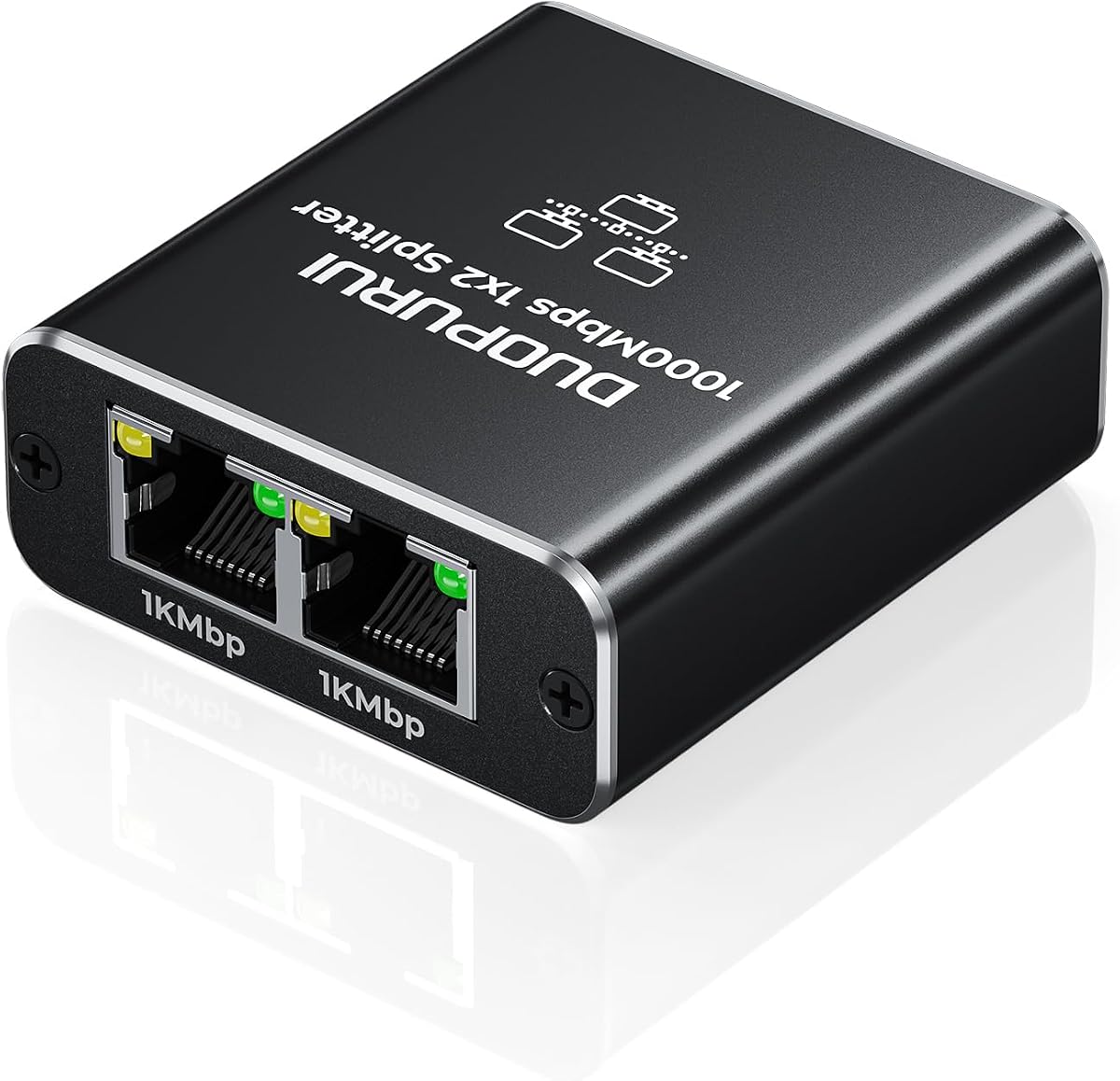
The DUOPURUI Ethernet Splitter 1 to 2 is a powered two-output adapter aimed at straightforward home and office expansion. Its supplied rating is 4.4, and the listing emphasizes simultaneous connectivity for two devices, 1000Mbps-class performance, plug-and-play use, and compatibility with Cat5 through Cat8 Ethernet cables.
We may earn a commission when you buy through this link, at no additional cost to you.
Both RJ45 outputs can carry data at the same time, but the incoming network capacity is divided between them. The device also works backward with 10Mbps and 100Mbps networks, making it more adaptable than equipment designed only for newer Gigabit installations. Supported endpoints include routers, switches, computers, set-top boxes, game consoles, smart televisions, IP cameras, and wireless devices.
A 3.3-foot USB power cable is included, but the product should be connected to a dependable USB power adapter for stable operation. The listing specifically recommends a wall charger rather than a computer USB port, which is sensible advice for a device expected to remain active. The device cannot function without power.
This is a practical recommendation for someone who needs two Ethernet connections from one upstream port and does not want to install a larger switch. The trade-off is that the adapter consumes a power source and shares bandwidth, but it remains a simple way to avoid additional permanent cabling in a convenient location.
The splitter supports common household and office equipment, including game consoles, smart TVs, IP cameras, and computers. This broad compatibility makes it useful for mixed-device spaces rather than only computer desks.
Connecting the USB lead to a suitable wall adapter provides a steadier operating condition than relying on a device's USB port. Stable power is particularly relevant when both outputs are carrying continuous traffic.
We may earn a commission when you buy through this link, at no additional cost to you.
The LIEZHUA Ethernet Splitter 1 to 4 is designed to connect four devices through one Ethernet port, making it the most substantial compact splitter in this selection. It has a supplied rating of 4.4 and advertises Gigabit performance across a wide range of Cat5, Cat5e, Cat6, Cat7, and Cat8 cable installations.
We may earn a commission when you buy through this link, at no additional cost to you.
Four simultaneous connections are useful in a home office, media area, or shared workspace where several devices need network access but running four cables to the router would be inconvenient. The package includes USB power and LAN cables, according to the supplied product information, so the basic installation can be completed without sourcing a network cable separately.
All four users share the incoming 1000Mbps connection, so heavy simultaneous use can create contention. The splitter is an access-expansion device, not a guarantee that every attached device will receive full Gigabit speed. It also requires power, and the product will not operate if the USB supply is disconnected.
This is a strong choice for users who specifically need four outputs and want a portable solution that can travel between locations. It is more focused than the TP-Link TL-SG105 five-port switch and carries fewer port-management features, but it may be a better fit when compactness and a direct one-to-four layout are the priority.
The four-output design reduces the need for a large desktop switch in smaller spaces. It can consolidate nearby wired endpoints while keeping the upstream connection organized.
Included power and LAN cables simplify the first setup. Users still need suitable Ethernet runs for each of the four connected devices, but the central connection can be established quickly.
We may earn a commission when you buy through this link, at no additional cost to you.
The Internet Splitter 1 in 4 Out is a straightforward powered adapter for expanding one wired connection into four. Its supplied rating is 4.4, and its defining characteristics are four RJ45 outputs, support for up to 1000Mbps, compatibility with Cat5 through Cat8 cables, and a plug-and-play installation process.
We may earn a commission when you buy through this link, at no additional cost to you.
The included USB-C power cable is a notable convenience because the product does not require a separate external power adapter for normal use. After connecting the incoming Ethernet cable, the power lead, and the desired device cables, users can establish network access without installing drivers or navigating configuration menus.
The same shared-bandwidth principle applies to every multi-output splitter: the group receives the capacity of one incoming link rather than four separate connections. A gigabit upstream service and capable devices are necessary to approach the advertised maximum, while actual results vary with the network and traffic. Continuous power is also required.
This model is best for straightforward four-device expansion where simplicity matters more than switch features. It may suit a temporary office, entertainment center, or travel setup, provided the user understands that the devices will share a single network path.
No configuration is required, making the splitter approachable for users who want immediate expansion. The process is based entirely on connecting Ethernet and power cables.
Compatibility with Cat5 through Cat8 allows the adapter to work with both installed older wiring and newer high-performance runs. Users should still verify that their cables and connected devices meet the relevant network standard.
We may earn a commission when you buy through this link, at no additional cost to you.
The Ethernet Splitter 1 to 2 Out with Cat 6 Ethernet Cable is a compact adapter that expands one wired connection into two simultaneous outputs. Its supplied rating is 4.3, and the listing highlights a maximum transfer rate of 1000Mbps, support for distances up to 100 meters, an included Cat6 cable, and LED indicators for port status.
We may earn a commission when you buy through this link, at no additional cost to you.
The product's upgraded transmission chip is intended to support stable Gigabit connections without noticeable interference between the two output groups. It is compatible with Cat8, Cat7, Cat6, Cat5, and Cat5e cables and can be used with set-top boxes, PCs, switches, routers, televisions, and other RJ45 equipment.
Actual transfer rates can vary according to the devices and network path. As with other powered or active splitters, users should confirm the correct power arrangement in the current listing and instructions because the supplied information emphasizes an included cable and plug-and-play installation. The lightweight plastic housing also provides less physical protection than a metal model.
This adapter is most useful for a simple two-device extension where included cabling and visible port status are priorities. The one-to-four designs offer more expansion, while the TP-Link five-port switch offers more per-port network management, but this compact unit covers the common one-to-two use case neatly.
The included Cat6 Ethernet cable helps users begin the setup without purchasing a network lead immediately. Additional cables may still be needed to reach the second connected device.
LED indicators show the operating status of each port, making it easier to identify an inactive cable or device. This simplifies troubleshooting when the adapter is not in direct view.
We may earn a commission when you buy through this link, at no additional cost to you.
The Mini Ethernet Splitter 1 to 3 fills a useful middle ground between dual-output adapters and four-port splitters. Its supplied rating is 4.5, and it supports three simultaneous device connections through one incoming Ethernet line, with an advertised transfer capacity of up to 1000Mbps across the group.
We may earn a commission when you buy through this link, at no additional cost to you.
The compact aluminum housing and included USB-C cable make the unit suitable for desks, behind televisions, in offices, and in travel bags. It supports Cat5e, Cat6, Cat7, and Cat8 cables and is listed as compatible with ADSL equipment, hubs, switches, smart TVs, set-top boxes, routers, wireless devices, and computers.
All three connected devices share the same 1000Mbps network capacity, so heavy concurrent transfers can slow individual connections. Power must be connected, and the listing advises checking modem compatibility with technical support when that configuration is contemplated. It also states that no reboot or configuration is required.
This is a good option when three wired endpoints are needed in a small area and a full switch would be excessive. It can neatly serve a game console, television, and computer, although buyers should consider whether a multi-port switch would offer more flexibility for a permanent installation.
The three-output format offers more expansion than a conventional one-to-two adapter without the footprint of a larger desktop switch. That balance suits entertainment areas and temporary workstations.
Status lights help reveal which connected device is active, reducing the time needed to isolate a cable or endpoint problem. The feature is particularly helpful when the adapter is tucked behind equipment.
We may earn a commission when you buy through this link, at no additional cost to you.
The Dockteck Ethernet Splitter 1 to 3 is a powered three-output adapter designed for locations with limited Ethernet ports. It has a supplied rating of 4.5, supports up to 1000Mbps shared across connected devices, and accepts Cat5, Cat5e, Cat6, Cat7, and Cat8 cables.
We may earn a commission when you buy through this link, at no additional cost to you.
The included USB cable supplies the power needed for operation, while the splitter requires no configuration, driver, or computer reboot. Its compatibility list includes ADSL equipment, hubs, switches, smart televisions, set-top boxes, routers, wireless devices, and computers, allowing one central unit to serve a varied group of endpoints.
The supplied product information notes that all connected devices share a total 1000Mbps network and that actual performance depends on the incoming service. The listed support for Ethernet runs up to 100 meters gives the adapter flexibility across larger homes and offices, provided the wiring and connected equipment are appropriate.
Choose this model for a compact three-device arrangement, particularly when portability and a metal enclosure are important. It is a specialized splitter rather than a fully managed switch, so users primarily seeking more ports, per-port traffic controls, or a larger permanent topology may prefer the five-port TP-Link alternative.
The lightweight housing and modest size make the adapter convenient to carry between offices, hotel rooms, and other temporary locations where only one Ethernet line is available.
The metal body supports heat dissipation during sustained network use. That design can be useful when streaming, gaming, or transferring files through multiple attached devices.
We may earn a commission when you buy through this link, at no additional cost to you.
The UGREEN 1000Mbps Ethernet Splitter 1 to 2 is a compact powered adapter with a refined space-grey design and a supplied rating of 4.5. It expands one Gigabit network connection into two outputs, supports simultaneous device connections, and is compatible with Cat5, Cat5e, Cat6, Cat7, and Cat8 cables.
We may earn a commission when you buy through this link, at no additional cost to you.
The supplied listing highlights an aluminum alloy housing, protected RJ45 sockets, gold-plated pin cores, and an integrated PCB intended to reduce crosstalk and interference. It can operate with ADSL equipment, hubs, switches, smart televisions, set-top boxes, routers, wireless devices, and computers without requiring drivers.
Maximum performance depends on the upstream network, connected devices, cable quality, and local conditions. The two outputs share the incoming connection, so one active transfer can reduce the speed available to the other device. The splitter also requires a 5V power connection, with a USB cable included for that purpose.
This is a well-suited choice for a compact two-device extension where appearance, connector construction, and broad compatibility are priorities. It has the same core shared-bandwidth limitation as the other one-to-two adapters, but its combination of metal protection, lightweight design, and five-volt power makes it particularly convenient for travel or a tidy desk setup.
Metal protection around the RJ45 sockets and gold-plated contacts support dependable repeated connections. The compact space-grey enclosure can blend neatly into a modern desk or entertainment setup.
Support for 10Mbps and 100Mbps networks means the splitter can also operate with older equipment. The actual connection rate remains limited by the slowest component in the network path.
We may earn a commission when you buy through this link, at no additional cost to you.
The most important buying factors are the number of wired devices to connect, whether shared or switched performance is acceptable, power availability, and compatibility with the existing network equipment.
Begin by counting the devices that genuinely require an Ethernet connection. A one-to-two splitter serves two endpoints, a one-to-three model supports three, and a one-to-four design handles four. If you expect frequent growth, a five-port switch may offer more room and a more conventional network layout than repeatedly chaining compact splitters.
Most powered splitters divide one incoming Ethernet connection among their outputs. A product advertising 1000Mbps may support that aggregate rate rather than providing 1000Mbps independently to every attached device. A conventional network switch can offer separate per-port links, but its entire design and price point may differ from a compact splitter.
Most of the compact adapters require USB power and will not operate when disconnected from a power source. Check whether a cable is included and whether the product expects a wall charger or can draw sufficient power from a USB port. For permanent installations, a dependable wall outlet is usually more appropriate than a computer's USB port.
A broad compatibility list is useful, but the connection between the router, splitter, and endpoints must also agree on an appropriate Ethernet standard. The products here support combinations of Cat5, Cat5e, Cat6, Cat7, and Cat8. Users should also confirm that each endpoint has a genuine RJ45 Ethernet interface and that any intermediary device supports the intended arrangement.
A splitter is most useful when the objective is to turn one accessible Ethernet line into a small number of nearby connections. A switch is generally preferable for a permanent network with several devices, independent per-port operation, traffic prioritization, or a cleaner route back to the router. The TP-Link TL-SG105 illustrates the latter approach with five Gigabit ports and automatic features.
Compact models work well behind televisions, inside cabinets, beside desks, or in travel bags. Larger metal switches are better suited to visible shelves, office furniture, or wall-mounted locations. Cable length, access to USB power, visibility of status LEDs, and room for connector strain all influence whether a small adapter will remain convenient.
Aluminum housings can aid heat dissipation and provide more protection than lightweight plastic shells. Gold-plated or nickel-plated contacts and integrated circuit boards are intended to improve signal stability. LEDs make active ports and troubleshooting easier, particularly when the unit is placed out of sight.
Some products include a USB power lead, while one also includes a Cat5e network cable and another includes a Cat6 cable. The difference can simplify initial setup, but users may still require additional Ethernet leads for each endpoint. Reviewing the package contents prevents a false assumption that all necessary cables are present.
Begin by identifying the upstream Ethernet port on the router, modem, wall outlet, or existing switch. Connect that source to the splitter's input using a suitable Ethernet cable. Keep the source connection stable, because every downstream device will depend on that single path when using a compact splitter.
Next, connect the intended devices to the available RJ45 output ports. Attach the included USB power lead to the splitter and a suitable 5V power source, following the manufacturer's guidance. Most of these products use plug-and-play operation, so allow the network devices a moment to negotiate their connection and check the LEDs for activity.
For care, keep the adapter or switch in a dry, ventilated location away from direct heat and avoid hanging heavy loads on attached cables. Periodically inspect connectors for dust, gently clean them with appropriate tools, and avoid unplugging a cable while data is actively transferring. If performance declines, test the upstream line and individual cables before changing the device.
Usually not. A compact Ethernet splitter gives multiple devices access to the same incoming network connection, and the available bandwidth is shared among them. If separate per-port links or stronger network-management options are important, a network switch is generally the more appropriate device.
A splitter is normally placed after the router or another Ethernet source, not used to create internet service independently. Compatibility can vary with modem models and network providers, so confirm that the source device provides a standard Ethernet connection and review the splitter instructions before installation.
The external power helps the splitter maintain active electronics and stable signal transmission, particularly when several outputs are in use. Most powered splitters will not work at all without a suitable 5V power connection. A wall charger is generally more stable than a computer USB port for a permanent installation.
Not necessarily. A 1000Mbps specification generally describes the maximum aggregate connection rate supported by the splitter, and connected devices may share that capacity. Actual performance also depends on the source line, cables, endpoint capabilities, network congestion, and the traffic each device is using.
A one-to-four splitter expands one upstream connection into four shared outputs and is usually compact. A five-port switch provides five physical Ethernet ports with independent per-port operation and features such as automatic negotiation or traffic prioritization. The switch is generally better for permanent networks, while the splitter is convenient for compact extension.
The reviewed products support several common cable categories, ranging from Cat5 and Cat5e through Cat6, Cat7, and Cat8 depending on the model. The splitter cannot improve the performance of a lower-quality cable, and every connected device must also support compatible Ethernet standards.
Some models are designed to support cascading, but doing so adds complexity and can reduce performance as traffic passes through multiple active devices. A properly sized switch is often cleaner for larger expansions. Check the specific splitter's instructions and use a stable upstream connection when cascading.
First confirm that the power light and individual port lights are active. Then check the upstream cable, verify that the source port is active, and test each attached device with a known-good cable. If one port works while another does not, the output cable or connected device may be the issue rather than the splitter.
The TP-Link Ethernet Splitter 1 to 2 is the strongest all-around compact choice because it combines two simultaneous outputs, broad cable compatibility, cascading support, and included power and network cables. For buyers wanting a conventional multi-port network box, the TP-Link TL-SG105 offers five Gigabit ports, automatic features, and the highest supplied rating.
When choosing, prioritize the number of real Ethernet endpoints, the acceptability of shared bandwidth, power availability, and the need for switch-style features. One-to-two adapters suit simple paired connections, one-to-three models balance compactness with flexibility, and one-to-four devices consolidate more devices around one upstream line.
Finally, confirm the exact port arrangement, included cables, power requirements, and current product specifications before ordering. Ratings, availability, and pricing can change over time, and the best Internet Splitter is the one that fits the intended network rather than simply having the highest advertised speed.