
ASRock Intel Arc A380 Challenger ITX
4.3Editor score
Compact two-slot ITX design
Six gigabytes GDDR6 memory
Single fan with silent mode
Four modern display outputs
Discover the best GPU for Small Form Factor Sff PC options, comparing size, memory, power, cooling, display support, and workloads.
A GPU for a Small Form Factor SFF PC must balance graphics performance with a very different set of physical constraints from a conventional desktop. Card length, slot thickness, cooler height, power limits, and case airflow can matter more than raw benchmark results. A capable GPU that cannot fit, cool, or run quietly in the intended chassis is not a practical recommendation.
This guide compares ten compact and SFF-oriented graphics cards for gaming, media playback, professional visualization, and everyday accelerated computing. We considered stated dimensions, memory capacity, interface generation, clock specifications, cooling designs, display outputs, power requirements, and the intended use of each card. The list includes low-profile models, single-slot professional cards, dual-fan options, and SFF-ready enthusiast models.
Each review identifies the most appropriate use for the card and the compromises a buyer should understand before ordering. The top selections represent the strongest balance of performance, physical compactness, features, and value rather than simply the fastest specifications. Product availability and pricing can change, so confirm the current listing, exact dimensions, and power requirements before purchasing.
4.3Editor score

4.7Editor score

4.8Editor score
The comparison below organizes all ten cards by their most important SFF-related characteristics, including physical design, graphics memory, interface standard, cooling approach, and output configuration.




The ASUS SFF-Ready Prime NVIDIA GeForce RTX 5070 stands out as the most convincing all-around enthusiast option in this guide. It carries a 4.7 rating and combines the NVIDIA Blackwell architecture, DLSS 4, 12GB of GDDR7 memory, and a physical design explicitly intended for small-form-factor systems. It is not the smallest card here, but its compactness is intentional and balanced against substantial graphics performance.
We may earn a commission when you buy through this link, at no additional cost to you.
Its 2.5-slot design gives the cooler room to maintain performance without adopting the footprint of a conventional large graphics card. Axial-tech fans use smaller hubs, longer blades, and a barrier ring intended to increase downward air pressure. A phase-change GPU thermal pad supports heat transfer, which is especially relevant in a densely packed enclosure where cooler airflow may be limited. The dual BIOS also provides useful flexibility between performance-oriented and more restrained operating profiles.
The main compromise is power. A card with this level of performance is better suited to a system with a competent power supply and a chassis designed to accommodate a 2.5-slot accelerator. It will not satisfy builders who require a single-slot card, and it may be excessive for a media-only or office system. Its PCIe 5.0 interface, HDMI and DisplayPort 2.1 support, and 12GB memory nevertheless make it well equipped for modern gaming and graphics workloads.
Choose this RTX 5070 when you want strong SFF gaming performance without moving to a full-size desktop chassis. It is particularly attractive for a compact gaming PC that still needs a capable cooler, modern display support, and enough graphics memory for demanding games and creative applications. For this broad use case, it is the strongest recommendation in the roundup.
Rather than relying on a generic short cooler, ASUS has designed this card specifically for compact enclosures. The 2.5-slot format provides thermal breathing room while preserving more compatibility than a full-height, multi-fan desktop card.
The 12GB GDDR7 configuration gives the card meaningful headroom for current games and graphics workloads. Its PCIe 5.0 interface and HDMI and DisplayPort 2.1 connectivity also make it a forward-looking platform for a new compact build.
We may earn a commission when you buy through this link, at no additional cost to you.
The ASRock Intel Arc A380 Challenger ITX is a practical choice for builders who want a dedicated GPU without adopting a large enthusiast card. Its 4.3 rating reflects a capable entry-level product with a clear SFF design, a factory-overclocked 2250MHz GPU, 6GB of GDDR6 memory, and a two-slot layout. It targets compact gaming, home theater, media creation, and general graphics use.
We may earn a commission when you buy through this link, at no additional cost to you.
The card measures 169.9 by 123.5 by 39.2 millimeters, making it considerably easier to accommodate than many conventional gaming accelerators. A single fan provides straightforward cooling, while the 0dB Silent feature stops that fan at low temperatures. Three DisplayPort 2.0 connections and one HDMI 2.0b port allow a multi-display configuration, with support stated for up to four displays and resolutions up to 8K.
Its limitations center on performance and power. The specification calls for a single 8-pin power connection and a recommended 500W power supply, which should be checked before building a small system around it. The A380 is also positioned below the RTX 3050 and higher RTX models for gaming. AV1 hardware encoding and XeSS support make it more useful for creation and media than its gaming tier alone might suggest.
This is the pick for a budget-conscious mini-ITX or small-form-factor system that handles esports, casual gaming, 4K media, and productivity apps. Verify chassis clearance as the manufacturer requests, and make sure the power supply has the appropriate connection. Within those limits, the A380 offers an unusually clean balance of size, features, and efficiency.
The Challenger ITX avoids the length and height associated with large gaming cards. Its stated dimensions and two-slot thickness make it a realistic option for compact cases, provided the builder confirms the available clearance before ordering.
AV1 hardware encode support can be valuable for creators working with modern video formats. Combined with four display outputs and 8K output support, it makes the card more versatile than a basic gaming-only recommendation.
We may earn a commission when you buy through this link, at no additional cost to you.
The GIGABYTE GeForce RTX 5070 WINDFORCE OC SFF is the premium selection in this roundup, backed by a 4.8 rating. It combines 12GB of 192-bit GDDR7 memory with a PCIe 5.0 interface and the NVIDIA Blackwell architecture. Unlike a standard oversized desktop version of the same GPU family, this card is explicitly identified as SFF ready.
We may earn a commission when you buy through this link, at no additional cost to you.
The WINDFORCE cooling system is designed around the challenges of a compact enclosure. Its fan design emphasizes stable, high-pressure airflow, while the card's constrained SFF format seeks to preserve useful performance without taking up the space of a broad multi-fan desktop accelerator. The 12GB memory pool is especially attractive for high-detail games, creation tools, and modern applications that can exceed the memory capacity of lower-tier cards.
As the premium option, it still asks the builder to make sensible compromises. Power requirements need to be checked against the selected system power supply, and the case must accommodate the card's length, height, and slot width. The listed information does not provide exact physical dimensions, so compatibility should not be inferred from the SFF-ready label alone. A high-end compact system also needs careful attention to case airflow and CPU cooling.
Choose the GIGABYTE card when performance and memory capacity are priorities but the case cannot support a traditional full-size graphics card. It is best suited to a carefully planned enthusiast build with an appropriate power supply and ventilation. Within that context, it offers the strongest combination of premium specifications and purpose-built compact positioning.
The 12GB GDDR7 allocation and 192-bit memory interface provide a useful advantage over compact cards with smaller memory pools. That capacity helps when modern games, high-resolution textures, and demanding applications compete for graphics memory.
Compact systems benefit from coolers that can move air through a restricted path without creating excessive noise. The WINDFORCE system prioritizes stable airflow, making thermal design a central selling point rather than an afterthought.
We may earn a commission when you buy through this link, at no additional cost to you.
The maxsun GeForce RTX 3050 6GB is one of the most compact-looking gaming cards in the guide, with a 4.3 rating and an explicitly slim low-profile design. Its stated dimensions are 6.65 by 2.71 inches, making it a candidate for unusually restrictive mini and ITX cases. The card uses the NVIDIA Ampere architecture and provides 6GB of GDDR6 memory across a 96-bit interface.
We may earn a commission when you buy through this link, at no additional cost to you.
The listed core and boost clocks are 1042MHz and 1470MHz, while the memory operates at 14000MHz. It supports DLSS, HDMI 2.1, and DisplayPort 1.4a, with support for 8K output and multiple monitors. Those capabilities make it more versatile for entertainment and general graphics than a basic entry-level card, especially in a small system where integrated graphics may not be an option.
The main limitation is its 8-lane PCIe 4.0 connection, shown in the specifications as PCI-E x8 4.0. It also provides only 6GB of graphics memory, which can become restrictive in newer games or graphics-heavy applications. Because the available data does not state a typical power requirement, buyers should check the live listing and their power supply before completing the build.
This card makes the most sense when case clearance is the dominant concern and the intended games are not at the most demanding settings. It is also useful for a compact office or entertainment build that needs dedicated video outputs. Choose it when a short, slim card matters more than having the latest architecture or maximum memory capacity.
The stated 6.65-inch length and slim cooler make this card one of the easiest options to consider for highly constrained enclosures. Its low-profile form can prevent the height and depth problems that affect many standard desktop graphics cards.
HDMI 2.1 and DisplayPort 1.4a make the card appropriate for modern high-resolution displays. Multi-monitor support also increases its usefulness in compact productivity and entertainment systems.
We may earn a commission when you buy through this link, at no additional cost to you.
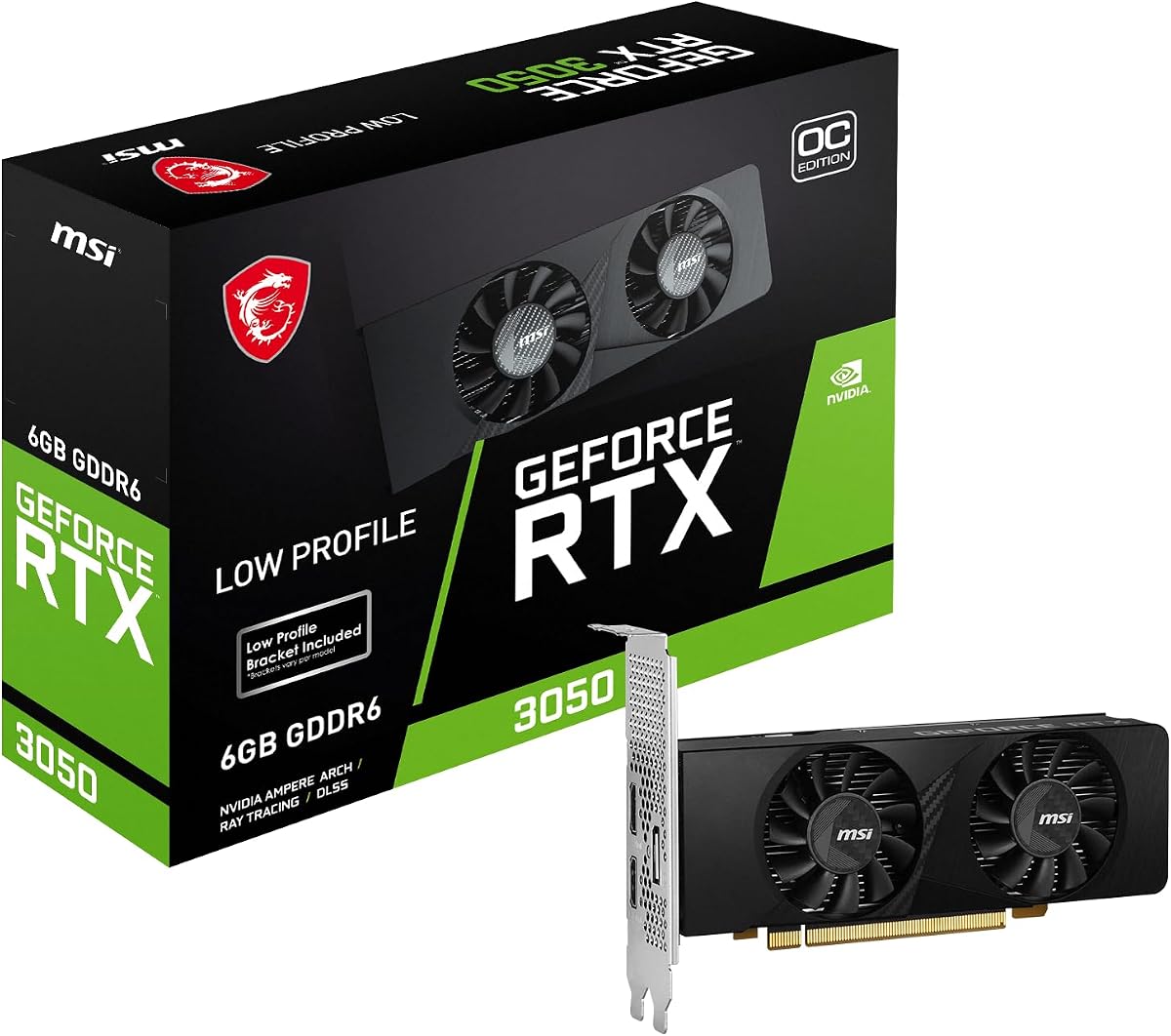
The msi Gaming RTX 3050 LP 6G OC provides a middle-ground option between basic compact cards and premium SFF models. Its 4.5 rating reflects a well-liked low-profile model with 6GB of GDDR6 memory, a 96-bit interface, 14Gbps memory speed, and a 1492MHz boost clock. It is built for smaller gaming systems that cannot accommodate a conventional full-height graphics card.
We may earn a commission when you buy through this link, at no additional cost to you.
Display connectivity is one of its strongest practical features. The card has one DisplayPort 1.4a output and two HDMI 2.1a outputs, which is useful for a compact workstation, a gaming PC with multiple screens, or a living-room system where display placement options matter. The HDMI 2.1a specification also makes it more future-facing than older compact cards that include only older connector versions.
The unavoidable compromise is capacity. Six gigabytes remains usable for many mainstream games, but modern titles with large texture packs can benefit from more. The product data does not specify exact dimensions, slot thickness, fan arrangement, power draw, or connector requirements, so those details should be verified directly. A low-profile label alone does not guarantee compatibility with every small chassis.
Buy this MSI card for a compact gaming build that values a recognizable product line, multiple current display connectors, and a 1492MHz factory overclock. It is more compelling than a basic office adapter and more restrained than a premium 12GB option. For a compact RTX 3050 build, it offers a straightforward balance of size, features, and gaming capability.
Two HDMI 2.1a outputs and one DisplayPort 1.4a output provide several ways to connect modern equipment. This is useful in a small office, a multi-screen desk setup, or a shared gaming and media system.
The 1492MHz boost clock and 14Gbps memory speed provide the specifications expected from an overclocked RTX 3050. The main constraint remains the 6GB memory pool, so buyers should consider how demanding their intended games and applications are.
We may earn a commission when you buy through this link, at no additional cost to you.
This MSI GeForce RTX 3050 LP 6G OC stands out for using two fans and a large heatsink within a low-profile design. It has a 4.6 rating, 6GB of GDDR6 memory, a 96-bit bus, a 1492MHz clock, and PCI Express Gen 4 support. That cooling arrangement can be especially attractive in small systems where sustained load and fan noise are important concerns.
We may earn a commission when you buy through this link, at no additional cost to you.
The product information highlights a custom PCB with hardened circuits and optimized trace routing. MSI Center provides monitoring and configuration for supported products, while the associated overclocking software offers advanced controls and real-time hardware monitoring. These utilities can help a compact-system owner understand load, temperatures, and performance without leaving the supplied software environment.
Its output configuration includes one DisplayPort 1.4a and two HDMI 2.1 connections, with 4K support stated in the title. Like the other RTX 3050 recommendations, it is held back by 6GB of memory, which may limit future headroom in demanding games or content creation. Exact physical measurements are not supplied, so the low-profile design should still be matched against the case's length, height, slot, and power specifications.
This model is a strong choice for a compact gaming PC where cooling deserves more attention than the absolute minimum. It is particularly suitable for builders who want MSI software, a dual-fan cooler, and current display outputs without moving to a premium-class SFF GPU. Verify the physical specifications and connector needs before purchase.
Two fans and a large heatsink can help manage heat within a restricted enclosure. The design offers a quieter and more thermally balanced alternative to many single-fan low-profile cards, subject to the case providing adequate airflow.
MSI Center and the listed overclocking controls provide convenient visibility into hardware behavior. These tools are useful for tuning a small system, particularly when balancing performance, temperatures, and noise.
We may earn a commission when you buy through this link, at no additional cost to you.
The PNY Nvidia RTX A400 is built for a very different purpose than the gaming cards in this list. Its single-slot, low-profile format, 50W power consumption, and four Mini DisplayPort outputs make it ideal for compact professional systems. It carries a 4.7 rating and provides 768 CUDA cores based on the Ampere architecture, with 4GB of GDDR6 memory for professional workflows.
We may earn a commission when you buy through this link, at no additional cost to you.
Its four Mini DisplayPort 1.4a outputs are listed as supporting up to four 5120 by 2880 displays at 60Hz. That configuration is highly relevant to video editing, visualization, financial analysis, and other professional environments that depend on multiple high-resolution screens. The low power requirement can also simplify compact workstation design and reduce the amount of cooling and electrical capacity demanded of the rest of the system.
The 4GB memory pool is the most important limitation. Large 3D scenes, detailed video timelines, and some AI workflows can require more memory than this card provides. Mini DisplayPort also requires suitable cables or adapters for many standard monitors. The product should be selected for workstation compatibility and display density, not simply because it carries an RTX name.
Buy the RTX A400 for a small professional workstation that needs multiple high-resolution displays and a single-slot accelerator. It is particularly compelling where power efficiency and chassis clearance are more important than maximum gaming performance. Verify that your applications work within the 4GB memory limitation before committing.
Four Mini DisplayPort outputs provide an unusually flexible option for specialized workspaces. The stated maximum configuration of four 5K displays at 60Hz makes the card relevant to high-density monitoring and professional visualization.
The 50W operating limit helps compact workstations remain manageable. A single-slot low-profile card also leaves more room for other expansion, storage, or cooling hardware in a densely designed system.
We may earn a commission when you buy through this link, at no additional cost to you.
The msi Gaming RTX 5060 Ti 8G Shadow 2X OC brings modern NVIDIA graphics to a card specifically labeled SFF-ready. It has a 4.5 rating, uses the Blackwell architecture, and carries 8GB of GDDR7 memory. DLSS 4 support adds another layer of appeal for compact gaming systems where the goal is strong visual output without a full-size desktop chassis.
We may earn a commission when you buy through this link, at no additional cost to you.
Thermal management is a major focus. TORX Fan 5.0 uses fan blades linked by ring arcs to help stabilize airflow, while a nickel-plated copper baseplate captures heat from the GPU and memory. Square-profile core pipes are designed to increase contact with the baseplate. Together, these features support the card's use in an enthusiast-oriented SFF enclosure.
The supplied title lists three DisplayPort 2.1a outputs and HDMI 2.1b, which is excellent for modern multi-monitor configurations. However, some listed technical details remain incomplete, including the memory bus width and clock value, both represented as TBA. Exact dimensions, power requirements, slot thickness, and connector details should therefore be confirmed from the current listing before buying.
Choose this card when you want a modern RTX 5060 Ti-class option with 8GB of GDDR7 in an SFF-ready design. It sits logically between the entry-level RTX 3050 cards and the premium RTX 5070 selections. Verify the missing specifications and make sure the power supply and case can support the final configuration.
The RTX 5060 Ti platform brings current-generation features into a smaller form factor. DLSS 4 support and GDDR7 memory make this a more future-facing compact option than the older RTX 3050 alternatives.
The copper baseplate and square core pipes focus on transferring heat away from sensitive components. These details are particularly relevant for a card installed in a compact enclosure with limited airflow.
We may earn a commission when you buy through this link, at no additional cost to you.
The AMD Radeon Pro WX 4100 is a low-profile workstation card built around efficiency and display support. Its 4.4 rating accompanies specifications for 4GB of GDDR5 memory, a 128-bit interface, up to 2.4 TFLOPS of compute performance, and a maximum power consumption of 50W. These characteristics make it useful for compact professional systems that cannot accommodate an enthusiast graphics card.
We may earn a commission when you buy through this link, at no additional cost to you.
Display flexibility is a major strength. The card can drive one 5K display at 5120 by 2880 and 60Hz, or up to four 4K displays. AMD PowerTune dynamically adjusts power usage, while AMD ZeroCore Power can reduce activity when workloads do not require full performance. Those features support quieter and more efficient operation in an office, visualization, or production environment.
The main drawbacks are the older GDDR5 memory configuration and limited 4GB capacity. It may be less suitable for newer AI models, large professional scenes, or workloads that have moved beyond older GPU architectures. The listed information does not specify its exact output connectors, physical dimensions, or slot thickness, so buyers should confirm those details for their particular workstation.
This Radeon Pro card is a sensible choice when low energy use and multiple displays are the priorities. It also provides credible compute acceleration for video effects, rendering, signal processing, transcoding, and digital production. Choose it for compact professional productivity, then verify driver support and application requirements before installing it.
A 50W maximum power limit reduces the burden on a compact workstation's power supply. Dynamic power management also makes the card more suitable for systems where energy use and acoustics are closely monitored.
Support for one 5K monitor or four 4K monitors enables dense, productive desk arrangements. This makes the card particularly attractive for visualization and media professionals working across several screens.
We may earn a commission when you buy through this link, at no additional cost to you.
The ASUS Dual Radeon RX 9060 XT 16GB combines an unusually generous memory allocation with a relatively restrained two-and-a-half-slot design. Its 4.7 rating makes it one of the strongest-rated products in the guide. For a small-form-factor system that can accommodate a dual-fan card but does not need a full-size desktop cooler, the 16GB configuration offers useful headroom for games and creative work.
We may earn a commission when you buy through this link, at no additional cost to you.
Its dual Axial-tech fans use smaller hubs, longer blades, and barrier rings intended to improve downward airflow. The 0dB technology is designed to keep the card quiet during light gaming, while the dual BIOS switch allows selection between Quiet and Performance profiles. Fan construction uses dual ball bearings, which ASUS lists as lasting up to twice as long as sleeve-bearing designs.
The listed clocks are up to 3250MHz boost and 2640MHz game clock in OC mode, with slightly lower values in default mode. The principal uncertainty is physical compatibility: the product is not explicitly identified as low-profile or SFF-ready in the supplied data, and exact dimensions are not given. Builders should compare the card's measurements, power needs, and bracket height against their case before ordering.
Choose this ASUS Radeon when memory capacity is a priority in a compact gaming build. It is also appealing for creators who want a 16GB pool without moving directly to premium SFF-ready NVIDIA models. Confirm the physical specifications and power requirements first, as the product name alone does not guarantee fit in every SFF enclosure.
The 16GB memory pool is the defining feature of this recommendation. It can reduce pressure from large texture sets and provides additional room for demanding applications compared with the 6GB and 8GB cards in this roundup.
The dual BIOS switch gives builders a simple way to prioritize quieter operation or stronger performance. This flexibility is valuable in compact systems where cooling and acoustics can be closely coupled.
We may earn a commission when you buy through this link, at no additional cost to you.
Choosing a compact GPU requires matching the card's dimensions and power demands to the case, cooler, and power supply. Beyond those physical constraints, memory capacity, workload requirements, display needs, and cooling design determine whether the purchase will be worthwhile.
Begin with the case's maximum graphics-card length, height, and slot allowance, then compare those measurements with the manufacturer's dimensions. A card can be advertised as low-profile or SFF-ready while still being longer or deeper than a particular enclosure allows. Pay attention to the height of the bracket and cooler, the distance from the rear panel, and any required clearance for display connectors and power cables. The maxsun RTX 3050 offers a clearly stated length of 6.65 inches, while the ASRock Arc A380 provides dimensions of 169.9 by 123.5 by 39.2 millimeters. Other cards should be checked against their live listings because exact measurements are not included in the supplied information.
Slot width affects both physical fit and the cooling options available to the rest of the system. A single-slot card such as the PNY RTX A400 leaves considerable room in a dense chassis, while 2.5-slot cards such as the ASUS Prime RTX 5070 and ASUS Radeon RX 9060 XT offer more substantial coolers. Multi-slot designs can also block adjacent expansion slots or interfere with a large CPU cooler. If the system requires additional PCIe cards, storage, or a riser, a narrower graphics solution may be more appropriate. If the chassis can support a wider card and the power supply is adequate, a 2.5-slot design may provide better thermal performance.
Graphics memory can determine whether a game or creative application fits comfortably, especially at higher resolutions or with detailed assets. Most RTX 3050 cards in this guide provide 6GB, the MSI RTX 5060 Ti Shadow provides 8GB, the RTX 5070 cards provide 12GB, and the ASUS Radeon RX 9060 XT provides 16GB. Professional cards such as the RTX A400 and Radeon Pro WX 4100 offer 4GB and prioritize compactness, display support, or power efficiency. More memory is useful, but it does not guarantee higher performance. Match the allocation to software requirements and consider whether a particular card's architecture and drivers are supported.
The power supply must support the graphics card's continuous consumption, its recommended system power, and any required auxiliary connector. The RTX A400 and Radeon Pro WX 4100 are listed at a 50W operating limit, making them comparatively straightforward to power. The ASRock Arc A380 uses a single 8-pin connector and recommends a 500W system power supply. The higher-end RTX 5070 and RTX 5060 Ti models will require more careful power-supply and case planning. Check the live product listing for the exact connector and recommended wattage, because those details are not complete for every product in the supplied data.
A shorter card does not automatically run quietly or cool effectively. The number of fans, heatsink area, fan-stop behavior, and the direction of airflow all matter. The ASRock Arc A380 uses a single fan and a 0dB Silent feature; the MSI RTX 3050 LP uses two fans and a large heatsink; and the GIGABYTE RTX 5070 WINDFORCE OC SFF emphasizes high-pressure airflow. Compact cases also need intake airflow and sensible CPU cooling because a compact processor cooler may restrict air moving across the motherboard. If the case exhausts directly through the graphics-card cooler, choose a card designed for that path and avoid blocking unused slots with thick heatsinks.
Display requirements can be more important than gaming performance in a compact workstation. The PNY RTX A400 provides four Mini DisplayPort 1.4a outputs and is listed for up to four 5K displays at 60Hz. The ASRock Arc A380 includes three DisplayPort 2.0 ports and one HDMI 2.0b port, while the RTX 3050 models commonly combine DisplayPort 1.4a with two HDMI ports. Make sure the card supports the resolution and refresh rate of each monitor, and confirm whether Mini DisplayPort requires an adapter or a specific cable.
The graphics interface and processor platform can affect practical performance even when a card fits. The maxsun RTX 3050 uses a PCIe 4.0 x8 connection, while the two RTX 5070 cards support PCIe 5.0 and the ASRock Arc A380 supports PCIe 4.0. Confirm that the motherboard and processor support the desired interface and that the operating system includes suitable graphics drivers. For integrated graphics, also verify whether the system permits the processor's embedded graphics and the selected discrete card to work together for multi-display setups.
The best compact card for gaming is not automatically the best card for professional workloads. The RTX A400 and Radeon Pro WX 4100 emphasize professional compute features, efficient operation, and multiple displays. The RTX 5070 options combine high-end gaming specifications with SFF-ready construction, while the Arc A380 targets compact gaming, HTPC, and media use. Consider whether the desired application benefits from the RTX gaming features, workstation drivers, video encoding, or multi-monitor support rather than choosing solely by the newest architecture.
Before installing the graphics card, shut down the system, disconnect the power supply, and follow the case and component manufacturers' instructions. Confirm that the expansion slot covers and rear bracket align with the chassis. Install the card without forcing it, secure the bracket, connect the required auxiliary power cable, and route cables away from fans and airflow paths. If the system uses risers, confirm that the cable and connector arrangement support the card's size and weight.
After installation, power on the system and install the latest supported graphics drivers from the GPU vendor. Use the associated monitoring or tuning software to check that the card is recognized, review operating temperatures, and verify the intended display outputs. Run a sustained workload while watching for thermal throttling, unstable frame rates, artifacts, or unexpected shutdowns. Increase fan speed, use a more demanding power profile, or improve chassis airflow if the card cannot sustain its expected performance.
For long-term care, keep the intake and exhaust paths clear of dust and ensure the case receives clean air from a suitable location. Do not change clocks or power limits without understanding the cooling capacity of the enclosure. A compact system needs more attention to airflow than a roomy desktop, so listen for unusual fan noise and inspect cable placement periodically. Updating drivers, maintaining case filters, and avoiding abrupt shutdowns will help preserve stable operation.
The best choice depends on the case and intended workload. For high-end compact gaming, the ASUS Prime RTX 5070 SFF-Ready and GIGABYTE RTX 5070 WINDFORCE OC SFF are purpose-built options, while the ASRock Arc A380 Challenger ITX is more appropriate for entry-level gaming and media use. Always compare the card's exact dimensions, power needs, and cooling requirements with your system.
No. Low-profile describes the bracket and cooler form factor, but card length, depth, slot width, connector placement, and power-cable clearance still vary. Mini-ITX cases can have sharply different layouts, so check the case's maximum GPU length and available height before purchasing. The supplied dimensions for the ASRock Arc A380 and maxsun RTX 3050 make those two models especially straightforward to compare.
Not necessarily. Compact professional cards such as the PNY RTX A400 and AMD Radeon Pro WX 4100 are listed at a 50W power consumption, while the ASRock Arc A380 recommends a 500W system power supply and uses one 8-pin connector. Higher-performance RTX cards require more power, so check both the card's recommendation and the complete system's expected draw.
A single-slot card provides more expansion flexibility and can simplify installation in a crowded chassis. The PNY RTX A400 is a clear example, with a single-slot low-profile design and four Mini DisplayPort outputs. However, wider cards often have larger coolers, so they may run more quietly or sustain higher performance when the case and power supply can accommodate them.
Six gigabytes can suit many mainstream and esports games, while 8GB provides more comfort in modern titles. Twelve or sixteen gigabytes is preferable for high-detail games, content creation, and workloads with large memory requirements. The ASUS Radeon RX 9060 XT's 16GB is notable, but memory alone does not make it suitable for every professional application.
They can be, but the complete system design determines the noise level. Fan-stop features, such as the ASRock Arc A380's 0dB Silent mode, help during light workloads, while larger heatsinks and multiple fans can support quieter behavior under load. Chassis airflow, CPU cooler placement, fan curves, and background software also influence the final sound level.
Possibly, depending on the motherboard, processor, operating system, drivers, and outputs. Many systems permit the integrated graphics to remain active while a discrete card is installed, allowing outputs from both GPUs to be used. Confirm this behavior before planning a multi-monitor arrangement around the additional ports on the selected card.
Choose an RTX 3050 when the priority is a smaller, less demanding build with lower power requirements, particularly if the case has limited slot space. Choose an RTX 5070 SFF model for stronger gaming performance, 12GB of memory, and DLSS 4 support. The latter should only be selected after confirming case clearance, cooling, and power-supply capacity.
The ASUS Prime RTX 5070 SFF-Ready is the strongest overall choice for a compact enthusiast system, combining a purpose-built 2.5-slot design with 12GB of GDDR7 memory and DLSS 4. The GIGABYTE RTX 5070 WINDFORCE OC SFF is the premium alternative, while the ASRock Intel Arc A380 Challenger ITX offers the most budget-conscious route to a compact dedicated graphics card.
Prioritize the constraints that cannot be changed after purchase: physical dimensions, slot width, cooler height, power connectors, recommended PSU capacity, and chassis airflow. Within those limits, choose based on workload. Compact low-profile RTX 3050 models cover mainstream gaming and media, professional cards serve display-heavy workflows, and the 5060 Ti or 5070 models provide more performance and memory for demanding games.
Finally, verify the current listing before checkout. Product revisions, connector information, dimensions, availability, and pricing can change, and a case that accepts one SFF card may reject another. Measure the available space, review the manufacturer's power guidance, check software and driver support, and then select the card that best matches both the enclosure and the work you expect it to perform.