
SUNLU Filament Dryer Box S1 Plus
4.3Editor score
Adjustable 35-55°C range
Active fan-assisted drying
Temperature and humidity display
Our 2026 guide compares 10 filament dryer for 3D printing options for capacity, temperature control, airflow, humidity monitoring, and material compatibility.
A filament dryer for 3D printing creates a controlled, low-humidity environment that helps prevent moisture-related problems such as stringing, bubbling, clogs, and poor layer adhesion. The right unit should match your spool size, materials, printer workflow, and tolerance for manual setup and maintenance.
We compared all ten products by capacity, temperature range, heating method, airflow, humidity visibility, filament compatibility, exit ports, controls, and drying-while-printing flexibility. The list includes compact single-spool units, larger multi-spool systems, detachable storage designs, and feature-rich premium dryers.
Each review identifies the strongest use case and any meaningful limitations. The top three receive special recognition, while every model receives a detailed comparison. Product specifications and availability can change, so verify current listings and filament manufacturer recommendations before purchasing.
4.3Editor score
4.4Editor score

4.6Editor score
This side-by-side comparison covers the essential differences in capacity, heating range, airflow, monitoring, and filament support, helping you identify the dryer that best matches your printer and materials.



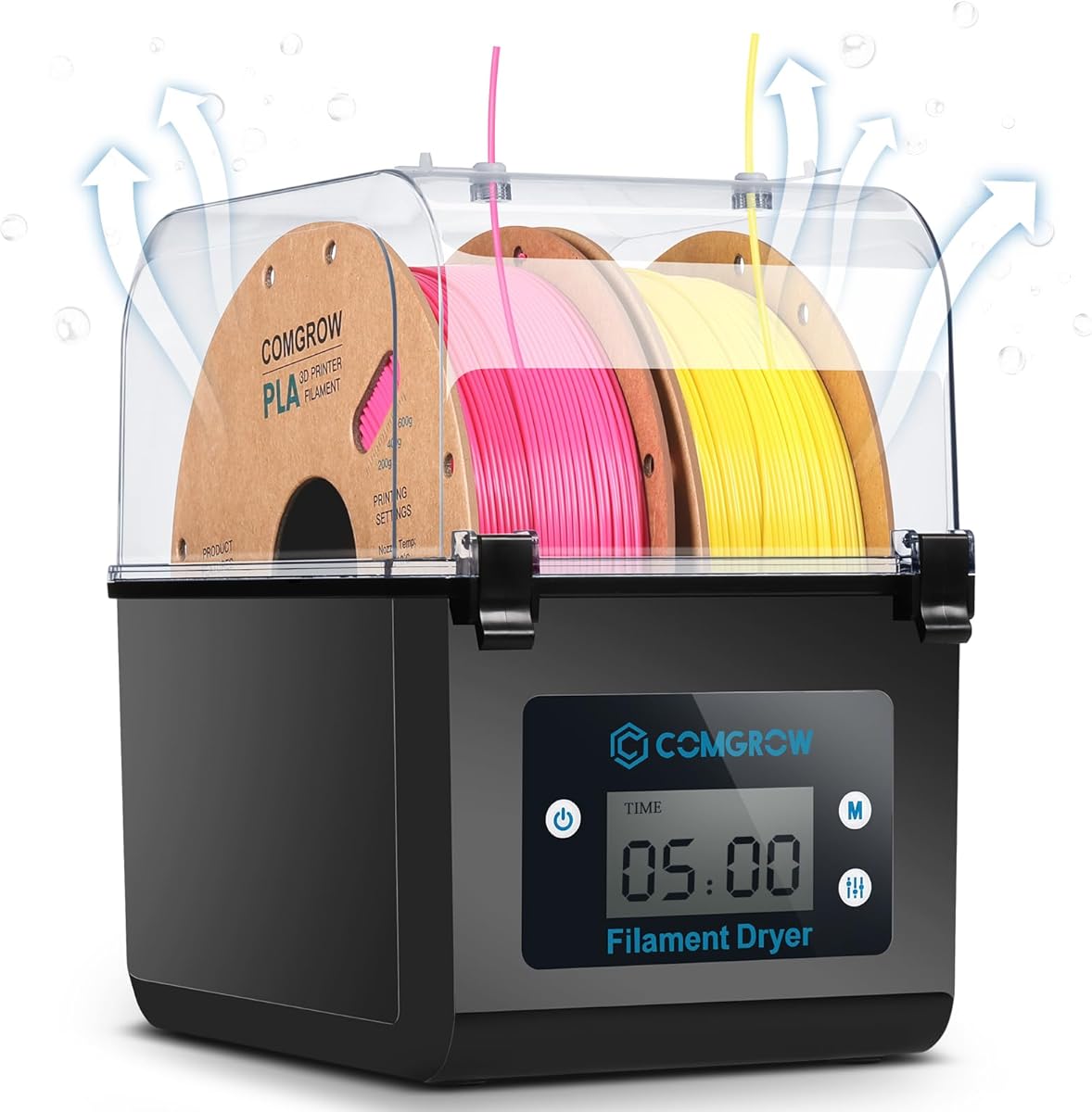
The Comgrow SH01 is a two-spool drying and storage box built around a straightforward 40-50°C temperature range. Its 4.4 rating reflects a practical balance of useful capacity, accessible controls, and compatibility with common PLA, PETG, and ABS formats. It is particularly attractive for users who want more than a single-spool desiccant box without moving to a large multi-chamber system.
We may earn a commission when you buy through this link, at no additional cost to you.
The inner dimensions are listed as 9.29 by 6.49 by 9.13 inches, allowing the unit to hold two rolls of 1kg filament. A two-inch LCD screen and touch buttons display operating information, while the function button changes drying time and temperature. The 6-to-12-hour timer is less granular than the 99-hour options found on some SUNLU models, but it covers common drying routines without inviting accidental over-drying.
The sealed enclosure, silicone cable sheath, smooth Teflon outlet, and closable moisture outlet are meaningful details for moisture control. The outlet should remain open while drying so vapor can escape and closed while the box is idle. Users must also follow the stated counterclockwise filament direction and keep the lower pulley properly aligned. Error codes E0 and E1 require checking the internal cable connections.
This is our strongest all-around recommendation for a home or maker-space setup needing two spools. It is less suitable for advanced engineering polymers requiring temperatures above 50°C, and its fixed timer steps may feel restrictive to experienced users. Even so, it combines drying, short-term storage, and direct filament feeding in a manageable package.
Holding two 1kg spools gives the SH01 more flexibility than a compact single-roll dryer. It works well when alternating materials or maintaining separate filament feeds for a printer.
The LCD screen, touch buttons, and visible temperature and humidity information simplify setup. The automatic shutdown when a working state is not displayed adds a useful layer of operational protection.
We may earn a commission when you buy through this link, at no additional cost to you.
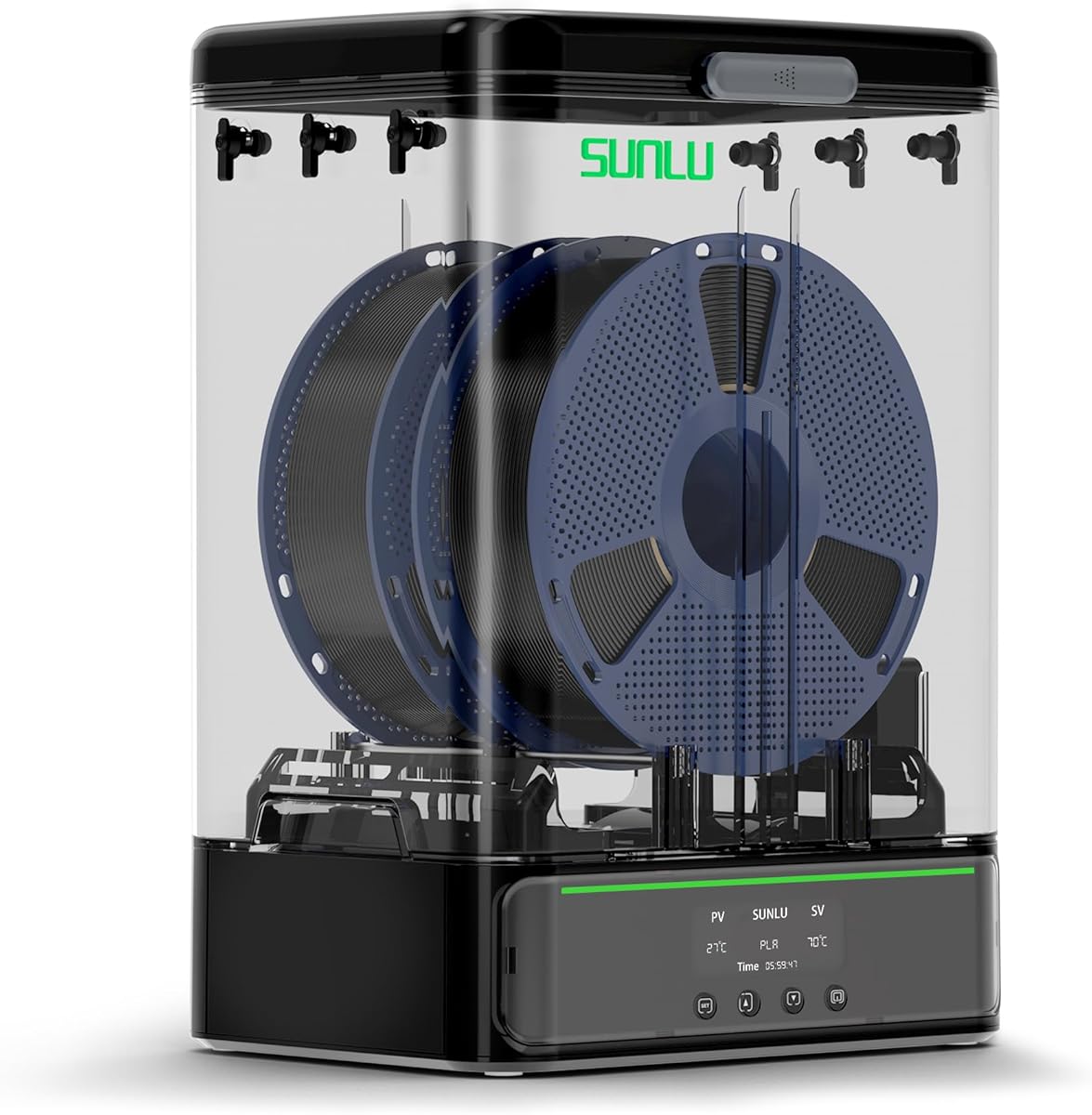
The SUNLU S1 Plus is an approachable dryer for users who mainly print with standard PLA, PETG, ABS, TPU, nylon, or PA. Its 4.3 rating and fan-assisted design make it a compelling budget option, especially for a single-printer home setup. The core purpose is straightforward: reduce moisture-related stringing, clogging, and poor adhesion while also displaying operating conditions.
We may earn a commission when you buy through this link, at no additional cost to you.
Its two-inch LCD screen presents temperature, time, and humidity. Users hold the left button to alter drying duration and press the right button to change the temperature setting within a 35-55°C range. The internal maximum dimensions are given as 210 by 89mm in diameter and height, and the stated compatibility covers 1.75mm, 2.85mm, and 3.00mm filament diameters.
The added fan is the key feature for the value. According to the supplied description, it helps discharge excess water from filament and reduces the effect of humid conditions. The trade-off is that this is a single-spool model, and the product information does not state a maximum timer duration. Its temperature ceiling may also be limiting for materials that benefit from more aggressive drying.
Choose the S1 Plus when you need a compact, uncomplicated dryer for one spool and want humidity visibility without moving to a premium multi-chamber system. It is a particularly sensible first dryer for PLA and PETG users, provided those materials are dried within the stated temperature range.
The integrated fan goes beyond passive heating by encouraging moisture to leave the filament chamber. That can make a meaningful difference in humid environments where damp material regularly causes print defects.
The screen-based interface makes temperature and time adjustments easy to understand. Support for three common filament diameters makes the unit practical for a broad mix of consumer printers.
We may earn a commission when you buy through this link, at no additional cost to you.
The Creality Space Pi X4 is the most advanced dryer in this guide, combining a 4.6 rating with four-spool storage and two independently heated chambers. It is designed for high-volume users, multiple materials, and advanced filaments that need more than a basic low-temperature drying cycle. Its touch interface and high temperature ceiling distinguish it from conventional single-box dryers.
We may earn a commission when you buy through this link, at no additional cost to you.
The chamber can accommodate four standard 1kg spools or two large 2kg spools, with compatibility for 1.75mm and 2.85mm filament. Two 200W heating sections are advertised as removing moisture 30% faster than single-chamber dryers. The maximum temperature reaches 85°C, while the suggested scenes cover everyday plastics and demanding materials including ABS, PET, PC, ASA, PA, and PAHT.
Its dual-function design is valuable: the active enclosure helps maintain humidity during print pauses, while the silicone-sealed structure is intended to limit moisture reabsorption during storage. An illuminated window allows spool monitoring without opening the enclosure, preserving the controlled internal environment. Custom temperatures from 50-60°C are suggested for common materials, with 80-85°C available for advanced polymers.
This model makes the most sense for a dedicated workshop, educational lab, or busy maker running several printers. The trade-offs are its larger footprint and greater complexity compared with a single-spool dryer. Even so, it offers the strongest combination of capacity, temperature flexibility, independent drying, and long-term storage in this roundup.
Separate 200W heating chambers let users dry different materials under distinct conditions. This is a major advantage when PLA, PETG, and engineering-grade filament require incompatible temperature ranges.
An 85°C maximum opens the unit to demanding materials such as PAHT, PC, and ASA. The higher range also gives experienced users more control when assessing moisture levels in moisture-sensitive polymers.
We may earn a commission when you buy through this link, at no additional cost to you.
The SUNLU S4 is a substantial four-spool dryer for workshops that keep several materials ready to print. It earns a 4.5 rating through a strong combination of capacity, circulation, exit-port flexibility, and a broad 35-70°C range. Unlike compact models, it is designed to serve multiple printers or several filament paths at once.
We may earn a commission when you buy through this link, at no additional cost to you.
The external dimensions are 460 by 220 by 310mm, with internal dimensions of 450 by 175 by 207mm and a listed net weight of 4kg. It holds up to four 1kg spools and provides eight filament exit holes, allowing different loading angles and connections. PTFE tubes, clips, silicone plugs, a power cable, and an illustrated user guide are included.
Heating comes from a 350W PTC element, stated to be 50% more efficient than the FilaDryer S2. Three circulation fans move air through the chamber to promote 360-degree surround heating and more even drying. The temperature range spans 35-70°C, and the timer can be set from 0 to 99 hours. Materials listed as supported include PLA variants, PETG, ABS, TPU, PA, PC, and nylon.
The S4 is an excellent choice for a multi-printer setup or a user who wants to dry several spools simultaneously. Its bulk and weight reduce its suitability for small desks or portable use. A possible omission for some buyers is the lack of a stated built-in humidity display, so users wanting immediate moisture feedback may prefer a model that includes one.
Eight exit holes make it easier to serve multiple printers, route spools in different directions, and avoid awkward filament paths. The included short and long PTFE tubes add useful installation flexibility.
Three fans work with the 350W PTC heater to distribute warmth across the full chamber. This design is especially useful when multiple spools occupy different corners of the enclosure.
We may earn a commission when you buy through this link, at no additional cost to you.
The Creality Space Pi Plus combines two-spool capacity with a large touchscreen, real-time humidity monitoring, and twelve material presets. Its 4.4 rating makes it one of the most user-friendly options here. The interface is designed to reduce guesswork when switching between common plastics and composite-filled filaments.
We may earn a commission when you buy through this link, at no additional cost to you.
A 3.7-inch touch display supports switching between Celsius and Fahrenheit. The 45-70°C range can be adjusted manually, while one-key settings cover up to twelve filament types, including PLA-CF, PA-CF, and ASA. The timer is adjustable from 0 to 48 hours, giving users more flexibility than a short fixed-duration program.
The 110W PTC heater works with a built-in fan to circulate hot air through the chamber in 360-degree patterns. Compared with a passive heating pad, the stated aim is more uniform drying. The unit operates on 110V at 50/60Hz, making it relevant primarily to users with compatible household power.
This dryer is a strong middle choice for people who regularly alternate between two materials and want a clear view of chamber conditions. The presets are convenient but should not replace the filament manufacturer's own drying guidance. Its 45°C floor also makes it less flexible than a model that starts at 35°C.
Material-specific one-key settings reduce the need to memorize temperature and duration combinations. Custom adjustment remains available for users who need to respond to local humidity or filament condition.
Real-time humidity monitoring gives users a better indication of the drying environment. The display is particularly useful when comparing a freshly opened spool with filament that has been stored for an extended period.
We may earn a commission when you buy through this link, at no additional cost to you.
The Polymaker Polydryer is built around a connected drying-and-storage workflow rather than treating drying as a one-time preparation step. Its 4.3 rating reflects a thoughtful design for maintaining filament between print sessions. The product is especially relevant to users who want to dry a spool and then keep it protected without transferring it between containers.
We may earn a commission when you buy through this link, at no additional cost to you.
A storage-box-based dock combines heated drying, sealed storage, and desiccant support. This layered approach is intended to reduce exposure to ambient moisture before, during, and after printing. A built-in hygrometer offers a simple way to track internal humidity, giving users a more informed view of filament condition between jobs.
The Polydryer is stated to support PA nylon, PLA, PVB, PETG, ABS, ASA, and TPU, with compatibility for 1.75mm, 2.85mm, and 3.00mm filament. Direct feeding lets filament move from the controlled environment to the printer while reducing the number of transfers that could expose it to humid air.
Choose the Polydryer if your priority is a compact, organized routine that treats storage as part of moisture control. It is less compelling for users who need to dry multiple spools simultaneously, and the supplied product data does not give a precise temperature or timer range. Those omissions make it especially important to confirm specifications before relying on it for a specific polymer.
A sealed storage dock with desiccant support extends protection beyond the initial heating cycle. This makes the system useful in humid rooms where filament could otherwise reacquire moisture between prints.
Direct filament feeding allows the spool to remain in the protected environment while printing. Reducing transfers helps users avoid unnecessary contact with ambient humidity.
We may earn a commission when you buy through this link, at no additional cost to you.
The Creality Space Pi SE is a compact single-spool dryer with a clear focus on rapid heating, sensor feedback, and easy operation. Its 4.3 rating makes it a practical middle-tier choice for PLA, PETG, ABS, ASA, TPU, and other common materials. It requires no assembly and uses a familiar display-and-knob interface.
We may earn a commission when you buy through this link, at no additional cost to you.
A PTC heating system and built-in fan circulate hot air throughout the chamber, with the product description claiming that the unit can reach 65°C within 15 minutes. Internal thermal insulation helps retain warmth and provides protection against the outer surface becoming hot. The operating range is 45-65°C, and drying time can be set from 0 to 24 hours.
Real-time humidity monitoring and a countdown timer provide useful feedback during a cycle. The display and knob keep adjustments straightforward, while the stated 1.75mm and 2.85mm compatibility covers most common spools. Teflon tubes can be paired with the outlet for smoother filament feeding, although the filament itself must still be dried before printing.
The Space Pi SE suits a single-printer user who wants sensor-based feedback without a large multi-spool system. It may be less suitable for users with 3.00mm filament because that diameter is not listed. As with any dryer, keeping filament in a sealed bag after drying is recommended to preserve the improved condition.
The stated 15-minute heat-up target makes the dryer practical for quick preparation sessions. The fan and insulated chamber support consistent conditions once the selected temperature is reached.
Humidity monitoring and a visible countdown make it easier to judge progress and avoid unnecessary heat exposure. The single-spool format keeps the system compact and straightforward.
We may earn a commission when you buy through this link, at no additional cost to you.
This SUNLU S4 listing offers the same high-capacity four-spool concept as the other S4 model, with a 4.6 rating and detailed support for multi-printer workflows. It is a strong choice for users who want several materials drying at once and value even circulation over a compact footprint.
We may earn a commission when you buy through this link, at no additional cost to you.
A 350W PTC heater and three circulation fans combine to provide 360-degree surround heating. The chamber holds up to four 1kg spools, and eight filament outlets allow different loading angles or connections to multiple printers. The temperature range is 35-70°C, while the 0-99-hour timer gives users substantial scheduling freedom.
Compatibility includes PLA, PLA Plus, PLA Meta, PETG, ABS, TPU, PA, PC, and nylon at 1.75mm, 2.85mm, and 3.00mm diameters. The external measurements are 460 by 220 by 310mm, the internal measurements are 450 by 175 by 207mm, and the net weight is 4kg. PTFE tubes, clips, silicone plugs, a power cable, and a user guide are included.
Users with several printers or a large material inventory will get the most from this configuration. Its dimensions and weight require a stable dedicated surface, and the lack of a stated humidity display may be a drawback for people who prioritize environmental feedback. Otherwise, the combination of capacity, fan circulation, and outlet flexibility is highly capable.
The three-fan layout is designed to keep air moving around all four spools. This helps the large chamber avoid the uneven drying that can occur when heating is concentrated in one area.
Eight outlet openings support numerous routing possibilities. Short and long PTFE tubes in the packing list help connect the internal spools to different printer locations and loading directions.
We may earn a commission when you buy through this link, at no additional cost to you.
The SUNLU SP2 stands out for its detachable design, which separates the heated drying section from a sealed filament storage base. With a 4.4 rating, it offers a flexible solution for users who want to dry material and then preserve it in a protected container. The same system also supports feeding filament directly to a printer while it is drying or being stored.
We may earn a commission when you buy through this link, at no additional cost to you.
A 250W PTC element is advertised as reaching 70°C in 15 minutes, with 360-degree surround heating and quiet operation. The active dryer holds two rolls of 1kg filament and includes six silicone exit holes plus two PTFE tubes. Its 35-70°C-style use case is particularly relevant to users who want more heat than a basic low-temperature box offers.
The storage base includes sliding lid latches, two bottom gaskets, and rollers that can accommodate larger spools up to 3kg. It can also support smaller 250g, 500g, and paper spools. A dryable hygrometer and desiccant containers support humidity monitoring and moisture protection, while the HD LCD touch screen displays temperature, time, and humidity with material presets.
The SP2 is best for a user who values flexible storage and occasional larger-spool support. Its detachable arrangement is more versatile than a fixed box, although detaching the dryer for storage means only one component is actively heating at a time. Users modifying the setup for very large rolls should follow the provided instructions carefully.
The removable heated upper section and sealed lower box let users choose active drying or passive protected storage. That versatility is useful when a spool is not needed immediately.
Rollers and an adjustable bar holder accommodate different spool formats, including rolls up to 3kg. Gaskets, latches, desiccant containers, and a hygrometer reinforce the storage-focused design.
We may earn a commission when you buy through this link, at no additional cost to you.
The SUNLU S2 is a straightforward single-spool dryer built around a wide temperature range, a long timer, and a rotating spindle. Its 4.3 rating reflects a capable design for users who mainly print with one material at a time. It can also serve as a spool holder while filament is dried during an active print.
We may earn a commission when you buy through this link, at no additional cost to you.
The internal dimensions are 265 by 274 by 118mm, and the unit supports 1.75mm, 2.85mm, and 3.00mm filament diameters. Temperature can be adjusted from 35-70°C, while the drying timer spans 0-99 hours. A large touch screen makes changing settings straightforward, and the translucent lid allows visual inspection without opening the chamber.
The built-in spindle rotates the filament for more even drying and helps expose different sections of the spool to heated air. The product is presented as useful for reviving damp or older filament and for maintaining dry conditions in humid spaces such as basements. Its simple design avoids the complexity of multi-chamber systems while retaining a broad control range.
The S2 is a sensible pick for one-printer users who want a long timer and reliable temperature adjustment without paying for multi-spool capacity. Its main limitations are the inability to dry several spools at once and the absence of a stated humidity display. For users who only need to manage one roll, those trade-offs may be more than acceptable.
The motorized spindle continuously changes the filament's position within the heated chamber. This approach promotes more uniform exposure than leaving a stationary spool in one hot area.
The 35-70°C range accommodates many common materials, and the 0-99-hour timer supports both short drying sessions and extended maintenance. The touch screen keeps those adjustments accessible.
We may earn a commission when you buy through this link, at no additional cost to you.
Choose a dryer by matching its capacity, temperature capability, airflow, and storage design to your filament types and printing habits. The most important factors are the materials you use, how many spools you need to manage, and whether you want to dry while printing.
In short, buy enough capacity for your normal inventory without choosing a large unit that will occupy valuable workspace.
Choose a range that covers your actual filament portfolio, and use manufacturer-prescribed profiles as the starting point.
Prioritize consistent airflow over nominal wattage alone, especially when drying more than one spool.
Choose visible humidity feedback if you dry varied materials, live in a humid climate, or need precise control.
For long gaps between prints, prioritize sealing, desiccant support, and protected spool handling over heating features alone.
Match the number and placement of outlets to your printer layout, and confirm that all included tubing is appropriate for direct feeding.
Favor clear controls and customizable settings over a large number of presets you do not understand.
Follow the stated ventilation procedure, use a stable surface, and keep the exit path clean for safer daily operation.
Begin by consulting the filament manufacturer's recommended temperature and drying time, then identify the material, diameter, and spool size. Place the spool in the chamber and ensure it sits securely on the rollers or spindle. Connect the PTFE tube to the appropriate outlet, route it to the printer without sharp bends, and confirm that the filament enters the feed mechanism in the specified direction before closing the enclosure.
Select the required temperature and duration using the unit's controls. If the dryer has a humidity display, note the starting reading and watch for a general decline during the cycle. Follow the manufacturer's instruction about opening or closing the moisture-release opening: it should normally allow vapor to escape during heating and be sealed during storage. Do not leave a running cycle unattended around children, pets, or combustible materials.
After drying, let the chamber and spool cool when necessary, then seal the filament in a moisture-resistant bag or transfer it to a protected storage box. Retain desiccant in the storage environment, keep the spool away from direct sunlight, and replace it when it becomes saturated. Clean residue from rollers and inspect the outlet tube regularly, while always following the dryer's error-code and maintenance instructions.
PLA is less moisture-sensitive than many engineering polymers, but it can still absorb enough water to affect print quality, particularly in humid conditions or after long storage. A dryer is useful when a fresh spool produces bubbling, stringing, rough surfaces, or weak adhesion. If your rolls remain sealed and print consistently, a sealed storage box with desiccant may be sufficient for occasional use.
Use the drying guidance published for your specific PLA or PETG product because formulations and spool designs can differ. A dryer offering approximately 35-55°C covers common consumer-filament workflows, but the precise setting should follow the manufacturer. Avoid increasing temperature solely to speed drying, since excessive heat can soften packaging, deform spools, or alter filament characteristics.
Many filament dryers are designed to dry and feed filament directly to a printer at the same time. This requires connecting the spool outlet to the printer with the supplied PTFE tubing and observing the correct filament direction. Check that the dryer and printer are on a stable surface, the tube has no tight kinks, and the feed mechanism can maintain a steady pull without resistance.
Drying time varies by material, diameter, initial moisture level, and dryer airflow. The products in this guide offer timer ranges from several hours up to 99 hours, but the number alone does not determine the correct cycle. Start with the filament manufacturer's recommended duration, monitor humidity where available, and evaluate the result through surface quality, extrusion, and interlayer adhesion.
No. Wattage describes the heater's power, not the total quality of the drying system. Fan-assisted airflow, chamber sealing, temperature uniformity, humidity monitoring, and suitable controls can be just as important. A lower-wattage dryer with effective circulation may suit one spool better than an oversized heater in a poorly balanced enclosure.
Usually not. If filament is stored in a sealed box with effective desiccant and the printer produces consistent results, drying after it has absorbed significant moisture is generally more practical. Drying repeatedly can consume electricity and may be unnecessary for material that was never exposed to humid air. Keep the spool protected after drying so the benefit lasts.
A dryer actively heats and often circulates air to remove moisture. A storage box creates a sealed environment and may use desiccant to limit further moisture absorption but does not heat the filament. The best option for many users is a combined system that dries the spool and then maintains it in a protected container.
Choose one spool for a single-printer, single-material workflow, two spools for frequent material changes, and four spools for a multi-printer or high-volume setup.
Also check maximum spool weight and dimensions, because models with several positions may not accommodate large rolls.
Choose based on your actual inventory and available workspace rather than on the highest capacity advertised.
The SUNLU S1 Plus is the best budget choice for a single-spool setup, offering fan-assisted drying and a clear humidity display. The Comgrow SH01 stands out as the best overall option for users wanting two-spool capacity and direct feeding, while the Creality Space Pi X4 is the best premium selection with four-spool storage, dual heating chambers, and an 85°C maximum.
Prioritize compatibility with your actual filament, adequate capacity, and a temperature range that follows the manufacturer's drying guidance. Humidity monitoring, uniform airflow, sealed storage, and sufficient filament outlets become increasingly valuable as your number of printers and materials grows. For a single home printer, simplicity may matter more than every available feature.
Specifications, configurations, and availability can change, so review the current listing before buying. Compare the included tubes, plugs, and accessories, confirm the chamber dimensions against your spools, and confirm electrical requirements. Checking current pricing and availability also helps you select the right capacity and features without overspending on unnecessary capability.