
Brother DS-640
4.3Editor score
16 pages per minute
Compact one-foot footprint
USB-powered operation
OCR and cloud destinations
Explore the best Document Scanner for iPhone 18 options, comparing portability, wireless connectivity, OCR, scan speed, media handling, and ease of use in 2026.
A document scanner for iPhone 18 users should make paper records easy to digitize without forcing a permanent desk setup. The most useful models balance portability, OCR, wireless transfer, reliable feeding, and straightforward software, whether you scan receipts, reports, identity cards, or multipage documents.
This guide compares ten scanners based on their documented capabilities, including scan speed, paper handling, supported systems, connectivity, OCR functions, output formats, and physical design. It also highlights the important distinction between scanners that can send files to an iPhone and devices designed to work directly with iOS.
The ranking shows which model fits each priority, from lightweight travel scanning to high-volume wireless workflows. Features, ratings, and availability can change, so readers should verify current specifications, connection requirements, and pricing on the product page before making a final purchasing decision.
4.3Editor score
4.4Editor score

4.3Editor score
The table below compares every scanner in the roundup by device type, core speed, connectivity, and document-handling features, helping you identify the option that best matches your iPhone workflow and scanning volume.





The Epson Workforce ES-50 earns a 4.3 rating and stands out as a balanced choice for people who want a genuinely mobile document scanner without giving up searchable output. It is designed around single-sheet automatic feeding, making it well suited to receipts, identity cards, forms, and individual pages that are accumulated into one digital file.
We may earn a commission when you buy through this link, at no additional cost to you.
Its most useful features include a claimed page scan time of as little as 5.5 seconds and support for documents measuring up to 8.5 by 72 inches. Nuance OCR can turn printed pages into searchable PDFs or editable Word and Excel files, while Epson ScanSmart provides a practical interface for reviewing and saving documents. Cloud destinations and broad TWAIN compatibility add flexibility at the computer stage of the workflow.
The important limitation is that the ES-50 connects to a computer through USB 2.0 rather than acting as a native iPhone scanner. For iPhone 18 users, files generally need to reach the phone through a computer, cloud account, email, or another configured destination. That makes it less convenient for someone who wants to scan and send directly from the handset, but it remains a dependable choice for organized digital archiving.
This scanner is best for students, mobile workers, and households that want a small, efficient feeder with strong OCR. It is less suitable for large document batches or users committed to a phone-only workflow. Overall, its combination of compact construction, quick operation, and professional file conversion makes it the strongest all-around recommendation in this guide.
Automatic Feeding Mode accepts inserted pages one at a time and can combine a multi-page sequence into one file. That behavior makes the ES-50 particularly useful for receipts, classroom worksheets, signed forms, and short reports that would be tedious to photograph individually.
The included Nuance OCR turns captured text into searchable PDFs and editable Office documents. This adds lasting value because scanned pages become easier to find, sort, copy, and reference on an iPhone after they are transferred.
We may earn a commission when you buy through this link, at no additional cost to you.
The Brother DS-640 carries a 4.3 rating and offers an efficient combination of compact size, fast scanning, and flexible desktop software. It is less than one foot long and weighs about 1.5 pounds, making it straightforward to carry between a home office, classroom, meeting room, or temporary workspace.
We may earn a commission when you buy through this link, at no additional cost to you.
Color and monochrome pages scan at up to 16 pages per minute, and the scanner includes automatic color detection and adjustment, image rotation, bleed-through prevention, background removal, text enhancement, and color drop. The Brother iPrint&Scan desktop app supports destinations including a PC, network location, cloud services, email, and OCR workflows. Windows, Mac, and Linux users also receive relevant scanning-driver support.
For iPhone 18 users, the DS-640 is a computer-mediated solution rather than a direct mobile scanner. The scanner receives documents through the included micro USB 3.0 cable, and completed files can then be routed toward a phone through supported destinations. This requires a little more setup than a native Wi-Fi scanner, but the included software reduces the complexity of creating searchable files and choosing where they are sent.
The DS-640 is a strong choice for budget-conscious users who need fast receipt capture, short document runs, and cloud organization. It is less suitable for a business that regularly scans hundreds of pages at once because it lacks an automatic sheet feeder. For the balance of portability, speed, and software functionality at this tier, it remains an excellent recommendation.
The DS-640 occupies less than 12 inches in length and can fit into a bag or other carry-on space. Its USB-powered design also removes the need for a separate external power supply, simplifying mobile work in offices and shared environments.
Automatic adjustments can improve consistency across mixed stacks of receipts and reports. Background removal, text enhancement, and color drop reduce the need for extensive manual editing before the resulting files reach an iPhone.
We may earn a commission when you buy through this link, at no additional cost to you.
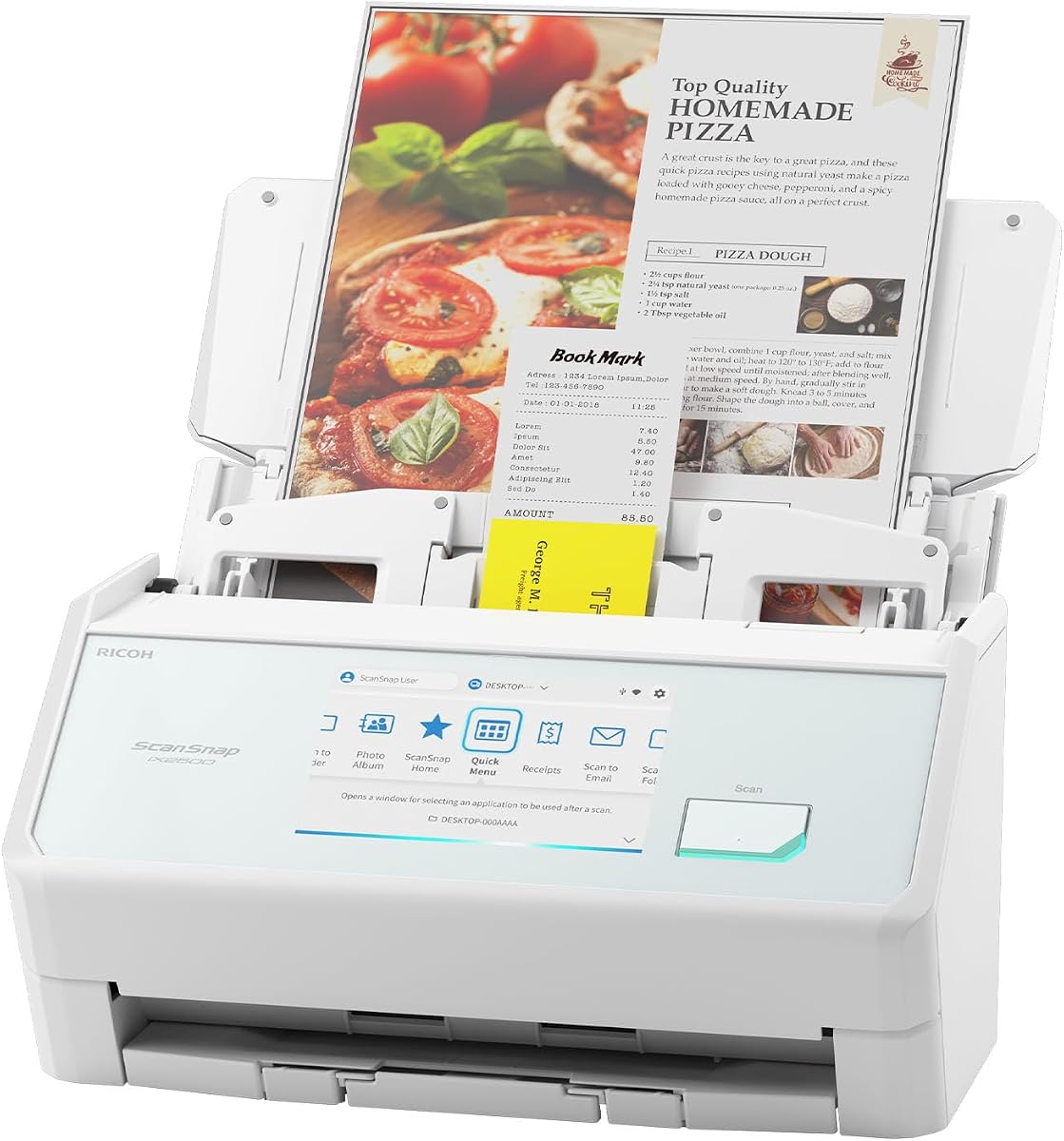
The ScanSnap iX2500 has a 4.4 rating, the highest among the ten products, and delivers the most complete document-management experience in the guide. It combines a 45-page-per-minute duplex scanner, a 100-sheet automatic feeder, a large touchscreen, Wi-Fi 6, and USB-C in a modern desktop-oriented design.
We may earn a commission when you buy through this link, at no additional cost to you.
Its wireless capabilities are particularly relevant to an iPhone 18 workflow. The scanner can connect to smart devices or cloud services without a computer, and the supplied information explicitly lists mobile devices among supported destinations. Users can create personalized touchscreen profiles, use the Quick Menu to move scans into favorite computer applications, and automatically optimize, name, and sort captured files.
Paper protection is another differentiator. A brake roller system supports smooth feeding, a multi-feed sensor detects pages stuck together, and skew detection helps prevent damage or data loss. These features are especially valuable for high-volume users who cannot easily monitor every page entering a scanner.
The iX2500 is best for a busy home office, small business, legal practice, classroom, or remote team that routinely scans multipage documents. It is not the most travel-friendly option because it is larger and more complex than the compact single-sheet models. For users who want direct mobile transfer, high speed, and dependable automation, however, it is the strongest premium choice.
Wi-Fi 6 provides a direct route from the scanner to mobile devices and cloud services. This reduces reliance on an intermediary computer and makes the iX2500 particularly attractive for iPhone users who want immediate access to finished documents.
Multi-feed detection, skew detection, and a brake roller system help maintain a safer feeding process. These controls are more meaningful for office users than for occasional receipt scanning because they reduce errors during lengthy, unattended sessions.
We may earn a commission when you buy through this link, at no additional cost to you.
The CZUR Shine Ultra is a 4.2-rated visual scanner designed for flat papers, thin books, remote teaching, and live demonstrations. Instead of using a conventional feeder, it employs a 13-megapixel CMOS camera to capture documents and can operate as both a scanner and a USB document camera compatible with services such as Zoom and Google Meet.
We may earn a commission when you buy through this link, at no additional cost to you.
Its image-based approach is especially valuable for textbooks, notebooks, and illustrated material that would be difficult to feed through a narrow scanner slot. The patented page-flattening technology can reduce the curved appearance of thin book pages, while Smart Paging, Auto Cropping, Combine Sides, Stamp Mode, and several color modes expand its editing capabilities. OCR support extends across more than 180 languages, although Thai, Hebrew, and Arabic are not supported.
This is not an iPhone 18 scanner in the direct sense. The product information explicitly states that it works with Windows and macOS but is not compatible with Android or iOS. A user can still scan into a computer, transfer the resulting files to an iPhone, and use them in mobile workflows, but that is not the same as scanning directly from the handset.
The Shine Ultra is ideal for teachers, students, bookkeepers, and collectors who regularly work with thin books or need a second camera-like scanning method. It is less appropriate for users seeking native iOS compatibility or a conventional automatic feeder. Its speed, flexible viewing setup, and book-oriented design nevertheless make it a distinctive specialist choice.
A camera-based capture method avoids pulling pages through a roller mechanism. This is advantageous for delicate layouts, illustrations, and bound material, particularly when the document does not need to be scanned at dedicated feeder speed.
The document-camera function makes the Shine Ultra useful for remote lessons and live presentations. Height adjustment and a foldable four-pound design help it move between a desk, classroom, and remote workspace.
We may earn a commission when you buy through this link, at no additional cost to you.
The Brother DS-740D combines a 4.3 rating with a feature that matters greatly in a compact scanner: single-pass duplex scanning. It captures single- and double-sided documents at up to 16 pages per minute, and color scanning operates at the same rate as black-and-white capture.
We may earn a commission when you buy through this link, at no additional cost to you.
The device is less than one foot long, while its Desk Saving Design is intended to reduce the amount of desk space required during operation. It draws power through the included micro USB 3.0 cable, allowing use with a laptop and avoiding a separate external power supply. The iPrint&Scan desktop app can route documents to a PC, network, cloud services, email, or OCR workflows.
Its iPhone relationship is indirect but practical. After a page is scanned, the user can send it through a configured cloud or email destination and open it on the phone. Automatic color adjustment, image rotation, background removal, text enhancement, and bleed-through prevention improve output quality. Windows, Mac, and Linux support, along with standard driver options, broaden its usefulness across computers.
The DS-740D is an excellent choice for someone who wants duplex capture in a small package. It is particularly useful for contracts, double-sided forms, and mixed office paperwork. Users who require direct wireless transfer to an iPhone should choose a model built for that purpose, but this scanner offers strong portability, speed, and document versatility for a computer-assisted workflow.
Single-pass duplex scanning means both sides of a sheet are captured during the same feed. This saves time and reduces the need to turn and reinsert pages, particularly for records with information on both sides.
The scanner combines its compact body with automatic image cleanup. Rotation, background removal, and text enhancement help produce consistent files while preserving room on a crowded desk.
We may earn a commission when you buy through this link, at no additional cost to you.
The Canon imageFORMULA R10 has a 4.1 rating and emphasizes approachable operation, portable construction, and duplex document capture. Its suggested daily volume is 500 scans, while the 20-sheet automatic feeder gives it more batch-handling capacity than the compact single-sheet alternatives in this guide.
We may earn a commission when you buy through this link, at no additional cost to you.
Canon specifies a scanning speed of up to 12 pages per minute in color, black-and-white, or grayscale. The scanner can handle receipts, business cards, plastic or embossed cards, reports, and legal documents. Its scanning software is built in, requires no separate installation, and is designed to update automatically, which may appeal to users who want fewer setup steps.
The R10 works with Windows and Mac computers, and finished files can later reach an iPhone through normal transfer or cloud workflows. It does not provide native iOS operation, so buyers searching specifically for a phone-first scanner should not mistake its portability for direct mobile connectivity. Preview tools also allow users to edit, straighten, trim, and create custom buttons for scanning settings and destinations.
This is a good choice for home offices, classrooms, and mobile professionals who want a small duplex scanner with accessible software. Its limitations include a lower rated speed than the Brother and ScanSnap models, the absence of wireless connectivity, and an explicit restriction against scanning photographs on photographic media. Within those boundaries, it provides a polished and practical document workflow.
The built-in scanning interface reduces friction for users who do not want to configure a complex desktop suite. Automatic updates also help keep the experience current without making software maintenance a major part of the purchase decision.
A 20-sheet feeder and support for receipts, cards, reports, and legal documents make the R10 more versatile than a basic single-page wand. It is better suited to routine office captures than to preserving photographic prints.
We may earn a commission when you buy through this link, at no additional cost to you.
The Epson Perfection V19 II is a 3.9-rated flatbed scanner built primarily for image quality. Its 4800-dpi optical resolution is the highest specification in the roundup, making it appropriate for photographs, artwork, illustrations, and detailed visual material in addition to ordinary documents.
We may earn a commission when you buy through this link, at no additional cost to you.
One-touch controls simplify the basic workflow, and Epson ScanSmart handles photos, artwork, books, documents, and more. A high-rise removable lid allows books and photo albums to be scanned, while Easy Photo Fix can restore color to faded images. OCR features also produce searchable PDFs and editable Word, Excel, and PowerPoint documents from printed pages.
Unlike the mobile feeders, the V19 II does not connect directly to iOS. It uses USB power and is primarily a desktop peripheral, although its compact three-pound body and built-in kickstand for vertical storage make it easier to manage in a home office. Files can reach an iPhone after scanning through the computer or an appropriate sharing workflow.
The V19 II is best for people who need occasional document capture alongside high-quality photo digitization. Its flatbed format is quiet and versatile, but the lack of an automatic feeder makes it inefficient for a large stack of papers. For an iPhone 18 owner, the model is a strong companion device when image quality matters more than speed or direct wireless delivery.
The 4800-dpi optical resolution preserves fine detail in photographs and artwork. Easy Photo Fix adds a convenient correction step for faded color, reducing the need for separate editing software in many cases.
The removable high-rise lid creates clearance for books and albums without forcing pages through a feeder. This makes the scanner comfortable for delicate material, though every sheet still needs manual placement.
We may earn a commission when you buy through this link, at no additional cost to you.
The Epson Workforce ES-60W is a 4.1-rated compact scanner with one of the clearest links to an iPhone workflow. It can scan wirelessly to a PC, Mac, iOS device, or Android device, making it a more natural choice for direct phone delivery than the USB-only models in the guide.
We may earn a commission when you buy through this link, at no additional cost to you.
A claimed four-second scan time makes it especially quick for receipts, identification cards, and individual pages. The scanner automatically detects connectivity and switches between USB and battery-powered wireless operation without manual intervention, while an LCD displays wireless and battery status. Its Automatic Feeding Mode can combine multiple inserted sheets into a single file.
The ES-60W also includes Nuance OCR for searchable PDFs and editable Word and Excel documents, Epson ScanSmart for reviewing and saving scans, and direct cloud scanning. TWAIN compatibility broadens its use with imaging software, and support for documents up to 8.5 by 72 inches adds welcome flexibility for long records.
This model is best for an iPhone 18 user who values direct wireless transfer over high-volume automatic feeding. It is less suitable for offices that need to process hundreds of pages per session because each sheet must be inserted individually. Even so, its quick capture, mobile support, and strong OCR suite make it one of the most relevant choices for this particular search.
The scanner's explicit iOS support removes much of the friction associated with moving scans through a desktop computer. A user can scan on the go and route the file to an iPhone, iPad, Mac, PC, or cloud service from the supported software.
Automatic switching between wired and wireless modes makes the device adaptable to different workspaces. The status display gives clearer feedback than many compact scanners and helps users know when wireless operation and battery status are ready.
We may earn a commission when you buy through this link, at no additional cost to you.
The blue 900DPI handheld scanner is a 3.9-rated travel-oriented option weighing about 0.31 pound. Its A4 color optical sensor offers 300, 600, and 900 dpi modes, allowing users to choose between faster working scans and finer image detail depending on the document.
We may earn a commission when you buy through this link, at no additional cost to you.
The scanner saves directly to a micro SD or TF card in JPEG and PDF formats, with support for cards up to 32 GB. A 16 GB card is included according to the product listing. This is a meaningful advantage for travelers because a computer is not required merely to store the captured file, and users can move the card to an iPhone or another device later.
The included compatibility information focuses on Windows systems, including older releases, and common Windows imaging and OCR software. It does not establish native iOS support or a direct iPhone workflow. The device uses two AA batteries, which are not included, and scanning is performed manually by moving the wand over a page and pressing the scan control.
The scanner is best for extremely light packing, field notes, handwritten records, receipts, and quick visual captures where convenience matters more than OCR depth. It is less suitable for formal office archives or users who want automatic page feeding, duplex capture, and searchable text. Its low weight and standalone storage nevertheless make it a useful specialist travel tool.
Saving to a micro SD card means scans can be captured without a nearby computer or continuous phone connection. The card can then be transferred to an iPhone for viewing, editing, backup, and sharing.
Three resolution modes let the user balance speed, image detail, and file size. The 900-dpi setting is useful for small text and detailed pages, while lower modes can be more practical for less demanding records.
We may earn a commission when you buy through this link, at no additional cost to you.
The silver 900DPI handheld scanner shares the basic design of the blue version, including a 0.31-pound body, A4 color sensor, and selectable 300, 600, or 900 dpi resolution modes. It is a simple travel scanner for users who need to capture a page quickly and move on without setting up a computer.
We may earn a commission when you buy through this link, at no additional cost to you.
Scanned images and documents can be stored as JPEG or PDF files on a micro SD or TF card, and the product supports cards up to 32 GB. A 16 GB card is included according to the listing. Because storage happens locally, the scanner offers a useful workaround for people who want to digitize paper and then transfer it to an iPhone through the card rather than a direct wireless connection.
Operation is straightforward: hold the power switch, select the color mode and resolution, position the scanner over the document, and use the scan button until the green indicator signals completion. The product also notes a page capture time of about 10 seconds at 900 dpi. Two AA batteries provide power, although they are not included.
The silver model is best for students, travelers, and field workers who prize minimum weight and standalone operation. It is less appropriate for batch processing, formal searchable archives, and direct iPhone workflows. The manual process and older stated operating-system compatibility should be considered carefully, but for lightweight visual capture it remains a practical option.
At roughly one-third of a pound, the scanner is easy to include in a small bag or document folder. Its simple controls also make it approachable for users who do not want to install and configure full desktop scanning software.
JPEG and PDF output provides two practical formats for viewing and sharing on an iPhone. Local card storage preserves user control over the originals and provides a simple path to move documents into a mobile file system.
We may earn a commission when you buy through this link, at no additional cost to you.
The most important decision is whether you need direct iPhone transfer or can use a computer-mediated workflow. After resolving that question, compare connectivity, OCR, paper capacity, speed, media support, and physical portability.
A scanner with explicit iOS support can transfer files to an iPhone, iPad, or other mobile device without requiring a desktop computer at every step. Among the listed products, the Epson Workforce ES-60W is the clearest compact example because its documentation specifically names iOS, while the ScanSnap iX2500 supports mobile devices and cloud services over Wi-Fi. By contrast, the Brother, Canon, Epson ES-50, and flatbed models generally scan into a computer-based workflow first.
Check whether direct transfer means sending the finished file, operating as a camera-like scanner, or merely saving to removable storage. None of the products should be assumed to offer native iOS operation without a clear compatibility statement. For the latest iPhone 18, also confirm that current software versions support the device and that the required cable, wireless network, or storage method fits your routine.
Optical character recognition converts printed characters into text that can be searched, copied, and edited. It is essential if your iPhone archive will contain contracts, invoices, notes, or forms that need to be located later. The Epson ES-50, ES-60W, and Perfection V19 II explicitly include OCR for searchable PDFs and editable Office files, while the Brother models include OCR workflows and the Canon supports searchable PDF output.
Recognized text quality depends on scan resolution, page alignment, and the original document, not merely the presence of an OCR label. Users should also verify which languages and file formats are supported for their particular records. If searchable text is the main purpose, prioritize a documented OCR feature over a higher nominal resolution that the scanner may use mainly for images.
Single-sheet scanners are compact and convenient for receipts, cards, and individual documents, but they demand more attention during longer runs. Automatic feeders are better for reports, contracts, and office archives. The ScanSnap iX2500 holds 100 sheets, the Canon R10 holds 20, and the Brother DS-740D offers duplex capture one sheet at a time. The Epson ES-50 and ES-60W accept loose pages sequentially and can combine them into a multi-page file.
Consider how often you scan and whether double-sided pages are common. A large feeder without duplex support may still be less convenient for double-sided paperwork than a smaller duplex model. The CZUR Shine Ultra and Epson V19 II use flatbed or visual capture, which is gentler for books but requires manual page placement.
Scanning speed matters most when processing recurring batches. The ScanSnap iX2500 leads this group at 45 pages per minute, while the Brother DS-640 and DS-740D reach 16 pages per minute and the Canon R10 reaches 12. The Epson ES-50 can scan a single page in as little as 5.5 seconds, and the ES-60W can complete one in as little as four seconds.
Single-page speed and pages-per-minute are not always directly comparable because one describes a single scan and the other describes throughput. For a user scanning occasional receipts, four or five seconds may be entirely adequate. For repeated stacks, automatic feeding and sustained speed usually offer a greater benefit than a quick first page.
Wireless connectivity is the most convenient option for an iPhone-centered workflow because it reduces cable management and can remove the need for a nearby computer. The ScanSnap iX2500 offers Wi-Fi 6 and USB-C, while the Epson ES-60W can operate over USB or battery-powered wireless connections and switch between them automatically. Wired models such as the Brother DS-640, Canon R10, and Epson ES-50 can be dependable but normally depend on a computer-mediated transfer.
Consider your workspace as well as the phone. A direct mobile workflow is useful while traveling, but a stable desktop setup may be more appropriate for an office that already uses cloud storage. Verify the software, network requirements, and security requirements before assuming that a scanner's wireless feature will connect seamlessly to a particular iPhone.
A mobile scanner should be easy to carry without becoming frustrating to use. The Epson ES-50, Brother DS-640, and Brother DS-740D are among the most compact conventional models, while the handheld scanners weigh about 0.31 pound. The CZUR Shine Ultra folds for transport and adjusts to different heights, but its camera-based design is intended for flat materials. The ScanSnap iX2500 is optimized for volume and includes a touchscreen, making it less compact than a single-sheet model.
Think about where the device will live and how often it will be moved. A lightweight scanner for receipts may be more valuable than a faster desktop unit if portability is the central requirement. Conversely, a fixed office with frequent batch jobs benefits more from a large feeder, sturdy paper controls, and a dedicated touchscreen.
The documents you routinely scan should dictate the best mechanism. Automatic feeders suit standard loose paper, while a flatbed or visual scanner is safer for books, albums, artwork, and fragile material. The Canon R10 supports receipts, business cards, plastic or embossed cards, reports, and legal documents, but it is not intended for photographs on photographic media. The Epson Perfection V19 II is strongest for photos and illustrations, while its removable lid also accommodates books and albums.
Also examine paper length, thickness, and whether both sides must be captured. Long receipts may suit the Epson single-sheet models, which support up to 72 inches. Very small cards require a scanner that explicitly accepts identity or business cards. Always check dimensions and media limitations before ordering for specialized records.
Hardware performance only matters if captured files are easy to organize. Epson ScanSmart supports reviewing and saving scans, Brother iPrint&Scan offers numerous scan-to destinations, and Canon provides built-in software with automatic updates and custom buttons. The ScanSnap iX2500 adds personalized profiles, automatic naming and sorting, and a Quick Menu for moving files into preferred computer applications.
Look for the destinations and editing tools that match your actual work. Cloud delivery, email, searchable PDFs, network folders, and app shortcuts are not interchangeable, and a broad destination list is more useful if you already use those services. A simple local workflow may be preferable for someone who mainly scans and transfers files to an iPhone for quick viewing.
Begin by choosing the correct connection method and destination. For a direct mobile model, install the required app, connect the scanner to the intended Wi-Fi network, and confirm that the iPhone can see it. For a computer-based model, install the included driver and software, connect the documented cable, and create a test destination such as a computer folder, email account, or cloud service before scanning a full batch.
Place the document on the scanner according to its design. Feeders should receive clean, correctly oriented pages, while flatbed and visual scanners should be placed squarely beneath the camera. Select the appropriate resolution, color mode, OCR option, and file format, then scan a representative page. Check edges, contrast, text recognition, and page order on the iPhone before committing to a lengthy run.
For care, unplug powered scanners before cleaning them, use a soft dry cloth, and avoid liquids unless the manufacturer specifically permits them. Keep the feed path and rollers clear of dust and debris, store the scanner in a protective case when traveling, and back up completed files. Do not force warped, torn, or unusually thick paper into a feeder.
The Epson Workforce ES-60W explicitly supports scanning to iOS devices, and the ScanSnap iX2500 supports mobile devices and cloud services over Wi-Fi. The remaining products are primarily computer-based scanners, though their files can be transferred to an iPhone afterward. Confirm the latest operating-system and app compatibility before purchase, especially for a newly released handset.
An iPhone camera can photograph documents, but it is not a direct replacement for a dedicated scanner. A scanner offers controlled lighting, consistent alignment, reliable page feeding, and automatic OCR in many models. These features can reduce uneven shadows, crooked pages, cropped content, and the amount of manual correction required before sharing or archiving.
The Epson ES-50 and ES-60W are compact choices for receipts because they scan a single page in as little as 5.5 and four seconds, respectively, and support document lengths up to 72 inches. The handheld 900DPI models are even lighter and save directly to a micro SD card. OCR support is valuable if you want to search or extract receipt text later.
A single-sheet scanner accepts loose pages one at a time and often remains small enough for travel. An automatic-feed scanner pulls pages from a tray, which is much more efficient for reports, contracts, and multipage records. The ScanSnap iX2500 and Canon R10 include larger feeders, while the Epson ES-50 and ES-60W use compact sequential feeding.
OCR is highly useful when you want to search, copy, or edit the text inside a scan. It creates searchable PDFs and, in some models, editable Word, Excel, or PowerPoint files. Without OCR, the iPhone usually receives an image of the page, which is visually faithful but harder to organize and retrieve.
The Brother DS-740D scans both sides in one pass, and the ScanSnap iX2500 also supports 45-page-per-minute duplex scanning. The Canon R10 includes duplex capture with a 20-sheet feeder. These are more practical for contracts and office records than single-sheet or flatbed models that require manual page turning.
The Epson Perfection V19 II and CZUR Shine Ultra are the strongest options for books, albums, artwork, and photographs because their flatbed or visual capture avoids pulling pages through a narrow feeder. The Canon R10 is not intended for photographs on photographic media. Check resolution and source condition carefully when preserving detailed visual material.
Wireless is usually more convenient for an iPhone-centered workflow because it can reduce computer dependency and cable clutter. USB is often straightforward, stable, and well suited to a fixed desk. The Epson ES-60W and ScanSnap iX2500 provide wireless options, while several compact Brother, Canon, and Epson models are designed around a computer connection.
The ScanSnap iX2500 is the most capable premium option, combining 45-page-per-minute duplex scanning, a 100-sheet feeder, Wi-Fi 6, mobile-device support, and sophisticated document management. The Brother DS-640 is a budget-minded compact favorite for fast single-page capture, while the Epson Workforce ES-50 is the best all-around balance of portability, speed, and OCR.
For an iPhone-specific purchase, prioritize direct mobile compatibility when convenience is your main concern. The Epson ES-60W offers clear iOS support in a compact wireless design, while the ScanSnap is better for high-volume work. If your workflow allows computer-mediated scanning, a smaller USB model may provide better portability and value.
Before ordering, verify the current product specifications, software support, connection method, and media requirements. Ratings and features can evolve, and current pricing and availability may change. Comparing the final model against the way you actually store, retrieve, and share documents will lead to the most satisfying result.