
8mm & Super 8 Film to Digital Converter
3.7Editor score
1080P MP4 output
32GB card included
Twenty frames per second
Computer-free conversion
Digital Converters Super 8 8mm devices can preserve aging home movies by transferring exposed film reels into manageable digital video files. A capable converter should support the reel sizes and film formats in your collection, provide clear framing controls, and save finished projects without forcing you to master complicated editing software.
This guide compares ten relevant products based on their documented film compatibility, output format, sensor resolution, display, controls, storage method, and included accessories. It also distinguishes true motion-picture film scanners from products made primarily for 8mm video tapes, because those media require fundamentally different playback equipment.
The first three recommendations represent the strongest all-around, value-oriented, and feature-focused choices, while the remaining reviews explain where alternatives excel or fall short. Availability, bundle contents, and prices can change, so confirm the current listing and specifications before purchasing a converter for your collection.
3.7Editor score

4.1Editor score

As an Amazon Associate we earn from qualifying purchases.
The comparison below covers true 8mm and Super 8 film converters as well as two tape-transfer bundles that are relevant to the broader 8mm category but do not scan motion-picture film reels.



The KODAK REELS 8mm & Super 8 Film Digitizer is the most complete-looking option in this roundup, combining an 8MP sensor, a five-inch LCD, touch controls, and direct 1080P MP4 recording. Its documented 4.1 rating reflects a capable general-purpose design, particularly for users who want to monitor framing and make corrections on a relatively large screen before committing each reel to digital storage.
We may earn a commission when you buy through this link, at no additional cost to you.
Its main advantage is the combination of interface size and operational control. The on-screen display allows users to record, convert, and play back footage while also adjusting exposure, sharpness, tint, zoom, alignment, and film type. The device accepts 3-, 4-, 5-, 7-, and 9-inch reels in both 8mm and Super 8 formats, making it a practical choice for collections containing multiple reel sizes rather than one standardized collection.
The converter saves to an SD card and can transfer files through the included Micro USB cable to a computer, laptop, or smart TV. An SD card is not included, and the resulting video has no audio, so owners should budget for storage and plan to add synchronized sound later if the source reel includes it. Even with those limitations, the sensor, display, and broad reel compatibility create a stronger all-around feature set than most of the dedicated scanners listed.
This is the most suitable option for families preserving several decades of mixed home movies, particularly when ease of setup and visible frame alignment matter. It is less appropriate for someone expecting a fully assembled professional restoration system or a device that includes memory storage. Subject to those expectations, the KODAK REELS combines the most useful interface features and one of the broadest documented compatibility ranges in the guide.
A five-inch touch screen gives more room to inspect the film gate, reposition frames, and judge focus before conversion. The direct controls for exposure, sharpness, tint, and zoom also reduce the need to correct every issue later in editing software.
Support for standard reel sizes from 3 through 9 inches makes the scanner useful for both short home reels and larger family collections. It accepts both 8mm and Super 8 media, reducing the need to own separate devices for each format.
We may earn a commission when you buy through this link, at no additional cost to you.
This 8mm & Super 8 Film to Digital Converter delivers a focused archive workflow with a 3.7 rating and a document that emphasizes convenience. It records frame by frame to 1080P MP4 at 20 frames per second, includes a 32GB SD card, and does not require a computer during conversion. That combination makes it approachable for first-time film owners who want a complete starting setup.
We may earn a commission when you buy through this link, at no additional cost to you.
The integrated 2.4-inch LCD provides immediate review and playback, while the included TV cable allows a larger display to be used for family screenings. Finished files can be transferred from the card to Windows, Mac, or Linux systems for editing, backup, and sharing. Supporting common computer platforms is helpful because it reduces uncertainty when the archival process eventually moves beyond the converter itself.
Its most important practical advantage is the included 32GB card. Many competing scanners require buyers to supply storage, while this product is ready for a first conversion out of the box. The trade-offs are a relatively small screen and a 3.7 rating, which is lower than the leading products. The output also contains no sound, and the documentation notes that media must be mounted correctly on a proper reel and adapter before recording and rewinding.
This converter is best for budget-conscious owners who want a simple first step toward preserving exposed film without buying storage separately. People who need fine manual image control may prefer a larger interface, while serious archivists will want to build a redundant backup plan after every transfer. Even so, its included card, broad reel compatibility, and no-computer workflow make it a strong value-oriented recommendation.
The included 32GB card removes a common source of delay and expense. Once the film is properly mounted, the converter can save completed MP4 files without requiring a computer, driver, or specialized capture application.
Standard MP4 output can be moved to Windows, Mac, or Linux systems for editing and long-term storage. This is useful for households with more than one type of computer or for families that may share the project with relatives using different platforms.
We may earn a commission when you buy through this link, at no additional cost to you.
The Magnasonic FS81 combines a dedicated 8mm and Super 8 design with a 4.0 rating, giving it a balanced position between basic converters and feature-rich models. It automatically converts 3-, 5-, and 7-inch reels into digital MP4 files and offers a built-in 2.3-inch LCD for immediate viewing. Its simple, button-led approach is well suited to users who want a predictable process rather than a dense editing interface.
We may earn a commission when you buy through this link, at no additional cost to you.
You can review captured video on the integrated display or send the signal to a television or monitor through the included RCA video-out cable. Brightness, sharpness, and framing can be adjusted directly on the scanner, which means many basic corrections can happen during capture. An SD card of up to 32GB is supported, although the card itself is not included, and the device does not depend on a computer or complicated photo-editing software.
The primary limitation is reel range. Supporting up to 7 inches means this scanner will not accept every larger reel supported by competing units, so owners with 9-inch reels should verify their collection before buying. The absence of audio in the resulting video is typical across the film-scanner category represented here and should be addressed separately if sound is important to the memories being preserved.
The FS81 is a strong recommendation for collectors with 3-, 5-, or 7-inch reels who value clear built-in adjustments and easy playback. It is less suitable for a mixed collection containing large 9-inch reels or for buyers who want the largest possible touch display. With straightforward controls, no-computer operation, and a solid documented rating, it remains one of the more balanced dedicated scanners available.
Brightness, sharpness, and framing controls are accessible directly from the scanner, reducing the need to learn a complex editing program. The included instructions on the unit and in the manual support a more accessible setup process.
The included RCA cable provides an easy way to show a converted reel on a larger television or monitor. This makes the scanner useful for family playback sessions as well as archival work.
We may earn a commission when you buy through this link, at no additional cost to you.
This 8mm & Super 8 Film to Digital Converter provides a 3.8 rating and a useful combination of touchscreen controls, a 5MP sensor, and 1080P frame-by-frame digitization. The 2.4-inch full-color LCD lets users record, convert, play back, select film type, and adjust brightness, sharpness, and framing without external editing software. That makes it flexible for both first-time and more experienced users.
We may earn a commission when you buy through this link, at no additional cost to you.
The device accepts 3-, 5-, 7-, and 9-inch reels and saves directly to SD/SDHC media with a maximum capacity of 32GB. A card is included, while the Micro USB cable enables transfer to a computer, laptop, television, or another playback device. The package also includes a film reel, power adapter, RCA video-out cable, real shaft plate, cleaning cloth, instruction manual, and online technical support.
Compared with similarly priced dedicated scanners, the main selling point is the breadth of the package and the touch interface. The 5MP sensor is lower than the 8MP specification of the first-ranked KODAK unit, and the 2.4-inch display is smaller than its five-inch screen. These differences may matter if fine visual inspection is especially important, though the image settings still provide useful control over the transfer.
This is a versatile choice for owners of standard and large reels who want a card and essential connection cables in the box. The stated one-year warranty and 24-hour online technical support also add reassurance. Buyers should understand that the converter creates silent video and that storage capacity still determines how much footage can be archived before files need to be transferred and backed up.
The full-color LCD and touch buttons put recording, playback, film selection, brightness, sharpness, and framing in one interface. Users can make corrections without installing a dedicated driver or navigating complicated photo-editing software.
Beyond the scanner, the package includes storage, power, television playback, cleaning, and setup accessories. This reduces the chance that a buyer will need to locate several basic items before beginning a conversion project.
We may earn a commission when you buy through this link, at no additional cost to you.
The MovieMaker Pro Film Digitizer offers automated conversion of 8mm and Super 8 reels, a 2.4-inch LCD, and documented 1080P output. Its 3.3 rating is the lowest among the products with numerical feedback, so prospective buyers should weigh the straightforward feature set carefully against competing models. Within that set, it includes a 32GB SD/SDHC card and does not require a computer or editing software.
We may earn a commission when you buy through this link, at no additional cost to you.
Frame-by-frame capture produces 1080P MJPEG-4 files at 20 frames per second, allowing converted movies to be opened on Windows, Mac, or Linux systems. The built-in display supports immediate review, while the included TV cable allows larger-screen viewing. The scanner is designed for 3-, 5-, 7-, and 9-inch reels, giving it broad coverage for family archives.
The lower rating may reflect concerns that cannot be determined from the supplied specifications, but the available information does confirm several important functions. A limitation worth noting is that 8mm or Super 8 media must be mounted properly on a reel no more than 5 inches in diameter and use the appropriate adapter before recording and rewinding. That instruction may be confusing for first-time owners, who should follow the setup process carefully.
This product makes the most sense for buyers seeking an automated, no-computer path that includes storage and supports large reels. It is less attractive if the numerical customer feedback is a primary purchasing criterion or if a larger screen is important for precise alignment. Compared with the KODAK REELS and the other higher-rated scanners, it offers a familiar core workflow but fewer controls and less prominent screen real estate.
The scanner handles reels frame by frame and writes them to removable storage without requiring a connected computer. This is useful for users who want a repeatable process for converting multiple family films in succession.
The resulting 1080P MJPEG-4 MP4 files can be transferred to Windows, Mac, and Linux computers. The broad file compatibility makes later editing, sharing, and backup less dependent on a single operating system.
We may earn a commission when you buy through this link, at no additional cost to you.
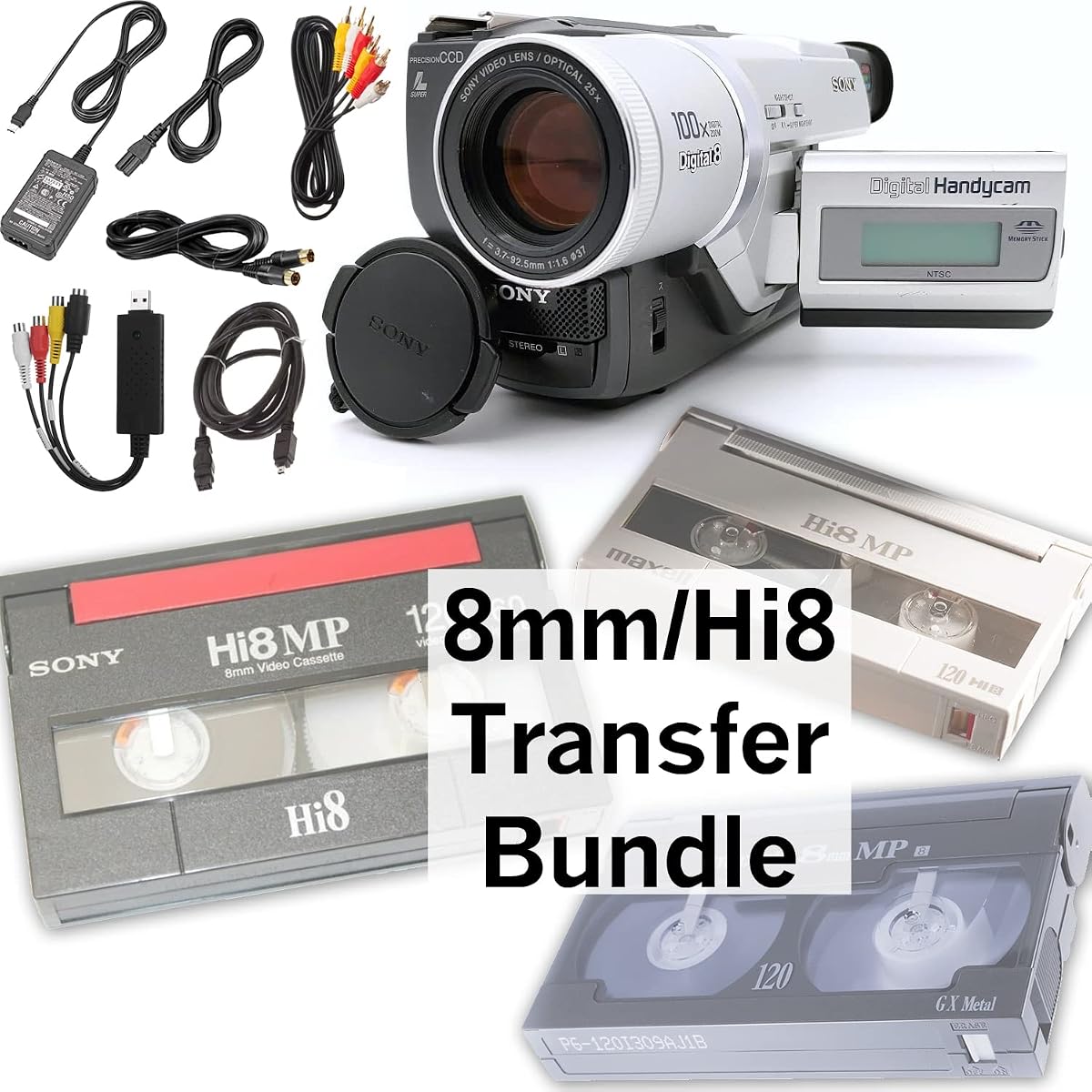
The Tech Collector 8mm, Digital8, and Hi8 Transfer Bundle is built for analog and digital video tapes rather than exposed 8mm or Super 8 motion-picture film. It earns a 4.0 rating and includes a camcorder, USB capture device, battery, AV cables, and an 8mm tape. This makes it relevant to the broader search for an 8mm converter, but it should not be considered a film scanner.
We may earn a commission when you buy through this link, at no additional cost to you.
The camcorder plays back 8mm, Hi8, and Digital8 tapes, while the USB capture device transfers the video signal to computer files or supports burning it to DVD. Because the process routes through a computer, this bundle suits users who already understand basic file management and want flexible options for editing, copying, and storing tape-based recordings.
Its key limitation is fundamental: it cannot accept an exposed reel of 8mm or Super 8 film. Owners with spliced film strips, sprocket-holed home movies, or reel-based family movies need one of the dedicated scanners in this guide. Conversely, someone whose collection consists entirely of cassette-format recordings will find a tape-specific setup more relevant than a film digitizer that cannot play those cassettes.
The bundle is a good fit for households preserving 8mm, Digital8, or Hi8 tapes and wanting playback equipment and capture accessories together. It is not recommended for the keyword's core film-reel conversion task. Checking the physical format of your collection before buying is essential, because the terms 8mm video and 8mm film describe incompatible media that require entirely different equipment.
The package combines a camcorder, USB capture unit, battery, and AV connection cables. That gives buyers the basic components needed to play a supported tape and transfer its picture to a computer.
USB capture allows recorded video to become computer files or be used in a DVD-burning workflow. This is less self-contained than a film scanner but can be useful when the owner wants to edit or organize the result on a desktop.
We may earn a commission when you buy through this link, at no additional cost to you.
The second Tech Collector bundle supports 8mm, Digital8, and Hi8 video tapes and carries a 3.8 rating. It includes a camcorder, USB capture device, battery, AV cables, and a blank 8mm tape. Like the other Tech Collector option, it addresses cassette-based media and is not suitable for transferring exposed 8mm or Super 8 film reels.
We may earn a commission when you buy through this link, at no additional cost to you.
Its included blank tape gives an owner something to test before attempting an irreplaceable family recording. The camcorder provides playback, while the USB adapter sends video to a computer for file capture or DVD preparation. This makes the set approachable for cassette owners, although the workflow is less direct than scanning film to an SD card without a computer.
Compared with the other Tech Collector bundle, this package includes a blank tape rather than an 8mm tape. The documented playback and transfer functions are otherwise closely aligned. The distinction illustrates why careful product comparison matters: two listings can appear almost identical while their included accessories differ, and neither should be mistaken for a device that scans Super 8 film strips.
This bundle is a sensible choice for owners of cassette recordings who want camcorder playback, computer capture, and a practice tape in one set. It should be skipped for true film-reel projects. Before choosing any converter, inspect a reel or cassette and determine whether the media contains a magnetic tape in a plastic housing or exposed film with perforations along its edge.
The included blank 8mm tape lets a new user learn the camcorder and capture workflow without risking a valuable recording. It is a small but useful addition for households that have never transferred analog video before.
Support for 8mm, Digital8, and Hi8 expands the potential uses of the included camcorder. Owners with several generations of home video tapes can use the same playback equipment for each supported format.
We may earn a commission when you buy through this link, at no additional cost to you.
The Digital Film & Slide Scanner is a dedicated 8mm and Super 8 converter with no numerical customer rating available in the supplied data. Its appeal comes from a documented no-computer workflow, a built-in 2.4-inch LCD, direct MP4 creation, and compatibility with 3- and 5-inch film reels. The product title also references slides and digital negatives, but the supplied description focuses on 8mm and Super 8 motion-picture film conversion.
We may earn a commission when you buy through this link, at no additional cost to you.
Users load film onto the universal supply reel and follow on-screen prompts to send footage to an SD/SDHC card of up to 32GB. The memory card is not included. Converted files can be reviewed on the built-in display or viewed on a television or monitor through the included TV cable, providing flexibility for both private inspection and family playback.
The most important trade-off is the narrower documented reel range. Products elsewhere in this guide accommodate 7- and 9-inch reels, while this scanner lists 3- and 5-inch sizes. The absence of a numerical rating also means there is no supplied customer feedback score to support a direct quality comparison. Buyers should therefore focus on whether their film has been mounted on a compatible reel and whether the streamlined setup meets their needs.
This scanner is most appropriate for smaller reels, owners who want a dedicated and guided no-computer process, and buyers seeking a polished home or office display option for converted memories. It is less suitable for a large-reel archive or for anyone who places substantial weight on established rating history. Its core strengths remain direct MP4 output, simple card-based storage, and uncomplicated playback.
The scanner leads users through loading the film and saving the result to removable card storage. This reduces the learning curve for families approaching reel-based home movies for the first time.
A built-in display and included television cable support both close inspection and group viewing. The listing also describes use as a digital photo frame in a home or office, adding a secondary role beyond archival conversion.
We may earn a commission when you buy through this link, at no additional cost to you.
The Old School Film Scanner is listed for 8mm and Super 8 conversion and has a built-in 2.4-inch display, but no numerical rating is available. Its supplied description says the device creates digital MP4 files and saves them to an SD/SDHC card of up to 32GB. The product title mentions JPEG images, creating a discrepancy that deserves attention before purchase.
We may earn a commission when you buy through this link, at no additional cost to you.
Its practical process is simple: load a 3- or 5-inch reel onto the universal supply reel, follow the on-screen prompts, and save the footage to a card without connecting a computer. A TV cable is included for larger-screen playback. This makes it a straightforward option for families seeking an independent conversion device rather than a computer-based capture setup.
The format inconsistency is the clearest concern. Buyers who need still JPEG images should not assume they will receive them based solely on the title, because the detailed bullet points repeatedly specify MP4 movie files. There is also no numerical customer rating to provide evidence of consistency, and no documented support for 7- or 9-inch reels. Checking the current listing and asking the seller to clarify the output format is advisable.
This scanner suits buyers with small reels who prioritize a guided, computer-free process and want to create shareable movie files. It is less suitable for users who require confirmed still-image output, a large-reel archive, or a product with an established numerical feedback history. Within those limits, the documented workflow is coherent and centered on preserving home movies for later family viewing.
The scanner writes directly to an SD/SDHC card, allowing conversion to happen without a desktop, laptop, driver, or dedicated capture program. Users can transfer the resulting files to a computer only when they are ready to edit, copy, or back them up.
The title suggests JPEG still images, while the supplied feature description says MP4 video files. Because those are different deliverables, buyers should confirm the current product format and included accessories before ordering.
We may earn a commission when you buy through this link, at no additional cost to you.
This Digital Film & Slide Scanner is another dedicated 8mm and Super 8 option with no numerical customer rating in the supplied information. It stands apart through a particularly detailed accessory list, including a film reel, 31-inch USB cable, power adapter, 39.3-inch RCA television cable, cleaning cloth, and instruction manual. The core conversion workflow remains focused on MP4 files stored on an SD/SDHC card.
We may earn a commission when you buy through this link, at no additional cost to you.
Its built-in 2.4-inch LCD supports setup and playback, while the included television cable makes it easy to share converted footage on a larger screen. The documented process uses a universal film supply reel and on-screen prompts, with 3- and 5-inch reels supported. No computer or drivers are required during the initial transfer, reducing barriers for families that want to preserve film without setting up a capture workstation.
This listing shares an image and broad feature language with the other Digital Film & Slide Scanner options, so buyers should compare the package descriptions rather than assuming every listed accessory is unique to one model. The absence of a numerical rating and the narrower reel range are the main documented limitations. The title references slides and digital negatives, but the supplied description concentrates on 8mm and Super 8 movie-film conversion.
The product is most suitable for a collector with smaller 3- or 5-inch reels who values a complete box of connection and setup accessories. It is a less compelling option for 7- or 9-inch reel owners and for buyers who require an established rating or confirmed still-slide output. With its guided workflow and direct MP4 saving, it remains a functional dedicated scanner for appropriately sized film collections.
The package includes power, USB, television playback, cleaning, and setup items in addition to a film reel. This gives a new owner several of the basic components required to prepare, connect, scan, and review footage.
The documented support for 3- and 5-inch reels keeps the setup focused and may appeal to families with smaller collections. Larger-reel owners should choose a model that explicitly supports their exact reel diameter.
We may earn a commission when you buy through this link, at no additional cost to you.
The most important choice is physical media compatibility. A true film scanner handles exposed 8mm or Super 8 strips, while an 8mm tape system reads magnetic cassettes. Resolution, screen size, controls, storage, and accessories should be evaluated only after confirming that the device fits the media you actually own.
Briefly: verify reel film versus cassette tape before buying a converter.
Briefly: choose a scanner that explicitly lists every reel diameter in your archive.
Briefly: look beyond resolution and compare sensor, frame rate, and manual controls.
Briefly: prioritize a visible, well-lit preview and the adjustments you expect to use.
Briefly: include card capacity, offloading, and backup in the total ownership plan.
Briefly: choose the level of control that suits your film condition and experience.
Briefly: plan audio restoration separately because these scanners create silent video.
Briefly: confirm reels, adapters, cables, power, and storage are included or planned.
Begin by identifying the film format, reel size, and condition. Inspect the reel for loose film, severe creases, torn perforations, adhesive residue, or sections that appear stuck together. Read the scanner's included instructions and mount the film on the correct supply and take-up reels with the proper adapters. Do not force a reel into a mechanism that does not support its diameter, and make sure the film advances smoothly before starting a long conversion.
Clean the scanner and reel components according to the product guidance, then insert a formatted SD or SDHC card when the model requires removable storage. Select the correct film type and set brightness, sharpness, framing, and other available settings. Run a short test section to confirm sprocket alignment, image stability, focus, and the direction of travel. Then begin the full frame-by-frame conversion and monitor the process, stopping to resolve any visible jitter, contamination, or film obstruction.
After the reel is converted, review the MP4 file from its beginning and watch representative sections throughout its duration. Copy the original capture to a computer, verify that it opens correctly, and create a second backup on another drive or storage service. Keep the SD card safely stored, label the corresponding reel, and record where the digital copy and any separately created audio track are located. Proper storage, labeling, and duplicate backups are what turn a successful scan into a durable archive.
Many dedicated scanners in this guide support both 8mm and Super 8 film, but you must still select the correct film type and use compatible reel adapters. The Magnasonic FS81, for example, is explicitly listed for both formats. Check reel diameter and mounting requirements before transferring because a device that accepts one film format may not support every reel size or adapter.
An 8mm film scanner captures exposed motion-picture film from reels and usually saves digital files directly to an SD card. An 8mm tape converter uses a camcorder to play magnetic 8mm, Digital8, or Hi8 cassettes and transfers the signal through a computer. The two Tech Collector bundles in this guide are tape solutions, not scanners for Super 8 film reels.
No. The supplied descriptions for the dedicated scanners consistently state that the digital output contains video without sound. Audio may have to be recorded separately from another source and synchronized during editing. Anyone for whom voices or music are a major part of the film should account for that extra step before beginning an archive project.
Most dedicated film scanners can perform the conversion without a computer and save directly to an SD or SDHC card. The KODAK REELS additionally provides a large five-inch touch interface, while the Magnasonic FS81 focuses on direct brightness, sharpness, and framing controls. A computer is still useful for editing, creating backups, and organizing the finished files.
Storage needs depend on reel length, output bitrate, and how the converter encodes each project. The listed devices commonly support SD/SDHC cards up to 32GB, and several include a 32GB card. For a substantial archive, plan to transfer and back up each reel before reusing the card rather than assuming one card will hold an entire collection.
Several options list support for 9-inch reels, including the KODAK REELS, the 2.4-inch converter at rank four, and the MovieMaker Pro. The Magnasonic FS81 lists support through 7 inches, while the three Digital Film and Slide Scanner listings describe 3- and 5-inch support. Always confirm the exact reel diameter and required adapter before ordering.
A better approach is to concentrate on obtaining a stable, correctly framed capture and make basic corrections only when needed. More extensive color, audio, sequencing, and restoration work can happen after the files reach a computer. This reduces the chance that a complex editing decision interrupts the scan and causes a reel to be converted more than once.
Keep at least two copies in different locations, such as an external drive and a separate cloud or secondary storage service. Use descriptive filenames that identify the film type, reel number, and family or event. Also label the original physical reel and store it in a dry, dark, stable environment so the digital copy and source material remain linked.
The KODAK REELS stands out as the strongest all-around choice because its 8MP sensor, five-inch touch display, manual adjustments, and support for standard reel sizes create a versatile conversion interface. The rank-two converter is the best value-oriented recommendation when having storage included matters, while the Magnasonic FS81 offers a balanced dedicated workflow with direct image controls and straightforward television playback.
Prioritize media format and reel diameter before considering any other feature. Choose a dedicated film scanner for exposed 8mm or Super 8 reels, and select a camcorder-based capture bundle only for magnetic 8mm, Digital8, or Hi8 tapes. Among film scanners, favor a screen large enough for accurate framing, enough adjustment control for the condition of the film, and a storage method that fits the size of the archive.
Finally, review the current listing, included accessories, warranty terms, and specifications before ordering, since bundles and product details can change. Prices also change over time, so compare the complete package and your storage needs rather than selecting on cost alone. A properly matched converter can give old home movies a practical path into digital files that families can view, edit, back up, and share for many years.