Digital Calendar 10.1-inch Smart Family Digital Wall Planner & Chore Chart
5.0Editor score
Ten-inch HD touchscreen
No subscription required
Shared calendar synchronization
Interactive star rewards
Wall or desktop placement
A digital chore chart can combine schedules, assignments, meal plans, reminders, and family photos in one shared display. The best models make responsibilities visible without turning the household into a constant reminder machine, giving every family member a useful place to see what is happening and when.
This guide compares 10 touchscreen digital chore charts based on display size, calendar compatibility, task features, reward tools, meal planning, photo functions, installation options, and stated ratings. It covers compact desk-oriented models as well as larger wall-mounted command centers for households that need more visible information.
Each pick highlights a different balance of capabilities, from straightforward family organization to expansive storage, flexible layouts, and interactive rewards. Ratings and product details reflect the supplied information, while availability and pricing can change. Always confirm the current specifications and conditions before making a purchase.
5.0Editor score

4.5Editor score

4.4Editor score
As an Amazon Associate we earn from qualifying purchases.
The comparison below places all 10 digital chore charts side by side, focusing on screen size, household task features, connected-calendar support, storage or display options, and installation flexibility. It is designed to make the differences visible before you compare current listings.
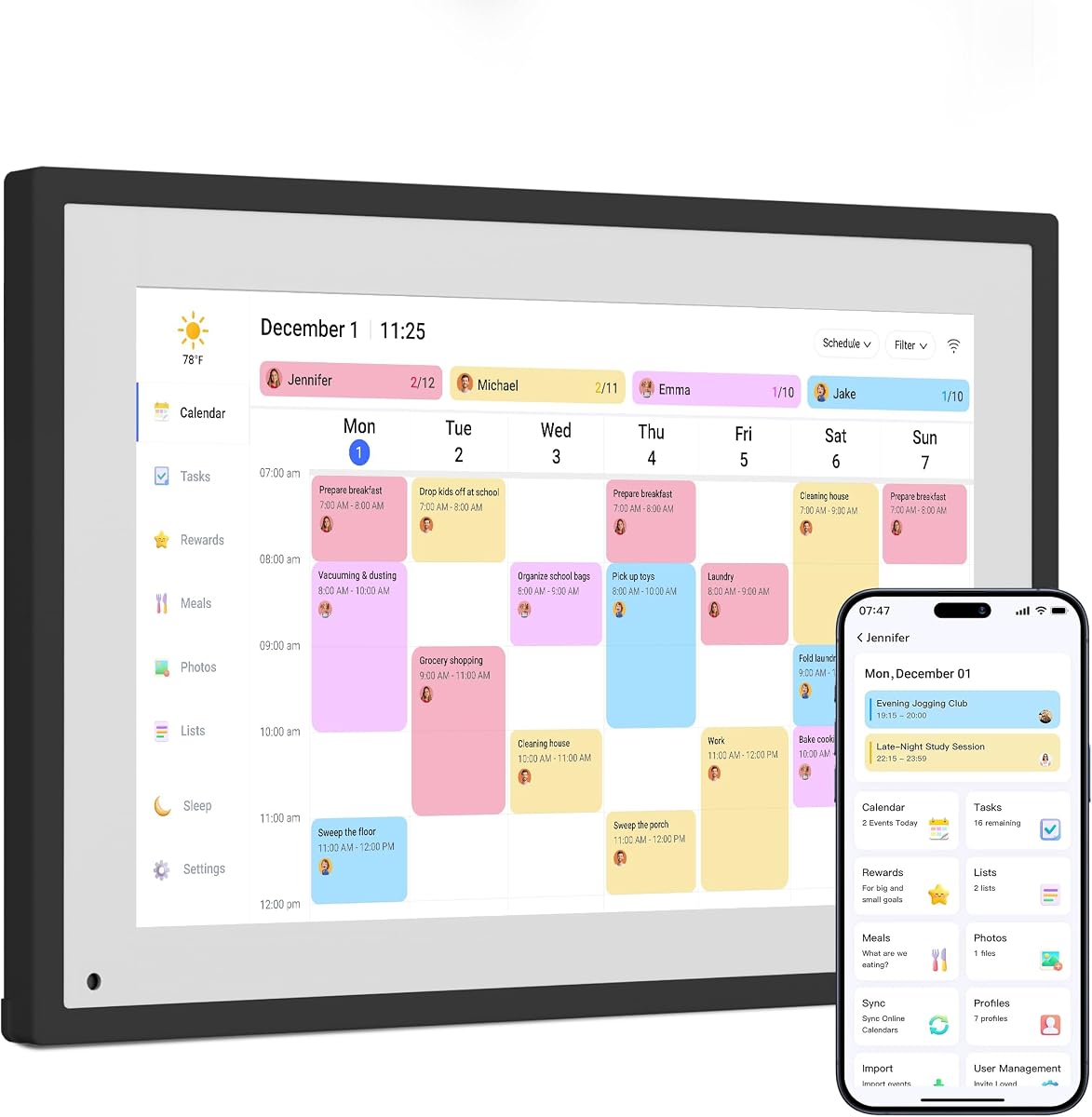




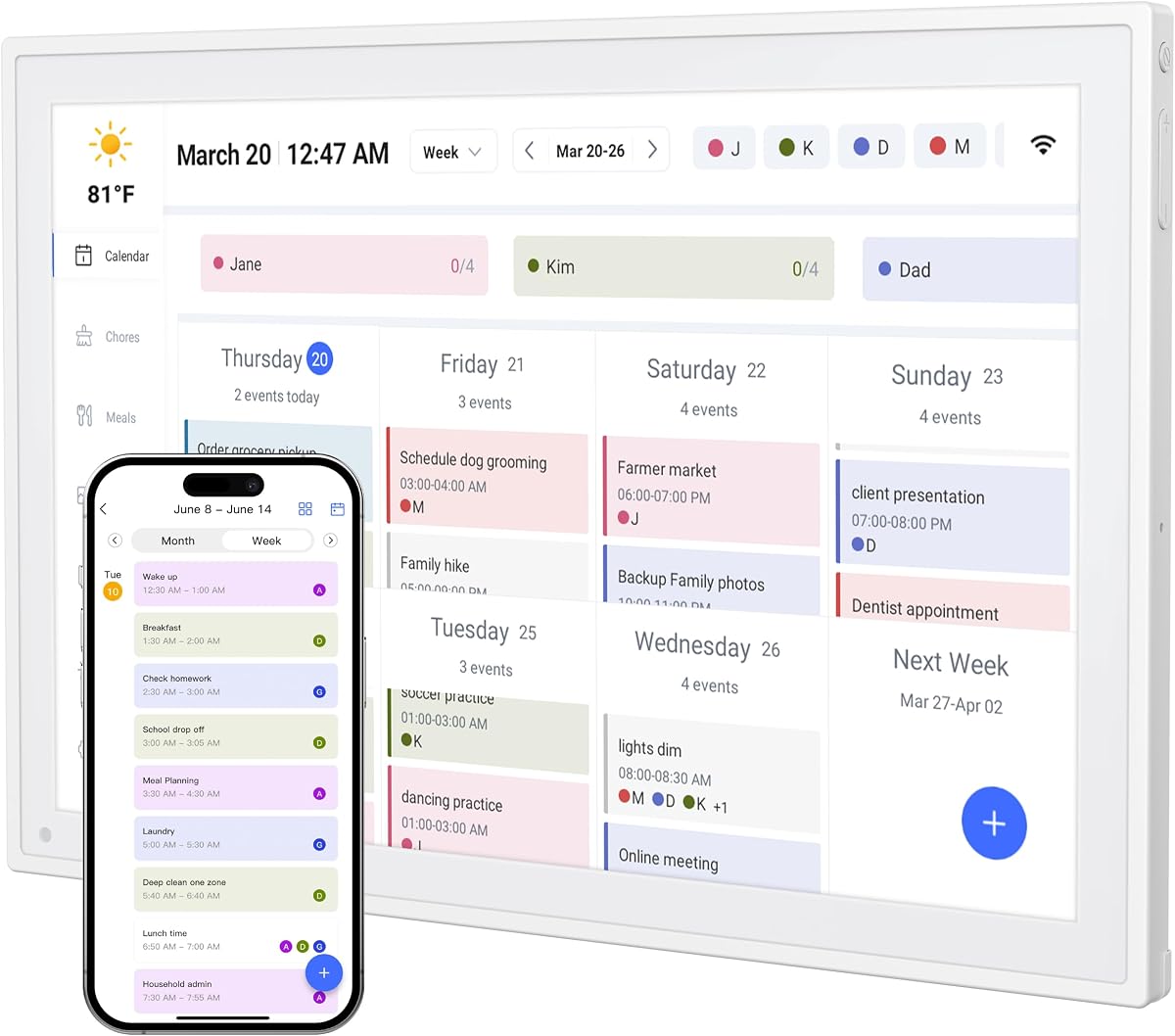

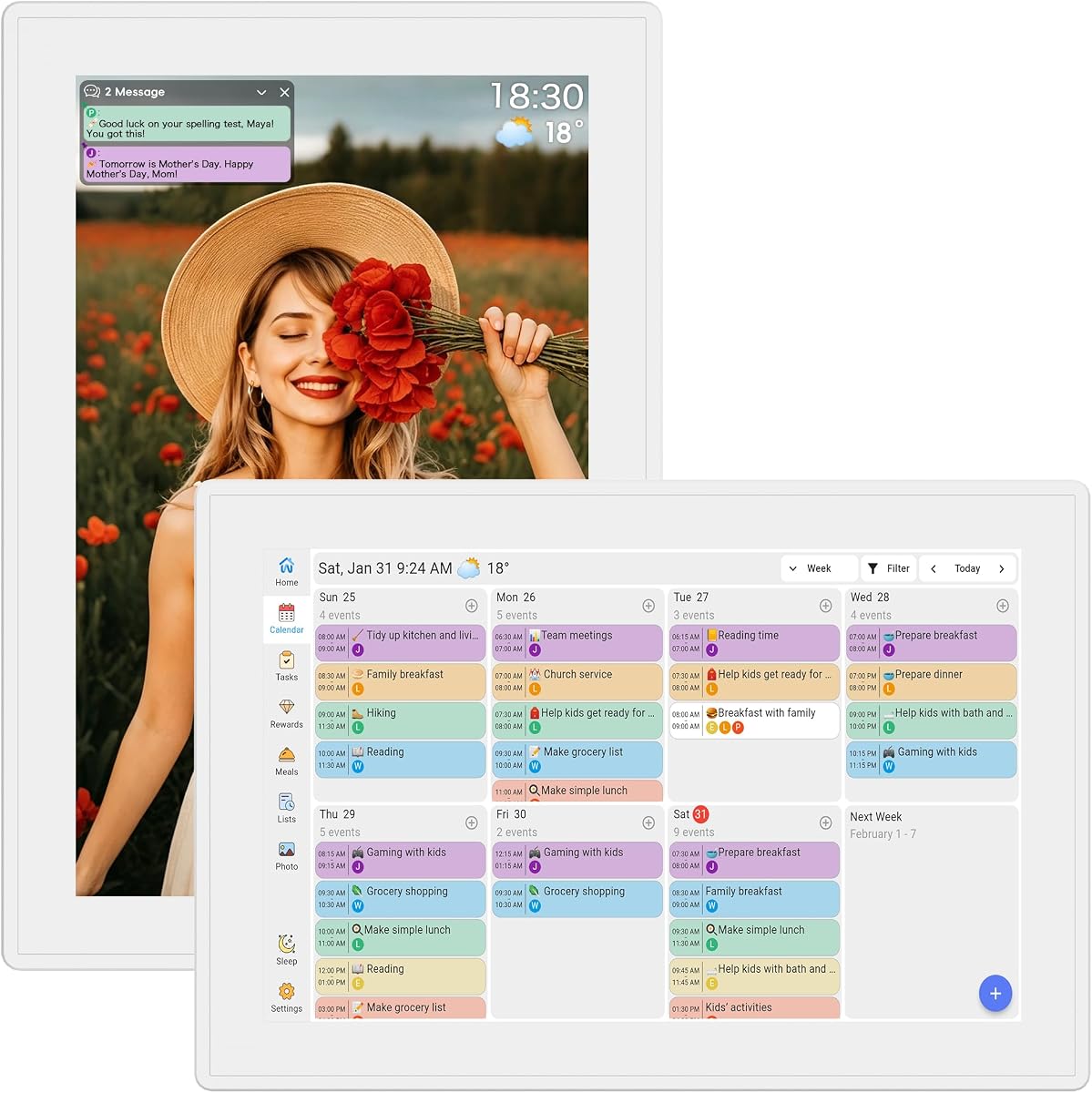
This Dragon Touch digital calendar chore chart combines a 10.1-inch touchscreen with family scheduling, color-coded tasks, and a digital picture frame. Its supplied rating is 4.5 out of 5, placing it among the stronger-rated models in this guide. The core appeal is its combination of everyday utility and decor, allowing a family display to serve more than one purpose.
We may earn a commission when you buy through this link, at no additional cost to you.
The screen can assign different colors and tasks to family members, which helps children and adults distinguish their responsibilities at a glance. A touchscreen makes checking or changing information direct rather than dependent on a phone. When the schedule is not the focus, the device can display treasured family photos, so the hardware does not become an unattractive task board taking up permanent space.
Its main limitation is size. A 10.1-inch display is more practical on a counter, shelf, or desk than in a busy central hallway where a larger screen may be easier to read. The supplied information also presents fewer details about calendar services, storage, and app features than some competing models, so buyers who require extensive specifications should verify them on the current listing.
This is a sensible choice for families seeking a compact, dual-purpose digital chore chart without moving to a large wall-mounted unit. It is especially useful in a kitchen or family office where schedules and photos can share the same footprint. For those needs, it delivers a clear and polished way to make shared responsibilities more visible.
The combination of a family organizer and picture frame is especially useful in shared spaces. Family members can review the day's plans, while the display still contributes visually to the room during quieter periods.
Assigning colors and tasks by family member creates an immediate visual distinction. Children can see which jobs belong to them, while adults can identify overlapping activities at a glance.
We may earn a commission when you buy through this link, at no additional cost to you.
This 15.6-inch digital calendar is designed as a full family command center, joining shared calendars, meal planning, chores, rewards, and photos in a wall touchscreen. Its supplied rating is 4.4 out of 5. The expansive display and flexible mounting options make it better suited to families who want a central information hub than to those seeking a modest counter display.
We may earn a commission when you buy through this link, at no additional cost to you.
Real-time synchronization is one of its strongest features. The system supports Google, Outlook, iCloud, and other platforms, allowing multiple family members to work from updated schedules without maintaining separate paper lists. The built-in chore system lets parents assign tasks and lets children mark them complete to earn reward points, adding a motivating element to ordinary routines.
Photo functionality is unusually substantial. The device includes 32GB of storage, which is expandable, and offers AI photo restoration for images shown in digital frame mode. It can also function as a wall-mounted touchscreen or sit on a desk using the included base. Buyers should note that batteries are not included and that a display this large requires a suitable wall, stand, or countertop area.
This model makes the most sense for active, multi-person households that want one visible hub for schedules, responsibilities, meals, and memories. Its 24/7 support and two-year warranty further strengthen the ownership proposition. If the available space and setup are suitable, it offers one of the most complete feature combinations in this roundup.
A 15.6-inch display can show more detail and remain readable from across a kitchen or activity area. That visibility makes it practical for everyone to check schedules without crowding around a phone.
The ability to assign chores and award points turns responsibility tracking into a more interactive exercise. Parents can monitor progress while children gain a visible reason to complete tasks.
We may earn a commission when you buy through this link, at no additional cost to you.
This Dragon Touch model offers a well-rounded family planner in a 10.1-inch format. It has a supplied rating of 4.5 out of 5 and combines a touchscreen calendar, interactive chore chart, meal planning, grocery lists, and digital photo display. The mix of direct touchscreen control and remote app access gives family members several ways to keep the household informed.
We may earn a commission when you buy through this link, at no additional cost to you.
Setup is described as a straightforward process involving power, Wi-Fi, and linking a calendar through the mobile app. Once configured, multiple personal calendars, including iOS and Google options, can appear in one interface. Additional devices may also be authorized. The chore chart, dinner plan, and grocery list help move beyond appointment display, while the app allows schedules and tasks to be managed away from home.
There is an important distinction between free and paid app functions. Core features include the photo frame, chore chart, dinner planning, and grocery list, while advanced tools such as Magic Import are listed as paid options. That distinction should be considered if your family depends on importing large numbers of events or using specialized planning features. The display is also smaller than the wall-oriented alternatives in this guide.
This Dragon Touch is a strong all-around recommendation for families wanting a reasonably compact screen with broad planning functions. It is particularly helpful for households that want to answer the daily dinner question, assign chores, and check schedules from a central but not oversized display. For most such buyers, the balance of features and convenience is difficult to overlook.
The companion eCalendar app lets adults manage the calendar while away from the main display. That means a change can be made from a phone rather than waiting until someone reaches the household command center.
Displaying dinner plans gives everyone a shared answer to a recurring question. The inclusion of a grocery list creates a practical bridge between deciding what to eat and preparing the ingredients.
We may earn a commission when you buy through this link, at no additional cost to you.
The Smart Digital Calendar 10.1 Inch is a family planner that emphasizes connection and routine management. It has a supplied rating of 4.4 out of 5. It combines calendars, color-coded schedules, an interactive chore chart, meal planning, to-do lists, and photo or video display, making it a varied option for busy households.
We may earn a commission when you buy through this link, at no additional cost to you.
Its synchronization system supports Google, iCloud, Outlook, Cozi, and Yahoo. Dual-band Wi-Fi is included for more stable updating, while custom colors help separate each person's schedule. The chore chart uses simple touchscreen interactions so children can record task completion, while the meal planner and to-do list place recurring household priorities in the same interface.
The included stand allows the unit to sit on a desk or counter, and wall mounting is also supported. When the calendar is idle, it can transition to a digital frame that cycles through family photos and videos. This reduces the feeling that a task-focused display is taking over the room. As with any glass-front touchscreen, fingerprints may require occasional cleaning, and families planning to store extensive media should verify the available capacity and upload limits.
This model is well suited to households using several different calendar services or seeking more than basic chore tracking. It offers a practical balance between screen size, wireless connectivity, and household features. Those who want one device to coordinate appointments, tasks, meals, and memories will find the combination especially relevant.
Support for Google, iCloud, Outlook, Cozi, and Yahoo reduces the inconvenience of separate personal calendars. Color coding then adds another layer, helping family members distinguish activities quickly.
Automatic photo and video display gives the screen a second purpose. The transition can keep the kitchen or living area visually engaging when no planning action is required.
We may earn a commission when you buy through this link, at no additional cost to you.
Skylight's 15.4-inch touchscreen wall planner is a premium presentation of the digital chore chart category. Its supplied rating is 4.4 out of 5, and the product centers on shared schedules, personalized chores, meal plans, lists, and a family-friendly display. It is designed for households that want a central and prominent planning surface rather than a small informational screen.
We may earn a commission when you buy through this link, at no additional cost to you.
The calendar connects with Google, iCloud, Outlook, Cozi, and Yahoo, and family members can add updates through the touchscreen or companion app. Color-coded events support quick recognition, while the chore chart allows personalized assignments intended to encourage independence. A weekly meal-planning view addresses another common point of household friction by making advance planning visible.
Its premium capabilities include a photo screensaver, Magic Import, stars and rewards, and Disney Mode with 16 characters. These are connected to the optional Calendar Plus subscription, so buyers should decide whether the richer family features justify a recurring plan. The display can be wall-mounted or placed on a kitchen counter, hallway table, or office desk, but a 15.4-inch panel needs a suitably prominent location.
This is the pick for families that place a high value on presentation, generous screen space, and a broad mix of shared planning tools. It also appeals to multi-generational households because grandparents, parents, and children can all reference one large display. When budget is secondary to a polished, comprehensive command center, this model offers the strongest premium case.
The large HD screen, clean design, and flexible placement make the Skylight Calendar feel like a permanent household fixture. It is especially effective where a small display would require close inspection.
Personalized chore assignments and optional stars and rewards support a positive routine. Families can use the system to make progress visible without relying entirely on verbal reminders.
We may earn a commission when you buy through this link, at no additional cost to you.
This 10.1-inch touchscreen calendar is built around the idea of an organized home hub without a recurring subscription. Its supplied rating is 4.4 out of 5. It supports Google Calendar, iCloud, and Outlook while combining schedules, chores, meal plans, grocery lists, to-do items, reminders, weather, and photos.
We may earn a commission when you buy through this link, at no additional cost to you.
The chore list is designed to be interactive, with children able to earn stars and unlock rewards as they complete tasks. Parents can assign work and monitor progress from a phone or the display itself. The meal manager supports menu displays, recipe uploads, and automatic grocery-list generation, offering a more connected workflow than simply writing dinner names on a board.
A built-in to-do list keeps work and household priorities visible, while automatic sleep and wake schedules help manage energy use and nighttime light. The device can be wall-mounted and also operates as a photo slideshow. Its main trade-off is the 10.1-inch size, which suits a counter or sideboard better than a large, central command center. Buyers should also confirm that the listed no-subscription features match their needs on the current product page.
This model is an attractive choice for families that dislike recurring fees but want a broad set of organization tools. It is particularly useful for a busy parent who wants chores, meal preparation, and family appointments connected in one place. For households prioritizing unrestricted core features, it delivers a useful balance of functionality and convenience.
The listed core tools remain available without a monthly plan. That makes the device easier to evaluate over the long term, provided the functions you need are fully unlocked as described.
Automatic grocery-list generation connects a weekly menu with the next practical task. The result is less duplicated planning and a clearer path from meal ideas to the kitchen.
We may earn a commission when you buy through this link, at no additional cost to you.
The AiMOR 15.6-inch digital calendar combines a 1080P interactive touchscreen with family scheduling, chores, meal planning, reminders, and extensive photo storage. Its supplied rating is 4.4 out of 5. It is a strong option for families that want the visibility of a wall display and the media capacity of a dedicated digital frame.
We may earn a commission when you buy through this link, at no additional cost to you.
Google, iCloud, Outlook, Cozi, and Yahoo calendars can be synchronized through the AiMOR app. Color-coded independent schedules and task lists help separate individual responsibilities. The chore chart assigns star points to custom tasks, allowing children to track their own progress. Integrated meal planning, recipe storage, grocery lists, birthday countdowns, and repeating reminders add a broad layer of daily planning.
The standout technical feature is 64GB of built-in storage for HD photos and short videos. The unit automatically becomes a picture frame while idle, and family members can transfer media or request remote access. Free sharing is limited to nine photos or one short video of up to 15 seconds at a time, an important detail for larger or photo-heavy households. Automatic orientation rotation, dimming, sleep mode, and included mounting hardware add installation flexibility.
This product is best for a family that treats its central display as both a planner and a media hub. The 15.6-inch screen should be mounted or placed where everyone can access it, and the one-year replacement warranty provides some ownership reassurance. Buyers prioritizing storage and large-screen multimedia will find this one of the strongest options in the guide.
The 64GB capacity distinguishes this model from organizers intended mainly for calendars. Families can keep a sizable rotating collection on the device without relying on constant cloud playback.
Automatic landscape and portrait rotation allows the display to adapt to different layouts. This is useful for a wall calendar that also serves as a desk-oriented family board.
We may earn a commission when you buy through this link, at no additional cost to you.
This 10.1-inch family digital wall planner stands out with a supplied rating of 5.0 out of 5, the highest numerical rating among the products in this guide. It combines shared calendars, color-coded schedules, task management, chore rewards, meal planning, weather, reminders, and customizable photo albums in one touchscreen.
We may earn a commission when you buy through this link, at no additional cost to you.
The calendar supports Google, iCloud, Outlook, Cozi, and Yahoo, along with other services. Events can be added or updated directly on the screen or through the companion app, with changes synchronized across connected devices. Personalized color assignments make the display easier to scan, while reward charts allow children to complete tasks, earn stars, and build routines through positive reinforcement.
The weekly meal planner reduces the need to answer the dinner question repeatedly, and smart weather forecasts support planning around the day. Automatic sleep and wake times help manage energy use and light. Installation is flexible because the unit can be mounted on a wall or displayed on a desktop. Its compact screen and ability to turn into a rotating photo gallery are practical for a kitchen, office, or hallway.
This is the leading budget-oriented recommendation because it combines a high supplied rating with a broad feature set and no subscription language in the product title. A new or less established listing may not offer the same volume of historical feedback as a long-running product, so checking recent customer comments remains wise. Even so, the stated functionality makes it a strong value-focused choice.
A 5.0 supplied rating does not guarantee every shopper's experience, but it is a favorable signal when considered alongside the feature set. The model covers scheduling, chores, meals, rewards, reminders, and photos.
Combining activities with routine responsibilities reduces the number of boards, printouts, and verbal updates a household must maintain. A direct touchscreen keeps routine changes accessible to children.
We may earn a commission when you buy through this link, at no additional cost to you.
This 10.1-inch touchscreen chore chart is designed for a kitchen counter, shelf, desk, or bedside table. Its supplied rating is 4.2 out of 5. The Full HD IPS panel, wide viewing angle, and automatic brightness make it suitable for a display that family members will consult from different positions throughout the day.
We may earn a commission when you buy through this link, at no additional cost to you.
Color-coded schedules help separate individual activities, while the chore and reward system allows children to mark completed jobs. The stated lack of a monthly subscription is useful for families that want a complete core feature set without another recurring household expense. Real-time synchronization across smartphones, tablets, and computers keeps changes visible across the family's devices.
A notable specialty is the built-in silent vibration motor. It can provide discreet appointment alerts on a nightstand, which is more considerate than a repeated audible alarm in a shared bedroom. Custom daily and weekly repeat cycles support regular routines. The meal planner and recipe keeper bring the display beyond chores, and the adjustable stand permits portrait or landscape positioning without requiring wall installation.
This model is a good fit for households that want a flexible screen rather than a permanently mounted appliance. Its supplied rating trails the leaders, so buyers should consider recent feedback and verify the compatibility of their existing calendars. The combination of silent alerts, auto-brightness, and a reversible stand nevertheless gives it a distinct and useful place in the category.
The silent vibration motor offers an alternative to audible notifications. It can help one family member stay aware of an early appointment without repeatedly waking the other.
The reversible stand allows the display to suit portrait schedules or landscape calendars. That flexibility makes it easier to move between a workstation, kitchen, and bedside table.
We may earn a commission when you buy through this link, at no additional cost to you.
The 10.1-inch Full HD Family Organizer is a compact touchscreen that presents shared calendars, tasks, rewards, meal titles, lists, and photos. Its supplied rating is 4.2 out of 5. It focuses on familiar family-organizing needs without emphasizing the larger screens or high storage capacities seen elsewhere in the guide.
We may earn a commission when you buy through this link, at no additional cost to you.
Apple and Google calendars can be synchronized, and color coding separates each person's activities. A meal-planning view displays the main course for each meal, allowing the calendar to act as a simple message board. Grocery, shopping, and wish lists can be maintained in one shared digital space, while daily routines and rewards provide structure for household participation.
When idle, the display changes to a digital photo frame and can be scheduled to enter sleep mode at night. Wall or desk mounting gives the buyer some placement flexibility. One important limitation is that the meal display shows menu titles rather than complete recipes, so users will still need a separate source for detailed preparation instructions. The 10.1-inch screen also presents less information at once than larger models.
This organizer is best for a straightforward household that wants to replace paper calendars and lists with a shared screen. It works especially well for families primarily using Apple or Google calendars and interested in meal titles, shopping lists, chores, and rotating photos. For basic daily coordination, the feature set is capable and the absence of a subscription helps keep the ownership model straightforward.
Showing the main course for each meal keeps the family informed while avoiding a crowded recipe interface. Families can plan a simple menu and retain detailed recipes elsewhere.
Automatic photo-frame and sleep modes let the display serve different purposes throughout the day. Scheduling sleep also limits unnecessary light during nighttime hours.
We may earn a commission when you buy through this link, at no additional cost to you.
The right digital chore chart depends on where it will live, which calendar services your family uses, and how children will interact with it. Screen size, synchronization, rewards, meal tools, storage, and subscription requirements should be considered together rather than in isolation.
A 10.1-inch display is easier to place on a kitchen counter, office desk, shelf, or bedside table and is generally sufficient for compact calendars and short task lists. A 15.4-inch or 15.6-inch screen provides more visible detail and works better as a wall-mounted central command center. Consider viewing distance, available wall space, power access, and whether children need to reach the touchscreen without assistance.
Choose a compact screen for a small or flexible space. Choose a large screen for a busy room with frequent viewing.
A useful chore chart should show the calendars your household already relies on rather than forcing everyone to move to one new system. The products reviewed support combinations of Google, iCloud, Outlook, Cozi, and Yahoo, but the exact list differs by model. Check whether multiple family calendars can be combined, whether color coding distinguishes members, and whether adults can add or change events from a companion app.
Prioritize exact service compatibility before considering optional features. Seamless updates matter more than an extra function you cannot use.
Basic chore lists show who is responsible for each task, while stronger systems let children check off work, earn stars or points, and monitor progress. Reward features can motivate younger children, but parents may want to control when points are awarded or link them to a specific privilege. A touch interface is valuable when children are expected to update the board independently.
Look for easy task assignment, direct completion checkoffs, and clear reward progress. The best system is one the whole family will actually use.
Several models advertise a no-subscription approach with core schedules, chores, lists, meals, and photos included. Others reserve premium capabilities such as Magic Import, enhanced screensavers, stars and rewards, or themed modes for an optional plan. Review which features remain available without payment and whether your intended routine depends on paid tools. This avoids discovering a limitation after setup.
Favor a model whose essential functions work without a recurring charge. Add a subscription only when its extras solve a genuine problem for your family.
Meal planning can display menu titles, store recipes, and create grocery lists. These capabilities save time when everyone can see dinner plans in advance, especially if they connect directly to shopping. Some screens only show meal titles, while others support recipe uploads and automatically generated lists. Decide how much recipe detail your family wants on the shared display to avoid paying for unnecessary complexity.
Simple menu titles work for many homes. Choose recipe storage and automatic lists if you want planning and shopping linked.
A digital chore chart often doubles as a family photo frame, but models differ substantially in media capacity. Some are designed primarily for a rotating photo slideshow, while others include tens of gigabytes for HD images and short videos. Review storage, upload limits, free sharing allowances, file support, and whether remote family members can contribute photos. Display resolution and viewing angle also influence how images look from across the room.
Match storage to your photo habits. Verify upload and sharing limits if relatives will add media remotely.
Wall mounting makes a display central and hands-free, while a desk or counter stand allows more flexible positioning. Some products support both, although wall hardware may not be included. A reversible or auto-rotating stand can help with portrait and landscape formats. Reliable Wi-Fi and a nearby outlet are also essential for synchronized updates, automatic wake, and sleep scheduling.
Measure the intended location before ordering. Confirm stand orientation, mounting hardware, outlet access, and Wi-Fi compatibility.
The best organizer is one that family members can understand without constant instruction. Color-coded schedules, recognizable icons, simple task checkoffs, and visible meal or weather information make the display useful at a glance. Touchscreens collect fingerprints, so plan to wipe the screen gently and keep the device's software updated through its app. Avoid placing it where direct sunlight, heat, or heavy kitchen splashes could cause problems.
Favor a simple interface your children can use independently. Choose a location and care routine that support long-term use.
Begin by deciding where the display will serve as the primary family reference point. Place it in a location where children can check tasks and adults can see appointments without blocking a work area. Connect the unit to power, join the Wi-Fi network, and use the manufacturer's app or setup process to authorize each family calendar before creating a complicated schedule.
Create a simple visual system rather than transferring every note from every paper planner. Use consistent colors for family members, organize chores by daily or weekly frequency, and keep only actionable tasks on the main view. Add meal titles and a shopping list after the calendar and chore routine are working well. Review the display with children and explain who can change tasks, assign rewards, or add events.
Maintain the device by keeping the touchscreen clean with a soft, lightly damp cloth, avoiding harsh cleaners, and checking that ventilation around the unit remains unobstructed. Apply a routine for reviewing completed chores and removing outdated events. Keep the app and calendar software updated, confirm that the wall mount or stand is secure, and periodically check whether any optional subscription features are still needed.
A digital chore chart can combine assignments, schedules, meal plans, rewards, and reminders in one continuously visible display. Changes can often be made from a touchscreen or companion app rather than requiring someone to erase and rewrite a paper board. The best system is not merely electronic; it provides a routine that family members can understand and update with minimal parental effort.
Most of the reviewed digital chore charts support interactive completion checkoffs, and several include stars or points for rewards. This allows children to update their progress directly and gives parents a shared view of completed work. Parents should establish clear rules about who can award points, how tasks are verified, and how rewards are exchanged.
Some models include their core calendar, chore, task, meal, and photo functions without a subscription. Other products place tools such as advanced import features, premium screensavers, rewards, or themed modes behind an optional plan. Check the current listing carefully to determine which functions are permanently included and which require a paid service.
Yes, the reviewed products generally support combinations of Google, iCloud, Outlook, Cozi, and Yahoo calendars. The exact compatibility varies, so confirm that every service used by your household is supported before buying. Color-coded member schedules make merged calendars easier to read and reduce the chance that one person's activities will be overlooked.
A 10.1-inch model is easier to place on a counter, desk, shelf, or bedside table and often works well for a small household. A 15.6-inch model is more visible from a distance and better suited to central wall mounting. The larger option consumes more space and may be unnecessary if family members stand close to the display.
Yes, every reviewed model can display family photos when it is not actively showing planning information. Capacity varies considerably, from slideshow-oriented models to devices with tens of gigabytes of built-in storage. Families that regularly add photos or videos should verify storage capacity, supported file types, and any remote-sharing limits.
Start with a small set of recurring information: color-coded family schedules, today's chores, and a simple task list. Add the weekly meal plan once the basic routine is consistent, because too much information at launch can make the display harder to read. Review the layout with the people who will use it and remove items that do not need to be visible every day.
The kitchen is popular because schedules, chores, meals, and shopping lists all fit naturally in the same routine. A home office, hallway, or family command center may work better for households that use the display throughout the day. Choose a location with convenient power and Wi-Fi access, away from excessive heat, glare, moisture, and direct kitchen splashes.
The best budget-oriented option is the 10.1-inch no-subscription family planner because it combines a 5.0 supplied rating with broad calendar, chore, meal, weather, reminder, and photo features. The Dragon Touch 10.1-inch model stands out as the editor's choice for its balanced combination of interactive chores, dinner planning, remote app management, and automatic synchronization.
For a larger central display, the Skylight Calendar is the premium recommendation, offering a polished 15.4-inch screen, extensive calendar support, meal planning, rewards, and family-friendly modes. The AiMOR and other 15.6-inch models are worth considering when storage, mounting, or multimedia functions matter more than minimizing the footprint.
Before purchasing, confirm screen size, placement, calendar compatibility, subscription terms, and the features your family will genuinely use. Product specifications, availability, customer feedback, and pricing can change over time, so check the current listing carefully before making a final decision.