
Vantrue N4 Pro S
4.4Editor score
4K front, 2.5K rear
Triple STARVIS 2 sensors
Rotatable 360-degree rear
Buffered parking detection
Vanlife puts more of your life on the road, making reliable video coverage essential for documenting traffic, parking incidents, and unexpected moments. The best dash cam for a van should combine a clear front view, useful rear or cabin coverage, dependable low-light performance, and power management suited to long periods away from an outlet.
This guide compares ten multi-camera and mirror-style dash cams based on resolution, viewing angles, sensors, night vision, GPS, Wi-Fi, parking features, storage support, and installation requirements. It includes four-channel systems for full van coverage, three-channel options for road and interior recording, and front-and-rear setups for simpler installations.
Each review explains what distinguishes the product for vanlife, along with practical compromises such as optional hardwire kits, upscaled rather than native footage, and the need to route long cables carefully. Product ratings and availability can change, and current prices should always be checked before purchasing.
4.4Editor score

4.8Editor score

4.6Editor score
As an Amazon Associate we earn from qualifying purchases.
This side-by-side comparison highlights each dash cam's channel count, recording resolution, low-light capabilities, navigation features, and parking functionality, making it easier to match a system to a van's layout and recording priorities.



The PRUVEEO 360° 4 Channel Dash Cam earns a 4.2 rating by giving van owners unusually broad coverage without requiring several separate devices. It records the front, rear, left, and right simultaneously, allowing a single system to document the road and activity around both sides of the vehicle. The included 128GB card is useful for getting started without an immediate additional purchase.
We may earn a commission when you buy through this link, at no additional cost to you.
Its most van-specific strength is camera adjustability. The front three lenses can be repositioned to emphasize a particular side, nearby parking spaces, or portions of the interior. This is valuable in a campervan where blind spots can include sliding-door access, curbside traffic, and the rear of a long body. Integrated GPS adds speed, location, and route information, while built-in Wi-Fi provides phone-based access and sharing through compatible iOS and Android apps.
Low-light recording is supported by an F1.8 cabin lens and four infrared lights, while time-lapse parking mode can condense an hour of stationary footage into one minute. Loop recording manages storage automatically and collision locking preserves important clips. The main compromises are that every camera is limited to 1080P and the parking feature requires a separately sold ACC hardwire kit, adding both installation work and cost.
This is a strong choice for vanlife travelers who want visibility from multiple directions, especially those parking in unfamiliar locations or carrying passengers, pets, or valuable gear. It is less compelling for someone who places maximum importance on native 4K detail. Nevertheless, the combination of four channels, adjustable lenses, GPS, and a supplied memory card makes it practical and adaptable for extended travel.
Simultaneous side and cabin views provide useful evidence when another vehicle approaches from an unexpected direction or when loading the van near traffic. Adjustable lenses let the owner prioritize those areas without replacing the complete system.
Built-in GPS records speed and route data, while Wi-Fi lets compatible phones access clips without physically removing the card. That combination helps travelers organize evidence by location or share a recording quickly after an incident.
We may earn a commission when you buy through this link, at no additional cost to you.
The ROVE R2-4K Dual has a 4.5 rating and offers a balanced setup for drivers who want a detailed road view, a separate rear camera, and strong performance after dark. The front camera uses a Sony STARVIS 2 IMX675 sensor with a wide aperture and HDR, while the rear camera records at 1080P through an F1.8 lens. This combination is well suited to nighttime van travel and poorly lit parking areas.
We may earn a commission when you buy through this link, at no additional cost to you.
Its front image is captured at 2.5K and intelligently upscaled to 4K rather than recorded natively at 4K. That distinction matters when evaluating marketing claims, although the higher-resolution output and STARVIS 2 sensor can still provide useful detail for plates, signs, and surrounding traffic. Dual-band 5.8GHz and 2.4GHz Wi-Fi supports app transfers at up to 20MB per second, a practical benefit when moving large clips from a van's storage to a phone.
Built-in GPS records precise routes, locations, and speed stamps, while the three-inch IPS screen can display live speed and compass direction. The parking system offers time-lapse, motion detection, and collision detection. When an event occurs, the camera saves a full one-minute clip, locks it, and announces it when the vehicle starts again. A hardwire kit is required but not included.
The ROVE is best for vanlife drivers who travel at night and want a manageable two-camera installation rather than four-channel complexity. Its included card, visible screen, strong sensor, and three parking choices are meaningful benefits. Buyers seeking genuinely native 4K should instead examine models that make that distinction more clearly.
The STARVIS 2 sensor, large aperture, and HDR improve the odds of identifying vehicles and signs around dusk, dawn, and poorly lit roads. Those attributes matter on remote routes where street lighting and reflective road markings are scarce.
A free 128GB microSD card supports extended travel out of the box. Loop recording manages older clips, and support for larger cards gives owners room to increase retention when the system is used for continuous driving.
We may earn a commission when you buy through this link, at no additional cost to you.
The REDTIGER F7NP 4K has a 4.1 rating and concentrates on high-quality road recording rather than trying to cover every side of the vehicle. It records native 4K through the front camera and 1080P through the rear, using a 170-degree front lens and 140-degree rear lens. The result is a straightforward dual-camera system for vans whose owners primarily care about traffic ahead, vehicles behind, and the surrounding road.
We may earn a commission when you buy through this link, at no additional cost to you.
The front STARVIS 2 sensor, F1.5 aperture, six-layer optical lens, WDR, and HDR work together to balance bright skies, shaded roads, and nighttime scenes. Built-in 5.8GHz Wi-Fi supports app-based previews, playback, downloads, and sharing, with stated transfer speeds up to 20MB per second. GPS data for route, speed, and location can be reviewed from the Redtiger Cam app.
A free memory card is included, and loop recording automatically replaces older unlocked files. The G-sensor locks incident footage, while parking mode can use either time-lapse or collision-triggered recording. A hardwire kit must be added separately for that feature. A supercapacitor replaces a conventional lithium battery, improving heat resistance and supporting long parking periods, although the manufacturer's guidance still warns against prolonged high-temperature exposure.
This F7NP is a good match for full-time road travelers and van owners who prefer fewer cables and a front-and-rear arrangement. It lacks an interior camera, so it does not meet every monitoring need. For basic incident evidence and detailed forward footage, however, its native 4K recording and wide field of view make it a compelling option.
Recording the forward scene at native 4K can be valuable when identifying distant vehicles, road signs, or details at a scene. The F1.5 aperture and wide lens also help preserve context around the van.
The supercapacitor is better suited to heat exposure than a lithium-battery design. Time-lapse parking recording can monitor a stationary van without continuously creating full-size video files, subject to installing a compatible hardwire kit.
We may earn a commission when you buy through this link, at no additional cost to you.
The Vantrue N4S 2.7K 3 Channel Dash Cam carries a 4.3 rating and stands out for adaptable rear-camera positioning. It records 2.7K at the front and 1440P from both the cabin and rear, using wide lenses of 158 degrees, 165 degrees, and 160 degrees. That level of coverage is especially useful in a van, where the rear camera can monitor traffic, cargo, luggage, or pets.
We may earn a commission when you buy through this link, at no additional cost to you.
All three channels use STARVIS 2 sensors, while HDR and PlatePix technology are intended to preserve detail in harsh contrast and low light. The system claims license plate sharpening of up to two times, which can help during nighttime recordings in tunnels, garages, and dim streets. Its supercapacitor is specified to operate from minus four degrees Fahrenheit to 140 degrees Fahrenheit, making it reassuring for seasonal travel in widely varying climates.
Installation uses a magnetic mount, static cling film, and cable clips, with the rear cable routed along interior trim. Four proprietary parking modes give owners control over motion detection, impact detection, and low-bitrate recording. Motion events can include ten seconds of pre-event footage, reducing the chance of missing the approach to a van. The memory card is not included, but the camera supports cards up to 1TB.
The N4S is best for vanlife owners who want one system to cover the road, cabin, and a rotatable rear view. The flexible mounting approach is more useful than a permanently fixed rear camera. Its main drawback is the substantial storage demand of three high-resolution channels, so buyers should plan for an appropriate memory card and regularly protect important clips.
The rotating rear module can remain aimed at traffic or turn inward toward living or cargo space. That flexibility is particularly valuable when a van's priorities change between driving, overnight parking, and loading gear.
The supercapacitor design is specified for broad temperature tolerance and avoids the lithium-battery risks associated with some conventional dash cam designs. The system also offers a screen saver and voice guidance for less distracting operation.
We may earn a commission when you buy through this link, at no additional cost to you.
The AProX HD 3 Channel Dash Cam has the highest rating in this group at 4.8, and its strongest attraction is the combination of true 4K recording at both the front and rear. The cabin camera records at 1080P, giving owners a clear road view, a detailed rear view, and interior coverage in one package. Wide viewing angles of 170 degrees at the front, 150 degrees at the rear, and 150 degrees inside help reduce blind spots.
We may earn a commission when you buy through this link, at no additional cost to you.
Advanced HD night vision and WDR support the three-channel system, while four infrared lights illuminate the cabin in complete darkness. That is especially useful for documenting life aboard a van or checking the interior at night. Dual-band Wi-Fi 6 enables stated transfers up to 20MB per second through the TERUNSOUL app, and the 3.18-inch laminated display is designed to reduce reflections.
The supplied 128GB card provides a useful starting point, and support extends to 512GB. Loop recording replaces older unlocked files, while the G-sensor protects incident footage. Integrated GPS stamps speed and location into recordings. For parked monitoring, time-lapse and collision detection are available, although a hardwire kit is required. The manufacturer also provides a three-year guarantee and 24/7 support.
This is an excellent choice for vanlife owners who want genuine 4K detail at both ends of the vehicle without moving to a premium tier. The trade-off is storage consumption and the extra work of hardwiring parking mode. It also offers no rotating rear camera, so cabin and rear angles are less adjustable. Even so, its resolution, night performance, included storage, and strong rating create a balanced feature set.
True 4K on the front and rear cameras provides a larger image data set than upscaled footage. That can help when a vehicle, sign, or license plate occupies only a small portion of a wide-angle scene.
Four infrared lights support clearer interior recordings when the van is dark. The feature is useful for documenting passenger activity, monitoring pets, or reviewing the living area after arriving at a campsite.
We may earn a commission when you buy through this link, at no additional cost to you.
The Vantrue N4 Pro S is a premium three-channel system rated 4.4, combining 4K front footage with 2.5K rear and 1080P cabin recording. Triple STARVIS 2 sensors, triple HDR, and PlatePix technology are designed to improve low-light and backlit scenes. It can capture readable license plates on lit streets at night at speeds up to 31mph, according to the stated product information.
We may earn a commission when you buy through this link, at no additional cost to you.
Its rotating 2.5K rear camera is a major advantage for vanlife. Owners can point it toward traffic, rotate it toward the trunk, or use it to watch cargo and interior activity. A front-and-rear mode records at 4K and 2.5K while reducing heat by 30 percent compared with triple recording. This option is valuable in hot climates or for long journeys where power and heat management deserve attention.
Parking operation includes buffered motion and impact detection, preserving ten seconds before an event, while all three cameras remain active. A separate hardwire kit is required. 5GHz Wi-Fi provides phone access, and high-precision GPS records route, speed, and location. Voice commands can take a photo without manual interaction. The supercapacitor design is built for temperature resistance, and storage can expand to 1TB.
The N4 Pro S is best for serious vanlife travelers who want premium sensors, flexible rear positioning, and sophisticated parking capture. It is a more involved installation than a two-camera dash cam, and the memory card is not supplied. Owners must also consider storage requirements, but for flexible three-channel coverage the feature set is exceptionally complete.
Triple recording provides maximum visibility, while the dual-channel mode concentrates detail on the front and rear and lowers heat generation. Choosing the appropriate mode can make long drives more comfortable and storage more manageable.
Each channel has a STARVIS 2 sensor, allowing the system to adjust to changing conditions across the road, cabin, and rear. HDR balances headlights against darker surroundings, improving the odds of identifying useful details after dark.
We may earn a commission when you buy through this link, at no additional cost to you.
The Icesky 4K Dash Cam combines a 4.6 rating with a 4K front camera and 1080P rear, interior, left, and right cameras. That is unusual coverage for a value-focused model, and it gives vanlife travelers simultaneous views of the road and both sides of the vehicle. A built-in three-inch display supports a multi-view display, reducing the need to check each camera separately.
We may earn a commission when you buy through this link, at no additional cost to you.
The side cameras include eight infrared lights, and their infrared modes can be controlled independently so one side does not affect the others. This is helpful for dark parking lots and narrow campsites. Wi-Fi 6 supports app-based preview, playback, downloads, and sharing at stated speeds up to 20MB per second. Built-in GPS records speed, route, location, and time for later use as contextual evidence.
A 128GB memory card is included, and the system supports cards up to 512GB. Loop recording overwrites older unlocked files, while the G-sensor locks clips after an impact. Parking mode and 24-hour monitoring require a separately sold hardwire kit. Adjustable cameras and broad compatibility with vans, trucks, SUVs, sedans, and rideshare vehicles make the installation flexible.
This is the best budget option for travelers who want comprehensive four-direction visibility and prefer not to assemble several separate cameras. The compromise is that only the forward channel reaches 4K, while the other three remain at 1080P. For monitoring a van's sides and cabin, that resolution is generally sufficient, especially with dedicated infrared assistance.
The left and right channels fill the side blind spots that remain in many front-and-rear dash cams. Watching those views from the app or three-inch display can help with narrow roads, campsite arrival, and unexpected approach from either side.
Dual-band Wi-Fi 6 keeps transfers responsive, and the supplied card means the system is ready for loop recording immediately. Owners can still use a larger U3 card when long travel or parking surveillance demands longer retention.
We may earn a commission when you buy through this link, at no additional cost to you.
The REDTIGER F17 4K 3CH Dash Cam has a 4.4 rating and combines a STARVIS 2 front sensor with 1080P cabin and rear cameras. Its 150-degree front, 160-degree cabin, and 155-degree rear lenses offer broad coverage, while WDR and HDR improve the balance of bright and dark areas. The result is a flexible three-channel system for recording the road, occupants, and traffic behind.
We may earn a commission when you buy through this link, at no additional cost to you.
One useful feature is the choice between recording modes. Turning off the cabin camera enables 4K front and 1080P rear recording, preserving more forward detail and reducing the burden of three simultaneous channels. Alternatively, 2.5K dual-channel recording can be used when a lower data rate is preferable. This flexibility is helpful in a van where storage space and heat management are practical concerns.
The system uses 5GHz and 2.4GHz Wi-Fi, with the REDTIGER app supporting simultaneous three-channel playback, metrics, and GPS information. A 64GB card is included. For parked use, time-lapse and collision-detection modes can capture activity around the vehicle, although an extra hardwire kit is necessary. A supercapacitor supports reliable operation in extreme temperatures.
The F17 is a good fit for owners who want three-channel flexibility but may not need the highest rear resolution. It balances front detail with broad field of view, and the option to simplify the recording setup is more useful than forcing one fixed configuration. Storage requirements remain significant at 4K, so selecting the appropriate mode is the best way to manage retention.
Owners can favor front-and-rear detail during high-speed travel or use all three cameras for greater awareness around a parked van. The mode choice prevents every drive from consuming the same amount of storage.
GPS and app-based playback can place a recording on its route and reveal the speed and direction at the time. That context becomes helpful when reconstructing a journey or documenting a roadside event.
We may earn a commission when you buy through this link, at no additional cost to you.
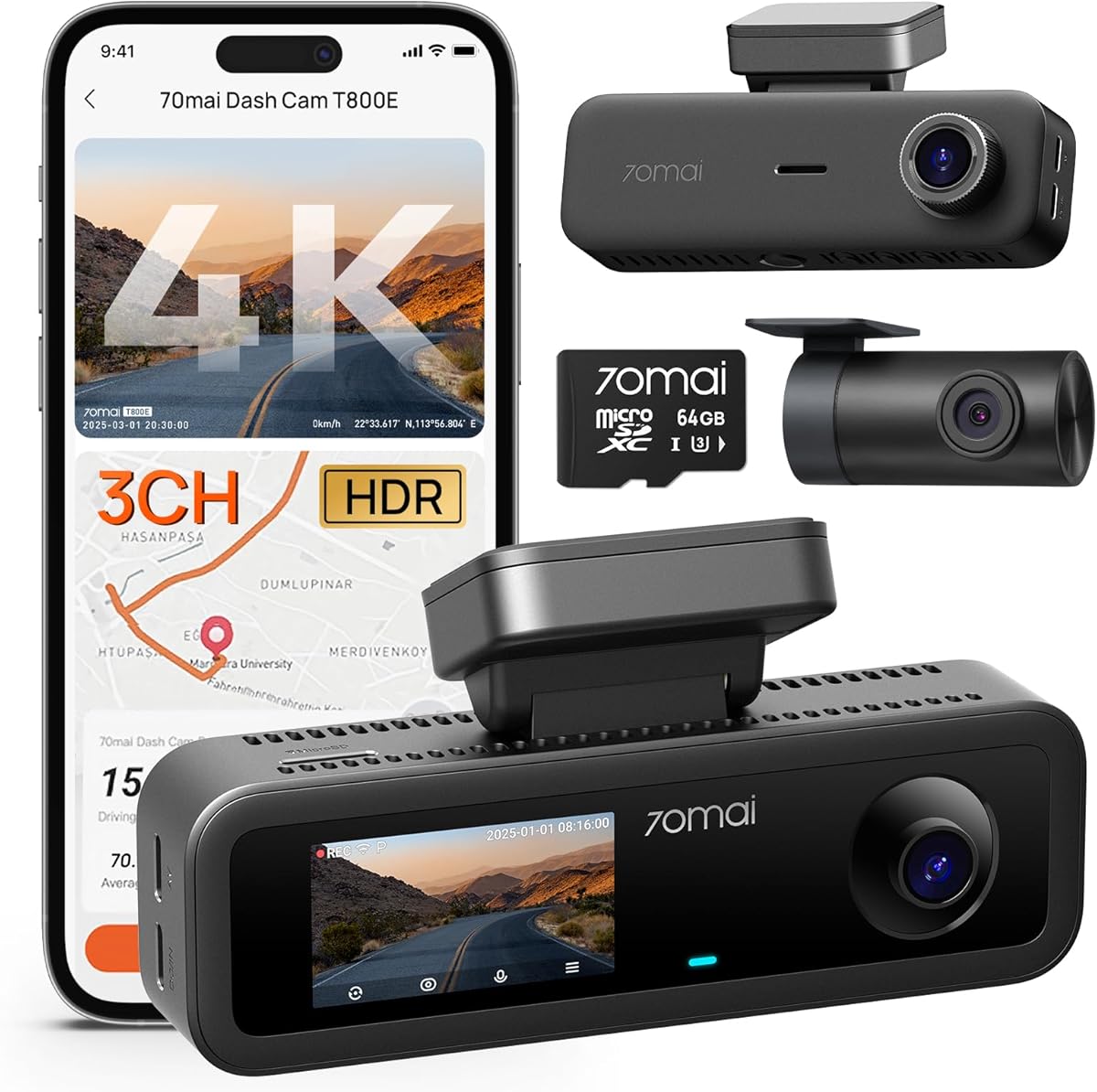
The 70mai T800E has a 4.5 rating and combines 4K front footage with 1080P interior and rear cameras. Wide lenses and an F1.55 aperture support visibility in varied conditions, while HDR and 3D noise reduction are intended to maintain clarity at night. The interior camera's switchable infrared function is a useful vanlife feature because it can illuminate the cabin without requiring external lights.
We may earn a commission when you buy through this link, at no additional cost to you.
Five-mode GPS records location, speed, and route information. Wi-Fi 6 transfers files through the 70mai app at stated speeds up to 10MB per second, and voice control allows the driver to take photos, start recording, or lock clips without touching the device. These controls are particularly useful during driving because they reduce distraction and preserve a driver's attention on the road.
The installation uses adhesive mounts and plug-and-play connections, and a 64GB card is included. Storage can be expanded to 512GB. A supercapacitor is specified to work from 14 degrees Fahrenheit to 140 degrees Fahrenheit. For parking monitoring, G-sensor collision detection and continuous recording are available through a compatible UP06 or UP03 hardwire kit, which is sold separately.
The T800E is well suited to vanlife travelers who want voice operation, flexible interior night recording, and straightforward setup. Its main limitation is the absence of 4G connectivity, so it should not be chosen for remote live viewing. It also does not offer a rotating rear camera. Within those boundaries, it provides a strong and approachable three-channel package.
Voice commands cover common actions such as taking a photo and locking a recording. This makes it easier to preserve a moment without fumbling with a phone or reaching toward the camera.
The cabin infrared can be switched on for darkness or turned off when unwanted. That control lets owners retain nighttime visibility without leaving an infrared light active during every daytime journey.
We may earn a commission when you buy through this link, at no additional cost to you.
The WOLFBOX G840S is a mirror-style dash cam with a 4.3 rating, offering a 4K front camera, 1080P rear camera, and a large 12-inch curved display. The screen provides 1.5 times the viewing area of a standard mirror, while a 170-degree front lens and 140-degree rear lens broaden the view. It is a visually integrated option for vans that already use a large rearview mirror.
We may earn a commission when you buy through this link, at no additional cost to you.
Split-screen viewing allows both cameras to be monitored simultaneously, making the rear image useful while reversing or parking. WDR and HDR balance difficult lighting, while a low-reflectivity LCD helps reduce daytime glare. The six-glass lens supports image quality, and night footage benefits from the system's exposure controls. This is primarily a front-and-rear system rather than a complete 360-degree interior solution.
An external GPS antenna provides location and route information, and 5.8GHz Wi-Fi connects to the WOLFBOX app on compatible phones for viewing, playback, and sharing. A 32GB memory card is included. Loop recording handles routine storage, while a 24-hour parking monitor uses time-lapse footage to reduce data demands. A hardwire kit is required for parking operation.
The G840S is best for a van owner who wants to replace the original mirror with a larger display and needs a convenient rear view. It is less appropriate for people who need cabin visibility or want to monitor both sides. The large screen may also take more windshield space than a compact camera, so its mounting position should be checked before installation.
The extended display reduces the limited visual area of a standard mirror and provides a simultaneous rear-camera image. That combination is useful in a loaded van, where cargo and passengers can make traditional mirror positioning less effective.
The external GPS antenna can improve location data reception while keeping the mirror format familiar. Connected phone access allows owners to review and share recordings without treating the display as the only way to work with footage.
We may earn a commission when you buy through this link, at no additional cost to you.
A useful vanlife dash cam should document more than the road ahead. Consider coverage, image quality, electrical demands, heat tolerance, storage, navigation, and how the system will fit the vehicle before choosing a model.
Front-and-rear systems offer the simplest balance of road evidence and situational awareness. Three-channel models add an interior view for passengers, pets, or living-space activity, while four-channel systems can also monitor the driver's left and right sides. For a long campervan, side views can reveal pedestrians, passing vehicles, or campsite activity that a conventional front-and-rear setup would miss. The disadvantage is more cameras, more cables, greater heat production, and a faster-filling memory card.
A 4K label does not always mean that every channel records at 4K. Native 4K captures four times the pixel count of 1080P, while upscaled 4K begins with lower-resolution video and enlarges it during processing. Native recording generally preserves more fine detail, which can help when a license plate or road sign is small within the frame. Multi-camera systems frequently mix resolutions, such as 4K at the front, 2.5K at the rear, and 1080P inside. Compare each channel rather than relying on the headline resolution.
Vanlife often means driving after sunset, parking in unlit areas, or arriving at remote campsites in darkness. STARVIS 2 sensors, large apertures, WDR, and HDR can improve the balance between headlights, reflective signs, and dim surroundings. Interior infrared lights are a separate advantage, providing visibility inside a dark cabin without relying on the van's dome lights. Reviews should not promise perfect darkness, but sensor specifications and exposure tools offer a useful basis for comparison.
Most dash cams draw power from the vehicle's 12-volt outlet and switch off when the engine stops. Hardwired parking modes connect to the fuse box or an ACC circuit so the camera can continue monitoring. A hardwire kit is not included with many products, and installation quality matters, particularly in a conversion with custom panels. Low-bitrate time-lapse reduces storage demand, while motion or collision detection can limit recording to relevant events. A hardwire installation should be checked for safe routing, adequate voltage, and correct accessory behavior.
Higher resolution and more simultaneous channels consume storage rapidly, so the included card is a starting point rather than a guarantee of adequate retention. Check whether the camera supports the card capacity, speed class, and format that the manufacturer specifies. Included cards range from 32GB to 128GB, while some premium systems accept up to 1TB. Loop recording replaces older files, and event locking helps preserve important clips. For frequent travel, larger storage is usually more valuable than choosing a marginally higher headline resolution.
A parked van can become hot, and a dashboard-mounted camera receives direct sunlight throughout the day. Supercapacitor-based systems are designed to avoid the heat and degradation risks associated with conventional lithium batteries. Thermal protection and automatic reduction to dual-channel recording can further control heat. Long rear-camera cables also need secure routing, and ventilation around the main unit should not be blocked. Whatever the rating, avoid leaving a camera exposed to excessive heat beyond the manufacturer's guidance.
GPS stamps speed, location, and route data into videos, adding context that can help during an incident review. Wi-Fi allows recordings to be previewed, downloaded, and shared through a phone app, but transfer speed and reliability vary. Dual-band Wi-Fi and Wi-Fi 6 are useful when files are large. Live cellular viewing is a separate feature, and one of the listed systems explicitly lacks 4G support. Ensure the app is available for the phone system in use and compare how easily clips can be located and exported.
A van's windshield, overhead console, and trim can make cable routing more complicated than in a passenger car. Measure the distance from the front camera to the rear, confirm that the supplied cable reaches, and decide where the cabin camera can be mounted without obstructing the driver. Adhesive mounts are quick but must be given time to bond. Magnetic and static-cling mounts can be easier to reposition. Owners with complex interiors should also allow time for cable clips, trim tools, and a clean installation that does not interfere with airbags or controls.
Begin by reading the included manual and identifying the correct power source, memory-card format, and mounting hardware. Clean the windshield or mounting area thoroughly, attach the cameras in their intended positions, and route rear cables along existing trim before connecting power. Photograph the installation so each cable and its connection point can be identified later. Do not begin parking operation until the hardwire circuit, voltage, and accessory mode have been confirmed.
After setup, format the supported memory card in the dash cam and record a short test clip in daylight and darkness. Check the app connection, GPS lock, video date, and time, and verify that every camera appears correctly on the display. Download a sample file before relying on wireless transfers, and make sure important incident clips are locked or copied before loop recording overwrites older footage.
For care, keep the lenses clean with a soft microfiber cloth and avoid touching the glass with rough fingers. Review cable connections periodically, particularly after rough roads or temperature changes, and check the mount for looseness. Avoid leaving the device in extreme heat beyond its specified limits, and let it cool before handling. Use compatible high-quality cards and inspect them for damage or cracking.
Not always, but it can be valuable when parking in unfamiliar places or carrying people, pets, and valuable cargo. A four-channel setup records the front, rear, left, and right, reducing blind spots around a long vehicle. It also requires more storage, more installation work, and greater power management. Travelers who mainly drive on open roads may be satisfied with front-and-rear coverage.
Yes, for the listed products that support continuous parking monitoring, a compatible hardwire kit is generally required because the normal accessory socket loses power when the engine is off. The kit connects the camera to a suitable vehicle circuit. Installation should avoid compromising safety systems, and the manual should be followed carefully. Verify the dash cam's parking-mode requirements before buying a kit.
Higher resolution helps when a vehicle is distant or occupies a small part of the image, but sensor quality, aperture, HDR, and lighting are equally important. A native 4K front camera can preserve more detail than an upscaled 4K image. For rear coverage, 1080P may still be useful, particularly when paired with a capable sensor. Night scenes and bright headlights remain the toughest conditions for any dash cam.
Several models use supercapacitors and are designed for improved heat resistance, but no system should be assumed immune to prolonged, excessive heat. Keep the main unit ventilated and avoid covering it. During installation, follow the stated operating-temperature guidance and disconnect the device if it becomes unusually hot. Parking in direct sunlight may still reduce lifespan even when a model includes thermal protection.
Capacity depends on the number of active channels, resolution, bitrate, and how long you drive. Three-channel 4K systems generally consume storage faster than a front-and-rear 1080P setup, so a larger card is often helpful for long journeys. Loop recording manages capacity, but event locking only protects selected clips. Check supported card capacity and speed class before purchasing, and copy important recordings regularly.
It can be, especially when monitoring a pet, passenger, or the living area at night. Infrared illumination can reveal cabin details in darkness without turning on bright interior lights. It is not necessary for every driver, however. Some owners may prefer to leave it off during daylight or in situations where cabin recording is unnecessary. A system with switchable infrared provides more control.
GPS is not essential for basic loop recording, but it adds speed, route, location, and time information to clips. That context can make a road incident easier to reconstruct or support an insurance claim. It is especially useful for long-distance travel and for documenting a route after parking. Owners should confirm that the app can display and preserve the metadata they need.
Basic front-and-rear systems are usually straightforward, while three- and four-channel setups require careful cable routing around trim, doors, and interior panels. Long rear cables must reach the intended camera location, and mounts should not obstruct the driver's view. Measure before installation and avoid routing cables near airbags. Complex campervan interiors may benefit from professional electrical or installation assistance.
The strongest overall option in this guide is the AProX HD 3-Channel system because it combines true 4K front and rear recording, a 1080P cabin view, Wi-Fi 6, GPS, infrared cabin lighting, and an included 128GB card. The Vantrue N4 Pro S is the premium choice for buyers who value a rotatable rear camera, triple STARVIS 2 sensors, and flexible recording modes. For broad coverage at a more restrained cost, the Icesky 4K 4-Channel system offers front, rear, left, right, and interior views.
Prioritize the capabilities that match your actual travel patterns. A front-and-rear setup is often sufficient for open-road travel, while a cabin channel becomes valuable for passengers, pets, or living-space monitoring. Side cameras help with tight parking and campsite maneuvering but increase storage demand. Night vision, heat management, GPS, and a comfortable app workflow may matter more than the largest resolution on the box, especially for extended off-grid journeys.
Before buying, verify memory-card support, parking-power requirements, app compatibility, and the physical length of rear-camera cables. Read the current product listing carefully because hardware revisions and included accessories can change. Ratings offer useful context, but direct features, support, and warranty terms are also important. Finally, check current prices and availability at the time of purchase, since they can change without notice.