
Crucial T710 1TB
4.6Editor score
Up to 14,900MB/s reads
Up to 13,800MB/s writes
Five-year warranty
AES-256 encryption support
Our Crucial Internal NVME SSD guide compares ten models for speed, capacity, compatibility, cooling, endurance, and features to help you choose with confidence.
A Crucial internal NVMe SSD can transform how quickly a compatible computer boots, opens applications, moves large files, and loads games. The best model depends on your storage interface, available M.2 slot, thermal tolerance, workload, and desired balance of speed, capacity, and practical features.
This guide compares ten Crucial NVMe models spanning PCIe 4.0 and PCIe 5.0, 480GB through 2TB, standard M.2 2280 designs, and heatsink-equipped gaming variants. We considered the stated read and write speeds, NAND type, platform support, cooling provisions, warranty details, and included software.
The selections show where the P310 prioritizes accessible Gen4 performance, where the T500 adds TLC NAND and productivity features, and where the P510, T700, and T710 target faster Gen5 platforms. Product listings and pricing can change, so confirm the current specifications and terms before buying.
4.6Editor score
4.8Editor score

4.7Editor score
This side-by-side comparison covers every Crucial internal NVMe SSD in the guide, highlighting differences in PCIe generation, stated performance, capacity, NAND, platform support, cooling, and bundled utilities.


The Crucial P310 1TB is the most broadly useful entry in this guide, earning a 4.7 rating for its combination of approachable PCIe 4.0 performance and wide compatibility. Its stated read speed reaches 7,100MB/s, with write speed reaching 6,000MB/s, giving compatible systems quick transfer and application-loading performance.
We may earn a commission when you buy through this link, at no additional cost to you.
This standard M.2 2280 drive is designed for laptops, desktops, and select handheld gaming consoles, including the ROG Ally X, Lenovo Legion Go, and AYANEO Kun. It also supports PCIe Gen3 systems, making it a practical choice for owners of older Gen3 machines who want an internal upgrade without needing the newest interface generation.
The main compromise is that the P310 does not include a heatsink, and a Gen4 slot is needed to realize its headline performance. Some computers and compact handheld devices also impose strict thermal or physical constraints. Nevertheless, for standard PC and laptop upgrades, it offers a practical balance of speed, capacity, and platform reach.
Choose the P310 1TB if you want a versatile internal upgrade for everyday productivity, a large game library, or a compatible handheld console. It is especially attractive for builders who do not need Gen5 throughput but appreciate a strong 1TB capacity and backward compatibility with Gen3 hardware.
The P310's stated sequential performance supports faster bootups, game loading, and application launches. Its advertised productivity benefits also cover demanding routines such as opening Adobe applications and working with spreadsheets or presentations, although real-world results depend on the host system.
Broad platform support makes this model less dependent on a recent flagship PC. A Gen3 system can still use the drive, while compatible Gen4 laptops, desktops, and handhelds can take advantage of its stronger rated throughput.
We may earn a commission when you buy through this link, at no additional cost to you.
The Crucial P310 2280 1TB with Heatsink is designed for gamers who want the P310's performance in environments where a bare drive may be less convenient. It has a 4.7 rating and retains stated speeds of up to 7,100MB/s read and 6,000MB/s write while adding a heat-management solution.
We may earn a commission when you buy through this link, at no additional cost to you.
Its standout use is in a PlayStation 5, where the integrated heatsink makes it a more purpose-built choice than the standard P310. The drive also works with desktops and laptops that can physically accommodate the taller heatsink assembly, giving console owners and PC builders another way to use the same performance class.
Thermal management is particularly relevant for a gaming drive placed near a console's ventilation system or inside a densely packed PC. However, the heatsink adds height, and some laptops have very limited clearance above the M.2 socket. Buyers should check their machine's service manual and the included mounting hardware before ordering.
This is the P310 to choose when your primary system is a PS5, or when a desktop has room for a heatsink-equipped M.2 drive. For compact laptops without clearance, the standard P310 is safer. For creators who also value TLC NAND and productivity software, the T500 may be a better fit overall.
The integrated heatsink helps the drive manage heat in a tightly packed console. It is also a sensible option for a gaming desktop that already has strong airflow, provided the additional height does not interfere with other components.
Besides PlayStation 5, the drive supports desktop and laptop installations that can accept its physical design. Backward compatibility with Gen3 systems broadens its usefulness, though maximum advertised performance still requires a compatible Gen4 connection.
We may earn a commission when you buy through this link, at no additional cost to you.
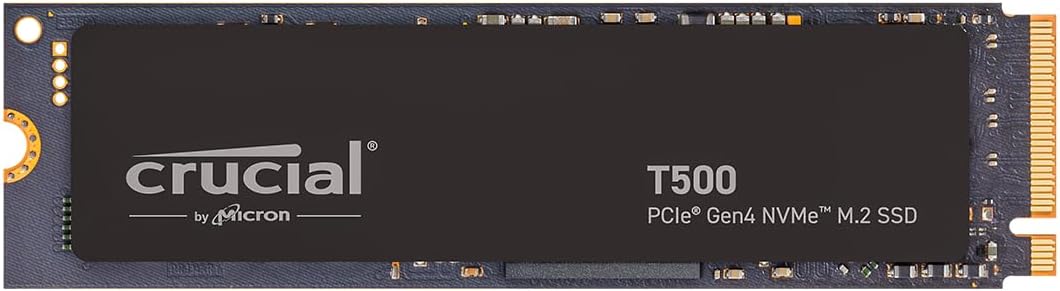
The Crucial T500 1TB combines a 4.8 rating, the highest listed rating in this roundup, with the performance profile needed by both gamers and content creators. It delivers up to 7,300MB/s reads, up to 6,800MB/s writes, and up to 1.15 million read IOPS and 1.44 million write IOPS.
We may earn a commission when you buy through this link, at no additional cost to you.
Unlike QLC-oriented storage options, the T500 uses TLC NAND, making it an attractive choice for buyers who place more emphasis on a balanced, productivity-oriented drive than on entry-level cost. Its compact M.2 form factor fits compatible desktops, laptops, and workstations with PCIe Gen4 M.2 slots.
Its productivity features also distinguish it from the standard P310. Acronis cloning software supports drive copying and transfer workflows, while one month of Adobe Creative Cloud All-Apps access provides access to photo, video, 3D, and other creative tools. The temporary subscription should be viewed as a trial rather than a permanent benefit.
The T500 is our top general pick for a reason: it combines very strong rated performance, TLC NAND, broad workstation utility, and useful transfer software. Choose it for a new creative workstation, a gaming PC with room for fast Gen4 storage, or a laptop that supports the required interface and physical format.
High sequential speeds and stated IOPS make the T500 suitable for both game libraries and active project files. The product data also highlights DirectStorage benefits for loading games and faster creative application performance.
Acronis cloning can help move an existing system onto the new drive, reducing the need for a fresh operating-system installation. Confirm the current version, included features, and operating-system requirements before relying on it for a migration.
We may earn a commission when you buy through this link, at no additional cost to you.
The Crucial P310 2TB is the capacity-focused member of this guide, offering twice the storage of the 1TB P310 configurations while retaining the familiar M.2 2280 shape and PCIe 4.0 x4 NVMe interface. Its 4.7 rating reflects a well-regarded offering in Crucial's mainstream NVMe range.
We may earn a commission when you buy through this link, at no additional cost to you.
A 2TB capacity is especially useful for owners of large AAA game installations, extensive media libraries, high-resolution photographs, or project files that would quickly fill a smaller system drive. The 3D NAND design and x4 interface provide a modern foundation for fast internal storage without requiring a Gen5 platform.
The supplied product information is intentionally concise, listing only the M.2 2280 form factor, 2TB capacity, and PCI-Express 4.0 x4 NVMe technology. As a result, buyers seeking detailed read and write figures, NAND composition, cooling guidance, or bundled utilities should inspect the current listing and manufacturer documentation before purchase.
Choose the P310 2TB when storage space is the priority and you want a mainstream internal upgrade. It makes more sense than a smaller model for a game-filled desktop or a workstation handling many large files. Verify physical clearance, interface support, and your need for heatsink or advanced cloning utilities before ordering.
Doubling capacity gives operating systems, applications, games, and media more breathing room. That can reduce the need for constant file management, particularly on systems where the internal SSD is also used for a large creative archive.
The M.2 2280 format and PCIe 4.0 x4 interface align with many current desktop and laptop designs. It is a practical choice for users who prioritize capacity over premium Gen5 throughput or integrated cooling.
We may earn a commission when you buy through this link, at no additional cost to you.
The Crucial P510 1TB offers a balanced route into PCIe 5.0 performance, pairing a 4.7 rating with stated speeds of up to 11,000MB/s read and 8,500MB/s write. TLC NAND makes it a credible all-round option for gamers, creators, and users who want more than a basic storage upgrade.
We may earn a commission when you buy through this link, at no additional cost to you.
Its compatibility with Gen4 systems is particularly useful. A Gen4 computer can use the drive, although it will not achieve Gen5 throughput on that interface. This lets buyers plan for a future platform upgrade without worrying that the current computer will reject the SSD.
Thermal management remains an important consideration with high-speed Gen5 storage. The product information mentions thermal control, but it does not specify an integrated heatsink, so buyers should check their chassis or laptop design and the current manufacturer installation guidance. A Gen5-capable slot, suitable processor platform, and sufficient airflow are all relevant.
The P510 is a sensible pick for a new Gen5 desktop or a compatible laptop owner who wants current fast storage without moving directly to the T710's extreme performance. It also includes Acronis True Image and a one-month Adobe Creative Cloud All-Apps subscription, adding migration and creative software value to the hardware.
The P510's listed read and write speeds place it above mainstream Gen4 drives while remaining below the most specialized Gen5 models in this guide. That middle ground can be attractive for a new build that needs fast transfers but will not regularly push a workstation to its limits.
Backward compatibility with Gen4 makes the drive adaptable to more than one generation of hardware. It can provide useful performance in an older system and remain ready for a faster replacement platform later.
We may earn a commission when you buy through this link, at no additional cost to you.
The Crucial T710 1TB is the premium performance option here, with a 4.6 rating and stated sequential speeds reaching 14,900MB/s read and 13,800MB/s write. Those figures are the highest listed in the guide, giving it an obvious appeal for advanced gaming rigs, content-production systems, and storage enthusiasts.
We may earn a commission when you buy through this link, at no additional cost to you.
Micron G9 TLC NAND, a five-year warranty, and AES-256 hardware encryption with TCG Opal 2.01+ support distinguish it from simpler general-purpose drives. The T710 is designed for Intel 13th- and 14th-generation platforms and AMD Ryzen 7000 systems equipped with M.2 2280 Gen5 slots.
Its heatsink-compatible design is important rather than cosmetic. Very high transfer rates generate more heat, particularly during sustained large-file work, and a compatible heatsink can help maintain stable performance. The enclosure does not include a cooling solution according to the supplied information, so system builders should plan for adequate airflow or an appropriate add-on heatsink.
Choose the T710 if you already own a supported Gen5 platform and need maximum stated throughput, or if your workflow regularly moves enormous project files. For ordinary office use or a Gen4 laptop, the extra headline performance may not produce a meaningful advantage. Verify slot, processor, cooling, and operating-system support before making the upgrade.
The T710's 14,900MB/s read and 13,800MB/s write specifications can benefit large transfers, asset-heavy applications, and enthusiast gaming builds. Actual performance will depend on the host interface, source files, workload, and sustained thermal conditions.
Hardware-based AES-256 encryption and TCG Opal support provide a stronger foundation for protecting sensitive information than relying only on application-level security. Confirm that your operating system and management tools support the encryption standard and management protocol you intend to use.
We may earn a commission when you buy through this link, at no additional cost to you.
The Crucial E100 480GB is a straightforward way to replace a SATA SSD or hard drive with a faster NVMe model. Its 4.5 rating, M.2 form factor, and stated performance of up to 5,000MB/s make it relevant to everyday desktop and laptop upgrades.
We may earn a commission when you buy through this link, at no additional cost to you.
Compared with SATA storage, the product information describes it as eight times faster, and it claims a 33-fold advantage over hard disk drives. The NVMe design also operates more quietly and generates less heat than a mechanical hard drive, which can make a system feel more responsive during everyday tasks.
Its main limitation is the 480GB capacity. That amount may be adequate for an operating system, core applications, and a modest selection of files, but it can be restrictive for large game libraries or media collections. The shorter warranty and lower stated throughput also place it below the more advanced P310, T500, and Gen5 options.
Choose the E100 when a computer has a spare M.2 slot and you want an affordable, uncomplicated way to improve responsiveness without installing premium hardware. It is also well suited to a secondary system or a smaller file-storage role. Users with many games or large projects should consider a higher-capacity model instead.
For a system still using a SATA SSD, the E100 offers a meaningful interface upgrade. The improvement is most noticeable in random workloads, bootups, and transfers, although the exact gain depends on the computer's other components.
The supplied information points to step-by-step installation instructions and cloning support. These can make migration more approachable, though users should still back up important files before modifying their existing system.
We may earn a commission when you buy through this link, at no additional cost to you.
The Crucial P310 1TB 232L is a QLC NAND option within the broader P310 family, earning a 4.6 rating and using a PCIe 4.0 x4 NVMe interface. Its 1TB capacity makes it a practical size for a primary system drive, secondary game drive, or general-purpose upgrade.
We may earn a commission when you buy through this link, at no additional cost to you.
QLC NAND stores more bits per memory cell, which can help manufacturers offer greater capacity at a lower cost. For many users, a 1TB QLC drive provides a useful balance between storage size and NVMe performance. The product title identifies Micron QLC NAND, while the supplied description does not provide detailed sequential or random performance figures.
Because this listing is less detailed than the primary P310, T500, and T700 entries, buyers should not automatically assume that it has the same listed speeds, software bundle, thermal design, or warranty as another P310 SKU. The product title specifically identifies the 232L configuration, so comparing it with other P310 listings requires care.
This model makes sense for buyers who understand QLC and want the P310 name with 1TB of capacity. It may be useful for secondary storage or general system duties. If consistent write performance, exact speed figures, included recovery software, or a heatsink-equipped design are priorities, choose a better-documented alternative.
QLC is a NAND type that prioritizes density and cost efficiency. It can be fully suitable for many consumer workloads, but sustained write behavior may differ from TLC, so buyers should consider how their drive will be used.
Multiple P310 configurations use similar family names but differ in NAND, cooling, included software, and physical design. Check the 232L designation and the detailed listing to confirm that this version matches your intended use.
We may earn a commission when you buy through this link, at no additional cost to you.
The Crucial T500 1TB Heatsink combines the T500's high-rated performance and TLC NAND with cooling designed for gaming systems. Its 4.8 rating matches the highest listed score in the guide, while stated speeds of up to 7,300MB/s read and 6,800MB/s write place it near the top of the Gen4 options.
We may earn a commission when you buy through this link, at no additional cost to you.
PlayStation 5 compatibility is the defining feature for console owners. The integrated heatsink is intended to support silent, stable operation during heavy gaming sessions and creative workloads, making it a stronger choice for a PS5 than a bare M.2 drive without a dedicated cooling solution.
The same physical heatsink can create clearance issues in laptops. Even if the laptop supports the M.2 2280 format and PCIe 4.0, the extra height may prevent the cover or other components from closing correctly. Desktop owners should likewise check the available space above the motherboard's M.2 slot.
Choose the heatsink T500 for a PlayStation 5 or a well-ventilated gaming desktop that values high Gen4 throughput, TLC NAND, and integrated cooling. For mobile workstations needing the most demanding Gen5 transfers, consider the T500's non-heatsink sibling for simpler installation or a supported Gen5 alternative for maximum performance.
The built-in heatsink is a major convenience for compatible gaming systems. It removes the need to search for a separate low-profile cooler simply to address the thermal demands of sustained storage activity.
The T500's high rated throughput, TLC NAND, and stated IOPS make it well suited to game libraries and heavy multitasking. It offers a compelling option when storage performance matters but a top-tier Gen5 platform is unnecessary.
We may earn a commission when you buy through this link, at no additional cost to you.
The Crucial T700 1TB is an enthusiast-oriented Gen5 drive with a 4.6 rating, TLC NAND, and stated speeds of up to 11,700MB/s read and 9,500MB/s write. It is built for high-speed storage users who want more throughput than conventional Gen4 drives can provide.
We may earn a commission when you buy through this link, at no additional cost to you.
Its platform focus is specific: Intel 13th- and 14th-generation systems and AMD Ryzen 7000 processors with M.2 Gen5 slots are identified as supported targets. That focus makes it a strong candidate for a new enthusiast desktop, but buyers should verify motherboard slot layout, processor support, and system firmware before ordering.
The T700 is heatsink-compatible rather than including a cooling solution in the supplied information. A compatible heatsink and good chassis airflow can help manage sustained workloads, which is important when moving very large files or repeatedly transferring project assets. Software support includes Acronis True Image plus one month of Adobe Creative Cloud All-Apps access.
Choose the T700 if you own or are building a supported Gen5 system and regularly handle large files. It is faster on paper than mainstream Gen4 models, but it is not the fastest choice in this guide: the T710 offers still higher stated throughput. Your decision should therefore reflect how much your actual workload benefits from extreme sequential speed.
The T700's stated sequential performance is well suited to transferring large video files, game packages, and creative project libraries. Faster media reduces idle time, although source-device speed can also limit real-world transfer rates.
Explicit support for Intel 13th- and 14th-generation and AMD Ryzen 7000 systems helps buyers target the right hardware. A compatible M.2 slot and adequate cooling are essential parts of realizing the intended platform-level performance.
We may earn a commission when you buy through this link, at no additional cost to you.
The right internal NVMe SSD depends on interface generation, physical clearance, thermal conditions, NAND type, capacity, and the software that accompanies the drive. Start with your computer's M.2 support rather than choosing by peak speed alone.
PCIe generation determines the theoretical bandwidth and the maximum speed a compatible SSD can reach. The P310, T500, and E100 use PCIe 4.0, while the P510, T700, and T710 use PCIe 5.0. A Gen5 drive in a Gen4 slot can work but will be limited by the slower interface, so check the motherboard, laptop manual, and processor platform before choosing.
Choose the interface your computer actually supports and the performance your workload needs. Gen4 is broadly practical, while Gen5 is most useful on recent, properly configured platforms.
Most drives in this guide use the M.2 2280 format, but dimensions alone do not guarantee compatibility. The P310, T500, and T500 Heatsink options may differ in height or attached components, and some laptop manufacturers restrict drive length or thickness. Console and handheld systems can have their own supported layouts as well.
Measure the available space and check the system service guide. If clearance is uncertain, select a low-profile model without a heatsink rather than risk an installation that prevents the cover from closing.
Faster NVMe drives move more data per second and can generate meaningful heat during sustained transfers. The P310 and T500 gaming versions include integrated heatsinks, while the T700 and T710 are described as heatsink-compatible. A Gen5 system should also have effective case airflow and a motherboard slot with appropriate thermal support.
Use the included cooling where the product provides it, and add a compatible heatsink when high-speed models require one. Cooling is especially important in compact laptops and densely packed consoles where airflow is limited.
NAND influences storage behavior, especially under sustained writes. TLC drives in this guide include the T500, T500 Heatsink, P510, T700, and T710, while the P310 232L explicitly uses QLC. QLC can be a sensible density-focused option, but buyers should understand its write characteristics and compare them with their expected use.
Choose TLC for mixed productivity, creative, and gaming workloads that may involve repeated large writes. Consider QLC when lower cost and capacity density are priorities and the drive will handle a lighter or more mixed duty cycle.
Capacity should reflect operating-system needs, applications, games, media, and temporary project files. The E100 offers 480GB for smaller systems, the 1TB models suit many everyday and gaming configurations, and the P310 2TB provides more room for extensive libraries. A larger capacity can also reduce the need to constantly move or delete files.
Choose enough space to leave the drive comfortably filled without becoming a maintenance burden. For multiple large games or high-resolution media, 1TB may be the minimum sensible target, while 2TB is more accommodating.
Several models include Acronis True Image or data-recovery utilities, while the T500 and T700 families also mention a one-month Adobe Creative Cloud All-Apps subscription. These extras can make cloning, recovery, and creative setup more convenient, but software availability and subscription terms should be confirmed in the current listing.
Do not base the purchase on trial software alone. Prioritize the drive's hardware, interface, capacity, and warranty first, then treat the included utilities as a helpful addition rather than the main reason to choose a model.
Warranty length can be a useful indicator of the product tier and intended use. The E100 has a limited three-year warranty, while the T710 and T700 list five-year warranties. Platform support matters just as much: the T710 and T700 specifically name Intel 13th- and 14th-generation and AMD Ryzen 7000 systems with Gen5 M.2 slots.
Match the warranty and support details to the role of the drive. Confirm that your exact computer model, motherboard, processor, and firmware are covered before installation.
The T710 specifically lists AES-256-bit hardware encryption and TCG Opal 2.01+ support, making it the clearest choice in this guide for buyers who require hardware-backed security features. Encryption is useful for sensitive business, personal, or shared-system data, but it must be configured and managed through compatible tools.
If security is a core requirement, identify the encryption standard and management protocol your environment uses before purchasing. Do not assume every NVMe model supports the same hardware features.
Before installation, back up your important files, confirm that the computer supports the drive's interface, size, and physical profile, and read both the computer and drive instructions. If replacing a boot drive, create a recoverable copy of the current system and verify that the cloning or installation utility supports your operating system.
Power down the computer before opening it, use the correct mounting hardware, and connect the M.2 module without forcing it. If the drive requires a heatsink, install the compatible solution and ensure that nearby components can still fit. For a new drive in a secondary slot, follow the operating system's disk-management process to initialize, format, and assign a drive letter.
After installation, confirm that the system detects the correct capacity and run a storage test before moving important files. Keep firmware, storage drivers, and system software current, leave adequate airflow around the drive, and avoid unnecessary abrupt shutdowns during large writes. Periodically check free space and back up critical data to a separate location.
Generally, yes, but performance will be limited by the computer's interface. The P510 explicitly supports Gen4 systems, while the T700 and T710 are described around specific Gen5-capable platforms. Check the motherboard or laptop manual for physical and protocol compatibility before purchasing.
An M.2 2280 drive may fit, but length, width, thickness, and heatsink clearance all matter. Some laptops support only shorter M.2 2242 drives, while others restrict height or omit an M.2 slot. A bare drive is more likely to fit than a heatsink-equipped model, so consult the service manual.
It can be enough for a small game collection, but modern game installations often consume substantial space. Operating-system updates, saved games, videos, and applications also reduce usable capacity. The E100 480GB works well for focused or secondary-storage use, while 1TB is a more comfortable general gaming target.
It can shorten loading times and reduce stutter associated with storage access, but it does not automatically increase the maximum frame rate. CPU, graphics card, memory, game engine, and settings usually have a larger effect on frame rate. Fast storage is still valuable for large games and DirectStorage-capable titles.
Buy Gen4 if your computer only supports it or if your workload does not benefit from extreme transfer speeds. Choose Gen5 when you have a compatible platform, regularly move very large files, and have adequate cooling. The fastest specification is not automatically the most useful or efficient choice.
Both are 1TB PCIe 4.0 drives, but the heatsink version is built for applications that benefit from attached cooling, including the PlayStation 5. The standard P310 is generally easier to fit in laptops and compact desktops. Check clearance and the intended system before selecting between them.
TLC generally provides a stronger fit for mixed and write-intensive workloads, while QLC emphasizes storage density and value. The guide's T500, T500 Heatsink, P510, T700, and T710 use TLC, while the P310 232L uses QLC. Your actual write workload and capacity needs should guide the choice.
The P310 and T500 gaming variants include a heatsink, while the T700 and T710 are described as heatsink-compatible rather than including one. Follow the current manufacturer guidance for your model and system. Good case airflow, proper mounting, and a compatible cooler can help maintain performance during sustained transfers.
The Crucial T500 1TB is the most balanced general recommendation, combining a 4.8 rating, TLC NAND, strong Gen4 throughput, and useful cloning software. The T710 1TB is the premium choice for supported Gen5 systems, while the standard P310 1TB offers strong everyday performance and broad compatibility at a more accessible tier.
Prioritize the hardware your computer can actually use. Confirm interface generation, M.2 dimensions, heatsink clearance, and cooling before choosing a model. Capacity should reflect your game and media library, while NAND, warranty, encryption, and bundled software should support the way you actually work.
Finally, revisit the current product listing before purchasing. Specifications, package contents, warranty details, and prices can change, and the same family name may cover standard, heatsink, NAND, and capacity variants. Confirm the exact model number to ensure the drive matches your computer and intended use.
