
Mechanic Master C34Pro
3.9Editor score
ATX and E-ATX support
360mm radiator compatibility
Integrated carry handle
Our Compact E ATX Case guide compares 10 models for motherboard support, cooling, GPU clearance, airflow, build quality, and portability in 2026.
A compact E ATX case offers a practical middle ground between a small micro-ATX enclosure and a full-size mid-tower. The strongest choices preserve room for standard ATX motherboards, E-ATX boards, long graphics cards, flexible cooling options, and full-size power supplies without making every component difficult to reach.
This guide compares ten cases using the specifications and features supplied for each model. We examine motherboard support, processor-cooler clearance, graphics-card length, radiator capacity, fan positions, power-supply accommodation, front connectivity, portability, airflow design, and the ease of organizing cables and building a system.
Each review explains the product's strongest qualities, compatibility limits, and most suitable type of builder. The list includes premium ATX designs, highly compact micro-ATX alternatives, portable cases, and airflow-focused models, helping readers distinguish true E-ATX support from cases that only use the term loosely. Prices and availability change.
3.9Editor score

4.7Editor score

4.5Editor score
The comparison below shows how the ten cases differ in motherboard support, hardware clearance, cooling flexibility, portability, and everyday usability. Specs are based on the supplied product information, so checking exact dimensions against your planned components remains essential.


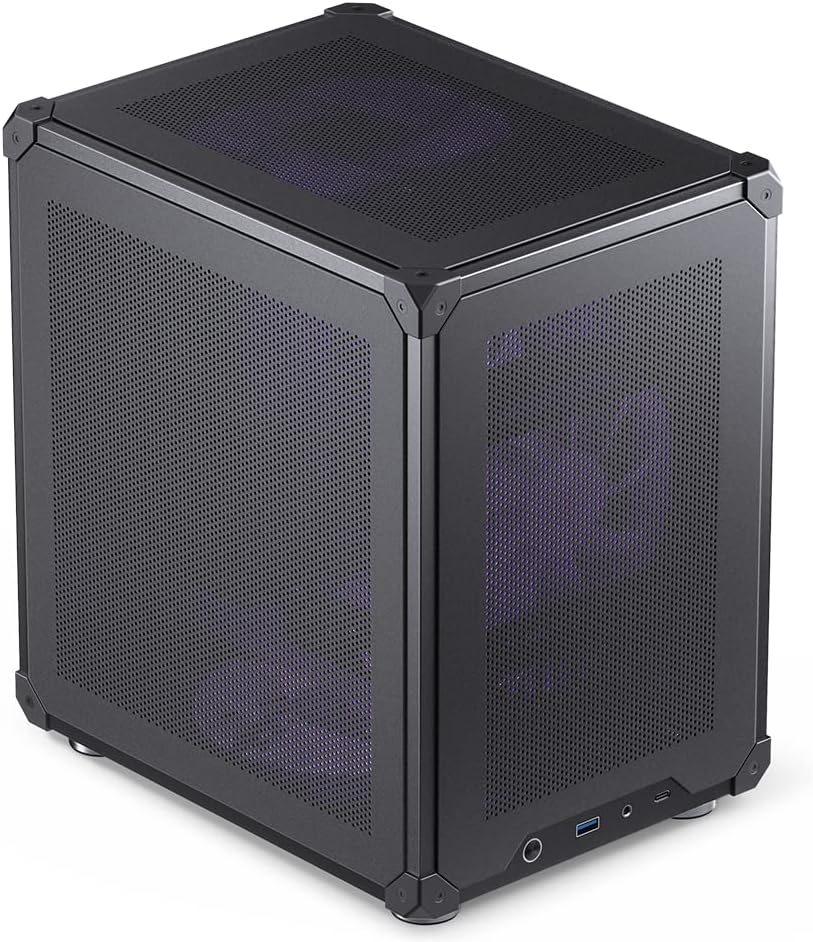

The Cooler Master QUBE 540 combines an unusually broad hardware allowance with a design that can be used in horizontal or vertical positions. Its 4.4 rating reflects a strong overall proposition for builders who want genuine E-ATX support, substantial graphics-card clearance, and flexible orientation without relying on a sprawling full-size tower.
We may earn a commission when you buy through this link, at no additional cost to you.
Its standout feature is motherboard flexibility. The case supports ITX, ATX, and large E-ATX motherboards up to 11 inches wide, all within what the manufacturer describes as a compact ATX form factor. Graphics-card clearance reaches 415 millimeters when the front fan is removed, making the enclosure especially relevant to builders using a long modern graphics card. The front mesh and preinstalled SickleFlow 120mm fan provide a sensible airflow foundation.
There are trade-offs to consider. The supplied information does not state a specific radiator size, so liquid-cooling buyers should confirm bracket and mounting details. Using the largest supported graphics card also requires removing the front fan, which means the builder must add or reposition cooling to preserve intake. Orientation flexibility adds value, but the reversed I/O panel and movable handles make setup more involved than a conventional fixed-layout case.
The QUBE 540 is best for builders prioritizing E-ATX compatibility, long graphics cards, and a flexible physical setup. It is a particularly strong recommendation when desk placement, floor display, or eventual transport makes horizontal and vertical positioning useful. Confirm the front-fan arrangement and radiator details before ordering if your build depends on a specific liquid-cooler size.
Support for E-ATX boards up to 11 inches wide is the key reason to shortlist this case. That allowance lets the chassis combine a compact footprint with the wider rear I/O and expansion layouts of extended ATX motherboards, provided the rest of the selected hardware stays within the published clearances.
The reversible I/O panel, movable handles, and horizontal or vertical operation make the QUBE 540 easier to adapt to different rooms and furniture. A buyer should still plan cable routing and airflow direction for the final orientation rather than assuming both positions produce identical results.
We may earn a commission when you buy through this link, at no additional cost to you.
The Lian Li O11D Mini V2 is one of the strongest all-round compact ATX cases in this guide, earning a 4.7 rating. It combines a compact footprint with support for standard ATX, micro-ATX, and Mini-ITX motherboards, including an optimized arrangement for ATX back-connect boards. Fans are not included, allowing buyers to create a cooling configuration tailored to their hardware.
We may earn a commission when you buy through this link, at no additional cost to you.
The slanted 10-degree bottom improves direct cold-air intake and GPU cooling, while the protruding side mesh accommodates full-size ATX power supplies without abandoning the compact format. Horizontal and vertical graphics anti-sag brackets provide support for heavy cards, and dedicated 24-pin cable brackets help keep the interior tidy. Pillar-less tempered glass on the front and side offers a clear view of the components.
The most important limitation is motherboard support. The supplied specifications list standard ATX, micro-ATX, and Mini-ITX, but do not identify E-ATX compatibility, so this should not be selected for an extended ATX board without further confirmation. Its no-fan configuration also means it is not a ready-to-use cooling solution; buyers must provide the fans needed for their processor, graphics card, and power supply.
This case is ideal for someone who values presentation, tidy assembly, heavy graphics-card support, and the ability to use a full-size power supply in a compact enclosure. It is an especially compelling option for builders using ATX back-connect motherboards or vertical GPUs. For genuine E-ATX support, the QUBE 540 or C34Pro offers clearer documentation.
The chassis is specifically optimized for ATX back-connect motherboards, helping keep connectors away from the visible interior. Its separate 24-pin brackets also reinforce that focus on tidy presentation, making it a natural fit for clean-build aesthetics and display-oriented systems.
Horizontal and vertical anti-sag brackets give builders flexibility in how the graphics card is mounted. This is useful with long, heavy graphics cards, although the final orientation should account for cable reach, riser requirements, and the location of the power-supply chamber.
We may earn a commission when you buy through this link, at no additional cost to you.
The Mechanic Master C34Pro is designed for builders who want full-size and extended-ATX hardware in a relatively compact 30.6-liter enclosure. It carries a 3.9 rating, but its specification sheet is unusually ambitious, with ATX and E-ATX motherboard support, 360mm radiator compatibility, 165mm tower coolers, 420mm graphics cards, and 220mm ATX power supplies.
We may earn a commission when you buy through this link, at no additional cost to you.
Its internal layout is deliberately flexible. PCIe slot adjustments allow micro-ATX expansion, while multi-zone fan mounts across the top, bottom, and front provide several routes for moving air. Dust filters support the thermal design, and flexible PSU mounting options include front, bottom, and side positions. An 18millimeter cable-management area and included magnetic screwdriver kit make assembly more convenient.
The main caution is that its expansive compatibility claims demand careful planning. A 429 by 205 by 349millimeter chassis, 420millimeter graphics-card allowance, and large radiator support may look straightforward on paper, but the best position for each component depends on the exact motherboard, cooler, power supply, and selected fans. Its 3.9 rating is lower than the alternatives, so prospective buyers should weigh the supplied feature set against the model's overall customer feedback.
The C34Pro makes sense for a high-end portable build, a LAN-event system, or any project where flagship components must travel between locations. It is also a strong true E-ATX candidate with room for large cooling hardware. Users should map their components before ordering and confirm that the proposed PSU, radiator, and graphics card can occupy their intended mounting positions simultaneously.
The enclosure manages to pair E-ATX support with allowances for very long graphics cards, full-size ATX power supplies, and 360mm radiators. Buyers can use that space intelligently, but the case rewards careful planning rather than placing every component in the largest possible position without considering interference.
The integrated carry handle is a defining feature for a chassis this size. It is useful at LAN events, between workstations, and whenever a powerful desktop must be moved without treating the case as a separate accessory or adding a separate transport solution.
We may earn a commission when you buy through this link, at no additional cost to you.
The Cooler Master Q300L V1 is a practical choice for builders who want a compact case without giving up room for a long graphics card or a substantial air cooler. It has a 4.5 rating and supports Micro-ATX and Mini-ITX motherboards, making it more flexible than many similarly sized micro-ATX enclosures.
We may earn a commission when you buy through this link, at no additional cost to you.
The listed clearances are generous: CPU coolers may reach 159millimeters, graphics cards may reach 360millimeters, and power supplies may reach 160millimeters. Cooling versatility includes support for a 240mm liquid cooler and five fans. Its perforated sides promote airflow, magnetic dust filters aid maintenance, and the transparent side panel displays the finished build. The modular I/O panel can be placed at the front, top, or bottom on either side.
This is not a true E-ATX case. It is designed for smaller motherboards, and buyers should not equate its standard ATX power-supply accommodation with full-size motherboard support. The older and simpler design also does not offer the same back-connect integration, tool-free panel removal, or multi-position GPU-bracket flexibility seen in newer premium models.
The Q300L V1 is best for a budget-conscious micro-ATX build that needs a long GPU, a moderately tall tower cooler, and flexible I/O positioning. It remains a sensible choice when the smallest practical footprint matters more than support for extended motherboards. Users intending to install an E-ATX board should choose the QUBE 540 or Mechanic Master C34Pro instead.
A maximum graphics-card length of 360millimeters gives the Q300L V1 room for many performance cards despite its compact size. That makes it a better fit for a large GPU than several cases whose short dimensions force a smaller card or unusual mounting compromises.
The adjustable I/O panel can be positioned on the front, top, or bottom and on either side. This flexibility is useful when the case sits beneath a desk, against a wall, or beside a display where convenient front access matters.
We may earn a commission when you buy through this link, at no additional cost to you.
The Mechanic Master C34 targets builders who want a standard ATX motherboard in a small, portable enclosure. Its 4.6 rating and integrated handle distinguish it from conventional compact towers, while support for full-size ATX power supplies and graphics cards up to 335millimeters gives it more flexibility than a basic micro-ATX case.
We may earn a commission when you buy through this link, at no additional cost to you.
Cooling support includes 240mm radiators and CPU air coolers up to 162millimeters, allowing either liquid or air configurations. The internal layout is designed to simplify installation, and a metal front I/O panel includes USB 3.0 and USB Type-C connectivity. The most important assembly advice is also clear: the manufacturer highly recommends an SFX-L power supply for the cleanest cable management and easiest build experience.
The case supports standard ATX rather than E-ATX motherboards, so buyers with an extended board must look elsewhere. Using a full-size ATX power supply may physically be possible while making the internal layout less tidy, particularly in an already compact chassis. The supplied data also does not provide a radiator width or detailed mounting map, so custom liquid-cooling users should verify all dimensions.
The C34 is well suited to a compact work-focused system, a portable gaming PC, or a build that must be moved between locations. It offers a useful balance of ATX hardware support and mobility without expanding into a large mid-tower. Buyers who need true E-ATX compatibility should examine the C34Pro or QUBE 540 rather than treating standard and extended ATX support as interchangeable.
Supporting a standard ATX board while retaining a small footprint is the C34's central achievement. It gives builders more expansion-board and rear-I/O options than a typical micro-ATX chassis without requiring a large mid-tower footprint.
The internal design is optimized for the cleanest result with an SFX-L power supply. Full-size ATX power supplies are supported, but the compact layout makes the power-supply choice central to cable routing, component clearance, and overall ease of installation.
We may earn a commission when you buy through this link, at no additional cost to you.
The ASUS Prime AP201 stands out as an efficient micro-ATX case, earning a 4.7 rating while fitting into a 33-liter footprint. Its quasi-filter mesh panels contain more than 57,000 machined 1.5millimeter holes, balancing airflow with a clear view of the internal components. The design targets systems that need efficient cooling without the footprint of a conventional tower.
We may earn a commission when you buy through this link, at no additional cost to you.
Cooling capacity includes support for 280 and 360millimeter radiators and as many as six fans. Despite the small volume, the AP201 accommodates ATX power supplies up to 180millimeters, graphics cards up to 338millimeters, custom liquid-cooling hardware, and several storage devices. Tool-free side-panel removal and a 32millimeter cable-management gap make routine access and routing more convenient.
Its primary limitation is that it supports Micro-ATX rather than E-ATX motherboards. Although the case handles long ATX power supplies and substantial graphics cards, that does not extend its motherboard support. A 360millimeter radiator also requires the right mounting position and compatible case geometry, so the complete cooling layout should be checked rather than judging by radiator support alone.
The AP201 is a strong match for space-conscious builders who want a polished mesh design, flexible cooling, and easy panel access. It is particularly suitable for a compact gaming or productivity system with a Micro-ATX motherboard. Buyers seeking genuine E-ATX support should select the QUBE 540 or C34Pro, while compact-case shoppers should verify their dimensions and power-supply needs here.
More than 57,000 precisely machined holes create a fine mesh across the case panels. The pattern is intended to increase airflow while filtering dust and preserving visibility, making the exterior more purposeful than a simple open-frame design.
A 33-liter enclosure can still accommodate a 180millimeter ATX power supply, a 338millimeter graphics card, and 360millimeter liquid cooling. The result depends on disciplined component selection, but the published limits are notably ambitious for a Micro-ATX chassis.
We may earn a commission when you buy through this link, at no additional cost to you.
The Cooler Master Q300L V3 updates the popular compact-building formula with generous clearances and high-airflow features. It has a 4.6 rating, supports Micro-ATX motherboards, and accommodates graphics cards up to 366millimeters, processor coolers up to 178millimeters, and ATX power supplies up to 200millimeters.
We may earn a commission when you buy through this link, at no additional cost to you.
Its cooling flexibility is a major strength. The case can hold six 120 or 140millimeter fans, 240millimeter all-in-one liquid coolers, and CPU air coolers as tall as 178millimeters. Magnetic dust filters, tempered glass, clean cable management, and a movable I/O panel round out a builder-friendly design. The mesh-oriented airflow approach suits systems using powerful processors and graphics cards.
The obvious constraint is motherboard format: this is a Micro-ATX case, not a true E-ATX option. Its dimensions and 200millimeter power-supply allowance may encourage buyers to assume complete full-tower flexibility, but that would confuse power-supply compatibility with motherboard support. The absence of a listed carry handle also makes it less obviously suited to portable use than the Mechanic Master models.
The Q300L V3 is a strong option for a compact Micro-ATX gaming system that needs a long graphics card, a tall air cooler, or a full-length ATX power supply. It gives builders more thermal headroom than the Q300L V1 while retaining the recognizable strengths of a compact, high-airflow layout. E-ATX builders should choose one of the explicitly extended-ATX-capable models.
Support for CPU coolers up to 178millimeters is among the more generous limits in this group. That range allows a substantial tower air cooler to be considered, giving builders an alternative to a 240mm liquid cooler in a compact Micro-ATX system.
The 200millimeter ATX power-supply allowance provides room for many conventional units. In a compact chassis, that capacity improves component choice, but users should still consider drive placement, cable bend radius, and the position of the selected power supply.
We may earn a commission when you buy through this link, at no additional cost to you.
The Zalman CUBIX M-ATX prioritizes a very small desktop footprint over the expansive component support found elsewhere in the guide. It has a 4.5 rating, a 17.1-liter total volume, and a straightforward design for Micro-ATX systems. The construction uses 0.8millimeter steel to provide a sturdy structure despite the compact dimensions.
We may earn a commission when you buy through this link, at no additional cost to you.
Despite its small size, the case accepts standard ATX power supplies and graphics cards up to 260millimeters. CPU coolers may reach 137millimeters, and the perforated front panel works with a preinstalled 80millimeter fan to promote cooling. The front interface is simple but useful, with one USB 3.0 port, one USB 2.0 port, and a 3.5millimeter stereo auxiliary connection.
The component restrictions are significant. A 260millimeter graphics card is shorter than the allowance in most competing models, and a 137millimeter processor-cooler limit excludes many of the larger dual-tower designs. The single 80millimeter fan also offers less obvious expansion flexibility than cases designed around 120 and 140millimeter fans or larger radiators.
The CUBIX M-ATX is best for a small office, reception, or general-purpose computer where the display and system need to occupy minimal space. It makes more sense for a modest graphics card and low-profile or moderately sized CPU cooler than for a high-end gaming build. Buyers should measure the intended hardware before choosing it over larger, more flexible compact cases.
A 17.1-liter volume makes this one of the smallest cases listed, yet it still supports a standard ATX power supply and a Micro-ATX motherboard. That combination can produce a capable compact desktop for office, media, or general productivity tasks.
The 260millimeter graphics-card and 137millimeter CPU-cooler allowances are the decisive limits. Choosing smaller compatible parts from the outset is easier than discovering a fitment problem after buying a case for a specific prebuilt component list.
We may earn a commission when you buy through this link, at no additional cost to you.
The JONSBO C6 uses a compact desktop format and extensive mesh surfaces to create an open-airflow design. It carries a 4.6 rating, supports ITX and Micro-ATX motherboards, and measures 202millimeters wide by 266millimeters deep by 295.2millimeters high including the footpad. The upper cover and side panel open without tools for easier access.
We may earn a commission when you buy through this link, at no additional cost to you.
Three principal fan positions are available: one at the top, one at the bottom, and one at the front. The top and bottom locations accept 120 or 140millimeter fans, while the front position accepts a 120millimeter fan or a hard drive. Front connectivity includes USB Type-C, one USB 3.0 port, and combined audio connections. Storage support consists of one 3.5-inch hard drive or two 2.5-inch solid-state drives.
The most restrictive component limit is the 75millimeter CPU-cooler allowance. That means the case is intended for a low-profile air cooler or a compatible compact liquid-cooling solution, and many standard tower coolers will not fit. Graphics cards are also limited to 200 through 255millimeters, which is shorter than the allowance offered by most alternatives in this comparison.
The C6 is best suited to a small office or compact system using a low-power processor, a low-profile cooler, and a moderately sized graphics card. It is less appropriate for a high-end gaming build unless every major component falls within its limits. The mesh construction and tool-free access are appealing, but compatible hardware selection is more important than raw case volume.
The all-sided mesh approach supports airflow from multiple directions and gives the enclosure a visually light appearance. It is a sensible strategy for a small desktop case, where large solid panels could otherwise occupy a meaningful share of the available surface area.
The upper cover and side panel can be removed without tools, simplifying initial assembly and later maintenance. This convenience is particularly useful in a compact layout where removing an entire panel is necessary to reach internal connections.
We may earn a commission when you buy through this link, at no additional cost to you.
The NZXT H5 Flow is a compact ATX mid-tower that combines a polished appearance with a functional airflow layout. It has a 4.6 rating and arrives with two 120mm Quiet Airflow fans, one at the front and one at the rear, making it a more immediately usable starting point than the Lian Li O11D Mini V2's no-fan configuration.
We may earn a commission when you buy through this link, at no additional cost to you.
Fine mesh covers the top, front, and side panels, allowing air to pass through the enclosure while helping filter dust. The perforated sides of the bottom power-supply shroud create additional intake for two 120mm fans, which are not included. Liquid-cooling flexibility is strong, with support for a 360millimeter radiator in front and a 240millimeter radiator at the top. Wide channels, hooks, and straps help conceal cables.
The supplied specifications identify it as a compact ATX mid-tower but do not list E-ATX motherboard support. Buyers planning an extended board should not infer compatibility from the case's ATX designation. A front 360millimeter radiator and top 240millimeter radiator also need to be considered together with the height and length of the chosen motherboard and graphics card.
The H5 Flow is a strong general recommendation for a compact gaming or productivity build that wants good airflow, modern cable management, and a pair of fans already installed. It is especially attractive to builders planning front or top liquid cooling. Those needing true E-ATX clearance should favor the QUBE 540 or Mechanic Master C34Pro instead.
Two preinstalled 120mm fans provide immediate front-to-rear airflow, while additional 120millimeter intake positions around the power-supply shroud offer room for expansion. The supplied fan arrangement makes the H5 Flow easier to begin with than a case that requires every fan to be selected and installed separately.
A 360millimeter front radiator and 240millimeter top radiator support substantial liquid-cooling configurations. Their placement leaves the case visually clean and can reduce CPU-cooler height, though users should verify clearance with the rest of the selected hardware.
We may earn a commission when you buy through this link, at no additional cost to you.
A compact case only works when its motherboard format, major component dimensions, cooling plan, and physical location all align. Use the following factors to narrow the field before comparing appearance or small front-panel details.
E-ATX is a specific, extended motherboard format rather than a general term for a compact tower. In this list, the Cooler Master QUBE 540 and Mechanic Master C34Pro explicitly support E-ATX, while the QUBE 540 also accommodates boards up to 11 inches wide. Cases listed only for Micro-ATX, Mini-ITX, or standard ATX may still accept a full-length power supply and long graphics card, but that does not mean they accept an E-ATX motherboard.
Graphics cards, power supplies, CPU coolers, and radiators determine whether a compact case is genuinely usable. Published allowances range from 200 to 255millimeters for some Micro-ATX models, while the QUBE 540, Q300L V1, Q300L V3, and AP201 offer substantially longer graphics-card allowances. The C34Pro reaches 420millimeters, but long-card support does not guarantee that a radiator, front fan, and tall cooler can all be installed simultaneously.
The cases range from a compact design with a preinstalled 80millimeter fan to models supporting six fans, 360millimeter radiators, and large tower coolers. Fine mesh and perforated panels help move air, but they cannot compensate for an undersized fan or poorly positioned radiator. Air-cooled builders should compare the case's CPU-cooler limit, while liquid-cooling users should identify the exact radiator position, mounting dimensions, and any front-fan conflict.
A standard ATX power supply can be accommodated by many small cases, but cable management may become the deciding factor. The C34 supports full-size units while recommending SFX-L for the cleanest build. Other models list power-supply limits ranging from 160 to 220millimeters. The C34Pro offers mounting positions at the front, bottom, and side, while the O11D Mini V2 uses a protruding mesh side panel to accommodate full-size supplies.
A compact case may live beneath a desk, beside a display, or in a portable LAN setup. The QUBE 540 can operate horizontally or vertically and includes movable handles, while the Mechanic Master C34 and C34Pro have integrated carry handles. Other cases prioritize fixed desktop placement. Orientation changes cable access, fan direction, and available mounting positions, so buyers should account for the final setup rather than only the dimensions.
Tool-free panels, movable I/O, cable-management gaps, and dedicated mounting brackets can save significant assembly time. The AP201 has tool-free side panels and a 32millimeter routing gap, the JONSBO C6 opens without tools, and the Q300L V1 and V3 use movable I/O panels. The O11D Mini V2 adds 24-pin cable brackets and GPU anti-sag supports, which help create a clean finish but can also constrain exact component positions.
Case volume is useful, but it does not describe usable space by itself. The AP201 fits substantial components in 33 liters, while the CUBIX M-ATX uses 17.1 liters with shorter GPU and cooler limits. The C34Pro combines a 30.6-liter volume with E-ATX support and large component allowances. Compare volume alongside motherboard format, dimensions, fan locations, and clearance rather than treating the smallest case as the most capable.
Some cases include fans, while others expect the buyer to provide a complete cooling setup. The QUBE 540 has a preinstalled SickleFlow 120mm fan, the H5 Flow includes front and rear 120mm fans, and the Zalman CUBIX M-ATX includes an 80mm fan. The O11D Mini V2 includes no fans. Preinstalled equipment can make a case easier to assemble, but it may not match the airflow pattern required by a particular processor or graphics card.
Before installing components, lay out the case, motherboard, power supply, graphics card, cooling hardware, and cables. Compare every major part with the published clearance, and decide where the power supply, storage devices, and fans will sit. Installing the power supply and front fans first can make cable routing easier in a compact chassis.
Install the motherboard, processor, memory, and storage before routing permanent cables if the design allows. Connect the front-panel and front USB leads before closing the side panel, because tight layouts can make those connections difficult to reach afterward. Route power cables through the available channels, hooks, straps, or behind the motherboard tray, and avoid sharply bending cables.
For ongoing care, power down and disconnect the system before opening the case. Clean removable dust filters according to the manufacturer's instructions, keep intake and exhaust paths unobstructed, and check that cables have not been pressed against sharp chassis edges. After adding or changing components, confirm that every fan spins freely and that the selected radiator, graphics card, and CPU cooler remain within their documented limits.
ATX describes a standard motherboard size, while E-ATX is an extended version with a wider rear layout and more expansion space. A case that accepts a standard ATX motherboard does not necessarily accept an E-ATX model. In this guide, the QUBE 540 and C34Pro explicitly list E-ATX support, while the other cases should be treated as standard ATX or smaller unless the manufacturer confirms otherwise.
Not necessarily, but airflow depends on the case's fan positions, mesh design, radiator support, and the placement of heat-producing parts. Some compact models support 360millimeter radiators and six fans, while smaller cases may have tighter limits. Choose a cooling layout that creates a clear intake and exhaust path, and verify that the radiator, fans, motherboard, and graphics card do not compete for the same space.
Several models in this guide do, including the Lian Li O11D Mini V2, Mechanic Master C34, C34Pro, ASUS Prime AP201, Q300L V3, and Zalman CUBIX M-ATX. The available mounting space and cable routes still matter, however. The C34 specifically recommends an SFX-L power supply for the cleanest and easiest build, demonstrating why physical support does not always mean equal convenience.
A carry handle is valuable if the system will move between rooms, workstations, or LAN events. The Mechanic Master C34 and C34Pro include integrated handles, while the QUBE 540 uses movable handles and also supports horizontal and vertical placement. For a stationary desktop, these features matter less than component fit, cooling, and cable management.
It depends on the model and the planned cooling system. The QUBE 540, H5 Flow, and Zalman CUBIX M-ATX include a preinstalled fan, while the Lian Li O11D Mini V2 includes no fans. Even when one fan is present, a high-performance processor or graphics card may benefit from a more complete intake and exhaust arrangement.
The Zalman CUBIX M-ATX has the lowest stated volume at 17.1 liters, followed by the more specialized C34Pro at 30.6 liters and the ASUS Prime AP201 at 33 liters. Small volume does not automatically mean greater compatibility, so compare graphics-card, cooler, and power-supply limits before choosing the most compact enclosure.
It can be a practical alternative, but it will not accept an E-ATX motherboard. The smaller form can provide excellent component clearance in some models, as seen with the ASUS Prime AP201 and Cooler Master Q300L V3. It is best treated as a compact-case recommendation rather than as E-ATX compatibility.
Compare the complete intended airflow path rather than counting fans. Check the position of included fans, additional fan mounts, radiator locations, mesh openings, and the power-supply shroud intake. Also consider whether a front or top radiator would conflict with a long graphics card or tall CPU cooler, since those combinations often determine whether a nominally capable layout remains practical.
The Lian Li O11D Mini V2 stands out for polished presentation, ATX back-connect optimization, full-size power-supply support, and flexible GPU anti-sag brackets. The Mechanic Master C34Pro leads the true E-ATX field with large component allowances, multiple PSU positions, substantial radiator support, and portability, while the Cooler Master Q300L V1 offers a practical, economical route into compact building.
Prioritize motherboard format first, followed by the combined fit of the graphics card, CPU cooler, power supply, radiator, and fans. A smaller case is not automatically better, and a long GPU allowance is not useful if the remaining layout becomes impossible to assemble. The right model is the one whose published limits match your exact component list while providing the airflow and accessibility you need.
Finally, confirm current pricing, availability, and manufacturer specifications before purchasing. Product details and component support can change, and dimensions should be checked against the exact parts already selected. With the hardware list finalized, the strongest compact E ATX case becomes the model that balances fit, cooling, assembly convenience, and placement most effectively.