
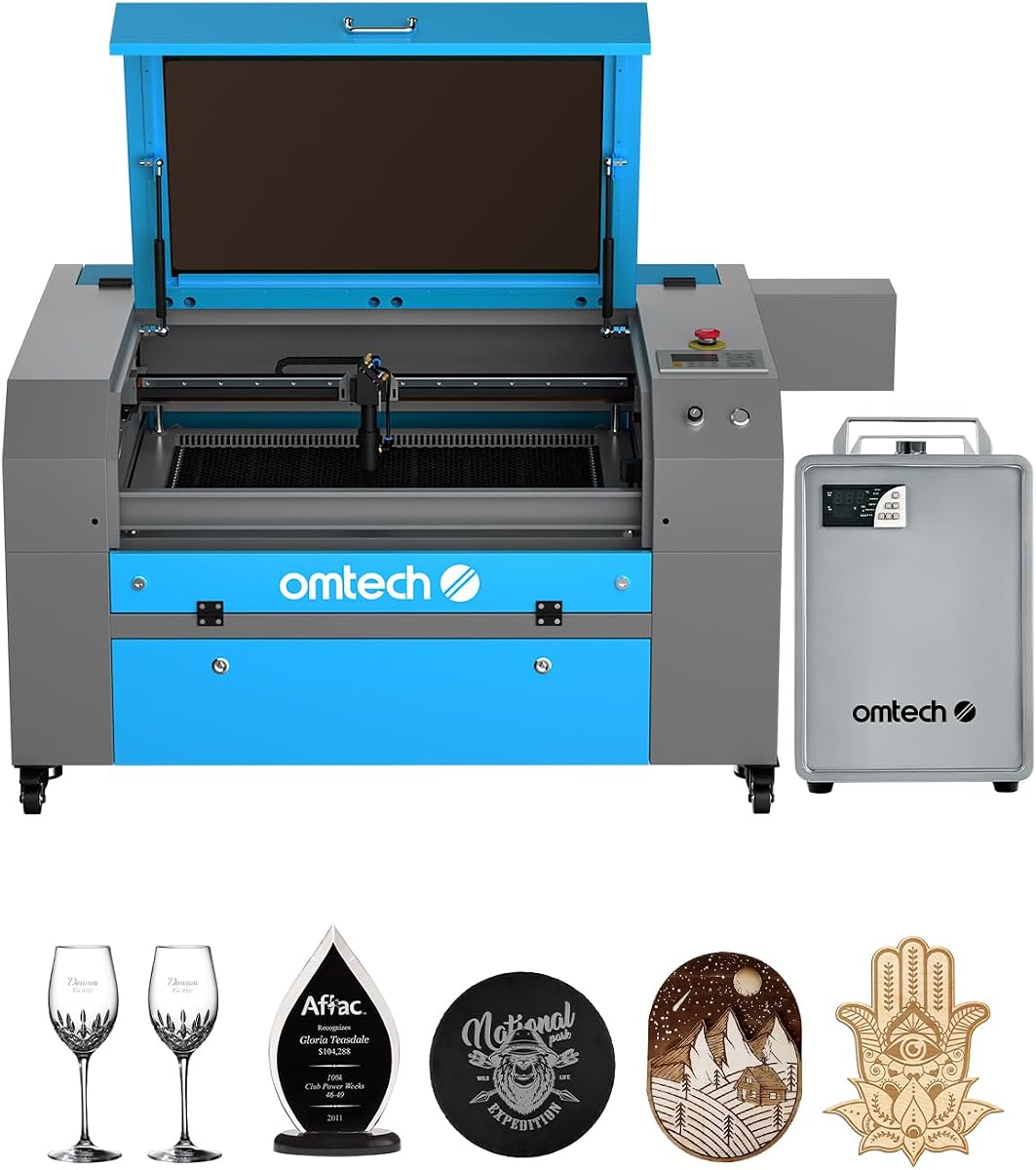
OMTech Pro 130W
130W cutting power
35 by 55 inch workspace
Built-in CW-5200 chiller
Our CO2 Laser Cutters guide compares 10 models for power, work area, software, safety, automation, and production versatility for makers and small businesses.
CO2 laser cutters are among the most versatile tools for working with wood, acrylic, leather, paper, cardboard, glass, stone, and other nonmetallic materials. A capable machine can transform drawings into engraved artwork, clean cut parts, personalized products, signage, and production components. The right model balances cutting power, usable work area, safety, software control, and operating convenience.
We compared 10 CO2 laser cutters using the specifications and feature details supplied for each machine. Our evaluation covers laser power, maximum engraving speed, cutting depth, bed dimensions, pass-through access, autofocus, air assist, cooling, software compatibility, and safety systems. The list includes compact desktop units as well as enclosed professional systems designed for larger materials and longer production runs.
Each review identifies the feature that makes the model most useful and also explains where it may be less suitable. The top selections represent the strongest options for general use, advanced production, and value-conscious buyers. Product availability, configurations, ratings, and prices can change, so readers should verify the current listing and included accessories before purchasing.

4.5Editor score

4.4Editor score
The following comparison places all 10 models side by side, emphasizing power, work area, speed, and workflow features so buyers can quickly identify the machine that matches their materials, production volume, and available space.



The xTool P3 is a feature-rich 80W CO2 laser cutter built for makers, educators, and small production businesses that want less manual setup and more repeatability. Its supplied rating is 4.5, and its defining advantage is the combination of high cutting capability, a substantial 36 by 18 inch work area, and an unusually comprehensive automation system. That combination makes it our most versatile all-around recommendation.
We may earn a commission when you buy through this link, at no additional cost to you.
Its LiDAR ranging system, dual HD cameras, and powered AutoLift Base support a place-and-go workflow. The cameras offer a wide 16MP SkyView preview plus a close-range detail camera, while the stated 0.0079 inch alignment accuracy supports detailed placement. AI-powered Smart Nesting claims 98.7 percent material utilization, and spreadsheet-based Variable Batch Fill is useful when repeating designs across many pieces. These are particularly valuable features for users who would otherwise spend considerable time arranging material or repeating setup steps.
The 80W laser can cut wood up to 20mm thick and acrylic up to 25mm, with a maximum speed of 1200 mm/s. It is especially appropriate for clear acrylic, a material that many diode systems cannot process effectively. The trade-offs are the substantial equipment commitment and the fact that advanced modules such as the conveyor feeder, rotary attachment, infrared laser, and air purifier are separate accessories unless included in a bundle. Buyers should therefore treat those modules as possible expansions rather than standard equipment.
The xTool P3 suits users who repeatedly move between design work and production. Its enclosed Class 1-rated design, lid interlocks, active detection and suppression, and scrap buildup alerts are especially convincing for a workshop occupied by beginners and experienced operators alike. Choose it when automation, placement accuracy, material efficiency, and safe operation matter more than a modest initial outlay.
LiDAR autofocus, dual camera positioning, and the adjustable AutoLift Base can eliminate much of the trial-and-adjustment involved in focusing and placing artwork. This is a meaningful advantage for batch work, repeat orders, and less experienced users.
Smart Nesting and Variable Batch Fill support better material use and repeatable customization. Together, they make the machine more relevant to small production runs rather than only occasional engraving.
We may earn a commission when you buy through this link, at no additional cost to you.
The OMTech K40+ 45W is a capable entry into desktop CO2 laser cutting without giving up the power needed to slice acrylic or wood. It carries a 4.4 rating and combines a 45W laser with a compact 12 by 8 inch workspace. For makers who work on smaller signs, labels, ornaments, educational models, or custom gifts, it offers an approachable balance of capability and convenience.
We may earn a commission when you buy through this link, at no additional cost to you.
The stated cutting capacity reaches 0.4 inches in acrylic and 0.31 inches in wood. OMTech says the upgraded power improves cutting speed by 1.5 to 2 times and depth by 15 to 20 percent compared with earlier performance, while engraving reaches 300 mm/s. A standout feature is the built-in 45-degree air assist, which automatically adjusts airflow according to laser power to clear debris, protect the lens, reduce carbonization, and lower fire risk.
Its limitations center on scale. The small bed will not accept large signs or full production sheets, and the machine does not offer the automatic bed positioning or autofocus found on the larger OMTech models. The optional rotary axis expands the range of supported objects, but rotary work is not implied to be included. Buyers should also account for the amount of exhaust ventilation and material preparation required for any CO2 laser.
This is a strong recommendation for a first CO2 laser cutter, home studio, classroom, or small craft operation. Choose it if you want meaningful cutting ability, automatic air support, and standard design software in a relatively compact package. It is less appropriate when oversized materials, fully automated focusing, or high-volume batch production are central to the project.
A 45W source is sufficient for common wood and acrylic projects while the enclosure remains suitable for a smaller workshop. It also makes the K40+ more versatile than an engraving-only entry-level machine.
Power-responsive airflow helps move smoke and debris away from the cutting point. The result can be cleaner edges, less staining, and better protection for the optics.
We may earn a commission when you buy through this link, at no additional cost to you.
The VEVOR 100W stands out for combining high laser power with a surprisingly accessible 5.0 rating. It can cut materials up to 0.59 inches in one pass and engraves at speeds as high as 19.7 inches per second. Its 24 by 35 inch honeycomb bed provides 840 square inches of working area, making it practical for sign panels, layered components, and multiple medium-sized pieces.
We may earn a commission when you buy through this link, at no additional cost to you.
Software compatibility is one of its strongest selling points. The control panel works with third-party programs such as LightBurn, CorelDRAW, and AutoCAD, and the system supports Windows, macOS, and Linux. Files can be transferred through USB storage, a USB cable, or a network connection. That flexibility makes it easier to integrate into an existing creative workflow rather than forcing one particular operating environment.
The intelligent laser head includes a red-dot positioning pointer, project framing, and a linear guide rail intended to support smooth curves. A tinted viewing window allows progress monitoring, while opening the enclosure automatically cuts power. An emergency stop, two-way pass-through doors, air assist, and movable wheels round out the practical design. As with any high-power laser, the size, heat, smoke, and exhaust requirements deserve careful consideration before installation.
Choose the VEVOR when you want more cutting authority and bed capacity than a desktop model but do not need the largest production equipment in the list. It is a compelling option for growing small businesses, educational makerspaces, and hobbyists ready to produce larger signs and components with a broad selection of design software.
The 24 by 35 inch honeycomb work area offers room for oversized panels and multiple products. Pass-through doors also help when processing long stock through the machine.
Compatibility with major design programs and all three leading desktop operating systems gives users considerable freedom. Multiple transfer options further simplify project preparation.
We may earn a commission when you buy through this link, at no additional cost to you.
The OMTech Maker 90W is a midrange production machine with a 20 by 28 inch bed, 90W laser tube, and a bundled water chiller. It is designed for makers and small businesses that need real cutting capacity and sustained operating support. The lack of a published rating means it has less visible customer feedback than several alternatives, but its supplied specifications form a compelling production package.
We may earn a commission when you buy through this link, at no additional cost to you.
The machine reaches engraving depths of 0.4 inches across materials including wood, glass, acrylic, and leather, while operating at up to 23.6 inches per second. Its Yongli H2 tube is rated for up to 8,000 hours and is said to last longer when consistently operated at lower settings. The included chiller supports extended engraving sessions, which is an important advantage for users who do not want to install separate cooling equipment.
Honeycomb and aluminum blade beds support diverse stock, and four-way pass-through doors make it easier to accommodate longer or wider materials. Safety features include a flame-retardant viewing window and an interlock that cuts the laser beam when the cover opens. Built-in air assist helps clear smoke and dust, protecting the laser lens and mirrors. One limitation is that the supplied information does not describe automatic focusing or powered bed adjustment.
This model is well suited to operators who value core production hardware over elaborate automation. Choose it for professional wood and acrylic work, batch engraving, and projects that benefit from external material pass-through. Verify chiller operation, ventilation requirements, and local safety obligations before installation.
The bundled water chiller is a meaningful production accessory, not merely a convenience. Consistent cooling can support steadier operation during extended engraving or cutting workloads.
Four-way pass-through doors make the 20 by 28 inch bed more adaptable to long and wide stock. The mixed honeycomb and aluminum blade surfaces also suit different sheet materials.
We may earn a commission when you buy through this link, at no additional cost to you.
The OMTech Maker 60W combines 60W cutting power with the automation features buyers often want but do not always receive in a production-sized CO2 cutter. It has a 4.7 rating, a 20 by 28 inch work area, powered bed adjustment, and preinstalled autofocus. LightBurn and a water chiller are also included, giving new users more of the complete workflow out of the box.
We may earn a commission when you buy through this link, at no additional cost to you.
Autofocus is the machine's most useful distinction. Instead of manually adjusting the bed and estimating focal distance, the user can initiate the process and let the system find the correct plane. This reduces setup time and makes results more consistent when materials vary in thickness. The water chiller contributes to stable laser performance, while air assist clears smoke and dust from the work area.
This is not the most powerful model in the guide, and the 60W source will be slower or less capable with thick, demanding materials than the 90W, 100W, and 130W alternatives. Its Class 2 designation also means appropriate handling and safety procedures remain essential. However, automated setup can outweigh raw wattage for shops prioritizing repeatability and operator convenience.
Choose the Maker 60W for small commercial production, education, or advanced personal projects where autofocus, software, and cooling matter. It is an attractive middle ground for users who want a sizable bed and streamlined operation without moving directly to the most powerful equipment in the category.
Automatic focal adjustment reduces errors caused by manual bed positioning. It is especially useful when switching between materials or running multiple product sizes in one session.
LightBurn and the water chiller simplify initial setup and sustained use. This makes the package practical for users who want a production workflow rather than only a basic cutter.
We may earn a commission when you buy through this link, at no additional cost to you.
This OMTech K40+ 45W listing provides the same core desktop platform as the other K40+ entries, including a 45W laser, a 12 by 8 inch workspace, and engraving speeds up to 300 mm/s. Its 4.5 rating indicates generally favorable user feedback. It remains a practical choice for smaller projects where portability and a manageable footprint matter more than high-volume production.
We may earn a commission when you buy through this link, at no additional cost to you.
The laser is specified to cut 0.4 inches of acrylic and 0.31 inches of wood. Automatic 45-degree air assist adjusts to the laser setting, helping clear smoke and debris, reduce wood carbonization, protect the lens, and lower fire risk. A honeycomb bed supports flat stock, while a detachable base and optional rotary axis allow cylindrical or taller objects to be engraved.
LightBurn and LaserGRBL compatibility makes it approachable for both new and experienced users. Door and water protection, an emergency stop, a flame-retardant acrylic panel, and an exhaust fan provide a thoughtful safety package. The main limitation is obvious physical scale: projects need to fit within 12 by 8 inches unless they are processed with a rotary attachment or another compatible solution.
Choose this model for a home workshop, classroom, craft studio, or beginner who wants a capable CO2 cutter at a relatively accessible level. It can handle meaningful engraving and shallow-to-medium cutting, but it is not the right choice for oversized panels or continuous industrial production.
The small footprint makes it easier to reserve a dedicated station without taking over a large workshop. It can be moved when the project mix changes.
Support for LightBurn and LaserGRBL gives buyers a choice of established control environments. This is useful for both first-time laser users and operators with existing design files.
We may earn a commission when you buy through this link, at no additional cost to you.
The OMTech Pronto 100W is built for operators who want quick movement across large sheets. It combines a 100W laser with a 40 by 24 inch honeycomb and aluminum blade bed, a maximum engraving speed of 1000 mm/s, and advanced autofocus. The supplied data does not include a customer rating, but the specification set clearly targets high-throughput production.
We may earn a commission when you buy through this link, at no additional cost to you.
The stated speed is 37 percent faster than traditional models, making it attractive for bulk orders and extensive layouts. The 100W source can work with wood, acrylic, leather, and other nonmetallic materials, while two-way pass-through doors help accommodate larger or longer stock. Autofocus reduces manual setup and supports consistent alignment across varied material thicknesses.
Airflow is another strength: a 4.4 cfm air pump and 318 cfm fan are specified to improve cut cleanliness and reduce material burn. The high-performance tube is rated for up to 12,000 hours and is intended to last longer when used consistently at lower settings. Water protection, temperature alarms, cover protection, air assist, and an emergency stop round out the safety provisions.
Choose the Pronto 100W for a growing business that values speed and bed size. Its footprint and production demands are substantial, and no published rating is available, so prospective buyers should review the current customer feedback, installation requirements, and included components carefully.
The 1000 mm/s maximum rate can shorten job times when layouts contain many repeated shapes. That advantage becomes more meaningful as order volume rises.
The 40 by 24 inch bed provides useful material capacity, and two-way access simplifies the flow of longer stock. This is a practical layout for production rather than only hobby projects.
We may earn a commission when you buy through this link, at no additional cost to you.
The OMTech Pronto 130W is one of the most capable production-style machines in this guide, with a 51 by 35 inch work area, 130W laser, and a 5.0 rating. It can engrave as deep as 0.4 inches in wood, glass, acrylic, leather, and other nonmetallic materials. The very large bed makes it especially relevant to sign fabricators, panel producers, and established small manufacturers.
We may earn a commission when you buy through this link, at no additional cost to you.
Speed is rated at up to 1000 mm/s, while the laser tube is specified for up to 12,000 hours. Powered bed adjustment and preinstalled autofocus simplify setup across different stock thicknesses. Honeycomb and aluminum blade beds accommodate varied materials, and two-way pass-through doors support the movement of larger or longer workpieces through the work area.
Safety and environmental controls include water protection, air assist, temperature alarms, cover protection, and an emergency stop. A professional machine of this size still requires proper extraction, electrical service, ventilation, training, and fire-aware operating procedures. Its size may also make it less practical for a small home office, even if the per-unit capacity is attractive.
Choose the Pronto 130W when large panels, high cutting power, and repeatable production setup are nonnegotiable. It is a strong fit for users who can dedicate adequate floor space and want a broad range of materials processed in one system.
A 51 by 35 inch bed greatly reduces the need to tile designs across multiple sheets. It also makes the machine more useful for signage, panels, and oversized decorative pieces.
Automatic focusing and bed adjustment reduce setup time and improve consistency. These features are especially useful when a shop alternates between different product heights.
We may earn a commission when you buy through this link, at no additional cost to you.
This OMTech K40+ 45W listing is a straightforward desktop choice for buyers focused on learning CO2 laser cutting, completing small batches, or producing compact personalized items. The supplied information identifies a 45W source and a 12 by 8 inch work area, making it more capable than an engraving-only tool while remaining manageable for a home or classroom studio.
We may earn a commission when you buy through this link, at no additional cost to you.
Other K40+ listings in this guide describe LightBurn and LaserGRBL compatibility, a honeycomb bed, an optional rotary axis, integrated air assist, and protection features that include door and water monitoring, an emergency stop, and a flame-retardant panel. Buyers should confirm which of these components are included with this specific listing, since configurations can vary between marketplace offers.
The 45W power level is sufficient for common wood, acrylic, and leather projects at smaller dimensions. It is less suitable for thick production stock, large sign panels, or a workflow requiring high throughput. The machine also lacks the powered bed and autofocus functions found in the larger OMTech products, so operators will spend more time manually setting the focal distance.
No published rating is supplied for this listing, making current customer feedback especially important. Consider it for experimentation, education, prototypes, and small finished goods, and compare the final package with the other K40+ offers before ordering.
The compact format gives new users a manageable way to learn focus, power, speed, and material settings. It can support experimentation without requiring a full production cabinet.
Multiple K40+ marketplace listings appear in this guide with varying image and rating data. Checking the exact bed, software, accessories, and warranty terms helps prevent purchasing assumptions.
We may earn a commission when you buy through this link, at no additional cost to you.
The OMTech Pro 130W is the premium industrial-style option in this guide, pairing a 130W laser with a huge 35 by 55 inch workspace and a 1200 mm/s maximum speed. It is intended for professional and industrial users who process large nonmetallic sheets and need more throughput, capacity, and integrated infrastructure than a desktop machine can provide.
We may earn a commission when you buy through this link, at no additional cost to you.
A built-in CW-5200 water chiller maintains temperature within 0.5 degrees Fahrenheit and provides 5,186 BTU per hour of cooling. That integrated thermal support is a notable advantage over systems requiring a separate chiller. Servo motors and ball-bearing guide rails underpin the rapid movement, while four-way pass-through doors make it easier to feed long or wide material through the cabinet.
Control is handled through the Ruida 6445G touchscreen, and built-in WiFi adds network convenience. A widened tempered glass viewing window and tri-color status lights improve visibility and machine-status awareness. The supplied data does not provide a customer rating, so the absence of an established rating history should be weighed against the impressive production specifications.
Choose this machine for a professional workshop or industrial operation with sufficient space, electrical capacity, and ventilation. It is best suited to high-volume work on wood, glass, acrylic, and other nonmetallic materials where a large bed, fast motion, and integrated cooling justify the major investment.
The built-in CW-5200 chiller removes the need to plan for a separate cooling unit. Tight temperature control supports consistent laser performance during demanding schedules.
The 35 by 55 inch bed and 1200 mm/s speed make the system suited to large sheets and rapid job completion. Four-way doors further improve material flow for oversized work.
We may earn a commission when you buy through this link, at no additional cost to you.
Choosing a CO2 laser cutter means matching the machine to your materials, production volume, available space, and workflow. The most important decision is not simply the highest wattage, but the balance among power, bed size, automation, safety, cooling, and the software and support you need.
Choose enough power for the thickest material you realistically expect to cut, not merely the largest headline specification.
Select a bed that fits your most common material sizes and account for clearance around the full machine, not only the stated bed dimensions.
Prioritize consistent results and efficient layout, not the fastest headline number in isolation.
Automatic focusing is worth prioritizing for repeat orders, mixed materials, or inexperienced operators.
Use established design and control software, and confirm that your computer, file formats, and preferred workflow are supported.
Budget for adequate extraction, filtration, and cooling even when a machine includes air assist or a water chiller.
Prioritize complete interlocks, a visible emergency stop, flame-retardant panels, and clear manufacturer safety guidance.
Compare support coverage and included accessories before purchasing, and verify any add-ons needed for your intended workflow.
Begin by reading the machine's manual and completing the prescribed safety training. Place the cutter on a stable, level surface with adequate ventilation, electrical capacity, and clearance around every access door. Install the correct chiller or cooling arrangement when required, connect extraction equipment, and check the lens, mirrors, bed, air assist, and safety controls before using the laser. Confirm that the emergency stop and enclosure interlocks function properly.
Prepare artwork in compatible software and test the settings on a small offcut of the same material and thickness. Set the correct working height or use autofocus, verify the focal plane, establish a safe starting power and speed, and make a test cut before sending a full job. Keep the air assist active, monitor the process, and never leave a running job unattended. Remove combustible scraps and keep reflective or hazardous materials away from the work area.
For maintenance, follow the manual's cleaning schedule for the lens, mirrors, bed, airflow components, and cooling system. Allow the laser tube to cool as directed, inspect cables and connections, and confirm that water lines and filters remain clear. Clean residue promptly, monitor smoke extraction, and address unusual noise, odor, or power changes before continuing work. Proper care protects the machine, improves cut quality, and helps maintain safer operation.
CO2 laser cutters are especially effective on wood, acrylic, leather, paper, cardboard, glass, stone, and other nonmetallic materials. Common projects include engraved signs, personalized gifts, jewelry, decorative panels, educational models, packaging prototypes, and custom product components. Material compatibility and results depend on the machine's power, optics, focus, and proper settings.
No. Higher power can improve cutting speed, depth, and throughput, but it also increases machine size, heat, ventilation needs, and operating complexity. A 45W desktop model is adequate for many small projects, while 90W to 130W systems make more sense for demanding materials and repeated production. The best choice matches actual work rather than wattage alone.
Yes, and many CO2 laser cutters are particularly well suited to acrylic because the beam can produce a polished edge. The xTool P3 is specifically noted for cutting clear acrylic, while several OMTech models specify acrylic cutting depths. Settings, focus, airflow, backing material, and cooling all affect edge quality, so test cuts are essential.
Yes. Cutting and engraving can generate smoke, fumes, gases, and fine particles, especially when working with plastics, leather, coated wood, or other materials that contain resins. A suitable extraction and filtration system is essential, and requirements vary by material and local regulations. Air assist improves the cut at the nozzle, but it does not replace room extraction.
Autofocus automatically measures or determines the correct focal distance between the laser head and material. It reduces manual bed adjustment, saves setup time, and improves consistency when switching between material thicknesses. Models such as the xTool P3, OMTech Maker 60W, and Pronto 130W include advanced automatic positioning systems.
A small business should consider its largest common material size, production volume, and staffing workflow. A 20 by 28 inch bed may suit many sign and panel workflows, while larger systems are useful for oversized stock. Faster machines and automated focusing become increasingly valuable as order volume rises, but ventilation, floor space, and operator training remain essential.
Yes, a single design can often combine engraved details with cut outlines. The operator can assign different power, speed, and pass settings to each operation in compatible software. Material preparation and test cuts are still important, because engraving and deep cutting may require different focus or air-flow conditions.
Check the actual product listing rather than relying only on the model name because configurations can vary. Verify laser power, bed dimensions, included chiller, air assist, autofocus, software, safety controls, accessories, warranty, and support. Also confirm the machine's physical dimensions, electrical requirements, ventilation needs, and the current condition of the tube, mirrors, lens, bed, and cooling system.
The xTool P3 is the strongest all-around choice because it combines 80W cutting power with a large bed, LiDAR autofocus, dual cameras, intelligent nesting, and a highly enclosed safety system. The OMTech Pro 130W represents the premium production end of the range with 130W power, a very large workspace, integrated cooling, rapid motion, and networked touchscreen control. For value-conscious buyers, the OMTech K40+ 45W delivers a capable desktop platform with automatic air assist and broad software support.
Before buying, prioritize the materials you actually use, the largest sheet you need to process, and how often you expect to run the machine. Autofocus, cooling, pass-through doors, and safety features become increasingly valuable as production volume rises, while a compact bed may be perfectly adequate for small custom work. Choose software and support that fit your skills, and budget for extraction, ventilation, training, and maintenance rather than treating them as optional extras.
Marketplace listings, included bundles, ratings, and prices can change after publication, and several closely related OMTech models appear in this guide. Before ordering, confirm the exact ASIN, machine version, bed size, accessories, software, warranty, and current technical specifications on the product page. That final check helps ensure the selected CO2 laser cutter fits both your project list and your workshop.