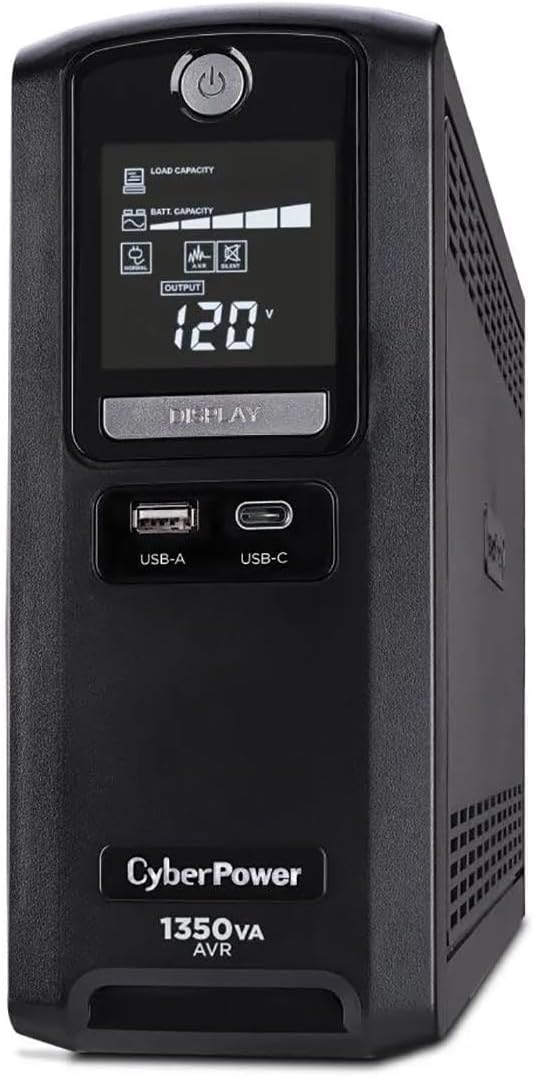
CyberPower CST135UC
4.9Editor score
1350VA and 810W capacity
Detailed multifunction LCD
Network and coax protection
Explore the best battery backup for small office options, comparing capacity, runtime, outlets, protection, and features to help you choose confidently.
Battery backup for a small office should protect computers, network equipment, telephones, and other essential electronics from outages, voltage fluctuations, and surge damage. A capable uninterruptible power supply provides more than an emergency outlet: it can maintain power long enough to save work, keep communication systems online, and shut down sensitive equipment safely.
We compared the included products by examining their stated capacity, continuous wattage, number and arrangement of protected outlets, waveform type, surge protection, display features, runtime information, mounting options, battery replacement provisions, and warranty coverage. The list covers compact units for essential equipment as well as higher-capacity systems for workstations and multiple connected devices.
Each review explains where a product fits within a small-office setup and highlights the trade-offs that matter before purchase. Ratings and technical details reflect the supplied product information, while availability and pricing can change. Always verify the current specifications and conditions for your location before ordering.
4.9Editor score

4.5Editor score

4.5Editor score
The comparison below highlights each unit's capacity, wave output, outlet layout, and most relevant management or protection features, making it easier to identify the right battery backup for a compact or equipment-heavy office.


The CyberPower CP1500PFCLCD is the strongest all-around choice in this guide, combining a 1500VA capacity with a 1000W continuous output rating and pure sine wave operation. Its 4.5 rating reflects a well-rounded feature set for offices that need to protect several connected devices without moving to a rack-mounted or large online system. The color LCD provides immediate information about battery and power conditions, which is particularly useful when the UPS supports network equipment in another room.
We may earn a commission when you buy through this link, at no additional cost to you.
One of its most important distinctions is the pure sine wave output. That makes it more appropriate than many simulated-wave alternatives for modern workstations, active power factor correction equipment, conventional power supplies, network devices, and telecom equipment. The unit provides six battery-backed and surge-protected outlets plus six surge-only outlets, allowing administrators to reserve the protected section for critical loads. Two USB ports, one Type-A and one Type-C, add convenient charging for phones and tablets without occupying an AC receptacle.
The trade-offs are mainly physical rather than functional. A system with twelve outlets and a color display naturally occupies more space than compact models intended for a single workstation or router. The USB charging ports are useful for mobile devices, but they should not be treated as substitutes for network communications or USB data protection. Despite these limitations, the combination of output quality, capacity, AVR, monitoring, surge coverage, and a three-year warranty including the battery makes this model exceptionally versatile.
Choose the CP1500PFCLCD when your small office has a desktop computer, router, network switch, telephone equipment, and other electronics that benefit from stable power. It is also a sensible choice for users who want pure sine wave output without moving into a much larger UPS category. For offices centered on basic continuity, a smaller standby model may be sufficient, but this CyberPower system provides the most balanced foundation for a growing collection of critical equipment.
Pure sine wave output is the defining benefit for offices containing active PFC or conventional workstation power supplies. It also makes the UPS easier to pair with network and telecom equipment that may be sensitive to abrupt transitions between utility and battery power.
The color LCD, AVR correction, 12 NEMA outlets, and USB charging ports reduce the need for separate monitoring devices and spare charging adapters. This concentration of features makes the unit practical for a shared desk or small network cabinet.
We may earn a commission when you buy through this link, at no additional cost to you.
The CyberPower CP1500AVRLCD3 offers 1500VA of capacity, a 900W continuous output rating, and a feature-rich LCD interface. It is designed to safeguard workstations, networking devices, and home entertainment equipment within a small office or advanced home workspace. Its 4.5 rating and broad outlet selection make it a practical option for anyone who wants more flexibility than a compact plug-in UPS but does not require pure sine wave output.
We may earn a commission when you buy through this link, at no additional cost to you.
The outlet layout is notably useful. Six receptacles provide battery backup and surge protection, while another six provide surge protection for equipment that does not need to remain running during an outage. A six-foot input cord gives users more placement freedom, and the Type-A and Type-C USB ports can charge mobile devices. The intelligent color LCD reports power and battery information and can alert users to developing issues before they interrupt operation.
Automatic Voltage Regulation corrects minor fluctuations without immediately transferring to battery power, which helps preserve runtime during ordinary electrical instability. The included PowerPanel Personal software provides management information, and the product carries a three-year warranty that includes the battery alongside a 500,000 connected equipment guarantee. The primary compromise is its simulated sine wave output, which may not be ideal for highly sensitive loads or modern active PFC systems compared with a pure sine wave model.
This UPS is a good fit for offices that keep a computer, monitor, router, and several supplementary devices connected while wanting clear status information. It is less compelling when a dedicated server, NAS, or high-end workstation is the only priority and pure sine wave compatibility is essential. Subject to those conditions, it offers a generous number of outlets and thoughtful monitoring in a single enclosure.
Six battery-backed outlets and six surge-only outlets make it easy to distinguish essential equipment from accessories. Keeping the critical group within the backup section maximizes the available runtime during a prolonged outage.
The color LCD provides a clear way to check line state, battery condition, and potential overload concerns. That visibility is especially helpful in shared offices where a user may not be responsible for every connected device.
We may earn a commission when you buy through this link, at no additional cost to you.
The CyberPower EC850LCD is designed for offices that want meaningful battery protection and an outlet-rich layout without moving to the largest capacity in the roundup. Its 4.4 rating reflects a balanced mix of useful monitoring, surge protection, and energy-conscious control. The multifunction LCD keeps users informed about battery and power conditions, while the right-angle input plug and five-foot cord simplify installation near a desk or equipment shelf.
We may earn a commission when you buy through this link, at no additional cost to you.
Its 12 NEMA 5-15R receptacles include six battery-backed and surge-protected outlets and six surge-protected outlets. Three of the surge-only receptacles are controlled by ECO mode. When the connected computer is turned off or enters sleep mode, the UPS can remove power from peripherals attached to those ECO outlets, reducing unnecessary energy use. That makes the design attractive for a workstation with monitors, speakers, chargers, and other accessories that do not need to remain active around the clock.
The connected equipment guarantee is lower than on the higher-capacity CyberPower models in this guide, and the product is centered more on efficient everyday protection than extensive high-end support. Users who need many hours of runtime, rack mounting, or pure sine wave operation should look elsewhere. Those limitations are reasonable for a compact system intended primarily to maintain essential equipment and protect against surges during normal operation.
The EC850LCD is most appropriate for a small office with a primary computer, router, monitor, and connected peripherals, particularly when reducing standby consumption matters. It is less suitable as the sole protection for power-hungry workstations, large network switches, or several servers. For a balanced desktop setup, however, it provides a useful combination of status visibility, protected receptacles, and automatic peripheral control.
ECO mode can shut down selected peripherals when the main computer is off or asleep. This is useful in a small office because it reduces energy use without requiring employees to unplug chargers and accessories manually.
With 12 receptacles, the unit can organize both essential and lower-priority equipment. The separate backup and surge-only groups make it easier to decide which devices should remain operational during an interruption.
We may earn a commission when you buy through this link, at no additional cost to you.
The CyberPower ST900U combines a 900VA capacity with a 500W maximum output in a slim standby design. Its 4.5 rating makes it a credible choice for a small office where space matters and the connected equipment does not require pure sine wave support. The unit is particularly relevant to offices that need to protect a broadband router, desktop computer, network equipment, and other essential devices without taking up a large amount of room.
We may earn a commission when you buy through this link, at no additional cost to you.
There are 12 NEMA 5-15R outlets divided evenly between battery-backed surge protection and surge-only protection. Four outlets are widely spaced, which helps when using large power adapters that would otherwise block neighboring receptacles. The GreenPower high-efficiency design uses a compact charger and inverter to reduce power consumption, and the product includes downloadable PowerPanel management software.
A 500W output ceiling is the main limitation. It leaves less room for high-power workstations, multiple large displays, and other demanding equipment than the 900W- and 1000W-capable alternatives. The simulated sine wave output is another consideration for sensitive electronics. A three-year warranty including the battery, 125,000 connected equipment guarantee, and UL safety certification help offset those limitations in a more modest installation.
Choose the ST900U for a compact home-office or small-office setup with several essential but moderate-power devices. It is a particularly good fit for maintaining internet access and protecting a computer during short outages. If the office depends on a NAS, high-end workstation, or other active PFC equipment, a pure sine wave unit with a higher continuous wattage would provide a safer foundation.
The slim profile helps when the UPS must sit behind a desk, on a narrow shelf, or close to networking equipment. Four widely spaced outlets add practical flexibility for larger adapters.
The GreenPower design focuses on reducing consumption while maintaining standby protection. It suits offices with routers, access points, and other devices that remain connected continuously.
We may earn a commission when you buy through this link, at no additional cost to you.
The CyberPower CST135UC is the standout premium pick in this list, combining a 1350VA/810W power rating with a 4.9 rating—the highest customer score among the included products. Its multifunction LCD, HID-compliant USB management connection, PowerPanel Personal software, and comprehensive surge filtration give it a strong management and protection feature set for a small office that wants more than basic outlet protection.
We may earn a commission when you buy through this link, at no additional cost to you.
The system includes 10 NEMA 5-15R receptacles, five with battery and surge protection and five with surge protection only. It also has dual USB charging ports using Type-A and Type-C connections. Protection extends beyond AC outlets through 1500 joules of surge suppression, EMI/RFI filtration, and network and coaxial data line protection. Those added defenses are useful in offices where network equipment, audiovisual systems, or long external connections are exposed to surges and line noise.
Runtime information is more concrete than on many competing listings. The stated figures provide two minutes at full load and 10 minutes at half load, giving users a realistic indication of the trade-off between capacity and duration. Energy Star certification and GreenPower UPS Bypass Technology also distinguish this model, although simulated sine wave output remains less universally compatible than pure sine wave power.
The product is best suited to users who value monitoring, layered surge protection, and a polished feature set. It is less attractive for an office needing many battery-backed outlets or for loads that require a pure sine wave. Even with those qualifications, its rating, protection package, defined runtime, and management tools make the CST135UC an excellent choice for a protected and monitored small-office installation.
Network and coax protection extend surge defense to connected lines. Combined with EMI/RFI filtering and 1500-joule suppression, this is valuable where communications equipment is connected through external cabling.
Stated full-load and half-load runtimes make the capacity trade-off easier to understand. The LCD, HID USB connection, and PowerPanel Personal software provide several ways to monitor and manage the system.
We may earn a commission when you buy through this link, at no additional cost to you.
The CyberPower AVRG900LCD earns a 4.6 rating and offers a balanced combination of 900VA capacity, 480W continuous output, an LCD, and 12 outlets. It is designed to protect desktop computers, workstations, networking devices, and home entertainment equipment. This makes it useful for a small office that has numerous modest loads but does not need a unit capable of supporting a heavy multi-device workstation.
We may earn a commission when you buy through this link, at no additional cost to you.
Six outlets supply battery backup and surge protection, while the other six are surge-only. Automatic Voltage Regulation corrects minor voltage fluctuations without switching to battery, preserving runtime and reducing unnecessary wear. Data line protection helps stop surges traveling through telephone lines from reaching connected electronics. These features make the system more versatile than a basic surge protector, particularly when business communications equipment is part of the setup.
The right-angle NEMA 5-15P input and five-foot cord can simplify placement near a wall or beneath a desk. A three-year warranty includes the battery, and the product has a 200,000 connected equipment guarantee, downloadable management software, and UL safety certification. However, the 480W output limit and simulated sine wave output narrow the range of supported equipment compared with higher-capacity pure sine wave models.
Buy the AVRG900LCD when your priority is a large selection of protected receptacles, clear status information, and protection for a mix of office electronics. It is a strong fit for a single workstation, router, monitor, and related network devices. For equipment with strict power-quality requirements or a high aggregate load, consider a model with greater continuous wattage and pure sine wave output.
Data line protection addresses a path that ordinary AC surge protection does not cover. It is a meaningful advantage for offices using telephone equipment, routers, or networked peripherals.
AVR corrects small voltage changes without transferring the load to the battery. That can preserve remaining runtime and avoid unnecessary intervention during common electrical fluctuations.
We may earn a commission when you buy through this link, at no additional cost to you.
The Eaton Tripp Lite BC450 is a compact 450VA/255W battery backup designed for a computer, router, television, and similar electronics. Its 4.2 rating is the lowest among the listed products, but the unit still presents a useful combination of eight widely spaced outlets, replaceable battery, surge suppression, EMI/RFI filtering, and flexible installation. It is particularly appealing where a large desk UPS would be inconvenient.
We may earn a commission when you buy through this link, at no additional cost to you.
Four outlets offer both battery backup and surge protection, while the other four provide surge protection only. The stated 316-joule suppression rating offers a defined level of surge defense, and the filtering helps limit disruptive EMI/RFI disturbances. The UPS remains silent in both line and battery modes, with an alarm reserved for a low battery or fault condition, while a green LED provides protection and operating status.
A five-foot cord and bottom mounting tabs allow use on a desk, shelf, or wall. The internal battery uses Eaton's RBC36H cartridge and can be replaced without discarding the entire enclosure. The two-year manufacturer's warranty and lifetime connected equipment insurance provide support, although this coverage is less extensive than the three-year battery-inclusive packages offered by several CyberPower models.
The BC450 is best for a small office that needs to maintain a small network and allow a computer to shut down safely, especially where space or wall mounting is important. It is not the right choice for several high-power computers, large displays, or a NAS requiring extended runtime. The California availability restriction must also be checked before purchase. Within those boundaries, the model is a straightforward and serviceable compact option.
The replaceable RBC36H cartridge makes long-term maintenance more economical. A worn battery can be exchanged while retaining the UPS enclosure, outlets, and installation.
The unit stays silent during normal line and battery operation and only sounds an alarm for low-battery or fault conditions. That behavior suits shared offices where continual noise would be distracting.
We may earn a commission when you buy through this link, at no additional cost to you.
The Eaton Tripp Lite BC350R is the best budget choice in this guide, with a 4.5 rating and a 350VA/210W specification. It is built for smaller offices, kiosks, retail counters, and light industrial applications where the most important requirement is maintaining a router, point-of-sale system, or basic computer long enough to respond to an outage. It does not attempt to power a full office, but it can protect essential equipment economically.
We may earn a commission when you buy through this link, at no additional cost to you.
The product offers 190 joules of surge protection, EMI/RFI filtering, and an automatically restarting function. Green and red LEDs indicate power, line or battery mode, overload, and low or replace-battery conditions, while an audible alarm provides another notification method. A resettable circuit breaker helps prevent dangerous overloads from becoming a persistent problem, and the internal AG-075C battery cartridge is easy to replace.
Installation is straightforward. The small enclosure fits on a desktop, floor, or wall, and its keyhole slots follow a 100 by 100 millimeter VESA pattern. User-supplied cable ties can also be used for mounting. The principal limitation is capacity: a 210W continuous ceiling leaves less room for a large workstation, multiple monitors, and other energy-hungry equipment. Runtime may also be brief when the available wattage is fully used.
Choose the BC350R when the goal is economical, compact protection for a small number of essential devices rather than comprehensive office coverage. It is especially appropriate for point-of-sale equipment, a Wi-Fi router, a lightweight computer, or a network cabinet with limited power demands. Users wanting to keep several devices running during a longer outage should move up to a higher-capacity system with a more accurate runtime specification.
The 350VA rating and 190-joule suppression coverage prioritize the devices that truly need continuity. It is a sensible way to protect a router or point-of-sale terminal without oversizing the installation.
VESA-pattern mounting slots support neat wall installation, while the compact body fits easily on a desk or floor. The user-replaceable AG-075C battery simplifies upkeep when reserve capacity declines.
We may earn a commission when you buy through this link, at no additional cost to you.
The APC BE600M1 focuses on the kind of continuity a small office often needs most: keeping a computer, Wi-Fi equipment, and router operational long enough to work safely during a power interruption. Its 4.5 rating and straightforward 600VA design make it a recognizable option for desks where internet access and a controlled shutdown are the main goals. The product also supports NAS protection within its stated use case.
We may earn a commission when you buy through this link, at no additional cost to you.
Its standout specification is a stated runtime of 23 minutes at a 100W load. That is a more useful reference than capacity alone for users deciding whether the system can sustain a specific router, computer, and network arrangement. Five well-spaced outlets provide full battery backup and surge protection, while two additional outlets are surge-only for less critical equipment. The spacing reduces the chance that oversized power adapters will block one another.
A built-in 1.5A USB port can charge a phone during an outage, which is helpful for employees who need a charged mobile device for communications. Maintenance is also straightforward because the internal battery can be swapped with an APCRBC154 cartridge sold separately, without replacing the whole UPS. A potential drawback for buyers is that the replacement battery is not included with the unit.
The BE600M1 is a strong recommendation for a home office or small business desk with a router, a modest computer setup, and a need to remain online during short outages. It is less suitable for high-power workstations, several servers, or environments requiring detailed power monitoring. If a clear runtime estimate and serviceable battery are the priorities, this APC model offers a focused and understandable package.
The 23-minute runtime at a 100W load gives buyers a concrete scenario to compare against their actual connected equipment. It helps distinguish a system intended for a light load from a larger UPS designed for extended runtime.
Well-spaced outlets, two surge-only connections, and a USB charging port address common desk needs directly. The result is practical protection for a computer, router, NAS, and mobile-device charging setup.
We may earn a commission when you buy through this link, at no additional cost to you.
The CyberPower ST425 is a compact 425VA/260W standby UPS intended to safeguard basic office and home-office equipment such as computers, routers, gaming consoles, and broadband equipment. Its 4.4 rating reflects a simple and efficient design with eight outlets, a useful mix of battery and surge protection, and a three-year warranty. It is a sensible last-resort pick for small offices that need continuity without advanced monitoring.
We may earn a commission when you buy through this link, at no additional cost to you.
Four NEMA 5-15R receptacles provide battery backup and surge protection, and four provide surge protection only. Transformer spacing helps accommodate large power adapters without blocking adjacent outlets. The right-angle input plug and five-foot cord make placement behind furniture or close to a wall more convenient. A single LED indicates whether the unit is powered on and whether a wiring fault is present.
The GreenPower high-efficiency design reduces power consumption through a compact charger and inverter arrangement. The system includes a 75,000 connected equipment guarantee and a three-year warranty that covers the battery, which provides reassuring support for a device likely to remain connected for long periods. There is no LCD, management software, USB charging, or data line protection mentioned in the supplied specifications.
Choose the ST425 for a small workspace where a router, computer, and a few peripherals need surge protection, while only the most essential equipment must remain on during a short outage. It is less appropriate for users who require detailed condition reporting, pure sine wave output, many outlets, or extended runtime. For those needs, the higher-capacity CyberPower models or APC BE600M1 offer more useful information or features.
The LED keeps the operating feedback straightforward: power on and wiring fault. This uncomplicated design can be preferable in a small office where advanced controls would not be used regularly.
The GreenPower design focuses on low consumption while a router, computer, or broadband device remains protected. It is a straightforward option when only a small subset of equipment needs battery runtime.
We may earn a commission when you buy through this link, at no additional cost to you.
Choosing a battery backup involves balancing runtime, power quality, outlet count, physical placement, and the devices that truly need to remain online. The following factors help narrow a broad UPS category to the model that matches a particular small-office environment.
Start by adding the wattage of every device that will receive battery power, then compare that total with the UPS's continuous wattage rating. Do not treat VA as a direct substitute for watts because power factor, waveform, and load type affect real performance. Leave some headroom for startup surges, especially when computers, monitors, network appliances, and power adapters switch on at the same time. A load that nearly matches the maximum output may trigger overload behavior or leave no reserve for temporary demand spikes.
Choose a unit with comfortable headroom above your measured load. If your essential equipment totals 350 watts, a 500W model is more practical than a 210W model, even if both fit into separate UPS categories. Higher capacity does not automatically mean a better fit, but it gives you more flexibility when equipment is added later.
Runtime depends on both the battery's available energy and the load placed on it. The APC BE600M1 provides a concrete 23-minute estimate at 100W, while the CST135UC states two minutes at full load and 10 minutes at half load. Compare a stated scenario with your actual equipment rather than relying only on VA. Also inventory how many devices need battery-backed outlets; several models provide twelve receptacles, but only six or five include backup.
Match outlet count to device count, then leave one or two protected spaces available. Separate battery-backed and surge-only sections make cable management easier and help prevent a router or computer from accidentally being attached to an outlet that will shut down during an outage.
Pure sine wave output is generally the most broadly compatible choice for sensitive or modern electronics. The CyberPower CP1500PFCLCD specifically supports active PFC and conventional power supplies by using a pure sine wave. Simulated sine wave models may work well with common computers, routers, and standard power bricks, but they are less appropriate for sensitive networking equipment, some high-end audio systems, or loads requiring consistent power quality.
Check the requirements of each connected device before choosing waveform type. If your office includes a NAS, a workstation with an active PFC supply, specialized telecom equipment, or other sensitive electronics, pure sine wave output deserves a strong preference.
A battery backup should also provide surge protection and noise filtering, but the available protections vary. The CST135UC includes 1500 joules of suppression, EMI/RFI filtration, and network and coax protection. The AVRG900LCD adds telephone data line protection, while the smaller Eaton models provide defined joule ratings and filtering. These features matter when office electronics are connected to long external lines or shared electrical circuits.
Look for data line protection if routers, phones, network switches, audiovisual equipment, or point-of-sale terminals use external cables. For desktop-only installations in stable utility power, standard AC surge protection may be adequate. The most important goal is to match the protection to the equipment and wiring actually present.
A multifunction LCD can show load level, battery condition, line status, and potential problems without requiring software. The CP1500PFCLCD, CP1500AVRLCD3, EC850LCD, CST135UC, and AVRG900LCD provide displays of varying sophistication. Downloadable software adds remote or computer-based insight, while simpler LED models focus on basic power and fault status. Decide whether active monitoring is worth the added complexity for your office.
If one person is responsible for several devices, a detailed display can make preventive maintenance easier. If the UPS protects only a router and a small computer, a simple status light may be enough. Software compatibility and administrative preferences should be checked before installation, particularly in managed business environments.
Consider where the UPS will live, how the input plug reaches a grounded outlet, and whether the power cord must be routed around furniture or equipment. The BC450 and BC350R offer wall mounting, and their compact sizes suit restricted spaces. Models with right-angle plugs can sit more neatly against a wall. Make sure the enclosure has enough ventilation and that its status remains visible when placed.
Battery maintenance is another important part of ownership. The Eaton BC450 and BC350R use replaceable cartridges, as does the APC BE600M1, whose replacement battery is sold separately. Confirm replacement availability, compatible cartridge models, and the expected battery service interval before purchasing.
Warranty terms can materially affect the long-term usefulness of a UPS. Several CyberPower models include a three-year warranty covering the internal battery, while the Eaton BC450 includes a two-year manufacturer's warranty. Connected equipment guarantees also vary, with some listed products offering considerably higher coverage than others. Read the terms carefully rather than treating them as interchangeable.
The appropriate coverage depends on what is connected and how quickly the office needs a replacement. A comprehensive connected equipment guarantee may be valuable for a desk with costly electronics, while a longer battery-inclusive warranty reduces uncertainty about maintenance expenses.
A UPS remains connected continuously, so its own energy use matters in a small office. The GreenPower designs in the ST900U and ST425 are intended to reduce consumption, while the CST135UC combines GreenPower bypass technology with Energy Star certification. The EC850LCD adds automatic ECO control for selected peripherals when the main computer is off or asleep.
Efficiency controls should complement, not replace, proper shutdown procedures. Confirm how the automatic modes identify device activity and whether essential accessories are connected to controlled outlets. This is particularly important for offices running monitors, speakers, docking stations, and other peripherals around the clock.
Place the UPS on a stable, dry surface with ventilation around the enclosure, then connect it to a grounded wall outlet before attaching office equipment. Identify which outlets provide battery backup and use only those for devices that must remain running during an outage. Keep surge-only outlets for lower-priority accessories, and avoid exceeding the stated continuous wattage or plugging in space heaters, high-power tools, or other unsuitable loads.
After connecting equipment, check the display or indicator lights and confirm normal line operation. If management software is included, install it only on a compatible system and configure alerts according to your needs. Test the battery periodically by briefly transferring the UPS to battery mode through the manufacturer's controls, then return it to normal operation. Many units also provide a self-test function that should be used according to the included documentation.
Allow the battery to recharge after any outage or test, and plan for routine inspection of its condition indicator. Replace a serviceable battery when the unit warns that it is low or due for replacement, and use only the specified cartridge. Keep firmware and monitoring software updated, record the installation date, and avoid placing the UPS in sealed cabinets where heat can build up. A periodic controlled shutdown test confirms that your actual equipment shuts down as intended.
Runtime varies with the capacity of the unit and the wattage of connected equipment, so the manufacturer's load-based estimate is more useful than a general number. A 23-minute runtime at 100W is stated for the APC BE600M1, while the CST135UC is listed at two minutes at full load and 10 minutes at half load. Measure your essential equipment's draw, compare it with those scenarios, and allow additional headroom for startup demand. The battery also loses usable capacity as it ages, so test the installed system periodically.
It is not always essential for a standard desktop and router, but pure sine wave output provides broader compatibility and cleaner transitions. It is especially relevant to active PFC power supplies, conventional workstation supplies, network devices, telecom equipment, and other sensitive electronics. The CyberPower CP1500PFCLCD is the clear pure sine wave option in this guide. If all connected loads are simple and explicitly compatible with simulated wave output, a less expensive alternative may be adequate.
The correct capacity depends on the combined continuous wattage of the devices that need battery support. Measure or identify the power requirements of computers, monitors, routers, switches, phones, and other critical equipment, then choose a UPS with comfortable headroom above that total. A 210W model may be adequate for a router and point-of-sale terminal, while several workstations and network devices may require a unit rated at 480W, 810W, 900W, or 1000W.
Only if the UPS's capacity, waveform, outlets, and runtime are appropriate for the equipment. A NAS and server should be connected to battery-backed outlets, and the combined load must remain below the continuous output rating. Pure sine wave output is preferable for sensitive systems, while accurate runtime information helps determine whether the battery can support a controlled shutdown. For business-critical servers, also verify compatibility with any operating-system shutdown integration and any separate redundancy requirements.
A surge-only outlet protects connected equipment from certain voltage spikes but does not supply power when utility electricity fails. A battery-backed outlet provides surge protection and receives battery power during an interruption. The models in this guide use both types, allowing administrators to keep essential equipment online while reserving other outlets for accessories that do not need backup. Plugging critical devices into a surge-only outlet can cause an unexpected shutdown during an outage.
Rechargeable UPS batteries naturally lose capacity over time, and replacement timing depends on usage, temperature, and battery condition. Several products here use replaceable cartridges, including the Eaton RBC36H, Eaton AG-075C, and APC APCRBC154 options. Use only the battery or cartridge specified for the model, follow the manufacturer's installation instructions, and disconnect the unit as directed before replacement. A warning indicator, unusual runtime, or failed self-test can signal the need for service.
Wall mounting can be useful in a tight office, under a desk, or near network equipment, provided the unit is installed according to its instructions and retains proper ventilation. The Eaton BC450 and BC350R include mounting provisions, and the BC350R uses keyhole slots in a 100 by 100 millimeter VESA pattern. Avoid enclosing a UPS in a sealed cabinet unless ventilation is proven adequate, and make sure the status display and power button remain accessible.
Test it at an interval recommended in the product documentation and after any significant outage, relocation, or battery replacement. A brief transfer to battery mode can confirm that critical outlets and connected devices continue receiving power, while a manufacturer-provided self-test can check internal conditions. Coordinate the test so that a nonessential system does not experience an unexpected shutdown, and always allow the battery to recharge fully afterward.
The CyberPower CP1500PFCLCD is the most balanced overall option because it combines pure sine wave output, 1000W of continuous capacity, 12 outlets, a color LCD, USB charging, AVR, and a three-year battery-inclusive warranty. The CyberPower CST135UC stands out for detailed monitoring and extensive surge, EMI/RFI, network, and coax protection, while the Eaton Tripp Lite BC350R delivers the most economical protection for essential equipment.
The right choice ultimately depends on the devices that must remain online. Lightweight routers, point-of-sale systems, and basic computers may need only a compact standby UPS, whereas multiple workstations, sensitive networking equipment, and higher-end electronics benefit from greater capacity and pure sine wave output. Before buying, measure load, confirm waveform compatibility, verify the intended runtime, check outlet placement, and review battery replacement and warranty terms.
Product specifications, availability, and pricing can change, so confirm the current listing before making a final decision. Comparing the capacity, protection, and monitoring details in this guide should make it easier to select a reliable battery backup for a small office without paying for features the installation will never use.