
15.6-Inch Smart Digital Calendar
4.7Editor score
Tool-free wall or desk setup
Real-time multi-calendar syncing
Chores, rewards, and photo display
No monthly subscription required
An AI digital smart calendar can turn a crowded wall into a shared command center for schedules, chores, meals, reminders, and family photos. The most useful models combine a large touch display with reliable calendar syncing, intuitive task management, and software features that reduce the need for constant phone-based updates.
We compared ten products based on screen size and resolution, supported calendar platforms, touchscreen capabilities, AI and voice tools, chore and reward systems, meal planning, photo functions, installation options, and the clarity of each included feature set. The list also distinguishes subscription-free core functions from optional or premium services.
Each review explains who can benefit most from a particular model and where compromises may arise. Product ratings and feature descriptions reflect the supplied information, while availability, software behavior, and current prices can change. Readers should confirm compatibility and the latest feature terms before ordering.
4.7Editor score

4.5Editor score

4.6Editor score
As an Amazon Associate we earn from qualifying purchases.
The table below compares the ten featured calendars by display, platform flexibility, household tools, and distinctive capabilities. It is designed to make the major differences easier to understand before reading the detailed reviews.
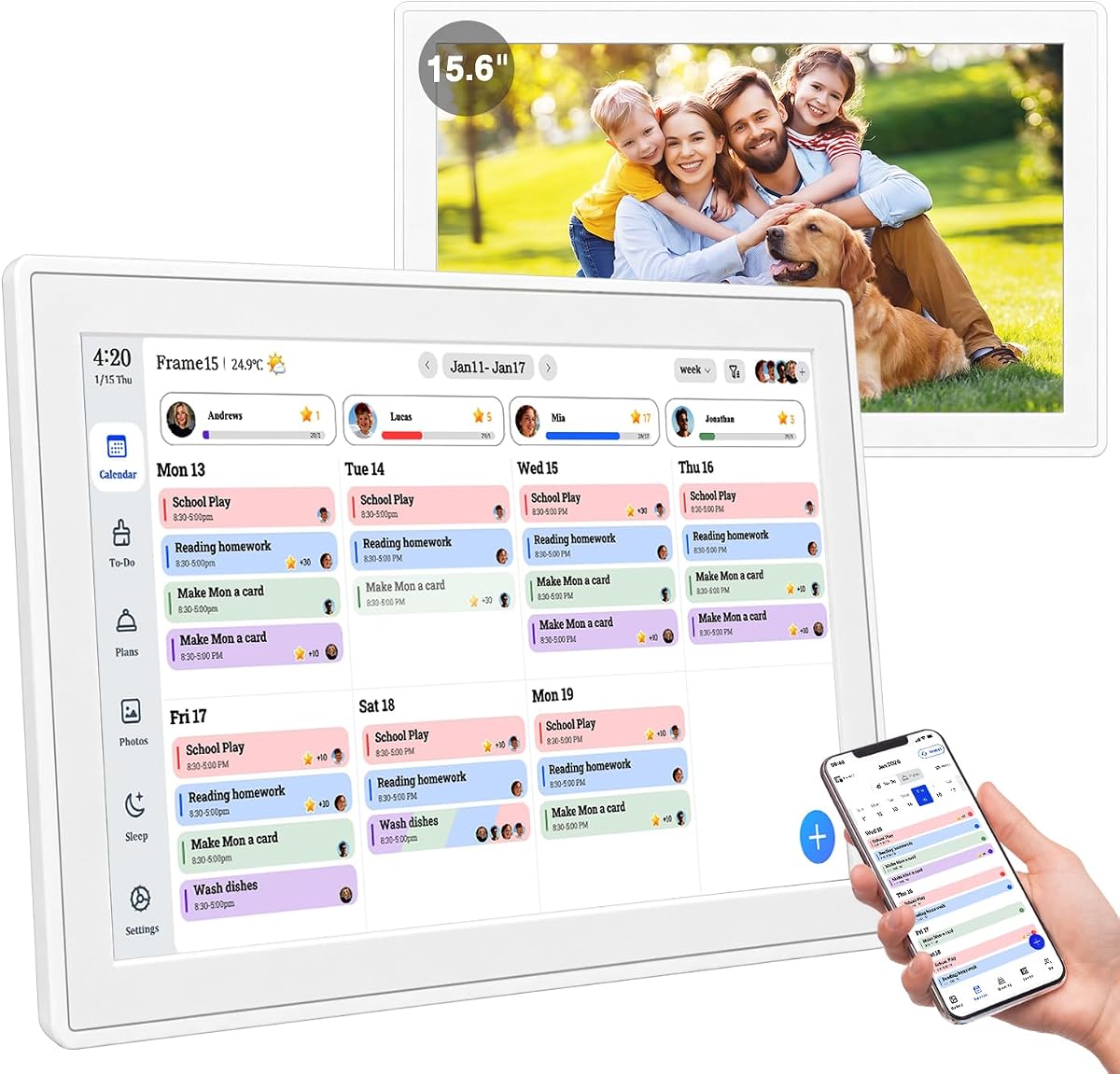


This 15.6-inch digital calendar combines shared scheduling, meal planning, chores, rewards, and photo display in a wall-mounted touchscreen. Its 4.4 rating reflects a versatile feature set, particularly useful for households that want one central display without separate paper planners, a chore board, and a digital frame.
We may earn a commission when you buy through this link, at no additional cost to you.
Real-time synchronization with Google, Outlook, iCloud, and other platforms is a major strength. Multiple family members can edit schedules simultaneously, while the subscription-free model avoids recurring charges for core coordination. The built-in chore system lets children receive assignments and earn reward points, adding a useful motivation layer to everyday responsibilities.
The product also provides 32GB of expandable storage and AI photo restoration for use as a digital frame. A glare-free HD touchscreen, included mounting hardware, and the ability to use it on a wall or desk make placement flexible. The trade-offs are that batteries are not included, and a product this multifunctional may need careful setup and some initial household adjustment.
This is a strong choice for busy families, parents coordinating school and work events, and multigenerational homes that want a visible family information center. It may be less suitable for someone who wants only a calendar, or who prefers a compact display with no wall installation. Overall, it offers a broad and well-balanced mix of planning, motivation, and display functions.
Combining calendars, routines, and rewards reduces the need to check several devices throughout the day. A large shared display also makes it easier for children and other household members to see what is coming next without requesting access to a parent's phone.
The digital frame mode adds practical value when the household is not actively managing the schedule. Families can display favorite memories in a visible central location while retaining the organization tools needed for daily routines.
We may earn a commission when you buy through this link, at no additional cost to you.
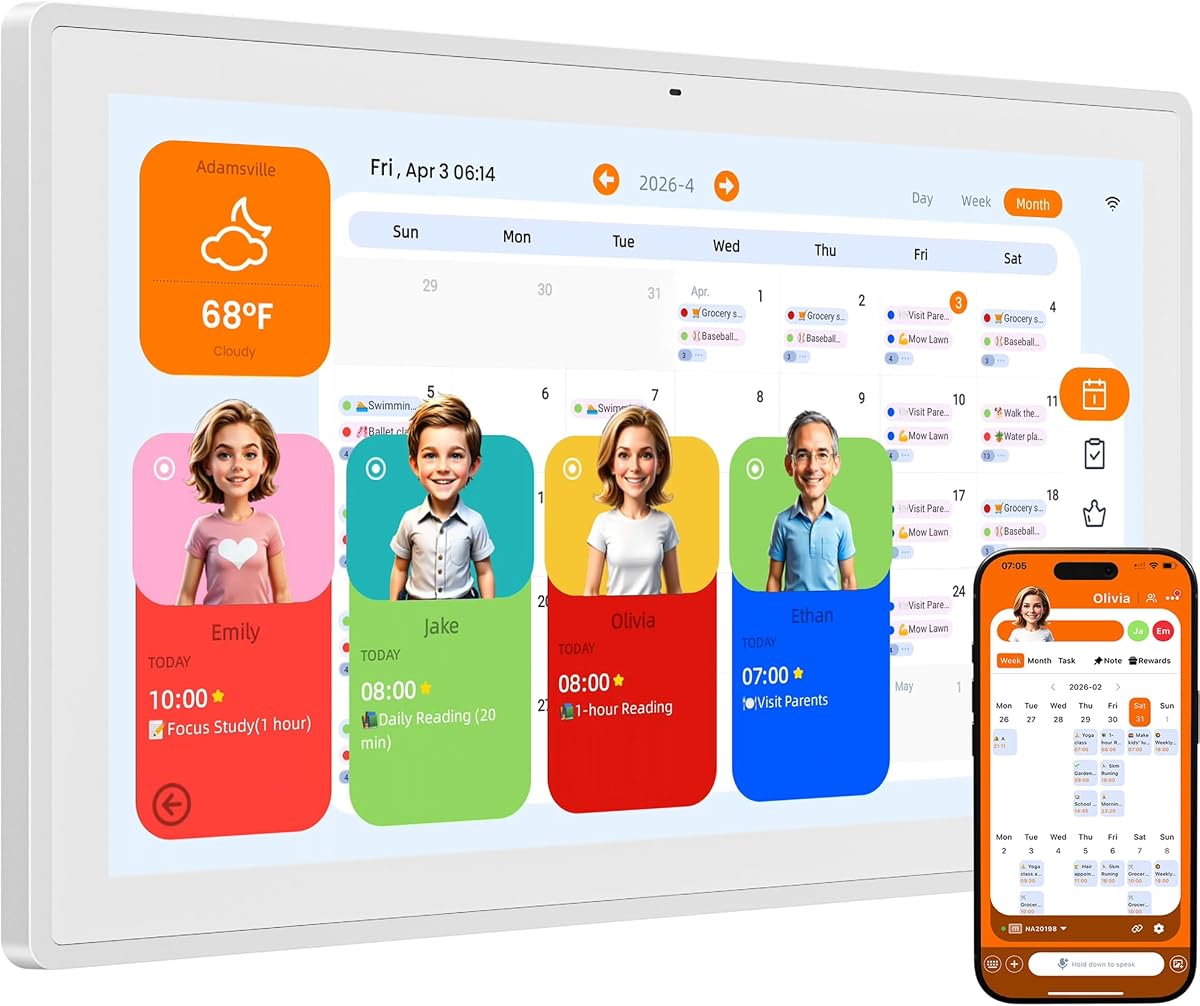
This 15.6-inch family planner emphasizes AI-assisted organization, with a voice assistant capable of recording tasks, extracting information from a photographed flyer, and providing spoken reminders. Its 4.4 rating reflects a capable hybrid of touchscreen operation and hands-free assistance for households that want to reduce repetitive data entry.
We may earn a commission when you buy through this link, at no additional cost to you.
The integrated Kairos App can interpret commands such as a spoken shopping reminder and convert photographed event information into calendar entries. Profile cards organize schedules for individual family members, while the task and rewards system supports both children and adults. One-touch photo sharing, customizable AI avatars, idle photo-frame behavior, and adaptive display brightness add more value beyond basic calendar management.
Compared with a conventional digital calendar, this model is more ambitious about voice interaction and automatic information capture. That convenience comes with a greater dependence on the associated app and its interpretation of commands, so users should still verify important dates after AI-assisted entry. It also offers fewer explicit details about storage and some of the standard syncing platforms found across competing models.
The product is well suited to busy parents, couples, and families who frequently receive schedules on printed flyers or want to create events without typing. Buyers who need maximum screen size, extensive local storage, or support for a specific platform other than Google and iCloud should confirm compatibility first. For voice-first users, it is one of the more compelling options in the roundup.
The absence of subscription fees makes the core planning experience easier to evaluate over time. Voice entry and photo-based event creation can save repeated typing, particularly when a parent is handling several schedules at once.
Sleep mode and adaptive brightness make the wall planner more suitable for a shared living space. The picture-frame function also gives the screen a secondary purpose rather than leaving it blank between calendar sessions.
We may earn a commission when you buy through this link, at no additional cost to you.
The NORI Family Hub is a 15.6-inch AI digital calendar designed as a shared operating system for family life. Its 4.5 rating is the highest among the 15.6-inch options, and the mix of routines, color-coded tasks, rewards, meal planning, and multi-format AI input makes it the most complete general-purpose choice in this guide.
We may earn a commission when you buy through this link, at no additional cost to you.
Compatible Google, iCloud, and Outlook schedules appear together in a color-coded view. Children can follow and check off morning, after-school, and bedtime routines, while each family member can own clearly marked tasks and rewards. The meal-planning tools add weekly menus, nutrition and calorie information, recipes, and shared shopping lists, extending the device beyond a standard schedule board.
NORI FAMILY AI can organize supported information supplied by voice, photo, file, or email. Plans can then be viewed or updated through the Hub, companion app, or browser. Everyday essentials are included without a subscription, while an optional AI upgrade offers added functionality. That distinction makes the basic product attractive, although buyers specifically interested in the broadest possible AI suite should review the optional terms carefully.
This Hub best fits families seeking one system for schedules, chores, meals, and shopping rather than a collection of separate apps. It is especially useful for parents developing independence in children and for households that need consistent shared plans across several devices. Its breadth is the principal advantage, while the potential complexity of color-coded information may require a short adjustment period.
Voice, images, files, and email can all serve as input paths, which makes the assistant practical for families handling information from many sources. The ability to access the same plan from the hub, app, or browser also supports planning away from the kitchen wall.
The task system is designed to make responsibilities visible and achievable rather than merely list them. Weekly meal planning and shared shopping lists add a practical connection between the calendar and another recurring source of household planning.
We may earn a commission when you buy through this link, at no additional cost to you.
The Cozyla Calendar Plus 2 differentiates itself with Google Play Store access and a drag-and-drop dashboard. Its 4.3 rating reflects a highly adaptable calendar that can combine calendars, chore charts, meal planners, to-do lists, media players, and weather widgets rather than relying on a fixed visual layout.
We may earn a commission when you buy through this link, at no additional cost to you.
Real-time synchronization covers Google, Apple, Outlook, Yahoo, and other services through the companion app. Family members receive individual colors and customizable avatars, while completed chores earn points. The meal-planning system supports uploaded recipes, streamed video tutorials, automatically generated shopping lists, and pantry inventory management.
Cozyla AI can turn voice commands, photographed paper events, recipes, and URLs into digital entries, reducing manual setup. Android app-store access also makes the device more flexible than a closed household dashboard, although this benefit comes with additional configuration and the potential for additional app downloads. Buyers should also consider the one-year warranty, which is shorter than the two-year coverage listed for the first model.
This Calendar Plus 2 is ideal for a household that wants to fine-tune its digital command center and may use Android apps beyond standard planning tools. It suits families with varied meal workflows and technical users who are comfortable managing apps and widgets. It is less attractive for someone seeking a completely hands-off appliance with minimal software customization.
Drag-and-drop widgets make it possible to prioritize the information that matters to your household. Users can move beyond a default calendar view and build a screen that better reflects their routines, media, weather needs, and task workflows.
Recipe uploads and video tutorials make the touchscreen useful while cooking rather than only during planning. Shopping-list generation and pantry management help connect selected meals with the rest of the grocery workflow.
We may earn a commission when you buy through this link, at no additional cost to you.
This 15.6-inch smart family calendar combines an approachable design with a strong 4.7 rating, the highest among all ten products featured. It provides a 1080P touchscreen, support for up to 20 family members, and a broad collection of planning features without requiring monthly fees.
We may earn a commission when you buy through this link, at no additional cost to you.
Setup is positioned as unusually simple: the tool-free thumb-nut design allows wall or desk mounting without drilling, while auto-rotation adapts the display to its orientation. It syncs with Google, iCloud, Outlook, Cozi, Yahoo, and TeamSnap, and users can switch among family calendar, photo frame, and art display modes.
The tap-to-create interface reduces the learning curve, while templates for school, work, medication, and routines support common entries. Tasks, chores, meal plans, reminders, and habits can be color-coded, while children can earn rewards. Photos and videos can be uploaded by phone, USB, or SD card, with 32GB of built-in storage and AI photo enhancement when connected.
The primary compromise is that it does not foreground the more elaborate AI input methods found in several competing products. Even so, it offers the most balanced combination of installation ease, household capacity, useful features, and no-subscription operation in the roundup. It is an excellent choice for a large or busy family seeking a straightforward central planner without an app-store-based setup.
The tool-free mounting system and auto-rotation reduce the physical setup burden. This is particularly helpful for renters, new households, or anyone who does not want to drill into a wall merely to start using a shared family display.
Support for as many as 20 family members gives the device room for busy homes, blended families, and shared spaces. Color-coded profiles and customizable avatars help keep individual responsibilities visible in a crowded schedule.
We may earn a commission when you buy through this link, at no additional cost to you.
This 15.6-inch touchscreen family organizer offers three display approaches: schedule, artwork, and photo album. Its 4.4 rating reflects a flexible Full HD unit that also includes seven core planning tools, covering calendar syncing, to-do lists, meal planning, habits, custom lists, rewards, and sleep mode.
We may earn a commission when you buy through this link, at no additional cost to you.
Google Calendar and iCloud synchronization make it possible to manage family information from a phone, while USB, Type-C, Wi-Fi, and SD card connectivity support media transfer. The product can send up to 100 high-resolution photos or a five-minute video directly from a smartphone, depending on the selected transfer method.
The included schedule, art gallery, and cloud photo modes make the screen more versatile than a dedicated calendar. Portrait and landscape orientations, a desktop stand, and a complete wall-mount kit support different room layouts. Voice commands for task reminders are supported through a phone, but the AI features are less comprehensive than those offered by models built around a dedicated AI assistant.
This organizer fits families that want a wall display to alternate between practical planning and visual decoration. It is a good choice for a kitchen, office, or living room where the screen will remain visible throughout the day. Buyers seeking advanced automatic event capture should look elsewhere, while those prioritizing value and multiple display modes will find a practical package.
The artwork and photo modes allow the display to blend into the room when detailed planning is not required. This makes it easier to keep the device mounted in a prominent central location without making it feel purely utilitarian.
The included collection covers the common building blocks of household organization. That breadth and the absence of recurring charges make the device appealing for users who want several planning tools in a single unit.
We may earn a commission when you buy through this link, at no additional cost to you.
The Westsee 15.6-inch digital calendar is a balanced family planner with a 4.4 rating. It provides color-coded schedules, tasks, rewards, meal plans, grocery lists, photos, videos, weather, and sleep mode, while making the principal planning functions available without a recurring subscription.
We may earn a commission when you buy through this link, at no additional cost to you.
Google, iCloud, Outlook, and other calendar integrations keep the shared display current. Users can switch among day, week, month, and custom views, add events on the touchscreen or through the Zical App, and use smart sound reminders for birthdays and notes. Task and meal comments improve interaction among household members.
With 32GB of built-in memory, the calendar can store thousands of photos and videos and support instant sharing from elsewhere. A table stand and wall-mount kit make placement flexible. The notable caveat concerns AI: advanced tools such as the AI Assistant may require a subscription for special needs in the future, so buyers should distinguish between the free core and optional AI services.
Westsee suits households that prioritize stable everyday organization and do not need the AI suite to be the centerpiece of the product. It works well for families that want visual task ownership, sound reminders, and a substantial local media library. Those who require all advanced AI functions to be included should verify current service terms before buying.
Core scheduling, tasks, rewards, meals, and photo functions cover the recurring needs of a shared family display. Optional advanced AI tools do not prevent the central planning functions from operating without monthly charges.
Thirty-two gigabytes of built-in memory provides meaningful space for family photos and videos. This makes the calendar useful as a central visual display rather than a temporary screen that depends entirely on a phone nearby.
We may earn a commission when you buy through this link, at no additional cost to you.
The Skylight Calendar is a 15.4-inch touchscreen wall planner that combines shared schedules, an interactive chore chart, meal planning, tasks, and lists. Its 4.4 rating reflects a polished organizational display, while the white design is intended to blend naturally into kitchens, hallways, offices, and living areas.
We may earn a commission when you buy through this link, at no additional cost to you.
It connects over Wi-Fi and synchronizes with Google, iCloud, Outlook, Cozi, and Yahoo. Anyone in the household can add updates directly on the touchscreen or through the app. Color-coded schedules and personalized chores encourage independence, while weekly meal plans help answer the recurring question of what the family will eat.
The main consideration is the optional premium structure. The Plus Plan unlocks Magic Import, a photo screensaver, stars and rewards, and the Disney Mode experience with characters, animations, avatars, and screensavers. The core calendar, task, list, chore, and meal features remain useful, but buyers wanting the richer family features should examine the current plan terms.
Skylight is best for households that value visual design and a straightforward shared dashboard, particularly families with children who respond to animated rewards. It works well as a countertop or wall-mounted centerpiece. It is less suitable for buyers who require every feature, including photo and reward enhancements, to be included without an optional subscription.
The clean display and color-coded information keep the device attractive while schedules remain legible. Disney Mode adds a playful option for families that want children to interact more enthusiastically with chores and shared tasks.
Task management, lists, and meal planning give the calendar a broader role in daily life. The touchscreen and companion app also let family members contribute updates from different parts of the home.
We may earn a commission when you buy through this link, at no additional cost to you.
The 24-inch Cozyla Calendar Plus 2 is the premium choice in this roundup, offering the largest display and a 4.6 rating. It extends the familiar shared-calendar, chores, meal planning, and AI-assisted entry system onto a screen large enough to serve as a central wall command center.
We may earn a commission when you buy through this link, at no additional cost to you.
Google, Apple, Outlook, Yahoo, and other calendars synchronize in real time through the companion app. Google Play Store access opens the door to additional apps, while drag-and-drop widgets let users arrange calendars, chores, meal plans, tasks, media players, and weather according to household priorities. Each family member can have a color and customized avatar.
Cozyla AI can transform voice commands, scanned photos, and URLs into digital entries. Recipe uploads, streaming video tutorials, shopping-list generation, and pantry management make the 24-inch panel especially useful in a kitchen. Rotation between portrait and landscape supports different layouts, though the larger panel naturally requires more wall or counter space and can dominate smaller rooms.
This model is best for a spacious kitchen, office, mudroom, or main family command center where several people can view information from a distance. It is also ideal for technically engaged households that want to customize a dashboard extensively. Buyers with limited space should consider the 15.6-inch version, while those who want premium scale and flexibility will get more from this model.
A 24-inch screen makes schedules, task lists, recipes, and household information easier to read from across a room. The additional size creates a stronger shared focal point for families that coordinate many activities in a central location.
App-store access and movable widgets give users more control over the display's priorities. The result can resemble a personalized family command center rather than a fixed-purpose calendar appliance.
We may earn a commission when you buy through this link, at no additional cost to you.
This 12.3-inch AI family calendar offers a compact approach to shared planning, combining schedules, tasks, lists, weather, photos, and communication tools. Its 4.1 rating is the lowest in the group, yet the included voice and video calling functions give it a distinct purpose beyond a conventional wall planner.
We may earn a commission when you buy through this link, at no additional cost to you.
Automatic synchronization covers Google, iCloud, Outlook, Yahoo, and Cozi, while reminders, recurring schedules, school timetables, work schedules, sports activities, and appointments can be managed from the central display. The mobile app provides remote control, and the screen can also function as a photo frame with sleep mode for quieter nights.
Built-in voice and video calling is the most unusual feature among the selected products. It may be useful for staying in touch with family members, although the supplied information does not describe the calling ecosystem in detail. The smaller 12.3-inch screen is less suited to long shopping lists, detailed recipes, or reading from across a large room than the 15.6-inch and 24-inch alternatives.
This is a sensible option for a bedroom, compact office, hallway, or family space where physical size matters. It is especially attractive to buyers who prioritize calling functions and a broad collection of basic organization tools. For a kitchen wall with detailed meal plans, a larger model may be more practical.
Voice and video calling turn the calendar into a family communication point rather than a passive schedule board. That distinction may matter most in homes that regularly use the display for quick check-ins.
The 12.3-inch panel takes less wall and counter space than larger models. It can fit into tighter areas while still presenting synced schedules, weather, reminders, tasks, and photos in a central location.
We may earn a commission when you buy through this link, at no additional cost to you.
The right digital family calendar depends less on the longest feature list and more on how your household works. Screen visibility, platform compatibility, recurring chores, meal planning, media use, and the availability of ongoing services should guide the decision.
Screen size affects both information density and the distance from which family members can read the display. A 12.3-inch model is easier to fit into a compact room, while 15.4-inch and 15.6-inch screens offer a more balanced format for calendars, task lists, recipes, and photos. The 24-inch Cozyla is intended for a spacious command center where multiple people may view it from across the room.
Choose the largest screen that comfortably fits your intended wall or counter space, and consider whether portrait or landscape orientation better suits the information you use most.
A digital calendar is only useful if it can reliably import the calendars your household already relies on. Google and iCloud are widely supported across the roundup, while Outlook, Yahoo, Cozi, Apple, TeamSnap, and other integrations vary by model. Some products sync through a companion app, whereas others may support direct or broader service access.
List the exact services used by every household member, confirm account and family-sharing requirements, and avoid buying solely on the phrase AI if your everyday schedules cannot appear on the display.
AI calendar features range from voice entry and photo interpretation to spoken reminders, smart home control, and automated planning. NORI accepts voice, photos, files, and email, while Cozyla converts voice, scanned events, recipes, and URLs into entries. Other products offer more limited automation or separate advanced AI tools behind optional subscriptions.
Prioritize the AI functions you will actually use and clarify which work without a paid plan. Also confirm that important manually created entries remain easy to correct after automatic import.
A useful chore chart should assign responsibility clearly, make progress visible, and give children a motivating way to complete routines. Most selected products use color coding, member profiles, points, and rewards, while the more advanced models add customizable avatars and comments. Visible morning, after-school, and bedtime routines can help children become more independent.
Test the workflow with realistic tasks, not just a short demonstration. Look for clear ownership, easy completion controls, and a reward system that children will understand without requiring continual adult explanation.
A shared meal planner can include weekly menus, recipes, nutrition information, shopping lists, and pantry inventory. Cozyla stands out for recipe uploads, streaming video tutorials, generated shopping lists, and inventory tools, while NORI combines weekly meal plans with recipes and shared shopping lists. Other displays provide simpler weekly menus.
Consider who prepares meals and whether recipes need to be visible on the display. If cooking instructions and pantry tracking are priorities, choose a model with richer meal tools rather than relying on basic calendar entries.
Many digital calendars double as photo frames, art displays, or screensavers when the planning screen is not in use. Built-in storage ranges from 32GB in several products, and transfer methods include phones, USB, Type-C, and SD cards. Some units support both photos and videos, while others focus more heavily on a rotating photo collection.
Consider storage, transfer convenience, offline support, and whether the family needs videos as well as images. Confirm that the display can be dimmed or placed into sleep mode so a central screen does not become distracting at night.
A wall-mounted calendar is most useful where the family already gathers, but installation requirements vary. The 15.6-inch Smart Family Calendar uses a tool-free thumb-nut design, while other products include conventional wall-mount kits and desktop stands. Larger models need sufficient clearance and may work best in kitchens with generous counter space or open walls.
Measure the area, check the included hardware, and think about power access, viewing height, glare, and Wi-Fi coverage. A flexible stand can help if you may later move the device between a wall, desk, and countertop.
Subscription policies are a major differentiator. Several products keep their core scheduling and household functions free indefinitely, while Skylight places features such as Magic Import, photo screensavers, stars and rewards, and Disney Mode behind the Plus Plan. Westsee states that advanced AI tools may require a subscription in the future, and NORI separates its basic essentials from an optional AI upgrade.
Compare the full service terms, warranty coverage, and support availability before ordering. A no-subscription label does not necessarily mean every advanced feature is included, so preserve the current product details and review them again at purchase.
Begin by choosing a central location with reliable Wi-Fi, access to power, and a comfortable viewing height. Connect the display to the intended calendar accounts, assign a color to each household member, and import only the calendars the family needs. Clear default views and remove duplicate events before distributing tasks or adding chores.
Build the system gradually rather than entering every possible activity at once. Start with recurring school, work, medication, and transportation schedules, then establish a small set of realistic routines. Add rewards, meal plans, shopping lists, and photos after the basic calendar is accurate. Use voice or AI import for printed information, but review the resulting date, time, and description before sharing it.
For care, dust the screen with a soft, dry microfiber cloth and avoid spraying liquid directly onto the display. Keep the device away from excessive heat, moisture, and unstable surfaces. Update the software and companion app when prompted, confirm calendar synchronization after major changes, and use sleep mode or brightness controls at night.
It depends on the model. Several products in this guide include calendar syncing, chores, tasks, and meal planning without recurring charges, while optional AI upgrades or premium features may still cost extra. Westsee says advanced AI tools may require a subscription for certain future needs, and Skylight places photo, reward, and Disney features behind its Plus Plan. Check the current service terms before purchase, especially if AI functionality is essential to your decision.
Google Calendar and iCloud Calendar are the most consistently supported across the selected products. Outlook is also common, while Apple, Yahoo, Cozi, TeamSnap, and other services appear on particular models. Compatibility alone does not guarantee identical setup procedures or family-sharing behavior, so confirm that each person can access the correct account before importing events.
For many households, they can replace the central family planner, chore sheet, and sometimes a separate meal or shopping list. They are less suitable as the only record for users who prefer handwritten notes, require printed materials, or need to carry a small planner throughout the day. A backup system may still be helpful for temporary notes and offline access.
A 15.6-inch screen is a practical starting point for most kitchens because it balances schedule readability with a manageable physical footprint. The 24-inch model offers greater visibility and stronger recipe or media workflows, but it needs considerably more space. A 12.3-inch model can work well in a compact area or secondary household command center.
Yes, and shared color coding is a major benefit of the category. The 15.6-inch Smart Family Calendar supports up to 20 members, while the other models also emphasize family profiles, avatars, individual tasks, and shared routines. You will still need to set permissions, assign users correctly, and establish who is responsible for adding or approving changes.
Several products offer voice-assisted or photo-based entry. Pastigio can read details from a photographed school flyer, NORI accepts information through voice, photos, files, and email, and Cozyla can process voice commands, scanned events, recipes, and URLs. Automatic extraction is convenient, but important information should be checked after import to avoid a misplaced date, time, or reminder.
Most of the selected products can display family photos when the calendar is idle. Several provide 32GB of built-in storage, photo enhancement, phone transfer, USB or SD card support, and dedicated art or photo modes. The exact combination of photo, video, offline, and enhancement functions varies, so check the media requirements of your preferred model.
Installation depends on the model. The 15.6-inch Smart Family Calendar uses a tool-free thumb-nut mounting design, while other products include wall-mount kits and desktop stands. Larger screens require more space, and a stand may be preferable if you want to move the display. Measure the location, confirm power and Wi-Fi access, and follow the included instructions.
The 15.6-inch Smart Family Calendar is the strongest budget-oriented choice thanks to its 4.7 rating, tool-free installation, broad calendar support, and useful household features without recurring fees. NORI is the editor's choice for a more integrated family hub, while the 24-inch Cozyla Calendar Plus 2 stands out as the premium option for expansive displays and extensive dashboard customization.
Prioritize the functions your household will use every day. Calendar compatibility and reliable syncing come first, followed by the size that fits the room and the organization tools that solve recurring problems. Voice, photo, and AI-assisted entry can be valuable, but they should complement rather than replace a sound setup and an understandable shared workflow.
Software features, subscription terms, ratings, availability, and prices can change over time. Before ordering, verify the current screen size, included accessories, service requirements, warranty details, and account compatibility using the latest product listing. Those checks will help ensure the selected AI digital smart calendar fits both the household's routine and the available space.