
2 in 2 Out USB 3.0 Switch
4.6Editor score
Shares two USB devices
Up to 5Gbps transfer speed
One-button desktop switching
Discover the best keyboard and mouse switch for 2 computers, with expert comparisons of ports, transfer speeds, switching methods, compatibility, and features.
A keyboard and mouse switch for 2 computers reduces cable clutter by letting one keyboard, mouse, and other USB peripherals move between a work PC and a personal computer. A useful model should switch quickly, identify the active computer clearly, and support the peripherals and operating systems in your setup.
The products in this guide were compared by examining their number of shared USB ports, computer inputs, supported connector types, data-transfer speed, switching controls, power options, operating-system compatibility, and practical limitations. Both basic USB selectors and more advanced HDMI KVM switches are included because they serve different desk configurations.
Each review explains the product's strongest use case, notable specifications, advantages, and trade-offs. The list ranges from simple two-device selectors to multiport switches with external controls, and prices and configurations can change, so readers should verify current availability and compatibility before purchasing.
4.6Editor score

4.0Editor score
4.3Editor score
The table below compares all ten switches by device capacity, connection type, switching method, and key practical consideration. It makes it easy to distinguish a simple keyboard-and-mouse selector from a multiperipheral switch or a full KVM solution that also controls one monitor.


The UGREEN USB 3.0 Switch is a four-device USB selector with a 4.0 rating, combining one USB-C and three USB-A device ports for two computers. It is especially useful when a desk includes several peripherals and the goal is to share them without moving a monitor or installing complicated network software.
We may earn a commission when you buy through this link, at no additional cost to you.
Its strongest quality is the mixed-port layout. A USB-C keyboard or modern peripheral can use the USB-C connection, while three USB-A ports accommodate a mouse, printer, webcam, or storage device. Up to 5Gbps transfer speed is suitable for everyday file movement, and backward compatibility with USB 2.0 broadens the range of older accessories that can be connected.
Switching can be performed from the built-in button or the supplied controller, allowing the switch itself to be placed out of sight. An optional USB-C power connection is valuable when several power-hungry devices are active. The trade-offs are that it is not a KVM switch, cannot transmit monitor video, and may require a USB-C-to-A adapter for a USB-C-only computer.
This is a strong recommendation for users who want more than a bare keyboard-and-mouse selector and already own mixed USB-C and USB-A equipment. It is less suitable for someone expecting the switch to carry a display signal or connect a dock.
With four shared ports, this model reduces the need for repeated manual cable changes. It is especially practical when a keyboard and mouse are accompanied by a printer, headset, webcam, card reader, or other frequently used accessory.
The external controller allows the main unit to be hidden under a desk or placed farther away. A front button remains available for users who prefer direct control.
We may earn a commission when you buy through this link, at no additional cost to you.
The BENFEI USB 3.0 Switch is a 2-in, 4-out USB selector rated 4.1 stars. It lets two computers share four USB-A peripherals, making it a conventional option for moving a keyboard, mouse, printer, scanner, flash drive, webcam, or headset between machines.
We may earn a commission when you buy through this link, at no additional cost to you.
The one-button control and LED indicator make the active connection easy to identify. USB 3.0 transfer rates reach up to 5Gbps and remain backward compatible with USB 2.0, so the switch is more versatile than a basic keyboard-only selector. It supports Windows, macOS, Linux, and Chrome OS without requiring driver installation.
An extra USB-C power input can stabilize operation with hard drives, cameras, and other higher-consumption devices. However, the charging cable is included while the power adapter is not, so buyers who want external power must account for that. The product also notes that operation with the supplied USB-A-to-A connection cables is the intended method.
Choose this switch if your peripherals use USB-A and you want more than two shared ports without moving to a monitor-capable KVM design. It is a sensible middle ground for home offices and mixed productivity setups, provided you understand that it handles USB data only.
The built-in LED provides immediate confirmation of which computer has control. That feedback is useful in a busy work area where an incorrect connection could lead to typing into the wrong system.
The auxiliary USB-C power connection can improve reliability when several demanding peripherals share the hub. It is an optional feature rather than a requirement for ordinary keyboards and mice.
We may earn a commission when you buy through this link, at no additional cost to you.
This 2-in, 2-out USB 3.0 switch has a 4.6 rating, the highest among the ten products listed. It is purpose-built for the core task of sharing a keyboard and mouse between two computers, while remaining capable of handling a printer, webcam, card reader, or USB drive in one of its two device ports.
We may earn a commission when you buy through this link, at no additional cost to you.
Its simple design is a major strength. Two USB 3.0 A-to-A cables are included, and the unit works without software or drivers across Windows, macOS, Linux, and Chrome OS. The one-button switch and LED indicator provide straightforward control, while the aluminum alloy shell is designed for heat dissipation and durability.
Transfer speeds reach up to 5Gbps and are backward compatible with USB 2.0 and 1.1. The limitation is capacity: with only two shared ports, a keyboard and mouse fill the available connections. It also does not transmit video and is not a KVM switch, so users expecting to route a monitor through it should choose a different design.
For the specific keyword use case, this is an excellent match. It is a focused solution for a dual-computer desk that needs to share only a keyboard and mouse, and its bundled cables simplify setup. It is less appropriate for printers, webcams, and several additional peripherals that need simultaneous access.
Two ports are enough for the most common arrangement: one keyboard and one mouse. That focused design avoids unnecessary complexity and makes the switch quick to configure.
The aluminum alloy enclosure and plug-and-play operation make this an uncomplicated option for users who want minimal desk hardware and broad platform support.
We may earn a commission when you buy through this link, at no additional cost to you.
The UGREEN 2-Port USB Switch is a 2-in, 2-out USB 3.0 selector rated 4.1 stars. It shares two USB-A peripherals between two computers and includes two five-foot USB 3.0 A-to-A cables, making it a ready-to-install option for a keyboard and mouse.
We may earn a commission when you buy through this link, at no additional cost to you.
It supports data transfer rates up to 5Gbps and remains backward compatible with USB 2.0. The hardware-free setup works with Windows, macOS, Chrome OS, and Linux, while a push button and LED indicator make the active computer easy to identify.
The main limitation is its USB-A-only device layout. If your keyboard or mouse uses USB-C, an appropriate adapter may be necessary. The switch also cannot carry a monitor signal and cannot be used as a full video KVM, despite its ability to share a printer or webcam as data devices.
This model best suits a straightforward dual-PC arrangement with conventional USB-A accessories. Its included long cables can simplify placement around monitors, and buyers who need more than two peripherals should look toward the four- or seven-device models in this guide.
The two included five-foot cables reduce the need for separate accessory purchases. The box provides the core hardware needed for a basic two-computer keyboard-and-mouse arrangement.
The LED indicator removes ambiguity about which computer is currently connected, helping prevent typing or mouse actions from reaching the wrong system.
We may earn a commission when you buy through this link, at no additional cost to you.
The Hearvo USB 3.0 HDMI KVM Switch is a two-computer, one-monitor solution rated 4.0 stars. Unlike ordinary USB selectors, it combines keyboard, mouse, USB, and HDMI control so the same desk can operate a full PC setup without separately changing the display source.
We may earn a commission when you buy through this link, at no additional cost to you.
Its display capabilities are a major differentiator. The switch supports 4K at 60Hz, HDCP 2.2, 4K at 30Hz, 2K, 3D, and 1080p. Adaptive EDID is included to optimize display settings, while plug-and-play operation means no external power supply or driver software is required according to the supplied information.
Four USB 3.0 ports—three USB-A and one USB-C—can serve keyboards, mice, scanners, printers, flash drives, headsets, and webcams. Switching works through the unit button or a wired remote, allowing the KVM box to be hidden or placed away from the monitor. The trade-off is that it controls only one display and adds HDMI plus remote-switch connections.
This is the best selection for a desk where switching the monitor is part of the daily routine. It is more complete than a USB-only switch but less flexible for a multiple-monitor arrangement. Users who need only keyboard and mouse sharing may find the extra video functionality unnecessary.
Switching the display and USB peripherals together creates a more coherent experience. Users do not have to remember a separate sequence for the monitor and the keyboard.
The wired remote switch can remain on the desk while the KVM unit is placed out of sight. This is especially useful where cable management or a tidy workstation is important.
We may earn a commission when you buy through this link, at no additional cost to you.
The UGREEN USB 2.0 Switch is a four-port USB selector rated 4.4 stars. It shares printers, scanners, mice, keyboards, card readers, flash drives, and similar peripherals between two computers through a one-button control and a clearly visible active-computer LED.
We may earn a commission when you buy through this link, at no additional cost to you.
The product is designed around USB 2.0, making it most relevant to older accessories, legacy systems, and users who have no need for faster file transfers. It is driver-free and compatible with multiple generations of Windows, Mac OS X, Linux, and Chrome OS.
A separate micro-USB female port permits optional external power for hard drives, solid-state drives, and digital cameras. The charging cable and charger are not included, and high voltage is not permitted. USB-C-only computers require a USB-C-to-A adapter rather than a direct USB-C-to-A cable connection.
This is a good option for an established office with several USB-A peripherals and older computing equipment. It offers four shared ports and dependable basic sharing, but anyone regularly moving large files or using modern high-speed storage should choose a USB 3.0 alternative.
USB 2.0 remains broadly compatible with established keyboards, mice, printers, and scanners. The design is well suited to offices that prioritize compatibility over high-speed transfers.
The optional power connection can help maintain stability with storage devices and cameras when several accessories are in use.
We may earn a commission when you buy through this link, at no additional cost to you.
The UGREEN USB 3.0 Switch is a 4.3-star four-port selector that balances modern transfer speed with broad device-sharing capacity. Two computers can share a keyboard, mouse, printer, scanner, USB camera, headphones, flash drive, and other USB peripherals.
We may earn a commission when you buy through this link, at no additional cost to you.
Up to 5Gbps data transfer makes it more capable than the USB 2.0 options for everyday storage and file-transfer tasks. Two USB 3.0 cables are included, and the switch supports Windows, macOS, Chrome OS, and Linux without driver installation. A one-button interface and LED indicator simplify daily operation.
For demanding accessories, an extra USB-C power port can supply 5V at up to 2A. The power adapter is not included, so that capability depends on an available compatible supply. The shared device ports are USB-A, meaning a USB-C peripheral may require an adapter.
This is a well-balanced recommendation for users who want more than a two-port keyboard-and-mouse switch but do not need a seven-device hub or a KVM with display switching. It suits a productive home office with a printer and several common peripherals.
Four device ports cover the most common peripheral combination while keeping the switch physically focused. It is a practical middle ground between basic selectors and larger seven-port models.
The auxiliary USB-C power input can reduce instability when using hard drives, cameras, headphones, microphones, or docking-related equipment.
We may earn a commission when you buy through this link, at no additional cost to you.
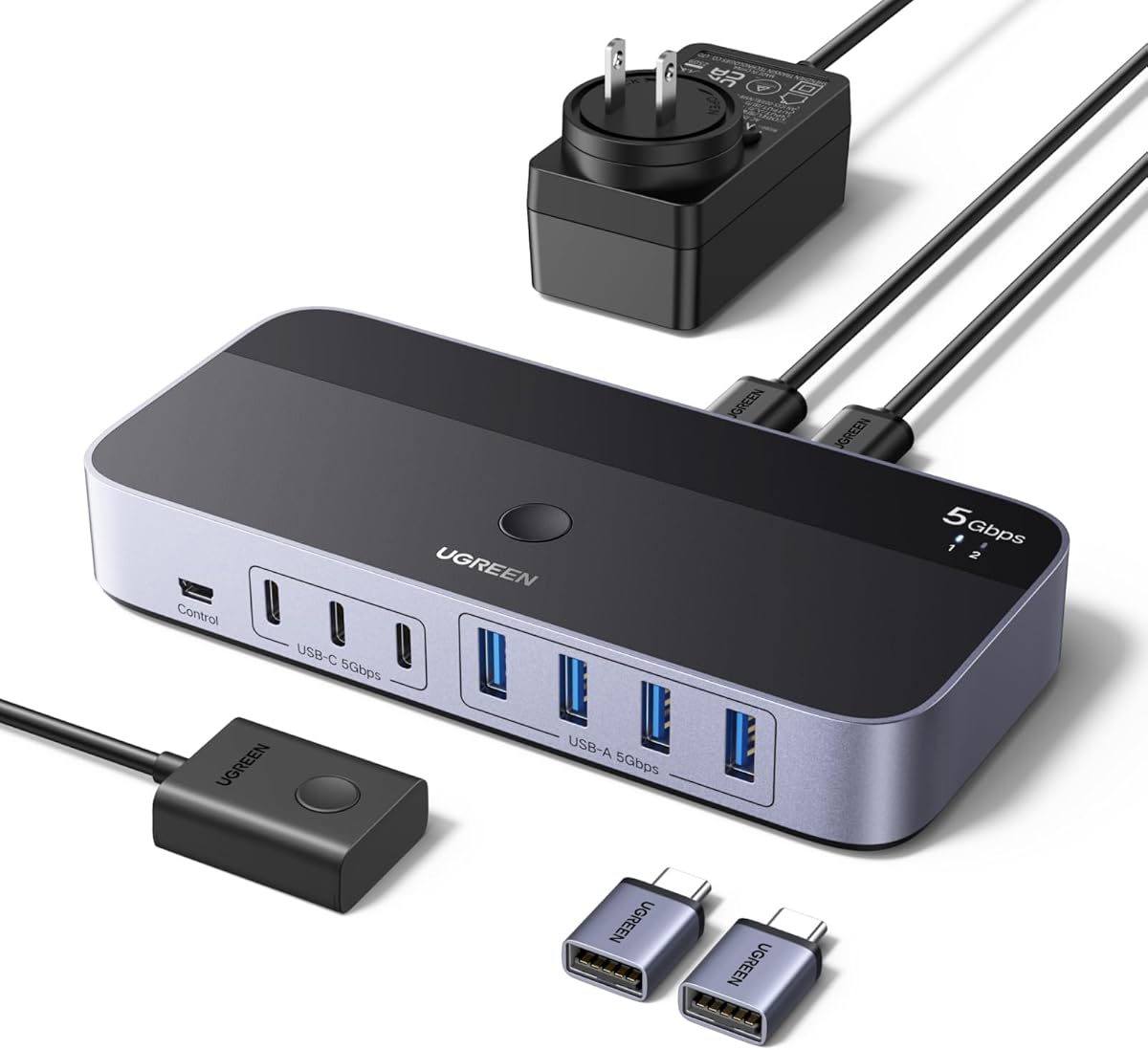
The UGREEN 2-in, 7-Out USB 3.0 Switch is a premium peripheral-sharing model rated 4.3 stars. It allows two computers to share seven devices through four USB-A and three USB-C ports, covering a broad mixture of modern and legacy accessories.
We may earn a commission when you buy through this link, at no additional cost to you.
This high capacity makes it suitable for a desk containing a keyboard, mouse, printer, flash drives, webcam, headset, and several other devices. Up to 5Gbps transfer rates are supported with backward compatibility for USB 2.0, and the USB-C male adapter helps connect computers with different port layouts.
The package goes beyond the switch itself. It includes a controller for remote switching, a USB-C-to-A adapter, and a power adapter with charging cable. That external power is intended to improve stability for hard drives and printers. As with other USB selectors, the device does not carry video and should not be treated as a monitor switch or dock.
Choose this model when cable consolidation and simultaneous peripheral access matter more than compact size. It is especially attractive for a sophisticated work or IT setup with many USB accessories and mixed connector types. Buyers with only a keyboard and mouse can get a simpler solution.
Seven shared ports reduce the need for separate hubs and make it possible to move a wide collection of accessories between two systems with one control action.
The included controller, USB-C adapter, and external power supply cover several setup needs in one package, which is particularly useful for newer and older computer combinations.
We may earn a commission when you buy through this link, at no additional cost to you.
The USB 2 in 2 Out Switch is a compact 4.2-star selector designed for two computers and two shared USB devices. It offers a direct way to move a keyboard and mouse between a work computer and a personal laptop without repeatedly unplugging both accessories.
We may earn a commission when you buy through this link, at no additional cost to you.
The switch is bus-powered through the connected computer, so no separate AC adapter is required. Two USB cables are included, and the package supports immediate plug-and-play use. A front push button and LED indicator handle switching, while an external desktop controller can keep the main unit out of sight.
Compatibility spans multiple versions of Windows, Mac OS X, Linux, and Chrome OS. The important limitation is that mass-storage devices such as hard drives and flash drives are not recommended, and the switch provides only two peripheral ports. It is not intended for video or monitor use.
This is a sensible choice for a minimalist dual-computer desk that needs exactly one keyboard and one mouse. The included controller is a notable convenience for keeping the desktop uncluttered. Users with printers, webcams, or additional accessories should consider a model with more shared ports.
Drawing power from the connected computer keeps setup simple. It is well suited to a clean desk where adding a wall adapter would be inconvenient.
The desktop controller lets the user change computers while the switch itself remains tucked away, producing a cleaner and more permanent installation.
We may earn a commission when you buy through this link, at no additional cost to you.
The UGREEN USB 3.2 Switch is a 4.3-star, seven-port selector offering the highest stated transfer speed in this guide. Its four USB 3.2 Gen 2 ports support rates up to 10Gbps, making it the most appropriate option here for frequent transfers involving fast storage or other data-heavy USB devices.
We may earn a commission when you buy through this link, at no additional cost to you.
The device arrangement consists of four USB-A and three USB-C shared ports. A USB-C-to-A cable allows connection to mixed computer configurations, while the power adapter and charging cable support stable operation with external hard drives and printers. Button and external-controller switching provide convenient access even when the unit is placed away from the desk surface.
Despite the strong performance, it remains a USB data switch rather than a KVM. It cannot route display video, and the supplied information advises against using the ports for audio devices. Those limitations make it less suitable for users who expect a complete keyboard, mouse, and monitor solution.
Choose this model for a multiperipheral, data-intensive setup where transfer speed and seven-port capacity are priorities. It is the most technically advanced USB-only option in the list, while the Hearvo KVM remains the better choice when one monitor must switch as well.
The 10Gbps specification is particularly relevant when users move data between fast SSDs, external drives, and two modern computers. The shared bus still requires connected devices to support their own corresponding speeds.
Seven mixed ports and bundled external power provide room for a broad peripheral collection. The included converter cable simplifies connections across USB-A and USB-C computers.
We may earn a commission when you buy through this link, at no additional cost to you.
The best choice depends on how many peripherals you need to share, whether the monitor must switch too, which connector types your equipment uses, and how often you move between systems. Review the following factors before buying.
A USB selector shares peripherals but does not carry a display signal. That makes it suitable for a two-monitor arrangement where each computer has its own screen and only the keyboard and mouse change. A KVM switch also routes one monitor, which is more convenient when the display source should change with the peripherals. The Hearvo model is the KVM option here because it combines HDMI control with USB sharing.
A keyboard and mouse require two shared device ports, so the smallest 2-in, 2-out designs meet the basic requirement. Additional ports allow a printer, scanner, webcam, headset, or storage device to remain connected. Four-port switches suit most desks, while seven-port models accommodate elaborate accessory collections and mixed USB-A and USB-C equipment.
Most older keyboards and mice use USB-A, while newer laptops and compact accessories may use USB-C. Choose a switch with matching device ports or confirm that a suitable adapter is included. Do not assume a USB-C data port on the switch supports display output, charging, or every dock function. Several products in this guide use USB-C exclusively for auxiliary power.
USB 2.0 is sufficient for basic input devices and many printers, but USB 3.0 options transfer data at up to 5Gbps. The UGREEN USB 3.2 model reaches up to 10Gbps and is the strongest choice for frequent movement of large files through compatible storage devices. Faster switch specifications cannot improve a peripheral's own slower connection.
A front button is the simplest option and works well when the switch is on the desk. An external controller allows the main unit to be hidden under a desk, mounted behind a monitor, or placed out of sight. The Hearvo KVM adds a wired remote for video switching. Choose a method that supports how and where you actually change computers.
Basic keyboards and mice usually work without external power, but hard drives, external SSDs, printers, webcams, and headsets can draw enough current to cause instability. A switch with an auxiliary power input is more flexible, although some packages include only the cable and not the adapter. Check the box contents carefully before planning a setup with several powered peripherals.
The listed switches generally support Windows, macOS, Linux, and Chrome OS without driver installation, although older Windows versions are not specified for every product. Plug-and-play operation does not guarantee support for every specialized peripheral. Check whether a device has special requirements and whether the switch is intended for input devices, mass storage, cameras, or audio.
The length and direction of the included cables affect desk layout. Most two-computer products include two computer-side cables, while some UGREEN models additionally provide a controller, converter, or power supply. Input and output ports are directional even when they use the same connector, so follow the manual and labels rather than assuming either side is interchangeable.
Begin by identifying the switch's computer input ports and shared device ports. Connect the appropriate USB-A or USB-C computer cables first, followed by the keyboard and mouse. If the model includes external power, connect it before attaching power-hungry storage devices or printers. Some switches draw power from the computer, so check whether an auxiliary power input is optional or required.
After the connections are secure, press the switch button and confirm that the LED indicates the desired computer. Test both inputs by moving the pointer and typing briefly in each system. For a KVM model, connect the monitor with HDMI, select each input, and verify that the display and USB devices change together. Never unplug a storage device while a transfer is in progress.
For care, keep the enclosure dry and avoid forcing cables into ports. Route the connected leads so they are not pulled sharply from the switch, and leave adequate ventilation around the housing. Dust the vents gently with a dry cloth, do not use liquid cleaners on the electronics, and check the connections periodically if a device disconnects or the active-computer indicator becomes unreliable.
Yes, as long as the switch has at least two shared device ports. Connect the keyboard and mouse to the device side, connect the two computer inputs, and use the button or controller to select the desired computer. The selected computer should recognize both peripherals after the switch changes.
Only a KVM switch carries video as well as USB data. Most products in this guide are USB selectors and explicitly do not support monitor connections. The Hearvo HDMI KVM Switch is the exception because it controls two computers and one monitor along with the shared USB peripherals.
Most listed products support Windows, macOS, Linux, and Chrome OS on a driver-free basis. Older operating-system support varies by model, so check the specifications for your exact version. A mixed Windows-and-Mac desk is generally well suited to the modern USB 3.0 options.
That depends on the switch and its included accessories. A switch with USB-A computer inputs may require a USB-C-to-A adapter, while models bundled with a suitable converter are easier to connect. The switch's USB-C device port does not necessarily support video, and an auxiliary USB-C power port may be intended only for supplying power.
The connected devices may collectively draw more power than the switch or computer port can provide. Connect the model with an auxiliary power input and use a compatible power supply. High-speed external drives can also be more demanding than keyboards, mice, and printers, so a four-port model with stable power may be preferable.
Yes, if the switch has enough shared ports and the devices are compatible with USB data sharing. A four-port model can support the keyboard, mouse, and two other peripherals, while a seven-port model provides more room. The switch should not be assumed to support specialized charging or audio functions.
No. A keyboard and mouse usually operate adequately on USB 2.0, and a USB 2.0 switch can be a sensible choice for older equipment. USB 3.0 becomes more important when the same switch handles flash drives, external SSDs, or other data-heavy peripherals and faster transfers are desired.
A built-in button requires reaching the switch itself, while an external controller places switching control directly on the desk. The latter is useful when the main switch is hidden beneath a desk or positioned behind a monitor. Both methods perform the same computer-selection function.
The 2 in 2 Out USB 3.0 Switch is the most focused choice for sharing only a keyboard and mouse, combining a high rating, two included cables, and a simple one-button design. The Hearvo HDMI KVM Switch is the most complete option for a two-computer, one-monitor desk, while the UGREEN 2-in, 7-Out model offers the greatest peripheral capacity and bundled accessories.
Prioritize the number of shared ports, the connector types on your actual keyboard and mouse, and whether you need video switching. Add external power when using storage devices, printers, cameras, or several demanding peripherals. If fast file transfers are central, choose 5Gbps or 10Gbps rather than a basic USB 2.0 unit.
Finally, verify the current specifications, package contents, and compatibility before ordering because product configurations can change. Prices and promotions also change over time, so compare current offers rather than assuming that one switch is always the least expensive option.