
Kensington T-Bar Standard Keyed Lock
4.5Editor score
Six-foot carbon steel cable
Compact pivoting lock head
Hidden-pin keyed security
Explore the best laptop lock cables for 2026, comparing lock compatibility, cable strength, security features, installation, and ideal uses for every device.
A laptop lock cable helps prevent opportunistic theft by tethering a computer to a desk or other fixed structure. A worthwhile model must match your device’s security slot, provide a suitably strong cable, and remain easy to lock without interfering with ports. Combination, keyed, and adapter-based designs each suit different settings.
We compared these ten options by examining their stated lock compatibility, cable construction, attachment methods, key or combination mechanisms, supported devices, and intended work environments. The list covers traditional Kensington-style locks, Dell-specific and ultra-thin variants, universal slot designs, and adhesive-anchor systems for devices without a native security opening.
Each pick highlights a different practical advantage, from broad device support to a low-profile head or extended cable. Ratings reflect the supplied customer feedback, while technical details come from the product information. Product availability and configurations may change, so verify your device’s slot and the included hardware before purchasing.
4.5Editor score

4.9Editor score

4.3Editor score
The comparison below organizes all ten laptop lock cables by device fit, locking method, cable length, and installation approach, making it easier to identify the option suited to your equipment and workspace.




The Kensington Combination Cable T-Bar is a versatile security option for laptops and other electronics that use a standard Kensington-sized slot. Its 4.4 rating reflects generally positive customer feedback, while the stated design combines a resettable four-wheel code, a six-foot carbon steel cable, and straightforward push-button engagement. It is particularly useful for offices, shared workspaces, and home setups where a keyed lock would add unnecessary key management.
We may earn a commission when you buy through this link, at no additional cost to you.
The lock supports HP, Lenovo, Acer, Asus, and other compatible devices, as well as desktops, televisions, monitors, hard drives, docking stations, and projectors. Its one-handed mechanism makes daily connection to a desk practical, and the steel cable provides useful reach while resisting cutting attempts. The head fits standard Kensington security slots and can anchor to desks, tables, or other fixed structures.
Compatibility is the principal limitation. It is not designed for Dell or Alienware systems using wedge-style slots, including some 2016 and newer Dell laptops and tablets. Some HP models, including certain EliteBook X2 tablets and Chromebooks, use a NanoSaver slot instead. Buyers should check the technical specifications of their computer rather than relying only on the brand name.
This is a strong recommendation for someone who owns a standard-slot laptop and wants combination convenience without sacrificing a substantial cable length. It also works for several peripherals, giving it more flexibility than a narrowly focused laptop cable. If your device uses a Noble, wedge, or Nano slot, choose a model explicitly designed for that format instead.
The resettable four-wheel number system offers 10,000 possible combinations and removes the need to carry or distribute a key. Users can set their own code and change it when needed, making the lock convenient for regular solo use or for a shared equipment program with clearly shared access.
The six-foot carbon steel cable balances reach and portability for desks, tables, and fixed structures. Its cut-resistant construction adds a tangible deterrent while keeping the setup simple enough for repeated daily locking and unlocking.
We may earn a commission when you buy through this link, at no additional cost to you.
The Kensington N17 Dell Laptop Computer Lock is designed specifically for Dell and Alienware computers with wedge-type security openings. Its 4.3 rating indicates solid customer reception, and the specialized fit makes it a sensible choice when a standard Kensington T-bar would not engage. The resettable four-wheel combination provides 10,000 possible codes without requiring a key.
We may earn a commission when you buy through this link, at no additional cost to you.
A push-button design supports one-handed engagement, while the lock head uses a unique engagement mechanism to create a strong connection with the device slot. The attached carbon steel cable is cut-resistant and measures six feet, giving the user enough range to loop around a desk, table, or another fixed structure. It is a straightforward security measure for temporary work in offices, libraries, or shared areas.
Its narrow compatibility is both strength and weakness. Owners of Dell wedge-slot devices gain a lock engineered around that exact format, but the N17 will not serve as a broad solution for other laptop brands or different slot standards. It is also important to confirm that the particular Dell or Alienware model actually uses the wedge slot rather than another security opening.
Buy this lock if your device is a compatible Dell or Alienware model with a wedge slot and you value a combination mechanism over a keyed option. It avoids the uncertainty and potential poor fit associated with forcing a universal head into a security slot that was not designed for it.
Because the lock is made for Dell and Alienware wedge openings, its geometry is tailored to the intended slot. This gives compatible users a more purposeful connection than a generic cable whose lock head must accommodate several unrelated formats.
The four-wheel resettable code offers a straightforward alternative to carrying keys. The one-handed push-button mechanism also helps with repeated use in offices and other places where a device may be tethered throughout the workday.
We may earn a commission when you buy through this link, at no additional cost to you.
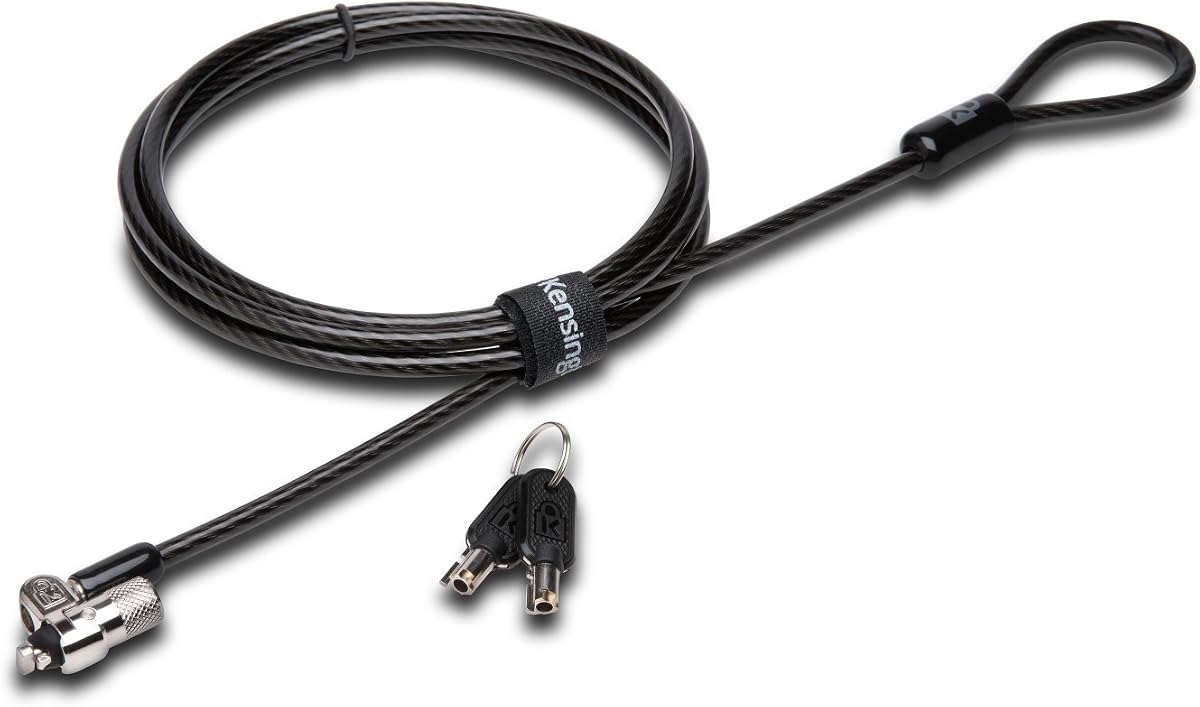
The Kensington T-Bar Standard Keyed Lock combines a familiar standard-slot format with a compact, pivoting lock head. Its 4.5 rating is among the strongest customer ratings in this group. The design targets laptops, desktops, televisions, monitors, hard drives, docking stations, projectors, and other products equipped with a Kensington security slot.
We may earn a commission when you buy through this link, at no additional cost to you.
The ten-millimeter pivoting head is intended to fit even thin laptops without becoming obtrusive. Hidden-pin technology supports the anti-pick tubular lock, while the special hinge helps eliminate awkward cable angles and makes locking and unlocking smoother. A six-foot carbon steel cable with a plastic sheath resists cutting while remaining flexible enough for routine repositioning.
This lock does not support 2016 and newer Dell laptops and tablets using the newer wedge slot. Certain HP products, including some EliteBook X2 tablets and Chromebooks, use the NanoSaver slot instead. The product information also notes eight-year and lifetime technical support, adding useful reassurance for a durable hardware accessory.
It is a strong fit for users who prefer keys and want a refined standard-slot lock for a thin notebook or desktop setup. Buyers should verify the exact slot before ordering, while organizations that do not want to manage keys may prefer one of the resettable combination alternatives.
The smaller pivoting head is designed to preserve access and stability on thin equipment. Its rotating geometry can also reduce awkward leverage on the cable, making the lock more practical for repeated daily use.
The tubular keyed core uses the stated hidden-pin anti-pick technology. Keys eliminate combination sharing concerns and can be especially convenient where only one person needs regular access to the tethered device.
We may earn a commission when you buy through this link, at no additional cost to you.
The Kensington Desktop & Peripherals Locking Kit 2.0 is built for more than a single notebook. Its 4.3 rating reflects positive feedback from users who want to secure desktop computers, monitors, and attached accessories. The system is particularly relevant to shared offices, repair areas, classrooms, and home workstations where multiple pieces of equipment need to remain together.
We may earn a commission when you buy through this link, at no additional cost to you.
Its strong lock head is designed for desktop PCs and other devices, while the five-millimeter keying system uses patented anti-pick hidden-pin technology. Two adapters and a cable trap help secure peripheral accessories. An anchor plate expands the system to equipment that lacks a Kensington security slot, and the eight-foot carbon steel cable provides generous reach.
Compared with a simple laptop cable, this kit involves more hardware and is intended for a broader workstation. The adapters and anchor plate must be positioned correctly for the included accessories to perform their intended function. Users should also account for the size and weight of the desktop-focused components around compact desks.
Choose this kit when protecting a full desktop setup matters more than minimizing the locking hardware. It is a particularly useful option for equipment without a native security opening because the included anchor plate creates an alternate attachment point. For a single slim notebook, one of the smaller laptop-specific locks may be easier to manage.
The adapters and cable trap are intended to keep peripherals attached to the main secured equipment. This makes the kit more useful for a complete desktop arrangement rather than only a computer tower that happens to have a compatible slot.
The included anchor plate provides a way to secure devices without a Kensington opening. Buyers can use this approach for compatible accessories, although correct placement and a stable mounting surface are essential.
We may earn a commission when you buy through this link, at no additional cost to you.
The Universal Hardware Cable Lock is aimed at mixed-device environments where a standard security slot may not be present. It has a 4.3 rating and includes a conventional lock head with keys, a six-and-a-half-foot cut-resistant steel cable with a PVC coating, and an anchor plate. The stated device applications include laptops, tablets, smartphones, monitors, projectors, and other electronics.
We may earn a commission when you buy through this link, at no additional cost to you.
For a laptop with a standard slot, the lock head can be inserted directly. For devices without one, the included adhesive-lined anchor plate is bonded to a hard surface and receives the locking head. The head is described as stainless steel with 360-degree rotation, helping the cable move without forcing awkward bends at the connection point.
Compatibility depends on how the device is secured. A native slot is preferable because it does not rely on an adhesive bond, while an adhesive plate may be less suitable for surfaces that are curved, textured, dusty, frequently handled, or exposed to heat. The product information also notes that some models may require a separate I3C adhesive security plate.
This option is best for users who need to secure several device types and already own a compatible standard-slot laptop. The included accessories add flexibility, but the need to understand the difference between slot-based and plate-based attachment is important. Check the surface and device carefully before applying the adhesive component.
A direct slot connection offers the cleanest installation for compatible laptops. The adhesive anchor plate provides a fallback for tablets, phones, and other electronics, allowing the same cable system to cover a broader collection of devices.
The six-and-a-half-foot PVC-coated steel cable allows enough movement to position equipment on a desk or table while keeping it tethered. The rotating head helps accommodate different cable directions when the device is used at an angle.
We may earn a commission when you buy through this link, at no additional cost to you.
The Universal Laptop Security Lock offers a different approach from slot-based products: it uses a three-point-five-millimeter audio port as the device’s attachment point. Its 4.1 rating is the lowest among these picks, but that should be interpreted alongside its broader purpose. It is designed for laptops that have no dedicated security slot, including many MacBook, Surface, Dell, Lenovo, tablet, and notebook models.
We may earn a commission when you buy through this link, at no additional cost to you.
The anchor adapter plugs into the headphone or auxiliary connection, and a screw is tightened to hold it in place. A cut-resistant steel cable measuring 1.7 metres connects the adapter to a resettable four-digit combination lock with 10,000 possible combinations. Installation is designed to take only seconds, which is useful for temporary deployments in offices, cafés, schools, restaurants, shops, and retail displays.
The main tradeoff is that the adapter occupies the audio port while installed. It is also important not to treat every device labeled as a laptop as universally compatible; the model must have the specified three-point-five-millimeter connection, and users should consider whether they need that port during use. The cable cannot stop every determined or properly equipped thief, but it serves as a visible theft deterrent.
This lock is a practical choice when a laptop has no native security slot and an audio port is available. It is especially attractive for traveling workers who want a portable, resettable lock without adhesive residue. A native-slot lock remains preferable when one is available because it does not consume a functional port.
The adapter transforms a common audio connection into a tethering point. This makes the lock relevant to many modern devices that omit a dedicated Kensington opening and helps preserve the option of taking portable security on the move.
The 1.7-metre steel cable provides ample working distance around a desk or table. A screw-in adapter and a flick-switch combination create a straightforward installation and removal process for temporary or changing workstations.
We may earn a commission when you buy through this link, at no additional cost to you.
The Kensington Combination Laptop Lock for Nano Size Security Slot is a compact choice for ultra-thin devices. Its 4.3 rating reflects generally favorable feedback, and the product is built around a slim lock head that allows a compatible laptop to remain flat and stable. The resettable four-wheel code provides 10,000 possible combinations and eliminates the need for a key.
We may earn a commission when you buy through this link, at no additional cost to you.
A five-foot carbon steel cable resists cutting and includes an anti-shearing plastic sleeve intended to protect nearby surfaces. The lock tip rotates 360 degrees, while the cable can rotate up to 90 degrees. This flexibility helps preserve access to ports near the security slot and makes repeated locking or unlocking more convenient.
The five-foot length is more compact than the six-foot cables used by many competing options, so buyers should measure the intended distance between the laptop and anchor point. Compatibility is also limited to nano-sized openings. A standard Kensington or Dell wedge slot will not accept this head, making device verification essential.
It is a recommended choice for owners of slim laptops with the appropriate Nano slot who want a small, key-free security accessory. It also offers a straightforward balance of portability and deterrence for shared workspaces. If your computer has a different slot, select the corresponding standard, Dell, or multi-slot design instead.
The slim head lets a compatible laptop lie flat and stable rather than remaining propped up by a bulky connector. That makes the lock easier to use on a desk where the computer may be opened, carried briefly, or positioned close to other equipment.
The 360-degree rotating tip and 90-degree cable movement help the lock sit at a comfortable angle. This is particularly useful when the security slot sits near ports or the edge of a thin chassis.
We may earn a commission when you buy through this link, at no additional cost to you.
The AboveTEK Laptop Lock is a multi-device security kit intended for laptops, notebooks, tablets, and smartphones that may not have a standard security slot. Its 4.4 rating indicates positive customer feedback. The package includes two sets of adhesive stickers and anchor plates, allowing protection across multiple mobile devices or more than one workstation.
We may earn a commission when you buy through this link, at no additional cost to you.
The lock body is described as stainless steel, while the six-foot galvanized steel cable is designed to resist cutting. Two keys are included for straightforward operation. Its stated uses include public libraries, cafés, restaurants, shops, retail point-of-sale locations, and showroom displays, where temporary tethering can help discourage opportunistic removal.
The adhesive anchors are the main point to evaluate. They use industrial-grade 3M adhesive intended to bond to most flat surfaces, but holding quality depends on surface texture, cleanliness, temperature, and whether the device is repeatedly moved. Although the plate can accommodate a larger notebook, a native security slot remains the more secure and less conspicuous method when one is available.
This kit is well suited to a collection of portable devices that need temporary protection. It offers extra mounting hardware and broad application potential, but it is not the first choice for a desktop where a permanent lock point already exists. Consider the adhesive method carefully before applying it to a valuable device.
Including two adhesive sticker and anchor-plate sets allows the same kit to secure more than one mobile device. That is useful for shared displays, hospitality counters, or a worker carrying both a tablet and a phone.
The six-foot cut-resistant cable and simple keyed operation provide a visible deterrent in public environments. Its value is greatest when temporary mobility and broad device compatibility matter more than a permanently integrated lock.
We may earn a commission when you buy through this link, at no additional cost to you.
The Kensington NanoSaver Combination Laptop Lock is intended for select HP, Lenovo, and Asus notebooks equipped with a nano-sized security slot. It has a 4.4 rating and combines a slim lock head with a resettable four-wheel combination. The stated feature set also includes support for selected Kensington docking stations, so checking the device specifications is essential.
We may earn a commission when you buy through this link, at no additional cost to you.
The slim head lets the laptop lie flat and avoids blocking valuable ports. A pivoting, rotating cable head supports one-handed operation and flexible positioning. The six-foot carbon steel cable has a plastic sheath that resists tampering and is described as offering the same level of cut and theft resistance as thicker cables, while retaining useful flexibility.
A notable advantage is Kensington’s Register & Retrieve program, which lets users store their combination online for later lookup if it is forgotten. The product information also states a two-year warranty and lifetime technical support. As with other compact slot-specific models, a laptop without the proper nano-sized opening cannot use this lock.
It is an excellent fit for a compatible ultra-thin computer whose owner wants to maintain a stable working posture and use a key-free combination system. The online code record is particularly useful for people who may forget combinations. For broader brand coverage, review the device list carefully before ordering.
The slim head is intended to keep the laptop flat and stable while leaving nearby ports usable. This focused construction makes it a natural choice for thin notebooks that would be destabilized by a larger standard-slot lock head.
The Register & Retrieve program provides a way to look up a forgotten code online. This adds convenience without changing the core resettable four-wheel system, which offers 10,000 possible combinations.
We may earn a commission when you buy through this link, at no additional cost to you.
The Sendt Universal Notebook Lock stands out for its broad hardware compatibility. Its 4.9 rating is the highest among the products supplied, while its stated compatibility includes Kensington, Nano, MiniSaver, Noble wedge, Samsung, and most other security slots. This makes it an appealing option for users who own more than one device or are unsure which slot format a computer uses.
We may earn a commission when you buy through this link, at no additional cost to you.
The lock combines a six-foot cut-resistant cable with a resettable combination mechanism and a simple installation process. It avoids the need to carry keys, and its understated black cable is intended to blend into a shared office or home workspace. The combination provides a practical theft deterrent when equipment needs to remain connected temporarily to a desk or another fixed object.
Broad compatibility comes with a need for reasonable care. A universal head must accommodate several geometries, so buyers should compare the opening on their device with the product’s stated supported formats. As with every cable lock, it is a deterrent rather than an absolute barrier against a determined thief using suitable tools.
This is a strong recommendation for a buyer who wants one combination cable to cover several laptop brands and slot styles. It is especially useful for mixed IT environments, shared workspaces, and travel kits containing different computers. Owners of a single device with a standard slot may prefer a dedicated model for a more specialized fit.
Support for Kensington, Nano, MiniSaver, Noble wedge, Samsung, and other common slots substantially reduces the need to maintain separate cables. It is a practical choice for mixed-device households, offices, and traveling professionals.
The resettable combination removes key carrying and distribution from the routine. Once the head is seated in a compatible slot, the six-foot cut-resistant cable provides a visible deterrent and flexible positioning around a fixed anchor.
We may earn a commission when you buy through this link, at no additional cost to you.
The right laptop lock cable depends less on brand names and more on the exact security opening, device thickness, key-management preferences, and intended anchoring point. Use the following factors to narrow the field before comparing cable length and construction.
Start by finding the opening on your laptop. A standard Kensington slot accepts a traditional T-bar head, a nano-sized slot requires a compact Nano-style lock, and Dell wedge openings need a Dell-specific design. Some devices use MiniSaver, Noble, Samsung, or other formats. The lock head must match the slot geometry closely for a secure engagement, so check the device’s technical specifications and compare the opening with the product’s compatibility list before ordering.
In short, measure and identify the slot before selecting any cable. Brand compatibility alone is not enough because models from the same manufacturer can use different security formats.
A native security slot is generally the cleanest method because it uses a purpose-built opening and does not cover a functional port or rely on an adhesive bond. Audio-port adapters can support modern laptops that omit a dedicated slot, while adhesive anchor plates are useful for tablets and phones. These alternatives add flexibility, but they may occupy a port or depend on the condition and texture of the mounting surface.
Choose a native-slot lock when available. Otherwise, compare the convenience of a screw-in port adapter with the portability and appearance of an adhesive plate.
Combination locks eliminate keys and offer a resettable code, making them convenient for individual users and temporary shared access. Keyed locks can suit offices with controlled key issuance, while anti-pick mechanisms add another layer to the physical lock core. Combination security depends on users recording their code, while keyed convenience depends on keeping keys accessible and accountable.
Pick a combination for key-free convenience, or a keyed model for centralized key management. Always consider who will need regular access to the tethered device.
Cable length determines how far a device can move from its anchor. Five-foot cables suit compact workspaces and portable kits, while six-foot models offer more positioning freedom around a desk. Eight-foot cables can be useful for larger workstations but are less convenient to carry. Before choosing, measure the distance from the laptop’s slot to the intended fixed structure and consider how the cable will be routed.
Choose the shortest length that comfortably reaches the anchor point. More cable is useful only when it does not create clutter or become easy to unplug.
The lock head affects both security and usability. A bulky head may stop a thin laptop from lying flat, while a narrow or pivoting design can preserve stability and access to nearby ports. Ultra-thin laptops frequently benefit from Nano-style models, while universal or multi-slot locks need to balance adaptability against fit. The cable’s rotation and the head’s pivoting range also influence how comfortably the device can be positioned.
For a slim notebook, favor a low-profile head that allows a stable working position. For a desktop, prioritize engagement strength and accessory support over compact dimensions.
Carbon steel, galvanized steel, and stainless steel are common materials in this category. Look for a cut-resistant cable, a protective sheath or sleeve, and a steel lock head. These features create a visible and physical deterrent, although no portable cable lock can guarantee protection against every prepared thief. The anchor structure should also be stable and difficult to lift or remove.
Steel cable construction and a protected sheath offer a stronger deterrent than a thin uncoated line. Pair any cable with a solid fixed anchor for the most convincing setup.
Workplaces, classrooms, libraries, cafés, retail counters, and shared homes face different practical demands. A permanent office setup may benefit from a standard or Nano lock with a long cable, while mobile workers may prioritize a compact combination model. Public displays often require enough cable length to move a tablet while keeping it tethered. Commercial installations may also need multiple anchor plates or adapters for a group of devices.
Match the lock to the environment rather than choosing only by appearance. Portability, sharing, device movement, and the availability of a solid anchor all affect the ideal design.
Useful extras include resettable codes, online combination registration, one-handed operation, pivoting heads, anti-shear sleeves, and included adapters. Registration can be valuable for combination locks, while multiple adapters can make a mixed equipment kit easier to deploy. Warranty and technical support are also relevant for a mechanical accessory expected to see repeated daily use.
Prioritize features that remove common friction, such as code recovery and easy locking. Extra hardware is most useful when it matches the devices and environment you actually have.
Before installation, confirm that the lock head matches your device’s security opening. Clean and inspect the slot and connector, then loop the cable around a solid desk frame or other fixed structure that cannot be lifted easily. Keep the cable clear of chair wheels, sharp edges, doors, and mechanisms that could damage its sheath or create an accidental disconnect.
Attach the lock using the mechanism specified for its design. For a keyed model, insert and turn the key before checking the engagement point. For a combination model, set the code in the required sequence and test it several times. When using an adapter or anchor plate, attach it to a clean, flat, stable surface and allow any stated adhesive curing period before placing the device under tension.
For routine care, wipe the lock head and cable with a soft, dry cloth and remove grit that could enter the locking mechanism. Avoid pulling the device by the cable, extending it beyond its intended length, or sharply bending the connector. Periodically inspect the sheath, anchor, and lock engagement, and move or replace an adhesive anchor if it begins to lift or lose its seal.
Check the security opening on the side or underside of your laptop and identify whether it is a standard Kensington, Nano, Dell wedge, or another format. The manufacturer’s technical specifications should provide the exact slot type. If no opening is present, consider a purpose-built audio-port adapter or an anchor-plate system instead of forcing a slot-based lock into the chassis.
For individual or temporary use, combination locks are often more convenient because there is no key to carry, lose, or distribute. Each user must remember and securely record the code. Keyed models can be preferable in managed offices where keys are tracked and only a small number of people need access.
Yes, but the attachment method changes. Some products use a compatible three-point-five-millimeter audio port as an anchor, while others include adhesive plates that bond to the device or another suitable surface. Port adapters can interfere with using that connection, and adhesive anchors depend on surface condition, so a native slot is generally preferable when available.
That depends on the design. A bulky standard T-bar head may raise one side of a slim notebook, while a compact Nano-style head is specifically intended to let the device remain flat and stable. Universal and Dell-specific heads may also fit securely but occupy more space than a purpose-designed ultra-thin model.
Choose a length that allows normal movement while keeping the device tethered without excessive slack. Five-foot cables suit portable and compact setups, while six-foot cables offer more flexibility around a standard desk. Measure from the intended anchor to the device slot and check that the cable will not interfere with nearby ports, chairs, or foot traffic.
They can be useful for devices without a security opening, but they depend on the adhesive’s bond with the surface. Clean, flat, stable surfaces generally produce better results than curved, textured, dusty, or frequently handled areas. A native security slot is usually more consistent because it was engineered as part of the device chassis.
Only if the devices use compatible openings and the lock includes suitable adapters or anchor hardware. Universal-style locks cover several common slot formats, while multi-device kits may include adhesive plates for phones and tablets. Check both the supported slot list and the included components before assuming one cable can secure every device.
Inspect the sheath regularly and clean the lock head with a soft, dry cloth. Keep the cable away from sharp edges, moving chair wheels, and pinch points, and do not pull a device by the cable. If the sheath is cut, the lock no longer engages properly, or an adhesive anchor lifts, address the issue before relying on the setup again.
The Sendt Universal Notebook Lock stands out for broad compatibility and the highest customer rating in this group, making it a compelling single-cable option for mixed devices. The Kensington T-Bar Keyed Lock is ideal when a refined standard-slot connection and anti-pick keyed design are priorities, while the Kensington Nano Combination Lock provides compact, key-free protection for ultra-thin notebooks with the proper slot.
The most important buying decision remains compatibility. Verify the exact security opening before choosing a model, and favor a native-slot lock when your equipment has one. If it does not, compare the tradeoffs of an audio-port adapter and an adhesive anchor, then select the method that offers the most stable connection for your workspace and usage pattern.
Also consider cable length, lock size, access around ports, and whether combination or keyed operation fits your routine. Product availability, included accessories, and current offers can change over time, so confirm the final specifications and package contents on the product page before making a purchase.