
Amicool External DVD Drive
4.2Editor score
USB 3.0 and Type-C
DVD and CD read/write
Windows 11 compatible
Compare 10 of the best DVD Player for Windows 11 options, covering external drives, disc support, connectivity, portability, and everyday playback needs.
Finding a DVD player for Windows 11 usually means looking for an external optical drive, because most modern laptops and many desktop PCs no longer include a built-in disc drive. A useful model should connect without demanding complicated setup, recognize common DVD and CD formats, and be portable enough for a laptop bag, office drawer, or travel kit.
This guide compares ten options based on Windows 11 compatibility, connection style, disc-reading and writing capabilities, portability, included software, and physical design. It covers external computer drives as well as standalone DVD players, clearly identifying which products can actually connect to a PC and which are intended for televisions and projectors.
Each review explains the strongest feature, practical limitations, and the type of user most likely to benefit. The top selections demonstrate the most balanced approach to computer use, while the remaining products provide useful alternatives for specific needs. Product prices and availability can change, so confirm the current listing before buying.
4.2Editor score

4.5Editor score
4.3Editor score
The comparison below separates true computer-compatible optical drives from standalone players designed for televisions, highlighting connection types, disc support, portability, and special features that matter when using physical media with a Windows 11 PC.



The Amicool External DVD Drive is a practical all-around choice for a Windows 11 laptop or desktop that needs an optical drive without sacrificing portability. It carries a 4.2 rating and supports both USB 3.0 and Type-C connections, giving it more flexibility than a model restricted to one connector. It can read and write DVD+R, DVD-R, CD-R, and CD-RW media.
We may earn a commission when you buy through this link, at no additional cost to you.
Its standout qualities are straightforward setup, a slim body, and an integrated cable design that reduces the chance of leaving a required cable behind. The drive is usually detected without extra drivers, and its stated transfer speed reaches 5Gbps. Maximum DVD read speed is 8x, while maximum CD read and write speed is 24x. Intelligent error correction and anti-shock technology are also included.
There are important limitations. It does not support DVD-RAM, Blu-ray discs, or certain proprietary formats, so it is not suitable for every optical-disc task. Recognition problems can occur when a laptop supplies insufficient power; the manufacturer recommends a direct USB connection, keeping the laptop plugged into power, and avoiding hubs or extension cables. Desktop users are advised to use a rear motherboard port.
This is a sensible recommendation for a Windows 11 user who wants disc playback, basic disc burning, and easy portability without a large collection of separate adapters. It works best when connected directly to a reliable port, and buyers should confirm that the discs they own use one of its supported formats.
USB 3.0 and Type-C support make this drive useful with a wide range of modern Windows 11 systems. The integrated cable is convenient for travel, although a separate Type-C adapter may still be needed depending on the computer's available ports.
The drive supports common DVD and CD formats for playback, disc creation, and basic backups. Its 8x DVD reading and 24x CD read/write capabilities make it suitable for routine media tasks rather than specialized archival workflows.
We may earn a commission when you buy through this link, at no additional cost to you.
The Dell External USB Slim DVD RW Drive DW316 combines a refined physical design with the highest rating in this comparison. Its 4.5 rating reflects a favorable reception, while the 14mm-thick, 200g enclosure makes it especially appropriate for Ultrabooks and notebooks. It can play and burn DVDs and CDs without batteries or a separate power cord.
We may earn a commission when you buy through this link, at no additional cost to you.
One of its strongest benefits is the preloaded CyberLink Media Suite, reducing the work required to begin playing or burning discs. The streamlined enclosure also complements modern workspaces, and the drive draws power directly from the computer's USB port. A one-year limited hardware warranty adds support without changing the basic plug-and-play format.
The main trade-off is that the product description does not advertise a modern Type-C cable or a high-speed USB interface. That makes it more conventional than several newer-looking alternatives, particularly for users whose computers emphasize USB-C. It is a computer optical drive rather than a standalone television player, which is exactly what Windows 11 users need.
The DW316 is a strong recommendation for someone who values a slim, established design, bundled playback software, and straightforward USB operation. It is particularly useful for playing and burning conventional DVD and CD media from a compatible Windows 11 notebook without managing separate power cables.
CyberLink Media Suite provides a convenient starting point for playing discs and creating DVD or CD media. This makes the drive approachable for users who want one package to handle common optical tasks.
At 14mm thick and 200g, the DW316 is easy to carry between home, office, and classroom. USB bus power removes the need to carry batteries, while the low-profile shape fits naturally beside a slim laptop.
We may earn a commission when you buy through this link, at no additional cost to you.
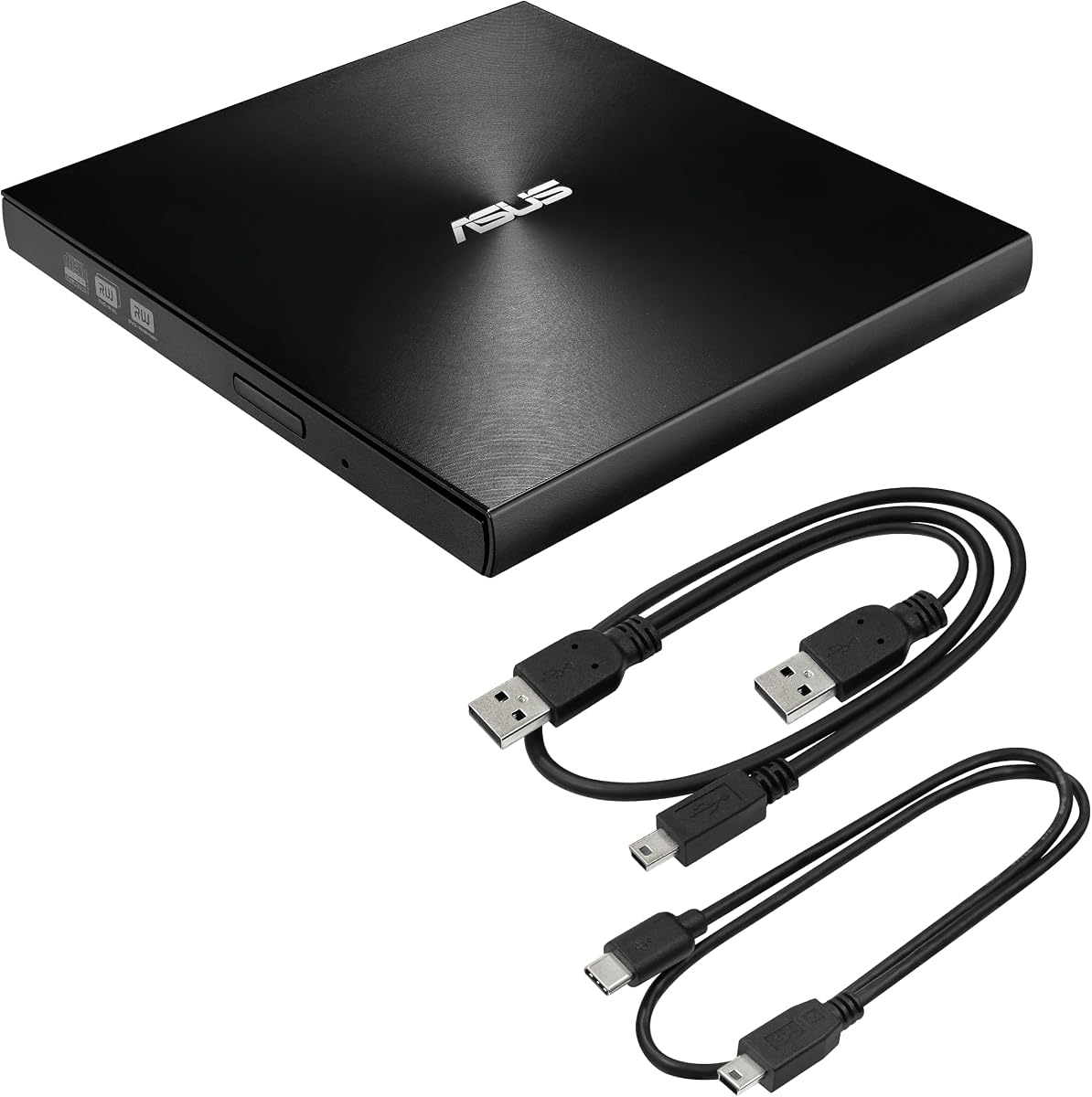
The ASUS ZenDrive Black 13mm is the premium choice in this list, combining an exceptionally thin enclosure with M-Disc support and a 4.3 rating. It is built for users who want to read or write discs on either a Mac or a Windows computer while preserving a compact, professional footprint.
We may earn a commission when you buy through this link, at no additional cost to you.
The package includes both USB 2.0 and Type-C cables, reducing the chance of being unable to connect to a chosen system. Its 13mm profile is even slimmer than the Dell DW316, and the drive supports 8x DVD operation. M-Disc support is particularly valuable for long-term storage, while DISC Encryption II adds password control and hidden-file functionality.
Its interface is USB 2.0 rather than the newer USB 3.0 used by several less expensive competitors. That distinction may matter for sustained transfers, although the product is primarily presented as a slim optical reader and burner for installation media, music, movies, and archival discs. Nero BackItUp support for Android devices broadens its backup-oriented use.
This drive best suits a Windows 11 user who values thinness, M-Disc capability, encryption options, and broad Mac-PC flexibility over the newest transfer interface. It is a particularly thoughtful choice for creating a physical media library that is intended to remain accessible over time.
M-Disc support distinguishes the ZenDrive from ordinary external drives focused only on playback and routine burning. It is a meaningful advantage for users building a physical archive that they expect to consult years later.
DISC Encryption II provides password controls and hidden-file functionality, while Nero BackItUp support is included for Android-device workflows. These tools complement the hardware for users who think beyond simple disc playback.
We may earn a commission when you buy through this link, at no additional cost to you.
The OAKCASTLE DVD100 is a standalone DVD player intended for a television rather than a Windows 11 computer. It earns a 4.1 rating and stands out for multi-region disc playback, 1080p upscaling, and a useful collection of connections. Users can connect it to a television through HDMI or RCA and navigate the player with the included remote control.
We may earn a commission when you buy through this link, at no additional cost to you.
It supports DVD movies, CDs, MP3 files, and media connected through USB. The package includes the player, two AAA batteries, an HDMI cable, RCA AV cable, manual, and remote. This makes the core viewing setup straightforward, while multi-region playback is particularly useful for users with discs from different regions.
The most important limitation is decisive: it is not an external computer drive and does not serve as a Windows 11 DVD player. It cannot read a disc through File Explorer or be used by Windows software as a conventional optical drive. Its 1080p output is upscaling rather than native 1080p disc-video decoding, and it does not support Blu-ray.
Choose the DVD100 when the goal is to watch physical media on a television, perhaps alongside a Windows 11 computer for digital media. It is not a substitute for an external USB DVD drive, so buyers searching specifically for PC connectivity should move to one of the computer-focused models in this guide.
Including both HDMI and RCA cables makes the player adaptable to newer and older televisions. The included remote and batteries provide most of the necessary controls for a quick setup.
USB playback supports stored movies, music, and photos, while CD and MP3 playback cover familiar audio formats. This broadens the unit's usefulness beyond a single disc collection.
We may earn a commission when you buy through this link, at no additional cost to you.
The BPAKDU External CD/DVD Drive is the most multifunction-oriented computer option here. It has a 4.3 rating, supports Windows 11, and combines an optical drive with a USB hub and memory-card reader. Its eight-in-one layout includes one USB 3.0 hub port, three USB 2.0 ports, SD and TF card access, and a USB-C connection.
We may earn a commission when you buy through this link, at no additional cost to you.
The optical side handles common CD and DVD formats for reading and writing, including CD-R, CD-RW, DVD-R, DVD-RW, and DVD-RAM. It also supports VCD and SVCD. USB 3.0 transfer rates are stated at up to 5Gbps, with 8x DVD reading and 24x CD read/write speeds. The card reader is especially useful for transferring photos and video from a camera.
Its port cluster introduces several practical caveats. A computer with limited USB connectivity may benefit from the extra ports, but some laptops may not provide enough power for every function at once. The manufacturer suggests using the extra power cable if the drive is not recognized. SD and TF cards also cannot be used simultaneously.
The BPAKDU drive is a good fit for a Windows 11 workstation or laptop that needs one compact accessory to handle optical discs, removable cards, and additional USB devices. Users focused purely on slim disc playback may prefer a simpler drive, but this model maximizes utility per cable connection.
The integrated USB hub and memory-card reader turn the unit into a small connectivity hub. That makes it useful for transferring camera files and connecting several peripherals without competing for every available computer port.
Support for standard CD and DVD recordable formats, DVD-RAM, VCD, and SVCD gives this drive broader disc versatility than many basic models. It remains a DVD and CD device rather than a Blu-ray drive.
We may earn a commission when you buy through this link, at no additional cost to you.
The Rioddas External CD/DVD Drive blends a 4.3 rating with a portable, travel-conscious design. It connects to a Windows 11 PC through USB 3.0 or Type-C, usually appears automatically, and requires neither an external driver nor a separate power adapter in normal use.
We may earn a commission when you buy through this link, at no additional cost to you.
Its embedded cable keeps the connection ready for packing, while the brushed shell gives it a modern appearance. A physical eject button is a particularly thoughtful detail because it can release a disc even if the computer fails to recognize the drive. The stated interface reaches 5Gbps and remains backward compatible with USB 2.0.
The drive supports conventional CD-ROM, recordable and rewritable CD media, DVD-ROM, DVD-R, DVD+/-RW, DVD+/-DL, and VCD. It is not compatible with Blu-ray or 4K discs, ChromeOS devices, smartphones, tablets, TVs, projectors, or vehicle systems. For desktop stability, a rear USB port is recommended.
This is a compelling option for a Windows 11 user who frequently carries a laptop and wants a dependable reader and writer. It offers a better balance of useful physical details, broad operating-system support, and modern connectivity than a very basic external drive, making it a strong all-purpose recommendation.
Copper mesh technology is included to support stable data transmission, while fault-tolerance features are designed to reduce freezing, skipping, and errors. A direct port connection remains the best method for consistent performance.
The eject button offers a mechanical way to remove a disc without relying entirely on software. It is especially helpful when Windows has not recognized the drive or a disc is not being read correctly.
We may earn a commission when you buy through this link, at no additional cost to you.
The ORIGBELIE External CD/DVD Drive is a slim 13mm option with a 4.2 rating. It weighs 0.2kg, uses an integrated cable design, and supports both USB 3.0 and Type-C. The drive is compatible with Windows 11, older Windows releases, Linux, and Mac OS 10.6 or above, making it a flexible choice across computer platforms.
We may earn a commission when you buy through this link, at no additional cost to you.
Disc support is extensive for a standard DVD and CD unit. It reads and writes CD+/-R/RW, CD-ROM, DVD+/-R/RW, DVD-ROM, DVD-RAM, single-sided and dual-layer DVD formats, VCD, and SVCD. Maximum DVD and CD read/write speed is listed at 8x and 24x, respectively, with USB data transfer reaching up to 5Gbps.
Some systems may need help with disc recognition. The included USB-A-to-5V charging cable can connect to a charger or power bank for extra power, which is especially relevant to computers with limited USB output. The product's warranty is 90 days, shorter than the one-year support stated for the BPAKDU drive.
The ORIGBELIE is well suited to a Windows 11 user who travels frequently and wants more disc-format flexibility than a minimal drive. Its included storage bag, low weight, and dual connector support make the package easy to organize, provided the buyer is comfortable with the shorter warranty period.
At 13mm and 0.2kg, the drive is small enough to remain unobtrusive beside a laptop. The integrated cable and included storage bag address two common packing problems: a loose cable and a drive without a dedicated place in a bag.
DVD-RAM, dual-layer DVD, CD rewritable, VCD, and SVCD support cover a wide collection of physical media. The extra-power cable remains useful when a computer's port cannot reliably operate the drive.
We may earn a commission when you buy through this link, at no additional cost to you.
The External CD/DVD Drive for Laptop is a compact, general-purpose option with a 4.2 rating. It can act as a reader, writer, burner, player, and ripper, giving Windows 11 users a single device for common disc tasks. USB 3.0, USB 2.0, and USB 1.0 compatibility support both newer and older computers.
We may earn a commission when you buy through this link, at no additional cost to you.
Maximum DVD write speed is 8x and maximum CD write speed is 24x. The drive handles CD-ROM, CD-R, CD+/-RW, DVD-ROM, DVD-R, DVD+/-RW, DVD-R DL, and VCD-ROM media. Its compact body includes a brushed texture, an embedded cable slot, dual USB-A and USB-C connectors, and an anti-skid base.
A distinctive physical feature is additional clearance around the disc inside the tray. The manufacturer says this helps avoid problems with unusually thick disc labels that can interfere with disc loading. Compatibility wording includes numerous older Windows and Mac releases, but it specifically excludes TVs, cars, iPads, Chromebooks, Surface Pro, and Ubuntu.
This is a good selection for a Windows 11 user who wants a lightweight drive for playback, simple disc creation, and file transfer. It does not offer a memory-card reader, an encryption suite, or archival-disc features, but it covers the essential functions in a simple package.
The drive can read, write, burn, play, and rip discs, making it adaptable to different media workflows. It is a practical addition for a modern computer that no longer includes a built-in optical mechanism.
The expanded internal clearance is intended to reduce loading problems caused by thick or raised labels. That practical tray design can be more meaningful day to day than an extra specification that never gets used.
We may earn a commission when you buy through this link, at no additional cost to you.
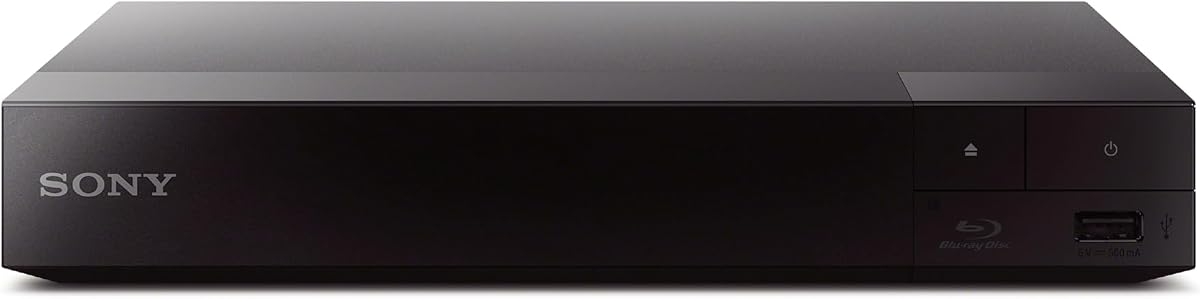
The Sony BDP-S1700U is a standalone Blu-ray and DVD player with a 4.3 rating. It is designed for a television or display rather than a Windows 11 computer, but it is the strongest premium option in the guide for users whose physical-media priorities include Blu-ray alongside DVDs.
We may earn a commission when you buy through this link, at no additional cost to you.
It plays Blu-ray movies in Full HD, plays standard DVD discs, and upscales DVDs to near-HD quality. The included HDMI cord simplifies setup, while a super-quick start mode is designed to reduce waiting after power-on. Its user-friendly interface keeps navigation straightforward for a living-room device.
Region restrictions are the main caveat. The listed region codes are Blu-ray Disc A and DVD Disc 1, so discs encoded for other regions may not play. It also cannot serve as an external disc drive for Windows 11, and it is much bulkier than a laptop-oriented optical drive.
The BDP-S1700U is best for someone building a home-theater setup that needs both Blu-ray and DVD support through one dedicated player. If the requirement is specifically to read discs on a Windows 11 computer, choose an external USB optical drive instead.
Handling both disc formats in one unit makes the player convenient for collections that mix pressed DVDs and Blu-ray discs. DVD upscaling offers a modest visual improvement for standard-definition content.
The included HDMI cable, quick-start mode, and accessible interface reduce setup friction. The player is positioned for television viewing rather than computer installation.
We may earn a commission when you buy through this link, at no additional cost to you.
The DESOBRY Mini DVD Player is designed to save space around a television or projector. It has a 4.2 rating, measures 6.1 by 5.9 by 1.2 inches, and weighs 1.1 pounds. It is a standalone player rather than a Windows 11-compatible external drive.
We may earn a commission when you buy through this link, at no additional cost to you.
Its major advantages are region-free playback for standard DVD formats, 1080p upscaling, and support for both modern HDMI displays and traditional RCA televisions. The package includes HDMI and RCA cables, a USB cable, remote control, adapter, and manual. A one-year warranty and lifetime professional customer support are also stated.
Feature limitations are worth noting. It does not support Blu-ray or MP4 files. USB and TF media playback is limited to listed formats, with FAT32 and a maximum 32GB stated for card use. CD playback is audio-only, and the player cannot connect to a computer as an external disc drive.
The DESOBRY is a good fit for a small entertainment area where a full-size player would be inconvenient, especially for a user with a mixed-region standard DVD collection. It should be treated as a television accessory, while Windows 11 users should select a USB-connected computer drive from the guide.
The compact enclosure takes up far less room than a conventional DVD player. That makes the device useful in small rooms, on shelves with limited clearance, or beside a compact projector.
Region-free support covers standard DVD, DVD+R, DVD+RW, CD, CD-R, CD-RW, VCD, SVCD, and photo CD formats. Breakpoint memory resumes playback from the prior stopping point, which is convenient for longer movies.
We may earn a commission when you buy through this link, at no additional cost to you.
The most important decision is whether you need a computer optical drive or a standalone television player. After confirming that distinction, compare connector types, disc formats, power requirements, portability, software, and warranty support.
A Windows 11 DVD player must be an external optical drive that connects through USB and appears as a disc device in the operating system. Standalone players such as the OAKCASTLE DVD100, Sony BDP-S1700U, and DESOBRY Mini DVD Player connect to televisions or projectors and cannot be used to read discs through a Windows computer. The DESOBRY product explicitly states that it cannot connect to a computer as an external disc drive.
Modern Windows 11 systems may use USB-A, USB-C, or both, so the connector arrangement deserves careful attention. The Amicool, Rioddas, ORIGBELIE, and BPAKDU drives support both USB 3.0 and Type-C. The ASUS ZenDrive includes USB 2.0 and Type-C cables. The Dell DW316 is described as a USB external drive without a stated Type-C cable, so buyers should confirm the connector included with the current package.
Reading DVD and CD media is the minimum for many users, while writing adds the ability to create discs, copy files, install software, and make backups. Check the supported list carefully. DVD-RAM appears on the BPAKDU and ORIGBELIE lists but not on the Amicool list. DVD-R DL, VCD, and SVCD support varies as well. None of the computer drives in this guide should be assumed to read Blu-ray or 4K discs.
External optical drives are most useful when they are small enough to accompany a laptop. The ASUS ZenDrive and ORIGBELIE drive are both listed at 13mm thick, while the Dell DW316 is 14mm and weighs 200g. Integrated or embedded cable designs reduce loose-cable problems. Standalone players should instead be evaluated for shelf space, included cables, remote controls, and display compatibility.
External drives normally draw power from the computer, but some laptops, especially older models or units with limited USB output, may not supply enough power for reliable operation. Direct connection to a rear desktop USB port is commonly recommended. The BPAKDU and ORIGBELIE products include an auxiliary power option, while the Amicool guidance emphasizes keeping the laptop plugged in and avoiding hubs or extension cables.
A stated 5Gbps interface does not determine DVD or CD read speed, so both types of specification deserve attention. The most consistently documented optical speeds are 8x for DVD and 24x for CD. For software, the Dell DW316 includes CyberLink Media Suite, and the ASUS ZenDrive adds Nero BackItUp and DISC Encryption II. Windows 11 users should also be prepared to use a compatible media player for ordinary DVD viewing.
A television player should be judged by region support, upscaling, output connections, and media formats. The OAKCASTLE DVD100 offers multi-region playback, while the DESOBRY Mini DVD Player is smaller and includes breakpoint memory. The Sony BDP-S1700U adds Blu-ray but carries region A and region 1 codes. Check TV compatibility and the exact disc types before selecting a standalone model.
Warranty length can provide a useful indication of how the seller expects the product to be supported, although it is not a substitute for checking current listing terms. The Dell DW316 includes a one-year limited hardware warranty, the BPAKDU drive states one year of after-sales warranty, and the DESOBRY player lists one year. The ORIGBELIE drive has a 90-day warranty, while the Sony unit is focused on consumer electronics support.
Begin by identifying the correct connector and plugging the external drive directly into the Windows 11 computer. For a desktop, use a rear USB port when possible. Keep the computer connected to power, avoid unpowered hubs and extension cables, and wait for Windows to detect the device before opening a disc. If no icon appears, try another direct port and restart the computer.
Insert a clean, standard-format disc with the printed side facing upward. Windows may display the optical-drive icon, but a compatible media player is still required for video playback. Avoid touching the shiny data surface, and do not force a disc that will not load. If a disc is scratched, dirty, or oddly shaped, clean or remove it rather than repeatedly cycling the tray.
For writing, select files in a disc-burning application and confirm the target format before starting. Do not move the drive or unplug its cable during burning, and do not use the same disc for multiple incompatible formats. Store the drive in a padded case, keep its cable attached or together, and let it cool before moving it after a long read or write session.
Usually, yes, unless your computer still includes a built-in optical drive. Most modern Windows 11 laptops lack one, and many compact desktops also omit it. An external drive connects through USB and allows Windows and compatible playback software to access a physical DVD. Confirm that your chosen drive supports the specific disc format you intend to use.
No. A standalone DVD player sends video and audio to a television through HDMI or composite connections; it does not act as a USB optical drive for Windows. The OAKCASTLE DVD100, Sony BDP-S1700U, and DESOBRY Mini DVD Player are intended for television viewing. Choose a computer-compatible USB drive for reading discs in File Explorer or other Windows applications.
Insufficient power or an unsuitable connection is a common reason. Plug the drive directly into the computer, use a rear motherboard port on a desktop, and keep the laptop connected to its charger. Try another USB port and restart Windows before troubleshooting drivers or disc playback. Some systems may also need the auxiliary power cable included with certain models.
The computer-compatible drives in this guide are for DVD and CD media and should not be assumed to support Blu-ray or 4K. Some explicitly exclude Blu-ray. The Sony BDP-S1700U is a standalone television player that does support Blu-ray, but it cannot be connected to Windows 11 as a computer drive. Check the product's supported-format list before buying.
DVD-R and DVD+R are recordable DVD formats, while DVD-RW is rewritable and can be erased and reused. Recordable discs generally cannot be rewritten, while compatible rewritable media can be used multiple times. A drive must support the specific format you plan to use, and some listed computer drives do not support every writable DVD format.
Yes, when the drive is recognized by Windows and the disc contains a normal software installer. Insert the disc, allow Windows to scan it, and open the installer from File Explorer or the optical-drive prompt. Older installers may require compatibility settings, administrator permission, or additional drivers, so check the software requirements before installation.
A USB 3.0 interface can provide a higher data-transfer ceiling and is preferable for modern computers. However, physical DVD and CD media have their own maximum read and write speeds, so the optical mechanism may remain the limiting factor. Interface speed matters most when transferring files, while disc playback and burning are also governed by the media and drive's rated disc speeds.
The answer depends on whether you own discs, need offline installation media, or want to create physical backups. A Windows 11 external drive remains useful for playing owned DVDs, installing disc-based software, reading music CDs, and burning files. If you no longer use physical media and only want on-demand video, a streaming subscription may be more convenient.
The Amicool External DVD Drive is the most balanced budget-oriented computer choice, offering USB 3.0, Type-C, disc writing, and a portable integrated-cable design. The Dell DW316 stands out for its refined 14mm construction, bundled CyberLink software, and higher customer rating, while the ASUS ZenDrive provides the most premium feature set with M-Disc support, encryption, and an exceptionally slim body.
Prioritize a direct USB connection, supported disc formats, and the correct connector type. BPAKDU is worth considering when a card reader and USB hub are valuable; Rioddas offers a particularly balanced travel design; and ORIGBELIE combines a slim body with broad format support. The OAKCASTLE, Sony, and DESOBRY products belong in a television setup rather than a Windows 11 computer workflow.
Always check the current product listing for connector contents, format support, warranty terms, and availability. Product prices and seller details can change, and the right choice ultimately depends on your computer's ports, the discs you use, and whether you need only playback or also want burning and archival functions.