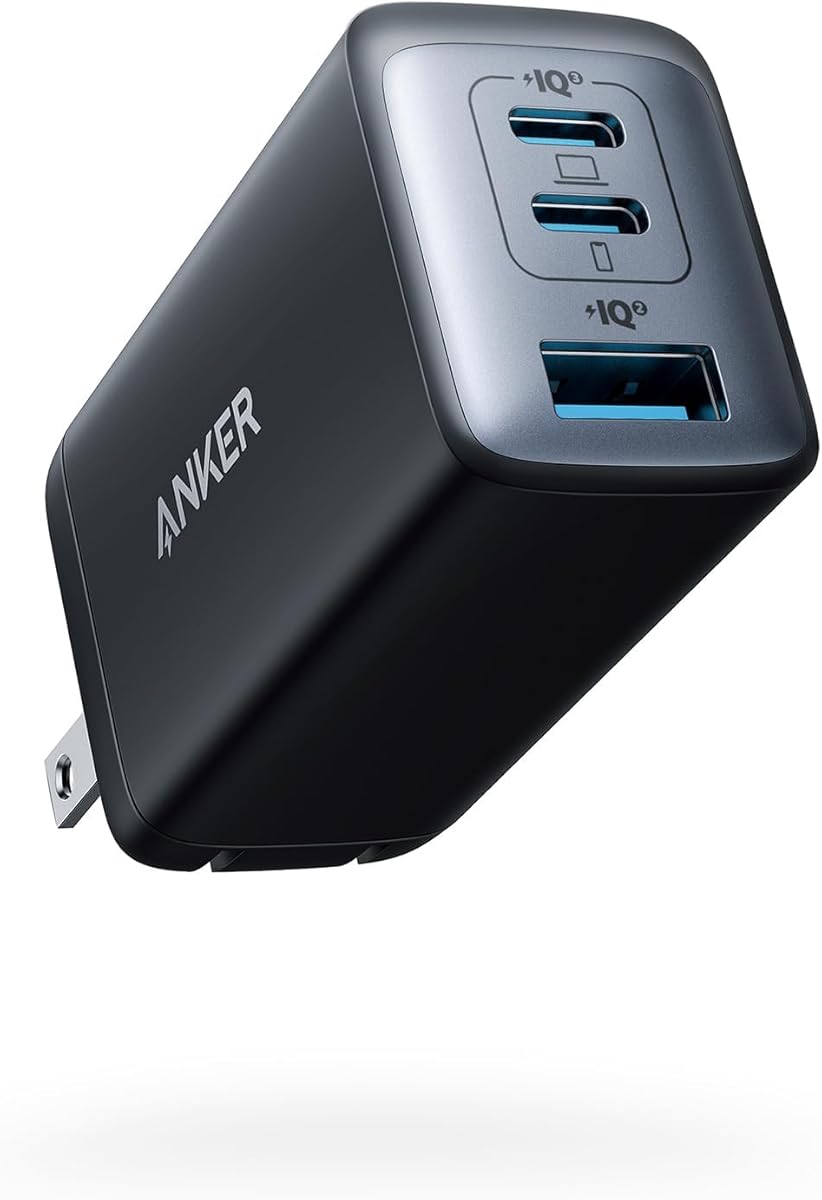
Anker 65W Max 3-Port USB C Charger Block
4.7Editor score
65W single-device charging
Three integrated charging ports
Compact GaN II construction
Explore an expert comparison of 10 Anker Gan Charger models covering power, portability, smart displays, laptop charging, safety, and multi-device use.
Anker Gan Charger models combine gallium nitride technology with compact construction to deliver substantial charging power without the bulk of conventional power adapters. The right model depends on your devices, travel habits, and appetite for smart features such as displays, app controls, or automatic power distribution.
This guide compares 10 Anker GaN chargers using the information supplied for each product, focusing on total output, individual port capabilities, portability, safety features, display functions, and the number of devices each model can support. It covers options for phones, tablets, notebooks, desktop setups, and international travel.
Each review identifies the charger best suited to a particular use, while the comparison table makes the major differences easy to scan. The top picks cover budget, premium, and display-equipped options, but product features and prices can change, so readers should verify current listings before purchasing.
4.7Editor score

4.7Editor score

4.6Editor score
This side-by-side comparison shows each charger's total power, port configuration, portability, and standout features, helping you match a charger to your devices rather than choosing on power alone.


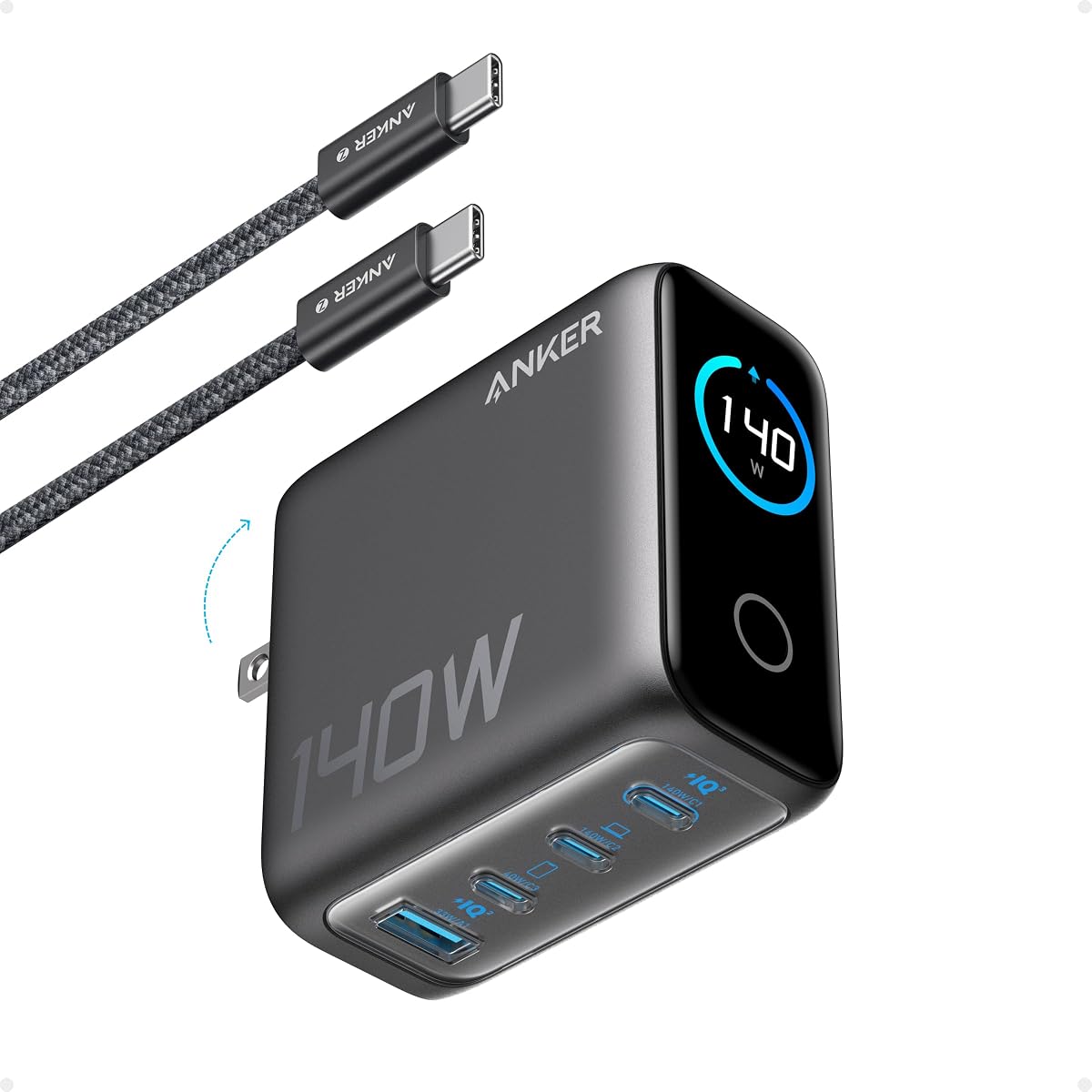


The Anker 67W 3-Port Charger combines generous laptop-class power with a remarkably compact wall-plug form. It carries a 4.6 rating and is designed for people who want to replace several ordinary adapters without carrying a large desktop charger. Its two USB-C ports and one USB-A port make it especially useful for mixed device collections.
We may earn a commission when you buy through this link, at no additional cost to you.
A single connected device can receive up to 67W, while a two-device configuration can provide up to 65W. That makes the charger well suited to a notebook, tablet, and phone combination, provided you understand that adding another device changes the available power distribution. The 51% smaller-than-original-67W-MacBook-charger claim reinforces the emphasis on portability.
Its main limitation is the absence of a display and app-based controls. It also does not approach the 140W or 160W single-port output available from more expensive models, so demanding workstations may need more headroom. Even so, ActiveShield 2.0 provides built-in protections, and the three-port layout offers more flexibility than a basic single-port adapter.
This is the most balanced recommendation for everyday users, students, frequent travelers, and anyone charging a phone, tablet, and smaller USB-C notebook. Choose it when useful multi-device charging and a compact footprint matter more than a screen, extensive customization, or extreme laptop power.
The 67W single-device output is sufficient for many phones, tablets, and USB-C notebooks, while the three-port arrangement helps consolidate a travel kit. It is particularly appealing to users who regularly carry more than one rechargeable device but do not need to charge two high-performance laptops at once.
Two USB-C ports handle modern phones, tablets, and notebooks, while USB-A covers older accessories and peripherals. The compact GaN design reduces desk and bag clutter without removing the familiar wall-charger format.
We may earn a commission when you buy through this link, at no additional cost to you.
The Anker Prime 160W 3-Port is the high-performance option in this lineup, combining 160W aggregate output with a dedicated 140W single-port capability. Its 4.6 rating reflects a charger aimed at demanding users, particularly professionals who need to replenish a large notebook and two mobile devices without carrying three separate power bricks.
We may earn a commission when you buy through this link, at no additional cost to you.
The standout feature is sustained 140W output from a single port without derating. Anker states that the charger can bring a 16-inch MacBook Pro from zero to 50% in 25 minutes. PowerIQ 5.0 can then allocate 140W, 35W, and 35W among a 16-inch MacBook Pro, iPhone 16 Pro Max, and 11-inch iPad Pro.
AnkerSense View adds a smart display, real-time power information, instant mode switching, and Bluetooth app access. Those controls are valuable for users who want visibility and customization, although they are unnecessary for simpler charging needs. The package also omits a cable, which is worth considering if you do not already own a suitable USB-C cable.
Buy this model for power-hungry notebooks, intensive mobile workflows, or anyone who values precise charging information. It is the premium choice here because it combines meaningful headroom, intelligent distribution, and a compact GaN enclosure without becoming a large desktop charging station.
The 140W single-port output gives compatible high-performance notebooks the headroom they need for fast charging. It also avoids the concern that connecting several accessories will immediately reduce the laptop's available output.
The display and Bluetooth application make it possible to monitor power and change charging modes. This adds convenience for users who routinely alternate between demanding and lighter workloads.
We may earn a commission when you buy through this link, at no additional cost to you.
The Anker 100W Smart Display offers an excellent balance of power, information, and travel convenience. It has a 4.7 rating, the highest among the listed products, and provides up to 100W on either USB-C port. That output is suitable for demanding phones, tablets, and many USB-C notebooks.
We may earn a commission when you buy through this link, at no additional cost to you.
The high-definition display presents charging status, temperature, and port performance in real time, making it easier to understand how power is being shared. The charger also automatically switches to a 95W plus 5W low-current arrangement when output remains at or below 5W for one minute, allowing compatible earbuds and other low-power devices to charge safely.
Its folding plug and 2.72 by 2.17 by 1.34-inch dimensions make it easy to pack, although this is still a larger wall brick than the 65W Nano options. It is not a substitute for the 160W Prime when two power-hungry notebooks need simultaneous charging, and the supplied 4.9-foot USB-C cable is the only cable mentioned in the package.
This is the most versatile recommendation for someone who wants meaningful laptop charging, a readable display, and automatic handling of smaller devices. It works especially well for travelers and hybrid workers who want one charger for several everyday electronics.
The screen provides useful information without requiring an app, including status, temperature, and port performance. It turns an otherwise opaque charger into a device whose behavior is easier to monitor and understand.
Up to 100W serves demanding USB-C equipment, while automatic low-current mode handles earbuds and similar devices. That broad range makes the charger practical for a mixed kit rather than a single-device setup.
We may earn a commission when you buy through this link, at no additional cost to you.
The Anker Prime 250W Station is built for a fixed power position rather than a travel bag. It combines 250W total output, four USB-C ports, two USB-A ports, and a 2.26-inch LCD display. Its 4.6 rating makes it a strong choice for desks where phones, tablets, notebooks, and accessories all need regular charging.
We may earn a commission when you buy through this link, at no additional cost to you.
The first USB-C port can deliver 140W, enough for Anker's stated 50% charge in 25 minutes for a 16-inch MacBook Pro. The small LCD supplies real-time charging feedback, while the control dial allows immediate output adjustments. Registering with the Anker application is required to enable the full IoT feature set.
This is not a travel charger. It measures 4.18 by 1.58 by 3.64 inches, weighs 22.58 ounces, and is described as approximately the weight of three iPhone 14 Pro devices. It also supports only 2.4 GHz Wi-Fi, not the 5 GHz band, so buyers should consider their network configuration before relying on connected functions.
Choose the 250W Station for a busy office, family desk, or shared workspace where one centralized hub can replace several bricks. The six-port layout and high aggregate output are compelling, provided it will remain plugged in and accessible rather than accompanying you on trips.
Four USB-C and two USB-A ports support a broad mix of modern and legacy devices. Keeping everything on one charging station reduces cable clutter and makes it easier to maintain a routine of charging every essential.
The physical dial and LCD provide immediate, at-a-glance control. This is more suitable for a stationary setup than a travel charger because the display and controls are designed for regular access.
We may earn a commission when you buy through this link, at no additional cost to you.
The Anker 140W 4-Port Charger is a powerful wall charger for people who want four-device support without moving to a desktop station. It carries a 4.4 rating and offers two high-speed USB-C ports, additional ports for peripherals, and a color display that reports charging information.
We may earn a commission when you buy through this link, at no additional cost to you.
Either USB-C port is stated to offer up to 140W, allowing a 15-inch MacBook Air to reach 50% charge in 30 minutes. The supplied 5-foot 240W USB-C cable is suitable for demanding connections, while the 140W total output provides more headroom than compact 65W models.
ActiveShield 4.0 is described as monitoring device temperatures more than 10 million times per day. That safety focus is reassuring, although the 4.4 rating is the lowest among the ten products reviewed. The display also makes this model bulkier than the simplest travel chargers.
Buy this charger if your devices frequently overlap in their charging schedule and you value a four-port wall format. It is a particularly strong fit for owners of a capable notebook who also need to charge two phones and another accessory at the same time.
Having two ports capable of up to 140W adds flexibility compared with chargers that reserve their fastest output for a single socket. That makes the charger more practical for users who alternate between high-demand and lower-power devices.
The color display presents charging status, temperature, and port details, while ActiveShield 4.0 focuses on thermal oversight. These are useful additions for anyone who wants more information than a simple power adapter provides.
We may earn a commission when you buy through this link, at no additional cost to you.
The Anker 65W Nano II, also identified in the supplied information as the Anker 735 Charger or PowerPort III 3-Port 65W Pod, is an excellent compact three-port charger. Its 4.7 rating reflects a popular design built around GaN II technology and a body roughly comparable in size to an AirPods Pro case.
We may earn a commission when you buy through this link, at no additional cost to you.
One connected device can receive the full 65W, which the product information says is enough to fast-charge a 2020 13-inch MacBook Pro at full speed. When three devices are connected, power is distributed efficiently between the available ports, making it a strong phone, tablet, and notebook travel companion.
The foldable design protects the prongs and improves packability, but the 65W ceiling is less generous than the 100W and 140W alternatives. It is therefore less appropriate for two simultaneously demanding notebooks, even though its three-port layout creates the impression of greater capacity.
Choose the 65W Nano II for travel, dorm rooms, office bags, and anyone replacing a collection of basic phone and tablet adapters. It delivers a rare combination of compact size, multiple ports, and enough single-device power for many smaller notebooks.
The roughly AirPods-Pro-sized enclosure is easy to carry and avoids the need for separate phone, tablet, and laptop bricks. Its three ports provide enough flexibility for a typical mobile device kit.
The key strength is the 65W maximum available to a single connected device. Multi-device users benefit as well because Anker distributes the available output intelligently between active ports.
We may earn a commission when you buy through this link, at no additional cost to you.
The Anker Prime 100W 3-Port is a straightforward and capable wall adapter for users who prioritize strong USB-C output, physical portability, and a secure connection. It has a 4.6 rating and two USB-C ports plus one USB-A port, all within a foldable GaN design.
We may earn a commission when you buy through this link, at no additional cost to you.
The product information states that each USB-C port can deliver a full 100W when used alone. Anker cites a 50% charge in 30 minutes for a 14-inch MacBook Pro with the M3 Pro, giving the charger enough capability for demanding mobile workstations. Total output across the charger is 100W.
Its thicker prongs, balanced structure, and drop-proof construction are practical details for frequent travelers. The trade-off is the lack of a display, application controls, or an explicit low-current mode, making it less informative than some similarly powerful alternatives.
This charger is a good fit for professionals who want one compact adapter for a notebook, phone, and USB-A accessory. It is especially attractive for users who value 100W USB-C performance more than visual charging data or customizable modes.
Giving both USB-C ports access to full 100W output means you are not locked into one preferred socket. The result is flexible charging for a capable notebook and other connected devices.
The folding prongs reduce snagging in a bag, while the thicker design and balanced body promote a stable wall connection. These details make the adapter practical for commuters and frequent packers.
We may earn a commission when you buy through this link, at no additional cost to you.
The Anker Prime 200W Station is a straightforward desktop charger for households or offices that need many ports. It provides 200W total output across six ports, and its 4.6 rating reflects a design focused on capacity, stability, and practical multi-device charging.
We may earn a commission when you buy through this link, at no additional cost to you.
When using two USB-C ports simultaneously, each can deliver up to 100W. Anker states that two 14-inch MacBook Pros can each reach 50% charge in 28 minutes. The remaining ports support a broader mix of devices, allowing phones, tablets, and accessories to charge alongside the notebooks.
The station measures 4.4 by 3.0 by 1.4 inches and weighs 1.24 pounds, making it larger and heavier than a travel adapter but manageable on a desk. It includes a five-foot AC power cord and is not intended for travel. Compared with the Prime 250W Station, it lacks a display and physical control dial.
Choose this model for a shared desk that needs six connections and strong USB-C performance without app-based customization. It is a particularly good match for a couple, family, or small team that regularly charges several computers and mobile devices together.
The high port count reduces the need for extension strips and separate desktop adapters. A single stable unit can serve several people or support a dense collection of personal electronics.
Up to 100W per USB-C port provides the core performance needed for capable notebooks. The lack of a screen keeps the design simpler and potentially less distracting in a shared workspace.
We may earn a commission when you buy through this link, at no additional cost to you.
The Anker Nano II 65W is the smallest and simplest option in this guide, built around one USB-C connection and maximum portability. It carries a 4.7 rating and uses GaN II technology to fit 65W of output into a body that is 58% smaller than an original 61W USB-C charger.
We may earn a commission when you buy through this link, at no additional cost to you.
A single device can draw the full 65W. The supplied information says the charger can charge a 2020 MacBook Air in less than two hours, run a 13-inch MacBook Pro at full speed, charge an iPhone 13 up to three times faster than with an original 5W charger, and support Samsung Super Fast Charging on compatible recent phones.
The trade-off is obvious: with one port, it cannot charge several devices at once. A cable is also not included, so a buyer without a suitable USB-C cable must add one separately. Even so, PPS support and substantial single-device power make it more versatile than a basic phone wall adapter.
Buy the Nano II 65W for travel, emergencies, office carry, or as a single-device charger you can keep in a bag at all times. It is the strongest choice when minimizing size and weight matters more than multi-device convenience.
Its 58% smaller size claim and folding plug make it easy to keep on hand. That low-burden approach is ideal for people who want emergency notebook or tablet charging without carrying a larger adapter.
PPS support benefits compatible Samsung phones, while 65W maximum output covers many other phones, tablets, and notebooks. The single-port design keeps operation uncomplicated.
We may earn a commission when you buy through this link, at no additional cost to you.
The Anker Universal 100W is built for international travelers who want one charger to work across multiple regions. It integrates US, UK, and EU plugs, supports a wide 100–275V input range, and can charge up to four devices through three USB-C ports and one USB-A port.
We may earn a commission when you buy through this link, at no additional cost to you.
USB-C1 or USB-C2 can each provide up to 100W when used individually, and PowerIQ 4.0 distributes power intelligently when more devices are connected. The 1.3-inch LCD shows the detected voltage zone, output, and temperature, while local voltage detection is stated to occur in one second.
Its flat-plug format sits close to the wall for stability, and NRTL certification, 320V overvoltage protection, and more than ten million temperature checks per day form the safety story. The Australian plug is not included, however, and the unit weighs 0.58 pounds, making it larger than a simple pocket adapter.
Choose the Universal 100W for international trips spanning the United States, United Kingdom, and European Union. It offers the most complete regional plug solution in this guide, provided the listed regions cover your itinerary and its larger body is acceptable in your bag.
Integrated US, UK, and EU prongs reduce the need to carry separate regional adapters. The broad voltage input broadens its usefulness, although travelers requiring an Australian plug need another solution.
The LCD provides immediate information about voltage zone, power output, and temperature. That visibility is particularly useful in unfamiliar outlets and when charging several devices with different power requirements.
We may earn a commission when you buy through this link, at no additional cost to you.
The right GaN charger depends on your highest-powered device, the number of devices you expect to charge, and whether portability, visibility, or desktop control matters most. These factors help narrow the options without overspending on capacity you will never use.
Begin with the power requirements of the most demanding device you intend to charge. A 65W model is enough for many phones, tablets, and smaller USB-C notebooks, while 100W provides more headroom for demanding laptops. The 140W and 160W options are better suited to large notebooks, and the 200W and 250W stations can coordinate several high-power devices at once.
Do not rely only on total wattage. Multi-port chargers share their available output, so the individual USB-C rating and power-allocation behavior are more meaningful when a laptop is connected. In short, choose enough capacity for one device while considering what happens when additional devices arrive.
Count the number of devices that genuinely need power at the same time, rather than simply adding every device you own. A one-port Nano is convenient for carry-on travel, while a three-port model is a more realistic daily replacement for separate phone, tablet, and laptop adapters. Four-port and six-port models are appropriate for shared desks or families with many devices.
USB-C is essential for modern phones, tablets, and notebooks, but retaining a USB-A port can be useful for older accessories. The best balance for most people is two or three ports, including both connector types and enough USB-C power for the largest device.
Smart displays can show charging status, temperature, port performance, voltage, and power allocation without opening an application. This is useful when several devices are connected or when you want reassurance that the charger is distributing output correctly. It is less important for a simple one-phone setup.
Displays also add bulk and may make a model less appealing for minimalist travel. App controls offer deeper customization on certain Anker Prime products, but they create a separate layer of setup. Choose a screen when immediate visibility will improve your routine; otherwise, a simpler charger may suit you better.
Travel chargers benefit from folding prongs, low weight, and a clear separation from desktop power stations. The 65W Nano models and the 100W three-port adapters are particularly convenient for bags. The universal model adds regional plugs and voltage support for international itineraries.
Desktop stations prioritize total output, multiple ports, stable construction, and included power cords. They are not intended for travel and may be heavier or require more space. Decide where the charger will spend most of its life before optimizing for a secondary use case.
A powerful USB-C port is only useful if you have a compatible cable. Some chargers include a USB-C to USB-C cable, while the single-port Nano II listing specifies that no cable is included. Check the package contents before ordering, particularly if your existing cable supports only a limited wattage or lacks fast-charging protocols.
Also consider the shape and rating of the connector. A capable 240W cable, such as the one supplied with the 140W four-port model, is more appropriate for high-output notebook charging than an unrated general-purpose cable. Accessories designed for high-power workflows can justify the additional cost.
A charger may advertise a high maximum output that applies to one device at a time. When two or three devices connect, output can be divided or certain ports can lose their maximum rating. Models with intelligent distribution, such as PowerIQ versions, are designed to allocate power according to connected devices.
Look for a stated multi-device arrangement, such as 140W plus 35W plus 35W, when you regularly charge a notebook and two mobile devices. Also check whether low-current mode is available for earbuds and other small accessories, since a high-power negotiation is not always desirable for every device.
Anker's supplied information highlights ActiveShield 2.0, ActiveShield 4.0, continuous temperature monitoring, NRTL certification, and overvoltage protection across different models. These protections make the chargers more suitable for prolonged use and mixed device loads. A foldable plug, reinforced prongs, and drop-resistant construction can also improve daily reliability.
Safety is especially important for desktop stations that remain connected for long periods. Choose a model with documented thermal monitoring and a stable enclosure, then use properly rated cables and suitable outlets. No charger is a substitute for observing its display or allowing adequate ventilation in demanding setups.
Begin by confirming that the charger and cable support the power and charging protocol required by your device. Connect the charger to a compatible wall outlet, then attach one or more devices. When using a model with automatic power distribution, allow a short period for it to recognize each connection and settle on an appropriate output arrangement.
Use the smart display and any compatible Anker application to check charging status, port performance, temperature, and active modes. Avoid repeatedly moving devices between ports during a high-power session, because a stable connection can help the charger maintain its intended allocation. If you have a USB-A accessory, use that port directly and do not attempt to force a USB-C plug into it.
Keep the charger on a stable, dry surface and avoid covering it with cloth, papers, or other materials that could restrict ventilation. Inspect cables for damage, do not use bent connectors, and unplug the charger if it becomes unusually hot or shows an abnormal reading. Fold travel prongs before packing, and store the charger in a dry bag to protect its contacts.
GaN uses gallium nitride to create compact, efficient power electronics that can deliver substantial charging power in a smaller enclosure. For travelers, the practical benefit is less bulk and fewer separate adapters. For desktop users, the technology can support higher aggregate output while keeping heat and device size manageable.
Yes, provided the charger has enough total output and the devices negotiate compatible charging rates. Three-port models are particularly useful for a notebook, phone, and smaller accessory. When several devices are connected, output is shared, so the charger may take longer or provide less power to the laptop than it would alone.
No. Charging speed depends on the charger's output, the cable, the device's input limit, and the charging protocol both sides support. A 140W charger cannot make a phone that accepts only a lower rate charge at 140W. It simply provides enough capacity for compatible devices without becoming the limiting factor.
The 65W Nano II is a single-port, extremely compact adapter with a foldable plug, while the 100W Prime provides two USB-C ports and one USB-A port. The Prime also offers more aggregate power and is better suited to a notebook plus mobile accessories. The Nano II prioritizes minimal size and uncomplicated single-device charging.
The larger Prime desktop stations are not intended for travel. Their weight, stationary design, and included AC power cord are optimized for desks and shared charging areas. For travel, consider a folding-plug wall charger such as the 65W Nano II, the 67W three-port model, or the Universal 100W model.
Multi-port chargers divide their available power based on the number and type of devices connected, along with each device's requirements. A display can show which port is receiving the main allocation. Connecting fewer high-power devices generally leaves more capacity for each one, while several small devices may be served at lower individual rates.
You need a compatible cable for any device you intend to charge, although some products include one. The Anker Nano II 65W listing specifies that a cable is not included, while the 100W Smart Display and 140W four-port model include USB-C cables. For high-wattage notebook charging, use a cable rated for the required output.
Compatible chargers should negotiate an appropriate low-power mode, but the exact behavior depends on the model and device. The 100W Smart Display explicitly switches to a 95W plus 5W low-current arrangement after output remains at or below 5W for one minute. Always confirm that an accessory supports the charger's protocols and use the appropriate port.
The Anker 65W Nano II stands out as the best-value three-port option for travel, while the 67W three-port charger offers a similarly balanced mix of power, compact construction, and protection. The 100W Smart Display is the most feature-rich travel choice, combining 100W USB-C performance, useful status information, and automatic low-current charging.
For demanding notebooks and premium control, the 160W Prime charger provides 140W sustained single-port output and app-adjustable smart functions. Buyers with many connected devices should examine the 200W and 250W desktop stations, while international travelers can select the Universal 100W for its US, UK, and EU plug arrangement. Prioritize the largest device, realistic port count, and where the charger will be used.
Features, bundles, ratings, and prices can change over time, so check the current product listing before making a final decision. Confirm the included accessories, port configuration, and device compatibility, and compare the current cost against the power and features you genuinely need.