
NIMO Ryzen AI Max+ 395
5.0Editor score
Ryzen AI Max+ 395
Dual operating system
Integrated dedicated NPU
Triple 4K display support
Discover the best desktop PC with Ubuntu pre installed, comparing processors, memory, graphics, connectivity, storage, and Linux-ready features.
A desktop PC with Ubuntu pre installed offers a ready-to-use path into Linux without requiring users to create boot media or install an operating system themselves. The strongest choices balance processor power, memory, graphics, networking, display support, and practical expansion options for development, office work, and home computing.
This guide compares ten systems based on the operating system included, processor capabilities, memory, storage, display connections, networking, form factor, and bundled accessories. It covers mini PCs, compact business machines, and traditional towers, while distinguishing systems that ship with Ubuntu from those offering Ubuntu as part of a dual-OS setup.
Each review identifies the hardware's standout capabilities, relevant limitations, and ideal user profile. The rankings are designed to make shopping easier rather than replace workload-specific testing. Product configurations, availability, and prices can change, so buyers should confirm the current operating system and hardware details before purchasing.
5.0Editor score

4.0Editor score

The comparison below highlights operating-system readiness, core performance, memory, storage, connectivity, and physical design, making it easier to identify the system that best matches your Linux workload and workspace.



The Beelink SER9 Pro 255 is a compact Linux-ready desktop with a 4.0 rating and one of the most complete feature sets in this guide. Its eight-core Ryzen 7 255 processor, Radeon 780M graphics, 24GB of LPDDR5X memory, and 1TB PCIe 4.0 SSD make it suitable for development, productivity, content creation, and capable gaming without a conventional tower.
We may earn a commission when you buy through this link, at no additional cost to you.
The operating system is a principal advantage because the system arrives with Ubuntu and OpenClaw already installed. Beelink also describes support for productivity tools, development assistance, lifestyle services, marketing operations, AI and large-language-model workflows, DevOps, browser automation, and social-media integrations. The 2.5Gbps Ethernet, Wi-Fi 6, Bluetooth 5.2, and broad USB selection reinforce its suitability as a connected workstation.
Display capability is another standout. HDMI 2.1, DisplayPort 1.4, and full-function USB4 support triple-display arrangements and high-resolution output, including 4K at up to 240Hz as stated in the product information. A built-in microphone, dual speakers, MSC2.0 cooling, and a stated 32dB operating noise level make the unit convenient for a shared office or entertainment setup. The main constraint is fixed LPDDR5X memory, while buyers should confirm the exact Ubuntu release at the time of purchase.
This is the most compelling overall recommendation for someone seeking a ready-to-use Ubuntu desktop in a compact form. It offers more modern connectivity and integrated graphics than most business-oriented alternatives, plus an operating-system bundle designed for immediate productivity. It suits Linux developers, students, creators, and home users who value a tidy desk and strong hardware without the bulk of a desktop tower.
Ubuntu and OpenClaw are already present, reducing setup work for users who want a functional Linux environment out of the box. Confirming the installed release, desktop environment, and included software before checkout is advisable.
Triple-display support, 4K high-refresh output, USB4, 2.5Gbps Ethernet, and Wi-Fi 6 create a versatile central workstation. It is particularly useful for coding with references open or for connecting a laptop to a larger multi-screen setup.
We may earn a commission when you buy through this link, at no additional cost to you.
The renewed Dell OptiPlex 7070 SFF earns a 4.1 rating and brings dependable business-desktop qualities to the roundup. It combines an eight-core Intel Core i7-9700 processor, 32GB of DDR4 memory, and a 1TB NVMe M.2 solid-state drive in a small-form-factor enclosure designed for office and home use.
We may earn a commission when you buy through this link, at no additional cost to you.
Its generous memory and fast storage remain useful for browser-heavy work, document processing, light development, and several simultaneous productivity applications. The supplied specification lists five USB 3.1 ports, four USB 2.0 ports, and two DisplayPort outputs. A wireless keyboard and mouse are also included, while AX210 Wi-Fi 6E support provides convenient wireless connectivity.
The key limitation is operating-system relevance. This computer ships with Windows 11 Pro rather than Ubuntu, so the buyer will need to install Ubuntu, replace the existing operating system, or use a separate storage device. The ninth-generation Intel platform also lacks the newest connectivity and accelerator features found in the leading mini PCs. Its renewed condition may involve cosmetic wear, though the listing describes a functional renewed system.
The OptiPlex 7070 is a practical choice for a buyer who values memory capacity, storage performance, conventional expansion, and included peripherals more than having Ubuntu preinstalled. It can become an excellent Linux workstation after installation, but it ranks lower for this keyword because that preparation remains the buyer's responsibility.
The 32GB DDR4 configuration provides comfortable headroom for many office applications and browser sessions. It also makes the system a solid foundation for Ubuntu users who routinely run containers, editors, and communication tools together.
The SFF tower design offers more room for conventional components than a sealed mini PC. Its selection of USB and dual-display connections supports typical office peripherals, although buyers should verify internal upgrade options against the exact listing.
We may earn a commission when you buy through this link, at no additional cost to you.
The NIMO Ryzen AI Max+ 395 is the premium selection and carries a 5.0 rating. It is a compact workstation with a distinctive dual-OS proposition: Windows 11 Pro and Linux Ubuntu are preloaded, allowing users to move between mainstream applications and Linux-oriented development, machine learning, or server environments without starting from a blank system.
We may earn a commission when you buy through this link, at no additional cost to you.
At the center is an AMD Ryzen AI Max+ 395 processor built on Zen 5 architecture, with an integrated NPU intended to accelerate local AI workflows. The product information specifically references large-language-model execution, image generation, data modeling, and AI-assisted code completion. It also advertises strong integrated Radeon graphics for 3D rendering, video editing, and gaming.
Connectivity is impressive, with USB4, Wi-Fi 7, Bluetooth 5.4, dual 2.5G RJ45 Ethernet, and triple 4K output through HDMI, DisplayPort, and USB4. A copper cooling module and silent high-airflow fan are intended to support sustained workloads, and a VESA bracket enables mounting behind a monitor. The trade-offs are the premium expense and the absence of a stated memory capacity in the supplied listing.
This system is the strongest match for developers, AI researchers, engineers, and advanced users who genuinely need both Windows and Ubuntu. The dual-OS setup is more useful than a single Linux image when work depends on cross-platform applications, proprietary tools, and native Linux services. For ordinary office tasks, however, its specialized capabilities may exceed what is necessary.
The preloaded Windows and Ubuntu environments are especially useful for cross-platform development. Users can retain proprietary applications on one side while using Linux-native tools, containers, and command-line workflows on the other.
The integrated NPU and high-performance Radeon graphics create a compelling platform for local AI and creative work. Actual application results depend on software support and model size, so compatibility should be checked before committing to demanding workloads.
We may earn a commission when you buy through this link, at no additional cost to you.
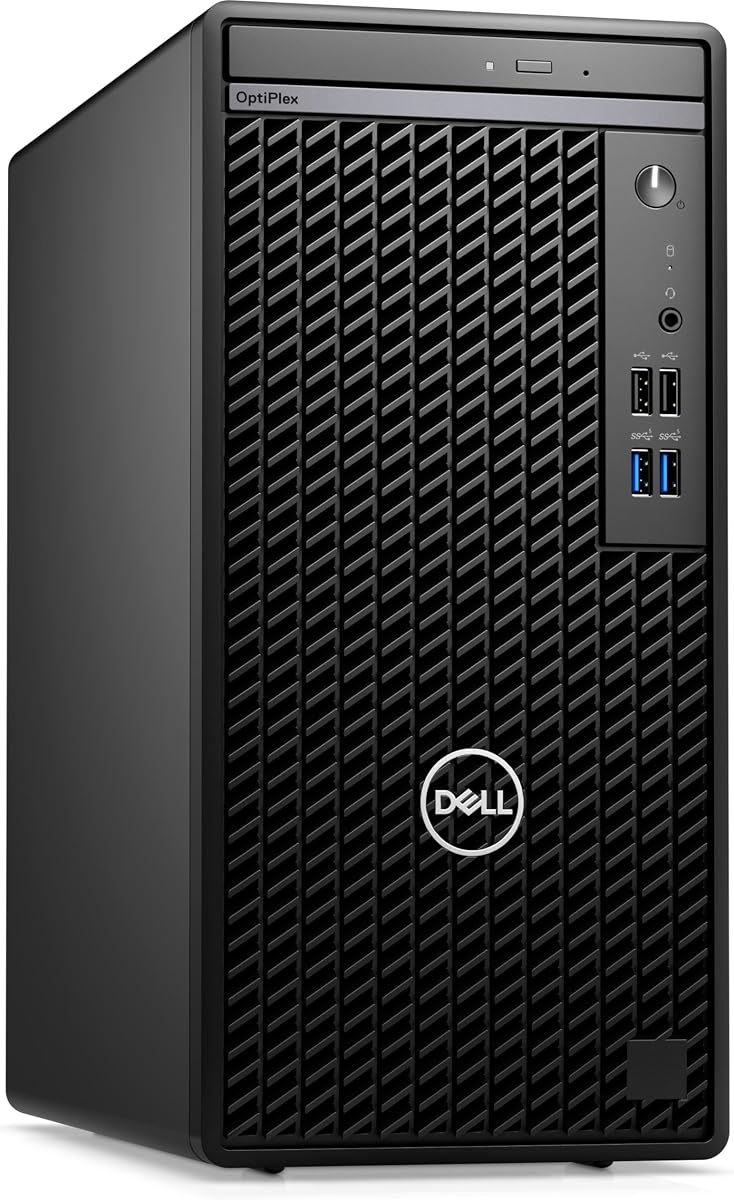
The Dell OptiPlex 7010 business mini tower is the most straightforward traditional Ubuntu desktop in the guide. It arrives with Ubuntu Linux 22.04, an Intel Core i5-13500 processor with 14 cores and 20 threads, 8GB of DDR4 memory, and a 256GB PCIe NVMe solid-state drive. No current customer rating is shown in the supplied data.
We may earn a commission when you buy through this link, at no additional cost to you.
Its processor provides considerably more core capacity than many older business desktops, making it well suited to office applications, browsing, software compilation, and virtualized Linux workflows. The physical design includes RJ-45 Ethernet, HDMI, DisplayPort, four USB 2.0 ports, a headphone and microphone combination jack, and a DVD read/write drive. A USB keyboard and mouse are also listed.
The configuration is constrained by modest memory and storage. Eight gigabytes can feel limited under heavy browser, container, or virtual-machine workloads, and 256GB may become restrictive for development projects or local data. Fortunately, the mini-tower format is generally easier to service and upgrade than a compact sealed system, making this a sensible starting point for buyers comfortable adding RAM and storage.
This OptiPlex is the best fit for an office or home user who wants Ubuntu already installed and prefers a conventional business PC. It offers a modern 13th-generation processor, familiar connectivity, and a manageable upgrade path. Buyers should treat it as a solid foundation rather than a turnkey high-end workstation, especially if they plan to run many memory-intensive applications.
Ubuntu Linux 22.04 is included, making this system attractive for organizations standardizing on Linux. The installed configuration should still be checked for proprietary drivers and the software required by your daily applications.
The mini-tower design provides a more familiar serviceable platform than many mini PCs. Adding memory, a larger SSD, or other supported components can extend its useful life when the base configuration no longer feels sufficient.
We may earn a commission when you buy through this link, at no additional cost to you.
The Dell OptiPlex 7050 SFF is a renewed office desktop with a 3.9 rating. Its defining specifications are an Intel Core i7-7700 quad-core processor, 32GB of DDR4 memory, and a 1TB solid-state drive. It includes Windows 11 Pro, a wired keyboard and mouse, a wireless USB Wi-Fi adapter, a power cord, and a stated 90-day seller warranty.
We may earn a commission when you buy through this link, at no additional cost to you.
The generous RAM and solid-state drive make the machine more future-proof for ordinary productivity than a system with only 8GB or 16GB. It can support demanding browser sessions, office suites, and multiple background applications. HDMI and DisplayPort provide dual-monitor connectivity, while USB 3.0, USB 2.0, Ethernet, and audio connections cover standard office needs.
Ubuntu is not preinstalled, so Linux users must create installation media or arrange a separate installation process. The processor is also an older seventh-generation design, which may limit performance in demanding compilation, rendering, and virtualized workloads. Renewed systems may carry cosmetic wear, and the included seller warranty is shorter than the coverage commonly associated with new equipment.
The OptiPlex 7050 is worthwhile for a buyer prioritizing RAM, SSD capacity, physical ports, and the lower cost of renewed business hardware. It can serve as a capable Linux workstation after installation, but it should not be selected over a ready-configured Ubuntu machine when setup simplicity is the primary requirement.
Thirty-two gigabytes of DDR4 is generous for standard office and development tasks, especially when compared with entry-level mini PCs. It also reduces the likelihood of memory pressure when several applications remain open throughout the day.
The combination of 32GB memory, a 1TB SSD, and a business desktop chassis can provide useful capacity at a restrained cost. Review the renewed condition, included accessories, warranty terms, and operating-system status carefully before purchase.
We may earn a commission when you buy through this link, at no additional cost to you.
The Dell OptiPlex 7060 SFF carries a 4.0 rating and offers a balanced mix of processing power, memory, and storage. Its Intel Core i7-8700 has six cores and can reach up to 4.60GHz, while 32GB of DDR4 supports heavy multitasking. A 512GB M.2 NVMe drive improves responsiveness and provides a practical capacity for general use.
We may earn a commission when you buy through this link, at no additional cost to you.
The listing highlights five USB 3.0 ports, two USB 2.0 ports, and two DisplayPort outputs for dual-monitor configurations. Built-in Wi-Fi and Bluetooth simplify wireless connectivity, and a wireless keyboard and mouse are included. The roomy small-form-factor case is also described as suitable for home and business use with room for future expansion.
As with the other renewed OptiPlex options, the main keyword-specific weakness is the absence of Ubuntu. Linux installation is straightforward for an experienced user but may not suit someone seeking an immediately usable system. The eighth-generation processor is aging, and the renewed condition calls for attention to cosmetic details, included components, and warranty coverage.
This OptiPlex works well for buyers seeking a well-equipped general-purpose desktop that can be converted into a Linux machine. Its 32GB memory, NVMe storage, and mature port selection are more compelling than the specification of many entry-level alternatives. For the stated search, however, it remains one step behind systems with Ubuntu or another Linux distribution already installed.
The six-core processor and 32GB memory provide a comfortable combination for office applications, web research, and multi-program workflows. NVMe storage keeps system responsiveness and application loading quick.
Built-in wireless support and included peripherals reduce the number of accessories a new owner needs. Two DisplayPort outputs make it straightforward to establish a two-monitor workspace for focused productivity.
We may earn a commission when you buy through this link, at no additional cost to you.
The Dell OptiPlex 5050 SFF has a 4.2 rating, the highest established average among the renewed business desktops in the guide. It pairs an Intel Core i7-7700 quad-core processor with 16GB of DDR4 memory and a 512GB NVMe solid-state drive in a slim small-form-factor chassis.
We may earn a commission when you buy through this link, at no additional cost to you.
Its storage provides quick startup and enough room for a moderate application and document library. Integrated Intel HD Graphics 630 handle ordinary graphical interfaces, media playback, and business productivity tasks. A wired black keyboard and mouse are included, reducing setup friction for buyers creating a basic office or home workstation.
The main disadvantages are the absence of Ubuntu and the age of the platform. The processor can turbo up to 4.2GHz, but it offers less headroom for modern compilation, intensive containers, and graphics-heavy workflows than the 12th-, 13th-, or newer-generation systems. Buyers should also expect the usual caveats associated with renewed hardware, including possible cosmetic marks and varying battery or component condition where applicable.
The OptiPlex 5050 is a sensible lower-cost starting point for someone comfortable installing Ubuntu and planning light to moderate work. Its high rating and mature business design are positives, but the lack of preinstalled Linux limits its relevance to buyers who want immediate operation without preparation.
A 512GB NVMe drive makes application launches and file transfers noticeably more responsive than a traditional hard drive. Sixteen gigabytes of RAM remains adequate for many mainstream productivity tasks.
The SFF enclosure occupies less space than a full tower while retaining familiar business-desktop construction. It is a practical choice for desks with limited room and for users who prefer replaceable desktop components.
We may earn a commission when you buy through this link, at no additional cost to you.
The Dell Pro Micro QCM1250 is a compact business mini desktop listed with Ubuntu Linux 18.04. It features a 15th-generation Intel Core Ultra 5-235T processor with 14 cores, 8GB of DDR5 memory, and a 512GB PCIe NVMe solid-state drive. No customer rating is available in the supplied product data, so its evaluation here focuses on the documented specifications.
We may earn a commission when you buy through this link, at no additional cost to you.
The processor can operate up to 5GHz and includes six performance cores, providing a modern foundation for browsing, business applications, and light development. Wi-Fi 6E AX211, Bluetooth 5.4, RJ-45 Ethernet, two USB 2.0 ports, USB 3.2 Type-C, HDMI 2.1, DisplayPort, and a combined audio jack create a useful selection of connections.
Its 8GB memory is the biggest concern, especially for a business Linux system where users may run a browser, communications tools, and background services simultaneously. Ubuntu 18.04 is also an older release. Depending on the seller's source, this may be intended for business deployment, but users seeking current applications, current kernels, and contemporary security updates should investigate upgrade availability before buying.
The QCM1250 is best suited to a small desk, managed office, or user who prioritizes a preinstalled Linux image and compact modern hardware. It could handle everyday tasks effectively, but Linux buyers who want long-term flexibility may prefer a system with more memory or a current Ubuntu release. Confirming the installable images and driver support is essential.
The Core Ultra 5-235T and DDR5 platform offer a current-generation foundation for routine enterprise and home-office tasks. Its compact footprint also suits workspaces where a full-size tower would be inconvenient.
Ubuntu 18.04 provides a ready-made Linux environment, but it is an older branch than many buyers may expect. Check whether the included image is appropriate for your applications or whether an in-place upgrade is planned.
We may earn a commission when you buy through this link, at no additional cost to you.
The ASUS NUC 14 Pro Linux Mint edition is a compact developer-oriented system with an Intel Core Ultra 7 155H processor, 16GB of DDR5 memory, and a 512GB PCIe solid-state drive. Its 1.0 customer rating warrants attention, but the supplied hardware description presents an ambitious platform for Linux users who do not specifically require Ubuntu.
We may earn a commission when you buy through this link, at no additional cost to you.
Linux Mint is preinstalled, providing an approachable desktop based on an open-source Linux ecosystem. The listed processor has 16 cores and 22 threads, while Intel Arc graphics, AI acceleration features, and memory expandable to 96GB create considerable theoretical headroom. The product information also references support for as many as four 4K HDR displays.
Connectivity is a major strength: Thunderbolt 4, USB 3.2 Gen2 Type-A and Type-C ports, HDMI 2.1, 2.5Gb Ethernet, Wi-Fi 6E, and Bluetooth 5.3 provide a modern, flexible platform. Cooling includes an aluminum fin design, dual copper heat pipes, and optimized airflow, while VESA mounting helps reclaim desk space. Nevertheless, the low rating may reflect configuration, component, or fulfillment issues that the listing does not explain.
This NUC is worth considering for developers, creators, and Linux enthusiasts who are comfortable with Linux Mint or willing to install Ubuntu themselves. It is not the strongest literal match for the search phrase because Ubuntu is not preinstalled. The low rating also means buyers should investigate recent customer feedback and verify the exact package contents before making a decision.
Linux Mint offers a polished, approachable environment and access to familiar open-source development tools. Users seeking an exact Ubuntu installation should confirm the available drive space and driver compatibility before replacing it.
Configurable high-bandwidth memory, Thunderbolt 4, and multiple display outputs make the NUC suitable for demanding desk setups. Its cooling design and VESA support further improve suitability for sustained work in a compact footprint.
We may earn a commission when you buy through this link, at no additional cost to you.
The ASUS PB64 is a full-system compact desktop built around an Intel Core Ultra 7 265 processor, 16GB of DDR5 memory, and a 512GB NVMe solid-state drive. It ships with Windows 11 Pro rather than Ubuntu, and no customer rating is shown in the supplied data. Its strongest features concern flexibility, compact construction, and business integration.
We may earn a commission when you buy through this link, at no additional cost to you.
The tool-less chassis design is intended to simplify access and upgrades, reducing downtime when components need attention. A 1.35-liter enclosure saves desk space, and the included VESA mount can position the system behind a compatible display. Dual DisplayPort, a configuration port, and USB 4 support as many as four 4K displays according to the supplied information.
Business features include Intel Wi-Fi 6E, Bluetooth 5.4, a hardware TPM 2.0, USB-C connectivity, and an ASUS Control Center. The secure-platform focus is useful for managed deployments, while the Core Ultra 7 platform supplies ample general-purpose performance. On the other hand, the system has no Linux distribution preinstalled, and buyers interested in Ubuntu will need to create media or arrange installation separately.
The PB64 is a strong compact foundation for organizations that standardize on Windows but may test Linux in a separate partition or boot environment. For the exact search category, it ranks last because it requires extra operating-system work. It remains attractive when tool-free maintenance, hardware security, VESA mounting, and multi-display support matter more than immediate Ubuntu availability.
Tool-less chassis access can make routine maintenance and expansion more convenient. The small 1.35-liter volume also reduces the physical footprint compared with a conventional office tower.
Hardware TPM 2.0, Wi-Fi 6E, Bluetooth 5.4, and centralized control software support business deployment. These features remain useful even if Ubuntu is installed later for a selected group of technical users.
We may earn a commission when you buy through this link, at no additional cost to you.
The right Linux desktop depends on your software, processor needs, available space, display setup, and willingness to perform installation or upgrades. The following factors help narrow the field before comparing the final hardware details.
A system marketed for Linux may include Ubuntu, Linux Mint, another distribution, or only the drivers required to install Linux yourself. Ubuntu is a strong general-purpose choice for development, server tooling, and everyday productivity, but a different distribution may better suit a particular workflow. Read the product title carefully, look for the stated Ubuntu version, and determine whether the operating system is included on the primary drive or supplied separately.
In short, verify the exact distribution and version before purchasing rather than assuming that every Linux-capable machine includes Ubuntu.
Processor selection should reflect the number of active tasks and the nature of your software. A modern six-core or 14-core processor is comfortable for office work, development, and moderate multitasking, while an integrated AI-focused platform can accelerate supported local models and media tasks. Older business CPUs may still be adequate for browsing and documentation, but they offer less room for heavy compilation, containers, and virtual machines.
In short, prioritize enough cores and clock speed for your heaviest sustained application, not merely a higher general-purpose specification.
Ubuntu and its applications generally benefit from at least 8GB of RAM, while 16GB is a more comfortable starting point for developers and power users. Additional memory becomes especially useful with many browser tabs, virtual machines, container workloads, local AI tools, and large desktop applications. Because some compact mini PCs use soldered LPDDR memory, confirm whether RAM can be upgraded before choosing a lower-capacity configuration.
In short, choose 16GB or more when possible, and treat fixed memory as a long-term constraint on a compact system.
An NVMe PCIe solid-state drive provides much faster operating-system startup, application loading, and file transfer than a SATA drive. Capacity still matters: operating systems and applications consume substantial room before personal files are added. The 256GB configuration in this guide suits a focused installation, while 512GB or 1TB is preferable for general use. Traditional towers may make it easier to add larger or secondary drives.
In short, prioritize NVMe storage and choose enough capacity for the operating system, applications, development assets, and local datasets you expect to retain.
Integrated graphics can handle office work, browsing, video playback, and some 3D applications, but higher-end Radeon and Intel Arc hardware offers more headroom for gaming, rendering, and video editing. Multi-monitor users should count HDMI and DisplayPort outputs and confirm the maximum supported resolution and refresh rate. USB4 may also carry display signals, though compatibility depends on the attached dock or monitor.
In short, match display outputs and graphics strength to your monitors, refresh rate, and creative or gaming requirements rather than considering graphics in isolation.
A useful Linux workstation needs more than its processor and display. Look for 2.5Gb Ethernet for fast transfers, modern Wi-Fi for wireless access, Bluetooth for peripherals, and enough USB ports for external storage and accessories. Thunderbolt 4 or USB4 can provide high-speed external device support, while fixed 2.5Gb Ethernet ports are valuable for developers running network services or transferring large project files.
In short, prioritize the connection types you use every day and make sure the compact chassis does not leave you short on essential ports.
Mini PCs excel at reducing desk clutter and often integrate attractive cooling, wireless support, and VESA mounting. Business towers and small-form-factor systems may be easier to service, expand, and cool under sustained loads. Consider whether you need to replace memory, add storage, use multiple internal drives, or connect specialized hardware. The operating system is only one part of long-term ownership; component access and thermal design also matter.
In short, favor a sealed mini PC for minimal footprint and a serviceable tower when frequent upgrades, abundant ports, or conventional component access are important.
Ubuntu supports a broad range of applications, but specialized hardware and commercial software can require extra configuration. Check whether the system includes proprietary wireless drivers, whether the intended Ubuntu version supports the processor's newer features, and whether your required applications are available natively or through compatible alternatives. For a business deployment, also consider remote-management tools, security policies, and the vendor's support lifecycle.
In short, validate application, driver, and management requirements before purchase; preinstallation is convenient, but it does not guarantee compatibility with every workflow.
Begin by completing the operating system's initial setup, creating an administrator account, connecting to a trusted network, and applying available system updates. The supplied listing may describe a particular Ubuntu or Linux release, so verify the installed version before installing business-critical applications. If the preinstalled system does not include your required drivers or software, use Ubuntu's standard update and hardware-support tools to resolve compatibility issues.
For added reliability, back up important files to an external drive or a properly configured cloud service before making major changes. Keep the system in a ventilated location, clean external vents periodically, and avoid placing a compact mini PC inside a closed cabinet without airflow. For business desktops, a surge protector and stable power source provide additional protection against unexpected interruptions.
As you add memory, storage, virtual machines, containers, or development projects, monitor available disk space and system memory. Use Ubuntu's built-in update tools, run storage checks when appropriate, and avoid deleting unidentified system partitions. For systems sold with Windows or Linux Mint when Ubuntu was expected, confirm whether replacing the operating system could affect the seller's return policy or bundled software.
The Beelink SER9 Pro 255 is the strongest overall match in this guide because it combines a preinstalled Ubuntu environment, a Ryzen 7 processor, Radeon 780M graphics, 24GB of memory, and extensive display and network connectivity. The best choice can still vary: a traditional business tower may be preferable for serviceability, while the NIMO system leads for dual-OS and AI-focused needs.
Yes. Ubuntu supports common web-based office applications, email, document editing, file management, communications, and a broad collection of open-source tools. Product compatibility depends on file formats and add-ins, so users relying on specialized Microsoft, accounting, design, or corporate software should verify native support or browser-based access before switching.
Usually, but the process requires a bootable USB drive or another installation method. Users can install Ubuntu alongside Windows, replace Windows after backing up data, or use an external drive. Check drive partitioning, secure boot, storage mode, and any organization-specific management policies before proceeding.
Sixteen gigabytes is a sensible minimum for modern development environments, especially when running containers or a code editor alongside a browser. Thirty-two gigabytes or more provides more comfortable headroom for virtual machines, large projects, databases, and local AI tools. Compact mini PCs with soldered memory deserve especially careful consideration because their capacity cannot be changed later.
They can be, because OptiPlex systems are conventional PCs and Linux generally supports their standard components well. Buyers should confirm the processor generation, wireless adapter, storage controller, display outputs, and installed operating system. Renewed condition and warranty coverage also warrant close review because they vary by seller.
For many users, yes. Linux Mint provides an approachable desktop and is built on the Ubuntu ecosystem, making it attractive for general productivity and development. The ASUS NUC 14 Pro in this guide is not a literal Ubuntu match, however, so buyers who require an exact Ubuntu image should check whether they are comfortable installing it themselves.
Several can. The Beelink SER9 Pro 255 and NIMO Ryzen AI Max+ 395 advertise triple-display configurations, while the ASUS NUC 14 Pro supports up to four 4K HDR displays according to its listing. The exact resolutions, refresh rates, operating-system support, and USB4 display behavior should be confirmed for the intended monitor combination.
Choose a mini PC for a smaller footprint, modern wireless connectivity, and often a more attractive desk setup. Choose a business tower or SFF system when expandability, replaceable components, more internal storage options, or straightforward servicing matter most. Both can run Ubuntu well, but preinstallation and included peripherals vary by product.
The Beelink SER9 Pro 255 stands out as the best overall option because it combines genuine Ubuntu readiness with capable Ryzen and Radeon hardware, ample memory, fast NVMe storage, triple-display support, and modern connectivity. The NIMO Ryzen AI Max+ 395 is the premium choice for users who need Windows and Ubuntu together, while the Dell OptiPlex 7010 offers the most conventional Ubuntu-equipped business desktop.
Before choosing, prioritize the exact installed operating system, processor demands, memory upgradeability, storage needs, and expected display configuration. Compact systems excel in efficiency and connectivity, while OptiPlex towers can be more attractive when serviceability and conventional expansion are priorities. A current Ubuntu release, appropriate drivers, and native application support are just as important as the advertised processor.
Finally, remember that hardware bundles and operating-system images can change over time. Confirm the current configuration, included accessories, warranty, and availability on the product page before ordering, and recheck the latest price. The best machine is the one that matches your Linux workflow, provides enough memory and storage, and remains practical to maintain for the period you expect to use it.


