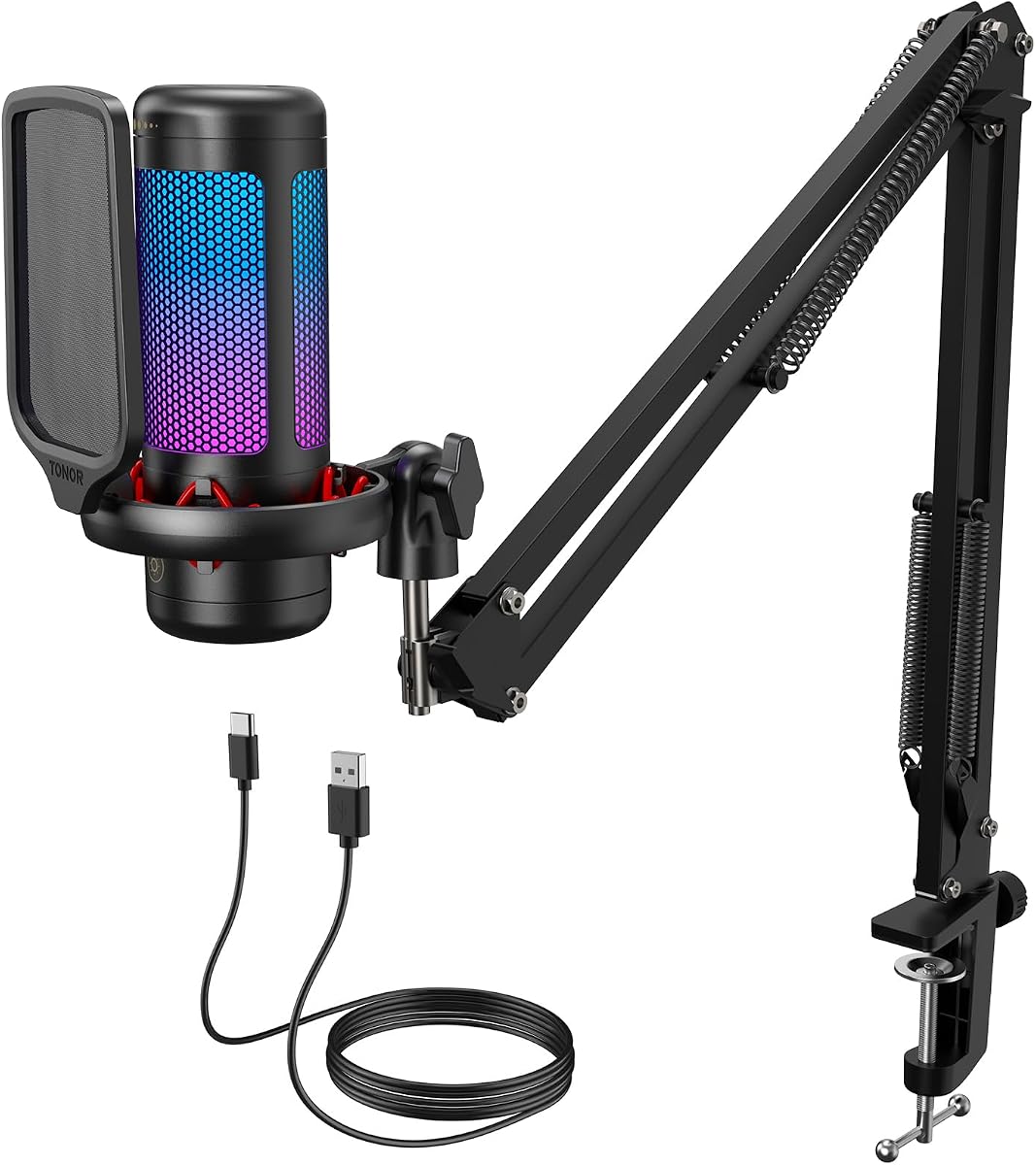
TONOR Gaming Microphone Set TC310+
4.5Editor score
Complete USB boom arm kit
Tap-to-mute top control
Adjustable RGB lighting
Rotating gain control
This Cheap Boom Microphone guide compares 10 affordable options for gaming, streaming, podcasting, calls, and recordings with reliable audio.
A cheap boom microphone can still deliver clear, useful voice audio for gaming, streaming, podcasting, video calls, and voice-over work. The best value comes from matching the microphone design to your setup, whether that means a USB desk model, a dual XLR and USB microphone, or a compact 3.5mm adapter.
We compared all ten products by examining their ratings, pickup methods, included boom arms, connection options, monitoring features, noise-handling capabilities, platform compatibility, and practical accessories. The list covers everything from entry-level gaming kits to more versatile podcast and recording packages.
Each pick highlights the product that best serves a particular use, with the top selections earning the Best Budget, Editor's Choice, and Best Premium distinctions. Product listings and promotions can change, so verify the current specifications and price before purchasing.
4.5Editor score
4.5Editor score

4.5Editor score
The comparison below organizes every microphone by its capture type, connection method, boom support, monitoring capabilities, and intended recording scenario. It makes it easier to distinguish a complete desk microphone from a lightweight 3.5mm boom adapter.


The TONOR TC310+ is an affordable all-in-one USB microphone kit rated 4.5 out of 5. It combines a vocal condenser microphone, metal boom arm, desk clamp, RGB lighting, tap-to-mute functionality, and a gain control. That combination makes it especially appealing to new streamers, gamers, and remote workers who want a coordinated desk setup without assembling several accessories separately.
We may earn a commission when you buy through this link, at no additional cost to you.
Its standout feature is the simplicity of the controls. A tap on the top of the microphone mutes it, while rotating the top adjusts the gain. The microphone uses premium chips and expert tuning to produce clean, high-fidelity voice reproduction for communication. Four lighting categories cover static colors, single-color gradients, breathing effects, and mixed-color gradients, while long-pressing the RGB icon adjusts brightness. The boom arm has multiple adjustable joints and a clamp designed for desks up to 2.36 inches thick.
The main limitation is that the TC310+ does not include a headphone output for real-time monitoring. A condenser design can also pick up more room noise than a dynamic microphone, making the kit less forgiving in a noisy or untreated space. It is still a well-balanced entry package for users who want straightforward USB operation, and the included arm saves the need to purchase a separate desk stand.
This is the best budget choice for someone building a first streaming, gaming, or content-creation setup. It offers the most important everyday controls, a practical boom support, and a coordinated visual design. Choose it when simplicity, a complete package, and gaming aesthetics matter more than advanced monitoring or the ability to connect to an external audio interface.
The bundled metal arm, clamp, and microphone provide a ready-to-assemble station for a desk. Adjust the joints until the capsule sits close to your mouth, then tighten the clamp without forcing the mechanism.
Tap-to-mute and adjustable gain are especially useful during live sessions because they can be reached without opening software. The lighting controls provide a visual match for a gaming setup without demanding complex configuration.
We may earn a commission when you buy through this link, at no additional cost to you.
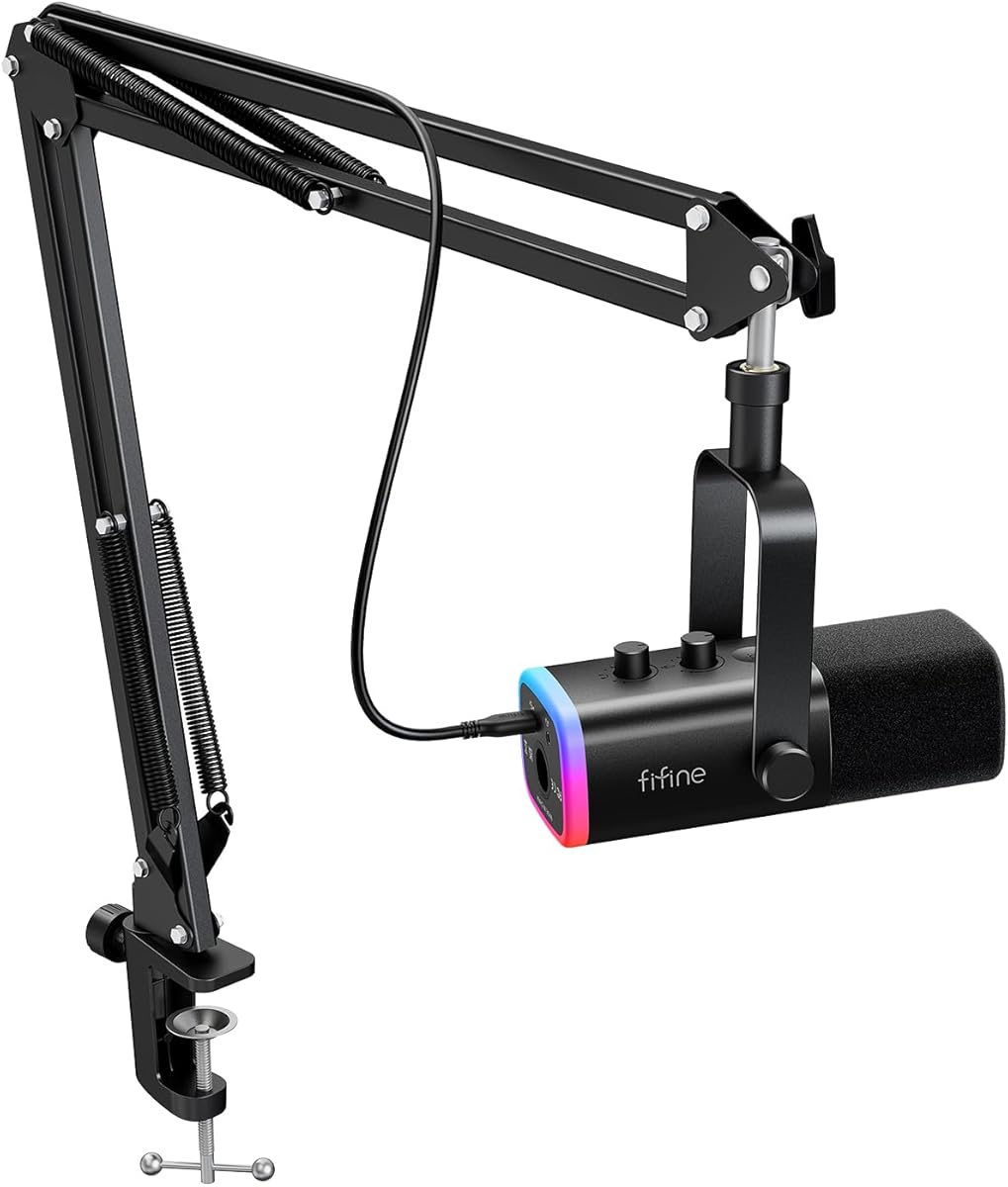
The FIFINE AmpliGame AM8T is a versatile microphone set rated 4.5 out of 5 that works through either USB or XLR. It comes with a dynamic cardioid microphone, a metal boom arm, C-clamp, and USB cable, making it a strong fit for gaming, streaming, podcasting, voice-over, and musical-instrument recording.
We may earn a commission when you buy through this link, at no additional cost to you.
The dynamic microphone has a minus-50 dB sensitivity rating and a cardioid polar pattern that focuses on sound from the front while resisting background noise. This makes it more practical than many condenser microphones for gamers who use a keyboard, play in a shared room, or record without extensive acoustic treatment. USB offers plug-and-play computer use, while XLR allows connection to a mixer or sound card. A mute button, gain knob, headphone jack, and headphone volume control support real-time monitoring and precise adjustment.
The supplied XLR cable is not included, so buyers should add one if they plan to use an interface or mixer. The 8.2-foot USB-to-USB-C cable is included, however, and the external windscreen helps soften plosive consonants. The boom arm uses a sturdy metal construction and elastic springs, while the desk clamp includes an anti-scratch pad and fits desktops up to 2 inches thick. RGB lighting can be changed or disabled by tapping its button.
The AM8T earns the Editor's Choice designation because it covers more upgrade paths than a basic USB model without becoming difficult to use. It is ideal for users who may begin with USB and later connect an audio interface through XLR. Choose it for versatile gaming and recording, particularly if a dynamic microphone and built-in monitoring matter more than having every cable included.
Starting in USB mode keeps the initial setup simple, while the XLR connection opens a path to a mixer or sound card. This flexibility makes the microphone useful across casual streaming sessions and more involved recording projects.
The cardioid dynamic design places emphasis on the speaker in front of the microphone and helps reduce off-axis room sound. It remains a practical choice for keyboard-heavy gaming setups, although technique and room treatment still affect the final result.
We may earn a commission when you buy through this link, at no additional cost to you.
The MAONO A04 is a USB condenser microphone kit rated 4.5 out of 5, aimed at podcasters, voice-over creators, video-call users, and streamers. It supports high-resolution 192kHz and 24-bit capture, giving the package a more recording-oriented specification set than a basic gaming microphone.
We may earn a commission when you buy through this link, at no additional cost to you.
The microphone uses a 16mm electret condenser transducer and is described as having a smooth, flat response with extended high-frequency coverage. The manufacturer recommends keeping it between 2 and 6 inches away for its best range. It connects directly by USB without drivers or an external sound card, and the package includes an adjustable scissor arm, metal shock mount, pop filter, foam windscreen, boom base, and USB-A or USB-C to USB-B cable.
A04 is not compatible with Xbox, and it does not work with Maono Link; the manufacturer recommends the A04 Gen2 for Maono Link users. The included desk clamp accommodates desktops less than 2.1 inches thick. Because it is a condenser microphone, it can capture subtle vocal detail but may also be more sensitive to room noise and keyboard sound than the dynamic options in this list.
This microphone is best for podcasters and beginner creators who value resolution and a generous accessory bundle. It is a particularly good match for spoken-word recording, tutorials, online meetings, and livestreams on a Windows PC, Mac, PS4, PS5, or compatible mobile device. Users should plan a quiet recording position and use the included pop filter and windscreen to control plosives and breath noise.
The 192kHz and 24-bit specification provides considerable detail for digital recording. It is useful for editors who want clean source material, although the actual sound still depends on vocal performance, distance, and the acoustic environment.
A shock mount, pop filter, foam windscreen, and adjustable stand cover the essential voice-recording needs. This makes the kit easier to start with than a microphone sold without basic vocal accessories.
We may earn a commission when you buy through this link, at no additional cost to you.
The InnoGear Gaming Mic is a USB desktop microphone rated 4.4 out of 5 for gamers and streamers who want coordinated lighting, clear voice capture, and a boom arm. Its feature set includes a cardioid condenser capsule, noise cancellation, RGB lighting, zero-latency monitoring, and straightforward on-device controls.
We may earn a commission when you buy through this link, at no additional cost to you.
The upgraded cardioid capsule is listed as amplifying sound clarity by up to 600%, while the cardioid pattern focuses on speech from the front. A touch-sensitive mute button on top and a large gain knob at the base make live adjustments convenient. The microphone also has a headphone output for real-time monitoring. Its 6.56-foot USB cable and USB-C interface support flexible positioning on a desk, and the listed compatibility covers Windows PCs, Macs, PS4, and PS5.
Xbox compatibility is explicitly excluded, which matters for console users. Since this is a condenser model, advanced noise cancellation does not eliminate every environmental sound; a close placement, quiet room, and suitable pop protection remain important. The RGB system provides solid color, multicolor gradient, breathing gradient, and transition effects, making the microphone more visually integrated with a gaming setup than a plain studio microphone.
Choose the InnoGear for streamers and gamers who value appearance, monitoring, and physical controls. It is especially useful when the microphone must work across computers, Macs, and supported PlayStation systems without relying on an XLR interface. For users who only need a simple USB microphone and do not care about lighting, one of the plainer studio kits may offer a more restrained setup.
The RGB modes provide visual variety without replacing useful core functions. Zero-latency headphone monitoring allows a creator to hear the microphone signal while speaking, helping with level checks and speaking distance.
Support for Windows, Mac, PS4, and PS5 makes the microphone practical for a mixed-device setup. It cannot be used with Xbox, so confirm your console before ordering.
We may earn a commission when you buy through this link, at no additional cost to you.
The V-MODA BoomPro is a detachable 3.5mm boom microphone rated 4.3 out of 5. Unlike the desk-based USB sets, it works as an inline adapter for compatible headphones, making it a portable option for gaming, calls, remote work, podcasts, and communication on the move.
We may earn a commission when you buy through this link, at no additional cost to you.
The microphone attaches through a universal 3.5mm plug and is designed for smartphones, tablets, PCs, notebooks, and consoles including PlayStation 4, PlayStation Vita, and Xbox One. Its reinforced but lightweight cable includes a gold-plated connector for durability. A clip-on controller adds a mute button and volume wheel, allowing basic changes without returning to device settings.
The BoomPro works with V-MODA Crossfade-series headphones and other headphones that accept a 3.5mm microphone input, although exact compatibility depends on the headphone model and version. It also does not provide the high-resolution digital capture or editing flexibility of a USB or XLR microphone. A separate TRRS adapter may be needed for devices that separate headphone and microphone ports.
Choose the BoomPro for travel, shared spaces, console gaming, or a minimalist setup where portability matters more than recording resolution. It is a particularly useful alternative for someone who already owns compatible headphones and wants to add a movable boom microphone without replacing their entire headset.
The detachable flexible boom can be positioned closer to the mouth than a fixed headset microphone. This often improves perceived clarity in calls and gaming without adding a large desktop stand.
The inline controller puts mute and volume within reach. It is a straightforward solution for users who prefer analog operation and do not need a USB microphone's direct digital capture.
We may earn a commission when you buy through this link, at no additional cost to you.
The FIFINE T669 is a studio condenser USB microphone rated 4.6 out of 5, the highest listed rating among these ten products. It is designed for vocals, podcasts, dubbing, Discord, Zoom, Skype, video calls, and home-studio recording, with a substantial accessory package that includes an adjustable boom arm.
We may earn a commission when you buy through this link, at no additional cost to you.
The cardioid condenser capsule emphasizes sound from the front and helps avoid ambient noise. The package includes a steel broadcast-style scissor arm with 180-degree vertical rotation, 135-degree forward and backward extension, a heavy-duty combo mount, a detachable desktop base, a studio shock mount, and a double pop filter. A 13-inch fixed horizontal arm provides a stated 30-inch reach, allowing the microphone to sit close without blocking the user's face.
The T669 connects to PCs and laptops by USB without extra hardware or drivers, but it is not compatible with Xbox. It lacks a headphone output, which means users cannot directly monitor the microphone signal through the device. As a condenser microphone, it can capture nuanced vocals but may also reveal keyboard noise, room reflections, and nearby sound sources. Good placement and the double pop filter remain important.
Choose the T669 for spoken-word recording, podcasting, and home studio work when a complete boom-and-filter system matters. Its robust steel arm and selection of mounting options make it a good fit for users who want a permanent desk installation rather than a compact travel microphone. Among the value options, it stands out for its highly rated overall package and studio-style accessories.
The all-steel scissor arm is sturdier than many lightweight plastic stands and can be positioned above the desk. Its vertical, forward, and backward adjustment makes it easier to keep the capsule near the mouth and out of the camera frame.
The double pop filter helps dissipate bursts of air before they reach the capsule. Combined with the shock mount, it makes the T669 well suited to speech-heavy podcast and voice-over sessions.
We may earn a commission when you buy through this link, at no additional cost to you.
The Cable Boom Microphone is a 3.5mm gaming boom adapter rated 4.2 out of 5. It provides a detachable flexible microphone, inline volume control, and an inline mute switch, allowing many existing headphones to function more like a gaming headset.
We may earn a commission when you buy through this link, at no additional cost to you.
The device uses 3.5mm male-to-male connections and is intended for equipment with a 3.5mm audio output. Listed compatible devices include PS4, Xbox One, PlayStation 5, Xbox Series X/S controllers, PCs, laptops, iPhones, and Android phones. On the headphone side, it supports V-MODA Crossfade M-100, LP, LP2, M-80, and V-80 models as well as many other headphones with a 3.5mm input, including several Beats models.
Its strengths are affordability and portability rather than recording fidelity. Because it works through analog headphone connections, it does not provide independent USB gain control, digital sample rates, or a dedicated monitoring port. A dual 3.5mm Y-adapter is included for devices that use separate microphone and headphone inputs, which increases its usefulness with older laptops and some gaming setups.
Choose this adapter when you want a simple way to improve microphone positioning for gaming, calls, or casual voice chat. It is best suited to people who already own compatible wired headphones and need an inexpensive movable boom. It is not the right choice for a home studio that requires direct digital capture, flexible gain control, or broader recording specifications.
The detachable boom converts a compatible pair of headphones into a more practical communication setup. The movable arm can be placed nearer the mouth than many fixed inline microphones.
The included Y-adapter makes the solution useful for systems with separate headphone and microphone sockets. It remains dependent on the presence of compatible 3.5mm connections on the selected device.
We may earn a commission when you buy through this link, at no additional cost to you.
The FIFINE AmpliTank K688CT is a USB and XLR dynamic podcast microphone rated 4.5 out of 5. It combines a cardioid capsule, 130dB sound pressure level, a metal boom arm, shock mount, windscreen, monitoring output, and on-device gain controls in a versatile package.
We may earn a commission when you buy through this link, at no additional cost to you.
The dynamic design focuses voice pickup toward the front of the microphone and helps reduce ambient noise, making it suitable for podcasting, streaming, gaming, and voice-over work. The manufacturer recommends recording from 2 to 6 inches for a suitable input level. In USB mode, the tap-to-mute button, gain knob, headphone jack, and headphone volume knob provide convenient control. Switching to XLR allows the microphone to work with a mixer or sound card for a more advanced signal chain.
An XLR cable is not included, so users should plan to purchase one if they need that connection. The function buttons on the microphone do not operate in XLR mode; gain and monitoring must instead be managed through the mixer or audio interface. The C-clamp fits desks under 2 inches thick, and the arm should be adjusted without forcing the knobs. The included windscreen and shock mount help reduce plosives and mechanical vibration.
The K688CT earns the Best Premium designation because it combines a strong dynamic capsule with both USB convenience and an XLR upgrade path. It is the top choice for a creator who wants a dedicated microphone for gaming and recording but may later invest in an interface. Its feature set is more advanced than the basic budget kits while remaining manageable for newcomers.
USB provides a fast start for streaming and podcasting, while XLR opens access to mixers and sound cards. That dual path lets a buyer preserve the microphone when moving to a more advanced recording setup.
Tap-to-mute, microphone gain, headphone output, and independent headphone volume give the user useful day-to-day control. Real-time monitoring helps identify balance, distance, and unwanted room noise while recording.
We may earn a commission when you buy through this link, at no additional cost to you.
The TONOR Dynamic Gaming Microphone is rated 4.5 out of 5 and combines a dynamic capsule with USB and XLR outputs, AI noise reduction, RGB lighting, and real-time monitoring. It is designed for creators who want a modern gaming microphone without giving up the option of using an external sound card.
We may earn a commission when you buy through this link, at no additional cost to you.
Its triple AI noise cancellation is intended to reduce distractions such as keyboard clatter during gaming streams and voice chats. The dynamic capsule supports focused voice capture, while the USB and XLR interfaces offer different recording paths. Microphone and headphone volume controls, plus a headphone jack, make it possible to check levels and hear the live signal. Customizable RGB lighting adds a gaming-oriented visual element.
The XLR cable is not included, so an interface user will need to purchase the appropriate connection. Xbox is not supported, although USB mode can connect directly to computers, PS4, and PS5. In XLR mode, the microphone connects to a sound card for an enhanced setup. As with any dynamic microphone, noise reduction cannot replace sensible gain control, close positioning, and treatment of obvious background sources.
Choose the TONOR for gamers who want noise-handling technology, monitoring, and a future interface path in one microphone. It is well suited to streams, team communication, and narrated gaming sessions. Compared with a basic USB condenser, it is the better option for a noisy desk; compared with a premium interface-only microphone, it remains easier to use immediately.
Triple AI noise reduction targets background disturbances that commonly complicate game streams. It is most useful when combined with a dynamic capsule, moderate gain, and careful microphone placement.
The dual interface supports direct USB operation today and an XLR-based audio interface later. Buyers do not need to replace the microphone when they decide to move into a more advanced recording workflow.
We may earn a commission when you buy through this link, at no additional cost to you.
The ZealSound Podcast Microphone is a feature-rich USB condenser kit rated 4.4 out of 5. It is designed for podcasting, livestreaming, video calls, voice-over, and content creation across computers, mobile devices, tablets, and supported PlayStation systems.
We may earn a commission when you buy through this link, at no additional cost to you.
The microphone uses a top-address cardioid condenser capsule with an 80Hz to 20kHz frequency response and minus-45 dB sensitivity. The manufacturer recommends keeping it 6 to 12 inches from the mouth with the upper pickup area facing the speaker. Three front controls adjust microphone input, headphone monitoring, and echo. A 3.5mm headphone connection provides zero-latency monitoring, while a long-press on the mute button toggles built-in noise reduction. A short press mutes the microphone, with a blue LED showing active status and a red LED showing mute status.
The package includes a metal boom arm that extends to 30.8 inches, rotates 360 degrees, and clamps to desks up to 1.8 inches thick. It also includes a foam windscreen, a 70.87-inch USB cable, and USB-C and Lightning adapters. The echo control is unique in this group and can add vocal depth, but it is not essential for every recording style and should be used conservatively for clear speech.
Choose the ZealSound for podcasters who want easy device switching, direct monitoring, and multiple physical controls in a single package. It is especially useful for creators moving between a PC, iPhone, iPad, or Android device. The included adapters remove much of the connection guesswork, while the boom arm keeps the top-address microphone consistently positioned.
Independent microphone and headphone volume controls make it easier to hear the effect of gain changes without altering the monitoring level. The echo control adds an optional creative effect for podcast and livestream use.
The included USB-C and Lightning adapters support a broad range of modern devices. This makes the kit useful for creators who alternate between a desktop recording and mobile voice workflow.
We may earn a commission when you buy through this link, at no additional cost to you.
The most useful cheap boom microphone is not necessarily the one with the most accessories. Connection method, microphone type, room conditions, monitoring needs, and platform compatibility should guide the decision before visual extras are considered.
A USB microphone is the easiest option for most computer users because it connects directly, usually requires no additional drivers, and provides a digital signal to the recording application. It works well for streaming, podcasting, meetings, and voice-over on a Windows PC or Mac. An XLR microphone offers a more flexible path to a mixer or sound card, but it requires compatible hardware and usually an additional XLR cable. A 3.5mm boom adapter is the lightest and most portable option, although it is tied to devices with compatible analog headphone connections.
Condenser microphones generally capture more vocal detail and subtle expression, making them attractive for podcasts, voice-over, and studio-style speech. Their sensitivity can also reveal keyboard noise, room reflections, and distant sound sources. Dynamic microphones are less sensitive to off-axis noise and often work better in untreated or active rooms. They are especially suitable for gaming, streaming from a busy desk, and recording a louder voice source. Neither design eliminates poor placement or excessive gain, so the room and speaker still influence the final sound.
A boom support is valuable because it allows the microphone to remain close to the mouth without a heavy desktop base. Look for adjustable joints, stable springs, a suitable clamp range, and a finish that will not scratch the desk. The listed clamp limits vary across the products, from 1.8 inches to 2.36 inches, so measure the desktop thickness before ordering. A boom arm is not automatically a suspension arm; shock mounts and elastic supports can reduce vibration and impact noise during speech.
Real-time monitoring lets a creator hear the microphone while speaking, which makes it easier to judge distance, gain, echo, and room noise. Headphone outputs are useful but not universal in this category. Microphone gain, headphone volume, mute, and monitoring controls can all improve workflow, especially during a live session. A touch or tap mute is convenient, although a physical indicator should remain visible enough to confirm the state. Software-level monitoring can help when a model lacks a built-in headphone jack, but it depends on correct system configuration and can introduce delay.
USB compatibility can sound broader than it really is. Some products omit Xbox support, and some rely on a specific USB-B port, adapter, or platform profile. The V-MODA and Cable Boom products depend on 3.5mm connections and may require a Y-adapter when a device separates headphone and microphone inputs. The ZealSound includes USB-C and Lightning adapters, while the FIFINE AM8T and K688CT support XLR but do not include an XLR cable. Check the computer, console, mobile device, interface, and headphone model before buying to avoid a connection surprise.
Noise control comes from several layers: the microphone's pickup pattern, built-in digital processing, physical filters, room treatment, and the user's recording technique. A cardioid pattern helps reject sound from the sides and rear, while a dynamic capsule is less likely to capture distant noise than a condenser. Built-in noise reduction can help with steady background sounds, but it cannot perfectly reconstruct a room or remove every keyboard click. The included windscreen and pop filter handle breath and plosive energy, so they remain valuable even on a microphone with noise reduction.
A boom arm alone does not make a complete podcast kit. A shock mount reduces movement and vibration, while one or more pop filters help control harsh consonants and air blasts. A foam windscreen adds another layer of breath protection. Some kits include desktop bases, clamps, cables, adapters, and even alternative mounting options. The MAONO A04, FIFINE T669, and ZealSound K66K provide especially complete accessory sets. Comparing the package helps prevent the need to buy several inexpensive accessories separately after the microphone arrives.
RGB lighting, touch controls, digital effects, dual connections, and multiple adapters can make a package feel advanced, but every extra feature adds another thing to learn. A first-time streamer may benefit more from a straightforward USB microphone, reliable mute, and stable arm than from extensive processing. An experienced creator may value XLR, independent monitoring, and a windscreen more than lighting. The best cheap boom microphone is therefore the one whose controls match your technical comfort and whose included accessories solve a problem you actually have.
Begin by mounting the boom arm securely, checking that the desktop clamp fits and that every joint is tightened without excessive force. Position the microphone according to its pickup style: top-address models should point their upper capsule toward your mouth, while front-address models should face the speaker directly. Keep a condenser around 6 to 12 inches away when the manufacturer allows it, and follow the stated dynamic recommendations when closer positioning is advised.
Connect the microphone using the correct port and set the input level in the operating system or recording application. If a gain knob is available, raise it gradually while watching the level meter, aiming for strong peaks without clipping. Connect headphones for real-time monitoring when supported, keep the microphone gain separate from the headphone volume, and use a short recording test to check balance, echo, keyboard noise, and room reflections.
For maintenance, switch off and disconnect the microphone before moving the arm or changing cables. Clean the grille and removable windscreen according to the manufacturer's instructions, avoid liquids near the electronics, and do not pull the microphone by its cable. Check clamp tension and arm joints periodically, keep the microphone away from moisture and direct heat, and update recording software when a new device is introduced so that the correct input and monitoring behavior are selected.
A USB microphone connects directly to a computer or compatible device and is usually the simplest option for digital recording. An XLR microphone requires a sound card or mixer with an XLR input and offers a more flexible studio signal path. A 3.5mm boom microphone typically plugs into a compatible headset or device and is best for portable calls and gaming rather than high-resolution recording.
A dynamic microphone is often better for a noisy gaming desk because it is less sensitive to off-axis keyboard and room sound. A condenser microphone can provide a more detailed vocal presentation and works well in a quieter, better-treated room. Either type benefits from close placement, correct gain, and a pop filter or windscreen when harsh consonants are an issue.
A boom arm is useful when you want the microphone close to your mouth, out of the way of your monitor, or securely positioned for hands-free work. A desktop stand is more compact and may suit a small recording area. Check whether the package includes a clamp, what desk thickness it supports, and whether the arm has enough range before choosing.
Yes, provided its connection method and platform compatibility match your recording setup. USB models are the most convenient for computer podcasting, while XLR models suit creators with a mixer or interface. Accurate positioning, reasonable gain, and a quiet room matter more than expensive branding, and a pop filter can improve spoken-word consistency.
Common causes include excessive gain, placing the microphone too far away, picking up a nearby speaker, and using a reflective untreated room. Move the microphone closer, turn off nearby playback, reduce input gain, and listen with headphones while recording. A dynamic microphone or built-in noise reduction may help, but acoustic treatment remains the most reliable way to control reflections.
Mute stops the microphone from picking up sound, while noise reduction attempts to suppress unwanted background noise while the microphone remains active. Noise reduction is useful for steady sounds such as fans or distant traffic, but it cannot eliminate every problem. A visible mute indicator is valuable during live streams because it confirms when the microphone is truly inactive.
Compatibility varies by model. The InnoGear, MAONO, and TONOR options explicitly exclude Xbox, while other USB models support selected computers and PlayStation systems. The ZealSound includes USB-C and Lightning adapters for compatible mobile devices. The V-MODA and Cable Boom products use 3.5mm connections and may require a Y-adapter, so check the exact ports before purchasing.
USB is the better starting point when you want immediate computer use, uncomplicated setup, and portable podcasting. XLR is worth considering if you already own a sound card or mixer, want more control over the signal chain, or plan to expand into a home-studio workflow. In either case, verify whether the required XLR cable and other accessories are included.
The TONOR TC310+ stands out as the best budget option because it combines a USB condenser microphone, metal boom arm, RGB lighting, tap mute, and gain adjustment in a coordinated package. The FIFINE AM8T is the most versatile editor's choice, offering both USB and XLR connections, a dynamic cardioid capsule, real-time monitoring, and a sturdy arm. The FIFINE K688CT takes the premium position with USB and XLR flexibility, a high-sound-pressure dynamic design, and comprehensive monitoring controls.
Prioritize the features that solve a real problem in your setup. Choose a dynamic microphone for a noisy room, a condenser for detailed speech in a quieter location, USB for simplicity, and XLR when you want an interface-based workflow. Confirm platform compatibility, measure the desk for the clamp, and check whether essential cables or adapters are included before placing an order.
Promotions and product details can change over time, so review the current listing before purchasing. Use the comparison chart to narrow the field, then confirm the pickup style, connection method, included boom hardware, and current specifications on the retailer's product page.