
Mares Puck Pro EZ Wrist Underwater Scuba Dive Computer
4.8Editor score
High-contrast wrist display
Buhlmann ZH-L16C algorithm
Bluetooth dive-log transfers
Our dive computer for scuba diving guide compares 10 models for navigation, readability, decompression features, connectivity, durability, and everyday ease of
A dive computer for scuba diving should provide clear information without demanding excessive attention. It must track depth and time, calculate decompression, surface meaningful alerts, and remain readable under changing conditions. The right model also depends on your experience, gas choices, navigation habits, wrist or tank mounting preference, and appetite for connected features.
This guide compares ten dive computers using the supplied specifications, ratings, feature lists, and construction details. It covers recreational and advanced configurations, from straightforward wrist units to rugged color models with surface GPS, wireless tank-pressure support, detailed mapping, and multiple-gas versatility. Differences in display, control method, connectivity, battery behavior, and navigation functions are examined in context.
Each selection highlights the type of diver it may suit best, along with practical trade-offs that are not obvious from a feature list. The three leading picks are the Shearwater Peregrine for overall versatility, the Mares Puck Pro EZ for value-conscious buyers, and the Garmin Descent X50i for premium functionality. Availability and prices change, so verify current listings before purchasing.
4.8Editor score

4.7Editor score

4.6Editor score
The comparison below highlights each computer's display, dive capabilities, navigation tools, connectivity, and physical design, helping you match a model to your preferred diving style.

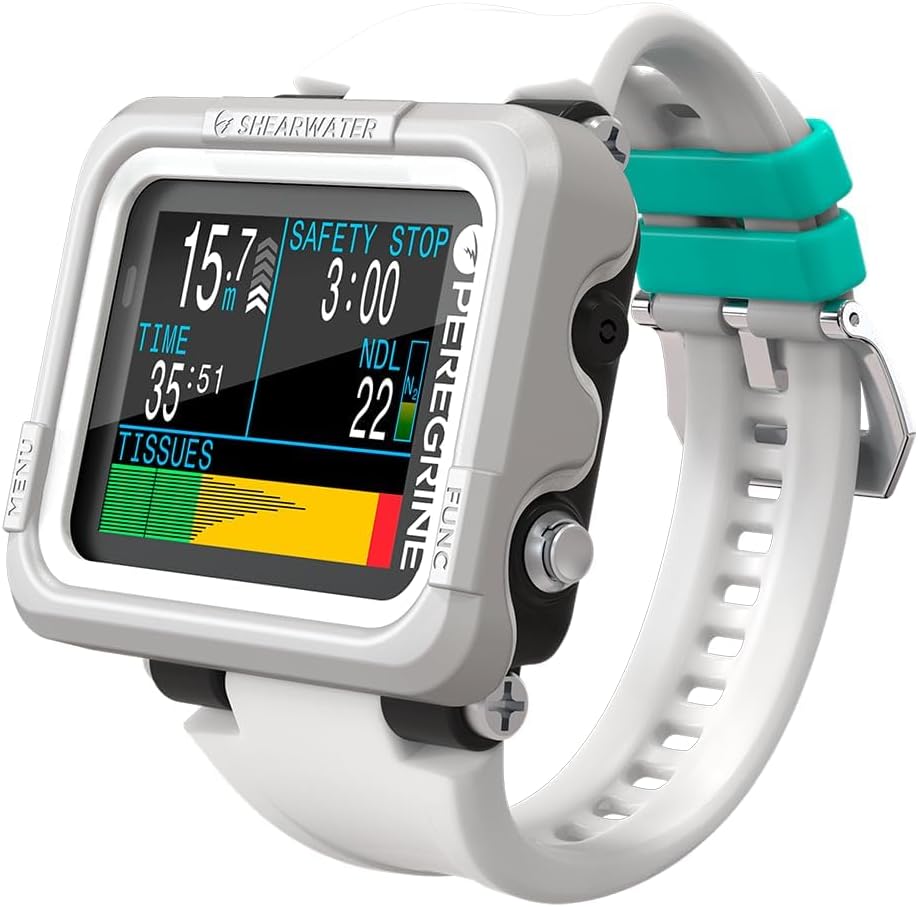


The Shearwater Research Peregrine earns the Editor's Choice position because it balances capable dive computing, restrained controls, and practical battery life. Its 4.7 rating indicates strong buyer satisfaction, although ratings should not be treated as a substitute for understanding a computer's algorithms and display. This model is particularly compelling for divers who want a focused wrist instrument without a large smartwatch profile.
We may earn a commission when you buy through this link, at no additional cost to you.
Its two-button interface uses a state-aware menu structure, which helps limit accidental navigation changes while underwater. Stainless steel buttons provide tactile feedback, and the supplied specifications emphasize simple operation. Battery life reaches up to about 30 hours at medium brightness, enough for a substantial number of dives under common conditions. The included USB wireless charging station also removes the need to connect a cable directly to the computer during everyday charging.
The main limitation is that the Peregrine focuses on dive essentials rather than the broad feature set associated with premium multisport devices. It does not promote surface GPS, an integrated dive light, or advanced diver-to-diver communication in the supplied information. A diver who expects a touchscreen, extensive topographic maps, or a watch-style fitness ecosystem may prefer one of the more elaborate Garmin options.
Even so, the Peregrine is a strong all-around recommendation for recreational and experienced recreational divers. It offers the most persuasive combination of clear physical controls, solid buyer feedback, useful battery endurance, and uncomplicated charging. Verify the supported gas modes and current feature set for your planned diving configuration before buying, especially if you intend to use it beyond a single gas.
Two physical buttons reduce menu complexity and make the Peregrine easier to operate with cold hands or bulky gloves. The state-aware structure also helps keep navigation decisions relevant to the screen currently being viewed.
Up to about 30 hours of operation at medium brightness supports extended dive travel, while the included wireless charging station simplifies routine recharging. Keeping the station with the computer also reduces the chance of leaving a proprietary cable behind.
We may earn a commission when you buy through this link, at no additional cost to you.
The SUUNTO D5 is a capable all-black dive computer with a color display, a 100-meter water resistance specification, wireless tank-pressure support, vibration alarms, and a digital compass. Its 4.0 rating is the lowest among the ten listed products, but the model still offers a broad set of functions for divers who want mobile connectivity and tank integration without moving to the most advanced devices in the guide.
We may earn a commission when you buy through this link, at no additional cost to you.
Wireless tank-pressure capability is one of its strongest attractions for scuba divers who monitor gas supply from a wrist unit. The vibration alarms provide an alternative to relying entirely on audible or visual prompts, while the digital compass adds a practical orientation tool. Wireless mobile connection can streamline interaction with a phone and make the computer more convenient as part of a connected routine.
The trade-off is that the D5's feature set does not match the display sophistication, mapping depth, or navigation capabilities found in the Garmin X30, X50i, and G1. Its 4.0 rating may also make prospective buyers want to examine current customer feedback and confirm whether their priorities align with the available functions. Specialized technical features are not detailed in the supplied specifications.
The D5 is best suited to a diver who values wireless tank monitoring, vibration alerts, and phone connectivity in a relatively conventional wrist computer. It may be less compelling for someone seeking large color screens, topographic dive-site mapping, advanced decompression-stress analysis, or a durable smartwatch-style design. Confirm compatibility with your tank transmitter and mobile ecosystem before purchasing.
Wireless tank-pressure support removes the need to read a separate mechanical gauge constantly. Divers can stay focused on the wrist display while retaining awareness of remaining gas, subject to using a compatible transmitter.
Vibration alarms can be noticed discreetly, and the digital compass provides a compact orientation reference. These features make the D5 practical for boat-based and shore-entry dives where situational awareness matters.
We may earn a commission when you buy through this link, at no additional cost to you.
The Shearwater Peregrine Adventures Edition shares the strengths of the standard Peregrine while adding a more vivid display and a broad selection of gas modes. Its 4.7 rating reflects favorable buyer reception. Air, Nitrox, three-gas Nitrox, and Gauge modes give it more flexibility than the basic model for divers who change gas configurations or use the computer across recreational and more advanced dive profiles.
We may earn a commission when you buy through this link, at no additional cost to you.
The 2.2-inch LED LCD display is specified with an enhanced color range and saturation, making it easier to read critical information at a glance. Decompression calculations use the Buhlmann ZHL-16C algorithm with gradient factors, which can be adjusted to reflect conservative or more permissive personal settings. The supplied information also notes that Shearwater computers never lock out when a diver deviates from the displayed plan, allowing deliberate intervention while maintaining access to essential data.
Two stainless steel buttons and a state-aware menu structure maintain the straightforward operational character associated with Shearwater. Battery life is up to about 30 hours at medium brightness, and the USB wireless charging station is included. As with the standard Peregrine, there is no listed surface GPS, compass, or advanced mapping system, so this is better viewed as an advanced dive computer than an outdoor adventure watch.
This edition is an excellent fit for divers who prioritize gas flexibility, a strong color screen, and configurable decompression modeling. It is particularly attractive for those already comfortable with the Shearwater menu approach. Divers whose priorities instead center on surface navigation, wrist fitness features, or a large touchscreen should examine the Garmin models later in the list.
Support for Air, Nitrox, three-gas Nitrox, and Gauge modes allows the computer to serve varied dive plans. This makes the Adventures Edition more accommodating when a diver uses different breathing mixtures or wants a dedicated gauge mode.
The Buhlmann ZHL-16C model with gradient factors provides a modern basis for decompression calculations. Adjustable gradients can reflect a more conservative or flexible personal approach, subject to appropriate training and good judgment.
We may earn a commission when you buy through this link, at no additional cost to you.
The Garmin Descent X30 is a rugged 2.4-inch color dive computer built for divers who want more navigation information than a conventional wrist unit. Its 4.7 rating signals strong satisfaction, and the supplied specifications support single-gas, multigas, and trimix scuba profiles. The four large metal buttons and 10 ATM dive rating emphasize underwater control and durability.
We may earn a commission when you buy through this link, at no additional cost to you.
Surface GPS is the standout feature. Divers can navigate to a dive site, mark entry and exit points, and use surface interval tracking to plan multiple dives in one day. A three-axis digital compass supports directional awareness, while the water-temperature sensor can help identify a thermocline. The display permits up to three customizable data fields per page, offering more flexibility than a fixed layout.
Its 2.4-inch vibrant color screen is smaller than the X50i's three-inch touchscreen but still large enough for at-a-glance readings. The housing and bezel use recycled ocean-bound plastics, combining environmental-oriented materials with a rugged form. NDL Aware depth metrics are intended to show how depth changes affect the remaining no-decompression limit, adding context beyond a simple number.
The X30 is a compelling choice for divers who value surface navigation, customizable pages, and rugged physical controls without moving to a premium touchscreen device. It may not satisfy buyers seeking extensive underwater maps, integrated lighting, or diver-to-diver communication. Review current specifications and accessories carefully if you plan to use advanced gases or expanded navigation.
Surface GPS lets divers mark entry and exit points and navigate back toward a site. It is especially helpful for shore diving, boat anchoring, and multi-dive days where finding the entry area after surfacing matters.
The large color display and four metal leakproof buttons are designed for quick interpretation and operation. Flip-screen mode places the buttons at the top of the housing for easier viewing when the unit is oriented in different positions.
We may earn a commission when you buy through this link, at no additional cost to you.
The Cressi Leonardo 2.0 is a watch-style dive computer centered on straightforward operation and familiar dive-watch features. It has a 4.2 rating and supports Air, Nitrox, and Gauge modes, covering common recreational configurations. The single-button interface makes it approachable for divers who prefer fewer controls than a touchscreen or multi-button device.
We may earn a commission when you buy through this link, at no additional cost to you.
Visual and audible critical alerts ensure important information is not limited to one type of feedback. The unit can pair with both iOS and Android devices, while USB and infrared transfer options support log management. These features add useful post-dive value without turning the computer into a large smartwatch, and the black-and-blue watch format may appeal to divers who prefer a traditional profile.
Its limitations are apparent when compared with the Garmin X30, X50i, and G1 or the advanced Shearwater models. The supplied information does not mention GPS, a compass, a large color touchscreen, detailed mapping, or wireless tank-pressure monitoring. While simplicity is an advantage for many recreational divers, technical divers may need more instrumentation and configuration options than this model provides.
The Leonardo 2.0 is a sensible recommendation for new or regular recreational divers who want air and Nitrox support, critical alerts, and convenient log handling in a familiar watch format. Confirm app compatibility and the exact data-transfer workflow before ordering, and verify that its available operating modes fit your dive plans.
A single control can reduce the cognitive burden of operating a computer underwater. It suits divers who want a predictable path through settings and displays without navigating a dense touchscreen interface.
Compatibility with both iOS and Android devices broadens the appeal of the Leonardo 2.0. USB and infrared transfer options also make it easier to move logs into a personal record system for later review.
We may earn a commission when you buy through this link, at no additional cost to you.
The Mares Puck Pro EZ takes the Best Budget position by combining a 4.8 rating—the highest listed here—with core functions recreational divers need. It clearly displays depth, decompression information, temperature, time, and no-decompression limits on a high-contrast screen. That combination makes it a strong choice for divers who want capable core tools without paying for premium navigation and smartwatch extras.
We may earn a commission when you buy through this link, at no additional cost to you.
The computer uses the Buhlmann ZH-L16C algorithm with dual gradient factors, providing a modern framework for decompression calculations. It supports Nitrox from 21% to 50% and uses a single-button interface that should be easy to learn. Its replaceable power source is specified to support up to 100 dives, offering a different maintenance approach from sealed rechargeable models.
Bluetooth connectivity allows fast log uploads, dive tracking, and sharing with a smart device. Against that, the supplied features do not mention GPS, a compass, a light, multiple-gas switching, or a large color screen. The Mares is consequently most appropriate for single-gas recreational diving rather than technical configurations requiring several breathing gases or advanced underwater navigation.
For a buyer seeking a clear, capable, and approachable dive computer, the Puck Pro EZ is difficult to overlook. Its high rating, modern algorithm, replaceable battery, and phone connectivity make it a particularly balanced budget recommendation. Verify local compatibility, app support, and your gas requirements before purchasing to ensure a smooth setup.
The high-contrast screen is designed to keep depth, elapsed time, temperature, and no-decompression limits readily visible. Clear presentation reduces the need to decode multiple small fields, which is valuable during active navigation.
A replaceable power source supports up to 100 dives according to the supplied specification. This approach can simplify maintenance for divers who prefer not to depend on a sealed rechargeable battery and a dedicated charging setup.
We may earn a commission when you buy through this link, at no additional cost to you.
The Garmin Descent X50i is the feature-rich premium selection in this guide. Its 4.6 rating reflects strong buyer satisfaction, and the supplied specifications justify attention from divers who want more than a basic dive watch. The centerpiece is a three-inch vibrant color touchscreen that presents projected ascent profiles, depth charts, and other critical information with considerable visual space.
We may earn a commission when you buy through this link, at no additional cost to you.
The construction is designed for demanding use, with a sapphire lens, 20 ATM dive rating, and leakproof metal inductive buttons. SubWave sonar technology can exchange preset messages between divers at distances up to 30 meters. When paired with the separately sold Descent T2 transceiver, the system can monitor tank pressures, distances, and depths for up to eight divers within a 10-meter range.
DiveView maps add another major layer of utility, providing bathymetric depth contours for more than 4,000 dive sites. The integrated backup light is accessible above and below water, while on-device storage holds up to 200 dives for review and sharing through the Garmin Dive smartphone app. These features make the X50i particularly compelling for traveling divers, technical-oriented users, and those who value navigation and group awareness.
The trade-offs are size, complexity, and the need for extra equipment for some advanced functions. The Descent T2 is not included, and the large touchscreen may not suit every diver. Nevertheless, the X50i is the most fully equipped model listed, making it the premium choice when advanced communication, detailed maps, and a high-resolution display justify a more substantial computer.
The three-inch touchscreen gives projected ascent profiles and in-dive depth charts room to remain readable at a glance. That extra space can be useful during critical phases when a diver needs to understand trends rather than a single static reading.
SubWave enables preset diver-to-diver messages, while T2 pairing can add tank, distance, and depth information for a group. The optional transceiver requirement should be considered when building a complete setup.
DiveView bathymetric contours for more than 4,000 sites support pre-dive research and underwater orientation. The model can also store up to 200 dives and exchange logs with the Garmin Dive app.
We may earn a commission when you buy through this link, at no additional cost to you.
The Garmin Descent G1 is a rugged watch-style dive computer for divers who want one device for diving, surface navigation, training, and everyday wear. Its 4.6 rating is strong, while the sapphire lens, silicone band, and monochrome display preserve the familiar look of a conventional sports watch. It supports recreational, advanced, technical, freediving, and spearfishing use.
We may earn a commission when you buy through this link, at no additional cost to you.
Battery life reaches up to 25 hours in dive mode, 21 days in smartwatch mode, and 26 hours in GPS mode. GPS, GLONASS, and Galileo support lets divers mark surface entry and exit points. On the land side, more than 30 built-in sports apps, advanced training features, wrist heart-rate tracking, Pulse Ox, Body Battery monitoring, and sleep information broaden its utility.
The monochrome display is less visually rich than the color screens on the X30 and X50i, but it may be easier to interpret in some conditions and supports a lighter, less conspicuous watch format. Smart notifications, Garmin Pay where supported, and Connect IQ personalization add smartwatch behavior. The supplied information cautions that Pulse Ox is not available in every country and that the wellness metrics are estimates rather than medical measurements.
The G1 is ideal for divers who want a single wearable for the dive trip, training, travel, and daily use. It may not satisfy someone who wants a touchscreen, integrated light, detailed bathymetric maps, or SubWave communications. Its dive-mode endurance is also shorter than the X50i's feature set might imply, so route planning remains important.
More than 30 sport applications, training data, health estimates, and smartwatch functions make the G1 useful beyond diving. This broadens its value for travelers who want to reduce the number of devices carried on a trip.
Support for GPS, GLONASS, and Galileo helps divers mark entry and exit points and return to a recorded surface location. That capability adds useful context to the dive log without replacing a dedicated dive-site map.
We may earn a commission when you buy through this link, at no additional cost to you.
The SUUNTO Nautic stands out for endurance, readability, and a feature set designed for dedicated divers. It carries a 4.4 rating and a bright, high-contrast AMOLED display, supported by compact leakproof construction, an integrated flashlight, and glove-optimized buttons. The supplied specifications make it look especially appealing for multi-day dive travel.
We may earn a commission when you buy through this link, at no additional cost to you.
Its standout claim is up to 120 hours of dive time on one charge. That is substantially more endurance than the 25-hour dive mode of the Garmin G1 or the approximately 30-hour medium-brightness figure listed for the Peregrine. Such capacity can reduce charging interruptions across extended itineraries, though real-world duration will depend on settings and use.
Single-gas and multigas modes, sidemount compatibility, customizable alarms and views, a compass, and wireless tank pressure give the Nautic meaningful technical potential. At the same time, the supplied information does not describe a touchscreen, extensive site maps, or diver-to-diver messaging. It sits between a conventional dive computer and the more watch-like premium devices in this comparison.
The Nautic is a strong recommendation for divers who travel frequently, want a bright AMOLED screen, and appreciate a built-in flashlight with glove-friendly operation. Review the detailed gas, navigation, and connectivity specifications for your intended use because the summarized listing is intentionally concise. Also consider the relatively limited buyer history associated with a newer listing.
Up to 120 hours of stated dive time offers substantial endurance for trips involving many dives. It can make the computer easier to manage when access to reliable charging is limited.
The AMOLED display provides vivid, high-contrast information, while glove-optimized buttons and a leakproof compact body support real-world handling. The integrated flashlight adds another layer of everyday underwater usefulness.
We may earn a commission when you buy through this link, at no additional cost to you.
The Shearwater Perdix 3 is the most advanced-looking new Shearwater model in the guide, centered on display clarity, customization, and faster connectivity. Its listing does not currently provide a numerical buyer rating, so its appeal must be evaluated primarily from the supplied features rather than customer feedback. The 2.4-inch ultra-bright AMOLED display is designed to keep essential information prominent underwater.
We may earn a commission when you buy through this link, at no additional cost to you.
A key benefit is personalization. The computer offers 14 color options and a new Big layout that switches between standard and giant fonts. Programmable quick-change settings allow divers to tailor frequently accessed views, potentially reducing menu navigation. The updated user interface and advanced decompression-stress monitoring features indicate that this is intended for divers who want detailed insight into their profiles.
The display is described as four times higher in resolution than a predecessor and brighter for improved visibility in varied conditions. Bluetooth connectivity is six times faster for quicker dive-log downloads and firmware updates, while enhanced data-security features add another layer of consideration. These are meaningful improvements for users who frequently transfer logs or manage detailed information.
Because the supplied data does not list specific gas modes, depth rating, mapping, or battery duration, it is difficult to position the Perdix 3 against every feature in the list. Its most defensible case is for divers who prioritize a vivid, customizable display and advanced decompression-stress information. Confirm the complete current specifications and algorithm configuration before making a purchase.
The 2.4-inch ultra-bright AMOLED screen is intended to remain clear in changing light and visibility. Four times higher resolution supports sharper text and more legible numerical data than earlier designs.
Programmable quick-change settings can place important controls closer at hand. The Big layout adds giant fonts for divers who prioritize rapid recognition over maximum information density.
Six-times faster Bluetooth improves the practical speed of downloads and updates. Enhanced data-security features also make the connected workflow more reassuring for regular users.
We may earn a commission when you buy through this link, at no additional cost to you.
Choosing a dive computer means balancing core dive data, display readability, algorithm configuration, gas support, navigation, connectivity, and physical durability. The right choice depends on your experience and diving plans rather than on the longest feature list alone.
In short, prioritize a transparent algorithm, compatible gas support, and settings you understand before relying on any model.
In short, choose the smallest display that still presents your preferred data clearly, with large text and strong contrast.
In short, match every planned breathing mixture and operational mode, then confirm whether required tank hardware is included.
In short, select enough endurance for your longest itinerary and consider whether replaceable power or a dedicated charging dock fits your routine.
In short, prioritize GPS and maps for shore or boat navigation, a compass for orientation, and redundant skills regardless of electronics.
In short, ensure the computer's app works with your phone and choose connectivity based on how much post-dive analysis you actually need.
In short, prioritize a secure fit, tactile controls, adequate depth protection, and a size you can operate without distraction.
In short, treat lighting and communication as useful supplements to established safety procedures rather than replacements for them.
Before your first dive, read the complete manual and configure the date, time, units, personal limits, gas mix, algorithm settings, and alarm preferences. Enter the correct oxygen percentage for every planned cylinder, and learn how the model behaves when gas is switched. Practice the main screens, depth hold, time mode, backlight, log review, and compass or navigation functions in shallow water before relying on them during a dive.
Treat the dive plan as the source of truth and use the computer to cross-check depth, time, remaining gas, ascent rate, and decompression information. Do not routinely loosen your personal limits to follow a more permissive reading. If the displayed plan differs from your intended dive, investigate the cause, make conservative corrections, and begin the ascent according to your training and the computer's guidance. Record the dive using the installed gas and confirm afterward that the log appears correctly in the companion app.
Rinse the computer with fresh water after every dive, especially around buttons, seals, the charging contacts, and any transmitter connection. Dry it before storage and avoid leaving it in a hot vehicle or direct sunlight for extended periods. Inspect the case, strap, buttons, screen, seals, and charging accessories for wear or damage. Follow the manufacturer's battery and storage instructions, download important logs, and arrange professional servicing if the unit has been dropped, exposed to damage, or fails to pass a pre-dive check.
No. A better computer is one whose display, controls, gas support, navigation features, battery life, and algorithm match your diving needs. A straightforward model can be ideal for a single-gas recreational diver, while a premium touchscreen and mapping system may add value for traveling divers, technical configurations, or extensive logging. Prioritize reliable core data and comfortable operation before advanced extras.
The Cressi Leonardo 2.0 and Mares Puck Pro EZ are strong candidates because both use a single-button interface and present core information clearly. The Shearwater Peregrine is also approachable with two physical buttons and a state-aware menu. Beginner's comfort still depends on familiarization, so complete a shallow practice dive and review the manual before entering deeper water.
GPS is most useful for finding a boat or shore entry, marking surface exit points, and navigating between surface locations. It is less central to underwater navigation, where a compass and dive compass remain important. The Garmin X30, X50i, and G1 provide surface positioning capabilities, while more basic models focus on the dive itself.
A wrist computer combines dive data, navigation, and sometimes smartwatch features in a wearable device. A tank-mounted unit places a display on the regulator hose for easy viewing from a buddy or tank-check position. This roundup focuses on wrist computers, with the SUUNTO D5, SUUNTO Nautic, and Garmin X50i offering wireless tank-pressure integration through compatible transmitter systems.
No. Several products use a Buhlmann-based algorithm with adjustable gradient factors, but the supplied information does not confirm that every model offers identical configuration choices. Do not assume that algorithm, gas, or safety settings can be changed without consulting the current manual. Use conservative settings appropriate to your training, and never alter them merely to extend bottom time.
The right duration depends on the number and length of dives, brightness, navigation use, and temperature. Listed endurance ranges from about 25 hours in dive mode for the Garmin G1 to up to 120 hours for the SUUNTO Nautic, while the Peregrine offers about 30 hours at medium brightness. Check current specifications and recharge fully before remote travel, regardless of the stated figure.
Color can improve visual separation between readings and make complex profiles easier to interpret, especially on larger models such as the Garmin X30, X50i, SUUNTO D5, SUUNTO Nautic, and Shearwater Peregrine Adventures. It is not mandatory, however. A high-contrast monochrome or simple LCD display can provide the essential information a diver needs without adding bulk or complexity.
It is useful when remaining gas is a central part of dive management. Wireless monitoring reduces the need to watch a separate gauge constantly, but it still requires a compatible transmitter and correct pairing. The SUUNTO D5, SUUNTO Nautic, and Garmin X50i support wireless tank-pressure features, while the X50i's broader monitoring system requires the separately sold Descent T2.
The Shearwater Peregrine is the strongest overall recommendation because it combines a 4.7 rating, simple physical controls, solid battery life, and wireless charging without expanding into a bulky smartwatch. The Mares Puck Pro EZ is the best budget choice, combining the highest listed rating with a clear display, modern Buhlmann ZH-L16C calculations, replaceable power, and Bluetooth transfers. For premium buyers, the Garmin Descent X50i leads with a large touchscreen, sapphire construction, detailed maps, group features, and SubWave communication.
Before choosing, prioritize the elements you will actually use underwater: readable data, compatible gas modes, an algorithm you understand, dependable alerts, and controls that remain easy to operate. Add GPS, mapping, tank monitoring, lighting, or smartwatch functions only when they support your diving style. Whichever model you select, learn its menus and behavior during a shallow practice dive, verify the settings against the current manual, and treat the computer as a tool within a broader, conservative dive plan.
Product listings, feature bundles, ratings, and prices can change. Before buying, confirm the current gas modes, depth rating, included accessories, charging method, app compatibility, and map availability for the exact listing. Those final checks help ensure that the chosen dive computer matches your planned dives and remains dependable throughout the season.


