
Roku Streaming Stick HD with Voice Remote
4.6Editor score
Compact HDMI-powered design
Simple Roku home screen
Voice remote with TV controls
Our best streaming stick for older TV guide compares ten options for ease of use, picture quality, connectivity, remotes, apps, and setup needs.
A streaming stick can add modern apps, live television, and voice control to an older television without requiring a new smart TV. The best device for an older set balances an uncluttered interface, a remote that is easy to understand, reliable Wi-Fi, and simple setup, even when the television itself is several years old.
We compared ten streaming sticks based on the features supplied for each model, including supported resolution, operating system, wireless connectivity, remote functions, app access, and physical design. The list covers budget and premium options, renewed models, Android TV devices, and Roku streamers for different viewing needs and room layouts.
Each review explains where a product stands out, where its specifications involve compromises, and which households it may suit best. Ratings and feature descriptions reflect the available product information, while availability, app compatibility, and prices can change, so readers should confirm current details before purchasing.
4.6Editor score

4.7Editor score

4.4Editor score
This side-by-side comparison highlights each stick's platform, output quality, wireless capabilities, remote design, and practical advantages for an older television.



The Roku Streaming Stick HD is a straightforward way to modernize an older television without introducing a complicated interface. Its 4.6 rating reflects a generally favorable customer reception, while the supplied feature set emphasizes straightforward setup, a simple home screen, and a remote that is not crowded with unfamiliar functions.
We may earn a commission when you buy through this link, at no additional cost to you.
Its most persuasive feature is the combination of a compact stick and a voice remote with television controls. The device can power from the television and hide behind the set, reducing visible cords. Users can search for entertainment by voice, launch content, adjust the volume, and handle basic television functions without moving between separate remotes.
The principal limitation is picture format. This model is designed for HD streaming rather than 4K, HDR10+, or Dolby Vision. That makes it a practical choice for an older HD television, where those advanced formats would not improve the displayed image anyway, but less suitable for a newer 4K set that should be used at its full capability.
This is a strong recommendation for older adults or anyone who values uncomplicated navigation over cutting-edge resolution. It is particularly useful when the television has limited HDMI space, clutter is a concern, or the household wants one dependable remote for both television functions and streaming.
The included remote controls power, volume, and Roku functions, reducing the number of devices to pick up. Voice search also provides a direct route to content without extensive on-screen typing.
Its slim body avoids blocking neighboring HDMI ports and can remain behind the television. Because it draws power from the TV, it also eliminates the need for a wall outlet or extra power cable.
We may earn a commission when you buy through this link, at no additional cost to you.
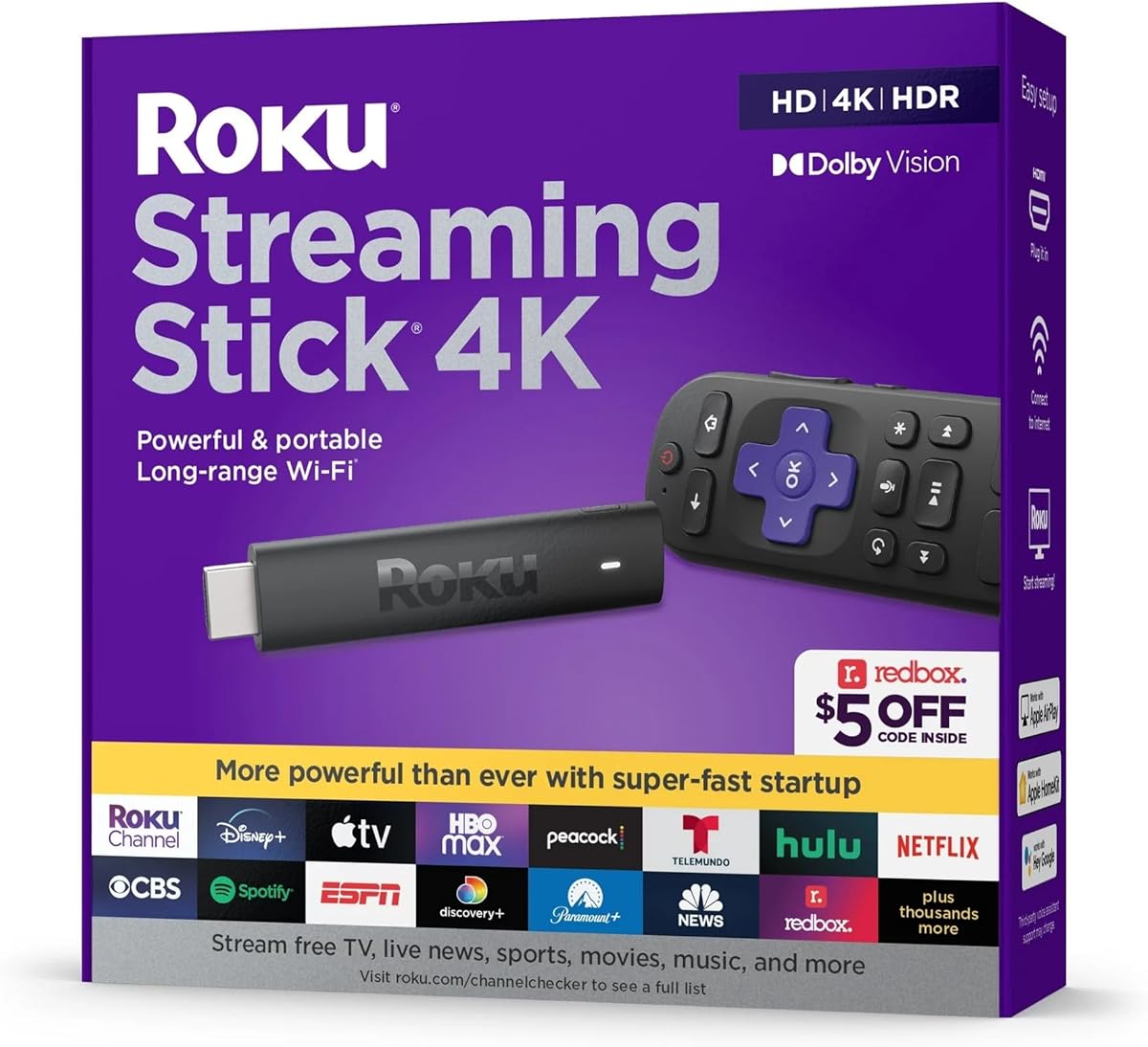
The Roku Streaming Stick 4K is the most versatile choice in this guide because it combines a clear interface with broad picture-format support. Its 4.7 rating is the highest among the ten products, and the supplied information highlights 4K, HDR10+, Dolby Vision, and a long-range Wi-Fi receiver.
We may earn a commission when you buy through this link, at no additional cost to you.
This model makes sense for an older television that has an HDMI input but cannot render modern 4K formats natively. It can also serve as an upgrade pathway for a mixed household in which the same stick may later be moved to a 4K television. Its compact form does not obstruct adjacent HDMI ports, and it can sit discreetly behind the display.
Like the standard Roku interface, it aims to reduce complexity. A single remote handles television power and volume as well as streaming, while voice commands help users find shows and entertainment quickly. The trade-off is that advanced formats add little to an older HD panel, and this device costs more than the entry-level Roku option.
It is a strong all-around recommendation for viewers who want an uncomplicated platform without giving up 4K capabilities. The combination of the highest listed rating, long-range wireless reception, broad format support, and one-remote operation makes it especially appealing for households with multiple televisions or a router positioned away from the viewing area.
Four times HD resolution, HDR10+, and Dolby Vision support allow the device to take advantage of a capable 4K television. On an older HD set, it still provides convenient access to streaming apps without replacing the display.
The long-range Wi-Fi receiver is designed to maintain smooth streaming in rooms farther from the router. Placement near the television can also improve reception compared with a device located in another part of the home.
We may earn a commission when you buy through this link, at no additional cost to you.
The ONN Android TV 2K FHD Streaming Stick provides a familiar Android TV experience for an older television. It carries a 4.1 rating, and its supplied features include built-in Chromecast, access to thousands of applications through the Play Store, a virtual assistant, and 2K full HD streaming.
We may earn a commission when you buy through this link, at no additional cost to you.
Its strongest attraction is flexibility. The Google-style platform supports familiar services such as YouTube and Play Movies & TV, while the ability to cast photos, videos, and music from a phone, tablet, or computer expands its use beyond conventional television streaming. The remote's microphone button gives users a way to issue voice commands through the built-in virtual assistant.
Compared with the Roku models, this device offers more visible Android and Google functionality but does not advertise 4K, HDR10+, or Dolby Vision output. The power adapter is included, but unlike the compact Roku sticks, the product is not described as drawing power directly from the television. Its 4.1 rating is respectable but trails the two highest-rated choices.
It is a good match for households that already use Google services or regularly cast their own media. Buyers prioritizing the simplest interface may prefer Roku, while those wanting a wider app storefront and integrated casting may find this ONN model more accommodating.
Built-in Chromecast lets a compatible phone, tablet, or computer send personal photos, videos, and music to the television. This makes the stick useful for more than subscription-based entertainment.
Play Store support provides access to thousands of apps. That selection is useful for users who want multiple entertainment services or utilities alongside the standard streaming applications.
We may earn a commission when you buy through this link, at no additional cost to you.
The renewed Roku Streaming Stick Plus offers 4K and HDR10+ streaming in the same streamlined form as Roku's other sticks. Its 3.8 rating is lower than the ratings of the new Roku models in the list, so buyers should distinguish the appeal of renewed hardware from the consistency normally associated with a new device.
We may earn a commission when you buy through this link, at no additional cost to you.
The core experience remains attractive. A simple home screen, quick setup, voice search, and a remote that controls television power and volume make the device approachable. It draws power from the television and fits behind the set without blocking adjacent HDMI ports, which is valuable in homes with limited connection space.
The renewed status is the key consideration. Condition, packaging, accessory completeness, and warranty terms may differ from a new product, and buyers should review the seller's current listing carefully. The lower rating may also reflect expectations or experiences specific to renewed inventory rather than a difference in the stated hardware functions.
This model is most suitable for budget-conscious buyers who want 4K capability, a familiar Roku interface, and minimal cable clutter but are comfortable purchasing refurbished equipment. Those who prioritize a stronger customer rating or straightforward new-device assurances may be better served by the standard Streaming Stick 4K.
The renewed designation refers to the product's condition rather than a reduction in the stated streaming features. Buyers still receive 4K, HDR10+, voice search, and the compact television-powered design.
The stick can be hidden behind the television and powered from the TV, reducing visible connections. Its slim form also helps preserve access to neighboring HDMI ports.
We may earn a commission when you buy through this link, at no additional cost to you.
The Android TV Stick 4K 2026 is a specification-heavy option for turning an older television into a more capable entertainment display. Its 3.6 rating is among the lower scores in the comparison, but the supplied information lists Android 14, a quad-core RK3518 processor, 2GB RAM, 16GB storage, 4K HDR10+, Wi-Fi 6, and Bluetooth 5.4.
We may earn a commission when you buy through this link, at no additional cost to you.
The device is explicitly positioned as an upgrade for an old or non-smart television. It supports native 4K output and 8K decoding, dual-band wireless connections, and a voice remote. Bluetooth can be used with wireless headphones, speakers, or game controllers, giving the device a broader home-entertainment role than a basic streaming stick.
Its physical design is less minimalist than many Roku models. The package includes an IR extension cable, remote, HDMI extension cable, power cable, and power adapter, so setup involves more accessories than a television-powered stick. The 3.6 rating suggests that some buyers may not have found the overall experience as satisfying as the leading models.
This is a practical choice for a technical user who values current Android specifications, fast dual-band networking, and accessory support. It is less compelling for someone who wants the least complicated setup or a minimalist remote experience, but it provides a capable way to reuse an older television.
Wi-Fi 6 and 2.4G/5G dual-band operation help maintain a stable connection in a busy home network. Bluetooth 5.4 expands the options for connecting compatible audio and control accessories.
Android 14 and 16GB of internal storage provide space for applications beyond the built-in entertainment options. The quad-core processor and 2GB of RAM are intended to support everyday navigation and app use.
We may earn a commission when you buy through this link, at no additional cost to you.
The Android 13.0 TV Stick 4K emphasizes portability and a straightforward Android interface. It has a 3.6 rating, matching the Android TV Stick 4K 2026, and the supplied specifications list a quad-core CPU, 2GB RAM, 16GB storage, dual-band Wi-Fi, Bluetooth 5.0, 4K, and HDR10.
We may earn a commission when you buy through this link, at no additional cost to you.
Its mini stick measures 4.05 by 1.33 by 0.45 inches and weighs 0.35 pounds, making it easy to carry or store. The small size is complemented by a voice remote that can search for content, control playback, and launch applications. It also supports projectors that lack their own application system, extending its usefulness beyond televisions.
The main caveat is that Android 13 is an older platform generation than Android 14, and the 3.6 rating gives buyers less customer feedback confidence than the leading products. As with other Android sticks, app performance can depend on the size and quality of individual applications, and the stated 2GB of memory is modest for a heavily loaded interface.
This product is a sensible fit for travelers, renters, and users who want a compact secondary streamer. It can provide 4K-capable app access to an older television or projector and may be especially convenient when storage space around the television is limited.
The listed dimensions and weight make the stick easy to pack. It can move between a home television, vacation property, hotel screen, or compatible projector without occupying much space.
The Bluetooth voice remote supports content search, app launches, and playback control. These functions can reduce dependence on directional navigation and text entry.
We may earn a commission when you buy through this link, at no additional cost to you.
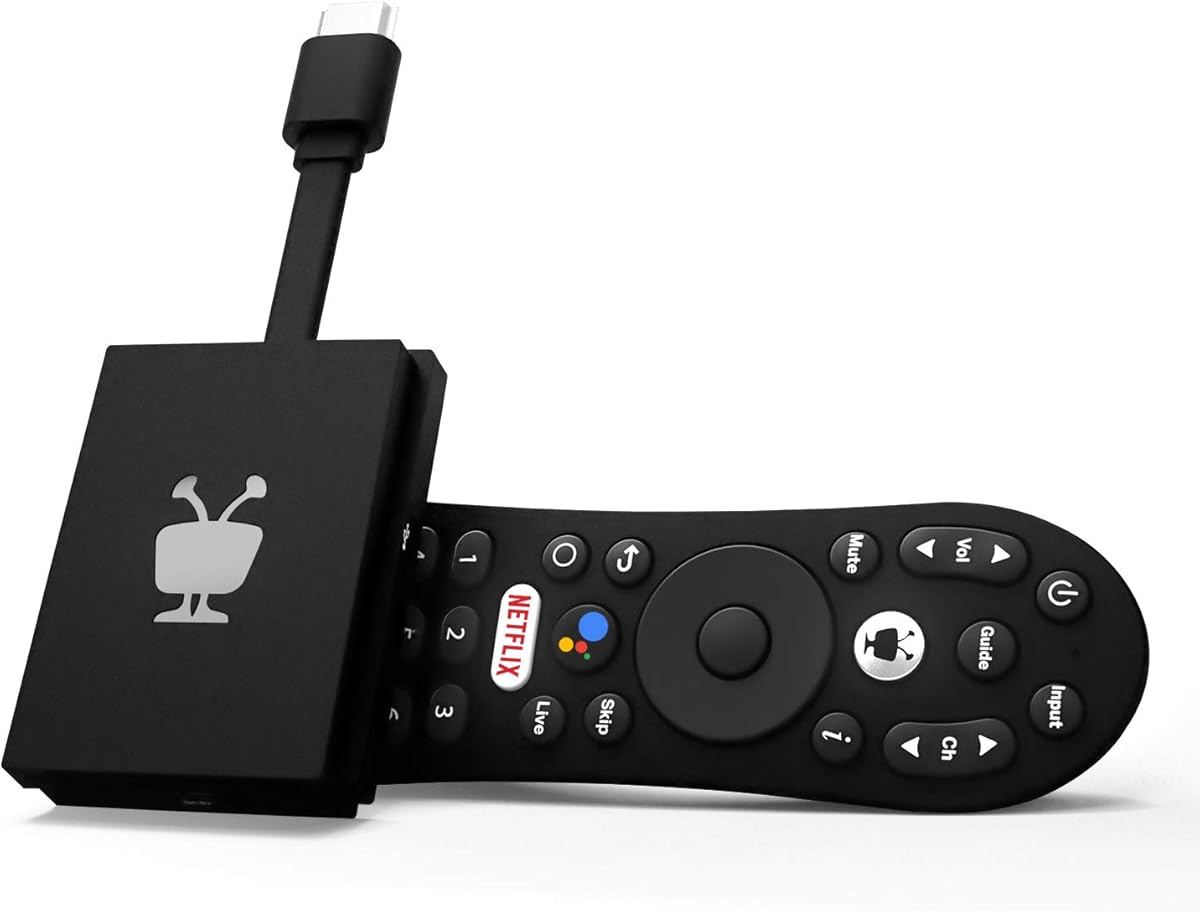
The TiVo Stream 4K differentiates itself with a unified search and recommendation system spanning multiple applications. Its 4.2 rating places it behind the top Roku models but above several Android alternatives. It supports 4K UHD, Dolby Vision HDR, Dolby Atmos, live TV, and major services including Netflix, Prime Video, Disney+, and Peacock.
We may earn a commission when you buy through this link, at no additional cost to you.
Rather than requiring users to open separate apps and learn separate interfaces, TiVo centralizes browsing, searching, and watch-list creation. Recommendations can draw on a user's viewing preferences across apps, while the integrated Google Assistant launches applications and supports voice control. That approach is potentially useful for users who subscribe to many services but dislike switching among them.
Its trade-off is physical simplicity. The supplied information does not emphasize the tiny, television-powered form found on the two leading Roku sticks, and the multi-output feature set may create more complexity for users whose main goal is a streamlined interface. Dolby Vision and Atmos also depend on the television, soundbar, or audio setup.
This model is a good fit for multi-service households that value one discovery screen and cross-app recommendations. It is especially appropriate for an older television with an HDMI input and capable home audio, offering a way to modernize the set while centralizing entertainment management.
A single interface can reduce the need to browse separately through each streaming service. Watch lists can also be created in one centralized place, which helps users organize programs across different subscriptions.
Dolby Vision and Dolby Atmos support can enhance compatible televisions and audio equipment. The device also serves as a connected screen for live television and major streaming applications.
We may earn a commission when you buy through this link, at no additional cost to you.
This Roku Streaming Stick 4K is another strong 4K option, carrying a 4.4 rating and a feature set centered on picture quality, wireless reception, and simple setup. It supports 4K, HDR, and Dolby Vision and is designed to hide behind an older television without creating visible cable clutter.
We may earn a commission when you buy through this link, at no additional cost to you.
Its long-range Wi-Fi receiver should appeal to homes in which the television is not close to the router. The included voice remote can power the television, change the volume, and operate the streamer, while a simple plug-in-and-connect setup reduces installation barriers. A redesigned internal receiver is one of the product's more useful distinctions from earlier compact designs.
The main issue is differentiation. It shares the same core platform and broad purpose as the Roku Streaming Stick 4K ranked second, so buyers should compare the current listing, included remote, availability, and price carefully. It does not offer the rechargeable, backlit remote or hands-free voice controls listed for Roku Ultra.
This stick is well suited to viewers who want the familiar Roku experience and 4K support in a compact form. It is a particularly practical choice for an older 4K television that needs discreet placement, while those seeking the most advanced remote and connectivity features can consider the premium Roku option.
4K, HDR, and Dolby Vision support deliver useful picture capabilities when connected to a compatible display. The small housing is intended to remain out of sight behind the television.
A redesigned long-range receiver is intended to improve streaming stability in rooms farther from the router. This makes the stick useful in home layouts where a wired connection is inconvenient.
We may earn a commission when you buy through this link, at no additional cost to you.
The 2026 Android 14.0 TV Stick offers a current Android platform, 4K output, Wi-Fi 6, and an inclusive accessory package for upgrading an older television. No numerical customer rating is supplied, so its feature set is a more reliable basis for evaluation than customer feedback.
We may earn a commission when you buy through this link, at no additional cost to you.
Its RK3518 quad-core Cortex-A53 processor, 2GB RAM, and 16GB ROM are intended to support app launches, everyday navigation, and multitasking. Dual-band Wi-Fi 6, Bluetooth 5.4, and built-in screen mirroring broaden the device's connectivity. The included voice remote can search and launch applications, while wireless keyboards, speakers, and headphones can be paired through Bluetooth.
Setup is described as taking only a few minutes and following on-screen prompts. However, the package includes an HDMI extension cable, IR extension cable, voice remote, power cable, power adapter, and manual, which may make the initial arrangement more involved than that of a television-powered Roku stick. The absence of a customer rating also means buyers have less independent feedback to consider.
This product suits buyers who want an up-to-date Android interface, wireless peripheral support, and screen mirroring in a straightforward package. It may be especially helpful for users who already store photos, presentations, or videos on a phone or computer and want to display them on an older television.
Built-in wireless screen mirroring can display photos, videos, presentations, and games from a compatible device. The feature reduces the need for additional cables for personal media.
The guided process asks users to connect the stick, supply power, select the input, and join Wi-Fi. Extension cables and an IR receiver improve reach or signal access in some television arrangements.
We may earn a commission when you buy through this link, at no additional cost to you.
The Roku Ultra is the premium entry in this guide, offering the most elaborate remote and connectivity features. It has a 4.4 rating and supports 4K, HDR10+, Dolby Vision, and Dolby Atmos. The supplied information also states that its interface and apps launch faster than those of other Roku players.
We may earn a commission when you buy through this link, at no additional cost to you.
Its rechargeable Roku Voice Remote Pro is the defining feature. Backlit buttons make commands visible in a dim room, a lost remote finder helps recover the device, and hands-free voice control allows a user to say Hey Roku from across the sofa. Bluetooth Headphone Mode can connect headphones directly to the streamer, supporting quieter late-night viewing without waking the household.
Wi-Fi 6 improves wireless performance, while Ethernet offers an alternative for a stable wired connection. Bluetooth headphone support and Dolby Atmos are meaningful additions to a home-theater setup. The trade-off is that this is the most expensive product listed, and users who watch mainly in a bright room with a simple remote may not use its premium functions.
The Roku Ultra is best for households seeking advanced remote convenience, flexible networking, and high-end format support. It is a particularly good match for older adults who appreciate illuminated controls and hands-free searching, provided the additional expense fits their budget and the television and audio equipment can take advantage of the available formats.
Backlit buttons, voice control, and the lost remote finder address common sources of frustration. A rechargeable design also removes the need to replace remote batteries regularly.
Direct Bluetooth headphone mode can make late-night viewing quieter. Wi-Fi 6 and Ethernet provide two connection choices, while Dolby Atmos support is useful with compatible sound equipment.
We may earn a commission when you buy through this link, at no additional cost to you.
The most useful device is not necessarily the most technically advanced. Interface clarity, remote design, television compatibility, wireless stability, and app access should be balanced against picture specifications and setup complexity.
An older television needs an available HDMI input because every streaming stick in this list relies on that connection. Check the television's ports before buying, and consider whether a neighboring input is needed for a soundbar, game console, or disc player. All of the models use a compact stick format, but their exact size and power arrangements differ. The Roku models are specifically described as avoiding blocked neighboring ports, while the Android packages include HDMI extension cables to improve positioning.
Choose a stick that fits the available space and can be hidden neatly. If the television is mounted or sits on a narrow shelf, placement and cable reach deserve attention before purchase.
A straightforward home screen can make a new streaming device feel much less intimidating. Roku models emphasize an uncluttered, simplified interface, while Android TV devices offer a familiar Google-style environment and broader Play Store access. TiVo focuses on centralized searching and recommendations across applications. The best choice depends on familiarity: users who already use Google services may prefer Android, while many viewers may find Roku's layout more approachable.
Look for clear menus, easy app access, and a remote that does not require repeated guessing. Voice commands are helpful, but the on-screen experience should still be comfortable for anyone who does not use them.
A remote that combines streaming and television controls reduces confusion and the need to remember which device responds to which buttons. The Roku sticks provide a single voice remote with power and volume functions, and the TiVo device adds Google Assistant. The Roku Ultra stands apart with backlit buttons, a rechargeable battery, a lost remote finder, and hands-free voice control. These features may be particularly helpful in a dim room or for users with limited vision.
Consider button size, labeling, tactile separation, voice responsiveness, and whether the remote can be used from a comfortable chair. A more advanced remote is useful only if its extra functions are understandable and regularly needed.
Match the stick's output to the television rather than choosing the highest available specification by default. An HD television cannot display 4K, HDR10+, or Dolby Vision, so those formats add little to its picture. The Roku Streaming Stick HD and ONN 2K model are sensible for HD sets. Devices offering 4K are more useful when an older 4K television needs a modern streaming platform, or when the stick may be moved to a newer display later.
For maximum compatibility, verify that the television supports the desired format and that the sound system can handle the selected audio standard. A capable stick cannot create picture quality the display cannot render.
A strong Wi-Fi connection is essential for smooth streaming, particularly for HD and 4K video. Several products support 2.4GHz and 5GHz dual-band Wi-Fi, while the newer Android models and Roku Ultra add Wi-Fi 6. Long-range receivers can help in homes where the router is separated from the television by walls or several rooms. The Roku Ultra and TiVo Stream 4K also support more traditional connected-device layouts, with the Ultra explicitly offering Ethernet.
If the television sits far from the router, compare the stated wireless specifications and consider reducing network congestion. A wired connection may be preferable where available, but it adds another cable that some viewers want to avoid.
A streaming stick is only as useful as the services supported by its operating system. Roku products provide a familiar channel-based platform, Android models offer Play Store access and built-in entertainment services, and TiVo centralizes major apps such as Netflix, Prime Video, Disney+, and Peacock. The ONN device also advertises thousands of applications through the Play Store. Before buying, confirm that every service the household subscribes to is available and that sign-in procedures are manageable.
Also check whether the desired content supports the stick's resolution and format. App compatibility can evolve, so current listing details and the latest platform information are worth reviewing.
Android TV sticks in this list generally offer 2GB of RAM and 16GB of internal storage, along with quad-core processors. Those specifications support everyday use, but they are more relevant to a buyer who installs many applications or values a broader software environment than a minimalist streaming platform. Bluetooth support can also permit the use of wireless headphones, speakers, keyboards, or game controllers.
Accessories matter too. Some packages include a power adapter, HDMI extension, and IR extension, while television-powered Roku sticks can reduce cable clutter. Choose the arrangement that is easiest to position and understand.
Compare customer ratings along with specifications, but do not treat a rating as a guarantee of individual experience. New, renewed, and very recently listed products may have different feedback histories. The renewed Roku Streaming Stick Plus may appeal to budget-conscious buyers, but its condition and included accessories should be checked. Products with strong support options or an inclusive package can offer better long-term convenience even when another model appears less expensive.
The right value choice is the device that supplies the functions the household will actually use. Paying for Dolby Vision on an HD set, rechargeable controls for occasional viewing, or a large app catalog when only one service is needed may not be worthwhile.
Begin by inspecting the television and identifying a free HDMI input. Connect the streaming stick, attach the included power components if required, and turn on the television. Select the matching HDMI input with the television remote before beginning the stick's on-screen setup. The Roku models can power from the television, while the Android products in this guide include external power components.
Follow the on-screen instructions to choose the appropriate language, connect to Wi-Fi, and sign in or activate the required streaming accounts. After setup, install any additional applications, organize frequently used channels, and test playback. Bluetooth accessories should be paired through the appropriate device settings, and a wired connection can be selected where the streaming platform and television arrangement make that preferable.
Keep the stick and television ventilation area unobstructed, and avoid placing the device inside a closed cabinet if it becomes warm. Dust the television and connections gently with a dry microfiber cloth, and do not push moisture into ports. To travel, unplug the power, remove any paired accessories, and pack the stick with its remote and required cables. Update the operating system when prompted to help maintain app compatibility and security.
Most older televisions can use a streaming stick if they have an HDMI input and can display a digital picture from that source. The stick supplies modern apps and smart features, but it cannot add those features to a television with only analog or legacy inputs. Confirm the available ports and television compatibility before ordering.
Usually not. A 4K stick can send a 4K signal, but an HD television will display the content in its supported format. The Roku Streaming Stick HD or ONN 2K model may therefore meet an HD television's needs without utilizing advanced 4K features. A 4K model makes more sense for a compatible 4K television or a future-proof setup.
Roku's interface is designed around a simple home screen and uncluttered remote, while Android TV offers a familiar Google environment and a large Play Store catalog. Ease of use depends on prior experience, but Roku is often considered a more streamlined option. The included voice remote on both platforms can help users find content without lengthy typing.
Several choices in this guide include remote controls for both functions. The Roku Streaming Stick models have voice remotes with television power and volume controls, while the Roku Ultra adds backlit and rechargeable features. The Android devices may control some television functions through an IR extension, depending on the included accessories and television compatibility.
Check the television's network speed and move the router closer or use an Ethernet connection if possible. Dual-band and Wi-Fi 6 devices can help, but network congestion, weak signal, and outdated router firmware may also matter. Closing unused background downloads and restarting the stick, router, and television can resolve some temporary issues.
A renewed model can provide useful hardware features at a lower cost, but the condition and included accessories may vary. Check the seller's description for signs of wear, the warranty, and what is included in the box. Buyers who prioritize reassurance and consistent condition may prefer a new model.
Some models and channels provide live television or local news within their interfaces. The Roku Streaming Stick Plus and Roku Ultra are specifically described as offering free live TV, news, and sports options, while TiVo also emphasizes live TV alongside streaming apps. Channel availability can vary by location and service.
Yes, provided the projector has a compatible HDMI input and can display the signal. The Android 13.0 TV Stick 4K is specifically described as compatible with projectors that do not have an application system installed. Check the projector's supported resolution and audio capabilities before connecting a new device.
The Roku Streaming Stick HD is the clearest budget option because it combines HD streaming, a simple interface, a television-powered design, and one voice-enabled remote. The Roku Streaming Stick 4K is the most balanced recommendation for viewers who want modern picture formats and long-range Wi-Fi, while the TiVo Stream 4K stands out for centralized search across applications.
Prioritize the features that will make daily use comfortable: a clear home screen, a remote that controls both the television and streamer, a reliable connection, and a device that fits behind the set. Advanced resolution, rechargeable controls, Ethernet, and Bluetooth headphone mode are valuable but more useful on newer televisions and in carefully planned entertainment setups.
Before buying, verify the television's HDMI availability, current app support, product condition, accessories, and latest specifications. Prices and availability change frequently, so comparing the current listing at the time of purchase can help ensure that the chosen stick matches both the budget and the viewing setup.