
MOTU 10pre 26×28 Thunderbolt 4/USB4
4.5Editor score
Native Thunderbolt 4 connectivity
Extensive 26-input expansion
Advanced networked studio control
Our Thunderbolt 4 Pro Audio Interfaces guide compares ten models for latency, connectivity, preamps, I/O, monitoring, expandability, and studio value in 2026.
Thunderbolt 4 Pro Audio Interfaces connect a computer to studio hardware with high-bandwidth, low-latency transport. The strongest models combine fast conversion, flexible preamps, dependable clocking, useful monitoring, and enough inputs for instruments, microphones, and expanded recording systems.
This guide compares ten interfaces relevant to Thunderbolt-based production, including one native Thunderbolt 4 model, several Thunderbolt 3 Apollo models, and USB-C alternatives that compete at different project scales. Features, channel counts, software ecosystems, latency claims, expandability, and user ratings informed every selection.
Each review shows where a product is especially capable and where another may fit more naturally. The MOTU 10pre leads for native Thunderbolt 4 expansion, while the Apollo options serve Unison and UAD users; more compact Scarlett, Fender, and PreSonus choices serve different budgets and recording styles.
4.5Editor score

4.5Editor score

4.5Editor score
The table below compares all ten models by connection, recording capacity, preamp offering, and monitoring or expansion features so buyers can identify the right scale before exploring the detailed reviews.




The Universal Audio Apollo Twin X DUO Gen 2 is a compact desktop interface for producers who want a polished recording front end and a substantial effects ecosystem. Its user rating is 4.5, and its defining strength is the combination of Unison preamp emulation, UAD processing, and Apollo monitoring tools in a manageable two-channel design.
We may earn a commission when you buy through this link, at no additional cost to you.
Unison can emulate the response of preamps from respected manufacturers including Neve, API, Avalon, Manley, and Fender while a track is being recorded. The interface also opens access to more than 200 UAD DSP and Native plug-ins, including Capitol Chambers, Sound City Studios, and EL8 Distressor. That makes the hardware useful well beyond the initial preamp stage, particularly for producers who want hardware-style processing without relying entirely on their computer's CPU.
Apollo Monitor Correction powered by Sonarworks is another major attraction. It can make a more ordinary monitor environment easier to trust, and the included bass management function helps users integrate a subwoofer more effectively. Auto-Gain sets levels across multiple inputs, reducing the chance of an unusable take caused by poor gain staging. The main limitation is that the DUO has only two Unison inputs, so a drummer, multi-instrumentist, or small ensemble may quickly need the QUAD model or a larger interface.
This Apollo is a strong recommendation for a singer-songwriter, podcast producer, electronic musician, or small tracking room that values polished pres, integrated software, and reliable monitoring. It is not a native Thunderbolt 4 model, but its Thunderbolt 3 connection remains relevant for Mac-based studios, and the interface provides an especially attractive mix of features for the money. Buyers should choose the QUAD if simultaneous microphone capture is more important than the DUO's more compact footprint.
Unison places emulated preamp behavior directly in the input path, giving each selected hardware emulation its own gain, dynamics, and tonal character. This makes the Apollo more than a converter and lets a producer shape the source before committing to other processing.
Monitor Correction, speaker comparison, Auto-Gain, and bass management address practical studio problems. Together, they can reduce uncertainty when judging mixes, fitting vocals and instruments, and integrating a subwoofer with main monitors.
We may earn a commission when you buy through this link, at no additional cost to you.
The Universal Audio Apollo Twin X QUAD Gen 2 is the four-microphone member of the Apollo Twin X family. It carries a 4.5 rating and is especially appealing to producers who need more simultaneous recording channels than the DUO but still want the familiar Unison, UAD, and monitor-management experience.
We may earn a commission when you buy through this link, at no additional cost to you.
The stated converter design emphasizes wide dynamic range and low distortion, while four Unison preamps let users select among emulations associated with Neve, API, Avalon, Manley, and Fender. The interface also provides access to more than 200 UAD DSP and Native plug-ins. For a recording room occupied by a vocalist, guitarist, drummer, or another instrumentalist, the additional preamp channels can eliminate the need for a second box during an initial tracking session.
Apollo Monitor Correction powered by Sonarworks, Auto-Gain, and the wider UAD catalog are particularly relevant to mixing and vocal production. Auto-Gain is especially helpful when multiple sources arrive at different levels, while monitor correction provides a more consistent view of a mix. The compromises are predictable: this is Thunderbolt 3 rather than Thunderbolt 4, and it is designed as a desktop system rather than a portable interface. A buyer with many high-end outboard devices may also need more analog insert flexibility than the compact enclosure offers.
Choose the QUAD when four direct microphone inputs and the complete Apollo software ecosystem are priorities. It is an especially strong fit for small bands, vocal booths, and project studios seeking high-quality preamps and plug-ins in one desktop unit. For musicians who record one source at a time and value portability, the DUO or Solo may be more appropriate; for those assembling a large facility, the MOTU 10pre offers much broader channel and networking capacity.
Four emulated input paths make it easier to record a complete compact ensemble in one pass. A producer can move between vocal, guitar, bass, and percussion without immediately adding another interface or preamp.
The emphasis on dynamic range and low distortion makes this model relevant to both tracking and critical listening. Its monitor controls and Apollo Monitor Correction add further assistance when judging balance, depth, and translation.
We may earn a commission when you buy through this link, at no additional cost to you.
The Apollo Solo Heritage Edition is a compact, bus-powered interface for recording one microphone and one instrument at a time. Its 4.6 rating reflects a well-regarded design that brings Apollo's Unison technology and UAD processing to a highly portable form factor for Mac and Windows users.
We may earn a commission when you buy through this link, at no additional cost to you.
The Heritage Edition includes five award-winning plug-in titles associated with Teletronix, Pultec, and Universal Audio, along with UAD SOLO Core processing. Its Unison emulations cover preamps and guitar amplifiers inspired by hardware from Neve, API, Avalon, Manley, Marshall, and Fender. These tools run in VST, AU, and AAX 64 formats, allowing the interface to fit comfortably within Logic Pro, Pro Tools, Cubase, Ableton Live, and other major DAWs.
The strongest compromise is its deliberately small recording capacity. LUNA is a capable integrated recording application, but it is Mac-only, so Windows users need to rely on their preferred DAW. A single Unison preamp also means that overdubbing a duet or drum kit will require additional input hardware. Even so, the detailed headphone amplifier, bus-powered construction, and low-noise monitoring make the Solo effective for mobile vocals, acoustic instruments, and focused home-studio work.
This model is best for a songwriter, vocalist, or bedroom producer who wants a polished Apollo experience without a permanently desk-bound system. It is less suitable for a live room, band with several simultaneous sources, or studio requiring high channel counts. Buyers who only need occasional tracking can use it as a portable complement to a larger system, while dedicated laptop musicians may find it sufficient as the primary interface.
Bus power and compact construction allow the Solo to move between rooms, studios, and recording locations without a separate power supply. That mobility makes it practical for a vocalist who records in different spaces or a musician building tracks away from a permanent desk.
SOLO Core offers vintage-style compressors, equalizers, tape machines, preamps, and guitar amplifier effects at near-zero latency. The included Heritage Edition plug-ins provide a strong starting point for recording and mixing without requiring the complete UAD ecosystem.
We may earn a commission when you buy through this link, at no additional cost to you.
This listing for the Universal Audio Apollo Twin X QUAD Gen 2 offers the same core product family as the higher-rated QUAD listing, including four Unison preamps, next-generation Apollo conversion, and access to more than 200 UAD DSP and Native plug-ins. Its 4.0 rating is still positive, though it trails several alternatives in the roundup.
We may earn a commission when you buy through this link, at no additional cost to you.
The major strengths are easy to identify. Unison can shape four microphone inputs with emulations inspired by Neve, API, Avalon, Manley, and Fender, while the UAD catalog gives the interface substantial relevance throughout production. Apollo Monitor Correction powered by Sonarworks assists critical mixing, and Auto-Gain reduces setup time when several channels arrive at inconsistent levels. The included UAD Analog Classics bundle also provides a substantial software foundation for a new Apollo system.
The lower rating is a reminder to consider the complete listing and current user feedback rather than assuming every configuration of an established model will suit every studio. It remains a desktop Thunderbolt 3 unit, so it does not satisfy a strict requirement for native Thunderbolt 4. Buyers seeking a broad collection of channels, analog inserts, or networkable devices should look beyond this four-input design, while buyers already invested in UAD software may find its ecosystem especially valuable.
This Apollo listing is best for producers who explicitly want four Unison inputs, UAD processing, and Sonarworks-assisted monitoring in a desktop interface. It is also sensible for Mac-centric studios that value a mature application and plug-in environment. The recommendation depends on finding a listing with the desired bundle and configuration, so comparing the available package with other QUAD listings is essential before ordering.
UAD, Unison, and Apollo Monitor Correction create a connected workflow rather than a collection of isolated features. Producers can use the same emulated character during tracking and additional UAD processors while mixing.
Auto-Gain is particularly useful when several performers need to be captured quickly. It helps establish useful input levels so the producer can focus on performance and arrangement instead of repeatedly adjusting hardware.
We may earn a commission when you buy through this link, at no additional cost to you.
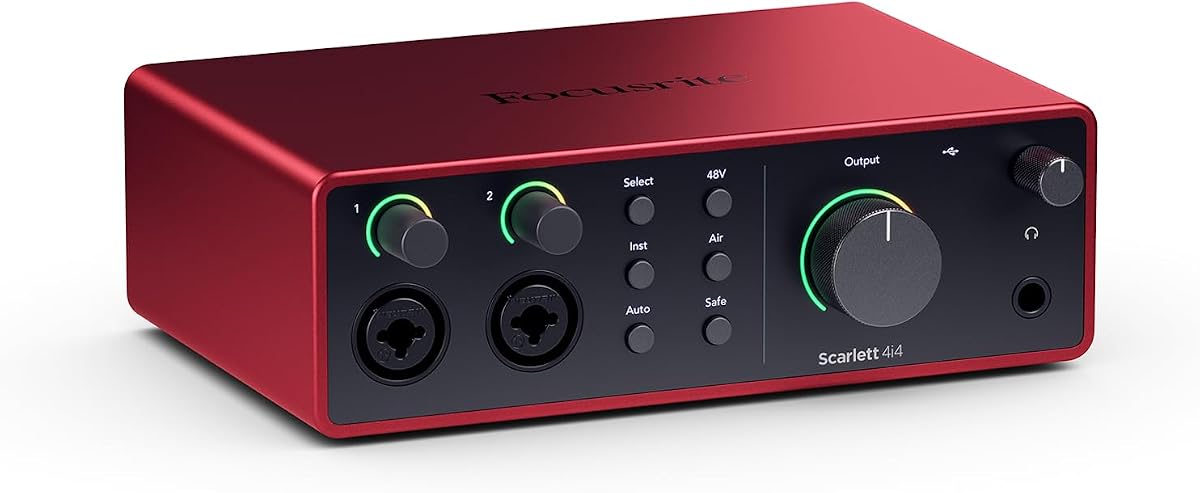
The Focusrite Scarlett 4i4 4th Gen is a four-input USB-C interface designed to act as the center of a compact music-production setup. Its 4.7 rating is the highest among the rated products in this guide, reflecting a favorable user response to its converter performance, practical connectivity, and approachable design.
We may earn a commission when you buy through this link, at no additional cost to you.
It provides two Scarlett 4th Gen microphone preamps, two Hi-Z instrument inputs, four line inputs, four line outputs, and MIDI input and output. This makes it a natural hub for a vocalist, guitarist, electronic performer, streamer, or small ensemble. The stated 120dB dynamic range uses the same converter family found in Focusrite's flagship interfaces, giving it performance well beyond what the familiar Scarlett name might otherwise suggest.
Air mode adds harmonic presence to vocals and guitars, while Auto Gain establishes a suitable recording level and Clip Safe helps prevent overload. The software bundle includes Pro Tools Intro+, Ableton Live Lite, Cubase LE, and Hitmaker Expansion, giving new owners recording software, instruments, effects, and mastering tools. The main drawback for this particular keyword is connection type: it is a USB-C interface rather than a Thunderbolt 4 device. It also has two mic preamps, so recording more than two microphones simultaneously requires another interface.
The Scarlett 4i4 is an excellent fit for project studios that prioritize useful I/O, strong conversion, MIDI support, and software over maximum channel count. It is less appropriate for a facility requiring native Thunderbolt expansion, AVB networking, or many simultaneous mic inputs. For those priorities, the Apollo Twin X QUAD or MOTU 10pre makes more sense; for a smaller setup, the Scarlett 2i2 may already provide enough connectivity.
The mixture of two preamps, two Hi-Z inputs, four line inputs, and MIDI gives the 4i4 more flexibility than a typical two-channel desktop interface. It can serve as the hub for a small band, music-production keyboard, electronic rig, or streaming setup.
The included applications cover major DAWs, instruments, effects, and basic mastering needs. This reduces the setup burden for a new creator, while experienced users can ignore the bundle and work in their established production environment.
We may earn a commission when you buy through this link, at no additional cost to you.
The Focusrite Scarlett 2i2 4th Gen is a straightforward interface for recording vocals, an instrument, or a two-person session. It earns a 4.5 rating and offers a clear entry into current-generation Scarlett conversion without the larger 4i4's four-input footprint.
We may earn a commission when you buy through this link, at no additional cost to you.
Two 4th Gen mic preamps and two Hi-Z inputs are enough for a solo singer-guitarist, voice-and-guitar combination, podcast, or mobile recording setup. The converters are credited with a 120dB dynamic range and are also used in Focusrite's flagship interfaces. This provides plenty of headroom and fidelity for projects that do not require the channel count of a larger professional console-style interface.
Auto Gain, Clip Safe, and Air mode make the device approachable. Auto Gain chooses a practical starting level, Clip Safe reduces the likelihood of digital clipping, and Air adds harmonic color to vocals and guitars. The software bundle includes Pro Tools Intro+, Ableton Live Lite, Cubase LE, and Hitmaker Expansion, covering essential recording and production needs. Its principal limitation is obvious: there is no Thunderbolt connection, and recording a full band would require another interface or a professional multi-channel hub.
The 2i2 is best for a beginner, songwriter, podcaster, or traveling musician who wants a dependable primary interface and only needs two simultaneous sources. It is also a useful desktop companion when a larger system handles multichannel recording. Buyers whose priority is specifically Thunderbolt 4 should treat this as a budget comparison point rather than a direct match, while the MOTU 10pre is the clearest native option in the group.
The two-channel arrangement keeps signal flow easy to understand. A solo artist can connect a microphone to a preamp and a guitar to a Hi-Z input, record both, and monitor the result without navigating a complex routing matrix.
Auto Gain and Clip Safe work together to make repeated takes more dependable. They are not substitutes for careful gain staging, but they reduce common mistakes for new users and fast-moving sessions.
We may earn a commission when you buy through this link, at no additional cost to you.
The Fender Quantum LT 4 is a four-by-two USB-C interface with an emphasis on guitar, bass, and general music creation. Its 3.7 rating is the lowest numerical score among the rated products here, so buyers should examine the current feedback carefully, although the supplied specifications present a capable creator-focused feature set.
We may earn a commission when you buy through this link, at no additional cost to you.
Two MAX-HD microphone preamps provide up to 75 dB of gain for vocals, instruments, and ensemble recording. Two dedicated instrument inputs are designed for clear, dynamic guitar and bass capture, while custom low-latency drivers support responsive recording. Balanced TRS outputs, a headphone amplifier, and loopback routing make the interface useful for music production, podcasting, streaming, and other content workflows.
Fender's strongest differentiator is its software direction. Registration through My Fender Access unlocks the complete Fender Amp and FX Pack in Fender Studio, including authentic Fender amplifier models and effects. A six-month Fender Studio Pro trial is included with hardware registration, and the interface can be controlled through Fender Studio Pro or Universal Control. The limitation is that this is a USB-C design rather than a Thunderbolt 4 interface, and only two mic preamps are provided despite the four-by-two channel layout.
This is a sensible choice for a guitarist, bassist, singer, or streamer who values instrument inputs and Fender tone tools. It is less suitable for Thunderbolt-centered studios, large ensembles, or buyers prioritizing the highest-rated compact option. Users who need a more conservative, broadly endorsed desktop interface may favor the Scarlett 2i2, while a project requiring four preamps and Fender guitar tools should examine the PreSonus Quantum ES 4.
The two instrument inputs are built around electric guitar and bass rather than treating them as a secondary convenience. This makes the Quantum LT 4 especially relevant to players who record direct and want dependable level, dynamics, and clarity.
The Amp and FX Pack places familiar Fender amplifier and effect character inside the recording process. A player can capture an instrument, audition modeled tones, and continue building a song without treating the interface as an isolated converter.
We may earn a commission when you buy through this link, at no additional cost to you.
The MOTU 10pre 26×28 is the only product in this guide with native Thunderbolt 4 and USB4 connectivity, making it the most literal match for the keyword. It provides 26 inputs, 28 outputs, ten advanced microphone channels, extensive networking, onboard DSP, and sophisticated control-room functions for professional studios.
We may earn a commission when you buy through this link, at no additional cost to you.
Its supplied 40Gbps Thunderbolt-compatible USB4 cable can also work with USB3 and USB2 hosts, depending on the available bandwidth. Depending on the host connection, the interface can handle up to 256 audio channels, with 128 inputs and 128 outputs, while its simultaneous analog and digital capacity reaches 54 channels. The second Thunderbolt port can support peripherals, a hub, or a dock, making it practical as the central connection point in a modern workstation.
The analog section is designed for critical work. ESS Sabre32 DAC technology is specified at 125dB dynamic range, and round-trip latency can reach 1.8ms at 96kHz with high-performance DAW hosts. Ten flexible combo inputs provide up to 74dB of preamp gain, a minus 20dB pad, phantom power, and phase inversion, with dedicated send and return inserts on inputs one and two. A high-resolution color display presents metering and status, while 64-channel 32-bit floating-point DSP handles mixing, busses, EQ, gating, compression, and reverb.
The trade-off is scale. This is a far more substantial system than a simple desktop interface, and it may be unnecessary for a creator recording one or two sources. Its no-rating listing also means it should be evaluated from technical fit and current customer feedback rather than a visible aggregate score. For a studio requiring native Thunderbolt 4, AVB expansion, many channels, and serious control-room integration, however, it is the clear recommendation in this group.
The combination of Thunderbolt 4, USB4 fallback, and broad host compatibility gives the MOTU room to grow. It can support a laptop, desktop, or iPad-based workflow while leaving bandwidth available for additional computer devices.
Two Gigabit network ports allow daisy-chained units and networked computers to exchange hundreds of audio channels over standard network cabling. This is especially valuable for studios connecting multiple rooms, interfaces, or performance systems without relying only on local USB bandwidth.
Talkback, A/B/C speaker selection, mono summing, metering, and remote preamp control put everyday studio management directly at the front panel or under software control. These details make the interface easier to integrate into a professional control room.
We may earn a commission when you buy through this link, at no additional cost to you.
The PreSonus Quantum ES 4 is a four-by-four USB-C interface built around four MAX-HD microphone preamps and a guitar-focused instrument input. It carries a 4.1 rating and is a practical option for small ensembles and project studios that require more microphone capacity than a conventional two-channel interface.
We may earn a commission when you buy through this link, at no additional cost to you.
Each preamp offers up to 75dB of gain and is described as transparent, low-noise, and digitally controlled. That combination is useful in rooms where a producer wants repeatable settings across sessions. The instrument input was co-developed with Fender engineers specifically for guitar and bass, which distinguishes it from a generic line input. The interface also supports operation up to 24-bit and 192kHz through a custom low-latency driver.
Auto Gain helps establish levels for microphones and instruments, while Studio One and the Universal Control app provide remote access to gain, phantom power, and other preamp functions. A perpetual Studio One Pro license is included, which makes the package especially compelling for PreSonus users. However, the Quantum ES 4 does not provide Thunderbolt 4, and its score is below the strongest compact alternatives. It is also a more specialized choice than a general-purpose four-input interface because of its strong PreSonus and Fender integration.
This model is best for a guitarist, singer, or small band that wants four preamps, high-resolution recording, and excellent software integration. It can also work for a podcast with several participants, provided the connection and monitoring requirements fit the room. A Thunderbolt-focused facility should examine the MOTU 10pre, while creators prioritizing a smaller footprint may prefer the Scarlett 2i2 and can use a separate converter for additional microphones.
Four dedicated preamps support vocal, acoustic, guitar, and percussion recording in a single take. For a quartet or a singer with several nearby instruments, this is often a more useful capacity than two preamps plus an awkward external mixer.
Universal Control can operate on mobile or desktop devices, allowing important preamp settings to be changed away from the interface. This is useful when a performer is positioned remotely or when the software workflow is more comfortable than direct hardware adjustment.
We may earn a commission when you buy through this link, at no additional cost to you.
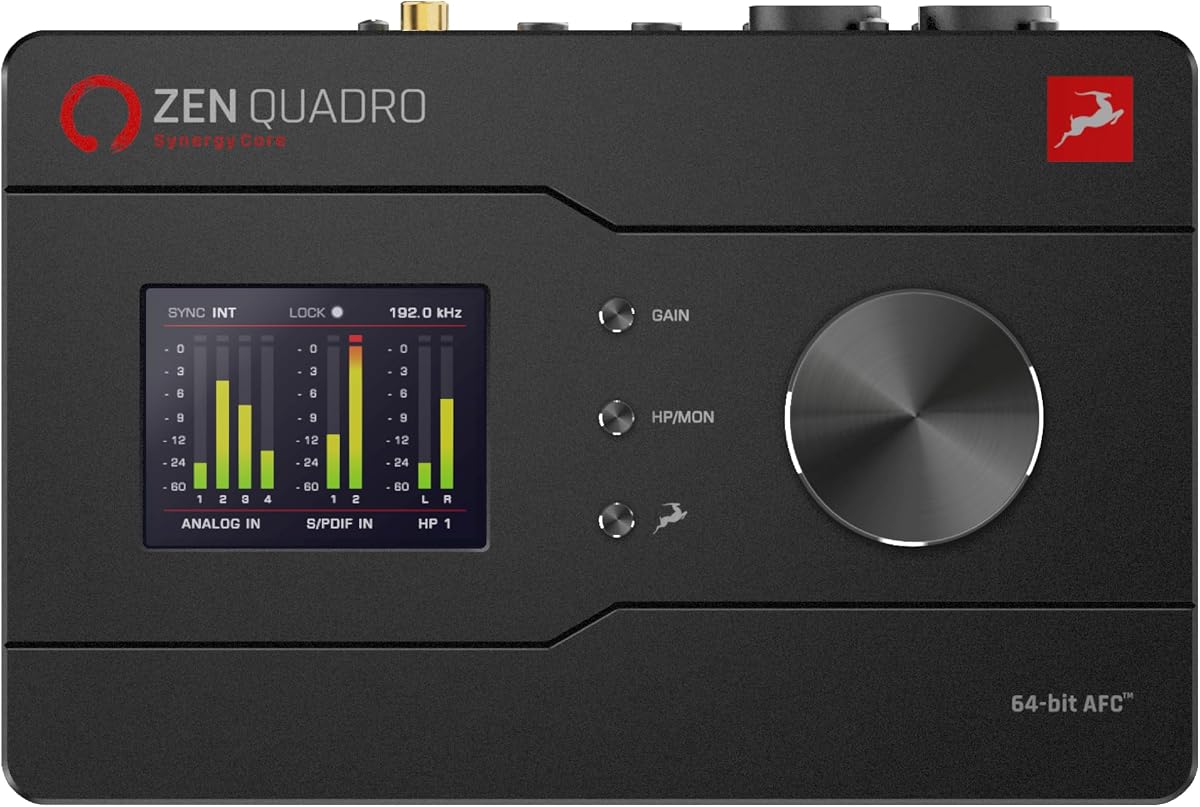
The Antelope Audio Zen Quadro is a portable four-channel interface with a strong emphasis on onboard real-time processing. Its 4.7 rating ties for the highest numerical score in the roundup, and its combination of four Discrete preamps, Synergy Core FX, two USB-C connections, and expandable I/O makes it distinctive.
We may earn a commission when you buy through this link, at no additional cost to you.
Four Discrete six-transistor preamps provide up to 75dB of gain, while two Hi-Z inputs accept guitars and basses directly. The converter specification reaches up to 130dB AD/DA dynamic range, and 64-bit AFC clocking is designed to maintain timing stability. Antelope's clocks are familiar to many working engineers, although the actual benefit in a given room will depend on the rest of the signal chain and monitoring setup.
The standout feature is Synergy Core FX. Thirty-seven effects are included, with more than 90 available. Analog-modeled compressors, EQs, preamps, amplifiers, and cabinets run on dedicated DSP and FPGA hardware, allowing near-zero-latency processing without loading the host CPU. Dual USB-C allows a computer plus phone or tablet to be connected at the same time, or two computers can be linked, and loopback supports streaming. ADAT and S/PDIF expansion can add up to eight more channels.
The Zen Quadro is best for a mobile creator who needs hardware processing, multiple computer workflows, or expandable I/O in a compact enclosure. It can handle vocals, instruments, and small sessions, and its two independent headphone outputs are useful for a performer and engineer sharing one system. It does not meet a literal native Thunderbolt 4 requirement, however, so Thunderbolt buyers should treat the MOTU 10pre as the primary recommendation and the Zen Quadro as a feature-rich alternative.
Synergy Core keeps included processors running on dedicated hardware rather than the computer. This can improve responsiveness and leave more host processing capacity for instruments, large sessions, and demanding mixing tasks.
ADAT and S/PDIF connections extend the initial 14-input and 10-output arrangement. That allows a small portable system to grow toward multichannel recording without requiring every peripheral to share the same USB connection.
The interface can connect a computer and mobile device at once, or support two computer workflows with routing between them. This is useful for live performance, mobile production, and creators who need a second device involved in the session.
We may earn a commission when you buy through this link, at no additional cost to you.
A professional interface should match the way you record, the number of sources involved, the software you use, and the room you need to control. The most important factors are connection bandwidth, preamp quality, latency, monitoring flexibility, and realistic expansion needs.
Choose native Thunderbolt 4 when you need maximum expansion, multiple peripherals, or a future-facing studio backbone. Otherwise, prioritize sound quality, I/O, and workflow over the version label.
Buy enough simultaneous inputs for the most common session, not merely the number of outputs shown in a marketing diagram.
Treat modeled character as an extra creative option, not a substitute for a clean front end with adequate gain and headroom.
Test the entire recording path with real plugins and instruments instead of relying only on headline latency numbers.
Prioritize clean conversion and dependable synchronization, then use converter specifications as supporting evidence rather than the only buying criterion.
Select controls that solve a real problem in your room rather than paying for features you will never use.
Treat bundled software as part of the system's real value, but verify that it fits your computer and preferred DAW before choosing.
Choose expansion only when the connection and workflow remain manageable after the project becomes larger.
Begin with the computer, driver, and DAW rather than connecting every peripheral at once. Install the current interface driver and control software, confirm that the device appears with the intended sample rate and buffer setting, and create a simple test session before attaching microphones, speakers, and outboard processors. Thunderbolt systems also benefit from a fully updated host computer and a direct connection rather than an unverified hub.
Set gain deliberately for every source. Begin with phantom power off for microphones that do not require it, engage it only when needed, and leave enough clean headroom for the loudest anticipated performance. Use Auto Gain as a starting point rather than an unquestioned endpoint, and check the recorded waveform for clipping. For instruments, confirm that the correct Hi-Z or line input is selected and that gain changes do not produce unwanted noise.
Treat the interface as the center of a carefully managed signal chain. Keep its ventilation unobstructed, use supported cables, and avoid repeatedly reconnecting power or data connections during a session. Update software cautiously, save presets, and keep a record of channel routing, sample rate, buffer size, and monitor configuration. Periodic headphone, speaker, and level checks help reveal changes that are otherwise easy to miss during long mixing sessions.
The MOTU 10pre 26×28 is the only listed model explicitly built around native Thunderbolt 4 and USB4. The Apollo Twin X DUO and QUAD use Thunderbolt 3, while the other models rely on USB-C. Thunderbolt 3 can still offer strong performance, but native Thunderbolt 4 provides the latest bandwidth and peripheral features.
Not always. A USB-C interface can be ideal for vocals, instruments, podcasts, and small ensembles where channel count and converter quality matter more than maximum bandwidth. Thunderbolt becomes more compelling when expanding with many channels, connecting high-speed peripherals, using multiple displays, or building a larger networked studio.
The Focusrite Scarlett 2i2 4th Gen is a straightforward fit because it provides two mic-capable inputs and two Hi-Z instrument inputs. The Apollo Solo Heritage Edition is another portable option for one vocalist and one instrument, particularly for producers who want Unison and UAD processing. The best choice depends more on software preference and workflow than on basic input availability.
The Antelope Audio Zen Quadro offers 37 included Synergy Core effects, with more than 90 available in total. Its DSP and FPGA hardware allows these processors to run at near-zero latency without host CPU load. The Apollo models offer an even larger UAD software catalog, but many UAD processors depend on their own hardware-processing requirements.
It depends on the number of actual microphone preamps, not the headline input count. The Apollo Solo has one Unison input, the DUO has two, the QUAD has four, the MOTU has ten advanced mic channels, and the Zen Quadro has four Discrete preamps. The USB-C Focusrite and PreSonus products also vary, so a complete channel count should not be treated as a microphone count.
Unison applies emulations of classic preamps directly during recording, changing the input behavior rather than merely processing a finished track afterward. Models associated with Neve, API, Avalon, Manley, Fender, and other hardware can help a producer shape the source before additional compression or equalization.
Several models explicitly support both platforms, including the Apollo Solo, the MOTU 10pre, and the Fender Quantum LT 4. Software availability can differ even when the hardware itself works, so check driver, control application, bundle, and plugin compatibility for your chosen operating system. LUNA, for example, is identified as Mac-only.
Only if the additional inputs, connectivity, and control features serve a realistic workflow. A large interface can complicate gain management, increase setup demands, and become difficult to transport. A smaller interface with clear expansion options may be more practical for a project studio, while the MOTU 10pre makes sense for a facility that genuinely needs extensive channels and AVB networking.
The MOTU 10pre 26×28 is the strongest literal answer because it combines native Thunderbolt 4, USB4 compatibility, ten microphone channels, 26 inputs, 28 outputs, extensive DSP, and AVB expansion. The Apollo Twin X DUO and QUAD remain compelling for producers who prioritize Unison preamp modeling, UAD plug-ins, and integrated monitor tools, while the Scarlett 2i2 and other USB-C models provide more focused or accessible recording paths.
Prioritize the factors your sessions will actually expose: sufficient microphone inputs, a clean gain range, dependable clocking, low latency, balanced monitoring, and software compatibility. Native Thunderbolt 4 matters most for ambitious expansion and peripheral-heavy studios, but converter quality and routing can have a greater daily effect than the connection label. For guitarists, the Fender Quantum LT 4 adds purpose-built instrument inputs; for real-time effects, the Antelope Zen Quadro provides extensive Synergy Core processing.
Before ordering, verify the current product listing, package contents, operating-system requirements, and availability of any included software. Configurations and bundles can change, and the distinction between Thunderbolt 4, Thunderbolt 3, and USB-C should remain clear. The right interface is the one that supports your session, integrates cleanly with your DAW, and leaves room for the next stage of your studio without becoming unnecessarily difficult to manage.