OREI HDBaseT 400ft Extender
4.2Editor score
Up to 400 feet
Two-way IR control
RS-232 and CEC
Our HDMI Extender Cat 5 6 7 Ethernet guide compares 10 extenders for range, 4K performance, IR control, EDID, PoC, and installation ease plus compatibility.
HDMI Extender Cat 5 6 7 Ethernet solutions make it practical to carry audio and video across rooms, ceilings, walls, and commercial spaces without a long HDMI cable. The right model should match your resolution, cable type, control requirements, and installation distance while providing a reliable connection.
We compared the listed extenders by examining their stated maximum distance, supported resolutions, bandwidth, EDID behavior, IR control, loop-out capability, Power over Cable design, installation requirements, and intended applications. The guide covers basic 1080p models, high-bandwidth 4K options, and long-range professional systems.
Each pick highlights the features that distinguish it from the alternatives, while important limitations are noted so you can choose realistically. Specifications and availability can change, and prices fluctuate, so confirm the current product details and cable requirements before making a purchase.
4.2Editor score

4.6Editor score

4.9Editor score
The table below places all ten extenders side by side, emphasizing maximum distance, headline video resolution, control features, and power design.




The OREI HDMI Over Ethernet Extender via CAT6 combines a stated 230-foot range with 4K at 60Hz support, making it one of the most balanced options in this guide. Its 4.6 rating reflects a favorable overall customer response, while the specification set is especially relevant to home theaters, media rooms, offices, and professional installations.
We may earn a commission when you buy through this link, at no additional cost to you.
Signal capability is a major strength. The extender supports HDMI 2.0a, HDCP 2.2, YUV 4:4:4, HDR10+, Dolby Digital, and 18Gbps bandwidth. Power over Cable means only the transmitter needs the included power connection, which simplifies installations where placing a power adapter beside the receiver would be inconvenient. One-way IR also permits remote-control commands to reach a source device from the receiver area.
There are still installation boundaries to understand. The stated maximum distance depends on Cat6, Cat6A, or Cat7 cabling, and the package is designed for point-to-point transmission rather than an IP network. The one-way IR arrangement is less flexible than a bidirectional system, and buyers needing RS-232 or two-way control should look at the dedicated HDBaseT model instead.
This is the most well-rounded choice for someone who wants 4K60, HDR support, long reach, and a relatively simple one-power-adapter installation. It is especially suitable for a wall-mounted television, projector, digital display, or media cabinet located beyond the practical reach of a standard HDMI cable.
With support for 4K at 60Hz, YUV 4:4:4, HDR10+, and 18Gbps bandwidth, this model targets displays and source devices that benefit from full high-resolution video. Its listed support for Dolby Digital and zero-latency transfer also makes it suitable for gaming, film viewing, and live display applications.
Power over Cable eliminates the need for a separate power adapter at the receiver. That is particularly useful above ceilings, inside commercial displays, or at projector locations where adding a new electrical outlet would be inconvenient.
We may earn a commission when you buy through this link, at no additional cost to you.
The OREI 4K at 60Hz HDMI Over Cat6 Balun offers a 165-foot maximum distance and comprehensive high-resolution support. Its 4.2 rating places it among the stronger choices for buyers who need more than a basic 1080p transmission and value local monitoring, EDID handling, and one-way IR control in one package.
We may earn a commission when you buy through this link, at no additional cost to you.
The stated video capabilities include uncompressed 4K at 60Hz in RGB or YCbCr 4:4:4, 18Gbps bandwidth, HDR, HDMI 2.1, HDCP 2.2, and support for up to 12-bit color. An HDMI loop-out at the transmitter allows a nearby display to mirror the source while the main signal travels over one Cat6 or Cat7 cable, making dual-display layouts more practical.
Audio coverage is another differentiator, with listed support for LPCM, Dolby Digital, Dolby TrueHD, DTS-HD, and DSD. The tradeoff is that this is a direct point-to-point cable system, not an extender for a conventional Ethernet network. It cannot be connected through a router or network switch, and a high-speed Cat6 cable is recommended for the stated long-distance 4K performance.
Choose this model when your installation needs a local loop-out, broad audio compatibility, and 4K60 over a single network cable. It is a strong fit for home theaters, conference rooms, digital signage, and monitoring installations where the remote display is within the stated 165-foot range.
The transmitter-side HDMI loop-out lets you keep a local screen connected while sending the same source to a remote display. This is useful for technicians, presentation control rooms, or dual-screen arrangements where operators need immediate visual feedback.
Built-in EDID management helps the source negotiate compatible display settings. Meanwhile, support for major surround-audio formats expands compatibility with AV receivers, home theaters, and professionally equipped playback devices.
We may earn a commission when you buy through this link, at no additional cost to you.
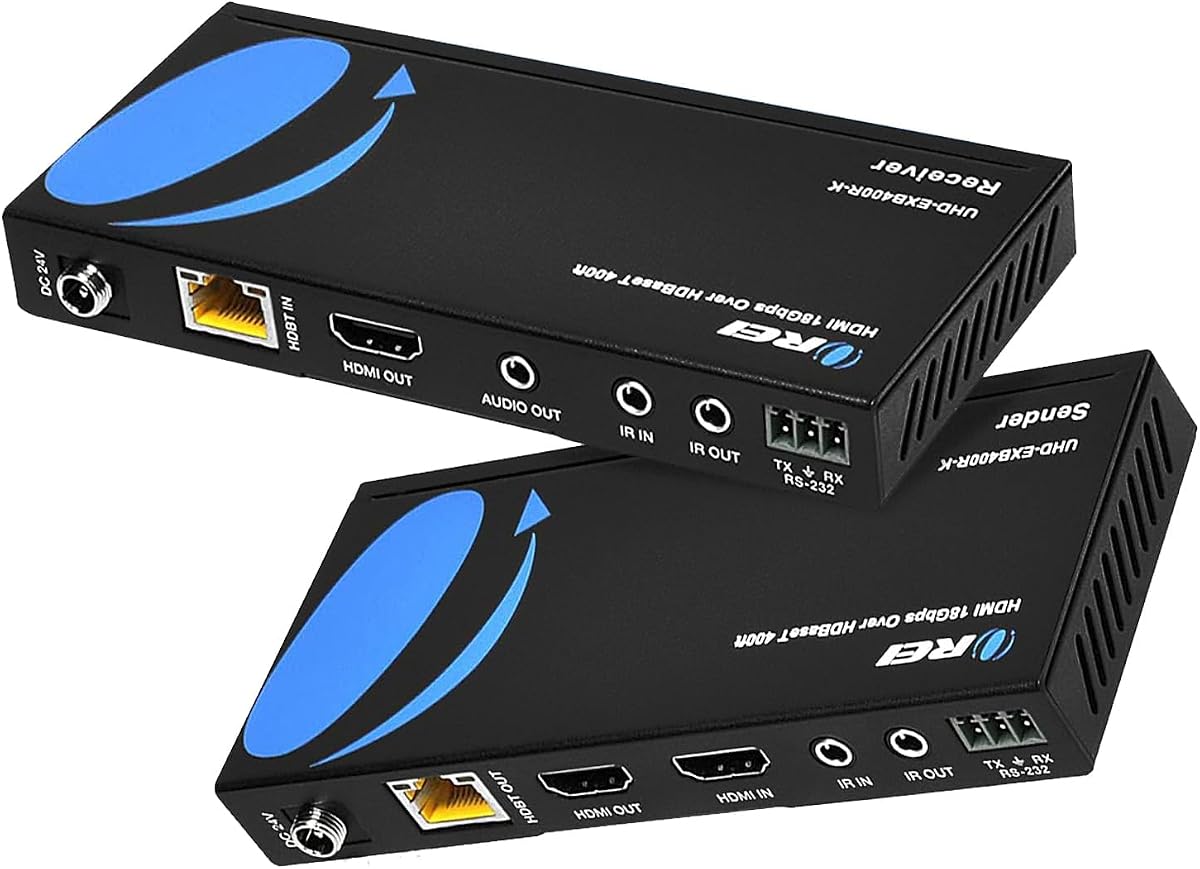
The OREI HDMI Extender HDBaseT 400ft is built for demanding installations that need extensive reach and professional control features. It supports transmission over Cat5e, Cat6, or Cat7 cable for up to 400 feet, while maintaining a stated 4K at 60Hz capability and zero-latency HDBaseT operation.
We may earn a commission when you buy through this link, at no additional cost to you.
Its most distinctive advantage is the control suite. Bidirectional IR allows remote commands to travel in either direction, while RS-232, CEC, and HDMI loop-out expand integration options. The system also lists HDR, HDR10+, Dolby Vision, 18Gbps bandwidth, DTS-HD, Dolby TrueHD, and 7.1-channel digital audio support, making it appropriate for professional AV, conference, and commercial environments.
The main constraint is compatibility. OREI states that its HDBaseT models work only with their matching transmitter and receiver and are not interchangeable with other OREI HDBaseT models or devices from other brands. PoC allows one power adapter at either end, but the need to retain the intended paired units makes this less flexible than generic converter kits.
This is the premium selection for long buildings, conference facilities, digital-signage networks, and installations requiring RS-232 or two-way IR. For a home setup with a shorter run, simpler extender may provide better value, while this kit earns its place when professional control and maximum range are central priorities.
Bidirectional IR, RS-232, and CEC give this system more integration options than a basic HDMI-over-network balun. These functions can simplify control of connected equipment in installations managed by AV personnel or specialized automation systems.
The stated 400-foot capability is the longest range among the products listed. It is particularly relevant for large venues and buildings where the source and display must be separated by long cable routes, walls, or floor levels.
We may earn a commission when you buy through this link, at no additional cost to you.
The OREI HDMI Extender Over Cat5 165ft delivers reliable extension for 1080p and 4K at 30Hz rather than 4K at 60Hz. Its 4.6 rating is among the strongest in the group, and the kit offers a practical combination of IR control, EDID support, loop-out, and Power over Cable.
We may earn a commission when you buy through this link, at no additional cost to you.
For displays, presentation systems, office equipment, and video sources that operate at 30Hz, the supported resolution list provides useful flexibility. The product information specifically identifies 1080p, 720p, 576p, and 480p, along with 4K at 30Hz. A local HDMI loop-out on the transmitter supports monitoring while the extended signal reaches a remote screen.
The obvious limitation is the absence of 4K at 60Hz. That distinction is essential for high-refresh-rate gaming, demanding computer use, and newer 4K media specifications. It also is not designed for HDMI ARC or IP/network systems, so it should not be confused with a conventional network extender or an audio return solution.
This kit is best for users who value a straightforward, well-supported extender at 1080p or 4K30. Choose it for a fixed display, classroom, conference room, or office setup where IR control and local monitoring are useful but 60Hz 4K is not required.
The manufacturer clearly distinguishes this model from 4K60 systems. That clarity helps buyers avoid overspending on unnecessary capability or, more importantly, avoid choosing a kit that cannot meet the refresh rate required by their source and display.
The HDMI loop-out can keep a local display connected near the source while the main feed is extended to a remote location. This is useful for control displays, confidence monitors, and straightforward two-screen arrangements.
We may earn a commission when you buy through this link, at no additional cost to you.
The HDMI Extender Over Single Cat5e/6/7 Ethernet offers uncompressed 1080p at 60Hz with 3D support over distances of up to 196 feet. With a 4.9 rating, it stands out as the strongest customer-rated option here and a sensible choice when full 4K60 transmission is unnecessary.
We may earn a commission when you buy through this link, at no additional cost to you.
Its smart EDID copy function reads the display's parameters and matches them to improve source-to-display compatibility. That can reduce common handshake and no-signal issues in mixed equipment setups. Power over Cable allows either transmitter or receiver to receive the single power connection, and no drivers are needed for the stated plug-and-play operation.
There are two important boundaries. The product supports 1080p rather than 4K, and the power adapter is not included. Instead, the package includes a USB-A-to-DC cable, allowing power from a TV, PC, or compatible USB wall charger. High-grade solid-copper Cat6 or Cat7 cable is recommended for the best result.
This is the budget selection for classrooms, offices, conference spaces, home theaters, and digital signage that operate at 1080p. It offers enough range and thoughtful EDID handling for many common projects, but buyers should verify local power options and confirm that 1080p meets their display requirements.
Copying the connected display's EDID information helps the source negotiate a suitable mode. This can be valuable when combining PCs, streaming devices, projectors, or displays that do not share a common default resolution.
Because either end can receive power through the cable, installers can choose the more convenient side. USB power adds further flexibility, though users should provide a dependable USB power source because no conventional adapter is included.
We may earn a commission when you buy through this link, at no additional cost to you.
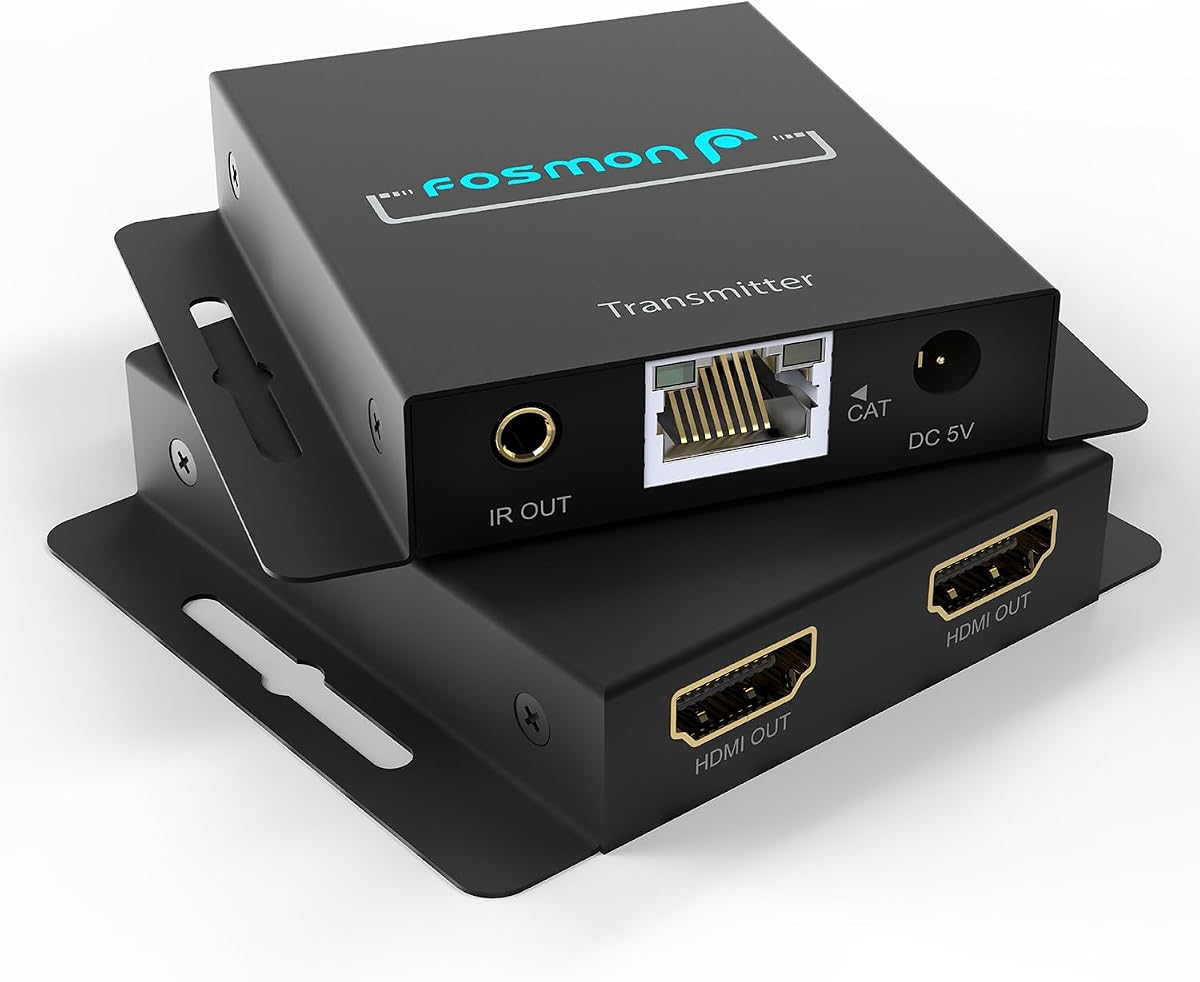
The Fosmon HDMI Extender provides 1080p at 60Hz over Cat5e, Cat6, Cat6A, or Cat7 cable. It supports up to 164 feet over Cat5e or Cat6 and up to 230 feet over Cat6A or Cat7, while its 4.5 rating indicates a generally favorable customer response.
We may earn a commission when you buy through this link, at no additional cost to you.
This model offers unusual output flexibility. A local loop-out is listed at both the transmitter and receiver, allowing the system to be used in different one-in-two-out or one-in-three-out configurations. An automatic EQ button adjusts for cable length, and Power over Cable means one adapter at the transmitter supports the system.
IR control is included so users can operate a source from the receiver location. The listed audio support includes DTS-HD and Dolby TrueHD, while 3D and 1080p60 operation target common entertainment and presentation equipment. Buyers still need to account for the physical cable: greater reach and higher-resolution signals depend on cable quality and category.
Fosmon is most attractive for installers who want more local output options than a basic extender provides. It works well in home theaters, classrooms, meeting rooms, gyms, bars, offices, and LED-display installations where 1080p is the target resolution.
Having loop-out connections at both ends provides flexibility when arranging source, control, and display equipment. It can extend the extender's usefulness beyond the simple one-source-to-one-screen arrangement.
The automatic EQ control is intended to simplify setup over different cable lengths. Correct adjustment can help maintain a stable link when using the full distance or encountering changes in cable type.
We may earn a commission when you buy through this link, at no additional cost to you.
The avedio links 196ft HDMI Extender sends HDMI audio and video over one Cat5e, Cat6, or Cat7 cable for up to 196 feet. Its 4.2 rating is solid for a general-purpose 1080p kit, and the product is aimed at a broad range of home, education, retail, and office devices.
We may earn a commission when you buy through this link, at no additional cost to you.
Video features include 3D, deep color up to 36 bits, and a listed 6.75Gbps data rate. EDID handling is included to recognize display parameters and improve matching with connected equipment. The built-in automatic adjustment system is designed to stabilize operation with PCs, DVD players, game consoles, and TV boxes.
PoC is a practical feature because only the transmitter-side power adapter is required. The sturdy metal shell is also intended to improve durability and reduce electromagnetic and radio-frequency interference. The important cable caveat is that Cat5e is stated to support up to 165 feet, while the full 196-foot range calls for Cat6 or Cat7.
This model fits users who need to place a TV, projector, or presentation display well away from a source and who want a simple single-adapter installation. It is less appropriate for 4K60 workflows, but it remains versatile for common 1080p consumer and commercial sources.
A single power connection at the transmitter reduces wiring and makes the receiver easier to place. That convenience can be decisive in finished rooms where running additional power is difficult.
The listed support for media players, game consoles, PCs, and TV boxes makes the kit relevant to many household and office systems. EDID handling and automatic adjustment further support easier integration with varied source equipment.
We may earn a commission when you buy through this link, at no additional cost to you.
The Monoprice Blackbird PRO-Sumer Extender holds a perfect 5.0 rating and offers an unusually balanced feature set. It carries 4K at 30Hz with YCbCr 4:4:4, 1080p at 60Hz, smart EDID, bidirectional IR, HDMI loop-out, and Power over Cable in a single point-to-point system.
We may earn a commission when you buy through this link, at no additional cost to you.
The stated distance depends on resolution. A 4K signal can travel up to 164 feet over one Cat5e or Cat6 cable, while 1080p can extend as far as 229 feet. This distinction is useful for installers who need long reach but may use a lower-resolution display at the remote end.
Power over Cable allows the receiver to be powered through the Ethernet cable, while the transmitter loop-out supports a local display. Bidirectional IR improves remote-control flexibility compared with one-way kits. The extender complies with HDMI 1.4 and HDCP 1.4 specifications, which also sets a clear expectation that it is not a 4K60 system.
This is an attractive choice for buyers who prioritize 4K30 picture quality, smart EDID behavior, two-way IR, and a polished control feature set. It works well in dual-display homes, offices, conference rooms, and monitoring installations, provided the connected equipment does not require 4K at 60Hz.
Smart EDID helps streamline source-to-display negotiation, while bidirectional IR gives users more ways to control equipment around the installation. Together, they address common frustrations that appear in extended AV setups.
The model provides 229 feet for 1080p but limits 4K to 164 feet. Planning around those separate limits can prevent a disappointing result when a long cable run is paired with a high-resolution display.
We may earn a commission when you buy through this link, at no additional cost to you.
The PWAY 4K at 60Hz HDMI Over Ethernet Extender is built around uncompressed 4K60 output with 4:4:4 color and HDR10 support. Its 4.2 rating is favorable, and the stated 200-foot range places it among the longer-reaching models that support a full 60Hz refresh rate.
We may earn a commission when you buy through this link, at no additional cost to you.
A loop-out port enables local monitoring while the main image is extended to a remote screen. This is useful for technicians, presentation systems, and multi-display arrangements. PoC means only the transmitter side needs the included 12V 1A power adapter, simplifying installations where the receiver is in a ceiling, display cabinet, or remote room.
Compared with several OREI models, the listed feature set is more focused. IR remote-control passthrough and dedicated EDID management are not mentioned in the supplied product information, so buyers who depend on those functions should verify compatibility before buying. The package otherwise includes one transmitter, one receiver, one power adapter, and a manual.
The PWAY is a strong candidate for a home theater, conference room, or professional AV installation that prioritizes 4K60, 4:4:4 color, HDR10, and local monitoring. Its direct feature set makes it easy to understand, provided your setup does not depend on the omitted control functions.
Support for uncompressed 4K at 60Hz in 4:4:4 preserves fine detail more effectively than chroma-subsampled configurations. It is particularly relevant for computer desktops, dense text, gaming, and high-quality source material.
PoC carries power through the cable to the receiver, reducing the need for a second adapter. That can streamline both professional installations and consumer setups where the remote display has limited power access.
We may earn a commission when you buy through this link, at no additional cost to you.
The J-Tech Digital HDMI Extender Over Single Cat5e/6/7 Cable is designed for 1080p, 3D, HDCP, and major audio formats over an extended network-cable run. Its stated maximum distance is approximately 394 feet, making it one of the longest-reaching 1080p products in the guide.
We may earn a commission when you buy through this link, at no additional cost to you.
Rather than carrying an uncompressed modern video signal, the system uses M-JPEG image-compression processing. The product description states that this is done without image-quality loss, but buyers seeking 4K, high-bandwidth HDR, or uncompressed computer signals should regard this as a 1080p-focused solution rather than a high-specification 4K extender.
The maximum color depth is listed as 36 bits over Cat7 and 24 bits over Cat6. Support for Dolby TrueHD and DTS Master Audio gives it potential in home-theater environments, while IR extension allows a source device's remote to be controlled from the receiving end.
This extender makes sense for a large home, commercial venue, classroom, or long hallway where the primary requirement is 1080p at maximum reach. It is less suitable for high-end 4K displays, high-refresh-rate gaming, or installations that need EDID management and contemporary 18Gbps HDMI performance.
The stated 120-meter reach is useful when the source and display are separated by a substantial distance. Cat7 is listed as supporting the highest color depth, so cable quality and category remain important to the final result.
The M-JPEG processing approach distinguishes this model from uncompressed 4K extenders. Set expectations around 1080p use and verify the displayed image in the intended environment before committing to a sensitive professional application.
We may earn a commission when you buy through this link, at no additional cost to you.
The right extender depends on resolution, cable length, control requirements, and the physical layout of your installation. Use the following factors to narrow the field before deciding which kit best fits your source, display, and room.
Begin by identifying the exact video mode your source and display need to share. Several products listed here support 1080p at 60Hz, while others support 4K at 30Hz or 4K at 60Hz. A 4K label alone is not enough: refresh rate, color format, HDR support, and bandwidth can differ substantially. If you need 4K at 60Hz, select a model that explicitly states that mode and verify whether the listed bandwidth, such as 18Gbps, matches your equipment.
Choose 1080p support for standard TVs, presentations, security displays, and most conventional 1080p sources. Choose 4K30 for a balance of higher resolution and reach, but choose 4K60 when using high-refresh-rate gaming, demanding PCs, or modern high-bandwidth displays.
Maximum extender distance is only part of the equation; the category and quality of the installed cable also matter. Cat5e may work over shorter runs, while Cat6, Cat6A, and Cat7 are better choices for longer 4K installations. Some products list different limits for 1080p and 4K, so check the distance for your actual resolution rather than relying on the largest headline figure.
Measure the complete route, including wall bends, service loops, and cable routed through conduit. Use a continuous point-to-point connection unless the manufacturer expressly says otherwise, and avoid connecting these extenders through routers or network switches.
EDID information tells a source which resolutions and display capabilities to negotiate. Smart EDID copying and built-in EDID management can improve compatibility between PCs, projectors, media players, and displays that do not share the same defaults. This is particularly useful when the source is in a concealed rack while the remote display has different capabilities.
If your installation has experienced no-signal or resolution problems, prioritize a model with clearly described EDID handling. Also check whether loop-out is available, since a local display can help confirm whether the source and cables are functioning correctly.
IR pass-through allows a source-side remote control to operate equipment from the receiver end. One-way IR is adequate when commands travel only from the remote location back to the source. Bidirectional IR is more flexible because the source room can also control equipment at the far end. Professional systems may additionally require RS-232 or CEC integration.
Choose one-way IR for a basic concealed-source setup, bidirectional IR for more flexible room control, and RS-232 when the system will be managed by professional AV equipment. Confirm that the necessary IR transmitter and receiver cables are included.
Power over Cable, or PoC, allows the transmitter and receiver to operate with one power connection. This is especially useful when the display is mounted on a wall, suspended above a ceiling, or installed in a location without a convenient outlet. Some kits allow power at either end, while others specify a particular transmitter or receiver side.
Check the included power supply and the method of powering the remote unit. The budget 1080p kit uses a USB-A-to-DC cable and does not include a conventional power adapter, so users should identify a suitable USB power source before installation.
An HDMI loop-out lets you connect a second display near the source while sending the image to a remote screen. This is useful for local monitoring, presenter confidence displays, technician test screens, and dual-display installations. The exact placement differs among products: some place loop-out at the transmitter, others include an output at the receiver, and the Fosmon model describes both.
Decide where a local display would be useful before paying for a loop-out. It can be valuable for troubleshooting and equipment control, but it is unnecessary for a basic one-screen room and should not replace confirmation that the extender's main resolution and range meet your needs.
A simple HDMI-over-Cat extender is not automatically compatible with professional HDBaseT equipment. The OREI HDBaseT kit specifically requires its matching transmitter and receiver and is not interchangeable with other OREI HDBaseT models or competing brands. This restriction helps ensure chipset and feature compatibility but reduces interchangeability.
Read the installation requirements before ordering. Verify the included components, supported source formats, IR accessories, EDID behavior, and any network limitations. A kit that closely matches your equipment and layout is usually more dependable than a nominally premium model with unnecessary functions.
Compact metal housings, heat-dissipation features, and durable enclosures can matter in permanent installations. Professional and commercial projects may also require RS-232, mounting ears, long warranties, or support, whereas a home theater may prioritize 4K60, HDR, and IR. Match the construction and feature set to the environment rather than assuming the largest advertised distance is the most capable option.
For temporary presentations, choose a simple 1080p kit with reliable EDID and PoC. For permanent home theaters, consider 4K60, HDR, loop-out, and bidirectional IR. For large commercial or professional systems, prioritize long range, RS-232, professional support, and matching-component requirements.
Begin by identifying the transmitter, receiver, power adapter, and any IR or HDMI accessories included with the selected model. Connect the source device to the transmitter's HDMI input, then run one continuous Cat5e, Cat6, Cat6A, or Cat7 cable between the matching transmitter and receiver. Connect the display to the receiver's HDMI output and power the system according to its PoC instructions.
After making the physical connections, power the source and display and allow the devices time to negotiate a compatible resolution. If the image is missing, verify the cable category and route, confirm that the extender supports the source's exact refresh rate and color format, and try the listed EDID or automatic adjustment control. Install IR components only after video is stable, positioning the receiver where it can detect the remote signal.
For permanent installations, label both ends of the network cable, secure the units away from excessive heat, and avoid sharply pinched or tightly bent cabling. Do not route the extender through a router or switch unless the manufacturer expressly supports network topology. Keep vents unobstructed, clean external surfaces with a dry soft cloth, and regularly inspect connectors for looseness, corrosion, or damage.
Yes, many of the listed extenders support Cat5e, but the maximum distance and resolution can be lower than with Cat6 or Cat7. Several products specify a shorter Cat5e range or recommend Cat6 for long-distance 4K performance. Always follow the cable requirements listed for the exact model and resolution you intend to use.
Most traditional HDMI-over-Cat systems listed here are designed for a direct point-to-point connection between the transmitter and receiver. The OREI 4K balun explicitly states that it cannot be used with network switches or routers. Check the manual for your chosen model rather than assuming the extender is an IP network device.
A 4K at 60Hz model provides the strongest match for modern 4K gaming displays. The 1080p models are better suited to conventional Full HD screens, while the 4K30 models can support higher resolution but not the highest common refresh rate. Also check HDR and color-format support when your game or console output requires those features.
One-way IR carries commands from the receiver location toward the source, which is enough for controlling a source while standing near the remote display. Bidirectional IR supports control in both directions. The latter is useful when the source room also needs to operate equipment at the far end of the installation.
No. Power over Cable is intended to power the system through the network cable using one external power connection. The exact powered side varies by model: some allow either end to receive power, while others require the transmitter or receiver to be powered. The budget 1080p kit can use a USB-A-to-DC cable, though a conventional power adapter is not included.
First confirm that the source, transmitter, receiver, and display are connected correctly and that the proper end is powered. Next, verify that the extender supports the source resolution, refresh rate, and color format, and that the cable meets the specified category and length. EDID settings, an incorrect IR connection, or incompatible paired components may also need attention.
Not every model supports HDMI ARC. The OREI 4K30 model specifically identifies ARC as unsupported, and traditional forward-only extenders generally do not carry an audio return path. If you need sound from an app or streaming service back to an amplifier, choose a product with explicit ARC or eARC support instead.
Higher-quality solid copper Cat6 or Cat7 is generally a sensible choice for long runs, especially when carrying 4K60, high color depth, or HDR. The budget extender specifically recommends high-grade solid copper Cat6 or Cat7 for optimal performance. In every case, verify that the installed cable is continuous, undamaged, and suitable for the planned route.
The OREI 230ft 4K model is the strongest all-around recommendation because it combines 4K60, 18Gbps bandwidth, HDR support, 230-foot reach, one-way IR, and PoC. The OREI HDBaseT kit is the premium choice for professional control and extreme range, while the single-cable 1080p extender offers the best budget balance with a 4.9 rating, smart EDID, and 196-foot reach.
Prioritize the needs that cannot be compromised: exact resolution and refresh rate, sufficient cable distance, the correct cable category, and any essential IR, EDID, or loop-out functions. A 1080p solution is sufficient for many displays, but 4K60 and HDR models are better for modern home theaters, high-end computers, and current gaming systems.
Finally, review the current specifications, package contents, warranty, and compatibility requirements before ordering. Product features and prices can change, and the presence of an extender in a network cable does not guarantee that an unrelated HDBaseT or IP-based system will work with it. Choose the model whose documented capabilities align precisely with your equipment and installation plan.