
TRENDnet TMO-313C2K
4.5Editor score
Two 2.5Gbps Ethernet adapters
Backward-compatible MoCA networking
Compact installation-friendly design
Supports up to 16 nodes
Moca 2.5 Adapters for Ethernet over Coax are compared for speed, wired coverage, compatibility, included accessories, and setup ease.
Moca 2.5 adapters turn compatible coaxial home wiring into a wired Ethernet network, helping reduce Wi-Fi congestion and reach rooms where pulling new cables would be inconvenient. The strongest options balance multi-gig performance, straightforward setup, and broad compatibility with connected cable outlets.
This guide compares ten Moca 2.5 Ethernet over Coax kits on Ethernet speed, port capability, networking features, included components, service compatibility, and suitability for extending internet, mesh systems, access points, and other wired devices. It also distinguishes complete starter kits from single add-on adapters.
Each pick highlights the strongest reason to consider that model while noting important limitations involving coax wiring, provider networks, and required accessories. Ratings and specifications reflect the supplied product information, while prices and availability can change, so compare current listings before purchasing.
4.5Editor score
4.6Editor score

4.4Editor score
The comparison below highlights each kit's Ethernet performance, package contents, networking reach, and installation requirements, with special attention to whether it is a complete two-adapter system or an add-on unit.


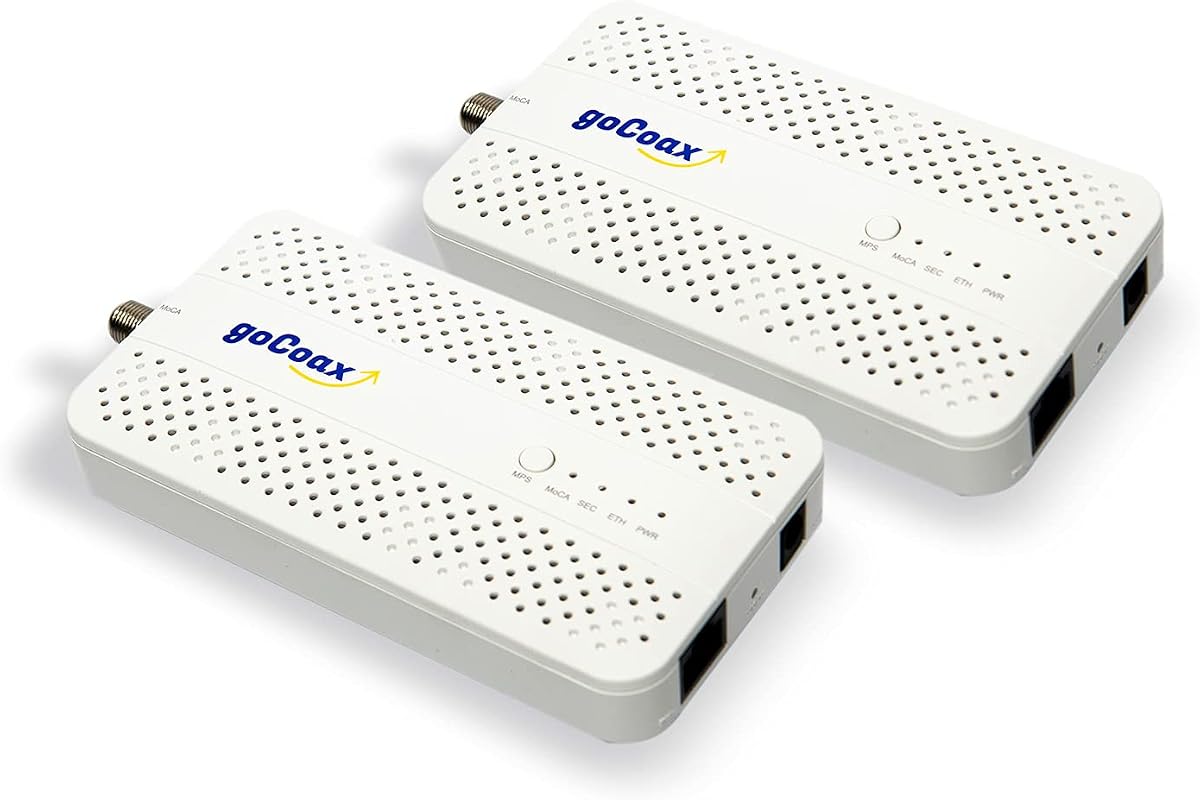
The goCoax MA2500D 2-Pack combines MoCA 2.5 performance with a dedicated 2.5GbE Ethernet port in a complete two-unit package. Its 4.6 rating is the highest among the listed products, and the kit is especially appealing for households seeking a fast wired backbone without opening walls or running new Ethernet cable. It is designed to work alongside an existing modem and router rather than replace either one.
We may earn a commission when you buy through this link, at no additional cost to you.
The main strength is the balance between speed and installation convenience. Each adapter connects to coax on one side and Ethernet on the other, while the included coax cables, Ethernet cables, and power adapters cover the basic two-location setup. The product description emphasizes automatic configuration, compatibility with PCs, consoles, televisions, NAS drives, and mesh systems, and operation alongside MoCA adapters from other manufacturers. Support for up to 16 nodes makes it a credible choice for a larger connected home.
The trade-offs are mostly practical rather than performance-related. The home must have coax outlets connected through a common splitter, and satellite installations frequently leave isolated or rewired runs that cannot support MoCA. AT&T U-verse is also excluded. A MoCA PoE filter is recommended at the cable entry point for optimal security and performance, but that accessory is sold separately. Buyers needing more than two wired locations must plan accordingly because each additional location generally needs another adapter.
This is the strongest all-around recommendation for users with compatible coax wiring and a need for multi-gig wired connections. It suits gaming systems, high-resolution streaming, offices, and mesh-node backhauls particularly well. Choose it over a single unit because MoCA links require endpoints, and choose it over lower-speed options when a 2.5GbE port can deliver meaningful benefits.
The dedicated 2.5GbE port makes this kit appropriate for modern routers, fast internet plans, demanding smart TVs, and local transfers involving NAS equipment. Actual throughput still depends on the internet connection, coax quality, the devices connected, and other network conditions.
The two-pack includes both adapters and the basic cabling and power components, reducing the need to assemble a starter system separately. Users should still confirm that their coax outlets share a functioning splitter network before installation.
We may earn a commission when you buy through this link, at no additional cost to you.
The ScreenBeam ECB7250K02 is a value-oriented starter kit with two ECB7250 adapters, 2.5Gbps Ethernet capability, and a generous set of included accessories. Its 4.4 rating reflects a generally favorable reception, while the bundled Ethernet cables, coax cables, power adapters, and coax splitters make it practical for establishing a complete two-location MoCA link.
We may earn a commission when you buy through this link, at no additional cost to you.
This kit is designed to create wired Ethernet connections over existing coax rather than act as a modem or router. It can serve a router, gaming console, smart television, remote access point, or other Ethernet-equipped device. The adapters are backward compatible with 10, 100, and 1000 Mbps Ethernet connections, so buyers do not need every endpoint to support 2.5 Gbps. A network may support up to 16 nodes, and additional ECBs can be placed in rooms with suitable coax.
Compatibility deserves careful attention. The product is not intended for DirecTV, Dish, AT&T internet, or AT&T U-verse coax networks. Some DOCSIS 3.1 modems can create frequency overlap that causes random disconnections, so checking with the internet provider is sensible. The description also notes that Comcast supports MoCA 2.0 with the Xfinity XB8, and that MoCA should be disabled in the Comcast gateway to take full advantage of MoCA 2.5 adapters. The kits work with most Ethernet-equipped devices and routers.
The ECB7250K02 is a sensible choice for a homeowner who wants a complete multi-gig MoCA starter setup without assembling every component independently. It is less attractive for a single-room add-on, where the separate ECB7250S02 is more appropriate. It is also a less natural fit for incompatible or disconnected coax layouts. For compatible homes, it offers an effective balance of capability, included equipment, and value.
Two adapters, power supplies, Ethernet cables, coax cables, and splitters provide the core components for a new two-point network. This makes the kit easier to start than a single adapter, although every installed location must still have usable coax.
Backwards compatibility allows the adapters to serve common 10, 100, and 1000 Mbps equipment. Faster endpoint connections remain important when the goal is to use the full multi-gig potential of the ECB7250.
We may earn a commission when you buy through this link, at no additional cost to you.
The Hitron MoCA 2.5 2-Pack emphasizes compatibility guidance and support, offering a 1Gbps Ethernet port on each adapter. It is intended to extend an existing internet connection through interconnected coax and works alongside a modem and router. The product's 4.4 rating makes it a credible choice for cable, fiber, DSL, and other compatible services, although it cannot deliver more than Gigabit Ethernet.
We may earn a commission when you buy through this link, at no additional cost to you.
Its most valuable feature may be the clarity of its installation requirements. The product data explains that traditional cable wiring with multiple outlets connected to a central splitter is usually the right environment. It supports cable providers such as Comcast/Xfinity, Spectrum, Cox, Optimum, and Mediacom, as well as Verizon Fios, Google Fiber, Frontier Fiber, and DSL. Included components include two adapters, two Ethernet cables, two coax cables, two power adapters, and a setup guide.
There are important limitations. AT&T U-verse uses HPNA technology that conflicts with MoCA, and homes previously wired for DirecTV or Dish may have isolated or disconnected coax runs. Cable users with DOCSIS 3.1 or 4.0 high-split modems may need a point-of-entry PoE filter, although the product description states that filter is not included. Each wired destination needs its own adapter, so the two-pack is primarily intended to connect a router-side location to one remote location. Free technical support is available to diagnose setup and wiring problems.
Choose this Hitron package when thorough compatibility information and troubleshooting support matter more than multi-gig port speed. It is a strong match for standard 1Gbps service, high-resolution streaming, gaming, and general home-office use. Users with 2Gbps or faster internet plans should consider the 2.5Gbps alternative identified in the product guidance instead of expecting the 1Gbps port to satisfy multi-gig demand.
The adapters need a shared splitter network rather than isolated coax runs. If multiple traditional cable outlets once worked together, the installation is more likely to be suitable, but unusual past wiring still warrants verification.
A 1Gbps port remains effective for many streaming, gaming, work, and smart-home needs. It does not match the headroom of a 2.5GbE port when the internet plan or local network traffic exceeds Gigabit speeds.
We may earn a commission when you buy through this link, at no additional cost to you.
The goCoax MA2500D Single provides the same core 2.5GbE and MoCA 2.5 platform as the two-pack, but it is aimed at buyers who already own an adapter or need only one additional endpoint. Its 4.4 rating reflects strong overall feedback, and the included coax cable, Ethernet cable, and power adapter make the unit relatively self-contained.
We may earn a commission when you buy through this link, at no additional cost to you.
The adapter is useful for extending a wired connection to a television, desktop, console, NAS drive, or Wi-Fi mesh access point. It automatically configures into a MoCA network, works alongside existing cable television, and supports up to 16 nodes. Its Ethernet port is suitable for modern high-bandwidth equipment, while the MoCA layer provides the connection over the home's shielded coax network.
The defining limitation is that a single unit cannot independently create a complete Ethernet over Coax network. At least two compatible MoCA endpoints are needed unless the router or another device already provides MoCA functionality. A separate PoE filter is recommended at the cable entry point, and the product remains unsuitable for satellite systems and AT&T U-verse. It also cannot solve homes whose outlets are not connected through a common splitter.
This is the right choice for a staged installation: place the first adapter near the router, then add this unit room by room as required. For a brand-new two-location network, the MA2500D 2-Pack is more convenient and generally makes setup easier. For a larger home that already has MoCA hardware, the single model offers a flexible way to expand with a 2.5GbE endpoint.
A single adapter is particularly useful when adding a remote room to an existing MoCA network. The growing system can support as many as 16 nodes while preserving multi-gig Ethernet at each compatible endpoint.
The unit creates one wired connection rather than providing a multiport Ethernet switch. A separate switch is needed when a room must connect several wired devices to the MoCA link.
We may earn a commission when you buy through this link, at no additional cost to you.
The Hitron HTEM5 2-Pack provides two MoCA 2.5 adapters with 2.5Gbps Ethernet ports, combining multi-gig capability with a complete two-location package. Its 4.3 rating makes it one of the stronger options in the list, especially for users who want more speed than the Hitron 1Gbps model and value access to technical support.
We may earn a commission when you buy through this link, at no additional cost to you.
The kit includes two adapters, two coax cables, two Ethernet cables, two power adapters, and a quick start guide. It can extend a network to distant rooms without installing new Ethernet wiring, making it appropriate for high-resolution streaming, gaming, and bandwidth-heavy devices. The adapters support up to 16 nodes, and the product description lists cable services and most fiber providers, including Verizon Fios and Google Fiber, as suitable when an active, interconnected coax network is available.
Compatibility restrictions are significant. AT&T Fiber is excluded because of signal interference, and satellite installations often leave coax outlets cut or disconnected. Users with traditional round screw-on coax connectors are the target audience; isolated runs, phone lines, and Ethernet cables cannot substitute. For cable systems using high-split DOCSIS technology, a PoE filter may be required and is not included. The product is an adapter, not a modem, router, or Wi-Fi system, so existing internet equipment remains necessary.
The HTEM5 is well suited to compatible households that want 2.5Gbps wired links and appreciate access to setup support. It is particularly relevant when there are multiple remote rooms to connect, because the two-pack supplies a sensible initial topology. Buyers should first confirm their provider and wiring status. Once that prerequisite is met, the kit delivers a capable and approachable way to build a wired backbone over coax.
The 2.5Gbps port offers useful headroom for fast plans, demanding local transfers, and current high-performance access points. Connected equipment must also support the relevant Ethernet speed to realize the full potential.
Free technical support can help determine whether a home's coax arrangement is the source of a connection issue. This is valuable because wiring mistakes and incompatible service infrastructure often resemble adapter faults.
We may earn a commission when you buy through this link, at no additional cost to you.
The ScreenBeam ECB6250K02 is a Gigabit Ethernet starter kit for extending a wired network through compatible coax. It includes two ECB6250 adapters, two power adapters, two Ethernet cables, two coax cables, two coax splitters, and a quick start guide. Its 4.4 rating indicates a solid reception, particularly for users who do not need the 2.5Gbps ports found in the ECB7250 models.
We may earn a commission when you buy through this link, at no additional cost to you.
The adapters use existing coax to provide more reliable wired connectivity for 4K streaming, gaming, and home working. Their Ethernet ports are backward compatible with 10 and 100 Mbps devices as well as Gigabit equipment. Networks can support up to 16 nodes, and the adapters can also connect remote Wi-Fi access points. This makes the kit useful for improving a mesh system or extending a router connection into another part of a home.
The product is limited to 1Gbps Ethernet output. The description notes that multiple adapters and a native MoCA router can allow MoCA speeds to reach 2.5Gbps, but the ECB6250's own Ethernet interface remains the narrower part of the path. Some DOCSIS 3.1 modems may cause frequency overlap and random disconnections, making it advisable to check with the provider. DirecTV, Dish, AT&T internet, and AT&T U-verse networks are incompatible. Comcast gateway settings may also need attention to use MoCA 2.5 effectively.
This starter kit is best for households whose internet and local network needs fit within Gigabit Ethernet but which want a more dependable wired alternative to Wi-Fi. It is also a practical choice for access-point backhauls and multiple remote rooms. Those seeking maximum throughput should move to an ECB7250 kit, while buyers with a single endpoint may prefer a one-adapter solution.
Gigabit Ethernet remains sufficient for many common streaming, work, and gaming systems. The main benefit over Wi-Fi is a stable wired route through the home's coax infrastructure.
Because a remote access point can connect through an ECB, the kit can help place Wi-Fi coverage where the main router's signal is weak. An Ethernet switch can serve multiple devices at the remote endpoint.
We may earn a commission when you buy through this link, at no additional cost to you.
The TRENDnet TMO-312C is a compact, single-adapter option with a Gigabit Ethernet port and MoCA 2.5 support. Its 4.3 rating reflects a favorable but not exceptional user score, while the three-year manufacturer protection adds confidence for buyers building a permanent wired network.
We may earn a commission when you buy through this link, at no additional cost to you.
The device has one F-type female coax input and one RJ-45 Gigabit LAN port. It can connect an existing coax network to a router, gaming console, or other Ethernet-equipped device without configuration. The adapter supports up to 16 nodes and remains backward compatible with MoCA 2.0, 1.1, and 1.0 standards, giving it broader interoperability with older equipment. Its compact housing is suitable for a desktop, entertainment center, or other space where a larger unit would be inconvenient.
This is a single unit, so at least two adapters are required unless the home already has a MoCA-capable router or gateway. Its Ethernet interface tops out at 1Gbps, making it less attractive for multi-gig service plans or local transfers that could benefit from 2.5Gbps. DirecTV, Dish, AT&T U-verse, and other non-MoCA-compliant services are not supported. Technical support is available during normal business hours, which can be useful during initial setup.
The TMO-312C works best as an additional node in an existing MoCA installation or as the first of a pair ordered separately. It is especially attractive for users who value a small enclosure, straightforward operation, broad standards compatibility, and a longer manufacturer support commitment. Those building a new high-speed two-point system from scratch may prefer the included-cable two-packs or the 2.5Gbps TMO-313C2K.
The compact, lightweight enclosure can fit near a television, network shelf, or desk without taking up much room. Placement near the desired coax outlet also helps avoid unnecessary cable runs.
Backward compatibility with MoCA 2.0, 1.1, and 1.0 can be helpful in a mixed equipment environment. Actual network throughput remains constrained by the adapter's 1Gbps Ethernet port and the coax installation.
We may earn a commission when you buy through this link, at no additional cost to you.
The TRENDnet TMO-313C2K is a premium two-pack built around 2.5Gbps Ethernet over Coax. Its 4.5 rating is the second-highest in this comparison, and the two compact TMO-313C units give buyers a complete way to build a high-speed link between a router area and a remote room.
We may earn a commission when you buy through this link, at no additional cost to you.
Each adapter features one 2.5GBASE-T RJ45 port and one F-type female coax input. The kit requires no configuration: existing coax is connected at each end, while Ethernet links the network equipment and target device. MoCA 2.5 technology is designed to improve packet-error performance and provide consistent bandwidth for applications such as 4K video. Backwards compatibility with MoCA 2.0, 1.1, and 1.0 broadens its usefulness alongside existing MoCA equipment.
The two-pack is particularly attractive for premium wired installations involving a router, gaming console, smart television, access point, or other high-bandwidth endpoint. Its 2.5Gbps interfaces provide more headroom than 1Gbps models and suit modern network equipment designed for multi-gig connections. Support for up to 16 nodes means the system can grow beyond the initial pair. The compact housings also make it easier to place adapters discreetly near entertainment equipment.
Compatibility remains the decisive issue. The adapters do not support DirecTV, Dish, AT&T U-verse, or other non-MoCA-compliant subscription networks. Their operation depends on an interconnected coax installation, and high-split DOCSIS environments may require a separate PoE filter. For compatible homes seeking a discreet, fast, manufacturer-supported two-adapter solution, the TMO-313C2K is a strong premium recommendation.
The 2.5GBASE-T port supports current multi-gig equipment and offers additional headroom for fast service plans or local data movement. End-to-end results still depend on the router, internet plan, and quality of the coax path.
The compact adapters are easy to position beside entertainment centers, desks, and network shelves. The lack of required configuration helps keep installation focused on physical connections.
We may earn a commission when you buy through this link, at no additional cost to you.
The PowerBridge KB-M3-03 stands apart with integrated PoE+ support, allowing it to carry data and power over the Ethernet connection to compatible devices. Its 4.4 rating reflects a strong reception, and the kit includes two PowerBridge 2.5G adapters. The 2.5G Ethernet ports make it suitable for demanding access points, IP cameras, VoIP phones, and other high-bandwidth equipment.
We may earn a commission when you buy through this link, at no additional cost to you.
PoE+ support follows IEEE 802.3at and can deliver up to 30W. This is the key distinction from standard MoCA adapters: a compatible Wi-Fi 6E or Wi-Fi 7 access point, high-resolution surveillance camera, or VoIP phone can receive both network connectivity and power through one Ethernet cable. That can simplify installations where a nearby power outlet is inconvenient or unavailable.
The remaining MoCA functions are conventional. The adapters use MoCA 2.5 for data over coax, support 2.5Gbps Ethernet, and operate with most MoCA 2.0 and 2.5 devices, Ethernet-enabled smart-home equipment, and mesh systems. Plug-and-play installation requires connecting coax, Ethernet, and power at the adapters. Satellite TV is excluded, and the PoE feature should not be confused with power delivery to every Ethernet device; the endpoint must support the appropriate PoE standard.
This kit is the most specialized option in the roundup. It is a natural choice for installers or advanced users who want remote access points or cameras connected by one Ethernet run while avoiding a separate local power supply. For ordinary internet extension, the additional PoE capability may be unnecessary, but for power-conscious network endpoints it offers a clear functional advantage.
IEEE 802.3at PoE+ can simplify access-point and camera placement where local power outlets are limited. The connected device must support PoE+ for the full integrated power feature to operate.
A 2.5G port and MoCA 2.5 create a suitable path for Wi-Fi 6E or Wi-Fi 7 access points, 4K or 8K cameras, and other devices with substantial network requirements.
We may earn a commission when you buy through this link, at no additional cost to you.
The ScreenBeam ECB7250S02 is a single 2.5Gbps adapter designed to add another room or endpoint to an existing MoCA 2.5 network. It carries a 4.4 rating and includes one adapter, one power adapter, two Ethernet cables, one coax cable, one coax splitter, and a quick start guide. The generous cabling makes it useful for adding a node without sourcing every basic connection separately.
We may earn a commission when you buy through this link, at no additional cost to you.
As a wired network endpoint, the add-on can connect a room's Ethernet devices to the rest of the home through coax. It is backward compatible with 10, 100, and 1000 Mbps Ethernet equipment, while 2.5Gbps devices can use the full port capability. A network can support up to 16 nodes, provided the router or gateway has MoCA capability and each room has a suitable coax outlet.
This product is not a complete starter kit for a home with no MoCA equipment. Buyers need compatible existing MoCA hardware or must add at least one other endpoint. Some DOCSIS 3.1 modems can create frequency overlap and random disconnections, so provider guidance may be needed. DirecTV, Dish, AT&T internet, and AT&T U-verse are unsupported. With Comcast's Xfinity XB8, the gateway's MoCA feature may need to be turned off to allow full MoCA 2.5 operation.
The ECB7250S02 is best for extending a network one location at a time. It is a logical companion to the ECB7250K02 starter kit, especially in homes where bedrooms, offices, or entertainment areas need separate wired endpoints. Its combination of a 2.5Gbps port, broad Ethernet compatibility, and included splitter makes it a focused and practical add-on choice.
Adding the unit to an established MoCA network is the most efficient use case. It can create a dedicated Ethernet endpoint without requiring another full two-adapter starter package.
Two included Ethernet cables and a coax splitter offer practical options for local wiring. A network switch can expand the endpoint when several wired devices need access.
We may earn a commission when you buy through this link, at no additional cost to you.
The right adapter depends less on marketing language than on your coax layout, provider technology, Ethernet speed, and the number of rooms that need wired access. These factors determine whether MoCA will work and which kit offers the most practical network.
MoCA requires a shared home coax network with outlets connected through a common splitter. Traditional cable television wiring is the usual target, and a useful clue is whether several outlets previously delivered cable service at the same time. Isolated runs, disconnected branches, and certain rewiring performed by satellite installers can prevent the adapters from finding one another. A wall outlet should also use a conventional round coax connector, not a phone-style RJ11 connection or an unrelated Ethernet jack.
AT&T U-verse is repeatedly excluded because its HPNA technology conflicts with MoCA, and the Hitron HTEM5 also excludes AT&T Fiber because of interference. DirecTV, Dish, and other satellite installations are also unsuitable, particularly when the installer cut or isolated the home's original coax network. Cable, Verizon Fios, Google Fiber, Frontier Fiber, and DSL can work when the wiring is properly interconnected, but the provider should still be consulted about gateway settings or frequency conflicts.
A 1Gbps Ethernet port is sufficient for many homes, online work, standard streaming, and gaming systems, while a 2.5GbE or 2.5Gbps port offers additional headroom for faster internet plans and modern local networking. The MoCA link speed alone does not determine the final result: the internet subscription, router, endpoint, switch, cable quality, and competing network devices all matter. For a new installation with current high-performance equipment, a 2.5Gbps adapter is usually the more future-oriented choice.
Most points along a MoCA path need an adapter, and each adapter normally provides one Ethernet endpoint. A new two-location network therefore requires at least two units, while a four-room extension may need more. Some routers or gateways include MoCA, reducing the number of separate adapters required, but this should be confirmed rather than assumed. A two-pack is convenient for a router-side unit plus one remote endpoint; single units are more economical when expanding an existing system.
Most standard MoCA adapters provide network data and require the endpoint to receive local power. The PowerBridge KB-M3-03 adds IEEE 802.3at PoE+ up to 30W, allowing a compatible access point, IP camera, or VoIP phone to receive data and power through one Ethernet cable. This can simplify installations in locations without nearby outlets. It is unnecessary for a basic internet extension and only benefits endpoint hardware designed to support PoE+.
A complete starter kit may include two adapters, power supplies, Ethernet cables, coax cables, and sometimes splitters. These accessories can reduce setup friction, but the included cable lengths may not reach between the router and the desired remote room. The ScreenBeam kits are notable for including splitters, while the goCoax and Hitron two-packs include the core power and connection cables. A PoE filter is not included with the products that recommend or require one for certain high-split cable systems.
Advertised adapter speed is a maximum capability rather than a guaranteed application throughput. Coax quality, splitters, distance through the home, network traffic, internet plan limits, and the performance of connected equipment can all reduce results. The goCoax listing cites under 3 milliseconds of latency as a product claim, while other products emphasize reliable wired delivery without promising a specific latency figure. Users should also avoid assuming that a multi-gig port can deliver more than their internet service provides.
MoCA networks can support as many as 16 nodes according to the supplied product information, making expansion across several rooms realistic. A system with more than one wired device in a room may also need an Ethernet switch. Hitron includes free technical support, while TRENDnet offers a three-year manufacturer protection on the TMO-312C and English-speaking support during normal business hours. Support can be especially valuable because many connection issues originate in the home's coax topology rather than the adapters themselves.
Before connecting anything, identify the coax entry point and confirm that the outlets you intend to use are linked to a common splitter. Review the internet provider's guidance, especially for DOCSIS 3.1 or DOCSIS 4.0 systems, and install a compatible MoCA PoE filter at the entry point when required. Do not attempt to use satellite-rewired, AT&T U-verse, or isolated coax runs without first confirming that the wiring has been reconnected appropriately.
Place one adapter near the router and connect its Ethernet port to the router with the supplied Ethernet cable. At the remote location, connect the second adapter to the coax outlet and run Ethernet to the target device, switch, television, console, or access point. Power both units, wait for the MoCA network to configure automatically, and then test the wired connection. If a room needs several wired endpoints, connect the adapter to an Ethernet switch rather than assuming that one adapter provides multiple ports.
For routine care, keep the adapters in a dry, ventilated location and avoid placing them where power cords or coax cables are tightly bent. Do not connect a MoCA network to satellite equipment or an incompatible provider gateway. If a DOCSIS gateway causes random disconnections, ask the provider for guidance on MoCA settings or a frequency-related solution. When expanding the system, add compatible MoCA adapters gradually and confirm the total remains within the supported node limit.
Usually, yes. A typical setup uses one adapter near the router and another near the remote Ethernet device, with coax connecting the two and Ethernet carrying the network link. If your router or gateway already supports MoCA, it may serve as one endpoint, allowing a single additional adapter to create a link. Confirm the router's MoCA capability and the number of endpoints you need before purchasing.
The products in this guide generally do not support DirecTV, Dish, or other satellite TV wiring. Satellite installers may cut the home's original coax network or isolate outlets, leaving no shared path for MoCA communication. A home that previously had satellite service may work only if the original interconnected cable network has been properly restored and tested.
It depends on the service. AT&T U-verse uses HPNA technology that conflicts with MoCA and is specifically excluded by the listed products. The Hitron HTEM5 also states that AT&T Fiber can interfere with MoCA. Other providers may be compatible when the home has a properly interconnected coax network, so the provider should be consulted before installation.
It can be necessary with certain high-split DOCSIS cable modems, such as some DOCSIS 3.1 or DOCSIS 4.0 systems. A MoCA PoE filter at the cable entry point helps prevent signal interference and is recommended or required in the guidance for some goCoax and Hitron products. It is generally not included and is not needed merely because a product supports PoE+ output.
A MoCA adapter extends an existing network over coax and provides an Ethernet connection at a remote location. It does not provide internet service, create a Wi-Fi network, or replace the modem and router. You still need active internet service and a router, and the adapter should be connected to the existing network rather than treated as a standalone internet provider.
The listed adapters generally provide one Ethernet port per unit. To connect multiple devices in the same room, connect the MoCA adapter to an Ethernet switch and plug the room's devices into that switch. The switch also provides a convenient way to retain the full Ethernet speed of the adapter when several wired endpoints need access.
No. The port rating indicates the adapter's Ethernet capability, not the speed of the internet service or the entire home network. Actual throughput depends on the subscription, router, connected device, coax quality, cable route, and network conditions. Multi-gig benefits are most likely with matching equipment and a service plan that can deliver more than 1Gbps.
The supplied product information states that the listed MoCA systems can support up to 16 nodes. That can include adapters and other compatible MoCA endpoints, but every room still needs suitable coax and an Ethernet connection where required. Mixed or older MoCA devices may affect performance, so it is wise to verify compatibility before building a large installation.
The goCoax MA2500D 2-Pack is the strongest all-around option, combining a 2.5GbE port, a complete two-adapter package, automatic configuration, and cross-brand MoCA flexibility. The TRENDnet TMO-313C2K stands out as a premium multi-gig pair with compact hardware, while the ScreenBeam ECB7250K02 offers a cost-effective complete starter kit with useful splitters and cables.
Prioritize coax compatibility before comparing port speeds. The installation must use interconnected outlets through a common splitter, and satellite, AT&T U-verse, AT&T Fiber in the stated case, and other incompatible network arrangements can prevent MoCA from working. After confirming wiring and provider support, choose 2.5Gbps for additional headroom, 1Gbps for standard Gigabit needs, and integrated PoE+ only when remote endpoint power is a genuine requirement.
Finally, review the current listing for package contents, included cables, technical support, and any required PoE filter. Prices and product availability can change, and the same model may be offered as a single unit, two-pack, or add-on. Buying the correct quantity for the intended router and room locations will prevent delays during setup.