
80W LCD Soldering Iron Kit
4.5Editor score
Wide 180–520°C range
Rapid 15-second heating
Thirteen-piece accessory bundle
Compare 10 soldering irons for small electronics by heating speed, temperature control, tip options, portability, and included accessories to help hobbyists
Soldering irons for small electronics must balance fast heat-up, precise temperature control, tip compatibility, and safe handling on compact circuit boards. A tool that works well for larger wires can still be awkward around tiny components, so the most useful kit is one that combines controlled heat with a stable tip and a comfortable working setup.
We compared these soldering irons using the supplied specifications, including power, temperature range, heating time, display features, sleep behavior, tip options, power source, and included accessories. The list covers straightforward pen-style irons, complete repair kits, digital stations, and cordless models for work away from a permanent bench.
Each review identifies the role that product is best suited to, from a budget entry for occasional repairs to a premium station for frequent bench work. Product ratings and availability can change over time, and current prices should always be checked on the linked listing before making a purchase decision.
4.5Editor score

4.8Editor score

4.2Editor score
The comparison below highlights the principal differences in power, temperature range, heating method, portability, and accessory support. It also distinguishes simple plug-in irons from digital stations and rechargeable tools, helping readers match the format to their repair volume and work environment.



This 60W soldering gun combines a ceramic heater, adjustable temperature control, and a broad collection of accessories in a kit aimed at electronics repair. Its 4.4 rating reflects a generally favorable balance of useful controls and ready-to-use supplies. It is especially relevant to users who want one tool for wires, watches, mobile devices, computer hardware, guitars, and other small electronics.
We may earn a commission when you buy through this link, at no additional cost to you.
The standout feature is a 200–450°C adjustment range, broad enough for many conventional soldering tasks without forcing a single operating temperature. An on/off control supports energy saving, while six ventilation openings are intended to reduce the likelihood of overheating and help extend the life of the iron. The kit also includes solder wire, solder paste, a pump, and differently shaped tips, reducing the need to source basic consumables separately.
Its main limitation is the absence of a digital readout. A user must estimate the working temperature from the physical control rather than seeing an exact figure on a display. It is also a corded 110V tool, so mobility is limited compared with the Fanttik T1 Max or FNIRSI HS-03. These trade-offs matter most to professionals who need maximum precision, but they are manageable for learning, hobby repairs, and mixed household projects.
This kit is a sensible choice for a beginner who wants a versatile package or an experienced hobbyist who occasionally repairs several types of electronics. Choose it when useful accessories, simple temperature adjustment, and a range of tip shapes matter more than a large display or cordless freedom. It is a solid general-purpose answer when you want to handle small components without buying several specialized tools.
The 200–450°C adjustment gives the user meaningful control without the complexity of a digital interface. It should suit common hobby-level work involving wires, circuit connections, and light electronic repairs, provided the selected temperature is matched carefully to the component and solder type.
Solder wire, paste, a desoldering pump, and several tip shapes make this more useful than a bare iron for first-time buyers. The expanded consumable capacity also makes it convenient to complete multiple small repair tasks without immediately purchasing separate supplies.
We may earn a commission when you buy through this link, at no additional cost to you.
The Plusivo 60W digital soldering pen stands out as the most complete general-purpose kit in this roundup. It combines a readable LED temperature display, five replaceable tips, and an extensive collection of repair accessories. Its 4.8 rating is the highest among the listed products, making it an especially attractive option for beginners, developing technicians, and experienced hobbyists who value organized accessories.
We may earn a commission when you buy through this link, at no additional cost to you.
The iron covers a 200–500°C range, giving users more headroom at the upper end than many of the simpler adjustable kits. A ceramic heating element, four ventilation holes, and a heat-resistant silicone grip support consistent use. Five interchangeable tips provide options for fine work and larger joints, while the kit includes solder wire, a desoldering pump, tweezers, a stand, sponge, wire stripper, miniature screwdrivers, heat-shrink tubing, and other useful items.
This is still a pen-style 120V tool rather than a full station, so it does not provide the automatic sleep behavior or calibration functions found on dedicated digital stations. A cord is also less convenient in field repairs. Even so, those omissions are reasonable for a portable, plug-and-use design that emphasizes accessibility, readable controls, and a broad accessory selection rather than permanent-bench features.
For someone building a first electronics-repair kit, the Plusivo package reduces the need for additional shopping while keeping the iron itself simple to operate. It also works well for routine soldering on circuit boards, computers, household appliances, jewelry, and crafts. Overall, it offers the strongest blend of useful features, included equipment, and apparent customer satisfaction in this group.
The clear LED display allows the operator to read the selected temperature instead of relying on an unlabeled or poorly marked dial. That visibility is particularly helpful when moving between different solder types, wire sizes, and heat-sensitive components.
Twenty-one listed pieces cover the common needs of a new repair bench, from solder and a pump to hand tools, tips, and heat-shrink tubing. The carry bag keeps the collection organized and makes it easier to move the kit to another workspace.
We may earn a commission when you buy through this link, at no additional cost to you.
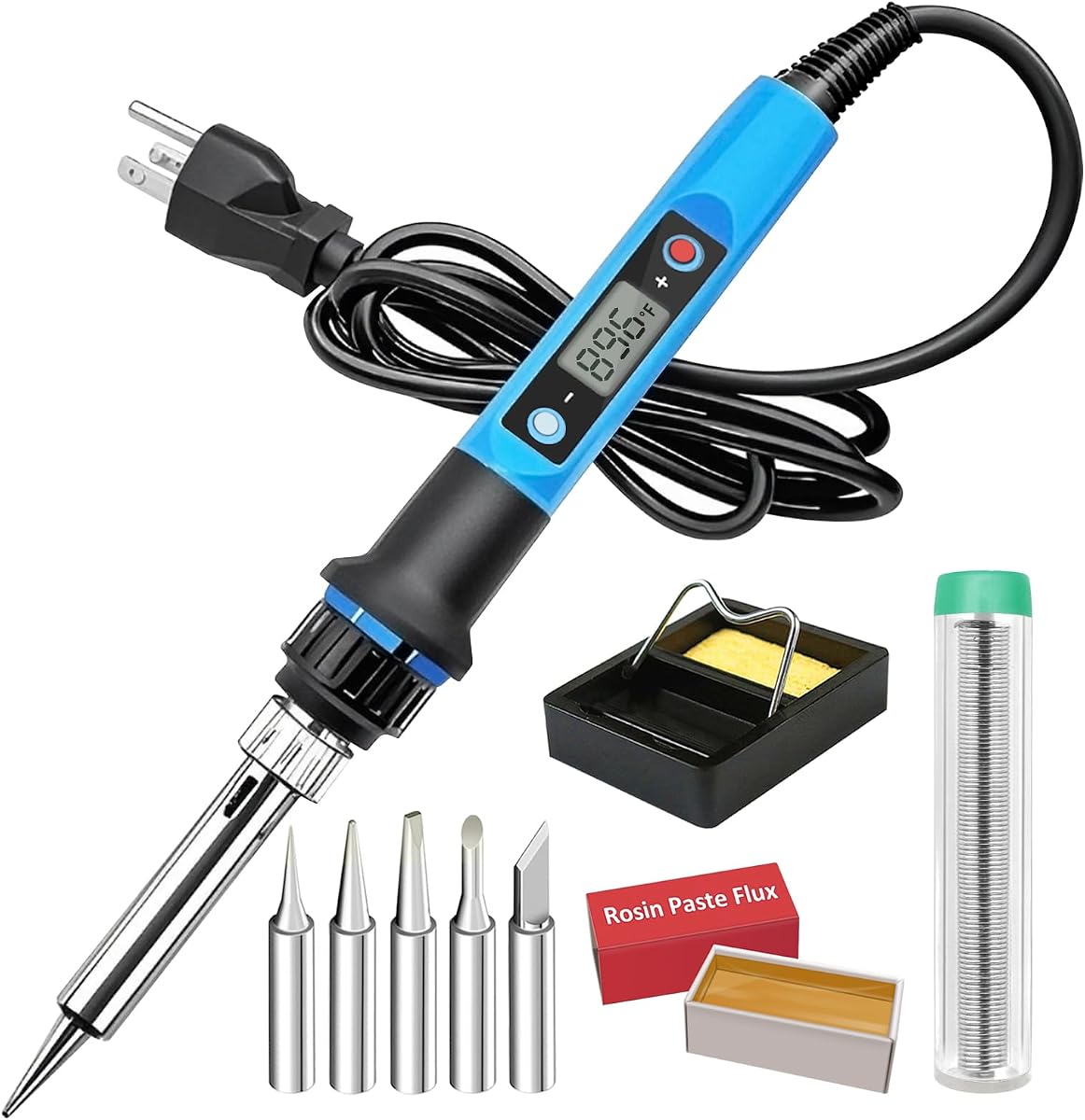
This 80W LCD soldering iron kit combines rapid heating, a large digital display, a wide temperature range, and a substantial accessory bundle. Its 4.5 rating places it among the strongest products in the list, while the absence of a full station makes it attractive for buyers who want useful controls without a complicated bench unit.
We may earn a commission when you buy through this link, at no additional cost to you.
The listed heating time is 15 seconds, and the selected temperature is shown on an LCD. Controls support Celsius and Fahrenheit conversion and offer a notably broad 180–520°C range. A 60W ceramic heating core, ventilation openings, an insulated silicone sleeve, and a heat-resistant sheath support practical heat management. The included PU case contains five 900M-series tips, a holder, sponge, solder wire, no-clean flux paste, a desoldering pump, wire stripper, cutter, and tweezers.
The product does not list automatic sleep, temperature memory, or calibration, so it cannot offer the unattended-work safeguards of the 80W digital gun or the YIHUA stations. Its corded format also ties it to a workbench or nearby outlet. However, the broad adjustment range, visible display, and quick heating make those limitations less consequential for ordinary component-level work.
This is an attractive option for a hobbyist who values both temperature control and the accessories needed for common solder jobs. It is also suitable for circuit boards, appliance repair, jewelry making, watch work, and guitar electronics. The combination of fast heat-up and a broad range gives it more flexibility than many basic adjustable irons without moving into the larger category of full soldering stations.
The 180–520°C range provides useful latitude for different joint sizes and component sensitivities. Positive and negative buttons make it straightforward to refine the setting, while unit conversion helps users accustomed to either Celsius or Fahrenheit.
Five tips cover different working shapes, while the solder wire, flux, pump, and hand tools support the basic sequence of a repair. The case prevents these components from becoming scattered across the workbench.
We may earn a commission when you buy through this link, at no additional cost to you.
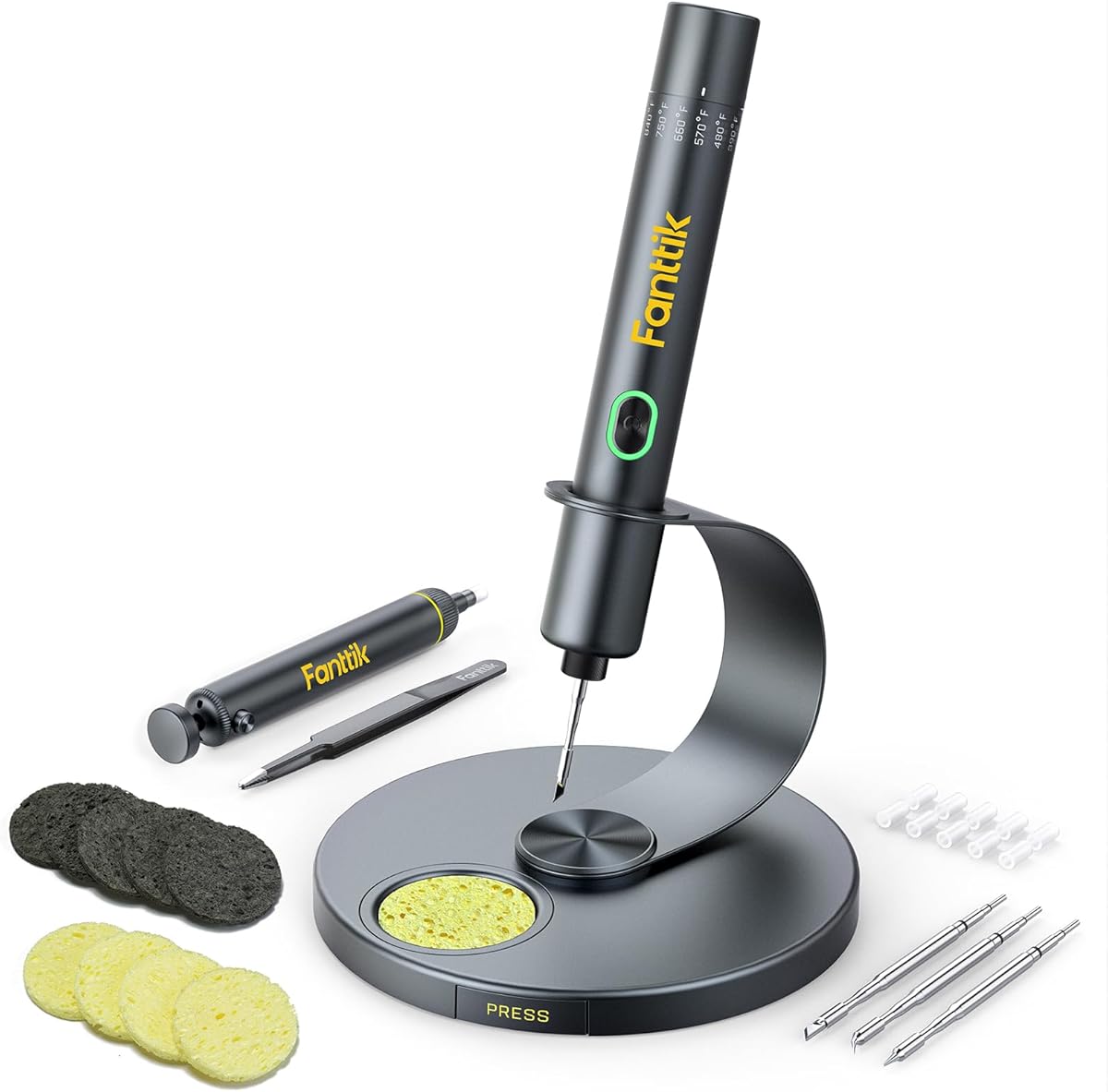
The Fanttik T1 Max is built around portability, offering cordless operation, a built-in 2600mAh battery, and compatibility with both AC and DC power. Its 4.4 rating and seven-second heating claim make it appealing for mobile repair work, hobby builds, and sites where a permanent soldering station would be impractical.
We may earn a commission when you buy through this link, at no additional cost to you.
Four tailored C210-series tips are included for rapid heating, longer service life, and resistance to oxidation. Six temperature levels span 200–450°C, giving the user reasonable control without the fine-grained display found on some premium tools. In wireless mode, maximum output is 12W and the stated runtime reaches 60 minutes at 450°C. Wired mode raises maximum output to 16W and can draw power through a Type-C charger or mobile power supply.
Its intelligent gravity sensing is especially useful. After 30 seconds without use, the iron enters sleep mode, then reheats to the chosen temperature when picked up again. The red flashing light indicates heating, while a steady green light signals that the selected temperature has been reached. The limitation is that this portability comes with a shorter wireless operating window and less precise adjustment than an iron offering one-degree or one-degree-equivalent increments.
Choose the T1 Max if you repair electronics away from a fixed desk or need to move around a large workspace. It is also appealing for beginners because the sleep system reduces unnecessary waiting and the included aluminum stand keeps the tool organized. For high-volume bench work requiring constant power and exact temperature readings, a corded digital station would be more suitable.
The battery makes true bench-free work possible, while AC operation provides a practical alternative when a longer session or more consistent output is required. Type-C power support also broadens the range of available power sources.
Gravity sensing reduces unnecessary waiting when the tool is briefly set down. Picking it up restores the selected operating temperature, which is useful for a repair workflow that repeatedly alternates between soldering and inspection.
We may earn a commission when you buy through this link, at no additional cost to you.
The FNIRSI HS-03 combines cordless convenience with unusually detailed controls for a portable soldering iron. Its 4.5 rating reflects a favorable reception, while the three-second heating claim, color screen, and fine adjustment controls distinguish it from simpler battery-powered models.
We may earn a commission when you buy through this link, at no additional cost to you.
A 2600mAh battery supports mobile work, and the iron can also operate from a direct Type-C power source, even without the battery installed. The control interface includes a knob for quick jumps among five temperature levels, buttons for fine tuning from 1–50°F, and a 212–842°F working range. Its 0.96-inch IPS display has adjustable brightness, making the information easier to read in bright work areas or dim garages.
The sleep and standby settings can be adjusted, while the tool-free tip system allows quick swaps among K, I, and IS tips. A left- and right-hand mode changes the viewing angle to suit either grip. The trade-off is that this advanced interface takes more time to learn than a basic dial, and the rechargeable battery still limits uninterrupted cordless use.
Quick level changes make broad adjustments efficient, while button-based fine tuning supports more deliberate selection. That combination is useful for users who alternate between smaller electronics repairs and larger electrical connections.
Wired operation can provide a continuous alternative to battery use, while the compact body and ambidextrous display make the iron comfortable to carry and orient. It suits field repair, modeling, and hobby builds away from a traditional bench.
We may earn a commission when you buy through this link, at no additional cost to you.
The YIHUA 926 III is a complete digital soldering station for users who want stable temperature control and an organized permanent workbench. Its 4.4 rating reflects a positive overall reception, and the combination of PID stabilization, calibration support, a digital display, and configurable sleep makes it more specialized than a simple direct-powered iron.
We may earn a commission when you buy through this link, at no additional cost to you.
The station offers a 194–896°F range, equivalent to 90–480°C, and is designed to hold the selected temperature consistently. The user can switch between Celsius and Fahrenheit, adjust the sleep timer from 5, 10, or 30 minutes, and calibrate the temperature through the digital interface. A master control knob also acts as a menu button, keeping the physical layout simple despite the number of functions.
The accessory package is extensive: two helping hands, six extra tips, lead-free solder, a solder sucker, ESD-safe tweezers, a wire dispenser, and a cleaning sponge. The integrated holder saves bench space, while the rear metal mesh protects against accidental contact and provides storage for spare tips. The main downside is the larger footprint and permanent connection to the station, which makes this less attractive for mobile use.
This is a strong recommendation for technicians, students, serious hobbyists, and anyone performing regular electronics repair. It supports controlled work on circuit boards, wiring, appliances, and craft projects without needing to treat the iron itself as the main control unit. Choose it when repeatability, organized accessories, and workbench convenience matter more than compact portability.
PID stabilization helps maintain the chosen operating temperature, reducing the need for repeated adjustments as the iron heats or the workload changes. Calibration support adds another layer of control for users who require closer temperature accuracy.
The integrated holder, rear mesh, tip-storage slots, wire dispenser, and helping hands reduce clutter around the active work area. The result is a more deliberate soldering setup than a loose pen iron with a separate stand.
We may earn a commission when you buy through this link, at no additional cost to you.
The 80W digital soldering gun delivers a fast, portable alternative to a full station. With a 4.5 rating, a stated 10-second heat-up, and an LCD temperature display, it provides many of the features users want without requiring a separate control box. It is well suited to circuit boards, jewelry, household electronics, and general DIY repair.
We may earn a commission when you buy through this link, at no additional cost to you.
The ceramic heating core covers 180–480°C, or 356–896°F, and the display can switch between Celsius and Fahrenheit. Automatic sleep activates after five minutes on the stand, reducing heat when the tool is idle. Temperature memory restores the last selected setting when the iron is switched back on, which reduces repetitive adjustments between repair sessions.
The main omission is a broad collection of accessories. Unlike the Plusivo, 80W LCD precision, and YIHUA bundles, this package focuses on the iron and its operating features. It is also a corded 110–120V device, so it offers less freedom than the battery models. However, the faster heat-up, memory, and sleep function compensate for some of that simplicity and make it convenient for regular plug-and-play use.
Choose this gun for hobbyists and repairers who want fast heat-up and digital temperature memory without setting up a station. It is also appropriate for training, since the display makes the operating temperature easier to observe. Users who want everything in one portable package may prefer the 13-piece 80W LCD kit, but this model remains a streamlined choice for soldering and component repair.
A stated ten-second heat-up reduces waiting before a quick repair. This is particularly helpful when the iron is used intermittently rather than kept at a station throughout an entire day.
Remembering the prior setting means users can resume familiar work without repeating the same adjustment. Automatic sleep lowers the temperature after five minutes of inactivity, helping preserve the heating core and reduce unnecessary heat.
We may earn a commission when you buy through this link, at no additional cost to you.
The 60W adjustable iron kit is a straightforward option for occasional small-electronics work. Its 4.3 rating is slightly lower than those of the leading digital and cordless choices, but the kit offers the essential controls, several tips, and basic supplies without requiring users to navigate a complex interface.
We may earn a commission when you buy through this link, at no additional cost to you.
Temperature can be adjusted across 200–450°C, and an on/off switch helps conserve energy when the iron is not in use. Five tips of different shapes support applications involving watches, wires, mobile devices, computer hardware, small electronics, guitars, and capacitors. The ergonomic handle and high-temperature silicone cover are designed for a secure, comfortable grip during longer sessions.
The central compromise is feedback. There is no listed digital display, so the user must work from the adjustment control rather than seeing an exact temperature. The 110V corded design also prevents use away from a suitable outlet, and the kit is less comprehensive than larger bundles that include a pump, paste, tweezers, and a larger set of hand tools.
This kit is best for beginners, students, and casual repairers who want a simple temperature-controlled iron and several useful tips. It can also serve as a secondary tool for a home workshop. For users who need visible temperature feedback, automatic sleep, or greater control, one of the digital models in this roundup would be the more refined choice.
The straightforward on/off switch and temperature adjustment reduce the number of concepts a new user must learn. Five tips provide enough shape variation to begin handling different joints and component sizes.
The anti-slip silicone-covered handle is intended to remain comfortable during repeated work. A stand and solder wire are included, helping create a more usable basic setup immediately after unpacking.
We may earn a commission when you buy through this link, at no additional cost to you.
This YIHUA 926 III LED station version combines digital temperature control with a broad accessory package and flexible sleep settings. Its 4.4 rating makes it a credible choice for a dedicated repair bench, particularly for users who value calibration support and consistent PID-regulated heat.
We may earn a commission when you buy through this link, at no additional cost to you.
The station operates across 194–896°F, equivalent to 90–480°C. Its display can present Celsius or Fahrenheit, and the main knob doubles as a menu button for changing settings. The sleep timer can be set to 0, 5, 10, or 30 minutes, giving users more control than models with a single fixed timeout. PID heat-control technology is intended to maintain a consistent temperature during work.
The package includes two helping hands, six different tips, lead-free solder, a solder wire bracket, tweezers, a solder sucker, a blue sponge, a manual, and a spanner. The integrated stand and mesh guard save space and help protect the work area. As a fixed 110–127V station, however, it does not provide the portability offered by the Fanttik or FNIRSI cordless irons.
Choose this model if you want a stable digital station and expect to solder regularly. Its calibration and timer options make it appropriate for training, hobbyist projects, and professional bench work where the operator wants more control over heat behavior. Those who need a simple disposable-at-a-bench setup may prefer a direct-powered pen iron.
The selectable sleep timer can be disabled or set to suit the user's workflow. This is useful when a strict power-saving schedule is unnecessary but quick cool-down is still desired between tasks.
Digital calibration support lets the operator account for differences between the displayed and actual working temperature. Combined with PID regulation, it is a useful feature set for users who perform varied electronics repairs.
We may earn a commission when you buy through this link, at no additional cost to you.
The Weller 70W Digital Soldering Station offers a focused premium approach built around quick heat-up, straightforward temperature control, and safe bench placement. Its 4.2 rating is the lowest in this group, but that figure does not erase the appeal of a well-known soldering brand for buyers who prioritize established product design over a large accessory bundle.
We may earn a commission when you buy through this link, at no additional cost to you.
The station is stated to heat from 212°F to 650°F in 15 seconds. Users can display the temperature in Celsius or Fahrenheit, preset a temperature, or activate standby mode. The molded pencil grip is designed for comfort, while the integrated safety rest reduces the chance of accidental contact or damage when the iron is not being used.
Quick tip changes allow worn tips to be replaced and different shapes to be selected for varying jobs. The main limitation is that the 212–650°F operating range is narrower than several digital alternatives, including the YIHUA stations and the Plusivo iron. The supplied product information also does not describe a large accessory collection, so buyers may need to purchase solder, flux, and additional tips separately.
This model is a good choice for a professional or serious hobbyist who wants a compact, recognizable station with an integrated rest and straightforward controls. It is less suitable for high-temperature specialized work beyond the stated range or for buyers seeking a comprehensive first-use toolkit. Within those boundaries, it delivers a clean and focused soldering setup.
The station avoids unnecessary display complexity while providing the core controls most users need: a temperature readout, unit conversion, presets, and standby. That makes it approachable despite its premium positioning.
The integrated rest gives the hot iron a defined parking place, reducing the need for a separate stand. The molded pencil-style grip is designed to support comfortable use during controlled electronics work.
We may earn a commission when you buy through this link, at no additional cost to you.
Small-electronics soldering calls for controlled heat, a suitable tip, safe handling, and the right level of portability. The following factors help distinguish a simple occasional-use iron from a digitally controlled station or rechargeable field tool.
Temperature control is one of the most important considerations because small components, wiring, and different solder compositions respond differently to heat. A range around 200–450°C covers many common hobby and electronics tasks, while broader ranges offer more room for specialized work. Digital displays make the selected value easier to identify, and PID-regulated stations are particularly useful when consistent heat is needed over longer sessions. Users should choose a range that covers their intended materials without routinely pushing the tool to its maximum.
In short, prioritize visible temperature feedback and a range broad enough for your typical components. A wider range offers flexibility, but precise and repeatable control matters more than having extra heat available.
Rapid heat-up is valuable for quick repairs, short work sessions, and field service where waiting wastes productive time. Ceramic heating elements are listed across many of the stronger options, and stated heat-up times range from a few seconds to roughly 15 seconds. These claims should be treated as supplied specifications rather than laboratory measurements, but they still indicate the intended performance. A fast heater is especially helpful when moving between a few tasks rather than working continuously at one station.
Choose fast heating when you work intermittently or need a portable setup. For continuous bench work, temperature stability and sleep behavior may matter more than shaving a few seconds off startup.
A chisel tip handles broader joints, while fine pointed or blade-style tips suit small pads and dense components. The useful measure is not simply the number of tips, but whether the shapes match the work and whether replacements are easy to obtain. Kits with five or six tips provide a versatile starting selection for repairs, wiring, watches, guitars, jewelry, and circuit boards. Check the stated tip series and the tool's tip-change method before buying if you already own compatible tips.
In short, favor a kit with several practical shapes and a straightforward replacement process. A smaller curated set can be more useful than a large collection of poorly matched accessories.
A corded iron is dependable, unrestricted during bench use, and often less complicated. A station separates the controls from the hand tool and usually adds digital temperature regulation, sleep modes, and integrated storage. A cordless iron provides the greatest freedom for field repairs and temporary work but introduces battery life and charging considerations. Some models offer both battery and wired operation, creating a useful compromise when the user can keep a power source nearby.
In short, prioritize continuous power for a fixed bench, portability for mobile repairs, and hybrid operation when you need both. Do not choose a battery format without checking whether its stated runtime matches the length of your typical jobs.
A digital display removes much of the uncertainty associated with a simple temperature dial. Automatic sleep lowers heat when the tool sits on its stand, reducing wear and energy use during short pauses. Temperature memory restores the previous setting, which helps when several jobs use similar heat levels. Stations may add calibration, allowing the displayed value to be adjusted when close temperature matching is important. These conveniences are not universal, so buyers should compare them according to how often they expect to pause or change materials.
In short, use a display for confidence and sleep for efficiency. Memory and calibration are worthwhile additions for frequent work but less critical for occasional, simple household repairs.
Solder wire, flux, a desoldering pump, tweezers, a sponge, a stand, and helping hands can make a substantial difference when starting a repair bench. Larger kits are convenient for beginners because the core consumables and common hand tools are already present. However, assess whether every included item has a purpose in your workflow. A focused station with a well-designed holder and stand may suit an experienced user better than a very large kit containing seldom-used components.
In short, prioritize the essentials: suitable tips, solder, flux, a pump, and a safe holder. Add organization and mobility tools only when they solve a recurring problem in your workspace.
Look for an on/off control, ventilation, a heat-resistant or anti-slip grip, and a safe place to rest the hot tip. The handle should remain comfortable through repeated tasks without bringing unnecessary heat near the user's fingers. Integrated rests are particularly valuable on stations because they reduce the chance of placing a hot iron on an unsuitable surface. Any product still produces very high temperatures and should be treated as a hot tool regardless of its safety features.
In short, look for insulation, ventilation, a secure grip, and a dedicated rest. These features improve handling, but safe technique and a clear work area remain essential.
The products here range from 60W hand tools to an 80W portable gun and a 70W station. Higher power can support quick recovery when a larger joint draws heat, but the tip, workpiece, and solder still determine soldering performance. Small electronics often benefit more from a fine tip and controlled temperature than from maximum wattage. Match the iron to the size and thermal demands of your projects rather than assuming the highest listed power is automatically the best choice.
In short, use 60W to 80W tools for general hobby and repair work, but focus on control and tip fit. The most powerful option is not necessarily the most appropriate for every tiny component.
Begin by setting up a stable, ventilated work area and placing the iron in its holder or integrated safety rest. Confirm that the electrical rating matches the outlet, inspect the tip and cord, and select a temperature appropriate for the component and solder. Before applying heat, secure the workpiece so it cannot shift, and arrange the tip, solder, and tools within easy reach.
Heat the iron only when it will be used, then clean the tip on the appropriate damp sponge or cleaning method recommended for the tool. Feed a small amount of solder to the tip, allow it to wet, and make contact between the heated tip and the joint. Once the pad or lead heats and the solder flows, remove the solder wire before lifting the tip away; lingering on the joint can create a blistered or poorly formed connection.
After each repair, return the iron to its stand and use a brass tip cleaner or suitable maintenance method if residue is present. Avoid abruptly cooling a hot tip or striking it against a hard surface. Unplug corded models when finished, store cordless units according to the manufacturer's charging guidance, and replace tips only after the tool has cooled. Keep the iron away from children and never move it while the tip is exposed.
A range around 200–450°C covers many common small-electronics tasks, including wiring, through-hole joints, and general circuit-board work. The correct setting depends on the solder composition, component sensitivity, and size of the joint. Start with the temperature recommended for your solder and component type, then adjust only as needed. Very high heat can damage small parts, while low heat may cause the solder to flow poorly.
Yes, provided the model offers a fine tip and controlled temperature. The Fanttik T1 Max and FNIRSI HS-03 both provide multiple tips, adjustable heat, and cordless capability, making them practical for mobile or delicate work. Their shorter wireless operating time is the main consideration. Keep a power source nearby or use wired operation when a repair will take longer.
A full station is usually better for frequent bench work because it often adds PID temperature stabilization, sleep modes, calibration, and integrated storage. A simple iron is more convenient for occasional tasks and easy transport. Choose a station when consistency and organization are priorities; choose a direct-powered pen iron when you need a straightforward tool with fewer controls.
At minimum, useful supplies include suitable soldering tips, compatible solder wire, flux, a desoldering pump, a sponge or tip cleaner, and a safe stand. Tweezers, a wire stripper, small screwdrivers, and heat-shrink tubing can also help. The larger kits in this guide bundle many of these items, making them convenient starting points for a new workbench.
A hot iron left unattended can overheat nearby materials, damage the work surface, or create a burn and fire risk. Automatic sleep is useful because it lowers heat when the tool is placed on its stand, but it does not replace proper supervision. Unplug the iron or switch it off when the task is complete, and return it to a heat-resistant holder.
Turn off or unplug the iron and allow the tip to cool before touching it. Loosen or release the tip according to the tool's design, remove the old tip, and fit the replacement firmly without forcing it. Cordless models should also be switched off before replacement. Once reassembled, confirm that the tip is secure before heating the iron again.
Not necessarily. A higher wattage can help an iron recover heat on larger joints, but tiny electronics are more sensitive to excessive temperature. Tip shape, temperature control, stable heat, and careful technique are often more important. Select a wattage that matches the workload, then use the lowest effective temperature for the component and solder.
No. The YIHUA 926 III listings specifically include lead-free solder, while several other kits list general solder wire without specifying composition. Check the current product listing and included-wire details before buying. Also verify the solder diameter, because finer wire can help with small electronics and dense circuit boards.
The Plusivo 60W digital kit is the strongest all-around choice because it combines a clear temperature display, five replaceable tips, an extensive accessory collection, and a 4.8 rating in an approachable package. For buyers seeking more value and an especially broad temperature range, the 80W LCD kit adds fast heating, useful supplies, and a carrying case. The Weller 70W station stands apart as the premium, focused option for a permanent bench.
Prioritize the features that match your actual workload. Cordless models are best for field repairs and mobile hobby work, while digital stations suit frequent use, controlled heat, and organized benches. Fine tips, visible temperature feedback, reliable sleep behavior, and the right accessory set matter more than maximum wattage for most small-electronics projects.
Before purchasing, confirm voltage, plug type, temperature range, power source, tip compatibility, and what is actually included in the current listing. Ratings, product configurations, and prices can change, so check the latest availability and current cost on the linked Amazon pages before making a final choice.